本文收集整理Python生态下的几个打印调试工具类。
官方自带
IceCream
开源(GitHub,10.1K Star,226 Fork)调试工具,print()的升级版,自动打印变量名和值,自动显示代码行号和调用位置,可直接嵌入到表达式中间,输出带语法高亮。
特性和优势
- 简化调试输出:提供
ic()函数,用于替代print(),自动打印变量名和值 - 高效编码:相比
print(),ic()的输入更加快捷,提高编码效率 - 优化的数据结构展示:支持美化打印数据结构,使输出更加易读
- 语法高亮:输出内容带有语法高亮,提升可读性
- 禁用和启用输出:使用
ic.disable()和ic.enable()可在不同的代码部分动态地关闭或开启ic()输出 - 安装为内置函数:通过在项目根文件中使用
install(),ic()可被安装为内置函数,无需在每个文件中重复导入 - 灵活的输出控制:开发者可自定义输出前缀、输出函数等,通过
ic.configureOutput()进行个性化设置 - 调试信息丰富:可选地包括程序上下文信息,如文件名、行号和父函数,帮助更好地定位代码
- 自定义数据类型的字符串转换:开发者可通过注册自定义的字符串转换函数,来控制特定数据类型的输出格式,满足更专业的调试需求
- 广泛兼容性:支持Python 2、Python 3、PyPy2和PyPy3
应用场景
- 快速调试查看变量或表达式的值
- 追踪代码执行流程:通过在代码的关键执行点插入
ic(),可清晰地看到代码的执行路径和顺序 - 无缝集成到现有代码中:
ic()函数返回其参数,可轻松地插入到现有的代码中,而不影响代码的其他部分 - 调试信息的定制和管理:提供多种配置选项,如自定义前缀、输出函数和上下文信息的包含,满足不同调试需求
实战
基于pip安装:pip install icecream
示例:
py
from icecream import ic
import logging

ic('hello')
# 配置前缀,高阶用法可实现Java生态下的logback.xml功能
ic.configureOutput(prefix='hello -> ')
ic('world') # hello -> 'world'

def warn(s):
	logging.warning("%s", s)

ic.configureOutput(outputFunction=warn)
ic('icecream') # WARNING:root:ic| 'icecream': 'icecream'
birdseye
Python生态下的开源(GitHub,1.7K Star,73 Fork)Flight Recorder,把每一次函数调用中所有变量的变化过程都记录下来,用浏览器可视化展示,官方文档。
可用于:
- 可视化递归函数:画出一棵调用树,每个节点都显示输入值和返回值
- 定位循环中的异常
- 理解复杂的数据流
其他竞品对比分析
| 方式 | 优点 | 缺点 |
|---|---|---|
print() |
简单直接 | 循环多就刷屏,得手写,用完要删 |
breakpoint() |
交互式 | 需要手动点下一步 |
birdseye |
可视化+自动记录+可回放 | 需要浏览器看结果 |
实战
基于pip安装:pip install birdseye
示例:
py
from birdseye import eye

@eye
def fibonacci(n):
	if n <= 1:
		return n
	return fibonacci(n-1) + fibonacci(n-2)

fibonacci(5)
在终端运行:
bash
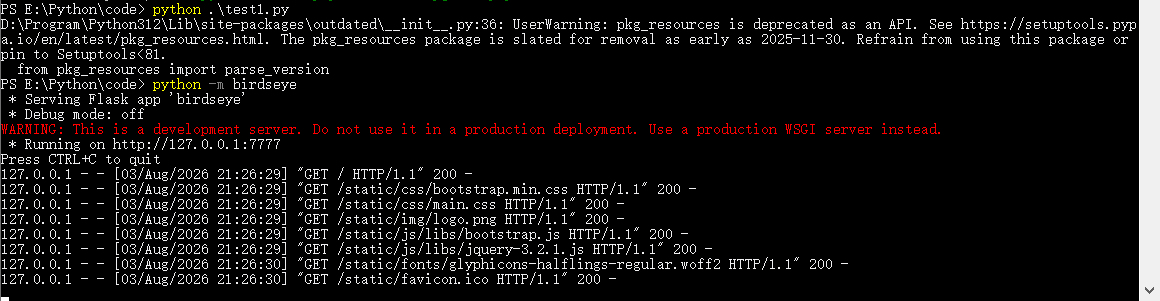
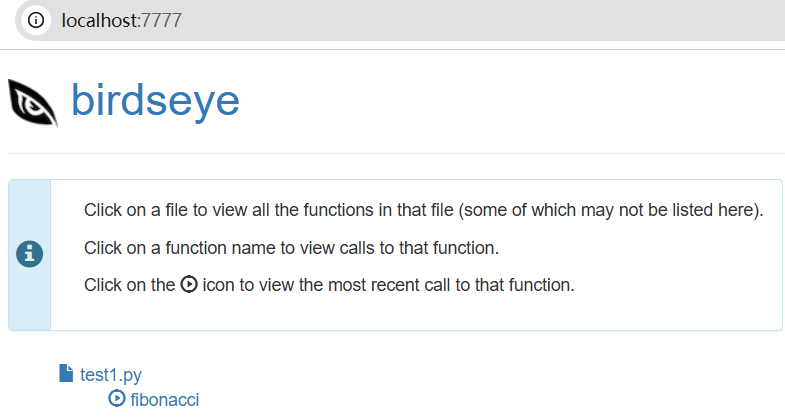
python -m birdseye注意不是执行python test.py。手动打开浏览器新标签页,即可看到:
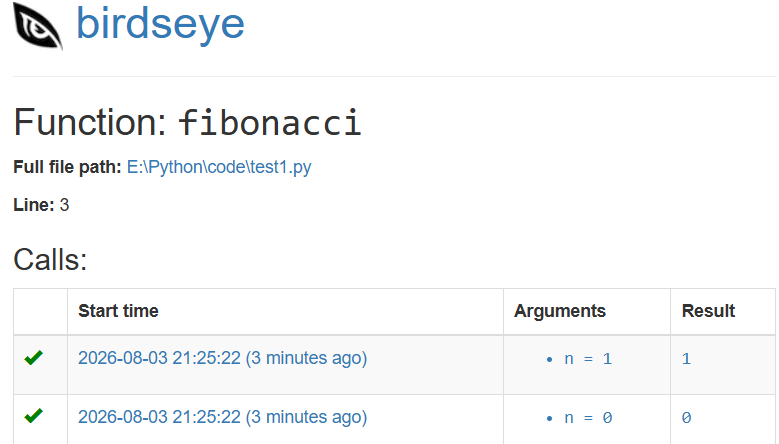
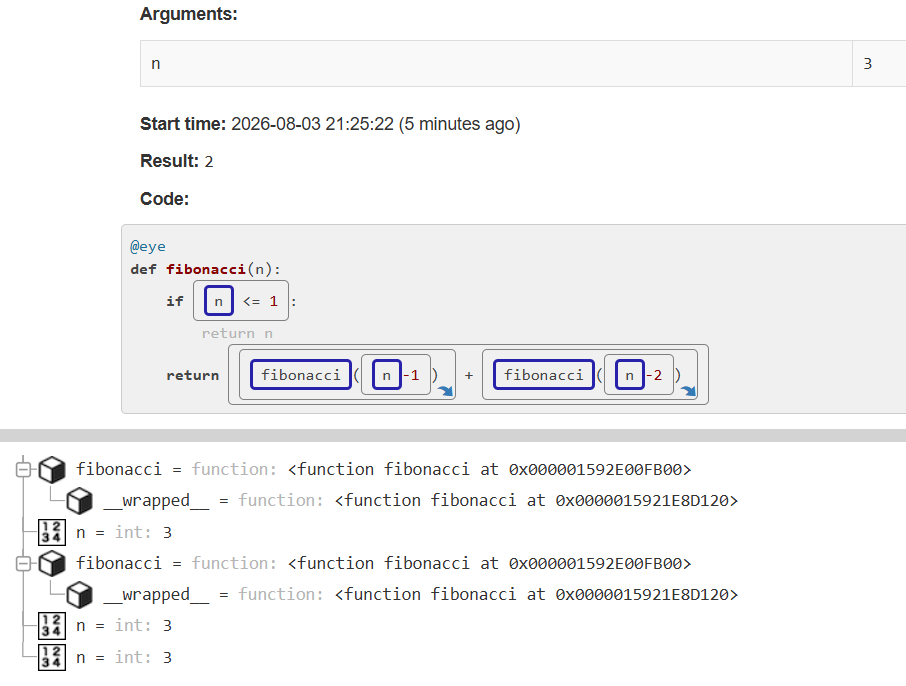
- 整个函数的调用树
- 每一层调用时各个变量的值
- 函数的输入和输出
- 甚至能单步回放整个执行过程
终端示意图
浏览器示意图
点击函数
点击某次请求(Call)
peek
开源(GitHub,56 Star,2 Fork)打印调试库,print()的增强版。
功能特性:
- 内联打印:
peek(add2(1000))输出`add2(1000)=1002。它返回值的特点让它能零侵入地嵌在表达式中间,你可以直接写 b = peek(add2(1000)),既打印了值,又不影响正常赋值 - 能当"执行标记"用:你只需在函数里写一行 peek()(不带参数),它就会自动打印出这是哪个文件的第几行,帮你快速确认程序有没有跑到这里。
- 耗时统计:想测一段代码跑多久,加个装饰器 @peek.timer 或者用 with peek.timer() 包起来,它不光告诉你执行时间,还能把函数的入参和返回值一并记下来。
实战
基于pip安装:pip install peek-python
示例:
py
import peek
import time

for number in range(4):
	number_divided_by_3 = number / 3
	if number % 3 == 0:
		peek(number, number_divided_by_3, color="red")
	else:
		peek(number, number_divided_by_3, color="yellow")

@peek.timer()
def mul(x, y):
	return x * y

print(mul(5, 7))

@peek.timer(show_exit=False)
def mul(x, peek):
	return x * peek

print(mul(5, 7))

@peek.timer(show_enter=False, show_line_number=True)
def do_sort(i):
	n = 10 ** i
	x = sorted(list(range(n)))
	return f"{n:9d}"

for i in range(6):
	do_sort(i)
打印输出:
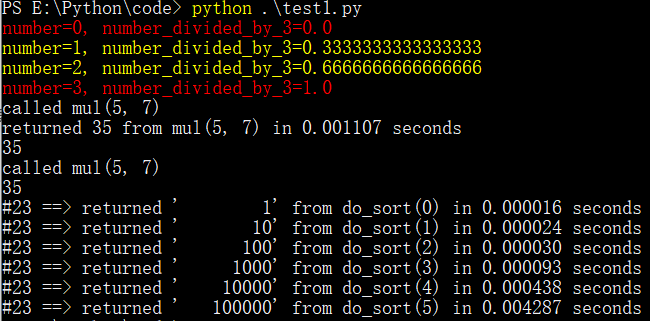
qj
核心理念:永远返回传入的参数本身,同时顺手把它的值给打印出来。可直接把 qj()像胶水一样塞到代码的任何缝隙里,而不用为了调试把代码拆成多行。
注:原GitHub仓库为iansf,10K Star,2 Fork,不过已3年多未维护;Fork仓库为itfische,也已1年未维护,PyPi最后一个版本号1.0.2停留在25年7月31号,即Fork仓库最后提交时间。
实战
基于pip安装:pip install qj
示例:
py
from qj import qj
# 一行代码调试到底
my_list = qj([qj(process_value(qj(value)))
	for value in some_function(various, other, args)
	if qj(some_condition(value))])
能通过缩进直观地展示推导式的嵌套层级。
在项目里导入from qj_global import qj,就能像内置函数一样在全局直接使用,查完Bug后Ctrl+F搜一下qj(就能全部移除。
crab_dbg
用Rust方式打印调试的开源(GitHub,6 Star,1 Fork)库,完美继承Rust dbg。支持递归打印嵌套结构、检测循环引用、numpy集成等。
特性:
- 完美平替
print:直接把print替换成dbg,整个项目瞬间升级为专业调试模式。输出不仅包含值,还自动带上文件名、行号等上下文信息 - 打印任何东西:无论是复杂的嵌套对象,还是包含自引用的循环数据结构,它都能清晰地展示出来,不会像
print一样直接崩溃或输出一堆看不懂的地址 - 零成本迁移:从
print调试向专业调试过渡
实战
基于pip安装:pip install crab_dbg
示例:
py
import numpy as np
from crab_dbg import dbg

pi = 3.14
ultimate_answer = 42
flag = True
stock_price = [100, 99, 101, 1]
fruits = {"apple", "peach", "watermelon"}
country_to_capital_cities = {
	"China": "Beijing",
	"United Kingdom": "London",
	"Liyue": "Liyue Harbor",
}

# You can use dbg to inspect a lot of variables.
dbg(
	pi,
	1 + 1,
	sorted(stock_price),
	"This string contains (, ' and ,",
	ultimate_answer,
	flag,  # You can leave a comment here as well, dbg() won't show this comment.
	stock_price,
	fruits,
	country_to_capital_cities,
)

# Or, you can use dbg to inspect one. Note that you can pass any keyword arguments originally supported by print()
dbg(country_to_capital_cities, file=stderr)

# You can also use dbg to inspect expressions.
dbg(1 + 1)

# When used with objects, it will show all fields contained by that object.
double_linked_list = DoubleLinkedList.create(2)
dbg(double_linked_list)

# dbg() works with lists, tuples, and dictionaries.
dbg(
	[double_linked_list, double_linked_list],
	(double_linked_list, double_linked_list),
	{"a": 1, "b": [double_linked_list]},
	[
		1,
		2,
		3,
		4,
	],
)
# 复杂结构
stack = Stack()
stack.push(double_linked_list)
stack.push(double_linked_list)
dbg(stack)
dbg("What if my input is a string?")

# If your type has its own __repr__ or __str__ implementation, no worries, crab_dbg will jut use it.
phone = Phone("Apple", "white", 1099)
dbg(phone)
dbg({"my_phones": [phone]})

# If you are extremely bored.
infinite_list = []
infinite_list.append(infinite_list)
dbg(infinite_list)

# If invoked without arguments, then it will just print the filename and line number.
dbg()
# np集成
ndarray = np.array([[1, 2, 3], [4, 5, 6]])
dbg(ndarray)
# 打印深度嵌套ndarray
stack = Stack()
stack.push({"dict_key": ndarray})
dbg(stack)
spewer
开源(GitHub,3 Star,5 Fork)调试库。
功能特性:
- 逐行执行追踪:精确查看正在执行的每一行代码
- 函数/方法调用追踪:仅追踪函数和方法调用,不包含行级细节
- 返回值事件追踪:追踪函数的返回值及完成状态
- 异常事件追踪:监控异常的抛出与处理
- 变量值检查:在每一步执行中查看变量的值
- 模块过滤:仅追踪特定模块或追踪所有模块
- 上下文管理器支持:支持
with语句,实现自动清理 - 轻量级:极低的性能开销和依赖
API使用:
- 通过
@snoop()装饰器绑定在函数上,要么跟踪整个函数,用with语句跟踪代码块 - 提供全局开关:可随时
spew()开启追踪,unspew()关闭追踪,不用反复修改装饰器 - 只追踪特定模块:通过
trace_names=['my_module']参数,可过滤掉第三方库,只关注业务代码 - 只追踪函数调用:用
functions_only=True可忽略逐行细节,只看函数进出的大局观,非常适合梳理调用关系
实战
基于pip安装:pip install spewer
基于源码部署:
bash
git clone https://github.com/Agent-Hellboy/spewer.git
cd spewer
pip install -e .
示例:
py
from spewer import spew, unspew

# 开启追踪,打印变量值
spew(show_values=True)
# 追踪代码执行过程
def tricky_function():
	x = 10
	y = 20
	return x + y

tricky_function()
unspew()
输出:
__main__:7:	x = 10
__main__:8:	y = 20
__main__:9:	return x + y
	x=10 y=20
spewer.spewer:28:     sys.settrace(None)
	sys=<module 'sys' (built-in)>
py-printer
开源(GitHub,5 Star,1 Fork)打印库,代码库已8年多未维护。
PyPi最后一个版本号1.5.3停留在19年1月24号。
基于pip安装:pip install pyprinter
示例,无!!