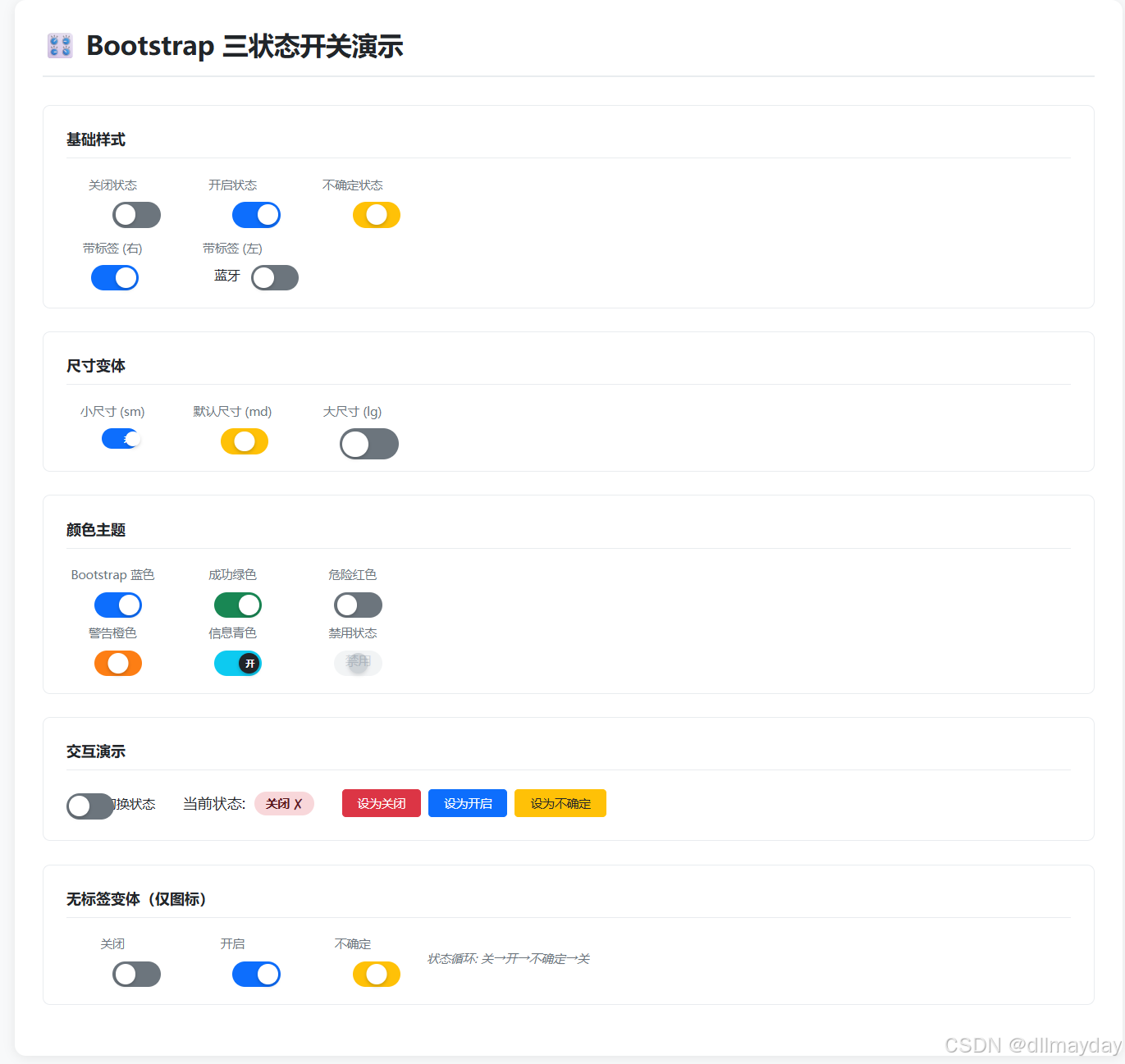
<!DOCTYPE html>
<html lang="zh-CN">
<head>
<meta charset="UTF-8">
<meta name="viewport" content="width=device-width, initial-scale=1.0">
<title>Bootstrap 三状态开关演示</title>
<style>
* {
margin: 0;
padding: 0;
box-sizing: border-box;
}
body {
font-family: -apple-system, "Microsoft YaHei", "Segoe UI", Roboto, sans-serif;
background: #f8f9fa;
color: #212529;
padding: 20px;
}
.container {
max-width: 1200px;
margin: 0 auto;
background: white;
border-radius: 12px;
box-shadow: 0 2px 12px rgba(0,0,0,0.08);
padding: 30px;
}
h1 {
font-size: 28px;
font-weight: 600;
color: #212529;
margin-bottom: 30px;
padding-bottom: 15px;
border-bottom: 2px solid #e9ecef;
}
h2 {
font-size: 18px;
font-weight: 600;
color: #495057;
margin-bottom: 20px;
}
.section {
background: #ffffff;
border: 1px solid #e9ecef;
border-radius: 8px;
padding: 25px;
margin-bottom: 25px;
}
.section-title {
font-size: 16px;
font-weight: 600;
color: #212529;
margin-bottom: 20px;
padding-bottom: 10px;
border-bottom: 1px solid #e9ecef;
}
.row {
display: flex;
flex-wrap: wrap;
gap: 30px;
align-items: center;
}
.col {
display: flex;
flex-direction: column;
align-items: center;
gap: 10px;
min-width: 100px;
}
.col-label {
font-size: 13px;
color: #6c757d;
}
/* ===== 开关样式 ===== */
.switch-container {
display: flex;
align-items: center;
gap: 12px;
}
.switch-label {
font-size: 14px;
color: #212529;
user-select: none;
}
.switch {
position: relative;
display: inline-block;
cursor: pointer;
flex-shrink: 0;
}
.switch input {
opacity: 0;
width: 0;
height: 0;
}
/* 开关轨道 */
.slider {
position: absolute;
cursor: pointer;
top: 0;
left: 0;
right: 0;
bottom: 0;
background-color: #6c757d;
transition: all 0.3s ease;
border-radius: 34px;
}
.slider:before {
content: "";
position: absolute;
height: 20px;
width: 20px;
left: 3px;
bottom: 3px;
background-color: white;
transition: all 0.3s cubic-bezier(0.4, 0, 0.2, 1);
border-radius: 50%;
box-shadow: 0 2px 4px rgba(0,0,0,0.2);
}
/* 状态标签 */
.slider .state-label {
position: absolute;
top: 50%;
transform: translateY(-50%);
font-size: 10px;
font-weight: 700;
color: white;
pointer-events: none;
opacity: 0;
transition: opacity 0.2s ease;
}
.slider .state-label.off-label {
left: 8px;
}
.slider .state-label.on-label {
right: 8px;
}
/* 尺寸变体 */
.switch-sm .slider {
height: 22px;
width: 40px;
}
.switch-sm .slider:before {
height: 16px;
width: 16px;
left: 2px;
bottom: 3px;
}
.switch-sm .slider .state-label {
font-size: 8px;
}
.switch-md .slider {
height: 28px;
width: 52px;
}
.switch-md .slider:before {
height: 22px;
width: 22px;
left: 3px;
bottom: 3px;
}
.switch-lg .slider {
height: 34px;
width: 64px;
}
.switch-lg .slider:before {
height: 28px;
width: 28px;
left: 3px;
bottom: 3px;
}
.switch-lg .slider .state-label {
font-size: 12px;
}
/* 状态:开启 */
.switch.on .slider {
background-color: #0d6efd;
}
.switch.on .slider:before {
transform: translateX(24px);
}
.switch.on .slider .on-label {
opacity: 1;
}
/* 状态:不确定 */
.switch.indeterminate .slider {
background-color: #ffc107;
}
.switch.indeterminate .slider:before {
transform: translateX(12px);
}
/* 状态:关闭 */
.switch.off .slider {
background-color: #6c757d;
}
.switch.off .slider:before {
transform: translateX(0);
}
.switch.off .slider .off-label {
opacity: 1;
}
/* 禁用状态 */
.switch.disabled {
opacity: 0.6;
cursor: not-allowed;
}
.switch.disabled .slider {
background-color: #e9ecef !important;
}
.switch.disabled .slider:before {
background-color: #adb5bd;
}
/* 颜色主题 */
.switch.success.on .slider { background-color: #198754; }
.switch.danger.on .slider { background-color: #dc3545; }
.switch.warning.indeterminate .slider { background-color: #fd7e14; }
.switch.info.on .slider { background-color: #0dcaf0; }
.switch.info .slider:before { background-color: #212529; }
/* 标签在左 */
.switch-container.label-left {
flex-direction: row-reverse;
}
/* 交互演示 */
.demo-area {
display: flex;
align-items: center;
gap: 30px;
flex-wrap: wrap;
}
.demo-status {
display: flex;
align-items: center;
gap: 10px;
}
.status-badge {
padding: 4px 12px;
border-radius: 20px;
font-size: 13px;
font-weight: 600;
}
.status-badge.on { background: #d1e7dd; color: #0a3622; }
.status-badge.off { background: #f8d7da; color: #58151c; }
.status-badge.indeterminate { background: #fff3cd; color: #664d03; }
.btn-group {
display: flex;
gap: 8px;
}
.btn {
padding: 6px 16px;
border: 1px solid #dee2e6;
background: white;
border-radius: 4px;
font-size: 13px;
cursor: pointer;
transition: all 0.2s ease;
font-family: inherit;
}
.btn:hover {
background: #e9ecef;
border-color: #ced4da;
}
.btn-primary {
background: #0d6efd;
color: white;
border-color: #0d6efd;
}
.btn-primary:hover {
background: #0b5ed7;
border-color: #0a58ca;
}
.btn-warning {
background: #ffc107;
color: #212529;
border-color: #ffc107;
}
.btn-warning:hover {
background: #ffca2c;
border-color: #ffc720;
}
.btn-danger {
background: #dc3545;
color: white;
border-color: #dc3545;
}
.btn-danger:hover {
background: #bb2d3b;
border-color: #b02a37;
}
/* 网格布局 */
.grid-2 {
display: grid;
grid-template-columns: 1fr 1fr;
gap: 15px 30px;
}
@media (max-width: 600px) {
.grid-2 {
grid-template-columns: 1fr;
}
.row {
gap: 15px;
}
.container {
padding: 15px;
}
}
</style>
</head>
<body>
<div class="container">
<h1>🎛️ Bootstrap 三状态开关演示</h1>
<!-- ===== 1. 基础样式 ===== -->
<div class="section">
<div class="section-title">基础样式</div>
<div class="row" style="margin-bottom: 20px;">
<div class="col">
<span class="col-label">关闭状态</span>
<label class="switch off switch-md">
<input type="checkbox" class="switch-input" data-state="off">
<span class="slider">
<span class="state-label off-label">关</span>
<span class="state-label on-label">开</span>
</span>
</label>
</div>
<div class="col">
<span class="col-label">开启状态</span>
<label class="switch on switch-md">
<input type="checkbox" class="switch-input" data-state="on" checked>
<span class="slider">
<span class="state-label off-label">关</span>
<span class="state-label on-label">开</span>
</span>
</label>
</div>
<div class="col">
<span class="col-label">不确定状态</span>
<label class="switch indeterminate switch-md">
<input type="checkbox" class="switch-input" data-state="indeterminate">
<span class="slider">
<span class="state-label off-label">关</span>
<span class="state-label on-label">开</span>
</span>
</label>
</div>
</div>
<div class="row">
<div class="col">
<span class="col-label">带标签 (右)</span>
<div class="switch-container">
<label class="switch on switch-md">
<input type="checkbox" checked>
<span class="slider">
<span class="state-label off-label">关</span>
<span class="state-label on-label">开</span>
</span>
</label>
<span class="switch-label">Wi-Fi</span>
</div>
</div>
<div class="col">
<span class="col-label">带标签 (左)</span>
<div class="switch-container label-left">
<label class="switch off switch-md">
<input type="checkbox">
<span class="slider">
<span class="state-label off-label">关</span>
<span class="state-label on-label">开</span>
</span>
</label>
<span class="switch-label">蓝牙</span>
</div>
</div>
</div>
</div>
<!-- ===== 2. 尺寸变体 ===== -->
<div class="section">
<div class="section-title">尺寸变体</div>
<div class="row">
<div class="col">
<span class="col-label">小尺寸 (sm)</span>
<div class="switch-container">
<label class="switch on switch-sm">
<input type="checkbox" checked>
<span class="slider">
<span class="state-label off-label">关</span>
<span class="state-label on-label">开</span>
</span>
</label>
<span class="switch-label" style="font-size:12px;">小</span>
</div>
</div>
<div class="col">
<span class="col-label">默认尺寸 (md)</span>
<div class="switch-container">
<label class="switch indeterminate switch-md">
<input type="checkbox">
<span class="slider">
<span class="state-label off-label">关</span>
<span class="state-label on-label">开</span>
</span>
</label>
<span class="switch-label">中</span>
</div>
</div>
<div class="col">
<span class="col-label">大尺寸 (lg)</span>
<div class="switch-container">
<label class="switch off switch-lg">
<input type="checkbox">
<span class="slider">
<span class="state-label off-label">关</span>
<span class="state-label on-label">开</span>
</span>
</label>
<span class="switch-label" style="font-size:16px;">大</span>
</div>
</div>
</div>
</div>
<!-- ===== 3. 颜色主题 ===== -->
<div class="section">
<div class="section-title">颜色主题</div>
<div class="row">
<div class="col">
<span class="col-label">Bootstrap 蓝色</span>
<div class="switch-container">
<label class="switch on switch-md">
<input type="checkbox" checked>
<span class="slider">
<span class="state-label off-label">关</span>
<span class="state-label on-label">开</span>
</span>
</label>
<span class="switch-label">默认</span>
</div>
</div>
<div class="col">
<span class="col-label">成功绿色</span>
<div class="switch-container">
<label class="switch on switch-md success">
<input type="checkbox" checked>
<span class="slider">
<span class="state-label off-label">关</span>
<span class="state-label on-label">开</span>
</span>
</label>
<span class="switch-label">成功</span>
</div>
</div>
<div class="col">
<span class="col-label">危险红色</span>
<div class="switch-container">
<label class="switch off switch-md danger">
<input type="checkbox">
<span class="slider">
<span class="state-label off-label">关</span>
<span class="state-label on-label">开</span>
</span>
</label>
<span class="switch-label">危险</span>
</div>
</div>
</div>
<div class="row" style="margin-top: 15px;">
<div class="col">
<span class="col-label">警告橙色</span>
<div class="switch-container">
<label class="switch indeterminate switch-md warning">
<input type="checkbox">
<span class="slider">
<span class="state-label off-label">关</span>
<span class="state-label on-label">开</span>
</span>
</label>
<span class="switch-label">警告</span>
</div>
</div>
<div class="col">
<span class="col-label">信息青色</span>
<div class="switch-container">
<label class="switch on switch-md info">
<input type="checkbox" checked>
<span class="slider">
<span class="state-label off-label">关</span>
<span class="state-label on-label">开</span>
</span>
</label>
<span class="switch-label">信息</span>
</div>
</div>
<div class="col">
<span class="col-label">禁用状态</span>
<div class="switch-container">
<label class="switch indeterminate switch-md disabled">
<input type="checkbox" disabled>
<span class="slider">
<span class="state-label off-label">关</span>
<span class="state-label on-label">开</span>
</span>
</label>
<span class="switch-label" style="color:#adb5bd;">禁用</span>
</div>
</div>
</div>
</div>
<!-- ===== 4. 交互演示 ===== -->
<div class="section">
<div class="section-title">交互演示</div>
<div class="demo-area">
<div class="switch-container">
<label class="switch off switch-md" id="demoSwitch">
<input type="checkbox" id="demoInput">
<span class="slider">
<span class="state-label off-label">关</span>
<span class="state-label on-label">开</span>
</span>
</label>
<span class="switch-label">点击切换状态</span>
</div>
<div class="demo-status">
<span>当前状态:</span>
<span class="status-badge off" id="statusBadge">关闭</span>
</div>
<div class="btn-group">
<button class="btn btn-danger" onclick="setSwitchState('off')">设为关闭</button>
<button class="btn btn-primary" onclick="setSwitchState('on')">设为开启</button>
<button class="btn btn-warning" onclick="setSwitchState('indeterminate')">设为不确定</button>
</div>
</div>
</div>
<!-- ===== 5. 无标签变体 ===== -->
<div class="section">
<div class="section-title">无标签变体(仅图标)</div>
<div class="row">
<div class="col">
<span class="col-label">关闭</span>
<label class="switch off switch-md">
<input type="checkbox">
<span class="slider">
<span class="state-label off-label">关</span>
<span class="state-label on-label">开</span>
</span>
</label>
</div>
<div class="col">
<span class="col-label">开启</span>
<label class="switch on switch-md">
<input type="checkbox" checked>
<span class="slider">
<span class="state-label off-label">关</span>
<span class="state-label on-label">开</span>
</span>
</label>
</div>
<div class="col">
<span class="col-label">不确定</span>
<label class="switch indeterminate switch-md">
<input type="checkbox">
<span class="slider">
<span class="state-label off-label">关</span>
<span class="state-label on-label">开</span>
</span>
</label>
</div>
<div class="col">
<span class="col-label" style="color:#6c757d; font-style:italic;">状态循环: 关→开→不确定→关</span>
</div>
</div>
</div>
</div>
<script>
// ===== 状态管理 =====
const STATES = {
OFF: 'off',
ON: 'on',
INDETERMINATE: 'indeterminate'
};
const STATE_NAMES = {
off: '关闭 ✗',
on: '开启 ✓',
indeterminate: '不确定 ---'
};
const STATE_CLASSES = {
off: 'off',
on: 'on',
indeterminate: 'indeterminate'
};
const STATE_BADGE_CLASSES = {
off: 'off',
on: 'on',
indeterminate: 'indeterminate'
};
// ===== 切换开关状态 =====
function toggleSwitch(switchElement) {
const currentState = getSwitchState(switchElement);
let newState;
switch(currentState) {
case STATES.OFF:
newState = STATES.ON;
break;
case STATES.ON:
newState = STATES.INDETERMINATE;
break;
case STATES.INDETERMINATE:
newState = STATES.OFF;
break;
default:
newState = STATES.OFF;
}
setSwitchStateForElement(switchElement, newState);
return newState;
}
function getSwitchState(switchElement) {
if (switchElement.classList.contains('on')) return STATES.ON;
if (switchElement.classList.contains('indeterminate')) return STATES.INDETERMINATE;
return STATES.OFF;
}
function setSwitchStateForElement(switchElement, state) {
// 移除所有状态类
switchElement.classList.remove('on', 'off', 'indeterminate');
// 添加新状态类
switchElement.classList.add(STATE_CLASSES[state]);
// 更新checkbox状态
const input = switchElement.querySelector('input[type="checkbox"]');
if (input) {
if (state === STATES.ON) {
input.checked = true;
input.indeterminate = false;
} else if (state === STATES.INDETERMINATE) {
input.checked = false;
input.indeterminate = true;
} else {
input.checked = false;
input.indeterminate = false;
}
}
// 触发自定义事件
const event = new CustomEvent('stateChanged', {
detail: { state: state }
});
switchElement.dispatchEvent(event);
}
// ===== 演示开关控制 =====
function setSwitchState(state) {
const demoSwitch = document.getElementById('demoSwitch');
setSwitchStateForElement(demoSwitch, state);
updateDemoStatus(state);
}
function updateDemoStatus(state) {
const badge = document.getElementById('statusBadge');
badge.textContent = STATE_NAMES[state];
badge.className = 'status-badge ' + STATE_BADGE_CLASSES[state];
}
// ===== 初始化所有开关 =====
function initSwitches() {
// 为所有开关绑定点击事件
document.querySelectorAll('.switch:not(.disabled)').forEach(switchEl => {
// 移除旧的事件监听(通过克隆替换)
const newSwitch = switchEl.cloneNode(true);
switchEl.parentNode.replaceChild(newSwitch, switchEl);
// 添加点击事件
newSwitch.addEventListener('click', function(e) {
// 如果点击的是内部的input,让它正常工作
if (e.target.tagName === 'INPUT') return;
e.preventDefault();
const newState = toggleSwitch(this);
// 如果是演示开关,更新状态显示
if (this.id === 'demoSwitch') {
updateDemoStatus(newState);
}
});
// 同步checkbox状态
const input = newSwitch.querySelector('input[type="checkbox"]');
if (input) {
if (newSwitch.classList.contains('on')) {
input.checked = true;
input.indeterminate = false;
} else if (newSwitch.classList.contains('indeterminate')) {
input.checked = false;
input.indeterminate = true;
} else {
input.checked = false;
input.indeterminate = false;
}
}
});
// 初始化演示开关状态
const demoSwitch = document.getElementById('demoSwitch');
if (demoSwitch) {
const initialState = getSwitchState(demoSwitch);
updateDemoStatus(initialState);
}
}
// ===== 页面加载完成后初始化 =====
document.addEventListener('DOMContentLoaded', function() {
initSwitches();
// 添加键盘支持
document.addEventListener('keydown', function(e) {
if (e.key === 'Enter' || e.key === ' ') {
const active = document.activeElement;
if (active && active.closest('.switch')) {
e.preventDefault();
const switchEl = active.closest('.switch');
if (!switchEl.classList.contains('disabled')) {
const newState = toggleSwitch(switchEl);
if (switchEl.id === 'demoSwitch') {
updateDemoStatus(newState);
}
}
}
}
});
});
console.log('🎛️ Bootstrap 三状态开关已加载');
console.log('状态循环: 关闭 → 开启 → 不确定 → 关闭');
</script>
</body>
</html>