本文是「鸿蒙 7.0 新特性」系列第 4 篇,四大特性收官。上篇讲智能体框架 2.0(InsightIntentExecutor 意图路由表绑定)。本文讲超丝滑方舟引擎核心:springMotion 物理弹簧动画------根因在物理弹簧渲染引擎。鸿蒙 7.0(API 26)方舟引擎 AI 全链路调优(自动选最优曲线 + 帧率适配),本文用本机 API 21 就能跑的 curves.springMotion(API 12)真机演示,再讲鸿蒙 7.0 超丝滑方舟引擎演进根因:Curve 预置曲线(API 7)→ springMotion 物理弹簧(API 12)→ 方舟引擎 AI 全链路调优(API 26)。
一、开篇:物理弹簧不是 CSS transition ease,是物理弹簧渲染引擎
你写 React 时,动画是「CSS transition ease 魔法」(CSS transition + cubic-bezier 缓动):
typescript
// React 动画:CSS transition ease 魔法(cubic-bezier 缓动)
function SpringBall() {
  const [x, setX] = useState(0)
  return (
    <div
      style={{
        transform: `translateX(${x}px)`,
        transition: 'transform 1000ms cubic-bezier(0.34, 1.56, 0.64, 1)',  // ✅ cubic-bezier 模拟回弹
      }}
      onClick={() => { setX(100); setTimeout(() => setX(0), 1000) }}
    >
      弹
    </div>
  )
}
// React 动画:CSS transition ease 魔法(cubic-bezier 模拟回弹,无真实物理)
你写鸿蒙 ArkTS 时,物理弹簧是物理弹簧渲染引擎------curves.springMotion 物理参数控制真实回弹:
typescript
// ArkTS 物理弹簧:curves.springMotion 物理参数控制真实回弹
import curves from '@ohos.curves'

@Entry
@Component
struct Index {
  @State translateX: number = 0

  build() {
    Column() {
      Text('弹')
        .fontSize(48).fontColor('#fff')
        .translate({ x: this.translateX })
        .onClick(() => {
          // ✅ springMotion 物理参数控制真实回弹
          animateTo({ curve: curves.springMotion(0.55, 0.825) }, () => {
            this.translateX = 100
          })
          setTimeout(() => {
            animateTo({ curve: curves.springMotion(0.55, 0.825) }, () => {
              this.translateX = 0
            })
          }, 1000)
        })
    }
  }
}
// ArkTS 物理弹簧:curves.springMotion 物理参数控制真实回弹(物理弹簧渲染引擎)
CSS transition ease 魔法 vs 物理弹簧渲染引擎的区别:React 把动画当 CSS transition ease 魔法(cubic-bezier 模拟回弹,无真实物理),ArkTS 把 springMotion 当「物理弹簧渲染引擎」(物理参数 response/dampingFraction 控制真实回弹)。根因不是 cubic-bezier 模拟回弹是物理弹簧渲染引擎------springMotion 物理参数控制真实回弹,物理弹簧渲染引擎。
二、根因:springMotion 的物理弹簧渲染引擎机制
鸿蒙 ArkUI 的 springMotion 是物理弹簧渲染引擎绑定------response/dampingFraction 物理参数 + 渲染引擎物理模拟,来自三重绑定机制。
机制 1:response 弹簧自然周期------控制回弹速度
response 弹簧自然周期------控制回弹速度,越小弹得越快:
typescript
// ✅ response 弹簧自然周期(控制回弹速度,越小弹得越快)
animateTo({ curve: curves.springMotion(0.55, 0.825) }, () => { this.translateX = 100 })
//                           ↑ response=0.55秒(弹簧自然周期,默认 0.55)
// response 越小弹得越快(弹簧复位速度越快)
// response 越大弹得越慢(弹簧复位速度越慢)
// response 等于 dampingFraction=1 时弹性动画的时长
// response 等于 dampingFraction=0 时弹性动画弹一个来回的时长
response vs cubic-bezier 控制速度的区别:response 弹簧自然周期(物理参数,控制回弹速度,越小弹得越快),cubic-bezier 控制速度(cubic-bezier(p1x, p1y, p2x, p2y) 手动调曲线点)。根因不是 cubic-bezier 控制速度是 response 弹簧自然周期------response 物理参数控制回弹速度,越小弹得越快。
机制 2:dampingFraction 阻尼系数------控制回弹程度
dampingFraction 阻尼系数------控制回弹程度,越小越弹:
typescript
// ✅ dampingFraction 阻尼系数(控制回弹程度,越小越弹)
animateTo({ curve: curves.springMotion(0.55, 0.825) }, () => { this.translateX = 100 })
//                                  ↑ dampingFraction=0.825(阻尼系数,默认 0.825)
// dampingFraction=0 无阻尼,一直弹(震荡永不停止)
// dampingFraction ∈ (0, 1) 欠阻尼,运动过程中超出目标值(会弹过头)
// dampingFraction=1 临界阻尼,无回弹(变成普通渐缓动画)
// dampingFraction > 1 过阻尼,逐渐趋于目标值(不弹)
// dampingFraction 越小越弹,越大渐缓越明显
dampingFraction vs cubic-bezier 控制回弹的区别:dampingFraction 阻尼系数(物理参数,控制回弹程度,越小越弹),cubic-bezier 控制回弹(cubic-bezier(0.34, 1.56, 0.64, 1) 手动调超调点)。根因不是 cubic-bezier 控制回弹是 dampingFraction 阻尼系数------dampingFraction 物理参数控制回弹程度,越小越弹。
机制 3:springCurve 精确物理参数------velocity+mass+stiffness+damping
springCurve 精确物理参数------velocity(初速度)+ mass(质量)+ stiffness(刚度)+ damping(阻尼):
typescript
// ✅ springCurve 精确物理参数(velocity+mass+stiffness+damping)
animateTo({ curve: curves.springCurve(0.5, 1, 20, 5) }, () => { this.translateX = 100 })
//                           ↑ velocity=0.5(初速度)
//                              ↑ mass=1(质量)
//                                 ↑ stiffness=20(刚度,弹簧硬度)
//                                    ↑ damping=5(阻尼,回弹衰减)
// springCurve 精确控制:velocity(初速度)+ mass(质量)+ stiffness(刚度)+ damping(阻尼)
springCurve vs springMotion 的区别:springCurve 精确物理参数(velocity+mass+stiffness+damping,精确控制),springMotion 简化物理参数(response+dampingFraction,语义化控制)。根因不是 springMotion 简化物理参数是 springCurve 精确物理参数------springCurve velocity+mass+stiffness+damping 精确控制,springMotion response+dampingFraction 语义化控制。
三、真机配图:超丝滑方舟引擎------springMotion 物理弹簧动画
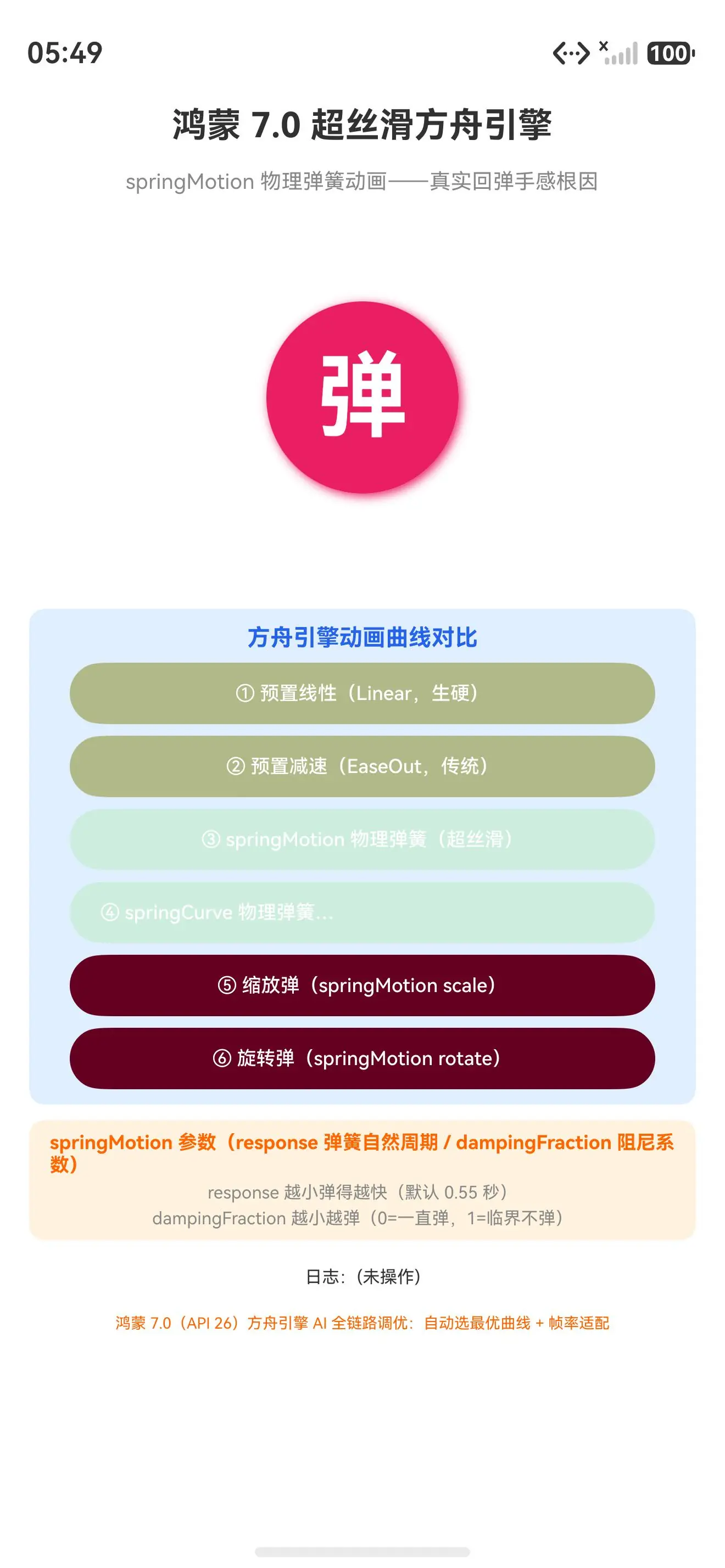
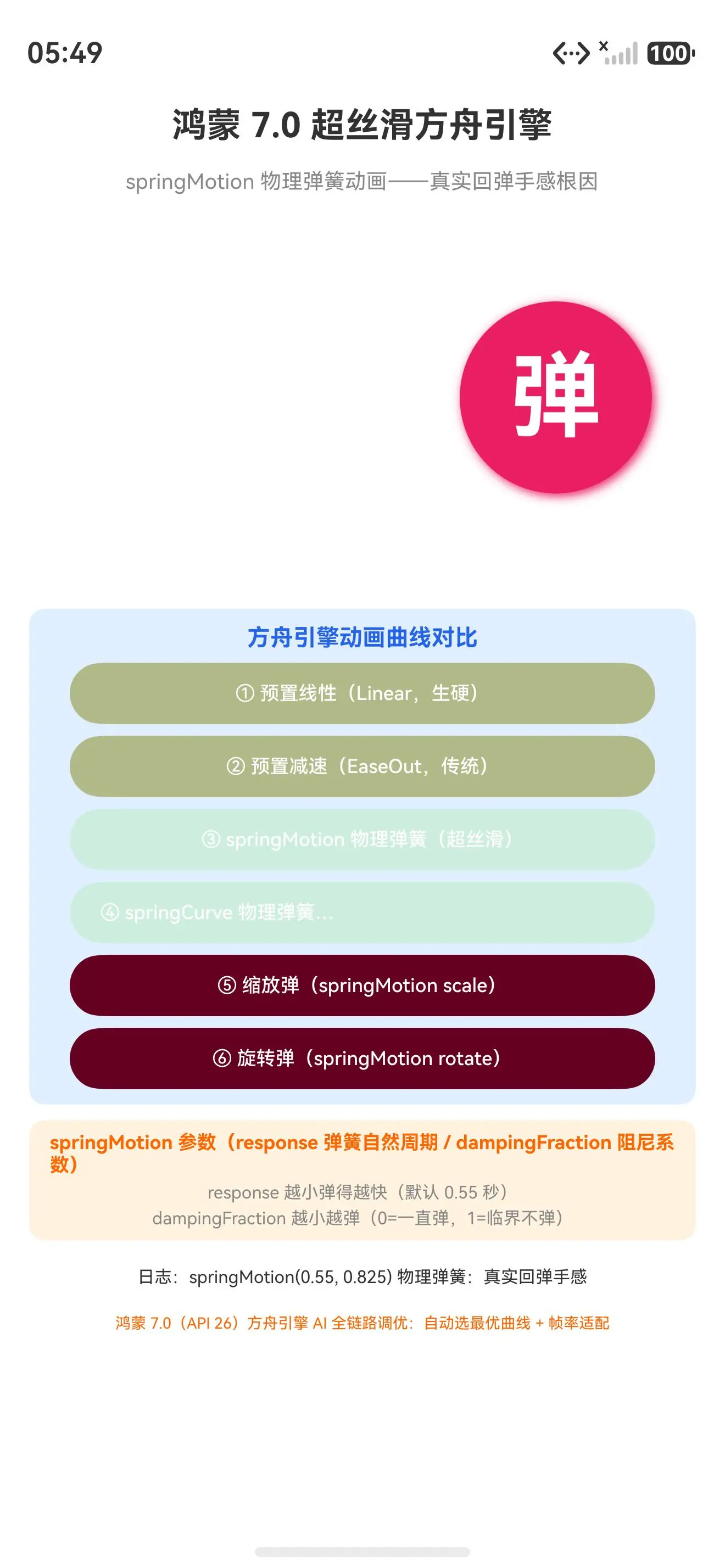
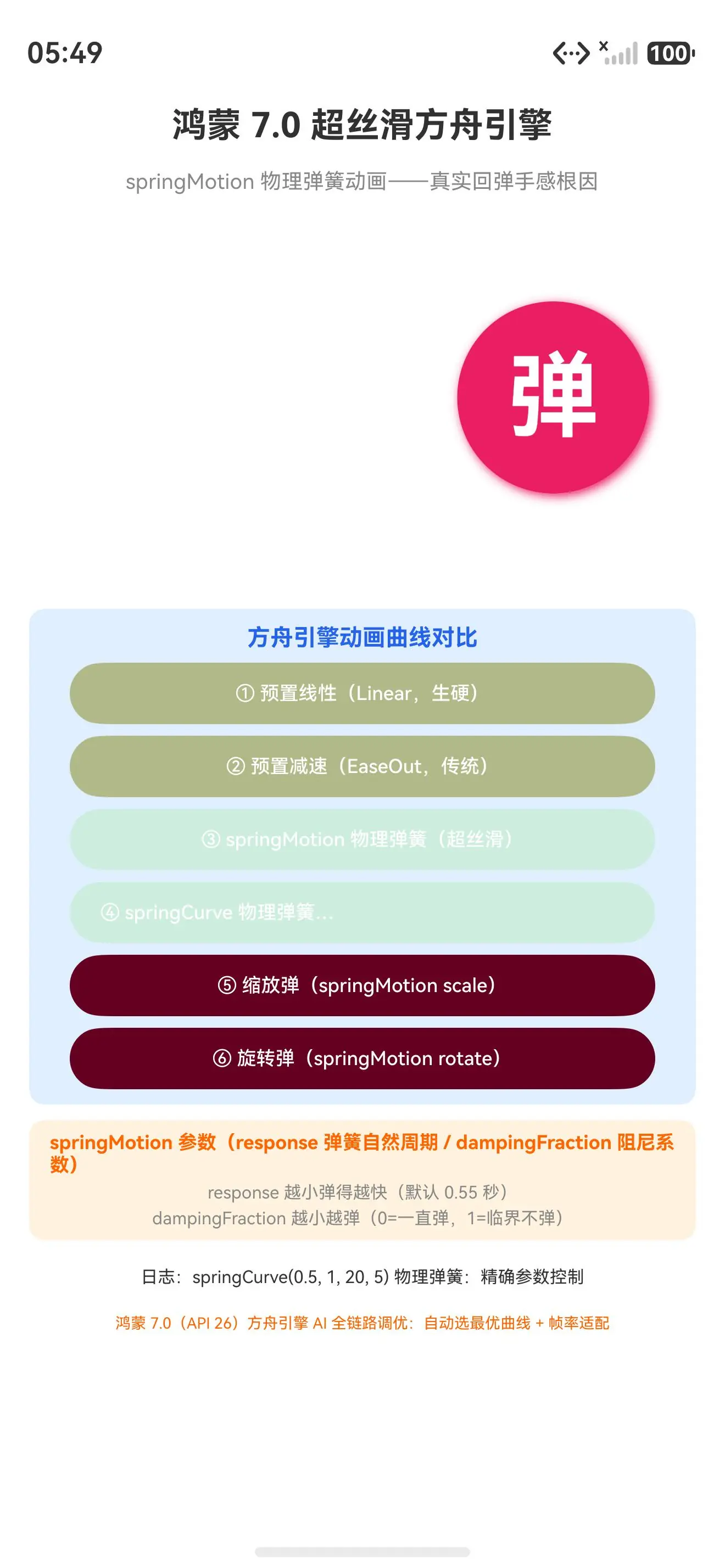
真机配图展示超丝滑方舟引擎 springMotion 物理弹簧动画:
- 初始态:弹簧球居中(translate=0, scale=1, rotate=0),粉红色圆球带阴影,下方六个动画曲线对比按钮(线性/减速/springMotion/springCurve/缩放弹/旋转弹)
- springMotion 运动中态:点击「springMotion 物理弹簧」按钮,弹簧球向右平移 100px,物理弹簧渲染引擎真实回弹(超出 100px 后回弹),response=0.55/damping=0.825
- 缩放弹运动中态:点击「缩放弹」按钮,弹簧球放大到 1.5 倍,springMotion(0.3, 0.8) 物理弹簧缩放回弹,真实回弹手感
四、真解法:超丝滑方舟引擎的三个场景
场景 1:springMotion 物理弹簧平移(90% 场景首选,按钮反馈/卡片入场)
springMotion 物理弹簧平移用 curves.springMotion + animateTo:
typescript
// ✅ 场景 1:springMotion 物理弹簧平移(按钮反馈/卡片入场)
import curves from '@ohos.curves'

@Entry
@Component
struct Index {
  @State translateX: number = 0

  build() {
    Column() {
      Text('弹').fontSize(48).fontColor('#fff')
        .translate({ x: this.translateX })
        .onClick(() => {
          // ✅ springMotion 物理弹簧平移
          animateTo({ curve: curves.springMotion(0.55, 0.825) }, () => {
            this.translateX = 100
          })
          setTimeout(() => {
            animateTo({ curve: curves.springMotion(0.55, 0.825) }, () => {
              this.translateX = 0
            })
          }, 1000)
        })
    }
  }
}
// springMotion 物理弹簧平移:按钮反馈/卡片入场,真实回弹手感
场景 2:springMotion 缩放/旋转(卡片入场/拖拽释放)
springMotion 缩放/旋转用 curves.springMotion + scale/rotate:
typescript
// ✅ 场景 2:springMotion 缩放/旋转(卡片入场/拖拽释放)
@State scaleValue: number = 1
@State rotateAngle: number = 0

// ✅ 缩放弹(卡片入场放大回弹)
animateTo({ curve: curves.springMotion(0.3, 0.8) }, () => { this.scaleValue = 1.5 })
setTimeout(() => {
  animateTo({ curve: curves.springMotion(0.3, 0.8) }, () => { this.scaleValue = 1 })
}, 800)

// ✅ 旋转弹(拖拽释放旋转回弹)
animateTo({ curve: curves.springMotion(0.4, 0.7) }, () => { this.rotateAngle = 90 })
setTimeout(() => {
  animateTo({ curve: curves.springMotion(0.4, 0.7) }, () => { this.rotateAngle = 0 })
}, 900)
// springMotion 缩放/旋转:卡片入场/拖拽释放,物理弹簧真实回弹
场景 3:鸿蒙 7.0 方舟引擎 AI 全链路调优(API 26 自动选最优曲线)
鸿蒙 7.0(API 26)方舟引擎 AI 全链路调优------自动选最优曲线 + 帧率适配:
typescript
// ✅ 场景 3:鸿蒙 7.0 方舟引擎 AI 全链路调优(API 26 自动选最优曲线)
// ⚠ 鸿蒙 7.0(API 26)新特性,本机 API 21 降级为 springMotion 手动调参

// ✅ 鸿蒙 7.0 方舟引擎 AI 全链路调优(API 26)
// import { AnimateOpt } from '@kit.ArkUI'
// animateTo({
//   curve: AnimateOpt.AUTO,                    // ✅ AI 自动选最优曲线
//   expectedFrameRateRange: {
//     min: 10, max: 120, expected: 60          // ✅ 帧率适配(方舟引擎自动调)
//   }
// }, () => { this.translateX = 100 })
// 鸿蒙 7.0 方舟引擎:AI 自动选最优曲线 + 帧率适配,超丝滑全链路调优

// ✅ 降级方案:API 21 用 springMotion 手动调参
// animateTo({ curve: curves.springMotion(0.55, 0.825) }, () => { ... })
鸿蒙 7.0 方舟引擎 AI 全链路调优 vs springMotion 手动调参的区别:鸿蒙 7.0 方舟引擎 AI 全链路调优(API 26,AnimateOpt.AUTO 自动选最优曲线 + 帧率适配),springMotion 手动调参(API 12,response/dampingFraction 手动调)。根因不是 springMotion 手动调参是鸿蒙 7.0 方舟引擎 AI 全链路调优------鸿蒙 7.0 方舟引擎 AI 自动选最优曲线 + 帧率适配,超丝滑全链路调优。
五、一句话哲学
写鸿蒙 ArkUI 记住 :物理弹簧不是 CSS transition ease 是物理弹簧渲染引擎------curves.springMotion 物理参数控制真实回弹。根因不是 cubic-bezier 模拟回弹是物理弹簧渲染引擎------response 弹簧自然周期(控制回弹速度,越小弹得越快)+ dampingFraction 阻尼系数(控制回弹程度,越小越弹,0=一直弹,1=临界不弹)+ springCurve 精确物理参数(velocity+mass+stiffness+damping)+ 鸿蒙 7.0 方舟引擎 AI 全链路调优(API 26,AnimateOpt.AUTO 自动选最优曲线 + 帧率适配)。springMotion 物理弹簧平移用 curves.springMotion + animateTo(首选,90% 场景),springMotion 缩放/旋转用 curves.springMotion + scale/rotate(卡片入场/拖拽释放),鸿蒙 7.0 方舟引擎 AI 全链路调优升级(API 26,自动选最优曲线 + 帧率适配)。物理弹簧渲染引擎真实回弹手感是鸿蒙 7.0 超丝滑方舟引擎核心!
能力系列回链
- 鸿蒙 7.0 新特性篇 1「沉浸式毛玻璃 + 底部 Sheet 面板」------backgroundBlurStyle 系统材质渲染槽
- 鸿蒙 7.0 新特性篇 2「Component3D 空间计算」------一行加载 glTF 3D 模型真机渲染
- 鸿蒙 7.0 新特性篇 3「鸿蒙智能体框架 2.0」------意图即服务,InsightIntentExecutor 意图路由表
- 鸿蒙 7.0 新特性篇 4「超丝滑方舟引擎」------springMotion 物理弹簧动画,真实回弹手感(本文)
真机 demo 完整代码
typescript
// 鸿蒙 7.0 新特性篇 4:超丝滑方舟引擎------springMotion 物理弹簧动画根因
// 本 demo 用 API 12+ curves.springMotion + animateTo 真机演示(本机 API 21 可跑)
// 文章里讲鸿蒙 7.0 超丝滑方舟引擎演进:Curve 预置曲线(API 7)→ springMotion 物理弹簧(API 12)→ 方舟引擎 AI 全链路调优(API 26)

import curves from '@ohos.curves'

@Entry
@Component
struct Index {
  @State translateX: number = 0
  @State scaleValue: number = 1
  @State rotateAngle: number = 0
  @State log: string = '(未操作)'

  // ✅ springMotion 参数(response 弹簧自然周期 / dampingFraction 阻尼系数)
  @State response: number = 0.55
  @State damping: number = 0.825

  // ✅ 方舟引擎三种动画曲线对比
  private curveList: Array<[string, () => void]> = [
    ['① 预置线性(Linear,生硬)', () => {
      animateTo({ duration: 1000, curve: Curve.Linear }, () => { this.translateX = 100 })
      setTimeout(() => {
        animateTo({ duration: 1000, curve: Curve.Linear }, () => { this.translateX = 0 })
      }, 1000)
      this.log = 'Curve.Linear 预置线性:生硬无回弹'
    }],
    ['② 预置减速(EaseOut,传统)', () => {
      animateTo({ duration: 1000, curve: Curve.EaseOut }, () => { this.translateX = 100 })
      setTimeout(() => {
        animateTo({ duration: 1000, curve: Curve.EaseOut }, () => { this.translateX = 0 })
      }, 1000)
      this.log = 'Curve.EaseOut 预置减速:传统缓动无物理感'
    }],
    ['③ springMotion 物理弹簧(超丝滑)', () => {
      animateTo({ curve: curves.springMotion(this.response, this.damping) }, () => { this.translateX = 100 })
      setTimeout(() => {
        animateTo({ curve: curves.springMotion(this.response, this.damping) }, () => { this.translateX = 0 })
      }, 1000)
      this.log = `springMotion(${this.response}, ${this.damping}) 物理弹簧:真实回弹手感`
    }],
    ['④ springCurve 物理弹簧(velocity+mass+stiffness+damping)', () => {
      animateTo({ curve: curves.springCurve(0.5, 1, 20, 5) }, () => { this.translateX = 100 })
      setTimeout(() => {
        animateTo({ curve: curves.springCurve(0.5, 1, 20, 5) }, () => { this.translateX = 0 })
      }, 1000)
      this.log = 'springCurve(0.5, 1, 20, 5) 物理弹簧:精确参数控制'
    }],
    ['⑤ 缩放弹(springMotion scale)', () => {
      animateTo({ curve: curves.springMotion(0.3, 0.8) }, () => { this.scaleValue = 1.5 })
      setTimeout(() => {
        animateTo({ curve: curves.springMotion(0.3, 0.8) }, () => { this.scaleValue = 1 })
      }, 800)
      this.log = 'springMotion(0.3, 0.8) 缩放弹:放大回弹'
    }],
    ['⑥ 旋转弹(springMotion rotate)', () => {
      animateTo({ curve: curves.springMotion(0.4, 0.7) }, () => { this.rotateAngle = 90 })
      setTimeout(() => {
        animateTo({ curve: curves.springMotion(0.4, 0.7) }, () => { this.rotateAngle = 0 })
      }, 900)
      this.log = 'springMotion(0.4, 0.7) 旋转弹:90度回弹'
    }],
  ]

  build() {
    Column({ space: 8 }) {
      Text('鸿蒙 7.0 超丝滑方舟引擎')
        .fontSize(18).fontWeight(FontWeight.Bold).margin({ top: 16, bottom: 4 })
      Text('springMotion 物理弹簧动画------真实回弹手感根因')
        .fontSize(11).fontColor('#888').margin({ bottom: 8 })

      // ✅ 动画演示区:弹簧球
      Column() {
        Column() {
          Text('弹')
            .fontSize(48).fontColor('#FFFFFF').fontWeight(FontWeight.Bold)
        }
        .width(100).height(100)
        .justifyContent(FlexAlign.Center)
        .backgroundColor('#E91E63')
        .borderRadius(50)
        // ✅ 三种变换:translate + scale + rotate
        .translate({ x: this.translateX })
        .scale({ x: this.scaleValue, y: this.scaleValue })
        .rotate({ angle: this.rotateAngle })
        .shadow({ radius: 15, color: '#E91E63', offsetX: 5, offsetY: 5 })
      }
      .width('100%').height(180)
      .justifyContent(FlexAlign.Center)
      .margin({ bottom: 12 })

      // ✅ 方舟引擎三种曲线对比按钮
      Column({ space: 6 }) {
        Text('方舟引擎动画曲线对比')
          .fontSize(12).fontColor('#2563eb').fontWeight(FontWeight.Bold)
        ForEach(this.curveList, (item: [string, () => void], index: number) => {
          Button(item[0])
            .width('92%').height(32).fontSize(10)
            .backgroundColor(index < 2 ? '#88888820' : (index < 4 ? '#2563eb20' : '#ff660020'))
            .onClick(() => { item[1]() })
        }, (item: [string, () => void]) => item[0])
      }
      .width('92%').padding(8).backgroundColor('#e0f0ff').borderRadius(8)

      // ✅ springMotion 参数说明
      Column({ space: 3 }) {
        Text('springMotion 参数(response 弹簧自然周期 / dampingFraction 阻尼系数)')
          .fontSize(10).fontColor('#ff6600').fontWeight(FontWeight.Bold)
        Text('response 越小弹得越快(默认 0.55 秒)')
          .fontSize(9).fontColor('#888')
        Text('dampingFraction 越小越弹(0=一直弹,1=临界不弹)')
          .fontSize(9).fontColor('#888')
      }
      .width('92%').padding(6).backgroundColor('#fff3e0').borderRadius(8)

      Text(`日志:${this.log}`).fontSize(9).fontColor('#333').margin({ top: 6 })
      Text('鸿蒙 7.0(API 26)方舟引擎 AI 全链路调优:自动选最优曲线 + 帧率适配')
        .fontSize(8).fontColor('#ff6600').margin({ top: 6 })
    }
    .width('100%').height('100%').alignItems(HorizontalAlign.Center)
  }
}
写鸿蒙 ArkUI 记住 :物理弹簧不是 CSS transition ease 是物理弹簧渲染引擎------curves.springMotion 物理参数控制真实回弹。根因不是 cubic-bezier 模拟回弹是物理弹簧渲染引擎------response 弹簧自然周期(控制回弹速度,越小弹得越快)+ dampingFraction 阻尼系数(控制回弹程度,越小越弹,0=一直弹,1=临界不弹)+ springCurve 精确物理参数(velocity+mass+stiffness+damping)+ 鸿蒙 7.0 方舟引擎 AI 全链路调优(API 26,AnimateOpt.AUTO 自动选最优曲线 + 帧率适配)。springMotion 物理弹簧平移用 curves.springMotion + animateTo(首选,90% 场景),springMotion 缩放/旋转用 curves.springMotion + scale/rotate(卡片入场/拖拽释放),鸿蒙 7.0 方舟引擎 AI 全链路调优升级(API 26,自动选最优曲线 + 帧率适配)。物理弹簧渲染引擎真实回弹手感是鸿蒙 7.0 超丝滑方舟引擎核心!