一 手势
8.1 onClick 单击
@Entry
@Component
export struct GestureLearn {
  private judgeCount: number = 0;

  increaseJudgeGuard(): void {
    this.judgeCount++;
  }

  build() {
    NavDestination() {
      Column() {
        Column() {
          Column()
            .width('60%')
            .height('50%')
            .backgroundColor(Color.Grey)
            .onClick(() => {
              // 1. 子组件上注册了点击事件,正常情况下点击在子组件上时,优先得到响应
              this.getUIContext().getPromptAction().showToast({ message: 'child', duration:10})
              console.info('Clicked on child');
              this.increaseJudgeGuard();
            })
            //  手势裁决函数 gestureInfo.type 判断手势类型 (不仅手势 onClick也能裁决)
            .onGestureJudgeBegin((gestureInfo: GestureInfo, event: BaseGestureEvent) => {
              // 3. 当数字增长为5的倍数时禁用子组件上的点击手势,此时父组件上的点击可以得到响应
              if (this.judgeCount >= 5 && gestureInfo.type == GestureControl.GestureType.CLICK) {
                return GestureJudgeResult.REJECT; // 拒绝
              } else {
                return GestureJudgeResult.CONTINUE; // 继续
              }
            })
        }
        .width('80%')
        .height('80%')
        .justifyContent(FlexAlign.Center)
        .backgroundColor(Color.Green)
        .gesture(
          TapGesture() // 2. 父组件上注册了点击手势,正常情况下点击在子组件区域时,父组件上的手势优先级低于子组件
            .onAction(() => {
              this.getUIContext().getPromptAction().showToast({ message: 'parent', duration:10})
              console.info('Clicked on parent');
              this.increaseJudgeGuard();
            }))
      }
      .height('100%')
      .width('100%')
      .justifyContent(FlexAlign.Center)
    }
    .backgroundColor('#f1f2f3')
    .title('点击事件')
  }
}
8.2 TapGesture 单击
Text('Click twice').fontSize(28)
  .gesture(
   // 连续点击两次
   TapGesture({ count: 2 })
    .onAction((event: GestureEvent|undefined) => {
      if(event){
        this.value = JSON.stringify(event.fingerList[0]);
      }
   }))
8.3 LongPressGesture 长按
Text('LongPress OnAction:' + this.count).fontSize(28)
  .gesture(
    // 绑定可以重复触发的LongPressGesture
    LongPressGesture({ repeat: true })
      .onAction((event: GestureEvent | undefined) => {
        if (event) {
          if (event.repeat) {
            this.count++;
          }
        }
      })
      .onActionEnd(() => {
        this.count = 0;
      })
  )
8.4 PanGesture 滑动
.gesture(
  PanGesture()
    .onActionStart(() => {
      console.info('Pan start');
    })
    .onActionUpdate((event: GestureEvent) => {
      console.info('Pan update');
    })
8.5 PinchGesture 捏和
.gesture(
  // 在组件上绑定三指触发的捏合手势
  PinchGesture({ fingers: 3 })
    .onActionStart((event: GestureEvent | undefined) => {
      console.info('Pinch start');
    })// 当捏合手势触发时,可以通过回调函数获取缩放比例,从而修改组件的缩放比例
    .onActionUpdate((event: GestureEvent | undefined) => {
      if (event) {
        this.scaleValue = this.pinchValue * event.scale;
        this.pinchX = event.pinchCenterX;
        this.pinchY = event.pinchCenterY;
      }
    })
    .onActionEnd(() => {
      this.pinchValue = this.scaleValue;
      console.info('Pinch end');
    })
8.6 RotationGesture 旋转手势
.gesture(
  RotationGesture()
    .onActionStart((event: GestureEvent|undefined) => {
      console.info('RotationGesture is onActionStart');
    })
      // 当旋转手势生效时,通过旋转手势的回调函数获取旋转角度,从而修改组件的旋转角度
    .onActionUpdate((event: GestureEvent|undefined) => {
      console.info('RotationGesture is onActionUpdate');
    })
      // 当旋转结束抬手时,固定组件在旋转结束时的角度
    .onActionEnd(() => {
      console.info('RotationGesture is onActionEnd');
    })
    .onActionCancel(() => {
      console.info('RotationGesture is onActionCancel');
    })
)
8.7 SwipeGesture 快滑手势
.gesture(
   // 绑定滑动手势且限制仅在竖直方向滑动时触发
   SwipeGesture({ direction: SwipeDirection.Vertical })
      // 当滑动手势触发时,获取滑动的速度和角度,实现对组件的布局参数的修改
      .onAction((event: GestureEvent|undefined) => {
      if(event){
        this.speed = event.speed;
        this.rotateAngle = event.angle;
      }
   })
)
8.8 手势组合
.gesture(
  // 声明该组合手势的类型为Sequence类型
  GestureGroup(GestureMode.Sequence,
    // 该组合手势第一个触发的手势为长按手势,且长按手势可多次响应
    LongPressGesture({ repeat: true })
    // 当长按手势识别成功,增加Text组件上显示的count次数
      .onAction((event: GestureEvent | undefined) => {
        if (event) {
          if (event.repeat) {
            this.count++;
          }
        }
        hilog.info(DOMAIN, TAG, 'LongPress onAction');
      })
      .onActionEnd(() => {
        hilog.info(DOMAIN, TAG, 'LongPress end');
      }),
    // 当长按之后进行拖动,PanGesture手势被触发
    PanGesture()
      .onActionStart(() => {
        this.borderStyles = BorderStyle.Dashed;
        hilog.info(DOMAIN, TAG, 'pan start');
      })
      // 当该手势被触发时,根据回调获得拖动的距离,修改该组件的位移距离从而实现组件的移动
      .onActionUpdate((event: GestureEvent | undefined) => {
        if (event) {
          this.offsetX = (this.positionX + event.offsetX);
          this.offsetY = this.positionY + event.offsetY;
        }
        hilog.info(DOMAIN, TAG, 'pan update');
      })
      .onActionEnd(() => {
        this.positionX = this.offsetX;
        this.positionY = this.offsetY;
        this.borderStyles = BorderStyle.Solid;
      })
  )
    .onCancel(() => {
      hilog.info(DOMAIN, TAG, 'sequence gesture canceled');
    })
)

// #### `GestureMode.EXCLUSIVE` --- 互斥模式
// 例如: 点击和长按只有一个能触发

// #### `GestureMode.PARALLEL` --- 并行模式
// 例如: 缩放和旋转同时响应

// #### `GestureMode.SEQUENTIAL` --- 顺序模式
// 例如: 必须先长按成功,长按结束后才能触发滑动
二 沉浸式适配
- 沉浸式模式: 减少无关干扰,沉浸于内容呈现,提升用户体验的设计模式
- 包含 状态栏 + 应用页面 + 底部导航
// 1 增加颜色设置区域
background():背景颜色扩展至顶部状态栏及底部导航条区域。
// EntryAbility.ets


onWindowStageCreate(windowStage: window.WindowStage): void {
  try {
    // 获取主窗口
    this.windowUtil = new WindowUtil(windowStage.getMainWindowSync());
  } catch (error) {
    let err = error as BusinessError;
    hilog.error(0x0000, 'TestLog', `Failed to get main window. Code: ${err.code}, message: ${err.message}`);
  }
  // 存储主窗口
  AppStorage.setOrCreate('windowUtil', this.windowUtil);
@Component
export struct ShoppingAvoid {
  // 获取存储的窗口
  @StorageLink('windowUtil') windowUtil: WindowUtil | undefined = undefined;

  build() {
    NavDestination() {
      Column() {
        Home()
      }
      .ignoreLayoutSafeArea() // 忽略安全区
      .height(LayoutPolicy.matchParent) //布局策略, 撑满父容器。
      .padding({
        // 状态栏避让区域
        top: this.windowUtil?.mainWindowInfo.avoidSystem?.topRect.height + 'px',
        // 导航栏避让区域
        bottom: this.windowUtil?.mainWindowInfo.avoidNavigationIndicator?.bottomRect.height + 'px'
      })
      .backgroundColor($r('app.color.page_background'))
    }
    .hideTitleBar(true)
  }
}
三 深浅色适配
3.1 文字适配
- base/element/color.json 和 dark/element/color.json 各写一套
3.2 图片适配
SVG + fillColorSymbolGlyph + fontColorPNG/JPEG base/media 和 dark/media 各写一套
build() {
  Column() {
    // ============ 方式一:用 SVG + fillColor ============
    // 优点:一张图,颜色自动变
    Image($r('app.media.icon_home'))  // SVG格式图片
      .width(48)
      .height(48)
      .fillColor(this.isDark ? Color.White : Color.Black)  // ⬅️ 关键:根据模式换颜色
      .margin(10)

    // ============ 方式二:用 SymbolGlyph(推荐) ============
    // 系统图标,更简单
    SymbolGlyph($r('app.symbol.home'))
      .fontSize(48)
      .fontColor(this.isDark ? Color.White : Color.Black)  // ⬅️ 一样换颜色
      .margin(10)
  }
}
// EntryAbility.ets

// 保存当前 颜色模式 (系统方法)
export default class EntryAbility extends UIAbility {
  onCreate(_want: Want, _launchParam: AbilityConstant.LaunchParam): void {
    AppStorage.setOrCreate<ConfigurationConstant.ColorMode>('currentColorMode', this.context.config.colorMode);

}

// 监听颜色模式改变 (系统方法)
onConfigurationUpdate(newConfig: Configuration): void {
  const currentColorMode: ConfigurationConstant.ColorMode | undefined = AppStorage.get('currentColorMode');
  if (currentColorMode !== newConfig.colorMode) {
    AppStorage.setOrCreate<ConfigurationConstant.ColorMode>('currentColorMode', newConfig.colorMode);
  }
}
四 UI性能优化
4.1 精简节点数 - UI
4.2 合理控制元素隐藏 - UI
Row(){
  Text ("Hello World")
  if (this.visible){
    Column() {
     // 100张Image组件
    }
  }
}
Row (){
  Text ("Hello World")
  Column () {
    // 100张Image组件
  }
  .visibility(this visible ? Visibility Visible : Visibility.None)
}
4.3 给组件宽高 - UI
4.4 使用推荐的布局组件 - UI
4.5 List优化
五 组件补充
1.1 Slider 滑块
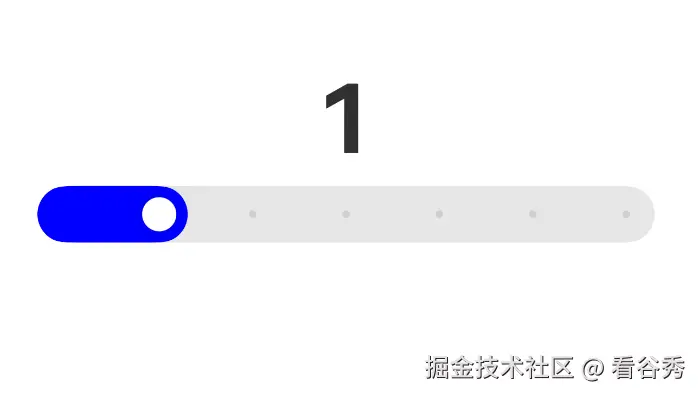
@Entry
@Component
struct LearnSlider {
  @State quantity: number = 0
  build() {
    Column(){
      Text(this.quantity.toString())
        .fontSize(50)
        .fontWeight(FontWeight.Bold)
        .margin({ top: 20 })

      Slider({
        value: this.quantity, // 当前值
        min: 0, // 最小值
        max: 6, // 最大值
        step: 1, // 步长 每次拖动1
        style: SliderStyle.InSet // 样式 内嵌
      })
        .blockColor(Color.White)  // 未滑动颜色
        .selectedColor(Color.Blue) // 滑动后颜色
        .showSteps(true) // 显示步长 小点
        .trackThickness(30) // 轨道粗细 30px
        .onChange((value: number) => {
          this.quantity = value;
        })
    }
    .width('100%')
    .height('100%')
    .backgroundColor(Color.White)
    .alignItems(HorizontalAlign.Center)
    .padding(20)
  }
}
六 文件操作
6.1 图片访问
6.2 文本访问
七 arkts 与 web 交互
7.1 生命周期
7.2 原生调用js
runJavaScript()和 runJavaScriptExt()
 .onClick(() => {
  // 调用前端页面有参函数。
  this.webviewController.runJavaScript('htmlTestParam(param)');
})
7.3 js调用原生
Web组件初始化调用,使用javaScriptProxy()接口Web组件初始化完成后调用,使用registerJavaScriptProxy()接口deleteJavaScriptRegister接口配合使用,防止内存泄漏
aboutToDisappear() {
  try {
    this.webviewController.deleteJavaScriptRegister('jsbridgeHandle'); // 删除之前注册 js对象
    hilog.info(0xFF00, 'SelectContact', '%{public}s', '[LifeCycle] aboutToDisappear');
  } catch (error) {
    let err = error as BusinessError;
    hilog.error(0xFF00, 'SelectContact', `deleteJavaScriptRegister fail, code = ${err.code}, message = ${err.message}`);
  }
}

Web({ // 语言切换文件
  src: $rawfile(/zh/.test(i18n.System.getSystemLanguage()) ? 'index.html' : 'index_en.html'),
  controller: this.webviewController
})
  .backgroundColor(Color.Red)
  .javaScriptAccess(true) // 允许执行js
  .javaScriptProxy({ // 注入js对象 js调用原生
    object: {
      call: this.chooseContact // 原生方法注入js
    },
    name: 'jsbridgeHandle', //
    methodList: ['call'],
    controller: this.webviewController
  })
  .height($r('app.float.web_height'))
  .onControllerAttached(() => { // Controller成功绑定Web组件回调 在这 注入js对象
    this.webviewController.registerJavaScriptProxy({ call: this.chooseContact },   'jsbridgeHandle', ['call']);
  })

// 获取通讯录 选择联系人 方法
chooseContact(): Promise<string> {
   // ...
}

// js调用 怎么调用 chooseContact() 方法 ?
// jsbridgeHandle.call()
八 通知
8.1 发送通知
import { common, wantAgent } from '@kit.AbilityKit';
import { notificationManager } from '@kit.NotificationKit';
import CommonConstants from '../constants/CommonConstants';
import Logger from '../utils/Logger';
import { BusinessError } from '@kit.BasicServicesKit';
import { hilog } from '@kit.PerformanceAnalysisKit';

// 创建want
export async function createWantAgent(bundleName: string, abilityName: string): Promise<Object> {
  let wantAgentInfo = {
    wants: [
      {
        bundleName: bundleName, // 包名称
        abilityName: abilityName // UIAbility 名称
      }
    ],
    operationType: wantAgent.OperationType.START_ABILITY, // 启动 UIAbility
    requestCode: 0,  // 请求码,用于区分不同请求
    wantAgentFlags: [wantAgent.WantAgentFlags.CONSTANT_FLAG] // 标志位:WantAgent 信息不可变
  } as wantAgent.WantAgentInfo;
  let result: Object = new Object(); // 兜底空对象,避免返回 undefined
  try {
    result = await wantAgent.getWantAgent(wantAgentInfo) // 创建 wantAgent
  } catch (error) {
    let err = error as BusinessError;
    hilog.error(0x0000, 'createWantAgent', `getWantAgent failed, error code=${err.code}, message=${err.message}`);
  }
  return result;
}

// 发布进度条通知 进度 通知标题  点击通知跳转的 WantAgent
export function publishNotification(progress: number, title: string, wantAgentObj: object) {
  // 1 构造进度条模板数据
  let template: notificationManager.NotificationTemplate = {
    name: 'downloadTemplate', // 模板名称,必须为 downloadTemplate
    data: {
      title: `${title}`,
      fileName: `${title}:${CommonConstants.DOWNLOAD_FILE}`, // '1653067.mp4';
      progressValue: progress, // 进度
      progressMaxValue: CommonConstants.PROGRESS_TOTAL, // 最大值 100
      isProgressIndeterminate: false // false=确定进度,true=不确定进度(加载动画)  !!!
    }
  };

  // 1 构造请求
  let notificationRequest: notificationManager.NotificationRequest = {
    id: CommonConstants.NOTIFICATION_ID, // // 通知 ID(更新通知时复用同一 ID)  !!!
    notificationSlotType: notificationManager.SlotType.CONTENT_INFORMATION, // 通知渠道类型:内容信息
    // Construct a progress bar template. The name field must be set to downloadTemplate.
    template: template, // 进度条模板 上面创建
    content: {
      notificationContentType: notificationManager.ContentType.NOTIFICATION_CONTENT_BASIC_TEXT, // 文本类型
      normal: {
        title: `${title}:${CommonConstants.DOWNLOAD_FILE}`, // '1653067.mp4'
        text: ' ',
        additionalText: `${progress}%`
      }
    },
    wantAgent: wantAgentObj  // 绑定 WantAgent,点击通知跳转指定页面
  };

  // 2 发送通知
  notificationManager.publish(notificationRequest).catch((err: BusinessError) => {
    Logger.error(`[ANS] publish failed, code is ${err.code}, message is ${err.message}`);
  });
}

// 请求通知权限
export function openNotificationPermission(context: common.UIAbilityContext) {
  notificationManager.requestEnableNotification(context).then(() => {
    Logger.info('Enable notification success'); // 授权成功
  }).catch((err: BusinessError) => {
    Logger.error(`Enable notification failed, code is ${err.code}, message is ${err.message}`);
  });
}
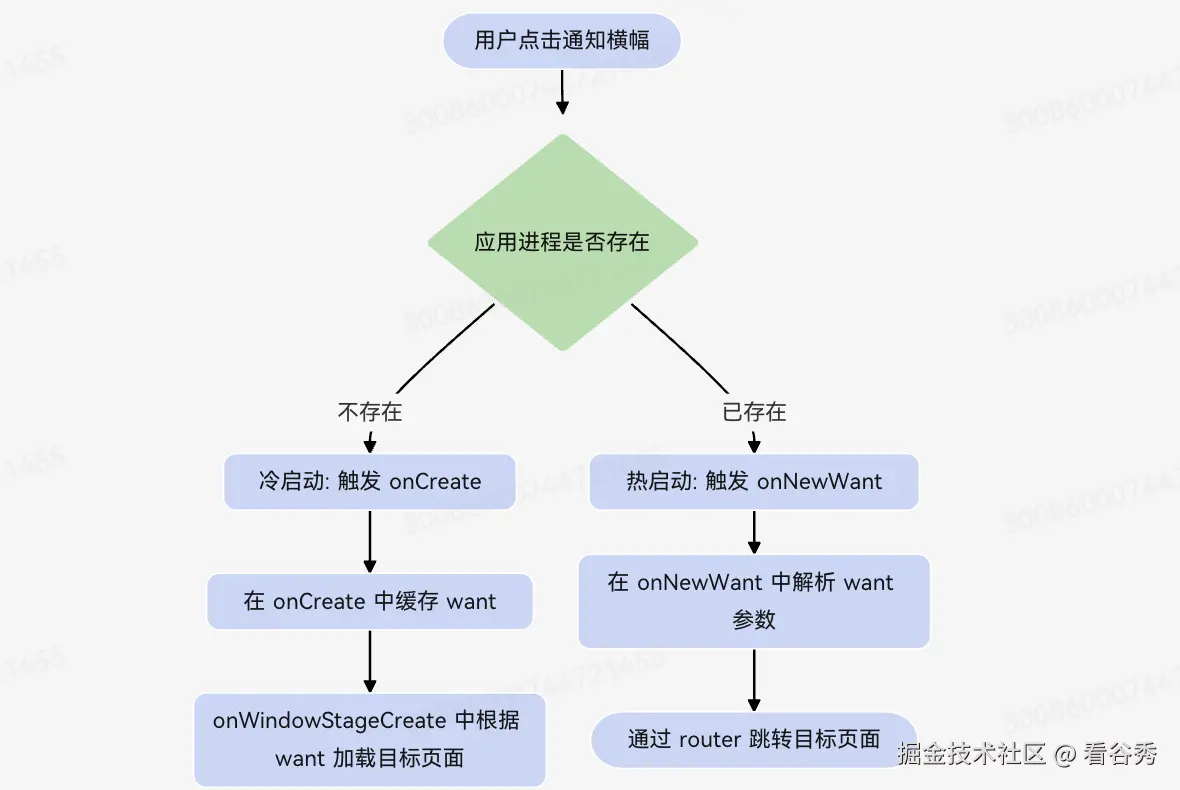
8.2 监听通知点击
import { AbilityConstant, UIAbility, Want } from '@kit.AbilityKit';
import { window } from '@kit.ArkUI';
import { router } from '@kit.ArkUI';
import { BusinessError } from '@kit.BasicServicesKit';

export default class EntryAbility extends UIAbility {
  private funcAbilityWant: Want | null = null;

  // 【冷启动】应用进程不存在时,点击通知拉起应用 → 走 onCreate
  // want 中携带了通知 WantAgent 配置的 parameters 数据
  onCreate(want: Want, launchParam: AbilityConstant.LaunchParam): void {
    // 缓存 want,不要在此处直接执行 router 跳转(UI 上下文尚未初始化)
    this.funcAbilityWant = want;
  }

  // 【热启动】应用已在后台运行,点击通知复用实例 → 走 onNewWant
  onNewWant(want: Want, launchParam: AbilityConstant.LaunchParam): void {
    // 解析 want.parameters 中携带的自定义参数
    let targetPage = want.parameters?.targetPage as string;
    if (targetPage) {
      // 通过 router 跳转到指定页面
      router.pushUrl({ url: targetPage }).catch((err: BusinessError) => {
        console.error(`router pushUrl failed: ${err.message}`);
      });
    }
  }

  // 冷启动时,onCreate 之后触发 onWindowStageCreate,在此加载目标页面
  onWindowStageCreate(windowStage: window.WindowStage): void {
    let url: string = 'pages/Index'; // 默认首页
    // 根据 onCreate 中缓存的 want 判断是否需要跳转指定页面
    if (this.funcAbilityWant?.parameters?.targetPage) {
      url = this.funcAbilityWant.parameters.targetPage as string;
    }
    windowStage.loadContent(url);
  }
}
九 Native & arkts 交互
- 为了提高业务性能,鸿蒙提供了,
arkts调用native的能力
Native编写业务代码,开放接口Arkts引入Native接口,解决实际问题- Native 实现方法包括同步,异步callback及异步promise
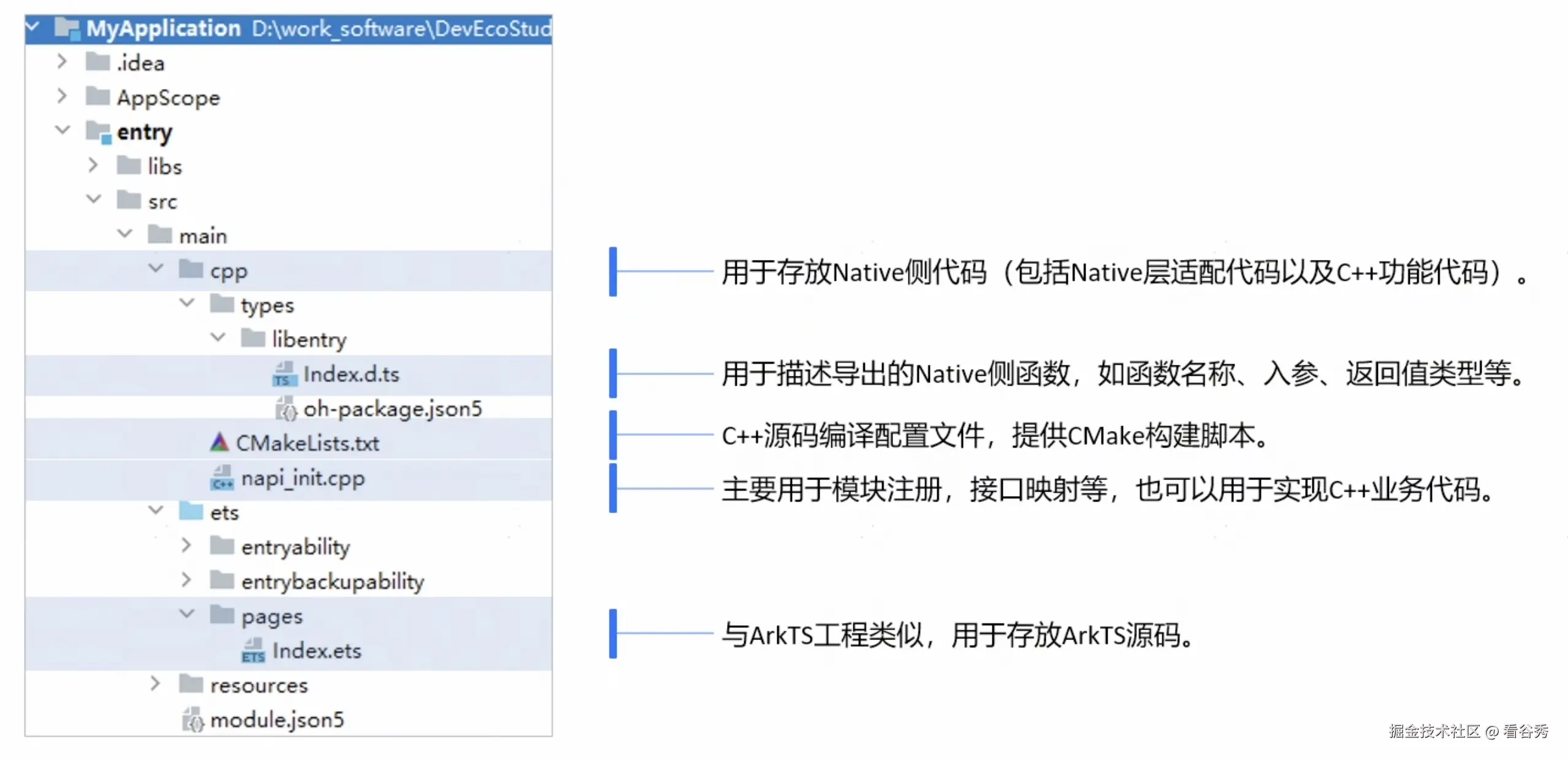
9.1 Native 项目目录介绍