文章目录
- [多格式文件进入 RAG 索引](#多格式文件进入 RAG 索引)
-
- [1. 为什么用 List<Document>?](#1. 为什么用 List
?) - [2. DocumentReader](#2. DocumentReader)
- [3. Maven 依赖](#3. Maven 依赖)
- [4. 配置说明](#4. 配置说明)
- [5. 各格式代码示例](#5. 各格式代码示例)
-
- [5.1 JSON 对象 --- JsonReader](#5.1 JSON 对象 — JsonReader)
- [5.2 JSON 数组 --- JsonReader](#5.2 JSON 数组 — JsonReader)
- [5.3 纯文本 --- TextReader](#5.3 纯文本 — TextReader)
- [5.4 HTML --- JsoupDocumentReader](#5.4 HTML — JsoupDocumentReader)
- [5.5 Markdown --- MarkdownDocumentReader](#5.5 Markdown — MarkdownDocumentReader)
- [5.6 PDF 按页 --- PagePdfDocumentReader](#5.6 PDF 按页 — PagePdfDocumentReader)
- [5.7 多格式通用 --- TikaDocumentReader](#5.7 多格式通用 — TikaDocumentReader)
- [6. 与向量入库衔接](#6. 与向量入库衔接)
- [7. spring-ai-alibaba 扩展 Document Reader](#7. spring-ai-alibaba 扩展 Document Reader)
- [1. 为什么用 List<Document>?](#1. 为什么用 List
多格式文件进入 RAG 索引
技术栈:Java 21 / Spring Boot 4.1 / Spring AI 2.0.0-M1。
Spring AI 官方对应文档 (ETL Pipeline / DocumentReader):https://docs.spring.io/spring-ai/reference/api/etl-pipeline.html
1. 为什么用 List<Document>?
RAG 索引链路可以概括为:
text
文件 → 读取 → List<Document> →(可选 TextSplitter 切分)→ 转化成向量 → 存储数据库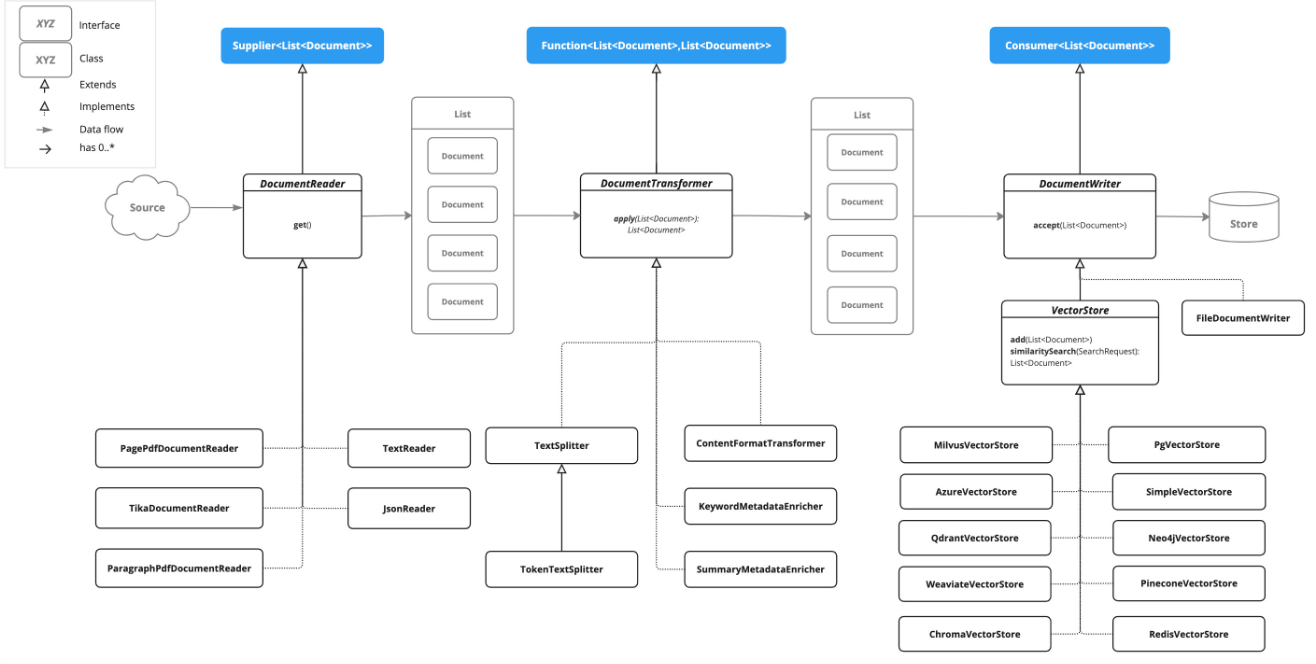
不同文件格式结构差异很大,于是 下游Document作为所有文件的统一 :Document(正文 + metadata元数据)。因此各 Reader 最终都返回 List<Document>:
| 原因 | 说明 |
|---|---|
| 统一入库 | vectorStore.add(documents) 不关心源文件格式 |
| 粒度可控 | 同一文件可拆成多条 Document(按页、按段落、按标签、分隔符等) |
| metadata 溯源 | 存放元数据,可以看作这个Document中的某个属性值 |
#mermaid-svg-pCCcLOs0hZ7DUGPU{font-family:"trebuchet ms",verdana,arial,sans-serif;font-size:16px;fill:#333;}@keyframes edge-animation-frame{from{stroke-dashoffset:0;}}@keyframes dash{to{stroke-dashoffset:0;}}#mermaid-svg-pCCcLOs0hZ7DUGPU .edge-animation-slow{stroke-dasharray:9,5!important;stroke-dashoffset:900;animation:dash 50s linear infinite;stroke-linecap:round;}#mermaid-svg-pCCcLOs0hZ7DUGPU .edge-animation-fast{stroke-dasharray:9,5!important;stroke-dashoffset:900;animation:dash 20s linear infinite;stroke-linecap:round;}#mermaid-svg-pCCcLOs0hZ7DUGPU .error-icon{fill:#552222;}#mermaid-svg-pCCcLOs0hZ7DUGPU .error-text{fill:#552222;stroke:#552222;}#mermaid-svg-pCCcLOs0hZ7DUGPU .edge-thickness-normal{stroke-width:1px;}#mermaid-svg-pCCcLOs0hZ7DUGPU .edge-thickness-thick{stroke-width:3.5px;}#mermaid-svg-pCCcLOs0hZ7DUGPU .edge-pattern-solid{stroke-dasharray:0;}#mermaid-svg-pCCcLOs0hZ7DUGPU .edge-thickness-invisible{stroke-width:0;fill:none;}#mermaid-svg-pCCcLOs0hZ7DUGPU .edge-pattern-dashed{stroke-dasharray:3;}#mermaid-svg-pCCcLOs0hZ7DUGPU .edge-pattern-dotted{stroke-dasharray:2;}#mermaid-svg-pCCcLOs0hZ7DUGPU .marker{fill:#333333;stroke:#333333;}#mermaid-svg-pCCcLOs0hZ7DUGPU .marker.cross{stroke:#333333;}#mermaid-svg-pCCcLOs0hZ7DUGPU svg{font-family:"trebuchet ms",verdana,arial,sans-serif;font-size:16px;}#mermaid-svg-pCCcLOs0hZ7DUGPU p{margin:0;}#mermaid-svg-pCCcLOs0hZ7DUGPU .label{font-family:"trebuchet ms",verdana,arial,sans-serif;color:#333;}#mermaid-svg-pCCcLOs0hZ7DUGPU .cluster-label text{fill:#333;}#mermaid-svg-pCCcLOs0hZ7DUGPU .cluster-label span{color:#333;}#mermaid-svg-pCCcLOs0hZ7DUGPU .cluster-label span p{background-color:transparent;}#mermaid-svg-pCCcLOs0hZ7DUGPU .label text,#mermaid-svg-pCCcLOs0hZ7DUGPU span{fill:#333;color:#333;}#mermaid-svg-pCCcLOs0hZ7DUGPU .node rect,#mermaid-svg-pCCcLOs0hZ7DUGPU .node circle,#mermaid-svg-pCCcLOs0hZ7DUGPU .node ellipse,#mermaid-svg-pCCcLOs0hZ7DUGPU .node polygon,#mermaid-svg-pCCcLOs0hZ7DUGPU .node path{fill:#ECECFF;stroke:#9370DB;stroke-width:1px;}#mermaid-svg-pCCcLOs0hZ7DUGPU .rough-node .label text,#mermaid-svg-pCCcLOs0hZ7DUGPU .node .label text,#mermaid-svg-pCCcLOs0hZ7DUGPU .image-shape .label,#mermaid-svg-pCCcLOs0hZ7DUGPU .icon-shape .label{text-anchor:middle;}#mermaid-svg-pCCcLOs0hZ7DUGPU .node .katex path{fill:#000;stroke:#000;stroke-width:1px;}#mermaid-svg-pCCcLOs0hZ7DUGPU .rough-node .label,#mermaid-svg-pCCcLOs0hZ7DUGPU .node .label,#mermaid-svg-pCCcLOs0hZ7DUGPU .image-shape .label,#mermaid-svg-pCCcLOs0hZ7DUGPU .icon-shape .label{text-align:center;}#mermaid-svg-pCCcLOs0hZ7DUGPU .node.clickable{cursor:pointer;}#mermaid-svg-pCCcLOs0hZ7DUGPU .root .anchor path{fill:#333333!important;stroke-width:0;stroke:#333333;}#mermaid-svg-pCCcLOs0hZ7DUGPU .arrowheadPath{fill:#333333;}#mermaid-svg-pCCcLOs0hZ7DUGPU .edgePath .path{stroke:#333333;stroke-width:2.0px;}#mermaid-svg-pCCcLOs0hZ7DUGPU .flowchart-link{stroke:#333333;fill:none;}#mermaid-svg-pCCcLOs0hZ7DUGPU .edgeLabel{background-color:rgba(232,232,232, 0.8);text-align:center;}#mermaid-svg-pCCcLOs0hZ7DUGPU .edgeLabel p{background-color:rgba(232,232,232, 0.8);}#mermaid-svg-pCCcLOs0hZ7DUGPU .edgeLabel rect{opacity:0.5;background-color:rgba(232,232,232, 0.8);fill:rgba(232,232,232, 0.8);}#mermaid-svg-pCCcLOs0hZ7DUGPU .labelBkg{background-color:rgba(232, 232, 232, 0.5);}#mermaid-svg-pCCcLOs0hZ7DUGPU .cluster rect{fill:#ffffde;stroke:#aaaa33;stroke-width:1px;}#mermaid-svg-pCCcLOs0hZ7DUGPU .cluster text{fill:#333;}#mermaid-svg-pCCcLOs0hZ7DUGPU .cluster span{color:#333;}#mermaid-svg-pCCcLOs0hZ7DUGPU div.mermaidTooltip{position:absolute;text-align:center;max-width:200px;padding:2px;font-family:"trebuchet ms",verdana,arial,sans-serif;font-size:12px;background:hsl(80, 100%, 96.2745098039%);border:1px solid #aaaa33;border-radius:2px;pointer-events:none;z-index:100;}#mermaid-svg-pCCcLOs0hZ7DUGPU .flowchartTitleText{text-anchor:middle;font-size:18px;fill:#333;}#mermaid-svg-pCCcLOs0hZ7DUGPU rect.text{fill:none;stroke-width:0;}#mermaid-svg-pCCcLOs0hZ7DUGPU .icon-shape,#mermaid-svg-pCCcLOs0hZ7DUGPU .image-shape{background-color:rgba(232,232,232, 0.8);text-align:center;}#mermaid-svg-pCCcLOs0hZ7DUGPU .icon-shape p,#mermaid-svg-pCCcLOs0hZ7DUGPU .image-shape p{background-color:rgba(232,232,232, 0.8);padding:2px;}#mermaid-svg-pCCcLOs0hZ7DUGPU .icon-shape .label rect,#mermaid-svg-pCCcLOs0hZ7DUGPU .image-shape .label rect{opacity:0.5;background-color:rgba(232,232,232, 0.8);fill:rgba(232,232,232, 0.8);}#mermaid-svg-pCCcLOs0hZ7DUGPU .label-icon{display:inline-block;height:1em;overflow:visible;vertical-align:-0.125em;}#mermaid-svg-pCCcLOs0hZ7DUGPU .node .label-icon path{fill:currentColor;stroke:revert;stroke-width:revert;}#mermaid-svg-pCCcLOs0hZ7DUGPU :root{--mermaid-font-family:"trebuchet ms",verdana,arial,sans-serif;} 本地/远程文件
DocumentReader
List Document
可选 TextSplitter
EmbeddingModel
VectorStore
2. DocumentReader
Spring-ai中为我们提供了将文件 转换为List<Document>的示例,方便快速上手
https://docs.spring.io/spring-ai/reference/api/etl-pipeline.html
3. Maven 依赖
JsonReader、TextReader 随 Spring AI 核心模块提供;HTML / Markdown / PDF / Tika 需额外引入(官方文档中有):
xml
<!-- HTML:JsoupDocumentReader -->
<dependency>
    <groupId>org.springframework.ai</groupId>
    <artifactId>spring-ai-jsoup-document-reader</artifactId>
</dependency>

<!-- Markdown:MarkdownDocumentReader -->
<dependency>
    <groupId>org.springframework.ai</groupId>
    <artifactId>spring-ai-markdown-document-reader</artifactId>
</dependency>

<!-- PDF 按页:PagePdfDocumentReader(Apache PDFBox) -->
<dependency>
    <groupId>org.springframework.ai</groupId>
    <artifactId>spring-ai-pdf-document-reader</artifactId>
</dependency>

<!-- 多格式通用:TikaDocumentReader(PDF/DOCX/PPTX/HTML 等) -->
<dependency>
    <groupId>org.springframework.ai</groupId>
    <artifactId>spring-ai-tika-document-reader</artifactId>
</dependency>
版本由 spring-ai-bom(本项目 2.0.0-M1)统一管理,无需单独写 version。
测试类放在 src/test/java,需已有 spring-boot-starter-test。
4. 配置说明
DocumentReader 多数不需要 在 application.yml 里单独配置;通过代码传入 Resource 或路径即可。
| 类型 | 配置方式 |
|---|---|
| JSON / Text | 无专用 Config,构造时传 Resource 或路径 |
| HTML | JsoupDocumentReaderConfig.builder() |
| Markdown | MarkdownDocumentReaderConfig.builder() |
PdfDocumentReaderConfig.builder() |
|
| Tika | 可选 ExtractedTextFormatter.builder() |
5. 各格式代码示例
代码建议参考官方文档
https://docs.spring.io/spring-ai/reference/api/etl-pipeline.html
示例文件存放位置:
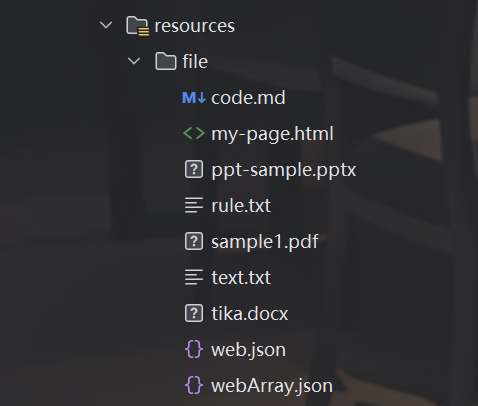
5.1 JSON 对象 --- JsonReader
依赖 :Spring AI 核心(无需额外 starter)
List 条数:根对象为单个 JSON 时,通常 1 条;可指定只读某字段
java
@Test
void jsonRead(@Value("classpath:/file/web.json") Resource resource) {
    // 只读取指定字段:new JsonReader(resource, "site")
    JsonReader jsonReader = new JsonReader(resource);

    List<Document> documents = jsonReader.get();  // 读取为 List<Document>
    System.out.println("length: " + documents.size());
    jsonReader.read().forEach(System.out::println);  // read() 与 get() 类似,均返回列表
}
5.2 JSON 数组 --- JsonReader
List 条数:数组有几个元素,就可能产生几条 Document(视 JSON 结构而定)
java
@Test
void jsonArrRead(@Value("classpath:/file/webArray.json") Resource resource) {
    // 在每个数组元素中只读 description:new JsonReader(resource, "description")
    JsonReader jsonReader = new JsonReader(resource);

    List<Document> documents = jsonReader.get();
    System.out.println("length: " + documents.size());
    jsonReader.read().forEach(System.out::println);
}
5.3 纯文本 --- TextReader
List 条数 :通常 1 条(整文件内容合并为一个 Document)
java
@Test
void textRead(@Value("classpath:/file/text.txt") Resource resource) {
    TextReader textReader = new TextReader(resource);
    // 也可:new TextReader("classpath:/file/text.txt")

    // 读取前附加自定义 metadata,入库后可过滤或展示
    textReader.getCustomMetadata().put("key111", "val1111");

    List<Document> documents = textReader.get();
    System.out.println("length: " + documents.size());
    textReader.read().forEach(System.out::println);
}
5.4 HTML --- JsoupDocumentReader
依赖 :spring-ai-jsoup-document-reader
List 条数 :由 selector 匹配到的节点数量决定(每个匹配可成一条)
java
@Test
void htmlRead(@Value("classpath:/file/my-page.html") Resource resource) {
    JsoupDocumentReaderConfig config = JsoupDocumentReaderConfig.builder()
            .selector("article p")                    // 只抽取 article 下的 p 段落
            .charset("ISO-8859-1")                    // 页面编码
            .includeLinkUrls(true)                    // 链接 URL 写入 metadata
            .metadataTags(List.of("author", "date"))  // 从 meta 标签提取 author、date
            .additionalMetadata("source", "my-page.html")  // 附加自定义 metadata
            .build();

    JsoupDocumentReader reader = new JsoupDocumentReader(resource, config);
    List<Document> documents = reader.get();
    System.out.println("length: " + documents.size());
    documents.forEach(System.out::println);
}
5.5 Markdown --- MarkdownDocumentReader
依赖 :spring-ai-markdown-document-reader
List 条数 :withHorizontalRuleCreateDocument(true) 时,每个 --- 可切出一条新 Document
java
@Test
void markdownReader(@Value("classpath:/file/code.md") Resource resource) {
    MarkdownDocumentReaderConfig config = MarkdownDocumentReaderConfig.builder()
            .withHorizontalRuleCreateDocument(true)   // --- 处切分为新 Document
            .withIncludeCodeBlock(false)              // 代码块不纳入正文
            .withIncludeBlockquote(false)             // 引用块不纳入正文
            .withAdditionalMetadata("filename", "code.md")
            .build();

    MarkdownDocumentReader reader = new MarkdownDocumentReader(resource, config);
    List<Document> documents = reader.get();
    System.out.println("length: " + documents.size());
    documents.forEach(System.out::println);
}
5.6 PDF 按页 --- PagePdfDocumentReader
依赖 :spring-ai-pdf-document-reader
List 条数 :默认 每页 1 条 ;withPagesPerDocument(n) 可合并多页;0 表示整 PDF 一条
java
@Test
void pdfRead(@Value("classpath:/file/sample1.pdf") Resource resource) {

    // 方式 A:默认配置
    // PdfDocumentReaderConfig.defaultConfig()

    // 方式 B:builder 自定义(当前使用)
    PdfDocumentReaderConfig config = PdfDocumentReaderConfig.builder()
            .withPageTopMargin(0)                         // 页面上边距裁剪
            // .withPageBottomMargin(0)                   // 页面下边距裁剪
            .withPageExtractedTextFormatter(
                    ExtractedTextFormatter.builder()
                            .withNumberOfTopTextLinesToDelete(0)  // 删除页眉行数
                            .build())
            .withPagesPerDocument(1)                      // 每 Document 包含页数
            // .withReversedParagraphPosition(false)      // 是否反转页内段落顺序
            .build();

    // 构造 1:new PagePdfDocumentReader("classpath:/file/sample1.pdf")
    // 构造 2:new PagePdfDocumentReader(resource)
    // 构造 3:resourceUrl + config(当前使用)
    PagePdfDocumentReader pdfReader = new PagePdfDocumentReader("classpath:/file/sample1.pdf", config);
    // 构造 4:new PagePdfDocumentReader(resource, config)

    List<Document> documents = pdfReader.read();
    System.out.println("length: " + documents.size());
    documents.forEach(System.out::println);
}
5.7 多格式通用 --- TikaDocumentReader
依赖 :spring-ai-tika-document-reader
支持 :PDF、DOC/DOCX、PPT/PPTX、HTML 等(见 Apache Tika 格式列表)
List 条数 :通常 1 条 (整文件纯文本);精细 PDF 分页请用 PagePdfDocumentReader
java
@Test
void tikaRead(@Value("classpath:/file/my-page.html") Resource resource) {

    ExtractedTextFormatter textFormatter = ExtractedTextFormatter.builder()
            .withNumberOfTopTextLinesToDelete(0)  // 删除顶部 N 行
            // .withNumberOfBottomTextLinesToDelete(0)
            // .withLeftAlignment(false)
            .build();

    // 构造 1:new TikaDocumentReader("classpath:/file/my-page.html")
    // 构造 2:new TikaDocumentReader(url, textFormatter)
    // 构造 3:new TikaDocumentReader(resource)
    // 构造 4:Resource + textFormatter(当前使用)
    TikaDocumentReader tikaReader = new TikaDocumentReader(resource, textFormatter);
    // 构造 5:new TikaDocumentReader(resource, new BodyContentHandler(-1), textFormatter)

    List<Document> documents = tikaReader.read();
    System.out.println("length: " + documents.size());
    documents.forEach(System.out::println);
}
6. 与向量入库衔接
Reader 产出的 List<Document> 可直接交给 VectorStore(内部会先 Embedding 再写入):
java
@Autowired
VectorStore vectorStore;

void ingest(List<Document> documents) {
    vectorStore.add(documents);  // List<Document> 统一入库,无需区分源格式
}
若单条 Document 过长,可先经 TokenTextSplitter 等再切分,仍得到新的 List<Document> 后入库。
Transform(切分)与 Load(写入 VectorStore)同样属于 ETL Pipeline,详见:https://docs.spring.io/spring-ai/reference/api/etl-pipeline.html
7. spring-ai-alibaba 扩展 Document Reader
Spring AI Alibaba 在 spring-ai-extensions 中提供了更多数据源,可以对飞书、github仓库、视频网站等 转化成 List<Document>:
| 类别 | 示例模块 | 数据源/格式 |
|---|---|---|
| 本地 Office | spring-ai-alibaba-starter-document-reader-poi |
DOC/DOCX、PPT/PPTX、XLS/XLSX |
| 云存储 | ...-tencent-cos |
腾讯云 COS |
| 数据库 | ...-mysql、...-mongodb、...-sqlite |
表数据转 Document |
| 在线平台 | ...-github、...-yuque、...-notion、...-bilibili |
仓库、语雀、Notion、B 站等 |
| 其他 | ...-archive、...-email、...-arxiv |
压缩包、邮件、论文等 |
完整列表与 POI 示例见官方文档:
- https://java2ai.com/integration/rag/document-readers
- https://github.com/spring-ai-alibaba/spring-ai-extensions/tree/main/document-readers
阿里扩展 Reader 同样实现 DocumentReader,读取后得到 List<Document>,后续 Embedding、VectorStore 流程与本文完全一致。