对外提供大模型推理API接口,或者UI界面
1.API调用方式
板端Qwen3-VL提供了两种API调用方式:RKLLM-Server-Flask Demo和KLLM-Server-Gradio Demo
两者底层共用一套 librkllmrt RKLLM 推理库,模型加载、NPU 推理逻辑完全一致,差异仅在对外交互方式、使用场景、部署目标。
核心定位对比
- RKLLM-Server-Flask
后端 API 服务,无界面,供程序调用
基于 Flask 轻量 Web 框架,只提供 HTTP 接口(/chat、/stream、/generate 等)
纯 JSON 数据流,支持流式 SSE 输出
面向:前端页面、小程序、设备 MCU、Python/Java 客户端、自动化脚本、第三方系统对接 - RKLLM-Server-Gradio
带可视化网页前端,人机直接对话调试工具
Gradio 封装完整 WebUI:输入框、发送按钮、对话历史、参数滑块(温度、top_p、max_tokens)
内置交互页面,浏览器打开地址直接聊天,不用写调用代码
面向:开发调试、快速验证模型效果、产品演示、无代码快速测试 - 虚拟机端代码结构
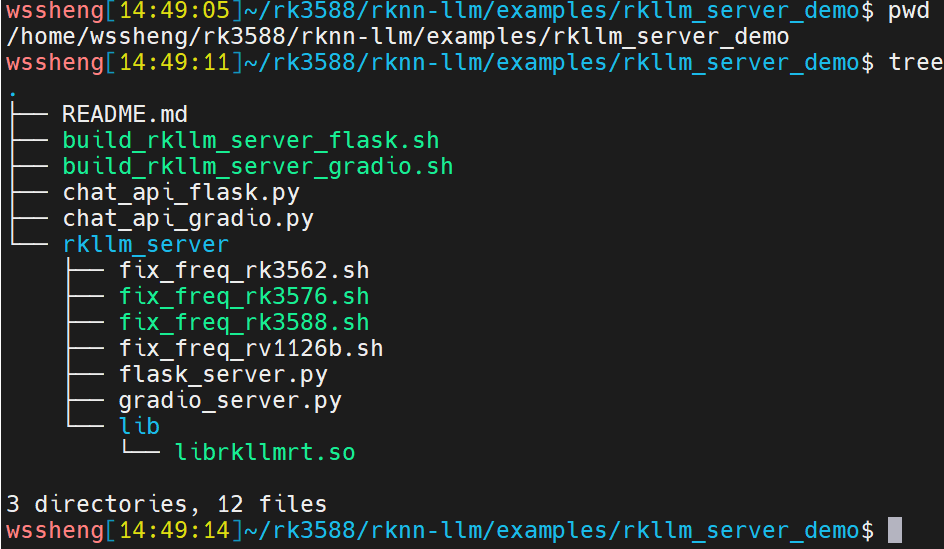
2.RKLLM-Server-Flask方式
在虚拟机里进行RKLLM-Server-Flask大模型API服务部署前,需要先确定RK3588的IP地址,后续会用到这个地址
部署脚本:build_rkllm_server_flask.sh,这个脚本是"部署 + 首次启动"一体脚本
./build_rkllm_server_flask.sh --help
Usage: ./build_rkllm_server_flask.sh --workshop [RKLLM-Server Working Path] --model_path [Absolute Path of Converted RKLLM Model on Board] --platform [Target Platform: rk3588/rk3576] [--lora_path [Lora Model Path]] [--prompt_cache_path [Prompt Cache File Path]]
2.1 参数解释
--workshop:RKLLM 服务工作目录(开发板上的绝对路径)
作用:用于存放服务代码、运行日志、KV 缓存、进程锁、临时文件
要求:板子本地可读写、空间充足,目录不存在脚本会自动创建
--model_path:RKLLM 量化模型文件板子端绝对路径
作用:指定推理加载的 .rkllm 主模型权重
注意:必须是转换完成、适配对应平台的模型文件
--platform:目标硬件平台,可选值:
rk3588:瑞芯微 RK3588 开发板
rk3576:瑞芯微 RK3576 开发板
脚本会根据平台加载对应底层 RKNN/RKLLM 运行库。
以下是可选扩展参数(按需添加,不传走默认)
--lora_path:LoRA 微调模型文件路径
场景:主模型基础上加载微调 LoRA 权重做专属任务
不传:不加载 LoRA,仅运行基础大模型
传参:填写板子上 LoRA rkllm 文件绝对路径
--prompt_cache_path:提示词缓存文件路径
作用:缓存固定系统 Prompt、上下文 KV 缓存,减少重复推理、提速首词生成
不传:不开启 Prompt 缓存功能
传参:指定缓存文件存放路径,重启服务可复用缓存
2.2 部署API服务
来到虚拟机 rkllm_server_dem 目录,板子和虚拟机之间需要adb连接正常,部署时会通过adb把文件自动传到板子上
执行如下命令
./build_rkllm_server_flask.sh --workshop /userdata/aidemo/qwen3-vl/rkllm-server --model_path /userdata/aidemo/qwen3-vl/models/qwen3-vl-2b-instruct_w8a8_rk3588.rkllm --platform rk3588看到如下打印就是部署完成了
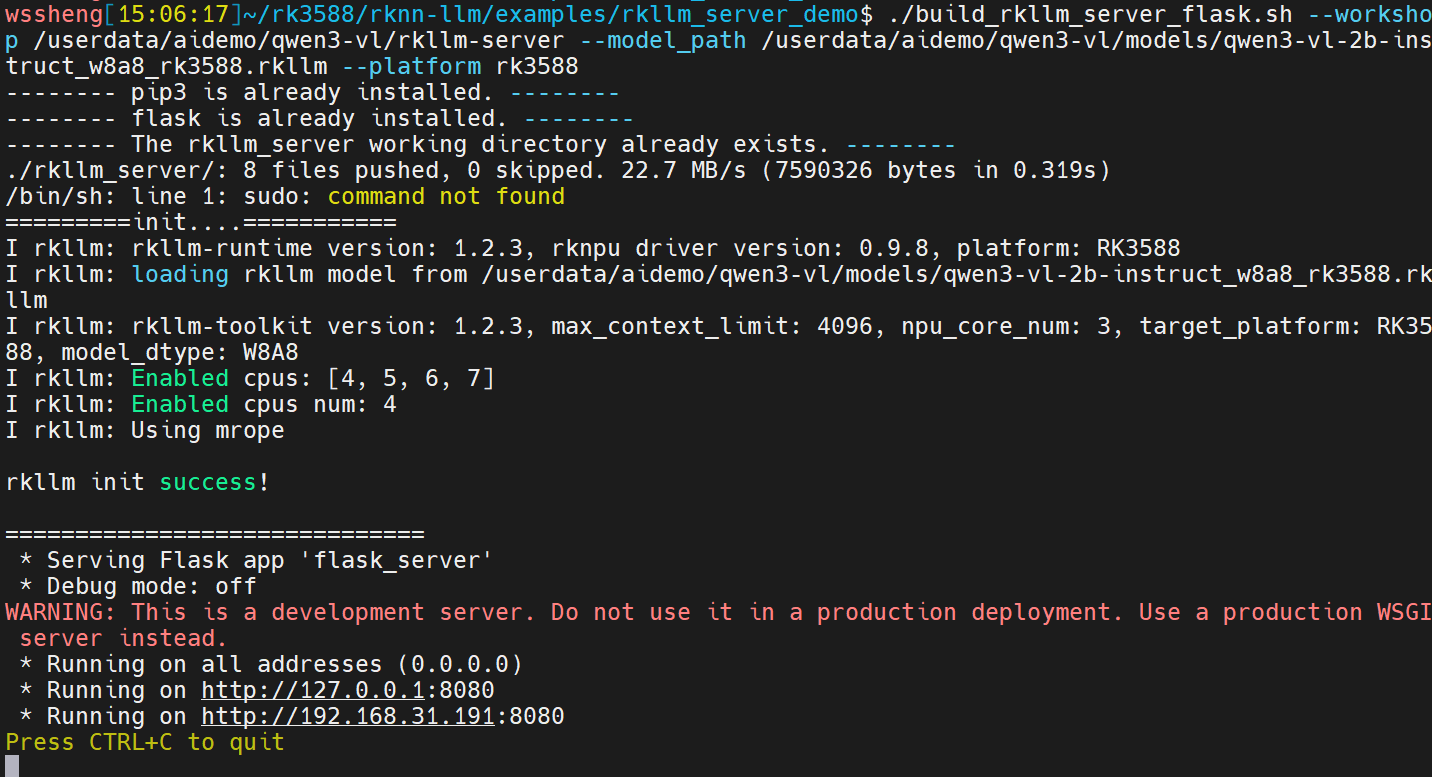
此时可以看到板子上部署了API 服务
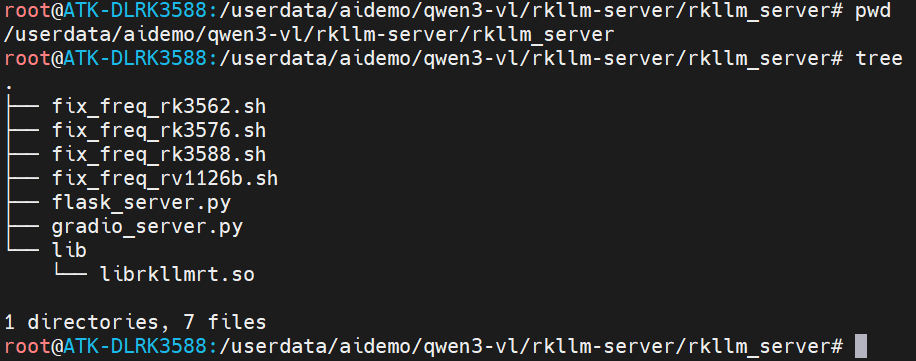
后续可以直接在板子上启动该服务(不需要每次都从虚拟机上执行build_rkllm_server_flask.sh来拉起服务)
python flask_server.py --rkllm_model_path /userdata/aidemo/qwen3-vl/models/qwen3-vl-2b-instruct_w8a8_rk3588.rkllm ----target_platform rk35882.3 测试API连接板端大模型
我们通过chat_api_flask.py来测试通过API连接板端大模型,chat_api_flask.py里有指定板子的IP地址,需要改为板子的实际IP,改完之后执行如下指令
python3 chat_api_flask.py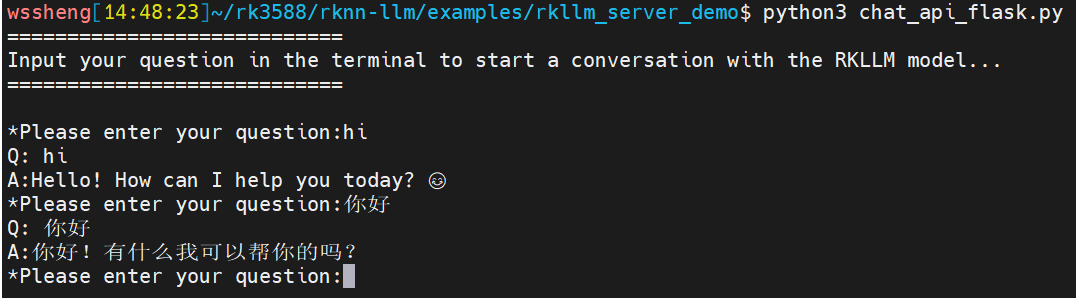
2.4 错误解决
2.4.1 ModuleNotFoundError: No module named 'flask'
登录开发板终端,手动安装:
pip3 install flask2.4.2 so库找不到
比如OSError: libgomp.so.1: cannot open shared object file
确保libgomp.so.1 librkllmrt.so librknnrt.so在板子的/usr/lib/目录
3.KLLM-Server-Gradio方式
3.1代码修改
因为板子上6.18.0的Gradio与gradio_server.py里的部分接口不兼容,需要修改gradio_server.py,把如下代码覆盖掉rkllm_server/gradio_server.py即可
import ctypes
import sys
import os
import subprocess
import resource
import threading
import time
import gradio as gr
import argparse
Set environment variables
os.environ["GRADIO_SERVER_NAME"] = "0.0.0.0"
os.environ["GRADIO_SERVER_PORT"] = "8080"
Set the dynamic library path
rkllm_lib = ctypes.CDLL('lib/librkllmrt.so')
Define the structures from the library
RKLLM_Handle_t = ctypes.c_void_p
userdata = ctypes.c_void_p(None)
LLMCallState = ctypes.c_int
LLMCallState.RKLLM_RUN_NORMAL  = 0
LLMCallState.RKLLM_RUN_WAITING  = 1
LLMCallState.RKLLM_RUN_FINISH  = 2
LLMCallState.RKLLM_RUN_ERROR   = 3
RKLLMInputType = ctypes.c_int
RKLLMInputType.RKLLM_INPUT_PROMPT      = 0
RKLLMInputType.RKLLM_INPUT_TOKEN       = 1
RKLLMInputType.RKLLM_INPUT_EMBED       = 2
RKLLMInputType.RKLLM_INPUT_MULTIMODAL  = 3
RKLLMInferMode = ctypes.c_int
RKLLMInferMode.RKLLM_INFER_GENERATE = 0
RKLLMInferMode.RKLLM_INFER_GET_LAST_HIDDEN_LAYER = 1
RKLLMInferMode.RKLLM_INFER_GET_LOGITS = 2
class RKLLMExtendParam(ctypes.Structure):
fields = [
("base_domain_id", ctypes.c_int32),
("embed_flash", ctypes.c_int8),
("enabled_cpus_num", ctypes.c_int8),
("enabled_cpus_mask", ctypes.c_uint32),
("n_batch", ctypes.c_uint8),
("use_cross_attn", ctypes.c_int8),
("reserved", ctypes.c_uint8 * 104)
]
class RKLLMParam(ctypes.Structure):
fields = [
("model_path", ctypes.c_char_p),
("max_context_len", ctypes.c_int32),
("max_new_tokens", ctypes.c_int32),
("top_k", ctypes.c_int32),
("n_keep", ctypes.c_int32),
("top_p", ctypes.c_float),
("temperature", ctypes.c_float),
("repeat_penalty", ctypes.c_float),
("frequency_penalty", ctypes.c_float),
("presence_penalty", ctypes.c_float),
("mirostat", ctypes.c_int32),
("mirostat_tau", ctypes.c_float),
("mirostat_eta", ctypes.c_float),
("skip_special_token", ctypes.c_bool),
("is_async", ctypes.c_bool),
("img_start", ctypes.c_char_p),
("img_end", ctypes.c_char_p),
("img_content", ctypes.c_char_p),
("extend_param", RKLLMExtendParam),
]
class RKLLMLoraAdapter(ctypes.Structure):
fields = [
("lora_adapter_path", ctypes.c_char_p),
("lora_adapter_name", ctypes.c_char_p),
("scale", ctypes.c_float)
]
class RKLLMEmbedInput(ctypes.Structure):
fields = [
("embed", ctypes.POINTER(ctypes.c_float)),
("n_tokens", ctypes.c_size_t)
]
class RKLLMTokenInput(ctypes.Structure):
fields = [
("input_ids", ctypes.POINTER(ctypes.c_int32)),
("n_tokens", ctypes.c_size_t)
]
class RKLLMMultiModalInput(ctypes.Structure):
fields = [
("prompt", ctypes.c_char_p),
("image_embed", ctypes.POINTER(ctypes.c_float)),
("n_image_tokens", ctypes.c_size_t),
("n_image", ctypes.c_size_t),
("image_width", ctypes.c_size_t),
("image_height", ctypes.c_size_t)
]
class RKLLMInputUnion(ctypes.Union):
fields = [
("prompt_input", ctypes.c_char_p),
("embed_input", RKLLMEmbedInput),
("token_input", RKLLMTokenInput),
("multimodal_input", RKLLMMultiModalInput)
]
class RKLLMInput(ctypes.Structure):
fields = [
("role", ctypes.c_char_p),
("enable_thinking", ctypes.c_bool),
("input_type", RKLLMInputType),
("input_data", RKLLMInputUnion)
]
class RKLLMLoraParam(ctypes.Structure):
fields = [
("lora_adapter_name", ctypes.c_char_p)
]
class RKLLMPromptCacheParam(ctypes.Structure):
fields = [
("save_prompt_cache", ctypes.c_int),
("prompt_cache_path", ctypes.c_char_p)
]
class RKLLMInferParam(ctypes.Structure):
fields = [
("mode", RKLLMInferMode),
("lora_params", ctypes.POINTER(RKLLMLoraParam)),
("prompt_cache_params", ctypes.POINTER(RKLLMPromptCacheParam)),
("keep_history", ctypes.c_int)
]
class RKLLMResultLastHiddenLayer(ctypes.Structure):
fields = [
("hidden_states", ctypes.POINTER(ctypes.c_float)),
("embd_size", ctypes.c_int),
("num_tokens", ctypes.c_int)
]
class RKLLMResultLogits(ctypes.Structure):
fields = [
("logits", ctypes.POINTER(ctypes.c_float)),
("vocab_size", ctypes.c_int),
("num_tokens", ctypes.c_int)
]
class RKLLMPerfStat(ctypes.Structure):
fields = [
("prefill_time_ms", ctypes.c_float),
("prefill_tokens", ctypes.c_int),
("generate_time_ms", ctypes.c_float),
("generate_tokens", ctypes.c_int),
("memory_usage_mb", ctypes.c_float)
]
class RKLLMResult(ctypes.Structure):
fields = [
("text", ctypes.c_char_p),
("token_id", ctypes.c_int),
("last_hidden_layer", RKLLMResultLastHiddenLayer),
("logits", RKLLMResultLogits),
("perf", RKLLMPerfStat)
]
Define global variables to store the callback function output for displaying in the Gradio interface
global_text = []
global_state = -1
split_byte_data = bytes(b"") # Used to store the segmented byte data
Define the callback function
def callback_impl(result, userdata, state):
global global_text, global_state, split_byte_data
if state == LLMCallState.RKLLM_RUN_FINISH:
global_state = state
print("\n")
sys.stdout.flush()
elif state == LLMCallState.RKLLM_RUN_ERROR:
global_state = state
print("run error")
sys.stdout.flush()
elif state == LLMCallState.RKLLM_RUN_NORMAL:
global_state = state
global_text.append(result.contents.text.decode('utf-8'))
return 0
Connect the callback function between the Python side and the C++ side
callback_type = ctypes.CFUNCTYPE(ctypes.c_int, ctypes.POINTER(RKLLMResult), ctypes.c_void_p, ctypes.c_int)
callback = callback_type(callback_impl)
新增:提取messages中的纯文本,兼容str / list[{type,text}]两种格式
def extract_text(content):
if isinstance(content, str):
return content
elif isinstance(content, list):
text_buf = ""
for item in content:
if item.get("type") == "text":
text_buf += item.get("text", "")
return text_buf
return ""
Define the RKLLM class, which includes initialization, inference, and release operations for the RKLLM model in the dynamic library
class RKLLM(object):
def init(self, model_path, lora_model_path = None, prompt_cache_path = None, platform = "rk3588"):
rkllm_param = RKLLMParam()
rkllm_param.model_path = bytes(model_path, 'utf-8')
    rkllm_param.max_context_len = 4096
    rkllm_param.max_new_tokens = 4096
    rkllm_param.skip_special_token = True
    rkllm_param.n_keep = -1
    rkllm_param.top_k = 1
    rkllm_param.top_p = 0.9
    rkllm_param.temperature = 0.8
    rkllm_param.repeat_penalty = 1.1
    rkllm_param.frequency_penalty = 0.0
    rkllm_param.presence_penalty = 0.0

    rkllm_param.mirostat = 0
    rkllm_param.mirostat_tau = 5.0
    rkllm_param.mirostat_eta = 0.1

    rkllm_param.is_async = False

    rkllm_param.img_start = "".encode('utf-8')
    rkllm_param.img_end = "".encode('utf-8')
    rkllm_param.img_content = "".encode('utf-8')

    rkllm_param.extend_param.base_domain_id = 0
    rkllm_param.extend_param.embed_flash = 1
    rkllm_param.extend_param.n_batch = 1
    rkllm_param.extend_param.use_cross_attn = 0
    rkllm_param.extend_param.enabled_cpus_num = 4
    if platform.lower() in ["rk3576", "rk3588"]:
        rkllm_param.extend_param.enabled_cpus_mask = (1 << 4)|(1 << 5)|(1 << 6)|(1 << 7)
    else:
        rkllm_param.extend_param.enabled_cpus_mask = (1 << 0)|(1 << 1)|(1 << 2)|(1 << 3)
    self.handle = RKLLM_Handle_t()

    self.rkllm_init = rkllm_lib.rkllm_init
    self.rkllm_init.argtypes = [ctypes.POINTER(RKLLM_Handle_t), ctypes.POINTER(RKLLMParam), callback_type]
    self.rkllm_init.restype = ctypes.c_int
    ret = self.rkllm_init(ctypes.byref(self.handle), ctypes.byref(rkllm_param), callback)
    if (ret != 0):
        print("\nrkllm init failed\n")
        exit(0)
    else:
        print("\nrkllm init success!\n")
    self.rkllm_run = rkllm_lib.rkllm_run
    self.rkllm_run.argtypes = [RKLLM_Handle_t, ctypes.POINTER(RKLLMInput), ctypes.POINTER(RKLLMInferParam), ctypes.c_void_p]
    self.rkllm_run.restype = ctypes.c_int

    self.set_chat_template = rkllm_lib.rkllm_set_chat_template
    self.set_chat_template.argtypes = [RKLLM_Handle_t, ctypes.c_char_p, ctypes.c_char_p, ctypes.c_char_p]
    self.set_chat_template.restype = ctypes.c_int

    system_prompt = "<|im_start|>system You are a helpful assistant. <|im_end|>"
    prompt_prefix = "<|im_start|>user"
    prompt_postfix = "<|im_end|><|im_start|>assistant"
    # self.set_chat_template(self.handle, ctypes.c_char_p(system_prompt.encode('utf-8')), ctypes.c_char_p(prompt_prefix.encode('utf-8')), ctypes.c_char_p(prompt_postfix.encode('utf-8')))

    self.rkllm_destroy = rkllm_lib.rkllm_destroy
    self.rkllm_destroy.argtypes = [RKLLM_Handle_t]
    self.rkllm_destroy.restype = ctypes.c_int

    rkllm_lora_params = None
    if lora_model_path:
        lora_adapter_name = "test"
        lora_adapter = RKLLMLoraAdapter()
        ctypes.memset(ctypes.byref(lora_adapter), 0, ctypes.sizeof(RKLLMLoraAdapter))
        lora_adapter.lora_adapter_path = ctypes.c_char_p((lora_model_path).encode('utf-8'))
        lora_adapter.lora_adapter_name = ctypes.c_char_p((lora_adapter_name).encode('utf-8'))
        lora_adapter.scale = 1.0

        rkllm_load_lora = rkllm_lib.rkllm_load_lora
        rkllm_load_lora.argtypes = [RKLLM_Handle_t, ctypes.POINTER(RKLLMLoraAdapter)]
        rkllm_load_lora.restype = ctypes.c_int
        rkllm_load_lora(self.handle, ctypes.byref(lora_adapter))
        rkllm_lora_params = RKLLMLoraParam()
        rkllm_lora_params.lora_adapter_name = ctypes.c_char_p((lora_adapter_name).encode('utf-8'))

    self.rkllm_infer_params = RKLLMInferParam()
    ctypes.memset(ctypes.byref(self.rkllm_infer_params), 0, ctypes.sizeof(RKLLMInferParam))
    self.rkllm_infer_params.mode = RKLLMInferMode.RKLLM_INFER_GENERATE
    self.rkllm_infer_params.lora_params = ctypes.pointer(rkllm_lora_params) if rkllm_lora_params else None
    self.rkllm_infer_params.keep_history = 0

    self.prompt_cache_path = None
    if prompt_cache_path:
        self.prompt_cache_path = prompt_cache_path

        rkllm_load_prompt_cache = rkllm_lib.rkllm_load_prompt_cache
        rkllm_load_prompt_cache.argtypes = [RKLLM_Handle_t, ctypes.c_char_p]
        rkllm_load_prompt_cache.restype = ctypes.c_int
        rkllm_load_prompt_cache(self.handle, ctypes.c_char_p((prompt_cache_path).encode('utf-8')))

def run(self, prompt):
    rkllm_input = RKLLMInput()
    rkllm_input.role = "user".encode('utf-8')
    rkllm_input.enable_thinking = ctypes.c_bool(False)
    rkllm_input.input_type = RKLLMInputType.RKLLM_INPUT_PROMPT
    rkllm_input.input_data.prompt_input = ctypes.c_char_p(prompt.encode('utf-8'))
    self.rkllm_run(self.handle, ctypes.byref(rkllm_input), ctypes.byref(self.rkllm_infer_params), None)
    return

def release(self):
    self.rkllm_destroy(self.handle)

if name == "main":
parser = argparse.ArgumentParser()
parser.add_argument('--rkllm_model_path', type=str, required=True, help='Absolute path of the converted RKLLM model on the Linux board;')
parser.add_argument('--target_platform', type=str, required=True, help='Target platform: e.g., rk3588/rk3576;')
parser.add_argument('--lora_model_path', type=str, help='Absolute path of the lora_model on the Linux board;')
parser.add_argument('--prompt_cache_path', type=str, help='Absolute path of the prompt_cache file on the Linux board;')
args = parser.parse_args()
if not os.path.exists(args.rkllm_model_path):
    print("Error: Please provide the correct rkllm model path, and ensure it is the absolute path on the board.")
    sys.stdout.flush()
    exit()

if not (args.target_platform in ["rk3588", "rk3576", "rv1126b", "rk3562"]):
    print("Error: Please specify the correct target platform: rk3588/rk3576/rv1126b/rk3562.")
    sys.stdout.flush()
    exit()

if args.lora_model_path:
    if not os.path.exists(args.lora_model_path):
        print("Error: Please provide the correct lora_model path, and advise it is the absolute path on the board.")
        sys.stdout.flush()
        exit()

if args.prompt_cache_path:
    if not os.path.exists(args.prompt_cache_path):
        print("Error: Please provide the correct prompt_cache_file path, and advise it is the absolute path on the board.")
        sys.stdout.flush()
        exit()

# Fix frequency
command = "sudo bash fix_freq_{}.sh".format(args.target_platform)
subprocess.run(command, shell=True)

# Set resource limit
resource.setrlimit(resource.RLIMIT_NOFILE, (102400, 102400))

# Initialize RKLLM model
print("=========init....===========")
sys.stdout.flush()
model_path = args.rkllm_model_path
rkllm_model = RKLLM(model_path, args.lora_model_path, args.prompt_cache_path, args.target_platform)
print("==============================")
sys.stdout.flush()

# Record the user's input prompt
def get_user_input(user_message, history):
    history.append({"role": "user", "content": user_message})
    return "", history

# Retrieve the output from the RKLLM model and print it in a streaming manner
def get_RKLLM_output(history):
    global global_text, global_state
    global_text = []
    global_state = -1

    # 核心修复:提取纯文本,兼容list格式content
    content_raw = history[-1]["content"]
    user_prompt = extract_text(content_raw)
    model_thread = threading.Thread(target=rkllm_model.run, args=(user_prompt,))
    model_thread.start()

    history.append({"role": "assistant", "content": ""})

    model_thread_finished = False
    while not model_thread_finished:
        while len(global_text) > 0:
            chunk = global_text.pop(0)
            history[-1]["content"] += chunk
            time.sleep(0.005)
            yield history

        model_thread.join(timeout=0.005)
        model_thread_finished = not model_thread.is_alive()

# Create a Gradio interface
with gr.Blocks(title="Chat with RKLLM") as chatRKLLM:
    gr.Markdown("<div align='center'><font size='70'> Chat with RKLLM </font></div>")
    gr.Markdown("### Enter your question in the inputTextBox and press the Enter key to chat with the RKLLM model.")
    rkllmServer = gr.Chatbot(height=600)
    msg = gr.Textbox(placeholder="Please input your question here...", label="inputTextBox")
    clear = gr.Button("Clear")

    msg.submit(get_user_input, [msg, rkllmServer], [msg, rkllmServer], queue=False).then(get_RKLLM_output, rkllmServer, rkllmServer)
    clear.click(lambda: [], None, rkllmServer, queue=False)

chatRKLLM.queue()
chatRKLLM.launch()

print("====================")
print("RKLLM model inference completed, releasing RKLLM model resources...")
rkllm_model.release()
print("====================")
3.2 部署到板端
在虚拟机上执行如下指令把相关代码部署到板子上,这个也是"部署+首次初始化一体"的脚本。
./build_rkllm_server_gradio.sh --workshop /userdata/aidemo/qwen3-vl/gradio-server --model_path /userdata/aidemo/qwen3-vl/models/qwen3-vl-2b-instruct_w8a8_rk3588.rkllm --platform rk3588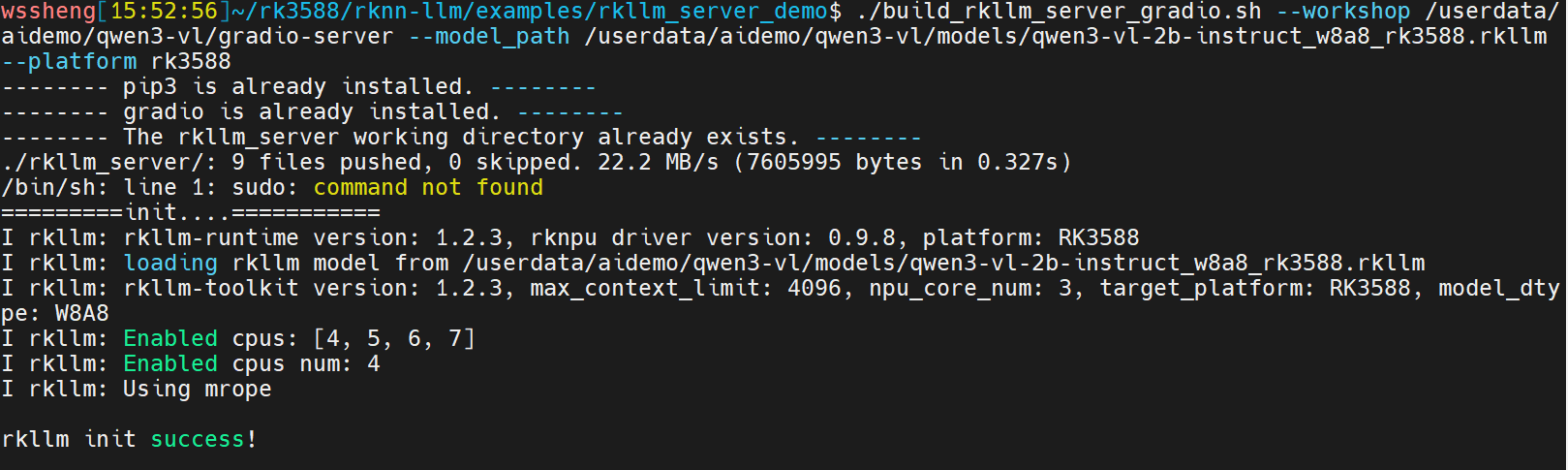
看到以上打印说明部署和板端服务启动都成功了。
后续可以在板子上拉起这个服务,在板子上执行如下指令:
python3 gradio_server.py --rkllm_model_path /userdata/aidemo/qwen3-vl/models/qwen3-vl-2b-instruct_w8a8_rk3588.rkllm --target_platform rk3588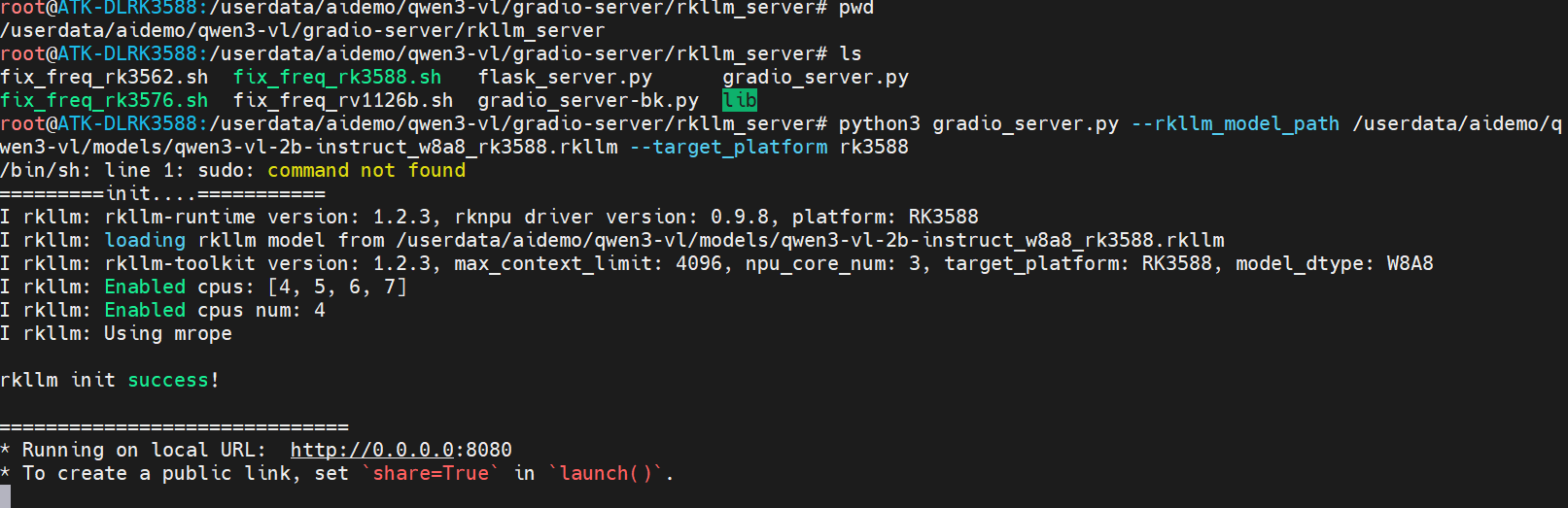
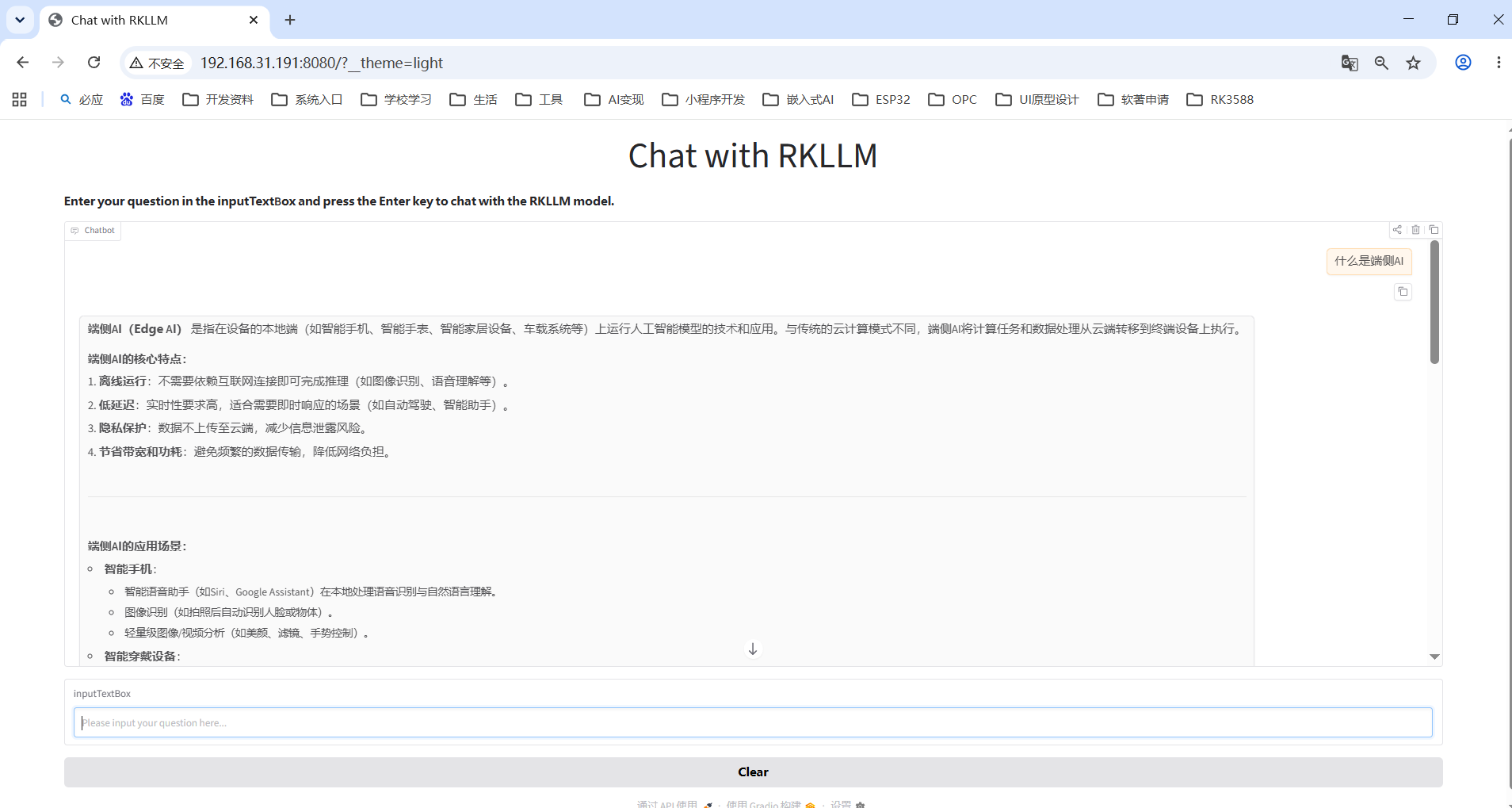
现在就可以在浏览器里进行对话了,打开 http://192.168.31.191:8080,其中192.168.31.191需要替换为自己实际板子的IP
3.3报错解决
ModuleNotFoundError: No module named 'gradio'
在板子上执行
pip3 install gradio我现在的gradio版本是6.18.0