一. Spring AI的设计
Spring AI 抽象了一层:
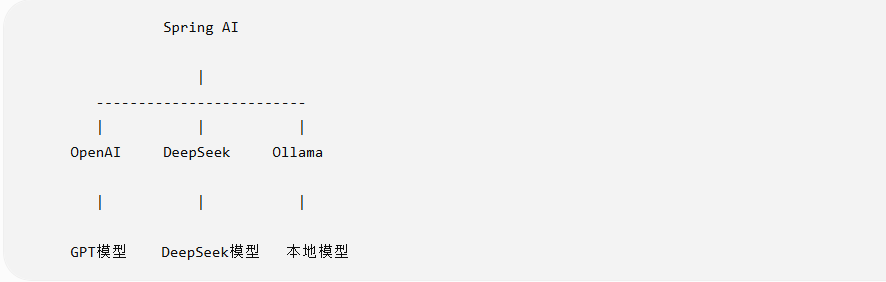
之前Java访问不同的大模型需要单独写适配的API接口,现在有了spring AI可以使用一套统一的API接口,换模型,不再需要修改java代码,只需要修改配置即可。
chatClient
.prompt()
.user("你好")
.call()
.content();
例如:
- spring:
ai:
deepseek:
api-key: xxx
chat:
options:
model: deepseek-chat
- spring:
ai:
openai:
api-key: xxx
chat:
options:
model: gpt-4o-mini
一句话总结:spring AI的优势,换大模型通常只需要换配置,不需要改业务代码。
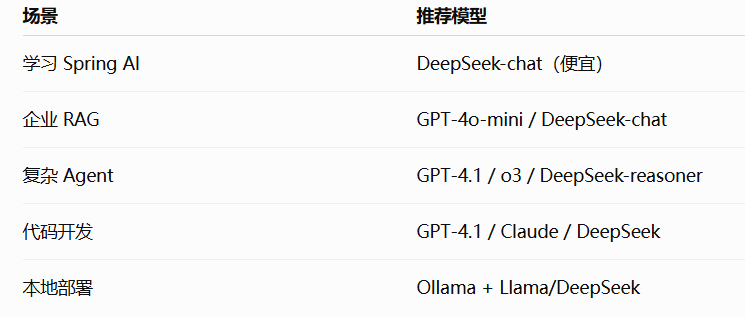
二. 在企业项目中怎么选
三. Spring AI的Demo搭建流程
- 引入依赖
Spring Boot 3.x + Spring AI 1.x
<dependencies>
<!-- Spring Web -->
<dependency>
<groupId>org.springframework.boot</groupId>
<artifactId>spring-boot-starter-web</artifactId>
</dependency>
<!-- Spring AI OpenAI -->
<dependency>
<groupId>org.springframework.ai</groupId>
<artifactId>spring-ai-starter-model-openai</artifactId>
</dependency>
</dependencies>
- 配置秘钥API Key application.yml
spring:
ai:
openai:
api-key: sk-xxxxxx
chat:
options:
model: gpt-4o-mini
- 创建 ChatClient
package com.itcast.springaiparent;
import org.springframework.ai.chat.client.ChatClient;
import org.springframework.stereotype.Service;
@Service
public class AiService {
private final ChatClient chatClient;
public AiService(ChatClient.Builder builder){
this.chatClient =
builder.build();
}
public String chat(String message){
return chatClient
.prompt()
.user(message)
.call()
.content();
}
}
- 写 Controller 测试
package com.itcast.springaiparent;
import org.springframework.web.bind.annotation.*;
@RestController
@RequestMapping("/ai")
public class AiController {
private final AiService aiService;
public AiController(AiService aiService){
this.aiService = aiService;
}
@GetMapping("/chat")
public String chat(
@RequestParam String msg
){
return aiService.chat(msg);
}
}
四. Function Calling(工具调用)
- 项目结构
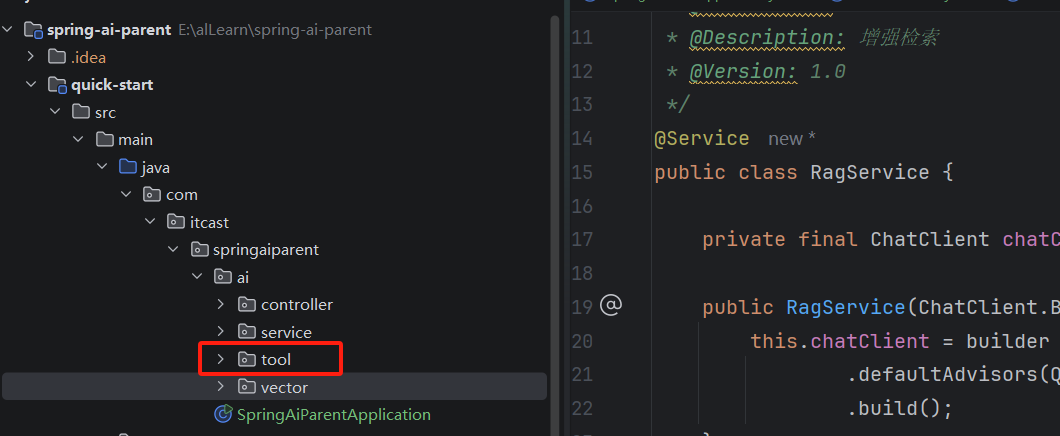
- 定义天气Tool
关键就是 @Tool 注解。
@Component
public class WeatherTool {
    /**
     * @Tool:让模型能真正调用这个工具
     * @param city
     * @return
     */
    @Tool(description = "根据城市名称查询天气")
    public String getWeather( @ToolParam(description = "城市名称,例如:北京")String city) {
        return city + "今天晴,气温 25℃";
    }
}
description告诉 AI:我这里有一个工具,可以根据城市查询天气。
- 创建 ChatClient
package com.example.service;
import com.example.tool.WeatherTool;
import org.springframework.ai.chat.client.ChatClient;
import org.springframework.stereotype.Service;
@Service
public class AiService {
private final ChatClient chatClient;
public AiService(
ChatClient.Builder builder,
WeatherTool weatherTool
){
this.chatClient =
builder
.defaultTools(weatherTool)
.build();
}
public String chat(String message){
return chatClient
.prompt()
.user(message)
.call()
.content();
}
}
关键代码:
.defaultTools(weatherTool)
告诉 AI: 这个 Java 对象里面的方法,你可以调用。/
五. Controller测试
@RestController
@RequestMapping("/ai")
public class AiController {
private final AiService aiService;
public AiController(AiService aiService){
this.aiService=aiService;
}
@GetMapping("/chat")
public String chat(
String msg
){
return aiService.chat(msg);
}
}
六. 如果有多个Tool,大模型来根据 需求决定调用哪个
@Component
public class OrderTool {
@Tool(description="查询订单状态")
public String queryOrder(String orderId){
return "订单已发货";
}
}
然后:
.defaultTools(
weatherTool,
orderTool
)
Function Calling本质
以前:
用户
|
你的代码判断
|
if(天气)
调天气接口
if(订单)
查订单
现在:
用户
|
LLM
|
判断意图
|
选择Tool
|
执行Java方法
|
返回答案
五. Function Calling和MCP区别?
| Function Calling | MCP | |
|---|---|---|
| 工具在哪里 | 你的Java代码 | 独立服务 |
| 标准 | 模型厂商各自实现 | 统一协议 |
| 适合 | 单体应用 | 企业级Agent |
| Spring AI | 支持 | 支持 |
六. RAG的实现原理
实现功能:
用户问:"公司的请假制度是什么?"
AI 不知道答案
→ 去知识库搜索
→ 找到《员工手册.pdf》
→ 把相关内容交给 GPT
→ AI 根据文档回答
1. RAG的整体工作流程
第一次准备
PDF / Word / txt
|
|
v
Document Reader
|
|
v
Text Splitter
|
|
v
Embedding模型
|
|
v
Vector DB
(向量数据库)
用户提问
用户:
"公司年假多少天?"
|
v
Embedding问题向量
|
v
Vector DB搜索相似内容
|
v
找到相关文档片段
|
v
Prompt增强
|
v
LLM回答
2. 技术选型
| 组件 | 技术 |
|---|---|
| Spring AI | 1.x |
| LLM | OpenAI / Ollama |
| Embedding | OpenAI / BGE |
| 向量库 | Chroma |
| 文档 | txt |
3. 添加依赖
<dependencies>
<!-- Spring Web -->
<dependency>
<groupId>org.springframework.boot</groupId>
<artifactId>spring-boot-starter-web</artifactId>
</dependency>
<!-- Spring AI OpenAI -->
<dependency>
<groupId>org.springframework.ai</groupId>
<artifactId>spring-ai-starter-model-openai</artifactId>
</dependency>
<!-- 向量数据库 Chroma -->
<dependency>
<groupId>org.springframework.ai</groupId>
<artifactId>
spring-ai-starter-vector-store-chroma
</artifactId>
</dependency>
</dependencies>
- 配置
spring:
ai:
openai:
api-key: sk-xxxx
chat:
options:
model: gpt-4o-mini
vectorstore:
chroma:
client:
host: localhost
port: 8000
4. 加载文档进入向量数据库
@Component
public class DataLoader {
private final VectorStore vectorStore;
public DataLoader(
VectorStore vectorStore
){
this.vectorStore=vectorStore;
}
@PostConstruct
public void load(){
Resource resource =
new ClassPathResource(
"docs/company.txt"
);
TextReader reader =
new TextReader(resource);
List<Document> documents =
reader.get();
vectorStore.add(documents);
}
}
5. 创建 RAG 查询
@Service
public class RagService {
private final ChatClient chatClient;
public RagService(
ChatClient.Builder builder,
VectorStore vectorStore
){
this.chatClient =
builder
.defaultAdvisors(
new QuestionAnswerAdvisor(
vectorStore
)
)
.build();
}
public String ask(String question){
return chatClient
.prompt()
.user(question)
.call()
.content();
}
}
重点代码:
.defaultAdvisors(
new QuestionAnswerAdvisor(vectorStore)
)
问题
|
向量搜索
|
找文档
|
拼接Prompt
|
调用LLM