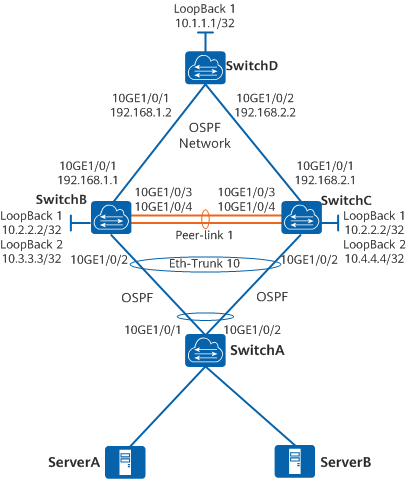
- 配置DeviceA、DeviceB、DeviceC建立M-LAG系统。
配置DeviceB和DeviceC的V-STP。
配置DeviceB和DeviceC的DFS Group并绑定管理网口的IP地址。
配置DeviceB和DeviceC之间的peer-link链路。
配置DeviceB和DeviceC的M-LAG成员接口,DeviceA的Eth-Trunk接口。
配置DeviceB和DeviceC的Monitor Link功能。
说明
Monitor Link将上行接口和下行接口关联,避免因上行链路故障导致用户侧流量无法
转发而丢弃。
在华为 CloudEngine (CE) 数据中心交换机上配置 M-LAG(跨设备链路聚合),核心逻辑分为四个部分:心跳线 (Keepalive)、控制组 (DFS Group)、数据同步线 (Peer-link) 以及 下行成员接口 (M-LAG Interface)。
以下是一套标准的 M-LAG 配置步骤与完整命令。
步骤
步骤配置DeviceA、DeviceB、DeviceC建立M-LAG系统。
1.
配置DeviceB和DeviceC的V-STP。
配置DeviceB。DeviceC的配置与DeviceB类似,这里不再赘述。
<HUAWEI> system-view
\~HUAWEI sysname DeviceB
\*HUAWEI commit
\~DeviceBstp mode rstp
\*DeviceBstp v-stp enable
\*DeviceBcommit
2.
配置DeviceB和DeviceC的DFS Group并绑定管理网口的IP地址。
DeviceB和DeviceC管理网口需要保证能够三层互通。
配置DeviceB。DeviceC的配置与DeviceB类似,这里不再赘述。
\~DeviceB dfs-group 1
\*DeviceB-dfs-group-1 dual-active detection source ip 10.200.1.1 peer 10.200.2.1
\*DeviceB-dfs-group-1authentication-mode hmac-sha256 password YsHsjx_202206
\*DeviceB-dfs-group-1 quit
\*DeviceB commit
3.
配置DeviceB和DeviceC之间的peer-link链路。
配置DeviceB。DeviceC的配置与DeviceB类似,这里不再赘述。
\~DeviceB interface eth-trunk 1
\*DeviceB-Eth-Trunk1 mode lacp-static
\*DeviceB-Eth-Trunk1 trunkport 100ge 1/0/4
\*DeviceB-Eth-Trunk1 trunkport 100ge 1/0/5
\*DeviceB-Eth-Trunk1 peer-link 1
\*DeviceB-Eth-Trunk1 quit
\*DeviceB commit
4.
配置DeviceB和DeviceC的M-LAG成员接口,DeviceA的Eth-Trunk接口。
配置DeviceB。DeviceC的配置与DeviceB类似,这里不再赘述。
\~DeviceB interface eth-trunk 10
\*DeviceB-Eth-Trunk10 mode lacp-static
\*DeviceB-Eth-Trunk10 port link-type trunk
\*DeviceB-Eth-Trunk10 lacp mixed-rate link enable
\*DeviceB-Eth-Trunk10 trunkport 100ge 1/0/2
\*DeviceB-Eth-Trunk10 trunkport 100ge 1/0/3
\*DeviceB-Eth-Trunk10 dfs-group 1 m-lag 1
\*DeviceB-Eth-Trunk10 quit
\*DeviceB commit
配置DeviceA。
<HUAWEI> system-view
\~HUAWEI sysname DeviceA
\*HUAWEI commit
\~DeviceA interface eth-trunk 10
\*DeviceA-Eth-Trunk10 mode lacp-static
\*DeviceA-Eth-Trunk10 port link-type trunk
\*DeviceA-Eth-Trunk10 trunkport 100ge 1/0/1 to 1/0/4
\*DeviceA-Eth-Trunk10 quit
\*DeviceA commit
5.
配置DeviceB和DeviceC的Monitor Link功能。
配置DeviceB。DeviceC的配置与DeviceB类似,这里不再赘述。
\~DeviceB monitor-link group 1
\*DeviceB-mtlk-group1 port 100ge 1/0/1 uplink
\*DeviceB-mtlk-group1 port eth-trunk 10 downlink 1
\*DeviceB-mtlk-group1 quit
\*DeviceB commit
tip:
-
在真实数据中心环境(尤其是二层网络)中,为了防止 M-LAG 分裂引发二层环路,还需要配置 V-STP (虚拟生成树) 或将全局 MAC 地址设置一致。
-
对接下端设备(服务器或接入交换机)时,下端设备只需将接口配置为普通的 LACP 动态链路聚合即可,它会认为自己连接的是同一台交换机。