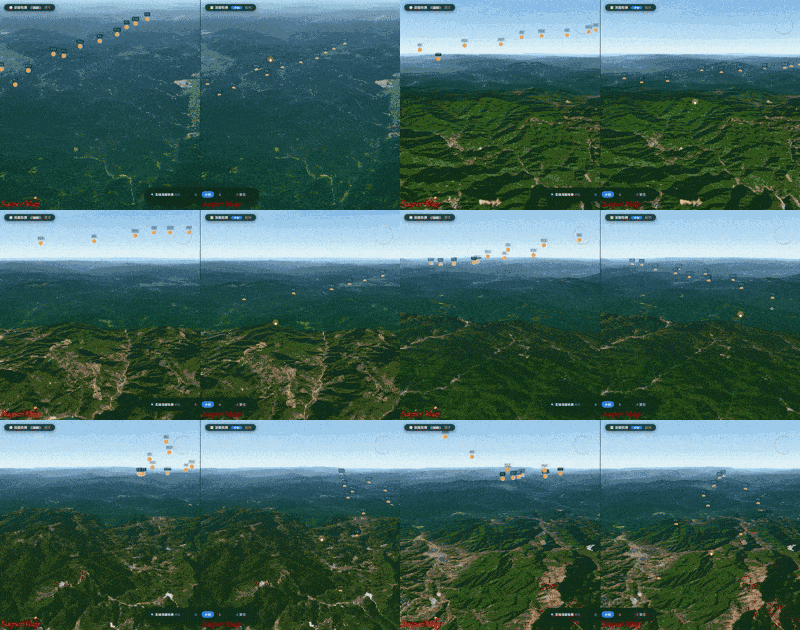
开启深度检测,实体精准贴地,三维空间交互真实可信!
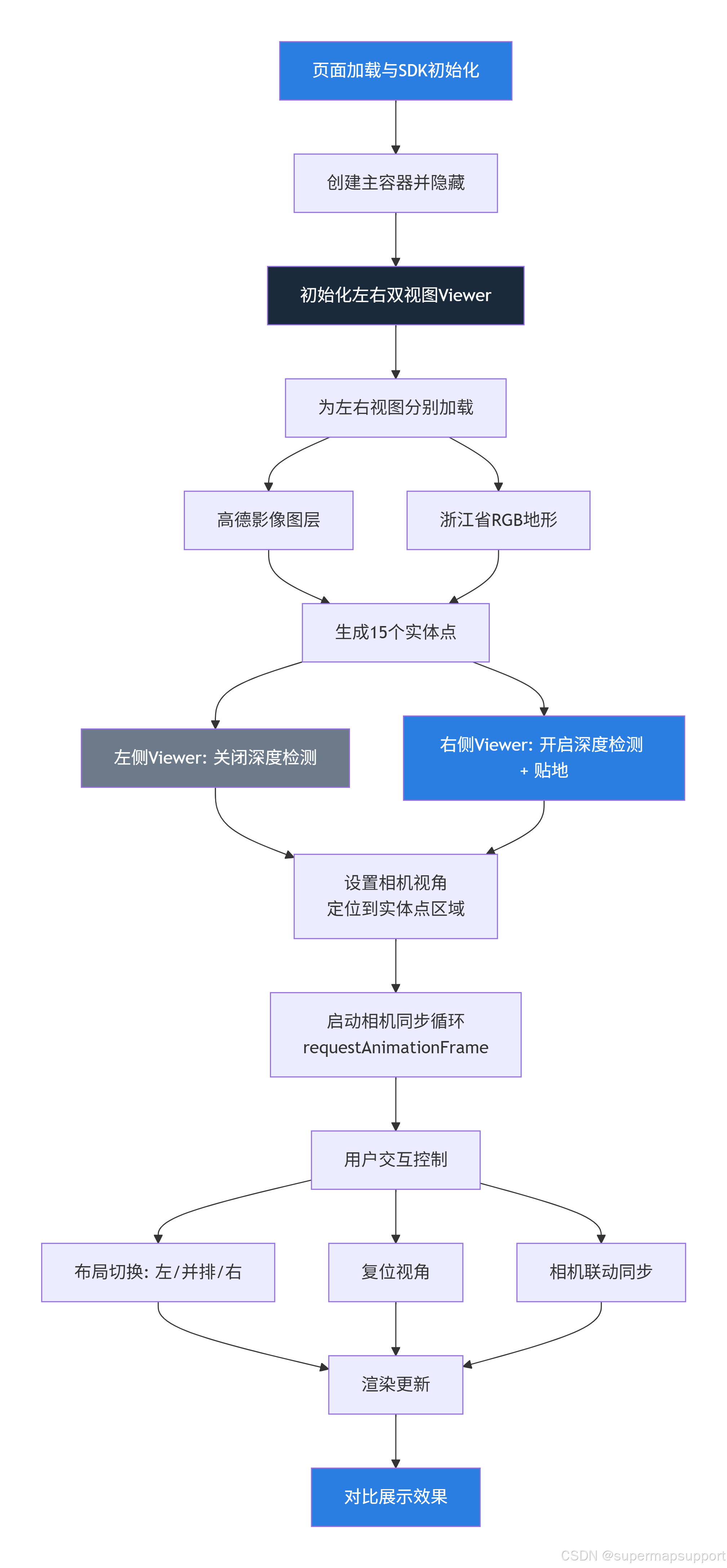
一、实现思路
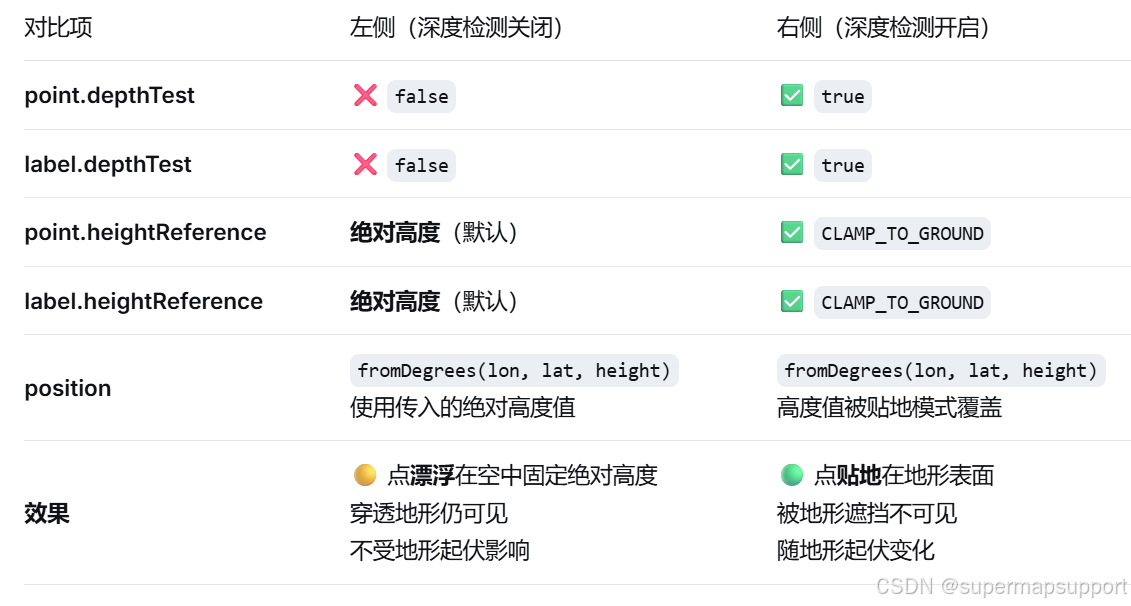
二、差异对比
三、示例完整代码
javascript
<!DOCTYPE html>
<html lang="zh-CN">
<head>
<meta charset="utf-8">
<meta http-equiv="X-UA-Compatible" content="IE=Edge,chrome=1">
<meta name="viewport" content="width=device-width, initial-scale=1, maximum-scale=1, minimum-scale=1, user-scalable=no">
<title>开启实体对象深度检测</title>
<link href="./css/pretty.css" rel="stylesheet">
<script src="./js/jquery.min.js"></script>
<!-- 引入超图产品SDK -->
<script src="./js/loadSDK/loadSDK.js"></script>
<style>
/* 对比覆盖样式 - 保留原始布局,添加双视图和控制栏 */
#compareWrapper {
position: absolute;
top: 0;
left: 0;
width: 100%;
height: 100%;
display: flex;
flex-direction: column;
pointer-events: none;
}
.viewer-row {
display: flex;
flex: 1;
min-height: 0;
pointer-events: auto;
}
.viewer-col {
flex: 1;
position: relative;
overflow: hidden;
border-right: 2px solid rgba(255,255,255,0.15);
}
.viewer-col:last-child {
border-right: none;
}
.viewer-col .label {
position: absolute;
top: 20px;
left: 20px;
background: rgba(0,0,0,0.7);
backdrop-filter: blur(6px);
color: #fff;
padding: 6px 18px;
border-radius: 30px;
font-size: 14px;
font-weight: 500;
z-index: 10;
border: 1px solid rgba(255,255,255,0.08);
pointer-events: none;
box-shadow: 0 4px 16px rgba(0,0,0,0.5);
}
.viewer-col .label .badge {
display: inline-block;
background: #2a7de1;
padding: 0 12px;
border-radius: 20px;
margin-left: 10px;
font-size: 12px;
color: #fff;
}
.viewer-col .label .badge.off {
background: #6c7a8a;
}
.control-panel {
position: absolute;
bottom: 40px;
left: 50%;
transform: translateX(-50%);
background: rgba(16, 22, 32, 0.88);
backdrop-filter: blur(14px);
border: 1px solid rgba(255,255,255,0.06);
border-radius: 60px;
padding: 10px 28px;
display: flex;
align-items: center;
gap: 24px;
z-index: 30;
pointer-events: auto;
box-shadow: 0 10px 40px rgba(0,0,0,0.7);
flex-wrap: wrap;
justify-content: center;
}
.control-panel button {
background: transparent;
border: none;
color: #c8d2e0;
font-size: 14px;
font-weight: 500;
padding: 6px 18px;
border-radius: 40px;
cursor: pointer;
transition: 0.2s;
background: rgba(255,255,255,0.03);
border: 1px solid rgba(255,255,255,0.05);
display: flex;
align-items: center;
gap: 6px;
}
.control-panel button:hover {
background: rgba(42, 125, 225, 0.15);
color: white;
border-color: rgba(42, 125, 225, 0.25);
}
.control-panel button.active {
background: #2a7de1;
color: white;
border-color: #2a7de1;
}
.control-panel .status {
color: #9aafcc;
font-size: 13px;
padding-right: 16px;
border-right: 1px solid #2f3742;
}
.control-panel .status strong {
color: #ecf3ff;
}
.control-panel .btn-group {
display: flex;
gap: 4px;
background: rgba(0,0,0,0.3);
padding: 4px;
border-radius: 40px;
}
.control-panel .btn-group button {
padding: 4px 14px;
font-size: 13px;
border: none;
background: transparent;
color: #9aadc9;
border-radius: 30px;
}
.control-panel .btn-group button.active-toggle {
background: #2a7de1;
color: white;
}
#Container {
position: absolute;
top: 0;
left: 0;
width: 100%;
height: 100%;
z-index: 1;
}
#loadingbar {
z-index: 999;
}
@media (max-width: 720px) {
.viewer-row {
flex-direction: column;
}
.viewer-col {
border-right: none;
border-bottom: 2px solid rgba(255,255,255,0.1);
height: 50%;
}
.control-panel {
bottom: 16px;
padding: 8px 16px;
gap: 10px;
width: 94%;
border-radius: 30px;
}
.control-panel .status {
border-right: none;
padding-right: 0;
width: 100%;
text-align: center;
}
}
</style>
</head>
<body>
<div id="Container"></div>
<div id="compareWrapper">
<div class="viewer-row" id="viewerRow">
<div class="viewer-col" id="colLeft">
<div class="label">
⚪ 深度检测 <span class="badge off">关闭</span>
<span style="margin-left:8px;opacity:0.6;font-weight:300;">漂浮</span>
</div>
<div id="subContainerLeft" style="width:100%;height:100%;"></div>
</div>
<div class="viewer-col" id="colRight">
<div class="label">
✅ 深度检测 <span class="badge">开启</span>
<span style="margin-left:8px;opacity:0.6;font-weight:300;">贴地</span>
</div>
<div id="subContainerRight" style="width:100%;height:100%;"></div>
</div>
</div>
<div class="control-panel" id="controlPanel">
<span class="status">🔍 <strong>实体深度检测</strong> 对比</span>
<div class="btn-group">
<button id="btnLeftOnly" class="active-toggle">左</button>
<button id="btnBoth">并排</button>
<button id="btnRightOnly">右</button>
</div>
<button id="resetViewBtn">↺ 复位</button>
</div>
</div>
<div id='loadingbar' class="spinner">
<div class="spinner-container container1">
<div class="circle1"></div>
<div class="circle2"></div>
<div class="circle3"></div>
<div class="circle4"></div>
</div>
<div class="spinner-container container2">
<div class="circle1"></div>
<div class="circle2"></div>
<div class="circle3"></div>
<div class="circle4"></div>
</div>
<div class="spinner-container container3">
<div class="circle1"></div>
<div class="circle2"></div>
<div class="circle3"></div>
<div class="circle4"></div>
</div>
</div>
<script>
function onload(SuperMap3D) {
var viewer = new SuperMap3D.Viewer('Container',{
baseLayerPicker: false,
selectionIndicator: false,
infoBox: false,
geocoder: false,
homeButton: false,
sceneModePicker: false,
navigationHelpButton: false,
animation: false,
timeline: false,
fullscreenButton: false,
});
viewer.scenePromise.then(function (scene) {
init(SuperMap3D, scene, viewer);
});
}
async function init(SuperMap3D, scene, viewer) {
viewer.resolutionScale = window.devicePixelRatio;
$('#loadingbar').remove();
const container = document.getElementById('Container');
container.style.display = 'none';
const leftContainer = document.getElementById('subContainerLeft');
const rightContainer = document.getElementById('subContainerRight');
// ============================================================
// 1. 创建左侧 Viewer(关闭深度检测)
// ============================================================
const viewerLeft = new SuperMap3D.Viewer(leftContainer, {
baseLayerPicker: false,
selectionIndicator: false,
infoBox: false,
geocoder: false,
homeButton: false,
sceneModePicker: false,
navigationHelpButton: false,
animation: false,
timeline: false,
fullscreenButton: false,
resolutionScale: window.devicePixelRatio,
});
viewerLeft.scene.backgroundColor = new SuperMap3D.Color(0.05, 0.08, 0.12);
// 左侧添加高德影像
viewerLeft.imageryLayers.addImageryProvider(new SuperMap3D.UrlTemplateImageryProvider({
url: 'https://webst02.is.autonavi.com/appmaptile?style=6&x={x}&y={y}&z={z}',
}));
// 左侧加载RGB地形(浙江省)
const terrainProviderLeft = new SuperMap3D.TerrainRGBProvider({
url: 'https://www.supermapol.com/realspace/services/map-ugcv5-ZheJiang/WMTS-tianditu',
layer: '浙江',
style: 'default',
format: 'image/png',
tileMatrixSetID: 'Custom_浙江',
tileWidth: 256,
tileHeight: 256,
maximumLevel: 11,
tilingScheme: new SuperMap3D.GeographicTilingScheme({
customDPI: new SuperMap3D.Cartesian2(96, 96),
numberOfLevelZeroTilesX: 1,
numberOfLevelZeroTilesY: 1,
origin: new SuperMap3D.Cartographic.fromDegrees(-180, 90, 0.0),
scaleDenominators: [5.916587109E8, 2.9582935545E8, 1.4791467773E8, 7.395733885999998E7, 3.697866942999999E7, 1.848933472E7, 9244667.36,
4622333.68, 2311166.84, 1155583.42, 577791.71, 288895.85000000003, 144447.93000000002, 72223.96000000002, 36111.98000000001,
18055.990000000005, 9028.0, 4514.0, 2257.0, 1128.5, 564.25
],
rectangle: new SuperMap3D.Rectangle.fromDegrees(118.02819444444445, 27.167361111972927, 122.83347222222261, 31.182638889751026),
}),
bounds: new SuperMap3D.Rectangle(118.02819444444445, 27.167361111972927, 122.83347222222261, 31.182638889751026)
});
viewerLeft.terrainProvider = terrainProviderLeft;
// ============================================================
// 2. 创建右侧 Viewer(开启深度检测 + 贴地)
// ============================================================
const viewerRight = new SuperMap3D.Viewer(rightContainer, {
baseLayerPicker: false,
selectionIndicator: false,
infoBox: false,
geocoder: false,
homeButton: false,
sceneModePicker: false,
navigationHelpButton: false,
animation: false,
timeline: false,
fullscreenButton: false,
resolutionScale: window.devicePixelRatio,
});
viewerRight.scene.backgroundColor = new SuperMap3D.Color(0.05, 0.08, 0.12);
// 右侧添加高德影像
viewerRight.imageryLayers.addImageryProvider(new SuperMap3D.UrlTemplateImageryProvider({
url: 'https://webst02.is.autonavi.com/appmaptile?style=6&x={x}&y={y}&z={z}',
}));
// 右侧加载RGB地形(浙江省)
const terrainProviderRight = new SuperMap3D.TerrainRGBProvider({
url: 'https://www.supermapol.com/realspace/services/map-ugcv5-ZheJiang/WMTS-tianditu',
layer: '浙江',
style: 'default',
format: 'image/png',
tileMatrixSetID: 'Custom_浙江',
tileWidth: 256,
tileHeight: 256,
maximumLevel: 11,
tilingScheme: new SuperMap3D.GeographicTilingScheme({
customDPI: new SuperMap3D.Cartesian2(96, 96),
numberOfLevelZeroTilesX: 1,
numberOfLevelZeroTilesY: 1,
origin: new SuperMap3D.Cartographic.fromDegrees(-180, 90, 0.0),
scaleDenominators: [5.916587109E8, 2.9582935545E8, 1.4791467773E8, 7.395733885999998E7, 3.697866942999999E7, 1.848933472E7, 9244667.36,
4622333.68, 2311166.84, 1155583.42, 577791.71, 288895.85000000003, 144447.93000000002, 72223.96000000002, 36111.98000000001,
18055.990000000005, 9028.0, 4514.0, 2257.0, 1128.5, 564.25
],
rectangle: new SuperMap3D.Rectangle.fromDegrees(118.02819444444445, 27.167361111972927, 122.83347222222261, 31.182638889751026),
}),
bounds: new SuperMap3D.Rectangle(118.02819444444445, 27.167361111972927, 122.83347222222261, 31.182638889751026)
});
viewerRight.terrainProvider = terrainProviderRight;
// ============================================================
// 3. 定义实体点位置数据 - 山区(丽水/温州交界处,地形起伏大)
// ============================================================
const positionsData = [
{ lat: 28.35, lon: 119.55, height: 2000 },
{ lat: 28.40, lon: 119.60, height: 3500 },
{ lat: 28.30, lon: 119.50, height: 1500 },
{ lat: 28.45, lon: 119.65, height: 4000 },
{ lat: 28.25, lon: 119.45, height: 1000 },
{ lat: 28.50, lon: 119.70, height: 5000 },
{ lat: 28.20, lon: 119.40, height: 800 },
{ lat: 28.55, lon: 119.75, height: 5500 },
{ lat: 28.38, lon: 119.52, height: 2500 },
{ lat: 28.42, lon: 119.58, height: 3000 },
{ lat: 28.33, lon: 119.48, height: 1800 },
{ lat: 28.37, lon: 119.56, height: 2800 },
{ lat: 28.43, lon: 119.62, height: 3800 },
{ lat: 28.47, lon: 119.68, height: 4500 },
{ lat: 28.52, lon: 119.72, height: 5200 },
];
// ============================================================
// 4. 创建实体点
// ============================================================
function createPointEntities(viewerInstance, enableDepthTest) {
const entities = [];
positionsData.forEach((pos, index) => {
const entityOptions = {
position: SuperMap3D.Cartesian3.fromDegrees(pos.lon, pos.lat, pos.height),
point: {
pixelSize: 14,
color: SuperMap3D.Color.fromCssColorString('#ffaa33'),
outlineColor: SuperMap3D.Color.WHITE,
outlineWidth: 1,
depthTest: enableDepthTest,
},
label: {
text: `P${index + 1}`,
font: '12px sans-serif',
fillColor: SuperMap3D.Color.WHITE,
outlineColor: SuperMap3D.Color.BLACK,
outlineWidth: 2,
style: SuperMap3D.LabelStyle.FILL_AND_OUTLINE,
pixelOffset: new SuperMap3D.Cartesian2(0, -20),
depthTest: enableDepthTest,
showBackground: true,
backgroundColor: new SuperMap3D.Color(0, 0, 0, 0.5),
backgroundPadding: new SuperMap3D.Cartesian2(6, 4),
}
};
if (enableDepthTest) {
entityOptions.point.heightReference = SuperMap3D.HeightReference.CLAMP_TO_GROUND;
entityOptions.label.heightReference = SuperMap3D.HeightReference.CLAMP_TO_GROUND;
}
const entity = viewerInstance.entities.add(entityOptions);
entities.push(entity);
});
return entities;
}
createPointEntities(viewerLeft, false);
createPointEntities(viewerRight, true);
// ============================================================
// 5. 设置相机视角
// ============================================================·
const targetPosition = SuperMap3D.Cartesian3.fromDegrees(119.65, 28.18, 12000);
const heading = 0.0;
const pitch = -0.6;
viewerLeft.camera.setView({
destination: targetPosition,
orientation: { heading: heading, pitch: pitch, roll: 0 }
});
viewerRight.camera.setView({
destination: targetPosition,
orientation: { heading: heading, pitch: pitch, roll: 0 }
});
// ============================================================
// 6. 相机同步逻辑
// ============================================================
let isSyncing = false;
let leftCameraState = null;
let rightCameraState = null;
function getCameraState(camera) {
return {
position: camera.position.clone(),
heading: camera.heading,
pitch: camera.pitch,
roll: camera.roll
};
}
function isCameraStateEqual(state1, state2) {
if (!state1 || !state2) return false;
return state1.position.equals(state2.position) &&
Math.abs(state1.heading - state2.heading) < 0.0001 &&
Math.abs(state1.pitch - state2.pitch) < 0.0001 &&
Math.abs(state1.roll - state2.roll) < 0.0001;
}
function syncCameras() {
if (isSyncing) return;
const leftCam = viewerLeft.camera;
const rightCam = viewerRight.camera;
if (!leftCam || !rightCam) return;
const leftState = getCameraState(leftCam);
const rightState = getCameraState(rightCam);
if (!isCameraStateEqual(leftState, leftCameraState)) {
isSyncing = true;
try {
rightCam.setView({
destination: leftState.position,
orientation: {
heading: leftState.heading,
pitch: leftState.pitch,
roll: leftState.roll
}
});
rightCameraState = getCameraState(rightCam);
} finally {
isSyncing = false;
}
leftCameraState = leftState;
return;
}
if (!isCameraStateEqual(rightState, rightCameraState)) {
isSyncing = true;
try {
leftCam.setView({
destination: rightState.position,
orientation: {
heading: rightState.heading,
pitch: rightState.pitch,
roll: rightState.roll
}
});
leftCameraState = getCameraState(leftCam);
} finally {
isSyncing = false;
}
rightCameraState = rightState;
return;
}
leftCameraState = leftState;
rightCameraState = rightState;
}
function startSyncLoop() {
function tick() {
syncCameras();
requestAnimationFrame(tick);
}
requestAnimationFrame(tick);
}
startSyncLoop();
// ============================================================
// 7. UI 布局切换
// ============================================================
function setLayout(mode) {
const colLeft = document.getElementById('colLeft');
const colRight = document.getElementById('colRight');
const row = document.getElementById('viewerRow');
colLeft.style.display = 'flex';
colRight.style.display = 'flex';
colLeft.style.flex = '';
colRight.style.flex = '';
colLeft.style.width = '';
colRight.style.width = '';
colLeft.style.height = '';
colRight.style.height = '';
row.style.flexDirection = 'row';
if (mode === 'left') {
colRight.style.display = 'none';
colLeft.style.flex = '1';
colLeft.style.width = '100%';
} else if (mode === 'right') {
colLeft.style.display = 'none';
colRight.style.flex = '1';
colRight.style.width = '100%';
} else {
colLeft.style.display = 'flex';
colRight.style.display = 'flex';
if (window.innerWidth < 720) {
row.style.flexDirection = 'column';
colLeft.style.height = '50%';
colRight.style.height = '50%';
colLeft.style.width = '100%';
colRight.style.width = '100%';
} else {
colLeft.style.flex = '1';
colRight.style.flex = '1';
colLeft.style.width = '50%';
colRight.style.width = '50%';
}
}
setTimeout(() => {
if (viewerLeft) viewerLeft.resize();
if (viewerRight) viewerRight.resize();
}, 50);
}
const btnLeft = document.getElementById('btnLeftOnly');
const btnBoth = document.getElementById('btnBoth');
const btnRight = document.getElementById('btnRightOnly');
const resetBtn = document.getElementById('resetViewBtn');
function setActive(activeBtn) {
[btnLeft, btnBoth, btnRight].forEach(b => b.classList.remove('active-toggle'));
if (activeBtn) activeBtn.classList.add('active-toggle');
}
btnLeft.addEventListener('click', () => { setLayout('left'); setActive(btnLeft); });
btnBoth.addEventListener('click', () => { setLayout('both'); setActive(btnBoth); });
btnRight.addEventListener('click', () => { setLayout('right'); setActive(btnRight); });
resetBtn.addEventListener('click', () => {
const dest = SuperMap3D.Cartesian3.fromDegrees(119.55, 28.35, 5000);
const orient = { heading: 0.0, pitch: -0.6, roll: 0 };
isSyncing = true;
try {
if (viewerLeft) {
viewerLeft.camera.setView({ destination: dest, orientation: orient });
leftCameraState = getCameraState(viewerLeft.camera);
}
if (viewerRight) {
viewerRight.camera.setView({ destination: dest, orientation: orient });
rightCameraState = getCameraState(viewerRight.camera);
}
} finally {
isSyncing = false;
}
});
setLayout('both');
setActive(btnBoth);
window.addEventListener('resize', () => {
if (viewerLeft) viewerLeft.resize();
if (viewerRight) viewerRight.resize();
const active = document.querySelector('.btn-group .active-toggle');
if (active) {
if (active.id === 'btnLeftOnly') setLayout('left');
else if (active.id === 'btnRightOnly') setLayout('right');
else setLayout('both');
} else {
setLayout('both');
}
});
window.__depthDemo = { viewerLeft, viewerRight };
}
</script>
</body>
</html>