使用 IDEA 生成API文档
一、 基础布置
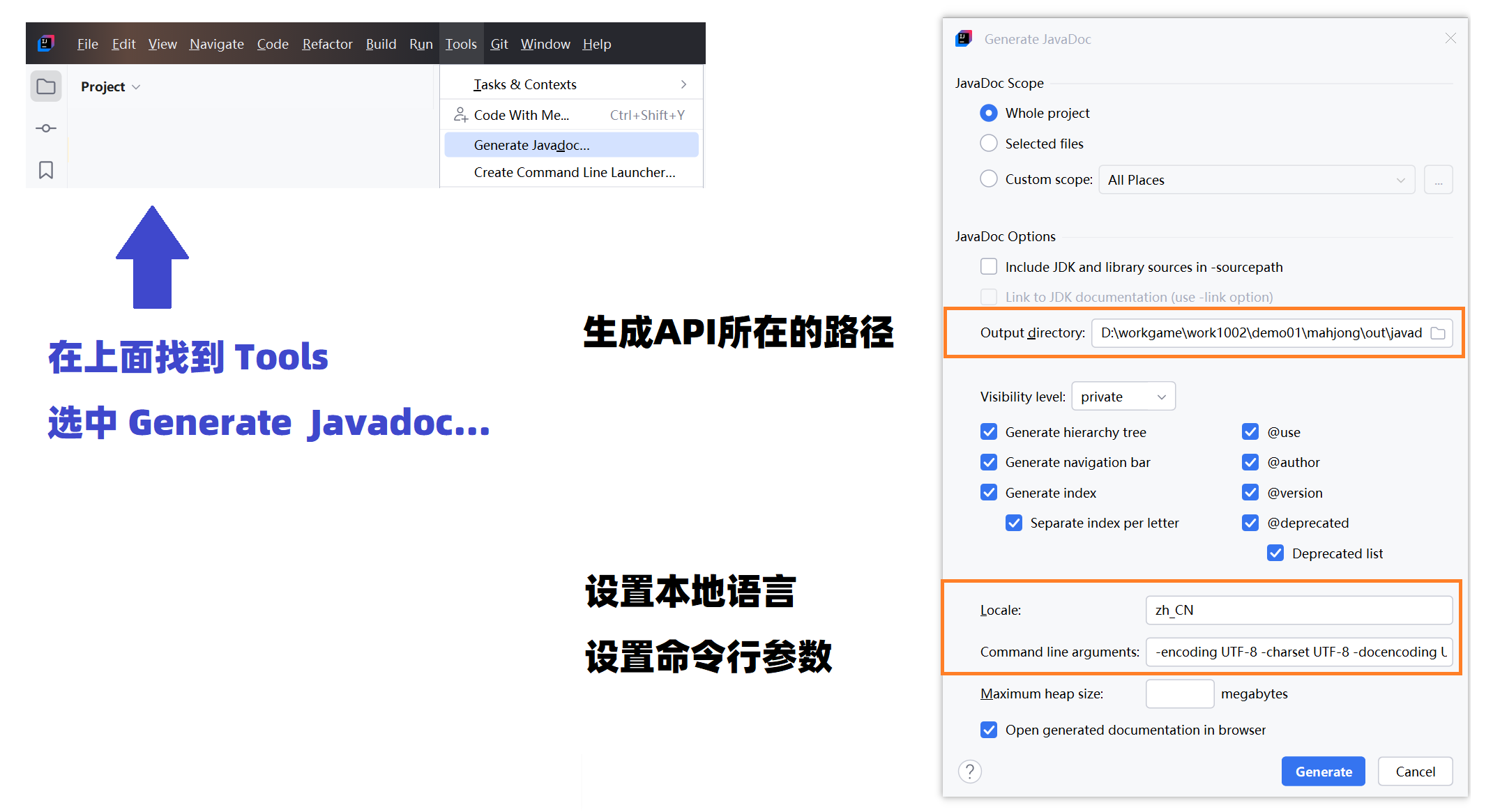
二、命令行写法
也就是在 Generate JavaDoc 里面的 Command line arguments 当中的写法
-encoding UTF-8 -charset UTF-8 -docencoding UTF-8 --add-stylesheet "D:/develop/ideadoc/apidoc.css" --allow-script-in-comments -bottom "<script src='D:/develop/ideadoc/apidoc.js'></script>" 注意这里只需要修改两个路径即可。
1、 javascript 的路径
2、 css 的路径

例如: 我的两个路径分别是
D:/develop/ideadoc/apidoc.js
D:/develop/ideadoc/apidoc.css
三、文件源码
1、JS文件源码
javascript
(function () {
    // 核心函数:根据当前网页地址,自动高亮对应的顶部导航栏菜单
    function applyInstantHighlight() {
        // 抓取页面顶部所有的导航菜单项(li 标签)
        var lis = document.querySelectorAll('header .nav-list li, div.top-nav ul li');
        if (!lis || lis.length === 0) return;

        // 获取当前网页的网址路径
        var pathname = window.location.pathname;

        lis.forEach(function (li) {
            var text = li.textContent.trim();

            // 隐藏不需要展示的"使用"菜单项
            if (text === '使用') {
                li.style.display = 'none';
                return;
            }

            // 情况 A:如果当前在"类"列表页面,高亮"类"菜单
            if (pathname.endsWith('allclasses-index.html')) {
                if (text === '类') {
                    li.classList.add('nav-bar-cell1-rev');
                } else {
                    li.classList.remove('nav-bar-cell1-rev', 'navBarCell1Rev');
                }
            }
            // 情况 B:如果当前在首页或"程序包"页面,高亮"程序包"菜单,取消"概述"高亮
            else if (pathname.endsWith('index.html') || pathname.endsWith('allpackages-index.html') || pathname.endsWith('/')) {
                if (text === '程序包') {
                    li.classList.add('nav-bar-cell1-rev');
                } else if (text === '概览' || text === '概述') {
                    li.classList.remove('nav-bar-cell1-rev', 'navBarCell1Rev');
                }
            }
        });
    }

    // 页面刚开始加载时先高亮一次(防止网页加载时出现样式闪烁)
    applyInstantHighlight();

    // 页面全部加载完成后,绑定点击事件
    document.addEventListener('DOMContentLoaded', function () {
        // 再次确认高亮状态
        applyInstantHighlight();

        var lis = document.querySelectorAll('header .nav-list li, div.top-nav ul li');

        // 为每个导航菜单项绑定点击逻辑
        lis.forEach(function (li) {
            var text = li.textContent.trim();

            // 1. 点击"概述/概览":不跳转新页面,直接在当前页面中间嵌入一个外部网页 (iframe)
            if (text === '概述' || text === '概览') {
                li.style.cursor = 'pointer';
                li.onclick = function (e) {
                    e.preventDefault();
                    e.stopPropagation();

                    // 手动将高亮样式转移到"概述"上
                    lis.forEach(function (el) { el.classList.remove('nav-bar-cell1-rev', 'navBarCell1Rev'); });
                    li.classList.add('nav-bar-cell1-rev');

                    // 找到页面主体内容区域
                    var contentArea = document.querySelector('div.flex-content, main[role="main"], div.content-container') || document.querySelector('main') || document.body;

                    // 将主体内容替换为包含目标网页的 iframe 嵌入框(并通过 CSS 溢出隐藏裁掉滚动条)
                    contentArea.innerHTML = `
                        <div style="width: 100%; height: calc(100vh - 40px); overflow: hidden; position: relative;">
                            <iframe src="http://www.hao123.com"
                                    style="width: calc(100% + 18px); height: 100%; border: none; margin: 0; padding: 0;">
                            </iframe>
                        </div>
                    `;
                };
            }
            // 2. 点击"程序包":跳转到当前目录下的 index.html 页面
            else if (text === '程序包') {
                li.style.cursor = 'pointer';
                li.onclick = function (e) {
                    e.preventDefault();
                    e.stopPropagation();
                    var root = document.location.pathname.substring(0, document.location.pathname.lastIndexOf('/') + 1);
                    window.location.href = root + 'index.html';
                };
            }
            // 3. 点击"类":跳转到当前目录下的 allclasses-index.html 页面
            else if (text === '类') {
                li.style.cursor = 'pointer';
                li.onclick = function (e) {
                    e.preventDefault();
                    e.stopPropagation();
                    var root = document.location.pathname.substring(0, document.location.pathname.lastIndexOf('/') + 1);
                    window.location.href = root + 'allclasses-index.html';
                };
            }
        });
    });
})();
2、CSS文件源码
css
/* 只有在屏幕宽度大于等于 768px(电脑/平板大屏)时才生效的样式 */
@media screen and (min-width: 768px) {

    /* 【1. 侧边栏整体】锁定在屏幕最左侧,变成深蓝色固定宽度侧边栏 */
    header[role="banner"],
    div.top-nav,
    .flex-header {
        position: fixed !important;         /* 固定在屏幕上,滚动网页时它不动 */
        top: 0 !important;                  /* 紧贴顶部 */
        left: 0 !important;                 /* 紧贴左侧 */
        width: 240px !important;            /* 固定宽度为 240px */
        height: 100vh !important;           /* 搞定高度为整个屏幕高度 */
        overflow-y: auto !important;        /* 内容如果变长,允许内部上下滚动 */
        z-index: 9999 !important;           /* 保证侧边栏显示在最上层 */
        background-color: #2c4a63 !important; /* 背景设为深蓝色 */
        padding: 20px 12px !important;      /* 内部上下留白 20px,左右留白 12px */
        box-sizing: border-box !important;  /* 让边框和内边距算进总宽度内 */
        border-right: 1px solid rgba(0, 0, 0, 0.12) !important; /* 右侧加一条淡色边框 */
        box-shadow: 2px 0 12px rgba(0, 0, 0, 0.1) !important;   /* 右侧加上淡阴影,制造立体感 */
    }

    /* 【2. 侧边栏列表容器】消除列表默认的内外边距与圆点 */
    header .top-nav ul.nav-list,
    header ul.horizontal,
    .flex-header ul.horizontal,
    div.top-nav ul {
        display: block !important;          /* 转为块级元素,垂直排列 */
        padding: 0 !important;              /* 清空内边距 */
        margin: 0 !important;               /* 清空外边距 */
        list-style: none !important;        /* 去除列表默认的小圆点 */
    }

    /* 【3. 菜单选项卡片】把每个菜单项设为统一尺寸,并锁定左侧 16px 边距防闪烁 */
    header .top-nav ul.nav-list > li,
    header ul.horizontal > li,
    .flex-header ul.horizontal > li,
    div.top-nav ul > li,
    header .top-nav ul.nav-list li.nav-bar-cell1-rev,
    header ul.horizontal li.navBarCell1Rev,
    .flex-header ul.horizontal li.navBarCell1Rev,
    div.top-nav ul li.nav-bar-cell1-rev {
        display: flex !important;           /* 使用弹性布局,内容垂直居中 */
        align-items: center !important;     /* 文字垂直居中 */
        width: 100% !important;             /* 宽度撑满侧边栏 */
        height: 40px !important;            /* 统一菜单项高度为 40px */
        line-height: 40px !important;       /* 行高 40px */
        margin-top: 0 !important;
        margin-bottom: 8px !important;      /* 每个菜单项之间间隔 8px */
        padding: 0 0 0 16px !important;     /* 强制锁定左侧 16px 缩进,避免选中状态切换时抖动 */
        box-sizing: border-box !important;
        border-radius: 6px !important;      /* 菜单项设置 6px 倒角 */
        font-size: 14px !important;         /* 统一字体大小 14px */
        font-weight: 500 !important;        /* 统一字体粗细 */
        font-family: -apple-system, BlinkMacSystemFont, "Segoe UI", Roboto, sans-serif !important;
        border: none !important;
        outline: none !important;
        overflow: hidden !important;        /* 溢出部分裁剪 */
        transition: background-color 0.15s ease, color 0.15s ease !important; /* 鼠标悬浮时变色的平滑过度动画 */
    }

    /* 【4. 菜单文字/链接】清空内部标签自带的边距,防止内嵌标签破坏对齐 */
    header .top-nav ul.nav-list > li *,
    header ul.horizontal > li *,
    .flex-header ul.horizontal > li *,
    div.top-nav ul > li *,
    header .top-nav ul.nav-list li.nav-bar-cell1-rev *,
    header ul.horizontal li.navBarCell1Rev *,
    .flex-header ul.horizontal li.navBarCell1Rev *,
    div.top-nav ul li.nav-bar-cell1-rev * {
        display: flex !important;
        align-items: center !important;
        width: 100% !important;
        height: 100% !important;
        padding: 0 !important;              /* 子元素边距清零,完全继承父级 li 的 16px 左边距 */
        margin: 0 !important;
        box-sizing: border-box !important;
        font-size: 14px !important;
        font-weight: 500 !important;
        font-family: -apple-system, BlinkMacSystemFont, "Segoe UI", Roboto, sans-serif !important;
        text-decoration: none !important;  /* 去除链接的下划线 */
        background: none !important;
        border: none !important;
        box-shadow: none !important;
    }

    /* 【5. 菜单交互状态:常规态】未选中时,背景透明,文字呈浅灰色 */
    header .top-nav ul.nav-list > li,
    header ul.horizontal > li,
    .flex-header ul.horizontal > li,
    div.top-nav ul > li {
        background-color: transparent !important;
        color: #e2e8f0 !important;
    }
    header .top-nav ul.nav-list > li *,
    header ul.horizontal > li *,
    .flex-header ul.horizontal > li *,
    div.top-nav ul > li * {
        color: #e2e8f0 !important;
    }

    /* 【6. 菜单交互状态:悬浮态】鼠标指上去时,变半透明白底,文字变高亮纯白 */
    header .top-nav ul.nav-list > li:hover,
    header ul.horizontal > li:hover,
    .flex-header ul.horizontal > li:hover,
    div.top-nav ul > li:hover {
        background-color: rgba(255, 255, 255, 0.18) !important;
        color: #ffffff !important;
    }
    header .top-nav ul.nav-list > li:hover *,
    header ul.horizontal > li:hover *,
    .flex-header ul.horizontal > li:hover *,
    div.top-nav ul > li:hover * {
        color: #ffffff !important;
    }

    /* 【7. 菜单交互状态:当前选中态】当前所在的页面选项,变高亮橙色底,文字纯白 */
    header .top-nav ul.nav-list li.nav-bar-cell1-rev,
    header ul.horizontal li.navBarCell1Rev,
    .flex-header ul.horizontal li.navBarCell1Rev,
    div.top-nav ul li.nav-bar-cell1-rev {
        background-color: #f59e0b !important;
        color: #ffffff !important;
    }
    header .top-nav ul.nav-list li.nav-bar-cell1-rev *,
    header ul.horizontal li.navBarCell1Rev *,
    .flex-header ul.horizontal li.navBarCell1Rev *,
    div.top-nav ul li.nav-bar-cell1-rev * {
        color: #ffffff !important;
    }

    /* 【8. 主体内容避让】将页面右侧的主内容整体向右推 250px,防止被左侧侧边栏遮挡 */
    div.flex-content,
    main[role="main"],
    .content-container,
    div.header,
    div.sub-nav {
        margin-left: 250px !important;      /* 左侧留出 250px 避让侧边栏 */
        margin-right: 0 !important;
        width: calc(100% - 250px) !important; /* 宽度调整为屏宽减去 250px */
        box-sizing: border-box !important;
        padding: 20px 40px !important;      /* 主内容区域四周留白 */
        text-align: left !important;
    }

    /* 【9. 右侧主内容区域排版样式修正】修改标题对齐方式与间距 */
    main h1, main h2, main .title, main .header {
        text-align: left !important;
        margin-left: 0 !important;
        padding-left: 0 !important;
        width: 100% !important;
    }

    main section.hierarchy-tree,
    main div.header span,
    main .package-hierarchy-label {
        display: block !important;
        text-align: left !important;
        margin: 15px 0 10px 0 !important;
        font-weight: 600 !important;
    }

    /* 横向标签列表排版:使各个小标签弹性平铺并保持间距 */
    main ul.horizontal {
        display: flex !important;
        flex-wrap: wrap !important;
        justify-content: flex-start !important;
        align-items: center !important;
        gap: 8px 10px !important;
        padding: 0 !important;
        margin: 10px 0 25px 0 !important;
        list-style: none !important;
        width: 100% !important;
    }

    /* 横向标签列表里的每一项样式(灰色小卡片风格) */
    main ul.horizontal li {
        display: inline-flex !important;
        background: #f1f5f9 !important;
        padding: 5px 12px !important;
        border-radius: 4px !important;
        border: 1px solid #cbd5e1 !important;
        font-size: 13px !important;
        color: #334155 !important;
        margin: 0 !important;
        height: auto !important;
    }

    main ul.horizontal li a {
        color: #2563eb !important;
        text-decoration: none !important;
        padding: 0 !important;
    }

    /* 层级树形列表排版(Java 类的继承关系树) */
    main ul.hierarchy,
    main section.hierarchy-tree ul {
        padding-left: 20px !important;
        margin: 8px 0 !important;
        list-style-type: circle !important;
        text-align: left !important;
    }

    main ul.hierarchy li,
    main section.hierarchy-tree ul li {
        margin: 6px 0 !important;
        line-height: 1.6 !important;
        font-size: 14px !important;
        color: #475569 !important;
        height: auto !important;
    }

    main ul.hierarchy li a,
    main section.hierarchy-tree ul li a {
        font-weight: 600 !important;
        color: #1e40af !important;
        text-decoration: none !important;
        padding: 0 !important;
    }

    main ul.hierarchy li a:hover,
    main section.hierarchy-tree ul li a:hover {
        text-decoration: underline !important;
    }

    /* 【10. 搜索框重置】适配左侧侧边栏宽度 */
    .sub-nav .nav-list-search {
        float: none !important;
        margin: 16px 0 8px 0 !important;
        padding: 0 4px !important;
    }

    #search-input {
        width: 100% !important;
        border-radius: 6px !important;
        padding: 6px 10px !important;
        border: 1px solid rgba(255, 255, 255, 0.25) !important;
    }
}

/* 【全局控制】彻底隐藏不需要展示的"使用"或第4个无用菜单项 */
header .top-nav ul.nav-list li:has(a[href*="use"]),
header .top-nav ul.nav-list li:nth-child(4),
div.top-nav ul li:nth-child(4) {
    display: none !important;
}

/* 【体验动画优化】关闭菜单过度动画,防止切换页面时高亮产生淡入淡出的闪烁感 */
header .top-nav ul.nav-list > li,
header ul.horizontal > li,
div.top-nav ul > li {
    transition: none !important;
}

/* 防冗余隐藏策略(与上方隐藏逻辑保持一致) */
header .top-nav ul.nav-list li:has(a[href*="use"]),
header .top-nav ul.nav-list li:nth-child(4),
div.top-nav ul li:nth-child(4) {
    display: none !important;
}