关键字
| 关键字 | 作用 | 示例代码 |
|---|---|---|
if |
条件判断开始 | if x > 0: |
elif |
否则如果 | elif x == 0: |
else |
否则 | else: |
for |
循环遍历 | for i in range(5): |
while |
条件循环 | while x < 10: |
break |
跳出整个循环 | break |
continue |
跳过本次循环 | continue |
def |
定义函数 | def my_func(): |
return |
函数返回值 | return result |
class |
定义类 | class MyClass: |
lambda |
定义匿名函数 | add = lambda x,y: x+y |
import |
导入模块 | import math |
from |
从模块导入 | from math import sqrt |
try |
尝试执行(异常捕获) | try: |
except |
捕获异常 | except ValueError: |
finally |
无论是否异常都执行 | finally: |
raise |
主动抛出异常 | raise ValueError("错误") |
pass |
占位(什么都不做) | pass |
yield |
生成器返回值 | yield i |
and |
逻辑与 | if a > 0 and b > 0: |
or |
逻辑或 | if a > 0 or b > 0: |
not |
逻辑非 | if not a > 0: |
in |
判断是否在序列中 | if x in list: |
is |
判断是否是同一个对象 | if a is None: |
None |
空值(特殊常量) | x = None |
True |
真值(布尔) | flag = True |
False |
假值(布尔) | flag = False |
| end | 用于将结果输出到同一行或者在输出的末尾添加不同的字符 | python # 两个元素的总和确定了下一个数 a, b = 0, 1 while b < 1000: print(b, end=',') a, b = b, a+b #输出 1,1,2,3,5,8,13,21,34,55,89,144,233,377,610,987, |
🐖break和continue的区分
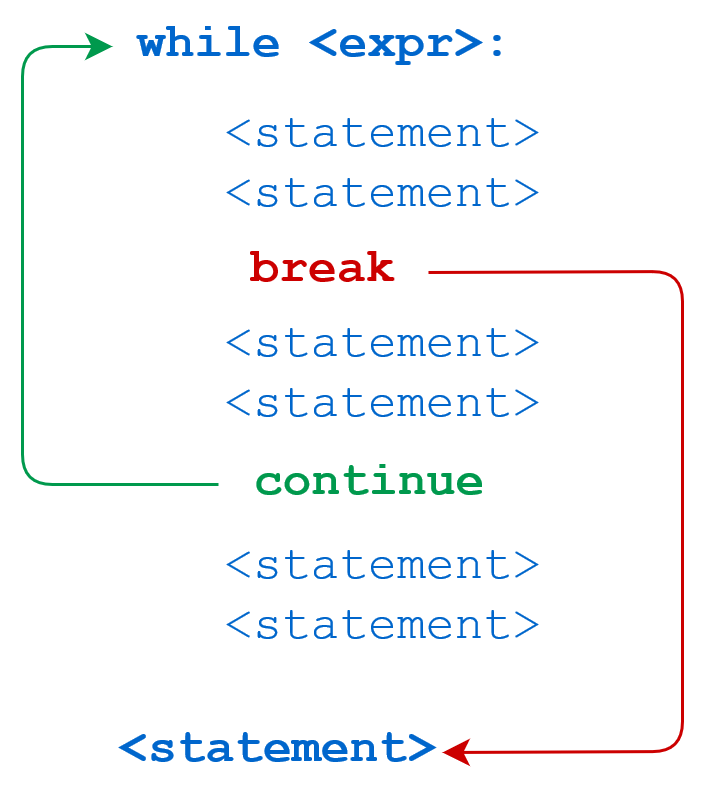
break 语句可以跳出 for 和 while 的循环体。如果你从 for 或 while 循环中终止,任何对应的循环 else 块将不执行。
continue 语句被用来告诉 Python 跳过当前循环块中的剩余语句,然后继续进行下一轮循环。
|----------------------------------------------------------------------------------|-------------------------------------------------------------------------------------|
| while 中使用 break | while 中使用 continue |
| python n = 5 while n > 0: n -= 1 if n == 2: break print(n) print('循环结束。') | python n = 5 while n > 0: n -= 1 if n == 2: continue print(n) print('循环结束。') |
| 输出: 4 3 循环结束。 | 输出: 4 3 1 0 循环结束。 |
函数
①函数定义
def()创建
定义函数就是创建 一个函数,告诉Python这个函数叫什么、需要什么参数、做什么事。( 定义函数时,代码不会执行,只是告诉Python:"我创建了一个叫xxx的函数"。)
python
def 函数名(参数列表):
    函数体代码
     ...
    return 返回值(可选)
lambda()创建
lambda 函数就是没有名字的单行函数(也叫匿名函数)。
python
# 普通函数(有名字,多行)
def add(x, y):
    return x + y

# lambda函数(没名字,单行)
lambda x, y: x + y

#lambda的基本用法
lambda 参数: 表达式
python
#map(lambda x: 加工方式, 数据)         批量加工
numbers = [1, 2, 3, 4, 5]
squared = list(map(lambda x: x**2, numbers))
print(squared)  # 输出: [1, 4, 9, 16, 25]
python
#filter(lambda x: 筛选条件, 数据)    筛选保留
numbers = [1, 2, 3, 4, 5, 6, 7, 8]
even_numbers = list(filter(lambda x: x % 2 == 0, numbers))
print(even_numbers)  # 输出:[2, 4, 6, 8]
python
#reduce(lambda x: 计算, 数据)     计算
from functools import reduce
numbers = [1, 2, 3, 4, 5]
# 使用 reduce() 和 lambda 函数计算乘积
product = reduce(lambda x, y: x * y, numbers)
print(product)  # 输出:120
python
#sorted(数据, key=lambda x: 排序依据) # 灵活排序  sorted 默认是从小到大排序(升序)
students = [
    {"name": "小明", "score": 85},
    {"name": "小红", "score": 92},
    {"name": "小刚", "score": 78},
    {"name": "小丽", "score": 88}
]

result = sorted(students, key=lambda s: s["score"])
print(result)
#输出
(78、85、88、92)
②函数调用
执行已经定义好的函数,让它的代码真正跑起来。
python
函数名(参数值)
# 或
变量 = 函数名(参数值)  # 接收返回值
python
# ========== 定义部分 ==========
def multiply(a, b):
    print(f"计算 {a} × {b}")
    return a * b

def show_message():
    print("这是一个消息")

# ========== 调用部分 ==========
# 现在才开始真正执行

# 第一次调用
result1 = multiply(3, 4)
# 输出: 计算 3 × 4
# result1 = 12

# 第二次调用
result2 = multiply(5, 6)
# 输出: 计算 5 × 6
# result2 = 30

# 调用无返回值函数
show_message()
# 输出: 这是一个消息
③常见函数
| 函数 | 作用 | 示例代码 | 返回值 |
|---|---|---|---|
print() |
输出到控制台 | print("hello") |
None |
input() |
获取用户输入 | input("请输入:") |
字符串 |
len() |
获取长度 | len("hello") |
5 |
type() |
查看数据类型 | type(123) |
<class 'int'> |
int() |
转为整数 | int("10") |
10 |
float() |
转为浮点数 | float("3.14") |
3.14 |
str() |
转为字符串 | str(100) |
"100" |
bool() |
转为布尔值 | bool(0) |
False |
list() |
转为列表 | list("abc") |
'a','b','c' |
tuple() |
转为元组 | tuple([1,2]) |
(1,2) |
dict() |
转为字典 | dict([("a",1)]) |
{'a':1} |
set() |
转为集合(去重) | set([1,2,2]) |
{1,2} |
abs() |
取绝对值 | abs(-5) |
5 |
sum() |
求和 | sum([1,2,3]) |
6 |
max() |
取最大值 | max(1,5,3) |
5 |
min() |
取最小值 | min(1,5,3) |
1 |
round() |
四舍五入 | round(3.14159, 2) |
3.14 |
pow() |
次方 | pow(2, 3) |
8 |
range() |
生成数字序列 | range(5) |
range(0,5) |
sorted() |
排序(返回新列表) | sorted([3,1,2]) |
1,2,3 |
reversed() |
反转(返回迭代器) | list(reversed([1,2,3])) |
3,2,1 |
enumerate() |
获取索引和值 | list(enumerate(['a','b'])) |
(0,'a'),(1,'b') |
zip() |
打包多个序列 | list(zip([1,2], ['a','b'])) |
(1,'a'),(2,'b') |
all() |
所有元素为真才真 | all([True, True]) |
True |
any() |
任一元素为真就真 | any([False, True]) |
True |
open() |
打开文件 | open("file.txt", "r") |
文件对象 |
id() |
查看内存地址 | id(obj) |
数字地址 |
isinstance() |
判断类型 | isinstance(5, int) |
True |
iter() |
创建迭代器 | iter([1,2,3]) |
迭代器对象 |
next() |
获取迭代器下一个元素 | next(it) |
下一个元素 |
help() |
查看帮助 | help(print) |
None |
dir() |
查看对象的属性和方法 | dir(list) |
属性列表 |
func |
被装饰的原函数,在 wrapper 里调用它来执行原逻辑 |
result = func(*args, **kwargs) |
原函数的返回值 |
wrapper |
装饰器内部定义的包装函数,替换原函数执行增强逻辑 | def wrapper(*args, **kwargs): |
原函数返回值 |
functools.wraps |
将原函数的元信息复制到 wrapper 上 |
@functools.wraps(func) |
None |
time.time |
获取当前时间戳(用于性能计时) | start = time.time() |
浮点数 |
time.sleep |
暂停程序执行(用于模拟延迟或限流) | time.sleep(1) |
None |
logging.info |
记录信息级别日志 | logging.info("函数被调用") |
None |
logging.debug |
记录调试级别日志 | logging.debug("参数: {args}") |
None |
logging.error |
记录错误级别日志 | logging.error("执行失败") |
None |
getattr |
获取对象的属性值 | getattr(user, "name") |
属性值 |
hasattr |
检查对象是否有某个属性 | hasattr(user, "name") |
True/False |
setattr |
设置对象的属性值 | setattr(user, "name", "张三") |
None |
方法
| 方法 | 作用 | 示例代码 | 返回值 |
| 字符串方法 | |||
|---|---|---|---|
.upper() |
转为大写 | "hello".upper() |
"HELLO" |
.lower() |
转为小写 | "HELLO".lower() |
"hello" |
.capitalize() |
首字母大写 | "hello".capitalize() |
"Hello" |
.title() |
每个单词首字母大写 | "hello world".title() |
"Hello World" |
.strip() |
去掉首尾空格 | " abc ".strip() |
"abc" |
.lstrip() |
去掉左边空格 | " abc".lstrip() |
"abc" |
.rstrip() |
去掉右边空格 | "abc ".rstrip() |
"abc" |
.split() |
分割成列表 | "a,b,c".split(",") |
'a','b','c' |
.join() |
用连接符合并 | "-".join(["a","b"]) |
"a-b" |
.replace() |
替换字符串 | "hello".replace("l","x") |
"hexxo" |
.find() |
查找位置(找不到返回-1) | "hello".find("e") |
1 |
.index() |
查找位置(找不到报错) | "hello".index("e") |
1 |
.count() |
统计字符出现次数 | "hello".count("l") |
2 |
.startswith() |
判断是否以...开头 | "hello".startswith("he") |
True |
.endswith() |
判断是否以...结尾 | "hello".endswith("lo") |
True |
.isdigit() |
是否全数字 | "123".isdigit() |
True |
.isalpha() |
是否全字母 | "abc".isalpha() |
True |
.format() |
格式化字符串 | "{}岁".format(18) |
"18岁" |
| 列表方法 | |||
.append() |
末尾添加元素 | [1,2].append(3) |
None(列表变1,2,3) |
.insert() |
指定位置插入 | [1,3].insert(1,2) |
None(列表变1,2,3) |
.extend() |
合并另一个列表 | [1,2].extend([3,4]) |
None(列表变1,2,3,4) |
.remove() |
删除指定元素 | [1,2,3].remove(2) |
None(列表变1,3) |
.pop() |
删除并返回元素 | [1,2].pop() |
2(列表变1) |
.index() |
查找元素位置 | [1,2,3].index(2) |
1 |
.count() |
统计元素次数 | [1,2,2,3].count(2) |
2 |
.sort() |
排序(改变原列表) | [3,1,2].sort() |
None(列表变1,2,3) |
.reverse() |
反转(改变原列表) | [1,2,3].reverse() |
None(列表变3,2,1) |
.clear() |
清空列表 | [1,2,3].clear() |
None(列表变\[\]) |
| 字典方法 | |||
.keys() |
获取所有键 | {"a":1}.keys() |
dict_keys('a') |
.values() |
获取所有值 | {"a":1}.values() |
dict_values(1) |
.items() |
获取所有键值对 | {"a":1}.items() |
dict_items(('a',1)) |
.get() |
获取值(找不到返回None) | d.get("b") |
None |
.update() |
更新字典 | d.update({"b":2}) |
None |
.pop() |
删除并返回值 | d.pop("a") |
1 |
.clear() |
清空字典 | d.clear() |
None |
| 集合方法 | |||
.add() |
添加元素 | {1,2}.add(3) |
None(集合变{1,2,3}) |
.remove() |
删除元素 | {1,2,3}.remove(2) |
None(集合变{1,3}) |
.union() |
并集(合并) | {1,2}.union({2,3}) |
{1,2,3} |
.intersection() |
交集(相同元素) | {1,2}.intersection({2,3}) |
{2} |
.difference() |
差集(在前不在后) | {1,2}.difference({2,3}) |
{1} |
| 文件方法 | |||
.read() |
读取整个文件 | file.read() |
字符串 |
.readline() |
读取一行 | file.readline() |
字符串 |
.readlines() |
读取所有行 | file.readlines() |
字符串列表 |
.write() |
写入内容 | file.write("hello") |
写入的字符数 |
.writelines() |
写入多行 | file.writelines(["a\n","b\n"]) |
None |
.close() |
关闭文件 | file.close() |
None |
.seek() |
移动文件指针 | file.seek(0) |
None |
.tell() |
获取文件指针位置 | file.tell() |
当前位置 |
| 特殊方法 | |||
__init__ |
创建对象时 | 初始化对象属性 | obj = MyClass() |
__str__ |
print() 或 str() |
返回用户友好的字符串 | print(obj) |
__repr__ |
交互式环境或 repr() |
返回开发者友好的字符串 | repr(obj) |
__len__ |
len() |
返回长度 | len(obj) |
__iter__ |
iter() 或 for 循环 |
返回迭代器对象 | for x in obj: |
__next__ |
next() 或 for 循环内部 |
返回下一个元素 | next(obj) |
__getitem__ |
obj[key] |
获取索引/键对应的值 | obj[0] 或 obj["key"] |
__setitem__ |
obj[key] = value |
设置索引/键对应的值 | obj[0] = 10 |
__delitem__ |
del obj[key] |
删除索引/键对应的值 | del obj[0] |
__contains__ |
in 操作符 |
判断元素是否在对象中 | if x in obj: |
__call__ |
obj() |
让对象可以像函数一样调用 | obj() |
__add__ |
+ 操作符 |
定义加法行为 | obj1 + obj2 |
__sub__ |
- 操作符 |
定义减法行为 | obj1 - obj2 |
__mul__ |
* 操作符 |
定义乘法行为 | obj1 * obj2 |
__eq__ |
== 操作符 |
定义相等比较 | obj1 == obj2 |
__lt__ |
< 操作符 |
定义小于比较 | obj1 < obj2 |
__gt__ |
> 操作符 |
定义大于比较 | obj1 > obj2 |
__enter__ |
with 语句开始 |
定义上下文管理器进入逻辑 | with obj: |
__exit__ |
with 语句结束 |
定义上下文管理器退出逻辑 | with obj: |
__new__ |
创建对象之前(先于 __init__) |
控制对象创建过程 | 一般很少重写 |
__del__ |
对象被销毁时 | 定义清理逻辑 | del obj |