volatility主要参数:
bash
PS C:\Users\Administrator\Downloads\世界技能大赛\volatility\volatility_2.6_win64_standalone> .\volatility_2.6_win64_standalone.exe -h
Volatility Foundation Volatility Framework 2.6
Usage: Volatility - A memory forensics analysis platform.

Options:
  -h, --help            list all available options and their default values.
                        Default values may be set in the configuration file
                        (/etc/volatilityrc)
  --conf-file=.volatilityrc
                        User based configuration file
  -d, --debug           Debug volatility
  --plugins=PLUGINS     Additional plugin directories to use (semi-colon
                        separated)
  --info                Print information about all registered objects
  --cache-directory=C:\Users\Administrator/.cache\volatility
                        Directory where cache files are stored
  --cache               Use caching
  --tz=TZ               Sets the (Olson) timezone for displaying timestamps
                        using pytz (if installed) or tzset
  -f FILENAME, --filename=FILENAME
                        Filename to use when opening an image
  --profile=WinXPSP2x86
                        Name of the profile to load (use --info to see a list
                        of supported profiles)
  -l LOCATION, --location=LOCATION
                        A URN location from which to load an address space
  -w, --write           Enable write support
  --dtb=DTB             DTB Address
  --shift=SHIFT         Mac KASLR shift address
  --output=text         Output in this format (support is module specific, see
                        the Module Output Options below)
  --output-file=OUTPUT_FILE
                        Write output in this file
  -v, --verbose         Verbose information
  -g KDBG, --kdbg=KDBG  Specify a KDBG virtual address (Note: for 64-bit
                        Windows 8 and above this is the address of
                        KdCopyDataBlock)
  --force               Force utilization of suspect profile
  --cookie=COOKIE       Specify the address of nt!ObHeaderCookie (valid for
                        Windows 10 only)
  -k KPCR, --kpcr=KPCR  Specify a specific KPCR address

        Supported Plugin Commands:

                amcache         Print AmCache information
                apihooks        Detect API hooks in process and kernel memory
                atoms           Print session and window station atom tables
                atomscan        Pool scanner for atom tables
                auditpol        Prints out the Audit Policies from HKLM\SECURITY\Policy\PolAdtEv
                bigpools        Dump the big page pools using BigPagePoolScanner
                bioskbd         Reads the keyboard buffer from Real Mode memory
                cachedump       Dumps cached domain hashes from memory
                callbacks       Print system-wide notification routines
                clipboard       Extract the contents of the windows clipboard
                cmdline         Display process command-line arguments
                cmdscan         Extract command history by scanning for _COMMAND_HISTORY
                connections     Print list of open connections [Windows XP and 2003 Only]
                connscan        Pool scanner for tcp connections
                consoles        Extract command history by scanning for _CONSOLE_INFORMATION
                crashinfo       Dump crash-dump information
                deskscan        Poolscaner for tagDESKTOP (desktops)
                devicetree      Show device tree
                dlldump         Dump DLLs from a process address space
                dlllist         Print list of loaded dlls for each process
                driverirp       Driver IRP hook detection
                drivermodule    Associate driver objects to kernel modules
                driverscan      Pool scanner for driver objects
                dumpcerts       Dump RSA private and public SSL keys
                dumpfiles       Extract memory mapped and cached files
                dumpregistry    Dumps registry files out to disk
                editbox         Displays information about Edit controls. (Listbox experimental.)
                envars          Display process environment variables
                eventhooks      Print details on windows event hooks
                evtlogs         Extract Windows Event Logs (XP/2003 only)
                filescan        Pool scanner for file objects
                gahti           Dump the USER handle type information
                gditimers       Print installed GDI timers and callbacks
                gdt             Display Global Descriptor Table
                getservicesids  Get the names of services in the Registry and return Calculated SID
                getsids         Print the SIDs owning each process
                handles         Print list of open handles for each process
                hashdump        Dumps passwords hashes (LM/NTLM) from memory
                hibinfo         Dump hibernation file information
                hivedump        Prints out a hive
                hivelist        Print list of registry hives.
                hivescan        Pool scanner for registry hives
                hpakextract     Extract physical memory from an HPAK file
                hpakinfo        Info on an HPAK file
                idt             Display Interrupt Descriptor Table
                iehistory       Reconstruct Internet Explorer cache / history
                imagecopy       Copies a physical address space out as a raw DD image
                imageinfo       Identify information for the image
                impscan         Scan for calls to imported functions
                joblinks        Print process job link information
                kdbgscan        Search for and dump potential KDBG values
                kpcrscan        Search for and dump potential KPCR values
                ldrmodules      Detect unlinked DLLs
                lsadump         Dump (decrypted) LSA secrets from the registry
                machoinfo       Dump Mach-O file format information
                malfind         Find hidden and injected code
                mbrparser       Scans for and parses potential Master Boot Records (MBRs)
                memdump         Dump the addressable memory for a process
                memmap          Print the memory map
                messagehooks    List desktop and thread window message hooks
                mftparser       Scans for and parses potential MFT entries
                moddump         Dump a kernel driver to an executable file sample
                modscan         Pool scanner for kernel modules
                modules         Print list of loaded modules
                multiscan       Scan for various objects at once
                mutantscan      Pool scanner for mutex objects
                notepad         List currently displayed notepad text
                objtypescan     Scan for Windows object type objects
                patcher         Patches memory based on page scans
                poolpeek        Configurable pool scanner plugin
                printkey        Print a registry key, and its subkeys and values
                privs           Display process privileges
                procdump        Dump a process to an executable file sample
                pslist          Print all running processes by following the EPROCESS lists
                psscan          Pool scanner for process objects
                pstree          Print process list as a tree
                psxview         Find hidden processes with various process listings
                qemuinfo        Dump Qemu information
                raw2dmp         Converts a physical memory sample to a windbg crash dump
                screenshot      Save a pseudo-screenshot based on GDI windows
                servicediff     List Windows services (ala Plugx)
                sessions        List details on _MM_SESSION_SPACE (user logon sessions)
                shellbags       Prints ShellBags info
                shimcache       Parses the Application Compatibility Shim Cache registry key
                shutdowntime    Print ShutdownTime of machine from registry
                sockets         Print list of open sockets
                sockscan        Pool scanner for tcp socket objects
                ssdt            Display SSDT entries
                strings         Match physical offsets to virtual addresses (may take a while, VERY verbose)
                svcscan         Scan for Windows services
                symlinkscan     Pool scanner for symlink objects
                thrdscan        Pool scanner for thread objects
                threads         Investigate _ETHREAD and _KTHREADs
                timeliner       Creates a timeline from various artifacts in memory
                timers          Print kernel timers and associated module DPCs
                truecryptmaster Recover TrueCrypt 7.1a Master Keys
                truecryptpassphrase     TrueCrypt Cached Passphrase Finder
                truecryptsummary        TrueCrypt Summary
                unloadedmodules Print list of unloaded modules
                userassist      Print userassist registry keys and information
                userhandles     Dump the USER handle tables
                vaddump         Dumps out the vad sections to a file
                vadinfo         Dump the VAD info
                vadtree         Walk the VAD tree and display in tree format
                vadwalk         Walk the VAD tree
                vboxinfo        Dump virtualbox information
                verinfo         Prints out the version information from PE images
                vmwareinfo      Dump VMware VMSS/VMSN information
                volshell        Shell in the memory image
                windows         Print Desktop Windows (verbose details)
                wintree         Print Z-Order Desktop Windows Tree
                wndscan         Pool scanner for window stations
                yarascan        Scan process or kernel memory with Yara signatures
常用命令:
bash
❤可以先查看当前内存镜像中的用户printkey -K "SAM\Domains\Account\Users\Names"

❤查看用户名密码信息(密码是哈希值,需要john爆破) hashdump

❤如果john爆破不出来,就使用 lasdmp 查看强密码 lsadmp

❤查看进程pslist

❤查看已知进程pslist

❤隐藏或解链的进程psscan

❤查看服务 查询服务名称svcscan

❤查看浏览器历史记录,获取当前系统浏览器搜索过的关键词 iehistory

❤查看网络连接 获取当前系统 ip netscan

❤查看网络连接connscan

❤查看网络连接connections

❤查看命令行操作,显示cmd历史命令 cmdscan

❤查看进程命令行参数(具体一些可疑进程的参数指令)cmdline

❤扫描所有的文件列表 filescan

❤查看文件内容dmpfiles

❤查看当前展示的notepad内容 notepad

❤显示有关编辑控件(曾经编辑过的内容)的信息 editbox

❤提取进程memdump

❤屏幕截图screenshot

❤查看注册表配置单元hivelist

❤查看注册表键名hivedmp

❤查看注册表键值printkey

❤ 获取主机名 printkey

❤列出用户名 pringkey

❤查看运行程序相关的记录,比如最后一次更新时间,运行过的次数等。serassist

❤最大程序提取信息timeliner

❤查看剪贴板信息clipboard

❤显示关于计算机及其操作系统的详细配置信息(插件)systeminfo

❤恢复被删除的文件mftparser

❤查看环境变量envars

❤列出某一进程加载的所有dll文件dlllist

❤程序版本信息 verinfo

❤产看进程树,可以轻松了解各进程之间的关系:父进程与子进程 pstree

❤从内存文件中找到异常程序植入到系统的开机自启痕迹 shimcache

七,内存取证的大致思路
八,例题讲解
题目一
解析
 1.从内存中获取到用户admin的密码并且破解密码,以Flag{admin,password} 形式提交(密码为 6 位);
2.获取当前系统 ip 地址及主机名,以 Flag{ip:主机名}形式提交;
3.获取当前系统浏览器搜索过的关键词,作为 Flag 提交;
4.当前系统中存在挖矿进程,请获取指向的矿池地址,以 Flag{ip:端口}形式 提交;
5.恶意进程在系统中注册了服务,请将服务名以 Flag{服务名}形式提交。
任务(一) 获取admin用户密码是多少 ?(20分)
· 你需要从内存中获取到当前用户admin的密码。
1.从内存中获取到用户admin的密码并且破解密码,以Flag{admin,password} 形式提交(密码为 6 位);
不管什么题内存取证的第一步肯定是去判断当前的镜像信息,分析出是哪个操作系统 使用参数 imageinfo 查看系统信息
.\volatility_2.6_win64_standalone.exe -f .\worldskills3.vmem imageinfo
bash
.\volatility_2.6_win64_standalone.exe -f .\worldskills3.vmem imageinfo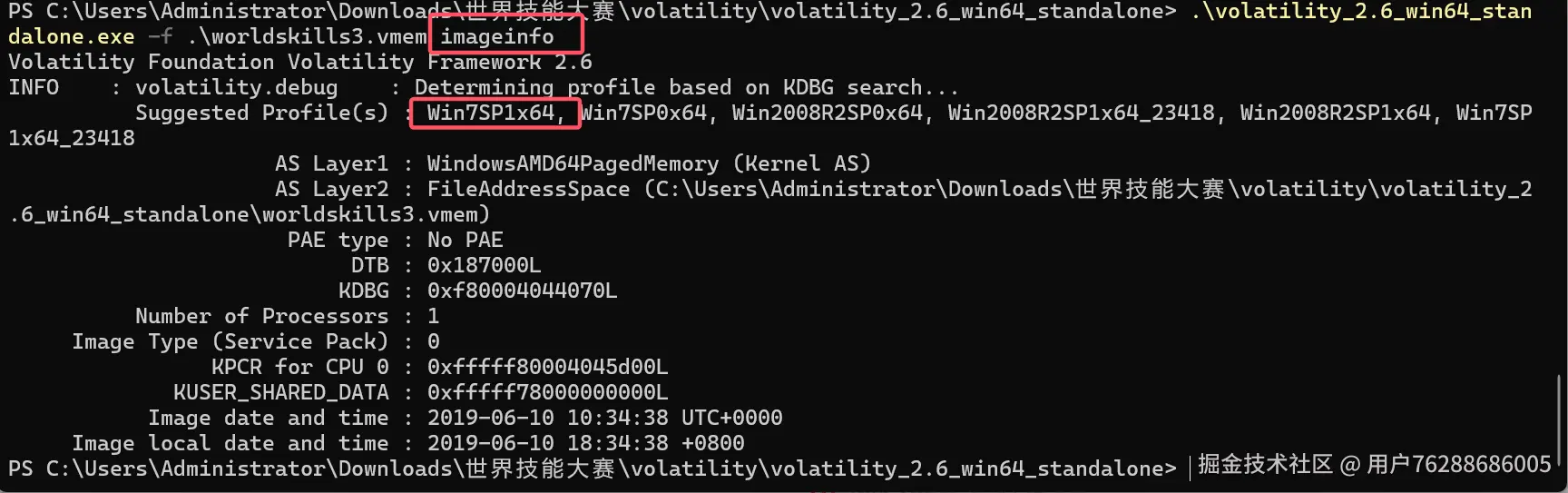
操作系统我们一般取第一个就可以了,接下来就可以输入参数,可以先查看当前内存镜像中的用户
volatility -f 1.vmem --profile=Win7SP1x64 printkey -K "SAM\Domains\Account\Users\Names"
bash
.\volatility_2.6_win64_standalone.exe -f .\worldskills3.vmem --profile=Win7SP1x64 printkey -K "SAM\Domains\Account\Users\Names"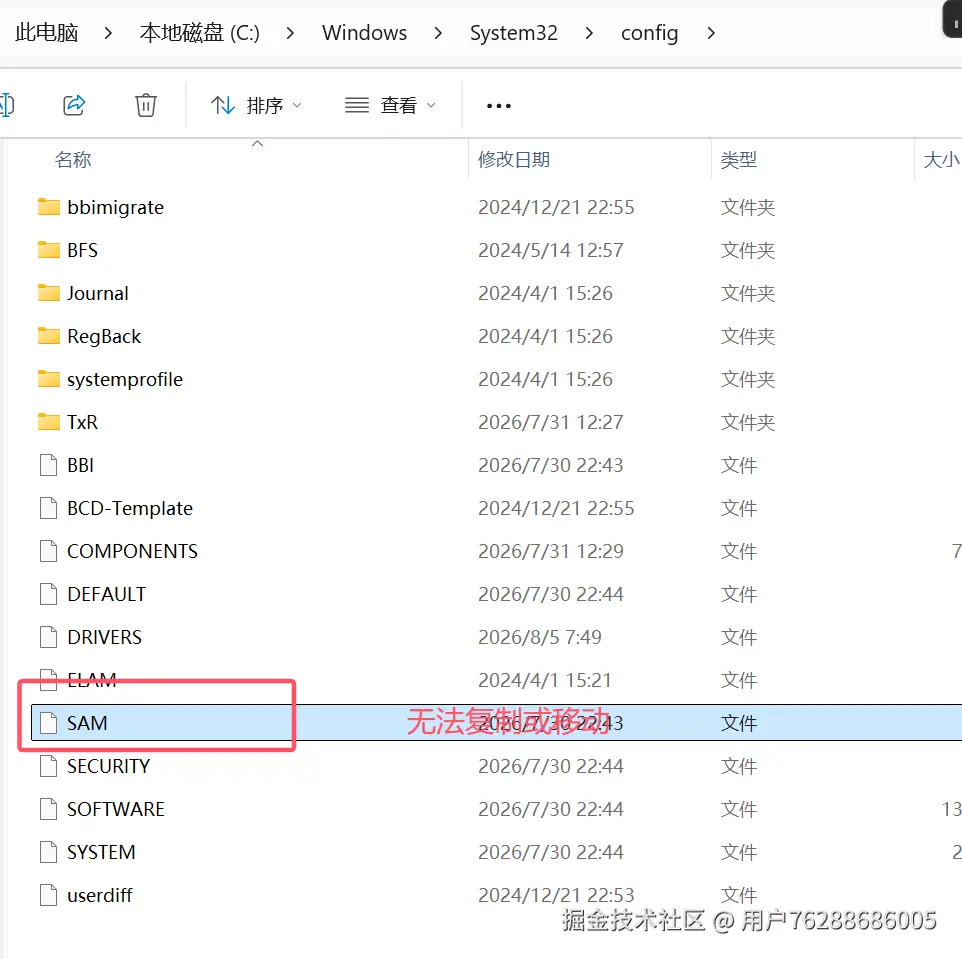
Wim+R输入regedit,快速打开注册表
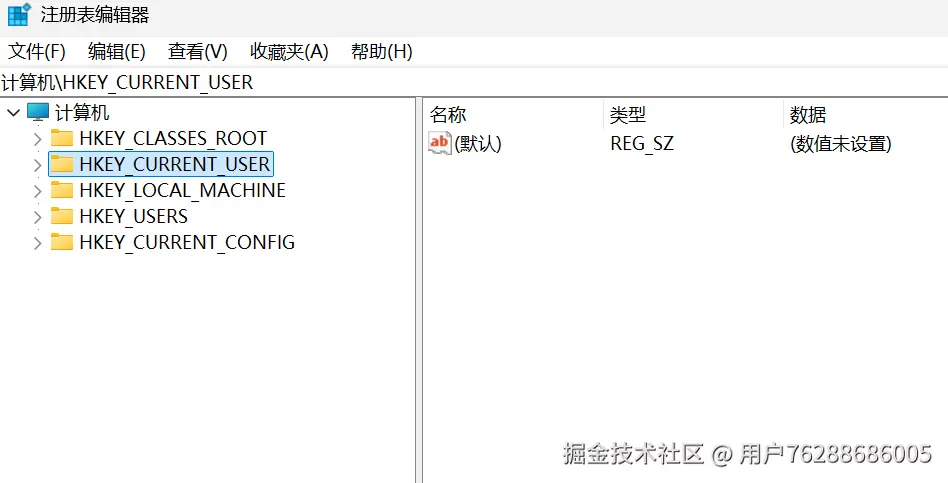
SAM\Domains\Account\Users\Names 详解
该路径为Windows 注册表 SAM 安全账户管理器 核心路径,完整注册表路径:HKEY_LOCAL_MACHINE\SAM\SAM\Domains\Account\Users\Names
一、基础定义与结构
- SAM 简介
SAM(Security Accounts Manager,安全账户管理器),Windows 用来存储本地账户、SID、密码哈希、账户权限 的数据库,对应磁盘文件:C:\Windows\System32\config\SAM。
- Names 目录作用
Names 是用户名→SID 索引映射表:
- 每一个子项名称 = 本地用户名(Administrator、Guest、新建普通账号等);
- 每个项的默认值数据 = 该用户对应的RID(相对标识符);
- 上层
Users文件夹以数字 RID命名子项,存放该用户完整配置(NTLM 哈希、账户状态、登录配置等)。
映射逻辑用户名 (Names 子项) → RID → Users RID → 账户详细信息、密码哈希
示例:
- Names\Administrator 数值为
0x1f4(十进制 500) - 对应 Users\000001F4,即为管理员账户详情。
二、权限特性
- 默认状态:系统内核独占锁定,正常运行时管理员、system 都无法直接读取、修改 SAM 注册表;
- 仅系统进程(lsass.exe)可读写;
- 仅 PE 系统、系统蓝屏快照、内存转储、卷影副本、离线挂载可导出 SAM 文件。
bash
.\volatility_2.6_win64_standalone.exe -f .\worldskills3.vmem --profile=Win7SP1x64 printkey -K "SAM\Domains\Account\Users\Names"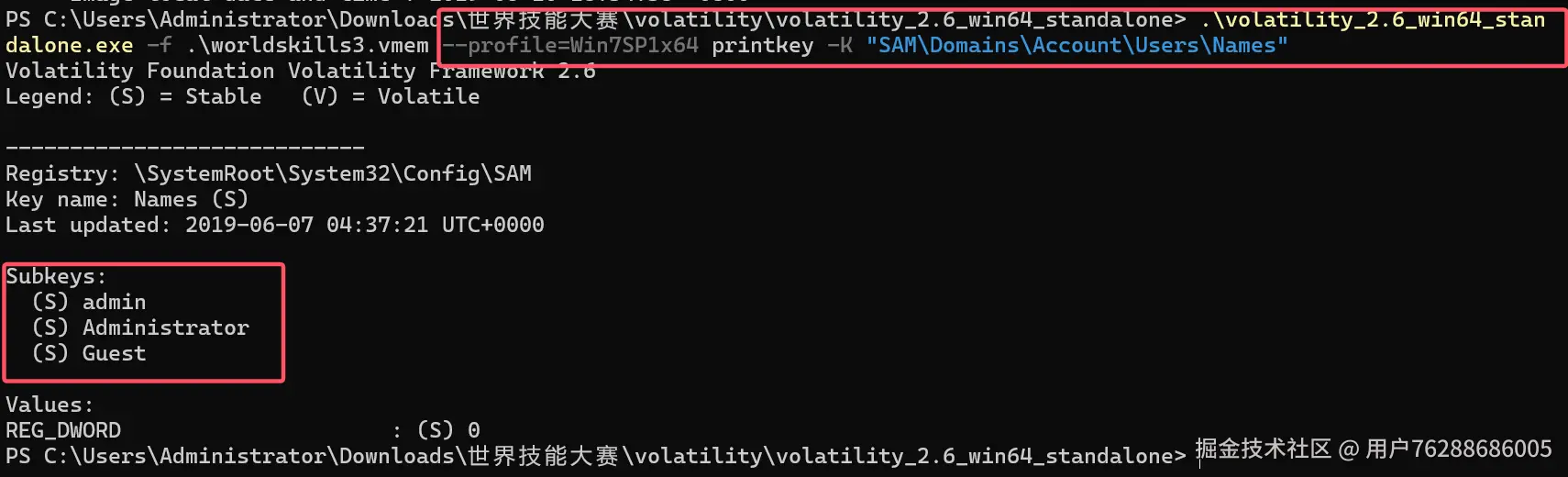
使用hashdump获取sam
volatility -f 1.vmem --profile=Win7SP1x64 hashdump
bash
.\volatility_2.6_win64_standalone.exe -f .\worldskills3.vmem --profile=Win7SP1x64 hashdump
可以通过john工具来进行爆破,但是好像跑不出来结果。应该是设定了强密码。于是只能使用了lasdump命令来查看
.\volatility_2.6_win64_standalone.exe -f .\worldskills3.vmem --profile=Win7SP1x64 lsadump
bash
.\volatility_2.6_win64_standalone.exe -f .\worldskills3.vmem --profile=Win7SP1x64 lsadump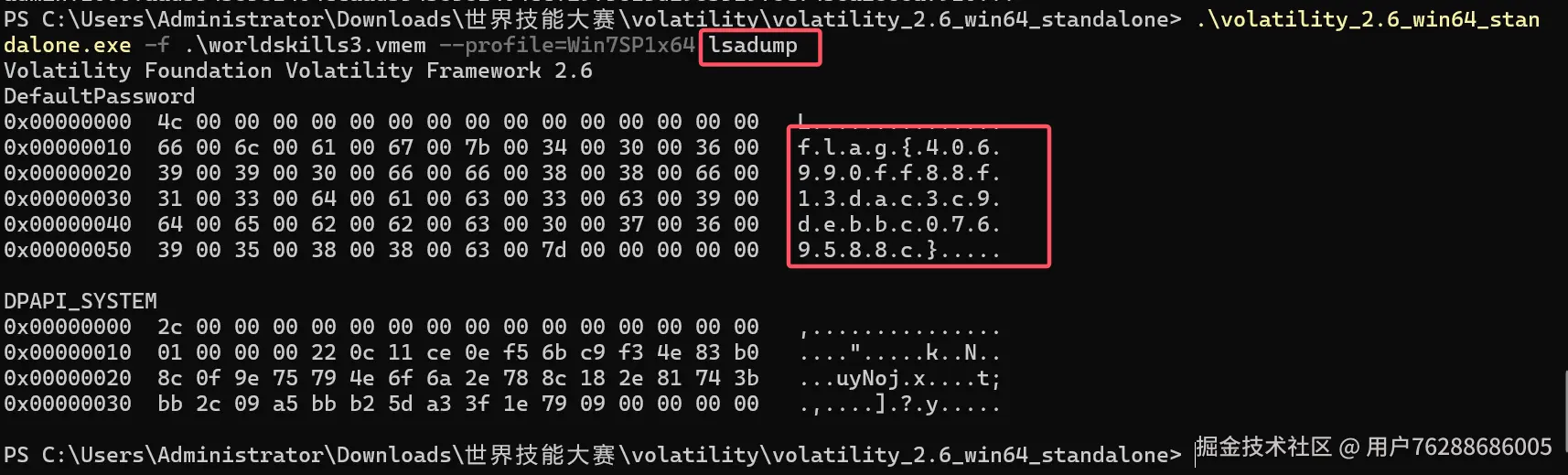
发现flag{406990ff88f13dac3c9debbc0769588c}
bash
flag{406990ff88f13dac3c9debbc0769588c}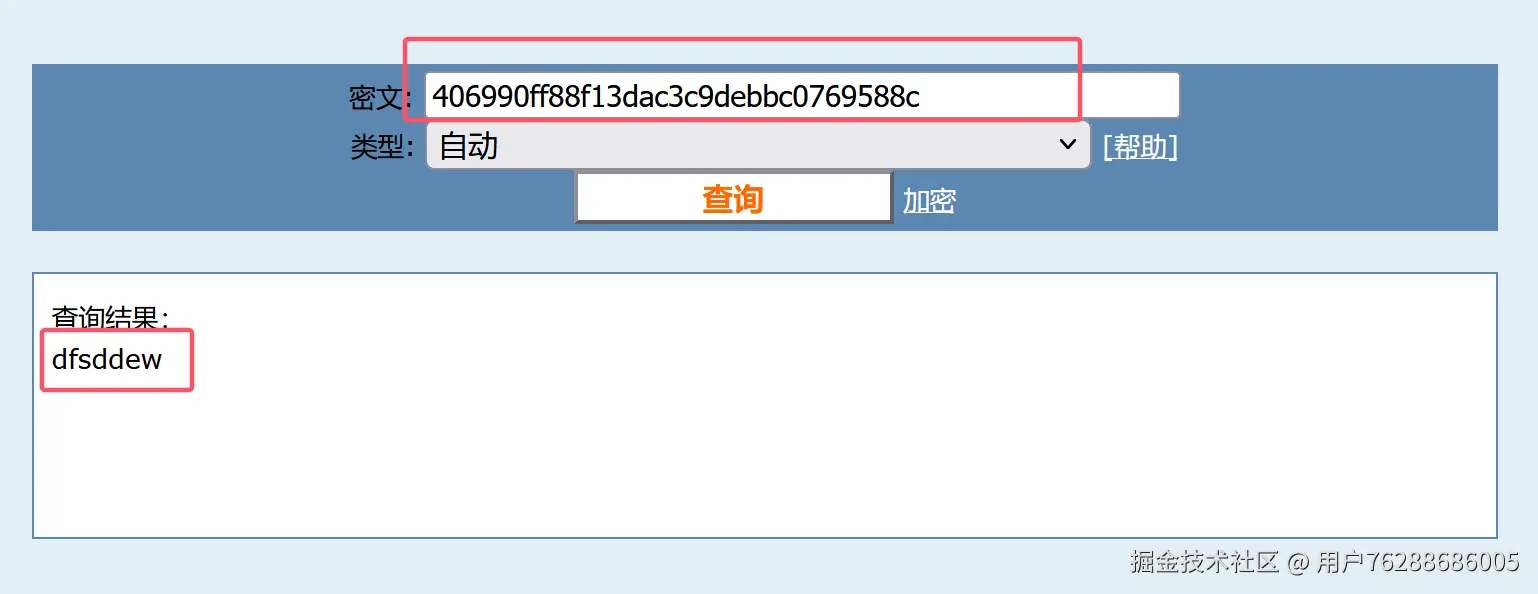
flag{admin.dfsddew}
任务(二) 获ip和主机名是什么?
Netscan 可以查ip
.\volatility_2.6_win64_standalone.exe -f .\worldskills3.vmem --profile=Win7SP1x6 netscan
bash
.\volatility_2.6_win64_standalone.exe -f .\worldskills3.vmem --profile=Win7SP1x6 netscan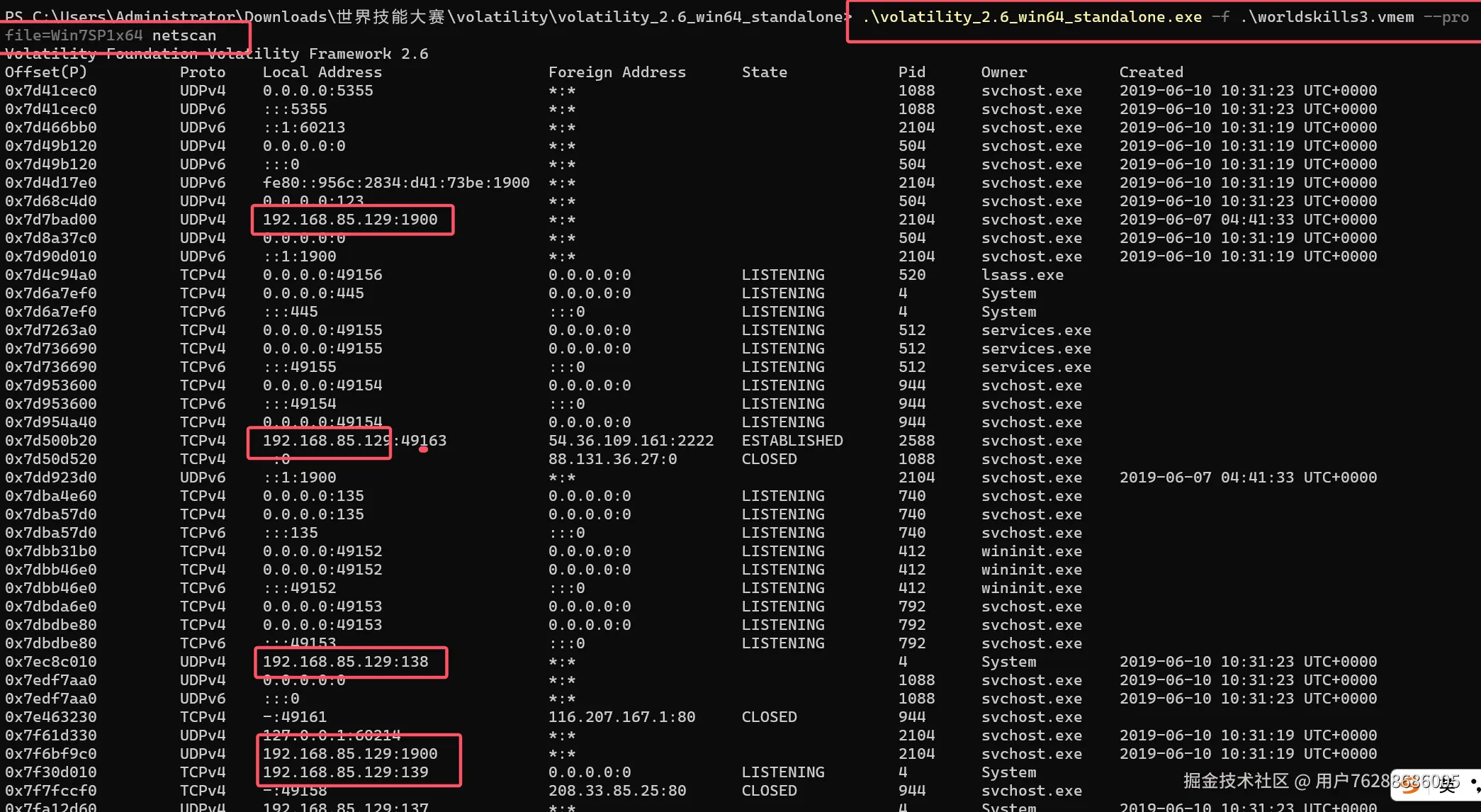
IP:192.168.85.129
主机名需要通过查询注册表,先用hivelist
Volatility -f 1.vmem --profile=Win7SP1x64 hivelist
bash
主机名需要通过查询注册表,先用hivelist

.\volatility_2.6_win64_standalone.exe -f .\worldskills3.vmem --profile=Win7SP1x6 netscan hivelist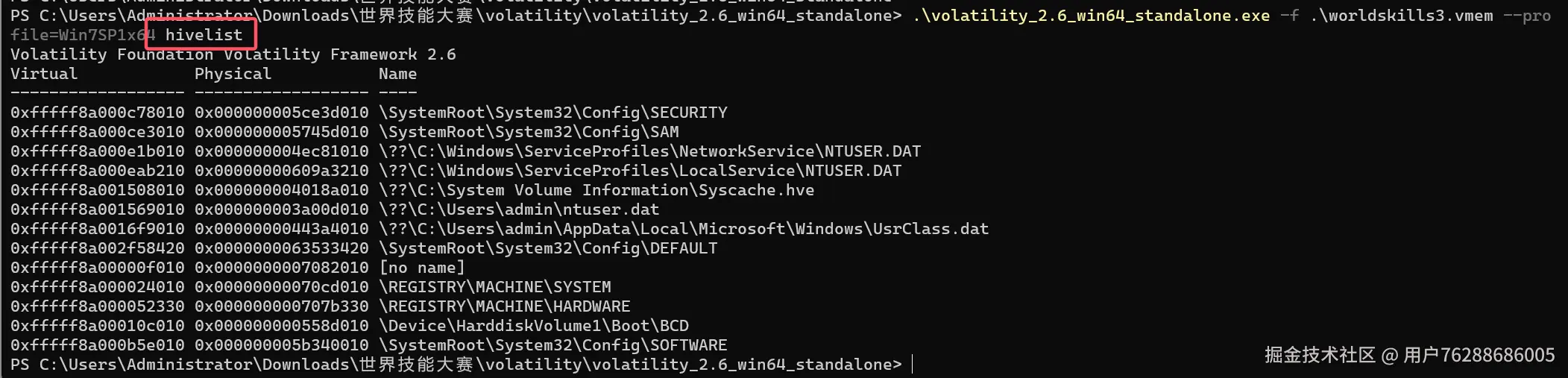
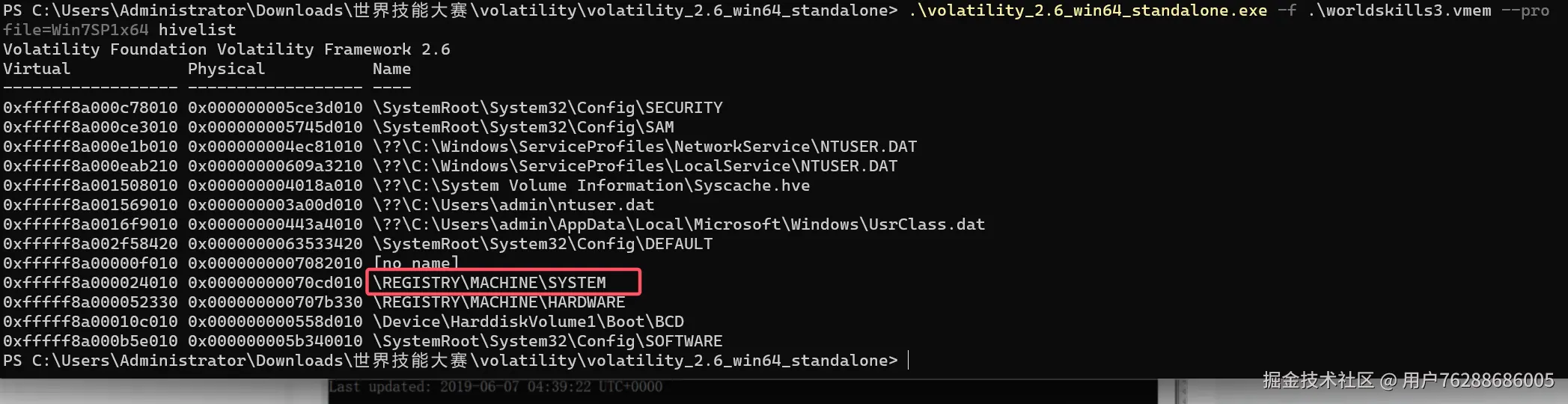
然后我们需要一步一步去找键名
主机名需要通过查询注册表,先用hivelist
.\volatility_2.6_win64_standalone.exe -f .\worldskills3.vmem --profile=Win7SP1x6 netscan -o 0xfffff8a000024010 printkey
bash
主机名需要通过查询注册表,先用hivelist

.\volatility_2.6_win64_standalone.exe -f .\worldskills3.vmem --profile=Win7SP1x6   -o 0xfffff8a000024010 printkey
继续
volatility -f 1.vmem --profile=Win7SP1x64 -o 0xfffff8a000024010 printkey -K "ControlSet001\Control "
bash
继续

.\volatility_2.6_win64_standalone.exe -f .\worldskills3.vmem --profile=Win7SP1x  -o 0xfffff8a000024010 printkey -K "ControlSet001\Control "

volatility -f 1.vmem --profile=Win7SP1x64  -o 0xfffff8a000024010 printkey -K "ControlSet001\Control "

volatility -f 1.vmem --profile=Win7SP1x64 -o 0xfffff8a000024010 printkey -K "ControlSet001\Control\ComputerName"

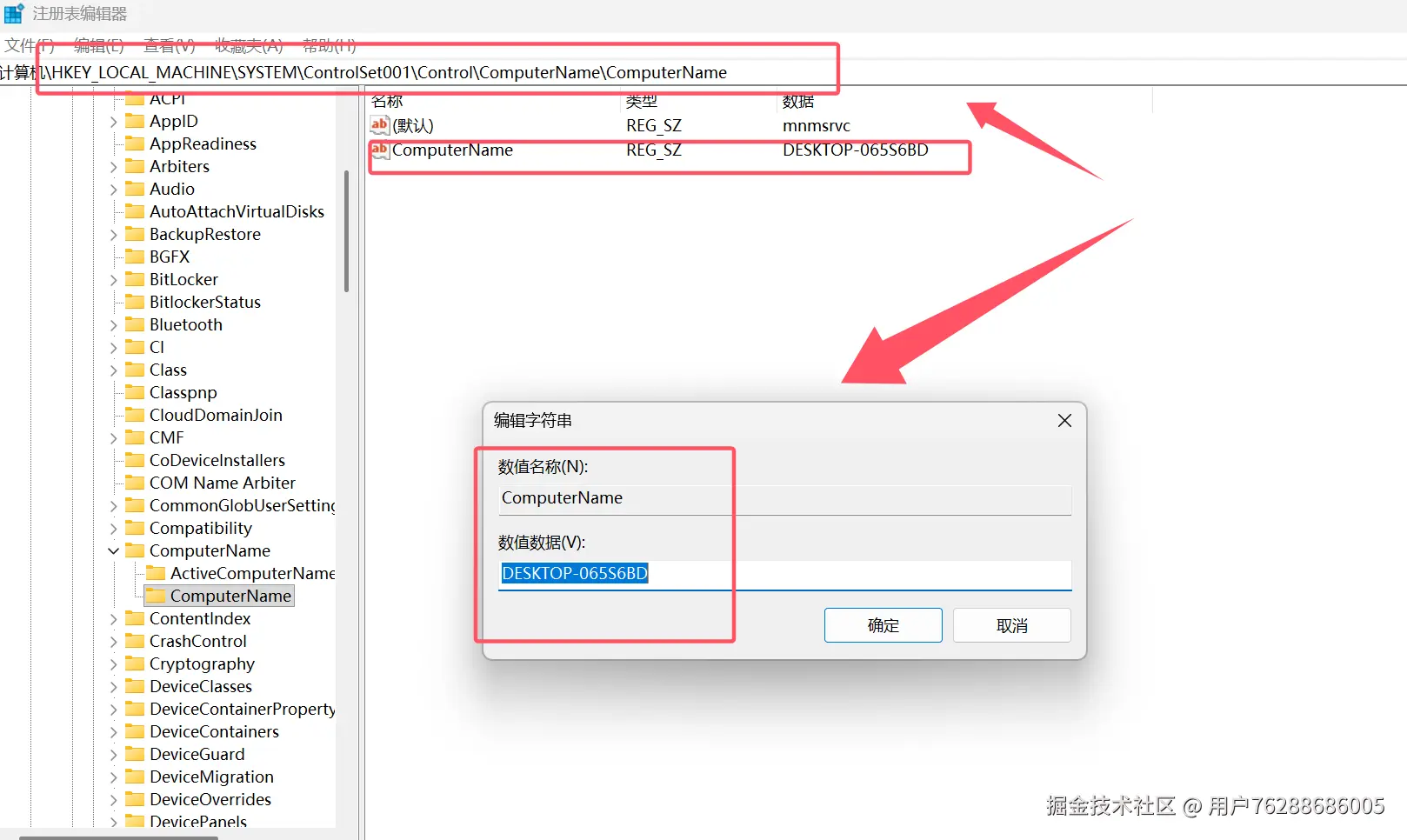
volatility -f 1.vmem --profile=Win7SP1x64 -o 0xfffff8a000024010 printkey -K "ControlSet001\Control\ComputerName\ComputerName"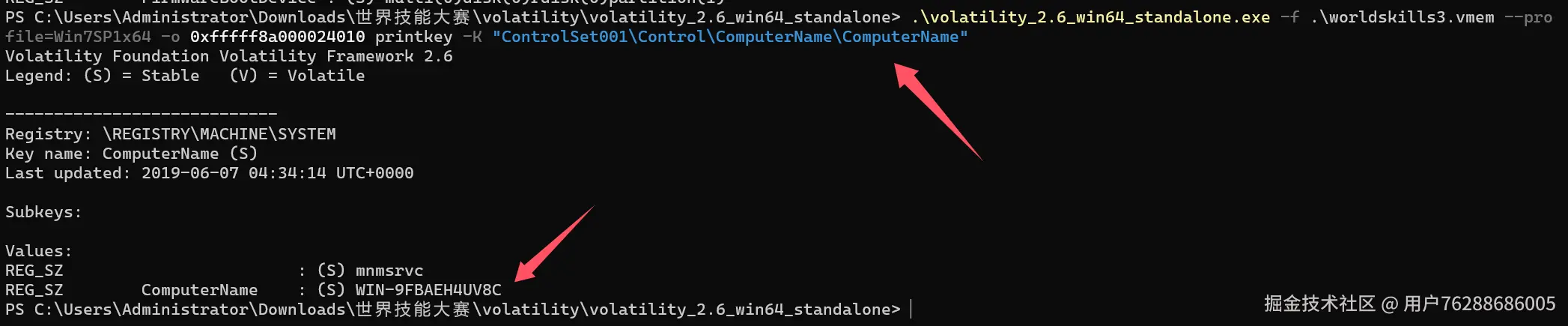
bash
ComputerName : (S) WIN-9FBAEH4UV8C得到主机名WIN-9FBAEH4UV8C
也可以直接通过 hivedump查询相应的键名 但比较慢
volatility -f 1.vmem --profile=Win7SP1x64 hivedump -o 0xfffff8a000024010 > system.txt
任务(三)获取桌面上的 flag.txt中的文件内容是什么?(40分)
·桌面上存放着一个flag文件,请获取flag文件中的内容。
bash
.\volatility_2.6_win64_standalone.exe -f .\worldskills3.vmem --profile=Win7SP1x64 filescan |grep flag
下载下来
bash
.\volatility_2.6_win64_standalone.exe -f .\worldskills3.vmem --profile=Win7SP1x64 dumpfiles -Q 0x000000007f1b6c10 -n --dump-dir=./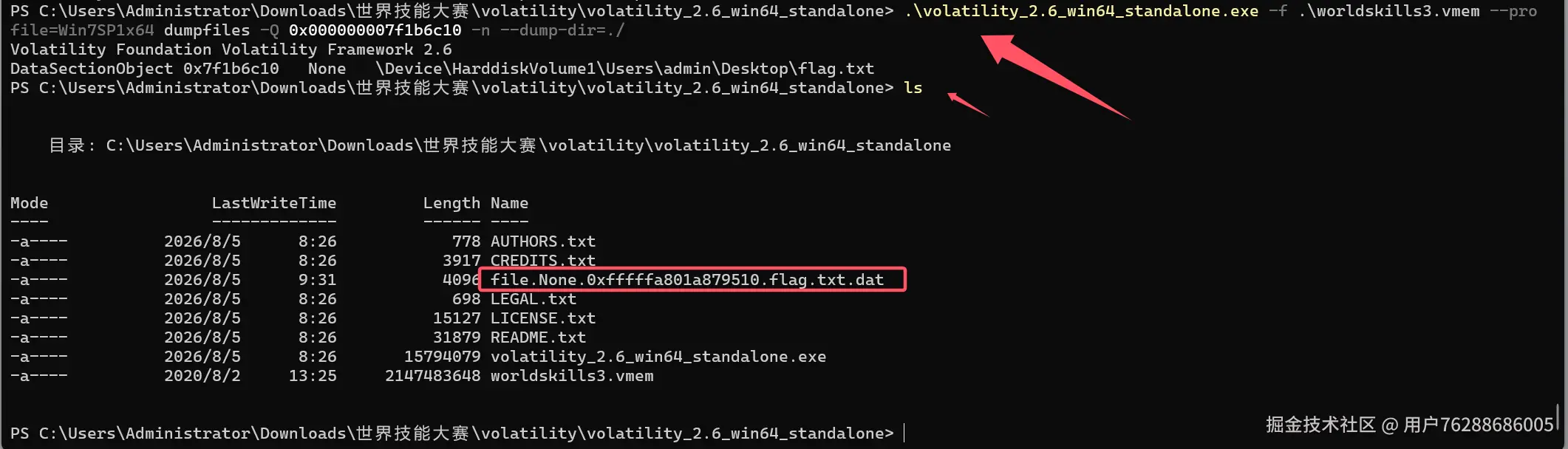
bash
查看
type .\file.None.0xfffffa801a879510.flag.txt.dat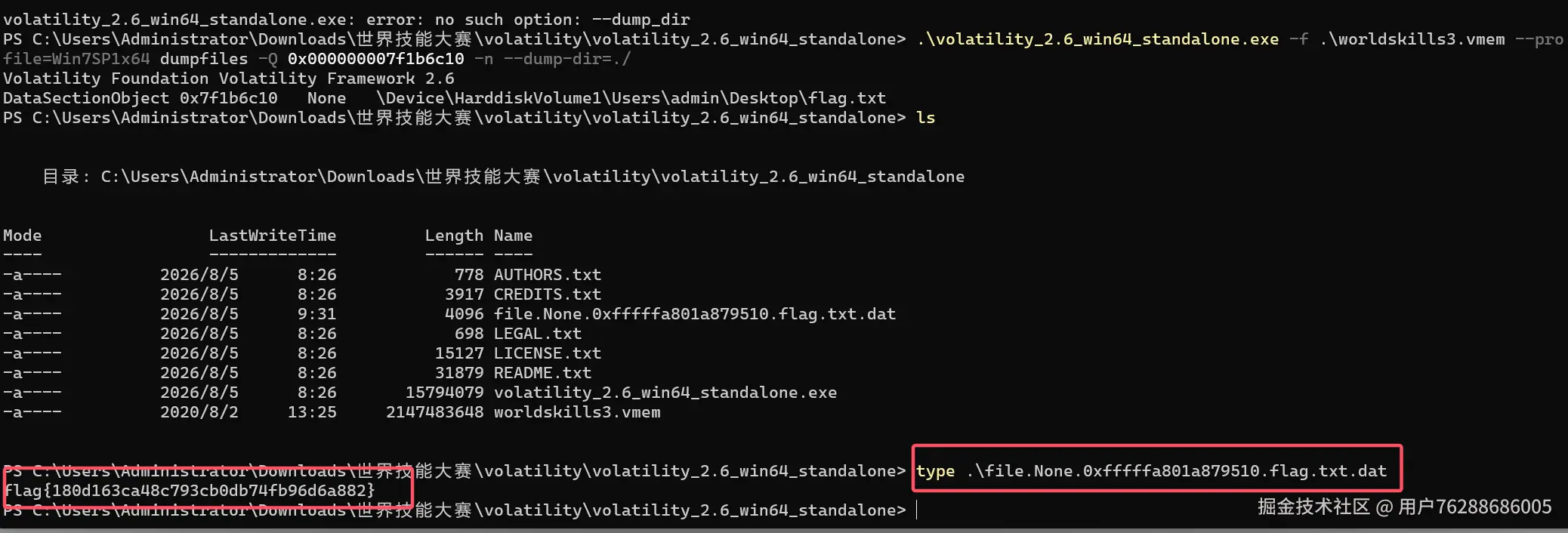
flag{180d163ca48c793cb0db74fb96d6a882};
任务(四) 服务器中存在一个挖矿病毒 矿池地址是?(10分)
·当前系统中存在挖矿进程,请获取矿池地址 以flag的形式提交
以flag形式提交flag{ip:端口}
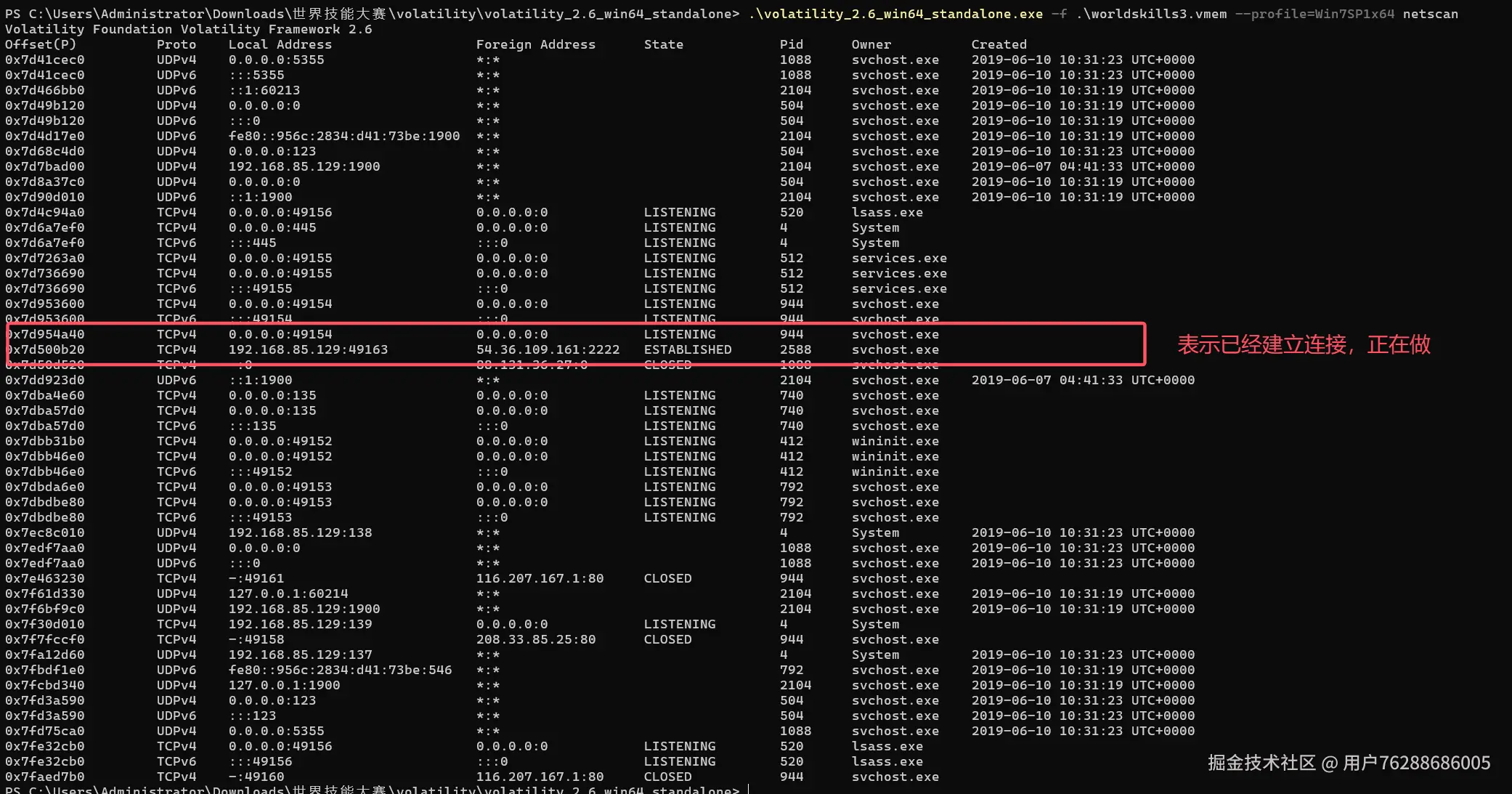
Flag{54.36.109.161:2222}
bash
0x7d500b20 TCPv4 192.168.85.129:49163 54.36.109.161:2222 ESTABLISHED 2588 svchost.exeFlag{54.36.109.161:2222}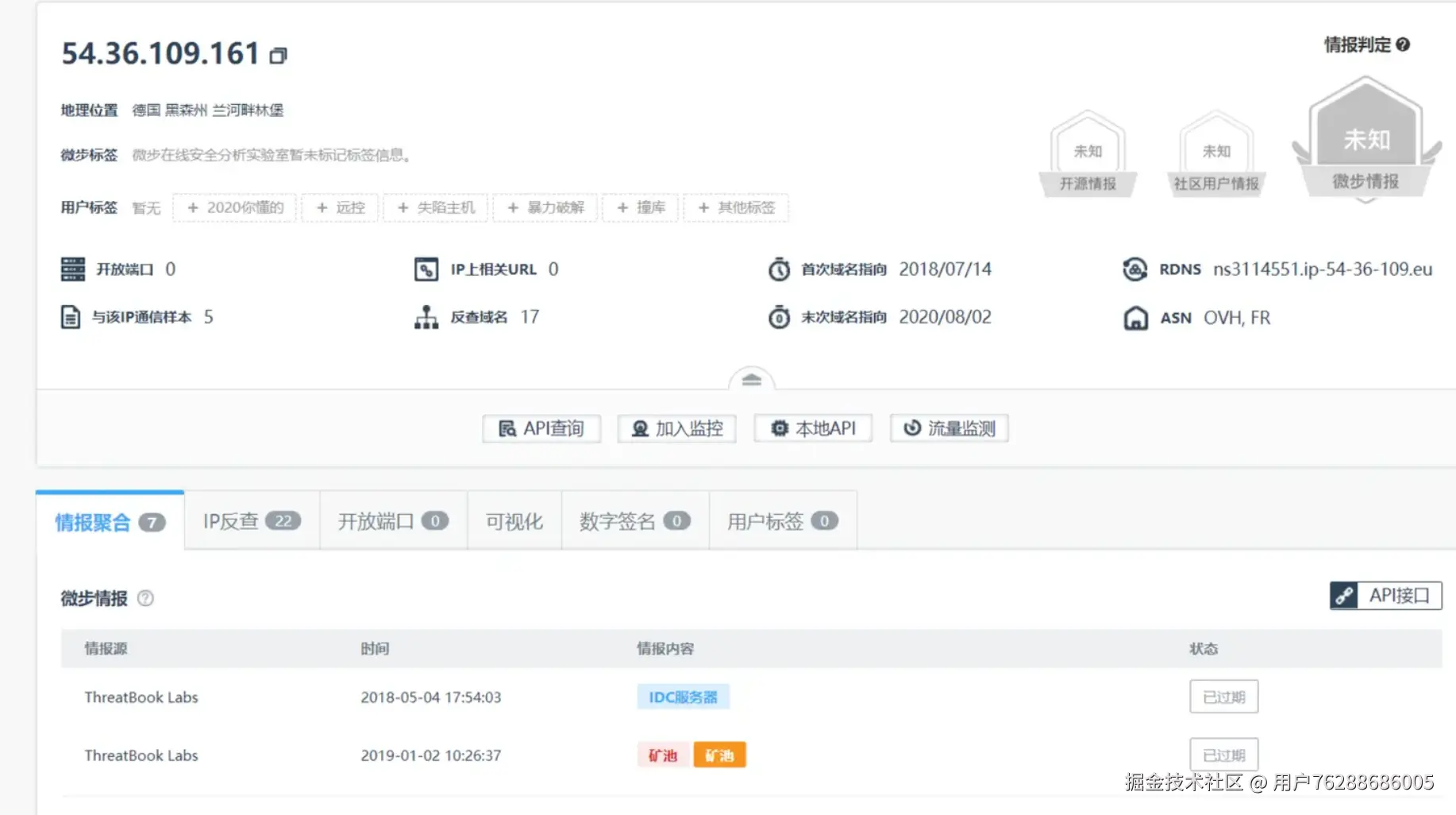
任务(五)恶意代码在系统中注册了服务 服务名是什么?(20分)
·恶意进程在系统中注册了服务,请获取服务名 以flag的形式提交
以flag形式提交flag{服务名}
(限制提交三次)
服务扫描
bash
.\volatility_2.6_win64_standalone.exe -f .\worldskills3.vmem --profile=Win7SP1x64 svcscan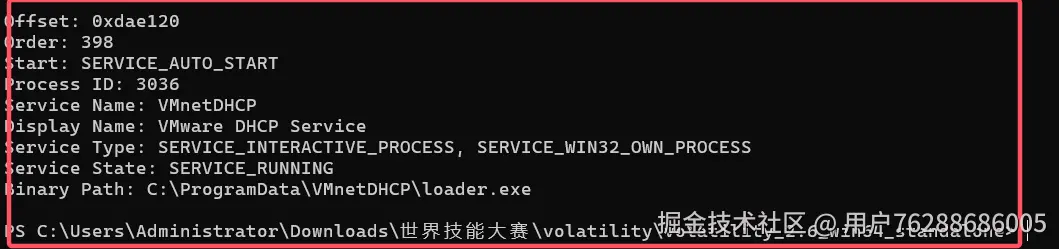
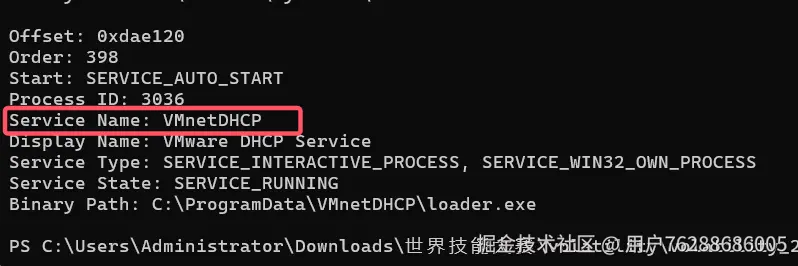
任务(六) 获取恶意代码的进程名pid。(30分)
·初步判断系统中存在系统存在恶意代码,获取恶意进程名和PID 如果存在多个进程,以pid大小进行排列
以flag的形式提交 flag{恶意进程1+pid(PID小);恶意进程2(PID)恶意进程3(PID大))
Flag{svchost.exe 2588 loader.exe 3036}
bash
.\volatility_2.6_win64_standalone.exe -f .\worldskills3.vmem --profile=Win7SP1x64 pslist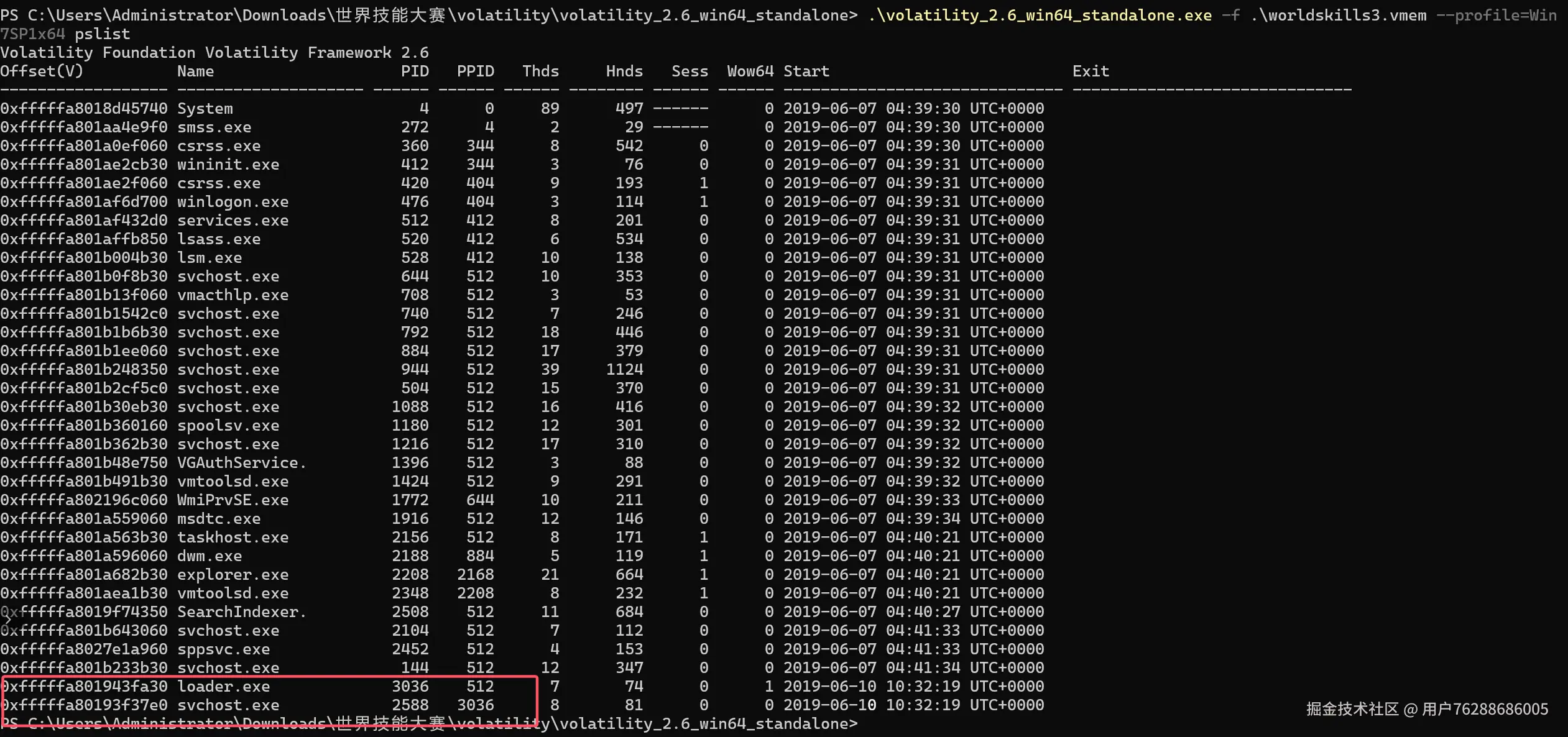
任务(七) 病毒在自我删除时 执行的命令是什么?(30分)
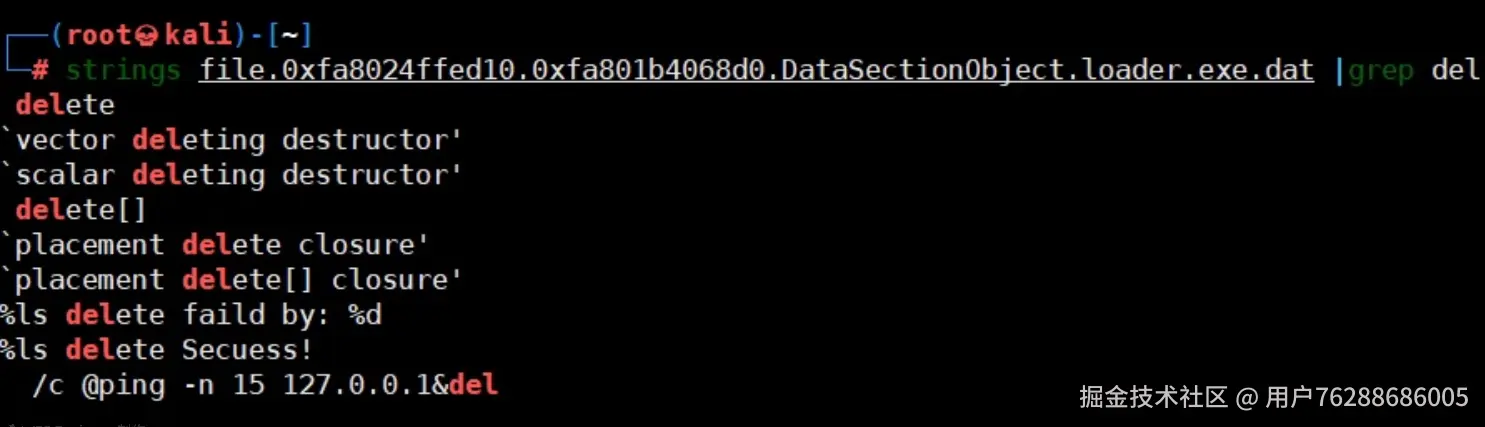
·病毒进入系统后会删除原始文件,请获取文件删除时执行的命令;以flag的形式提交 flag{命令的md5值} ;提示 路径信息用*代替 不带cmd.exe
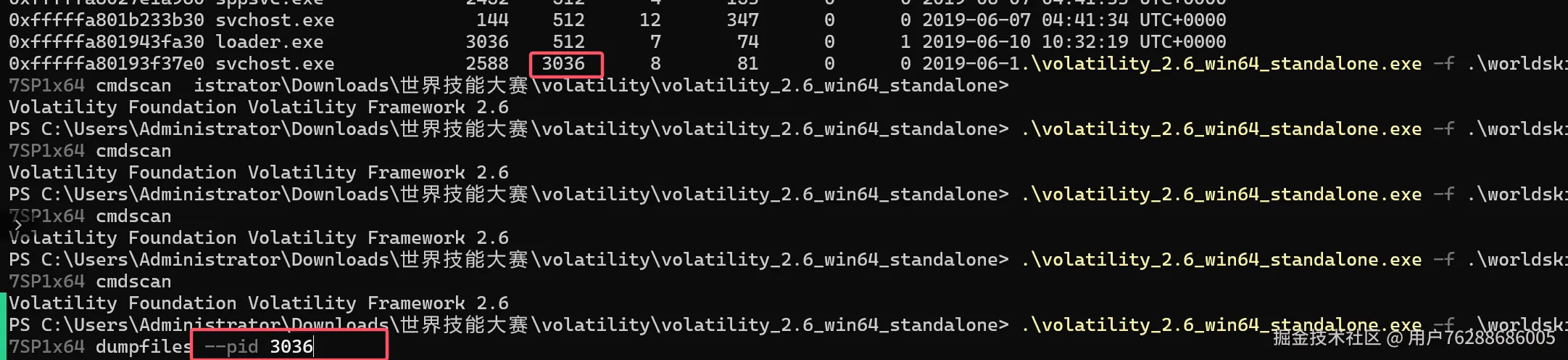

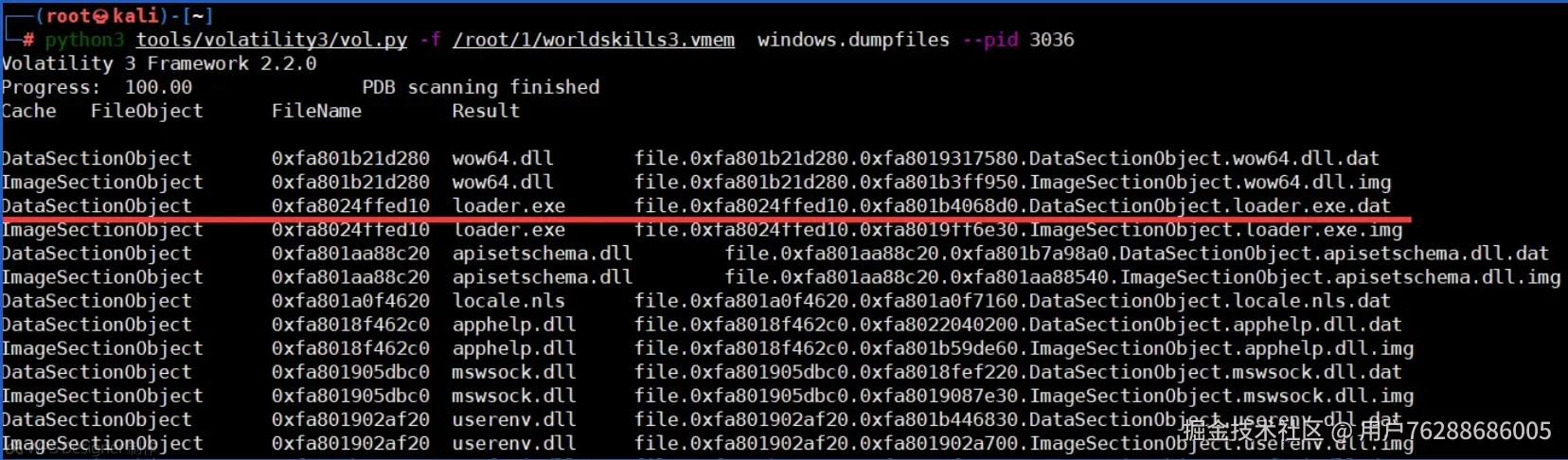
#导出病毒数据 默认导出了大量数据,而我们只需要关键信息即可
python3 tools/volatility3/vol.py -f /root/1/worldskills3.vmem windows.dumpfiles --pid 3036