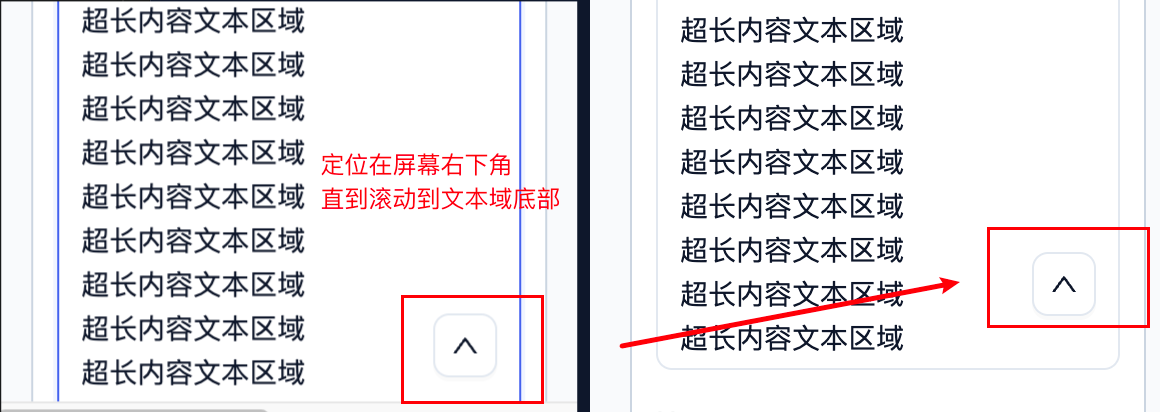
在后台系统、配置页面、编辑器等场景里,经常会遇到一个很长的文本域。文本域展开后高度可能远超一屏,用户滚动到底部后,如果想回到文本域顶部,体验会比较差。
这时可以在文本域区域内加一个"返回顶部"按钮。比较理想的效果是:
- 文本域顶部还在可视区域内时,不显示按钮
- 文本域顶部滚出可视区域后,显示按钮
- 文本域底部还没进入可视区域时,按钮固定在屏幕右下角
- 文本域底部进入可视区域后,按钮贴在文本域底部右下角
- 点击按钮后,滚动回文本域顶部
下面介绍一种通用实现思路。
核心思路
不要把按钮简单地绝对定位到文本域底部。
如果文本域非常长,按钮会出现在真实底部,用户滚动到中间时根本看不到它。
更好的方式是:
- 记录文本域顶部元素
- 记录文本域整体区域
- 记录页面可滚动容器
- 监听滚动
- 根据当前可视区域计算按钮位置
- 使用
position: fixed让按钮浮动在当前视图中 - 当文本域底部进入视图后,让按钮跟随文本域底部移动
基础结构
tsx
import { useEffect, useRef, useState } from 'react';

function LongTextArea() {
  const scrollContainerRef = useRef<HTMLDivElement | null>(null);
  const textAreaTopRef = useRef<HTMLDivElement | null>(null);
  const textAreaWrapperRef = useRef<HTMLDivElement | null>(null);
  const buttonRef = useRef<HTMLButtonElement | null>(null);

  const [showBackTop, setShowBackTop] = useState(false);
  const [buttonStyle, setButtonStyle] = useState<React.CSSProperties>({});

  return (
    <div ref={scrollContainerRef} className="page-scroll-container">
      <div ref={textAreaTopRef}>文本域标题</div>

      <div ref={textAreaWrapperRef} className="textarea-wrapper">
        <textarea className="textarea" />

        {showBackTop ? (
          <button
            ref={buttonRef}
            style={buttonStyle}
            onClick={() => {
              textAreaTopRef.current?.scrollIntoView({
                behavior: 'smooth',
                block: 'start',
              });
            }}
          >
            ↑
          </button>
        ) : null}
      </div>
    </div>
  );
}
滚动计算逻辑
tsx
useEffect(() => {
  const updateButtonPosition = () => {
    const containerRect = scrollContainerRef.current?.getBoundingClientRect();
    const topRect = textAreaTopRef.current?.getBoundingClientRect();
    const wrapperRect = textAreaWrapperRef.current?.getBoundingClientRect();

    if (!containerRect || !topRect || !wrapperRect) {
      setShowBackTop(false);
      return;
    }

    const visibleTop = containerRect.top;
    const visibleRight = Math.min(wrapperRect.right, containerRect.right);
    const visibleBottom = Math.min(wrapperRect.bottom, containerRect.bottom);

    const wrapperVisible =
      wrapperRect.bottom > containerRect.top &&
      wrapperRect.top < containerRect.bottom;

    const shouldShow = topRect.top < visibleTop && wrapperVisible;

    setShowBackTop(shouldShow);

    const nextStyle: React.CSSProperties = {
      position: 'fixed',
      right: window.innerWidth - visibleRight + 12,
      bottom: window.innerHeight - visibleBottom + 12,
      zIndex: 5,
    };

    setButtonStyle(nextStyle);

    const button = buttonRef.current;
    if (button) {
      button.style.position = 'fixed';
      button.style.right = `${nextStyle.right}px`;
      button.style.bottom = `${nextStyle.bottom}px`;
      button.style.zIndex = '5';
    }
  };

  updateButtonPosition();

  window.addEventListener('scroll', updateButtonPosition, true);
  window.addEventListener('resize', updateButtonPosition);

  return () => {
    window.removeEventListener('scroll', updateButtonPosition, true);
    window.removeEventListener('resize', updateButtonPosition);
  };
}, []);
为什么要直接更新 DOM style
如果只用 React state 更新按钮位置,快速滚动时可能会出现一点滞后:滚动停止后按钮才移动到正确位置。
为了让按钮在滚动过程中实时跟随,可以在计算位置后直接写入按钮 DOM 的样式:
tsx
const button = buttonRef.current;

if (button) {
  button.style.right = `${nextRight}px`;
  button.style.bottom = `${nextBottom}px`;
}
state 仍然可以保留,用来提供初始样式和控制显示隐藏。
关键点总结
- 按钮不要放在文本域真实底部,否则长内容中途看不到
- 使用
position: fixed,让按钮始终在当前视图里 - 用文本域整体区域和滚动容器的交集计算按钮位置
- 文本域底部进入视图后,按钮自然贴近底部
- 滚动事件建议使用捕获阶段:
addEventListener('scroll', fn, true) - 如果页面顶部有固定栏,需要控制按钮的
z-index,避免遮挡顶部操作区
这种方案适合任何"超长编辑区域 + 返回顶部"的交互,不依赖具体业务,也不要求文本域本身出现内部滚动条。