注:本文为 "USB" 相关合辑。
英文引文,机翻未校。
中文引文,略作重排。
如有内容异常,请看原文。
USB 接口标识系统
USB(Universal Serial Bus)接口作为现代电子设备中最普遍的连接标准,其物理接口旁的各类标识承载了供电能力、协议版本及功能特性等关键技术参数。本文依据 USB Implementers Forum(USB-IF) 官方规范及相关技术标准,对常见 USB 接口标识系统解析。
一、增强供电标识:"+"号
USB 接口旁的"+"号表示该接口具备增强供电能力。
标准 USB 2.0 下游端口(Standard Downstream Port, SDP)的额定输出电流为 500 mA,USB 3.0 SDP 为 900 mA。对于移动硬盘、USB 光驱等功耗较高的外设,标准接口可能因供电不足而无法正常驱动。标有"+"号的接口通常表示其支持 USB Battery Charging 1.2(BC 1.2) 规范中的充电下行端口(Charging Downstream Port, CDP)或专用充电端口(Dedicated Charging Port, DCP),可提供 1.5 A 或更高的输出电流。具体数值取决于主板设计及厂商实现,并非固定值。

应用提示:若移动硬盘在标准 USB 接口上无法识别或频繁掉线,可尝试更换至标有"+"号的增强供电接口。
二、SuperSpeed 标识:"SS"、"SS10"、"SS20"
USB 接口旁的 "SS" 标识代表 SuperSpeed 。该标识由传输速率决定,而非协议的市场命名版本。
USB-IF 在 2013 年与 2017 年对命名体系进行了两次整合,将旧有名称并入新的规范框架,造成了"同速不同名"的混乱局面:
| 原始规范(2008) | 2013 年重命名 | 2017 年重命名 | 传输速率 | 推荐标识 |
|---|---|---|---|---|
| USB 3.0 | USB 3.1 Gen 1 | USB 3.2 Gen 1 | 5 Gbps | SS |
| --- | USB 3.1 Gen 2 | USB 3.2 Gen 2 | 10 Gbps | SS10 |
| --- | --- | USB 3.2 Gen 2×2 | 20 Gbps | SS20 |
命名演变
- USB 3.0(2008 年发布)最初作为独立版本推出,速率为 5 Gbps。
- USB 3.1 (2013 年发布)引入了 10 Gbps 速率层。USB-IF 将原有的 USB 3.0 重命名为 USB 3.1 Gen 1 ,而将新的 10 Gbps 标准命名为 USB 3.1 Gen 2。
- USB 3.2 (2017 年发布)引入了双通道 20 Gbps 速率。USB-IF 再次重命名:USB 3.1 Gen 1 变为 USB 3.2 Gen 1 ,USB 3.1 Gen 2 变为 USB 3.2 Gen 2 ,新增的 20 Gbps 双通道标准被命名为 USB 3.2 Gen 2×2。
因此,"SS" 标识仅表示 5 Gbps 的 SuperSpeed 物理层 ,与接口在市场宣传中被称为 USB 3.0、USB 3.1 Gen 1 还是 USB 3.2 Gen 1 无关------三者本质上是同一规格的不同命名。详细信息可参考 Kingston Technology 的技术说明。
实际判断建议 :在设备规格参数中,应关注 "Gen X" 或具体速率数值(Gbps),而非单纯的"USB 3.x"版本号;在物理接口上,则以 SS / SS10 / SS20 标识为准。
三、闪电标识的区分
闪电标识的含义高度依赖物理接口形态,需根据具体形态及所在接口类型加以区分。
3.1 关机充电功能(Always On USB / Sleep-and-Charge)
在笔记本电脑的 USB Type-A 接口旁,标有单纯闪电符号(⚡,无附加箭头)通常表示该接口支持关机充电功能。即:在笔记本处于关机或睡眠状态时,该接口仍可利用笔记本电池或外接电源为移动设备供电。

注意 :关机充电标识并非全行业统一标准。部分厂商(如联想)采用黄色或红色舌片标识,部分厂商采用电池图标或 "+" 符号,也有厂商仅标注 "Always On USB" 或 "PowerShare" 文字。
3.2 雷电(Thunderbolt)协议
若 USB Type-C 接口旁标有闪电叠加向下箭头(⚡ + ↓) ,则表示该接口为 Thunderbolt 3 或 Thunderbolt 4 接口。
| 特性 | Thunderbolt 3 | Thunderbolt 4 |
|---|---|---|
| 物理接口 | USB Type-C | USB Type-C |
| 最大带宽 | 40 Gbps | 40 Gbps |
| 供电功率 | 最高 100 W(部分设备可达更高) | 最高 100 W |
| 视频输出 | 双路 4K@60 Hz 或单路 5K | 双路 4K@60 Hz 或单路 8K |
| 兼容协议 | USB 3.1 Gen 2、DisplayPort 1.2 | USB4、DisplayPort 1.4 |

详细信息可参考 Intel Thunderbolt 技术概述。
重要区分:
- Thunderbolt 1 / 2 采用 Mini DisplayPort 物理接口,其标识亦为闪电符号(无箭头),多见于 2011--2015 年苹果 MacBook 系列。
- Thunderbolt 3 / 4 统一采用 USB Type-C 接口,其认证标识为闪电叠加向下箭头。
- 部分笔记本电脑配备的 Thunderbolt 3 接口为"半速"版本,带宽为 20 Gbps,而非标准的 40 Gbps。
四、USB 接口颜色编码
USB Type-A 接口的内部舌片颜色是识别协议版本的直观参考方式,但该颜色编码仅为 USB-IF 的推荐性规范,并非强制性标准,部分厂商可能未严格遵循。
| 颜色 | 对应协议 | 说明 |
|---|---|---|
| 白色 / 黑色 | USB 1.x / USB 2.0 | 标准速率 |
| 蓝色 | USB 3.0 / USB 3.1 Gen 1 / USB 3.2 Gen 1 | 5 Gbps |
| 蓝绿色(Teal) | USB 3.1 Gen 2 / USB 3.2 Gen 2 | 10 Gbps |
| 黄色 | 关机充电 / 增强供电 | 常见于联想等厂商笔记本 |
| 红色 | 增强供电 / 充电专用 | 常见于华硕等厂商,表示高电流输出 |

注意:颜色编码仅作辅助参考,在判断接口协议时,应以接口标识(如 SS、SS10)和设备规格参数为准。
五、USB Type-C 的协议复杂性
USB Type-C 仅定义了物理接口形态(24 针双面可插拔设计),并不等同于特定的数据传输协议。同一 Type-C 接口可能基于以下不同协议:
- USB 2.0:480 Mbps,仅用于充电或低速数据传输;
- USB 3.0 / USB 3.1 Gen 1 / USB 3.2 Gen 1:5 Gbps;
- USB 3.1 Gen 2 / USB 3.2 Gen 2:10 Gbps;
- USB 3.2 Gen 2×2:20 Gbps;
- USB4:基于 Thunderbolt 3 协议,最高 40 Gbps;
- Thunderbolt 3 / Thunderbolt 4:40 Gbps,支持 PCIe、DisplayPort 隧道。
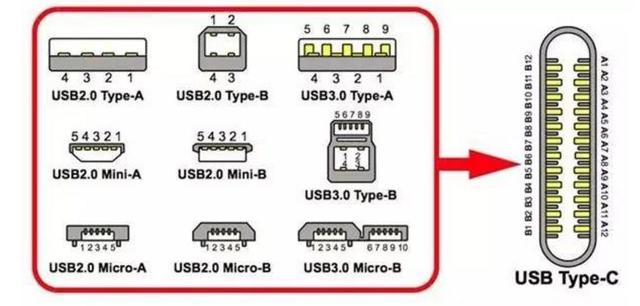
USB Type-C 的完整规范可参考 USB-IF USB Type-C 规范页面。
结论:USB Type-C 接口不一定是雷电接口;但 Thunderbolt 3/4 接口必然兼容 USB 协议(至少支持 USB 3.1 Gen 2),可视为 Type-C 接口的功能扩展形态。
六、USB 通用符号
USB Type-A 接口旁的 三叉戟符号(🔱)为 USB 的通用标识,表示该接口遵循 USB 标准规范,并不特指某一具体协议版本。

七、USB 接口标识汇总
| 标识 | 含义 | 适用场景与说明 |
|---|---|---|
| + | 增强供电(通常 ≥ 1 A,具体因厂商而异) | 移动硬盘、USB 光驱等大功率外设;部分厂商遵循 USB BC 1.2 规范,可提供 1.5 A |
| SS | USB 3.0 / USB 3.1 Gen 1 / USB 3.2 Gen 1(5 Gbps) | 高速数据传输;三者速率相同,命名因 USB-IF 规范迭代所致 |
| SS10 | USB 3.1 Gen 2 / USB 3.2 Gen 2(10 Gbps) | 更高速数据传输 |
| SS20 | USB 3.2 Gen 2×2(20 Gbps) | 需接口与线缆同时支持 |
| ⚡(单纯闪电,无附加箭头) | 关机充电(Always On USB)或 Thunderbolt 1/2 | 在笔记本 USB 接口旁通常表示关机充电,但并非全行业统一标准;在 Mini DisplayPort 接口上则表示 Thunderbolt 1/2 |
| ⚡ + ↓(闪电叠加向下箭头) | Thunderbolt 3 / Thunderbolt 4 | 仅适用于 USB Type-C 物理接口;Thunderbolt 4 向下兼容 Thunderbolt 3,带宽均为 40 Gbps |
| 蓝色舌片 | USB 3.0 / USB 3.1 Gen 1 / USB 3.2 Gen 1(5 Gbps) | 行业内最广泛采用的 USB 3.x 识别方式 |
| 蓝绿色(Teal)舌片 | USB 3.1 Gen 2 / USB 3.2 Gen 2(10 Gbps) | USB-IF 官方推荐配色,实际产品中并非所有厂商严格遵循 |
| 黄色舌片 | 关机充电 / 增强供电 | 常见于联想等厂商笔记本 |
| 红色舌片 | 增强供电 / 充电专用 | 常见于华硕等厂商,表示高电流输出或 Always On 功能 |
What's the Difference between USB 3.0, 3.2 Gen 1 and 3.2 Gen 2?
USB 3.0、3.2 Gen 1 与 3.2 Gen 2 之间有什么区别?
The USB standards and their specifications can be a little challenging to understand, especially after their many updates. We'll address questions like "What's the difference between USB 3.2 Gen 1 and Gen 2?" and talk about which of them is best for your system, along with other helpful information that'll allow you to understand everything you need to know about USB standards.
USB 标准及其技术规格理解起来可能有些难度,尤其是在经过多次更新之后。本文将会解答诸如"USB 3.2 Gen 1 和 Gen 2 有什么区别?"一类的问题,并介绍哪一种标准最适合你的设备,同时附上其他实用信息,帮助你全面掌握 USB 标准的相关知识。
USB 3.0 was released almost 20 years ago in 2008 and it was the third major revision to the USB standard. It was a big improvement from USB 2.0 which first arrived in 2000 with transfer speeds of only 480 Mbit/s. Since then, we've moved on from USB 3.0 which is now known as USB 3.2 Gen 1. Therefore, USB 3.0 is the same thing as USB 3.2 Gen 1.
USB 3.0 于 2008 年发布,距今已有近 20 年,它是 USB 标准的第三次重大修订版本。相较于 2000 年推出、传输速率仅为 480 Mbit/s 的 USB 2.0,USB 3.0 的性能得到大幅提升。此后 USB 3.0 完成更名,现在被称作 USB 3.2 Gen 1。因此,USB 3.0 和 USB 3.2 Gen 1 属于同一标准。
USB‑IF, the organization that is responsible for maintaining USB (Universal Serial Bus) standards, performance specifications and compliance, did this to make it easier for developers and manufacturers to have the same relevant information to ensure products are properly developed to be backwards compatible. The USB‑IF is responsible for the naming conventions and logos found on USB cables and devices.
USB‑IF 是负责维护 USB(通用串行总线)标准、性能规格与合规认证的机构。此次更名的目的是让开发者与厂商获取统一的参考信息,保障所开发的产品具备向下兼容性。USB‑IF 同时负责制定 USB 线缆与设备上使用的命名规则以及标识图案。
USB 3.2 Gen 1 vs USB 3.2 Gen 2
USB 3.2 Gen 1 对比 USB 3.2 Gen 2
The only difference between USB 3.2 Gen 1 and USB 3.2 Gen 2 is speed. USB 3.2 Gen 1 supports speeds of up to 5Gbit/s while USB 3.2 Gen 2 supports speeds of up to 10Gbit/s. The USB‑IF originally intended to use "SuperSpeed USB" and "SuperSpeed USB+" to differentiate the two standards strictly for marketing purposes, but the industry never caught on. Often, OEMs will add the speeds of 5Gbps or 10Gbps to their spec tables to highlight the differences between the two USB standards. The rest of the industry just refers to them as "USB 3.2 Gen 1" or "USB 3.2 Gen 2."
USB 3.2 Gen 1 和 USB 3.2 Gen 2 的唯一区别就是传输速率。USB 3.2 Gen 1 最高支持 5 Gbit/s 的速率,USB 3.2 Gen 2 最高支持 10 Gbit/s 的速率。USB‑IF 最初出于市场推广的目的,计划使用 "SuperSpeed USB" 和 "SuperSpeed USB+" 区分两项标准,但该命名并未在行业内普及。原始设备制造商常会在规格参数表中标注 5 Gbps 或 10 Gbps 的速率参数,以此区分两项 USB 标准。行业其余厂商则直接使用 "USB 3.2 Gen 1" 与 "USB 3.2 Gen 2" 作为名称。
Arrival of USB 3.2 Gen 2x2
USB 3.2 Gen 2x2 的问世
Almost a decade after the release of Gen 2, USB technology advanced even further with USB 3.2 2x2 arriving in 2017. Its release finalized three different variations of USB 3.2 with their own special names and meanings. To recap, the three variations of USB 3.2 are:
在 Gen 2 发布近十年之后,USB 技术迎来新一轮升级,USB 3.2 Gen 2x2 于 2017 年推出。该版本的发布确定了 USB 3.2 的三种分支版本,每一个版本都拥有专属名称与定义。现将 USB 3.2 的三个版本汇总如下:
| Specification 规格名称 | Also Known as 别称 | Connector Types 接口类型 | Theoretical Bandwidth 理论带宽 |
|---|---|---|---|
| USB 3.2 Gen 1 USB 3.2 Gen 1 | USB 3.0 USB 3.1 Gen 1 SuperSpeed | USB‑A USB‑B USB Micro B USB‑C | 5Gbps |
| USB 3.2 Gen 2 USB 3.2 Gen 2 | USB 3.1 USB 3.1 Gen 2 SuperSpeed+ | USB‑A USB‑B USB Micro B USB‑C | 10Gbps |
| USB 3.2 Gen 2x2 USB 3.2 Gen 2x2 | USB 3.2 SuperSpeed+ 20Gbps | USB‑C USB‑C | 20Gbps |
With the arrival of USB 3.2 Gen 2x2, the industry dominant USB‑A connection began to be phased out in favor of USB‑C. Since USB‑C supports higher data transfer speeds and could charge other peripheral devices faster, it has naturally become the main USB connector in utilizing USB 3.2 Gen 2x2. Beyond a boost in speed, what does 2x2 mean?
随着 USB 3.2 Gen 2x2 的问世,曾经占据行业主流地位的 USB‑A 接口开始逐步被 USB‑C 接口取代。USB‑C 能够支持更高的数据传输速率,同时可以为其他外围设备提供更快的充电速度,因此自然成为运行 USB 3.2 Gen 2x2 时使用的主要 USB 接口。除速率提升之外,2x2 代表什么含义?
What is USB 3.2 Gen 2x2?
什么是 USB 3.2 Gen 2x2?
USB 3.2 Gen 2x2 is a multi‑lane operation for new hosts and devices, allowing for up to two lanes of 10 Gbps operation to realize a theoretical 20Gbps data transfer rate. It delivers a strong performance boost to meet essential demands for USB storage. It allows the user to transfer data between devices quicker, and supports backwards compatibility, addressing any concerns related to functionality with your older technology. Backwards compatibility implies that new drives support existing USB specifications.
USB 3.2 Gen 2x2 是面向新型主机与设备的多通道工作模式,最多可以启用两条 10 Gbps 的传输通道,实现 20 Gbps 的理论数据传输速率。该标准带来显著的性能提升,可以满足 USB 存储设备的高性能使用需求。用户能够在设备之间更快地传输数据,同时该标准具备向下兼容性,可以消除用户对于新旧设备功能适配问题的顾虑。向下兼容性代表新款驱动器可以兼容现有的各项 USB 规格。
USB‑C¹ Connector
USB‑C¹ 接口
A USB‑C connector has four pairs of metal pins functioning as "lanes" that transfer and receive data. USB 3.2 Gen 1 (5Gbps) and USB 3.2 Gen 2 (10Gbps) use one TX lane (transmit) and one RX lane (receive), based on the positioning of the connector. USB 3.2 Gen 2x2 takes advantage of all four lanes to achieve up to the theoretical 20Gbps transfer rate.
USB‑C 接口内置四对金属引脚,这些引脚作为"通道"完成数据的发送与接收。USB 3.2 Gen 1(5 Gbps)与 USB 3.2 Gen 2(10 Gbps)会依据接口位置,启用一条 TX(发送)通道以及一条 RX(接收)通道。USB 3.2 Gen 2x2 将全部四条通道投入使用,以此实现最高 20 Gbps 的理论传输速率。
Why USB 3.2 Gen 2x2?
为什么选择 USB 3.2 Gen 2x2?
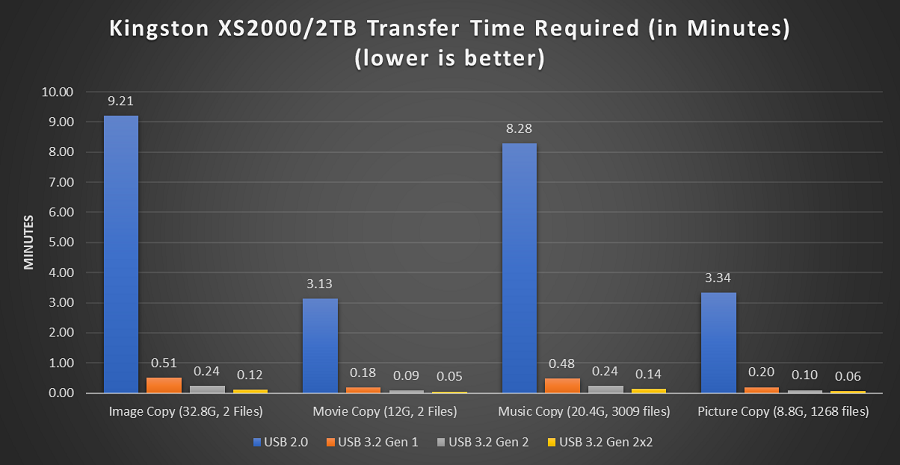
Figure 1: Transfer Speeds
图 1:传输速度对比
USB 3.2 Gen 2x2 (20 Gbps) is 2X faster than its predecessor, USB 3.2 Gen 2 (10 Gbps).
USB 3.2 Gen 2x2(20 Gbps)的传输速度是上一代标准 USB 3.2 Gen 2(10 Gbps)的两倍。
Figure 1 shows the transfer rate test results for different types of data transfer. The drive being tested is the XS2000 2TB portable SSD drive from Kingston.
图 1 展示了不同类型文件的数据传输速率测试结果,本次测试使用的设备为金士顿 XS2000 2 TB 便携式固态硬盘。
There is an increasing number of host devices with USB 3.2 Gen 2x2 support being released and the XS2000 aims to leverage these hosts with its USB 3.2 Gen 2x2 controller. The technology and transfer rate is only supported by the USB Type‑C connector. USB Type‑C connectors offer various improvements over USB Type‑A, including multi‑lane operation capability and a reversible connector with no 'up or down' orientation. Figure 2 includes a table showing the XS2000 benchmarks in all the supported USB technology.
目前越来越多的主机设备开始支持 USB 3.2 Gen 2x2,XS2000 固态硬盘搭载 USB 3.2 Gen 2x2 主控芯片,可在这类主机上发挥高速性能。该项技术与对应传输速率仅可通过 USB‑C 接口实现。相较于 USB‑A 接口,USB‑C 接口拥有多项升级,包括多通道传输能力以及无正反方向限制的可翻转插头。图 2 以表格形式列出 XS2000 在全部兼容的 USB 标准下的基准测速结果。
XS2000 Benchmark Results
XS2000 基准测速结果
| Specification 规格名称 | Also Known As 别称 | Connector Types 接口类型 | Theoretical Bandwidth 理论带宽 | XS2000 Benchmark Results² Read (MB/s) / Write (MB/s) XS2000 测速结果² 读取 (MB/s) / 写入 (MB/s) |
|---|---|---|---|---|
| USB 2.0 | Hi‑Speed USB | USB‑A USB‑B USB Micro A USB Micro B USB Mini A USB Mini B USB‑C | 480 Mbps | 42.76/43.35 |
| USB 3.2 Gen 1 | USB 3.0 USB 3.1 Gen 1 SuperSpeed | USB‑A USB‑B USB Micro B USB‑C | 5 Gbps | 465.16/463.80 |
| USB 3.2 Gen 2 | USB 3.1 USB 3.1 Gen 2 SuperSpeed+ | USB‑A USB‑B USB Micro B USB‑C | 10 Gbps | 1068.63/1038.85 |
| USB 3.2 Gen 2×2 | USB 3.2 SuperSpeed 20Gbps | USB‑C | 20 Gbps | 2086.65/2009.56 |
| USB4 | USB4 Gen 2×2 USB4 20Gbps USB4 Gen 3×2 USB4 40Gbps | USB‑C | 10 Gbps, 20 Gbps, 40 Gbps (depends on host specs) | 1069.43/1044.11² |
| Thunderbolt 4 | n/a 无别称 | USB‑C | 40 Gbps | 1069.20/1042.88³ |
Figure 2: Benchmark Results
图 2:基准测速结果
What Devices Support USB 3.2 Gen 2x2?
哪些设备支持 USB 3.2 Gen 2x2?
There are a variety of motherboards and laptops that have implemented USB 3.2 Gen 2x2. Here is a short list of hosts with at least one USB 3.2 Gen 2x2:
目前有多款主板与笔记本电脑搭载了 USB 3.2 Gen 2x2 接口。下面列出一部分至少带有一个 USB 3.2 Gen 2x2 接口的主机设备:
| Manufacturer 厂商 | Model/Type 型号 / 设备类型 |
|---|---|
| ASUS 华硕 | PRIME Z390‑A Motherboard |
| ASUS 华硕 | PRIME Z590‑A Motherboard |
| GIGABYTE 技嘉 | Z590 AORUS ELITE AX Motherboard |
| GIGABYTE 技嘉 | GC‑USB 3.2 GEN2X2 PCIe Expansion Card |
| MSI 微星 | X299 PRO Motherboard |
| MSI 微星 | MPG Z590 GAMING CARBON WIFI Motherboard |
| MSI 微星 | Z490 MPG Gaming Edge (WiFi) Motherboard |
| MSI 微星 | Z590 MPG Gaming Edge WiFi Intel Motherboard |
| MSI 微星 | TRX40 Pro WiFi AMD Motherboard |
| DELL 戴尔 | Inspiron 15 5515 15.6" Laptop Computer AMD |
| DELL 戴尔 | Inspiron 15 5510 15.6" Laptop Computer Intel |
| ABLECONN ABLECONN | PEX‑UB159 PCIe Expansion Card |
| ORICO 奥睿科 | PE20‑1C PCIe Expansion Card |
USB4 is Already Here
USB4 已经正式推出
The next advancement in USB technology is USB4. It offers 40Gbit/s data transfer speeds, Thunderbolt 3 compatibility and is only supported by a USB‑C connector or port. USB4 increases bandwidth and focuses on converging the USB‑C connector ecosystem and minimizing end‑user confusion.
USB4 是 USB 技术的下一代升级标准。该标准的数据传输速率可达 40 Gbit/s,兼容雷电 3(Thunderbolt 3),并且仅可通过 USB‑C 接口实现。USB4 提升了传输带宽,致力于统一 USB‑C 接口生态,降低终端用户的认知困扰。
Several key designs of the USB4 include:
USB4 的几项设计内容如下:
-
Display, data and load/store functionality with the use of a single USB‑C connector
通过单根 USB‑C 线缆实现视频输出、数据传输与充放电功能
-
Universally compatible with existing USB and Thunderbolt products
可与现有的 USB 设备、雷电设备实现全面兼容
-
Define port capabilities for a predictable and consistent user experience
明确定义接口能力,带来稳定且可预期的使用体验
-
Increase host flexibility to configure bandwidth, power management, and other performance‑related parameters for system needs
提升主机端配置自由度,可根据系统需求调整带宽、电源管理以及其余性能相关参数
What about Thunderbolt™ and USB4?
雷电™ 与 USB4 的相关说明
Thunderbolt and USB4 are different interfaces that have the protocol capabilities to run alternate mode or DisplayPort Alt mode. DisplayPort Alt Mode provides USB‑C cables and connectors the ability to not only transfer data but also video and/or audio. Thunderbolt/USB4, although rated at 30/40Gbps, is commonly maxed out at USB 3.2 Gen 2 speeds (10Gbps) (see Figure 2 above). Check the specification of your host device to confirm the USB transfer rate capabilities.
雷电与 USB4 属于不同的接口标准,二者在协议层面支持切换至替代模式,即 DisplayPort 备用模式。DisplayPort 备用模式可以让 USB‑C 线缆与接口同时传输数据、视频信号以及音频信号。雷电 / USB4 的标称带宽可达 30 / 40 Gbps,但是实际测速上限经常只能达到 USB 3.2 Gen 2 的 10 Gbps(见上方图 2)。请查阅你的主机设备规格参数,确认设备实际支持的 USB 传输速率。
USB and its specifications have come a long way from when it was first introduced and will continue to advance in the future. When it comes to USB 3.2 Gen 1 and Gen 2, the only differences are their speed and their backwards compatibility with USB 3.0 and USB 2.0, but don't forget to check your host device for compatibility if you're looking to upgrade your storage solution! In the future, with newer generations of USB standards and the transition to USB‑C, there will be even better improvements.
从首次推出至今,USB 及其相关规格已经经历了漫长的发展历程,并且未来还会持续迭代升级。对于 USB 3.2 Gen 1 和 Gen 2,二者的区别仅在于传输速率以及对 USB 3.0、USB 2.0 的向下兼容能力。如果你计划升级存储设备,请务必确认主机设备是否支持对应标准。在未来,伴随着新一代 USB 标准的发布与 USB‑C 接口的全面普及,USB 技术还会迎来更多性能升级。
参考文献
- USB Implementers Forum(USB-IF)官方文档库
- USB Battery Charging Specification, Rev 1.2
- USB Type-C Cable and Connector Specification
- USB Power Delivery Specification
- USB-IF Logo Usage Guidelines
- Intel Thunderbolt Technology Overview
- Kingston Technology --- USB 3.0 / 3.2 Gen 命名说明
- USB 接口上的小标签有啥用?从"+"号到闪电的奥秘_搜狐汽车_搜狐网
https://www.sohu.com/a/288019591_444417 - USB 接口上的小标签有什么用? - 知乎
https://www.zhihu.com/question/315168030 - usb接口为什么后面要突出一块,跟充电器口平齐不好吗? - 知乎
https://www.zhihu.com/question/593511546