前言介绍
本 PXE 自动化部署平台,面向国产化统信 UOS 服务器打造,完整支持 x86_64、aarch64、loongarch64 三大硬件架构,兼容 BIOS 与 UEFI 两种启动模式。平台整合 DHCP、TFTP、HTTP 服务,通过 Kickstart 无人值守应答脚本实现操作系统全自动安装,无需人工干预。可自动完成磁盘分区、系统基础配置、账号密码策略、LVM 分区配置、网络参数预设、系统安全基线初始化等工作。统一管理统信 UOS Server 多版本镜像资源,一套服务同时支撑异构服务器批量上线,大幅减少重复装机操作,提升机房服务器部署效率,满足国产化环境规模化运维需求。
创建一键自动化部署 pxe server x86 arm loongarch
-
服务器操作系统 20 1050U2A
-
支持架构:统信 UOS x86_64、aarch64、loongarch64
-
默认装机账号密码:root / 1234.com
-
镜像挂载根目录:
/var/www/html/- uniontechos_server_20_1050u2a_x86_x64
- uniontechos_server_20_1050u2a_aarch64
- uniontechos_server_20_1050u2_loongarch64
-
TFTP 启动文件目录:
/var/lib/tftpboot/- uniontechos_server_20_1050u2a_x86_x64
- uniontechos_server_20_1050u2a_aarch64
- uniontechos_server_20_1050u2_loongarch64
-
ISO 存放目录:
/ISO -
镜像持久挂载:写入
/etc/fstab实现开机自动挂载 -
BIOS 引导菜单:
/var/lib/tftpboot/pxelinux.cfg/default -
UEFI 引导配置
- x86_64:
/var/www/html/x86-x64/grub.cfg - aarch64:
/var/www/html/aarch64/grub.cfg - loongarch64:
/var/www/html/loongarch64/grub.cfg
- x86_64:
-
Kickstart 无人值守脚本目录:
/var/www/html/cfg/ -
DHCP 日志配置文件:
/etc/rsyslog.d/dhcpd.conf -
BIOS 引导依赖文件源目录:
/usr/share/syslinux/(pxelinux.0、vesamenu.c32 等) -
加密密码生成方式一 openssl passwd -6 1234.com (yum install -y openssl)
-
加密密码生成方式二mkpasswd -m sha-512 1234.com (yum install -y expect)
vim /uos-arm-loongarch-pxe-server.sh
#!/bin/bash
-- coding: utf-8 --
Author: make.han
Email: han10zheng@AI.com
Date: 2026/08/16
PXE Server support uniontechos_server arm x86-x64 LoongArch64
echo #######################################
echo "Firewall & config"
echo #######################################
echo "Firewall Selina is turned off"
setenforce 0
sed -i 's/SELINUX=enforcing/SELINUX=disabled/' /etc/selinux/config
systemctl stop firewalld && systemctl disable firewalldecho #######################################
echo "Firewall & config"
echo #######################################
echo "Installation Tools"
yum install -y net-tools vim unzip tmux bash-completion git tree curl wgetecho #######################################
echo "install httpd & config"
echo #######################################安装 httpd
echo "install httpd"
yum install -y httpd
mv /etc/httpd/conf.d/welcome.conf /etc/httpd/conf.d/welcome.conf.bak
sed -i '/Require all granted/a\ IndexOptions FancyIndexing HTMLTable VersionSort NameWidth=* Charset=UTF-8 FoldersFirst' /etc/httpd/conf/httpd.conf
systemctl enable --now httpdecho #######################################
目录创建,镜像下载,挂载
echo #######################################
echo "download ISO directory creation"
mkdir -p /ISOecho "uniontechos_server_20_1050u2a iso Mount directory creation"
mkdir -p /var/www/html/uniontechos_server_20_1050u2a_x86_x64
mkdir -p /var/www/html/uniontechos_server_20_1050u2a_aarch64
mkdir -p /var/www/html/uniontechos_server_20_1050u2_loongarch64uniontechos_server_20_1050u2a download iso
echo "uniontechos_server_20_1050u2a iso download"
wget -c -N -P /ISO/ https://cdimage-download.chinauos.com/server/1050u2/uniontechos-server-20-1050u2a-amd64.iso
wget -c -N -P /ISO/ https://cdimage-download.chinauos.com/server/1050u2/uniontechos-server-20-1050u2a-arm64.iso
wget -c -N -P /ISO/ https://cdimage-download.chinauos.com/server/1050u2/uniontechos-server-20-1050u2-loongarch64.isouniontechos_server_20_1050u2a 挂载镜像
echo "uniontechos_server_20_1050u2a iso mount"
mount -t iso9660 -o loop,ro /ISO/ https://cdimage-download.chinauos.com/server/1050u2/uniontechos-server-20-1050u2a-amd64.iso /var/www/html/uniontechos_server_20_1050u2a_x86_x64
mount -t iso9660 -o loop,ro /ISO/ https://cdimage-download.chinauos.com/server/1050u2/uniontechos-server-20-1050u2a-arm64.iso /var/www/html/uniontechos_server_20_1050u2a_aarch64
mount -t iso9660 -o loop,ro /ISO/ https://cdimage-download.chinauos.com/server/1050u2/uniontechos-server-20-1050u2-loongarch64.iso /var/www/html/uniontechos_server_20_1050u2_loongarch64uniontechos_server_20_1050u2a 开机自动挂载镜像
echo "Automatically mount the image upon startup uniontechos_server_20_1050u2a iso"
sed -i 'a/ISO/uniontechos-server-20-1050u2a-amd64.iso /var/www/html/uniontechos_server_20_1050u2a_x86_x64 iso9660 defaults,loop,ro 0 0' /etc/fstab sed -i 'a/ISO/uniontechos-server-20-1050u2a-arm64.iso /var/www/html/uniontechos_server_20_1050u2a_aarch64/ iso9660 defaults,loop,ro 0 0' /etc/fstab
sed -i '$a/ISO/uniontechos-server-20-1050u2-loongarch64.iso /var/www/html/uniontechos_server_20_1050u2_loongarch64/ iso9660 defaults,loop,ro 0 0' /etc/fstabecho #######################################
echo "install tftp & config"
echo #######################################安装 tftp
echo "install tftp"
yum install -y tftp-serveruniontechos_server_20_1050u2a images tftpboot 目录创建
echo "uniontechos_server_20_1050u2a images directory creation"
mkdir -p /var/lib/tftpboot/x86_64/uniontechos_server_20_1050u2a_x86_x64
mkdir -p /var/lib/tftpboot/aarch64/uniontechos_server_20_1050u2a_aarch64
mkdir -p /var/lib/tftpboot/loongarch64/uniontechos_server_20_1050u2_loongarch64通用 uniontechos_server_20_1050u2a x86-x64 BOOTX64
echo "Copy uniontechos_server_20_1050u2a x86-x64 universal EFI boot file"
cp -rf /var/www/html/uniontechos_server_20_1050u2a_x86_x64/EFI/BOOT/{BOOTX64.EFI,grubx64.efi,mmx64.efi} /var/lib/tftpboot/x86_64/uniontechos_server_20_1050u2a x86-x64 images 启动文件
echo "uniontechos_server_20_1050u2a x86-x64 images startup file"
cp -rf /var/www/html/uniontechos_server_20_1050u2a_x86_x64/images/pxeboot/{vmlinuz,initrd.img} /var/lib/tftpboot/x86_64/uniontechos_server_20_1050u2a_x86_x64通用 uniontechos_server_20_1050u2a aarch64 BOOTX64BOOTAA64
echo "Copy uniontechos_server_20_1050u2a aarch64 universal EFI boot file"
cp -rf /var/www/html/uniontechos_server_20_1050u2a_aarch64/EFI/BOOT/{BOOTAA64.EFI,grubaa64.efi,grub.efi,mmaa64.efi} /var/lib/tftpboot/aarch64/uniontechos_server_20_1050u2a aarch64 images 启动文件
echo "uniontechos_server_20_1050u2a aarch64 images startup file"
cp -rf /var/www/html/uniontechos_server_20_1050u2a_aarch64/images/pxeboot/{vmlinuz,initrd.img} /var/lib/tftpboot/aarch64/uniontechos_server_20_1050u2a_aarch64通用 uniontechos_server_20_1050u2 loongarch64
echo "Copy uniontechos_server_20_1050u2 loongarch64 universal EFI boot file"
cp -rf /var/www/html/uniontechos_server_20_1050u2_loongarch64/EFI/BOOT/{BOOTLOONGARCH64.EFI,BOOTLOONGARCH.EFI } /var/lib/tftpboot/loongarch64/uniontechos_server_20_1050u2 loongarch64 images 启动文件
echo "uniontechos_server_20_1050u2 loongarch64 images startup file"
cp -rf /var/www/html/uniontechos_server_20_1050u2_loongarch64/images/pxeboot/{vmlinuz,initrd.img} /var/lib/tftpboot/loongarch64/uniontechos_server_20_1050u2_loongarch64restart tftp
echo "restart tftp"
systemctl enable --now tftpecho #######################################
echo "bios config directory"
echo #######################################建bios 编排目录
echo "Create BIOS directory"
mkdir -p /var/lib/tftpboot/pxelinux.cfg创建默认引导菜单(先放一个最简可用模板)创建bios编排文件
echo "Create BIOS orchestration file"
cat > /var/lib/tftpboot/pxelinux.cfg/default <<'EOF'
#Simple page display
default vesamenu.c32#Set the home page timeout period according to project requirements
timeout 200menu title **** Intelligent systems division PXE Boot Menu ****
display boot.msglabel Auto uniontechos_server server 20 u2a x86_64 BIOS
menu label ^Auto Install uniontechos_server server 20 u2a x86_64 BIOS
menu default
kernel x86_64/uniontechos_server_20_1050u2a_x86_x64/vmlinuz
append initrd=x86_64/uniontechos_server_20_1050u2a_x86_x64/initrd.img ip=dhcp inst.ks=http://192.168.1.26/cfg/uniontechos_server_server_20_1050u2a-amd64.cfg quiet
EOF修正权限(tftp服务无法读取文件是高频坑)
echo "Granting permissions to the tftpboot directory"
chmod -R 755 /var/lib/tftpboot/echo #######################################
echo "install rsyslog & config"
echo #######################################安装 rsyslog
echo "install rsyslog"
yum install -y rsyslog启用开机自启 rsyslog
echo "Automatic rsyslog for startup and startup"
systemctl enable --now rsyslog#dhcp 专属日志规则
echo "Dhcp log rule creation"
cat <<'EOF'>>/etc/rsyslog.d/dhcpd.conf
local7.* /var/log/dhcpd.log
EOFdhcp 启用日志功能
echo "DHCP enables logging function"
grep -q '^log-facility local7;' /etc/dhcp/dhcpd.conf || echo 'log-facility local7;' >> /etc/dhcp/dhcpd.conf添加日志轮转(防止日志撑满磁盘)
echo "Add log rotation"
cat <<'EOF'>>/etc/logrotate.d/dhcpd
/var/log/dhcpd.log {
weekly
rotate 4
compress
delaycompress
missingok
notifempty
create 0644 root root
}
EOFecho #######################################
echo "install dhcp & config"
echo #######################################安装 dhcp
echo "install dhcp"
yum install -y dhcp-serverrm -rf /etc/dhcp/dhcpd.conf
cat <<'EOF'>>/etc/dhcp/dhcpd.confDHCP Server Configuration file.
see /usr/share/doc/dhcp/dhcpd.conf.example
see dhcpd.conf(5) man page
ddns-update-style interim;
allow booting;
allow bootp;
ignore client-updates;
set vendorclass = option vendor-class-identifier;
option pxe-system-type code 93 = unsigned integer 16;
#配置要分配的地址段及netmask, 需要修改为自己的网段
subnet 192.168.1.0 netmask 255.255.255.0 {
# 配置网关,网络里不要出现多个DHCP服务否则可能会无法正常引导。
option routers 192.168.1.1;
# 配置dns
option domain-name-servers 8.8.8.8;
# 配置netmask
option subnet-mask 255.255.255.0;
# 分配的ip范围
range dynamic-bootp 192.168.1.30 192.168.1.200;
# 缺省租约时间
default-lease-time 21600;
# 最大租约时间
max-lease-time 43200;
# 指定引导装机的ip
next-server 192.168.1.26;class "pxeclients" { # 根据系统类型选择不同EFI引导文件 # - 07和09 为x86_64 # - 0b 为ARM64 # - 27 为LoongArch64 # - 其他: legacy 方式引导 # EFI引导采用TFTP下载,文件位置为TFTP目录相对位置 match if substring (option vendor-class-identifier, 0, 9) = "PXEClient"; if option pxe-system-type = 00:07 { # x86_64 引导 filename "x86_64/BOOTX64.EFI"; } else if option pxe-system-type = 00:09 { # x86_64 引导 filename "x86_64/BOOTX64.EFI"; } else if option pxe-system-type = 00:27 { # LoongArch64 龙架构UEFI filename "loongarch64/BOOTLOONGARCH64.EFI"; } else if option pxe-system-type = 00:0b { # arm64引导 filename "aarch64/BOOTAA64.EFI"; } else { # legacy引导 该文件需要安装 syslinux, filename "pxelinux.0"; } }}
log-facility local7;
EOF
systemctl enable --now dhcpdecho #######################################
echo "install selinux & config"
echo #######################################安装 selinux
yum install -y syslinux
cp /usr/share/syslinux/{pxelinux.0,ldlinux.c32,libcom32.c32,libutil.c32,vesamenu.c32} /var/lib/tftpboot/重启所有服务
echo "restart all server"
systemctl restart dhcpd tftp httpdecho ############################################################
echo "Create x86-x64 aarch64 loongarch64 grub orchestration file"
echo ############################################################创建cfg 存放,脚本存放目录
mkdir -p /var/www/html/{cfg,script}
echo "x86-x64 grub arrangement"
cat <<'EOF'>>/var/www/html/x86-x64/grub.cfg
set default="0"
set timeout=6
set gfxmode=1024x768,auto
set menu_color_normal=white/black
set menu_color_highlight=green/black基础显示模块
insmod efi_gop
insmod all_video
insmod gfxterm
terminal_output gfxterm
rmmod tpmPXE网络核心配置
set root=(tftp,192.168.1.26)
set prefix=(tftp,192.168.1.26)/x86_64
insmod net
insmod tftp
insmod http
insmod gziomenuentry 'Auto Install uniontechos_server server 20 u2a x86-x64' {
linuxefi x86_64/uniontechos_server_20_1050u2a_x86_x64/vmlinuz ip=dhcp inst.ks=http://192.168.1.26/cfg/uniontechos_server_server_20_1050u2a-amd64.cfg
initrdefi x86_64/uniontechos_server_20_1050u2a_x86_x64/initrd.img
}
EOFecho "aarch64 grub arrangement"
cat <<'EOF'>>/var/www/html/aarch64/grub.cfg
set default="0"
set timeout=6set gfxmode=1024x768,auto
set menu_color_normal=white/black
set menu_color_highlight=green/black基础图形显示模块
insmod efi_gop
insmod all_video
insmod gfxterm
terminal_output gfxtermPXE网络基础配置
set root=(tftp,192.168.1.26)
set prefix=(tftp,192.168.1.26)/aarch64网络启动核心模块
insmod net
insmod tftp
insmod http
insmod gziomenuentry 'AUTO Install uniontechos_server server 20 u2a aarch64' {
linux aarch64/uniontechos_server_20_1050u2a_aarch64/vmlinuz ip=dhcp inst.ks=http://192.168.1.26/cfg/uniontechos_server_server_20_1050u2a-aarch64.cfg
initrd aarch64/uniontechos_server_20_1050u2a_aarch64/initrd.img
}EOF
echo "loongarch64 grub arrangement"
cat <<'EOF'>>/var/www/html/loongarch64/grub.cfg
set default="0"
set timeout=6set gfxmode=1024x768,auto
set menu_color_normal=white/black
set menu_color_highlight=green/black基础图形显示模块
insmod efi_gop
insmod all_video
insmod gfxterm
terminal_output gfxtermPXE网络基础配置
set root=(tftp,192.168.1.26)
set prefix=(tftp,192.168.1.26)/loongarch64网络启动核心模块
insmod net
insmod tftp
insmod http
insmod gziomenuentry 'AUTO Install uniontechos_server_server_20-u2a loongarch64' {
linux loongarch64/uniontechos_server_20_1050u2_loongarch64/vmlinuz ip=dhcp inst.ks=http://192.168.1.26/cfg/uniontechos_server_server_20_1050u2a-loongarch64.cfg
initrd loongarch64/uniontechos_server_20_1050u2_loongarch64/initrd.img
}
EOFecho ############################################################
echo "Create x86-x64 aarch64 loongarch64 cfg orchestration"
echo ############################################################echo "uniontechos_server server v10 x86-x64 cfg Create"
cat <<'EOF'>>/var/www/html/cfg/uniontechos_server_server_20_1050u2a-amd64.cfg
#version=DEVELUse text install
text
License agreement
eula --agreed
repo --name="BaseOS" --baseurl=http://192.168.1.26/uniontechos_server_20_1050u2a_x86_x64/BaseOS
repo --name="AppStream" --baseurl=http://192.168.1.26/uniontechos_server_20_1050u2a_x86_x64/AppStream
url --url=http://192.168.1.26/uniontechos_server_20_1050u2a_x86_x64selinux --disabled
firewall --disabled
reboot%packages
@^server-product-environment
@system-tools
%endKeyboard layouts
keyboard --xlayouts='cn'
System language
lang zh_CN.UTF-8
Network information
network --bootproto=dhcp --device=link --noipv6 --activate
Run the Setup Agent on first boot
firstboot --disable
System services
services --enabled="chronyd"
#ignoredisk --only-use=nvme0n1
zerombr强制 GPT 分区表
clearpart --all --initlabel --disklabel=gpt
#Automatic partition, / partition uses all space, disable home partition
autopart --type=lvm --fstype=xfs --nohomeSystem timezone
timezone Asia/Beijing --utc
Root password new 1234.com
rootpw --iscrypted 6NtuJ/ki3zeC2bTS9$4HStGncvLKmS1vIV1W0tnLHWCZqXjjrWw7XBfMPwh9eLxJ8qzf.L.3eSiTSz6TjGFEALw4uHHf4Q9M9D9ffUR/
%addon com_UOS_kdump --enable --reserve-mb='auto'
%end
%anaconda
pwpolicy root --minlen=8 --minquality=1 --strict --nochanges --notempty
pwpolicy user --minlen=8 --minquality=1 --strict --nochanges --emptyok
pwpolicy luks --minlen=8 --minquality=1 --strict --nochanges --notempty
%end%post
OL7.0~7.9 一次性开机DHCP转静态IP脚本(完全对齐你原有写法)
cat > /usr/local/bin/net-init.sh <<'SCRIPT'
#!/bin/bash
FLAG=/var/lib/net-finish.ok
[ -f $FLAG ] && exit 0等待网络DHCP就绪
sleep 15
DEV=(nmcli device | awk '2=="ethernet" && 1!="lo" {print 1;exit}')
IP_RAW=(ip addr show DEV | awk '/inet /{print 2;exit}') IPADDR={IP_RAW%/*}
PREFIX={IP_RAW#*/} GW=(ip route | grep default | awk '{print 3}') DNS=(grep -m1 nameserver /etc/resolv.conf | awk '{print $2}')========== OL7 替换为 ifcfg 传统配置文件 ==========
cat > /etc/sysconfig/network-scripts/ifcfg-{DEV} <
{DEV}
DEVICE={DEV} ONBOOT=yes NM_CONTROLLED=yes DEFROUTE=yes IPADDR={IPADDR}
PREFIX={PREFIX} GATEWAY={GW}
DNS1=${DNS}
DNS2=8.8.8.8
IPV6INIT=yes
CONFOL7 无需600权限,默认即可
重载网络并启用静态网卡
nmcli connection reload
nmcli connection up ${DEV}备选兼容命令:ifdown {DEV} && ifup {DEV}
创建完成标记,后续开机不再运行
touch $FLAG
SCRIPT
chmod +x /usr/local/bin/net-init.shOL7 systemd一次性服务单元(小修改依赖项)
cat > /etc/systemd/system/net-init.service <<UNIT
[Unit]
Description=Convert DHCP to Static IP once after first boot OL7
After=NetworkManager.service network.target
Wants=network-online.target[Service]
Type=oneshot
ExecStart=/usr/local/bin/net-init.sh[Install]
WantedBy=multi-user.target
UNIT重载并开机自启
systemctl daemon-reload
systemctl enable net-init.servicecheck Detected root logical volume
ROOT_LV=(df / | tail -n 1 | awk '{print 1}')
echo "Detected root logical volume: $ROOT_LV"Expand logical volume to use all remaining space
lvextend -l +100%FREE "$ROOT_LV"
Adjust file system size
xfs_growfs /
%end
EOFecho "uniontechos_server server 20 u2a aarch64 cfg Create"
cat <<'EOF'>>/var/www/html/cfg/uniontechos_server_server_20_1050u2a-aarch64.cfg
#version=DEVELUse text install
text
License agreement
eula --agreed
repo --name="BaseOS" --baseurl=http://192.168.1.26/uniontechos_server_20_1050u2a_aarch64/BaseOS
repo --name="AppStream" --baseurl=http://192.168.1.26/uniontechos_server_20_1050u2a_aarch64/AppStream
url --url=http://192.168.1.26/uniontechos_server_20_1050u2a_aarch64
selinux --disabled
firewall --disabled
reboot%packages
@^server-product-environment
@system-tools
%endKeyboard layouts
keyboard --xlayouts='cn'
System language
lang zh_CN.UTF-8
Network information
network --bootproto=dhcp --device=link --noipv6 --activate
Run the Setup Agent on first boot
firstboot --disable
System services
services --enabled="chronyd"
#ignoredisk --only-use=nvme0n1
zerombr强制 GPT 分区表
clearpart --all --initlabel --disklabel=gpt
#Automatic partition, / partition uses all space, disable home partition
autopart --type=lvm --fstype=xfs --nohomeSystem timezone
timezone Asia/Beijing --utc
Root password new 1234.com
rootpw --iscrypted 6NtuJ/ki3zeC2bTS9$4HStGncvLKmS1vIV1W0tnLHWCZqXjjrWw7XBfMPwh9eLxJ8qzf.L.3eSiTSz6TjGFEALw4uHHf4Q9M9D9ffUR/
%addon com_UOS_kdump --enable --reserve-mb='auto'
%end
%anaconda
pwpolicy root --minlen=8 --minquality=1 --strict --nochanges --notempty
pwpolicy user --minlen=8 --minquality=1 --strict --nochanges --emptyok
pwpolicy luks --minlen=8 --minquality=1 --strict --nochanges --notempty
%end%post
OL7.0~7.9 一次性开机DHCP转静态IP脚本(完全对齐你原有写法)
cat > /usr/local/bin/net-init.sh <<'SCRIPT'
#!/bin/bash
FLAG=/var/lib/net-finish.ok
[ -f $FLAG ] && exit 0等待网络DHCP就绪
sleep 15
DEV=(nmcli device | awk '2=="ethernet" && 1!="lo" {print 1;exit}')
IP_RAW=(ip addr show DEV | awk '/inet /{print 2;exit}') IPADDR={IP_RAW%/*}
PREFIX={IP_RAW#*/} GW=(ip route | grep default | awk '{print 3}') DNS=(grep -m1 nameserver /etc/resolv.conf | awk '{print $2}')========== OL7 替换为 ifcfg 传统配置文件 ==========
cat > /etc/sysconfig/network-scripts/ifcfg-{DEV} <
{DEV}
DEVICE={DEV} ONBOOT=yes NM_CONTROLLED=yes DEFROUTE=yes IPADDR={IPADDR}
PREFIX={PREFIX} GATEWAY={GW}
DNS1=${DNS}
DNS2=8.8.8.8
IPV6INIT=yes
CONFOL7 无需600权限,默认即可
重载网络并启用静态网卡
nmcli connection reload
nmcli connection up ${DEV}备选兼容命令:ifdown {DEV} && ifup {DEV}
创建完成标记,后续开机不再运行
touch $FLAG
SCRIPT
chmod +x /usr/local/bin/net-init.shOL7 systemd一次性服务单元(小修改依赖项)
cat > /etc/systemd/system/net-init.service <<UNIT
[Unit]
Description=Convert DHCP to Static IP once after first boot OL7
After=NetworkManager.service network.target
Wants=network-online.target[Service]
Type=oneshot
ExecStart=/usr/local/bin/net-init.sh[Install]
WantedBy=multi-user.target
UNIT重载并开机自启
systemctl daemon-reload
systemctl enable net-init.servicecheck Detected root logical volume
ROOT_LV=(df / | tail -n 1 | awk '{print 1}')
echo "Detected root logical volume: $ROOT_LV"Expand logical volume to use all remaining space
lvextend -l +100%FREE "$ROOT_LV"
Adjust file system size
xfs_growfs /
%end
EOFecho "uniontechos_server server v10 loongarch64 cfg Create"
cat <<'EOF'>>/var/www/html/cfg/uniontechos_server_server_20_1050u2a-loongarch64.cfg
#version=DEVELUse text install
text
License agreement
eula --agreed
repo --name="BaseOS" --baseurl=http://192.168.1.26/uniontechos_server_20_1050u2_loongarch64/BaseOS
repo --name="AppStream" --baseurl=http://192.168.1.26/uniontechos_server_20_1050u2_loongarch64/AppStream
url --url=http://192.168.1.26/uniontechos_server_20_1050u2_loongarch64selinux --disabled
firewall --disabled
reboot%packages
@^server-product-environment
@system-tools
%endKeyboard layouts
keyboard --xlayouts='cn'
System language
lang zh_CN.UTF-8
Network information
network --bootproto=dhcp --device=link --noipv6 --activate
Run the Setup Agent on first boot
firstboot --disable
System services
services --enabled="chronyd"
#ignoredisk --only-use=nvme0n1
zerombr强制 GPT 分区表
clearpart --all --initlabel --disklabel=gpt
#Automatic partition, / partition uses all space, disable home partition
autopart --type=lvm --fstype=xfs --nohomeSystem timezone
timezone Asia/Beijing --utc
Root password new 1234.com
rootpw --iscrypted 6NtuJ/ki3zeC2bTS9$4HStGncvLKmS1vIV1W0tnLHWCZqXjjrWw7XBfMPwh9eLxJ8qzf.L.3eSiTSz6TjGFEALw4uHHf4Q9M9D9ffUR/
%addon com_UOS_kdump --enable --reserve-mb='auto'
%end
%anaconda
pwpolicy root --minlen=8 --minquality=1 --strict --nochanges --notempty
pwpolicy user --minlen=8 --minquality=1 --strict --nochanges --emptyok
pwpolicy luks --minlen=8 --minquality=1 --strict --nochanges --notempty
%end%post
OL7.0~7.9 一次性开机DHCP转静态IP脚本(完全对齐你原有写法)
cat > /usr/local/bin/net-init.sh <<'SCRIPT'
#!/bin/bash
FLAG=/var/lib/net-finish.ok
[ -f $FLAG ] && exit 0等待网络DHCP就绪
sleep 15
DEV=(nmcli device | awk '2=="ethernet" && 1!="lo" {print 1;exit}')
IP_RAW=(ip addr show DEV | awk '/inet /{print 2;exit}') IPADDR={IP_RAW%/*}
PREFIX={IP_RAW#*/} GW=(ip route | grep default | awk '{print 3}') DNS=(grep -m1 nameserver /etc/resolv.conf | awk '{print $2}')========== OL7 替换为 ifcfg 传统配置文件 ==========
cat > /etc/sysconfig/network-scripts/ifcfg-{DEV} <
{DEV}
DEVICE={DEV} ONBOOT=yes NM_CONTROLLED=yes DEFROUTE=yes IPADDR={IPADDR}
PREFIX={PREFIX} GATEWAY={GW}
DNS1=${DNS}
DNS2=8.8.8.8
IPV6INIT=yes
CONFOL7 无需600权限,默认即可
重载网络并启用静态网卡
nmcli connection reload
nmcli connection up ${DEV}备选兼容命令:ifdown {DEV} && ifup {DEV}
创建完成标记,后续开机不再运行
touch $FLAG
SCRIPT
chmod +x /usr/local/bin/net-init.shOL7 systemd一次性服务单元(小修改依赖项)
cat > /etc/systemd/system/net-init.service <<UNIT
[Unit]
Description=Convert DHCP to Static IP once after first boot OL7
After=NetworkManager.service network.target
Wants=network-online.target[Service]
Type=oneshot
ExecStart=/usr/local/bin/net-init.sh[Install]
WantedBy=multi-user.target
UNIT重载并开机自启
systemctl daemon-reload
systemctl enable net-init.servicecheck Detected root logical volume
ROOT_LV=(df / | tail -n 1 | awk '{print 1}')
echo "Detected root logical volume: $ROOT_LV"Expand logical volume to use all remaining space
lvextend -l +100%FREE "$ROOT_LV"
Adjust file system size
xfs_growfs /
%end
EOF
执行一键部署pxe server
bash /uos-arm-loongarch-pxe-server.shUEFI 自动化部署uos 20 u2a 等待6秒自动开始
- 实现,自动分区,网卡IP自动配置(内网需要有DHCP哦)
- root/1234.com (openssl passwd -6 "1234.com" 自动生成密码)
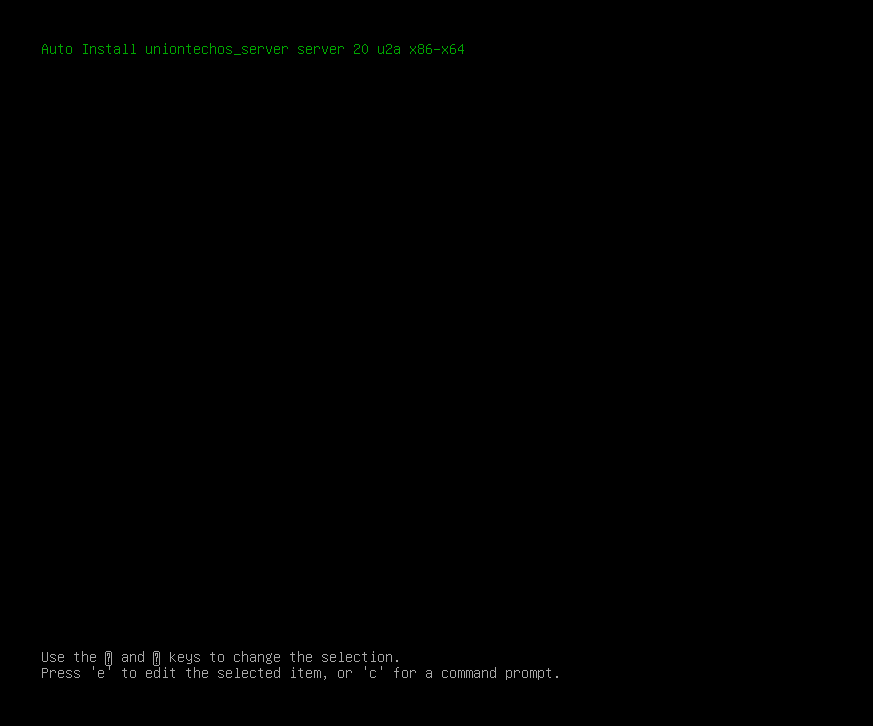
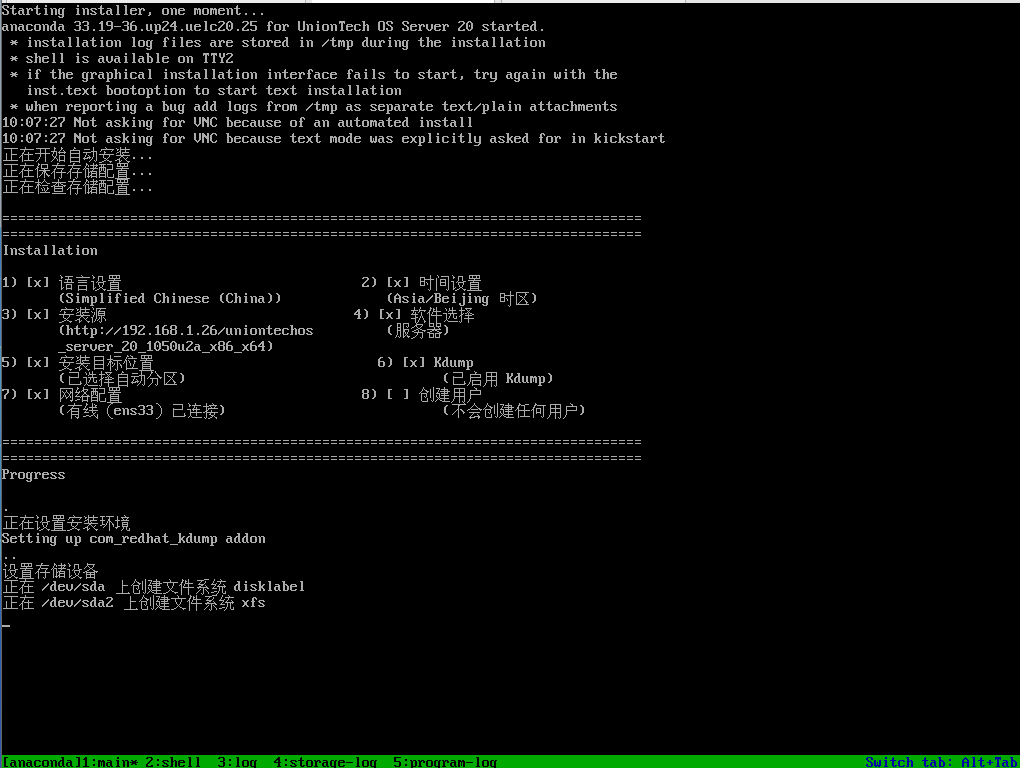
自动化开始安装
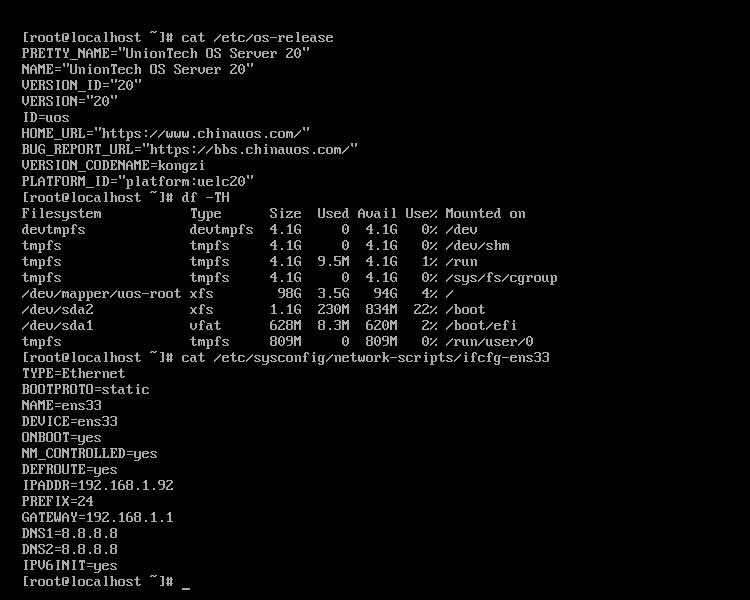
验证自动化脚本是否按照执行用户,磁盘,网卡配置
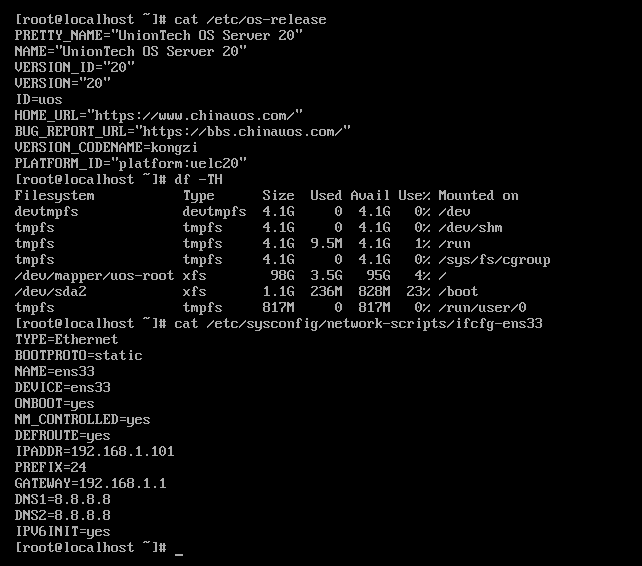
Bios 自动化部署uos 20 u2a,等待20秒自动开始
- 实现,自动分区,网卡IP自动配置(内网需要有DHCP哦)
- root/1234.com (openssl passwd -6 "1234.com" 自动生成密码)
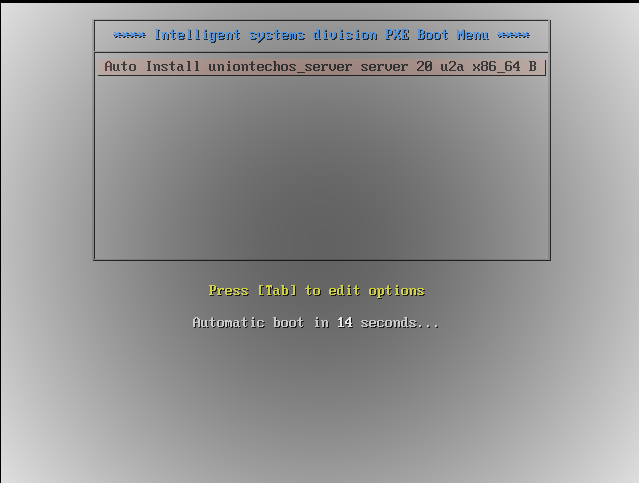
自动化开始安装
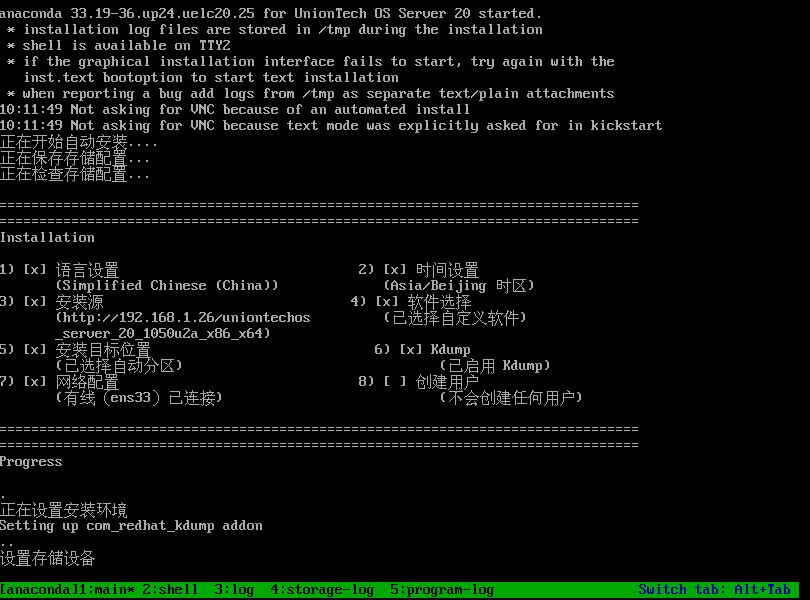
验证自动化脚本是否按照执行用户,磁盘,网卡配置