讲解xLua例8 Hotfix,运行时用lua替换C#,demo和代码都是围绕这个主题的
一.运行展示
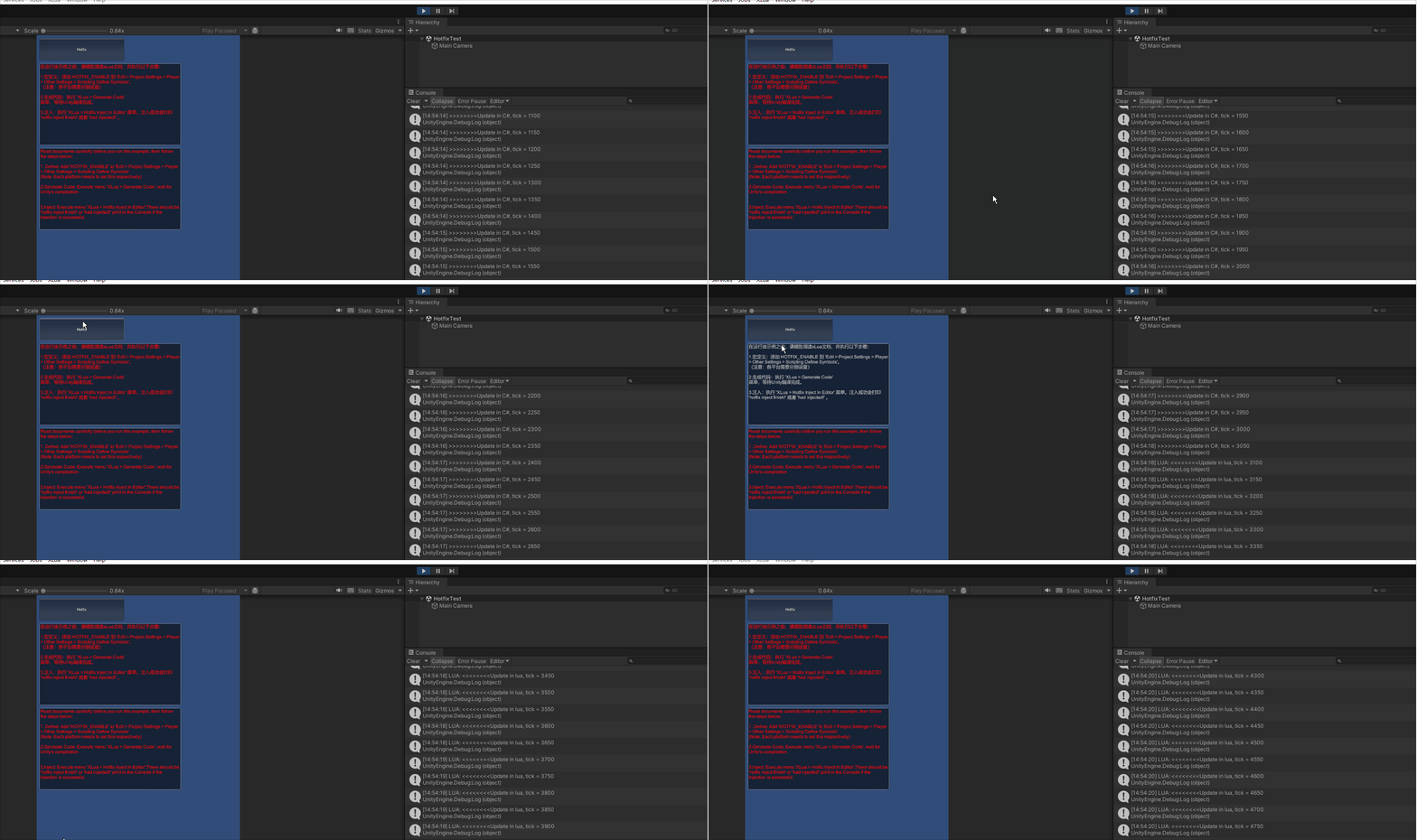
运行后打印Update in C#, tick =,点击Hotfix按钮后,打印Update in lua, tick
参考:hotfix.md
二.代码展示
HotfixTest.cs
接下来看要实现运行时用lua替换C#要做哪些关键处理,下文将介绍应该怎么做,为什么这么做也会进行必要分析
cs
using UnityEngine;
using XLua;

namespace XLuaTest
{
    [Hotfix]
    public class HotfixTest : MonoBehaviour
    {
        LuaEnv luaenv = new LuaEnv();

        private int tick = 0;

        // Use this for initialization
        void Start()
        {
        }

        // Update is called once per frame
        void Update()
        {
            if (++tick % 50 == 0)
            {
                Debug.Log(">>>>>>>>Update in C#, tick = " + tick);
            }
        }

        void OnGUI()
        {
            if (GUI.Button(new Rect(10, 10, 300, 80), "Hotfix"))
            {
                luaenv.DoString(@"
                xlua.hotfix(CS.XLuaTest.HotfixTest, 'Update', function(self)
                    self.tick = self.tick + 1
                    if (self.tick % 50) == 0 then
                        print('<<<<<<<<Update in lua, tick = ' .. self.tick)
                    end
                end)
            ");
            }

            string chHint = @"在运行该示例之前,请细致阅读xLua文档,并执行以下步骤:

1.宏定义:添加 HOTFIX_ENABLE 到 'Edit > Project Settings > Player > Other Settings > Scripting Define Symbols'。
(注意:各平台需要分别设置)

2.生成代码:执行 'XLua > Generate Code' 菜单,等待Unity编译完成。

3.注入:执行 'XLua > Hotfix Inject In Editor' 菜单。注入成功会打印 'hotfix inject finish!' 或者 'had injected!' 。";
            string enHint = @"Read documents carefully before you run this example, then follow the steps below:

1. Define: Add 'HOTFIX_ENABLE' to 'Edit > Project Settings > Player > Other Settings > Scripting Define Symbols'.
(Note: Each platform needs to set this respectively)

2.Generate Code: Execute menu 'XLua > Generate Code', wait for Unity's compilation.


3.Inject: Execute menu 'XLua > Hotfix Inject In Editor'.There should be 'hotfix inject finish!' or 'had injected!' print in the Console if the Injection is successful.";
            GUIStyle style = GUI.skin.textArea;
            style.normal.textColor = Color.red;
            style.fontSize = 16;
            GUI.TextArea(new Rect(10, 100, 500, 290), chHint, style);
            GUI.TextArea(new Rect(10, 400, 500, 290), enHint, style);
        }
    }
}
三.实现步骤
3.1 加特性Hotfix
对可能要用Lua替换逻辑的C#类加上特性Hotfix,遵循加特性的3种方式:加标签、静态列表、动态列表;demo用的加标签,便于展示。
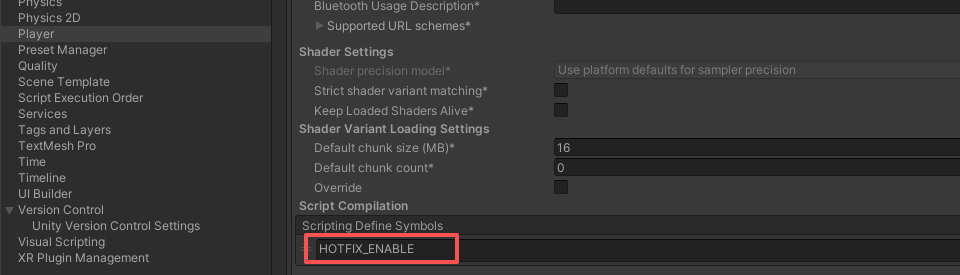
3.2 添加 HOTFIX_ENABLE 宏
3.3 生成代码
执行XLua/Generate Code
3.4 执行注入操作
执行XLua/Hotfix Inject In Editor,成功会打印"hotfix inject finish!",本节是本文重点
3.4.1 注入概念
先来理解一下注入的概念:通过修改编译产物:Assembly-CSharp.dll,使得标记了hotfix特性的C#代码的执行逻辑改为:先看有没有 Lua 补丁 → 有就跑 Lua;没有再跑原来的 C#,也就是为lua替换C#做必要准备
3.4.2 注入源码
Hotfix.cs:1653-1773行
前面部分主要是计算参数,代码核心是最后部分1737-1767,可以先从这里开始看:遍历所有要注入的程序集,每次遍历通过Process这个类运行C:\ProgramFiles\Unity\Hub\Editor\2022.3.62f3c1\Editor\Data\MonoBleedingEdge\bin\mono.exe
把Tools\XLuaHotfixInject.exe作为参数
(XLuaHotfixInject.exe不能直接运行,需要用mono.exe来运行)
这样来注入的
cs
            var injectAssemblyPaths = HotfixConfig.GetHotfixAssemblyPaths();
            var idMapFileNames = new List<string>();
            foreach (var injectAssemblyPath in injectAssemblyPaths)
            {
                args[0] = Path.Combine(assemblyDir, Path.GetFileName(injectAssemblyPath));
                if (ContainNotAsciiChar(args[0]))
                {
                    throw new Exception("project path must contain only ascii characters");
                }

                if (injectAssemblyPaths.Count > 1)
                {
                    var injectAssemblyFileName = Path.GetFileName(injectAssemblyPath);
                    args[2] = CSObjectWrapEditor.GeneratorConfig.common_path + "Resources/hotfix_id_map_" + injectAssemblyFileName.Substring(0, injectAssemblyFileName.Length - 4) + ".lua.txt";
                    idMapFileNames.Add(args[2]);
                }
                Process hotfix_injection = new Process();
                hotfix_injection.StartInfo.FileName = mono_path;
#if UNITY_5_6_OR_NEWER
                hotfix_injection.StartInfo.Arguments = "--runtime=v4.0.30319 " + inject_tool_path + " \"" + String.Join("\" \"", args.ToArray()) + "\"";
#else
                hotfix_injection.StartInfo.Arguments = inject_tool_path + " \"" + String.Join("\" \"", args.ToArray()) + "\"";
#endif
                hotfix_injection.StartInfo.WindowStyle = ProcessWindowStyle.Hidden;
                hotfix_injection.StartInfo.RedirectStandardOutput = true;
                hotfix_injection.StartInfo.UseShellExecute = false;
                hotfix_injection.StartInfo.CreateNoWindow = true;
                hotfix_injection.Start();
                UnityEngine.Debug.Log(hotfix_injection.StandardOutput.ReadToEnd());
                hotfix_injection.WaitForExit();
            }
调试时变量:

参考:Process 类
3.5 调用xlua.hotfix
用xlua.hotfix替换C#代码这个过程叫做打补丁,其定义在LuaEnv.cs的593-611
cs
            xlua.hotfix = function(cs, field, func)
                if func == nil then func = false end
                local tbl = (type(field) == 'table') and field or {[field] = func}
                for k, v in pairs(tbl) do
                    local cflag = ''
                    if k == '.ctor' then
                        cflag = '_c'
                        k = 'ctor'
                    end
                    local f = type(v) == 'function' and v or nil
                    xlua.access(cs, cflag .. '__Hotfix0_'..k, f) -- at least one
                    pcall(function()
                        for i = 1, 99 do
                            xlua.access(cs, cflag .. '__Hotfix'..i..'_'..k, f)
                        end
                    end)
                end
                xlua.private_accessible(cs)
            end
xlua可以用lua函数替换 C# 的构造函数,函数,属性,事件的替换。lua实现都是函数。
四.Demo HotfixTest2
HotfixTest2 是热更能力清单,展示C#这些语法在lua侧怎么写:重载、out/ref、泛型、结构体、构造、属性、事件
如果要替换整个类,不需要一次次的调用 xlua.hotfix 去替换,可以整个一次完成。只要给一个 table,按 method_name = function 组织即可,来看HotfixTest2的案例:
StatefullTest.cs
cs
using UnityEngine;

namespace XLuaTest
{
    [XLua.Hotfix]
    public class StatefullTest
    {
        public StatefullTest()
        {

        }

        public StatefullTest(int a, int b)
        {
            if (a > 0)
            {
                return;
            }

            Debug.Log("a=" + a);
            if (b > 0)
            {
                return;
            }
            else
            {
                if (a + b > 0)
                {
                    return;
                }
            }
            Debug.Log("b=" + b);
        }

        public int AProp
        {
            get;
            set;
        }

        public event System.Action<int, double> AEvent;

        public int this[string field]
        {
            get
            {
                return 1;
            }
            set
            {
            }
        }

        public void Start()
        {

        }

        void Update()
        {

        }

        public void GenericTest<T>(T a)
        {

        }

        static public void StaticFunc(int a, int b)
        {
        }
        static public void StaticFunc(string a, int b, int c)
        {
        }

        ~StatefullTest()
        {
            Debug.Log("~StatefullTest");
        }
    }
}
lua替换整个类写法:
Lua
            xlua.hotfix(CS.XLuaTest.StatefullTest, {
                -- C#: 构造函数 StatefullTest() / StatefullTest(int,int)
                ['.ctor'] = function(csobj)
                    util.state(csobj, {evt = {}, start = 0, prop = 0})
                end;
                -- C#: 属性 AProp 的 setter(obj.AProp = v)
                set_AProp = function(self, v)
                    print('set_AProp', v)
                    self.prop = v
                end;
                -- C#: 属性 AProp 的 getter(读 obj.AProp)
                get_AProp = function(self)
                    return self.prop
                end;
                -- C#: 索引器 this[string] 的 getter(读 obj[k])
                get_Item = function(self, k)
                    print('get_Item', k)
                    return 1024
                end;
                -- C#: 索引器 this[string] 的 setter(obj[k] = v)
                set_Item = function(self, k, v)
                    print('set_Item', k, v)
                end;
                -- C#: 事件 AEvent 的 +=(add)
                add_AEvent = function(self, cb)
                    print('add_AEvent', cb)
                    table.insert(self.evt, cb)
                end;
                -- C#: 事件 AEvent 的 -=(remove)
                remove_AEvent = function(self, cb)
                   print('remove_AEvent', cb)
                   for i, v in ipairs(self.evt) do
                       if v == cb then
                           table.remove(self.evt, i)
                           break
                       end
                   end
                end;
                -- C#: 实例方法 Start()
                Start = function(self)
                    print('Start')
                    for _, cb in ipairs(self.evt) do
                        cb(self.start, 2)
                    end
                    self.start = self.start + 1
                end;
                -- C#: 静态方法 StaticFunc 的两个重载
                StaticFunc = function(a, b, c)
                   print(a, b, c)
                end;
                -- C#: 泛型实例方法 GenericTest<T>(T a)
                GenericTest = function(self, a)
                   print(self, a)
                end;
                -- C#: 析构函数 ~StatefullTest()
                Finalize = function(self)
                   print('Finalize', self)
                end
           })
五.结论
1.知道xLua提供了运行时lua替换C#代码的能力
2.理解注入的概念和实现
3.xLua项目实际不一定会用Hotfix热补丁功能,拿到xLua项目后先搜索[Hotfix和xlua.hotfix来确定是否使用热补丁功能,若用则需要掌握HotfixTest2
4.注入后每个方法入口多一次「有没有补丁」判断,有开销。业务上只给真正需要热更的类型加 Hotfix