java
1.工作模式指的是消息发送及接受的策略。
2.官方给出 6 种典型工作模式,本质都是**交换机 + 队列 + 绑定**的组合玩法,只是交换机类型、队列数量、消费者数量不一样。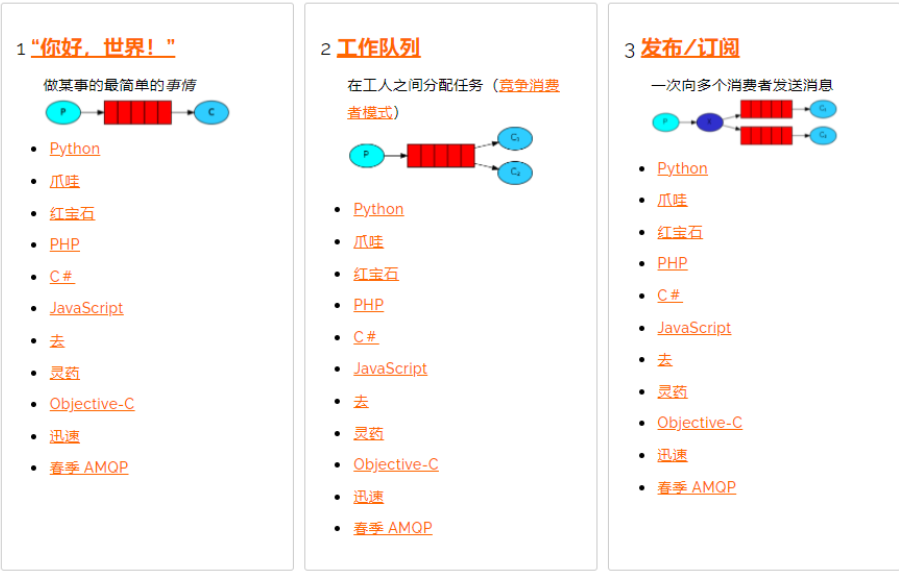
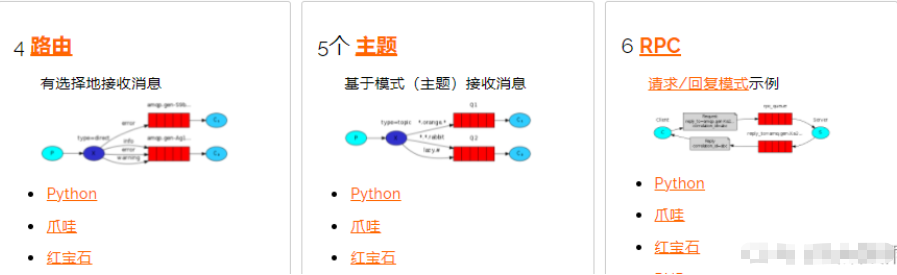
1、简单模式(Hello World)
架构
生产者 → 默认交换机"" → 1 个队列 → 1 个消费者
- 没有手动创建交换机,使用 RabbitMQ 内置默认交换机(direct)
- 发送消息时
routing‑key = 队列名称
流程
- 生产者发送消息,路由键写队列名
- 默认交换机把消息直接投递到对应队列
- 唯一消费者监听队列,消费消息
特点
- 一对一,一条消息只会被一个消费者处理
- 适合简单点对点发送
简单代码实现
xml
<project xmlns="http://maven.apache.org/POM/4.0.0" xmlns:xsi="http://www.w3.org/2001/XMLSchema-instance"
  xsi:schemaLocation="http://maven.apache.org/POM/4.0.0 http://maven.apache.org/xsd/maven-4.0.0.xsd">
  <modelVersion>4.0.0</modelVersion>

  <parent>
    <groupId>org.springframework.boot</groupId>
    <artifactId>spring-boot-starter-parent</artifactId>
    <version>2.7.15</version>
    <relativePath/>
  </parent>

  <groupId>com.demo</groupId>
  <artifactId>rabbitmq_simple</artifactId>
  <version>1.0-SNAPSHOT</version>
  <packaging>jar</packaging>

  <name>rabbitmq_simple</name>
  <url>http://maven.apache.org</url>

  <properties>
    <project.build.sourceEncoding>UTF-8</project.build.sourceEncoding>
  </properties>

  <dependencies>
    <dependency>
      <groupId>junit</groupId>
      <artifactId>junit</artifactId>
      <version>3.8.1</version>
      <scope>test</scope>
    </dependency>

    <!-- rabbitmq -->
    <dependency>
      <groupId>org.springframework.boot</groupId>
      <artifactId>spring-boot-starter-amqp</artifactId>
    </dependency>
    <!-- web 用于测试发送 -->
    <dependency>
      <groupId>org.springframework.boot</groupId>
      <artifactId>spring-boot-starter-web</artifactId>
    </dependency>
  </dependencies>
</project>
xml
spring:
  rabbitmq:
    host: 127.0.0.1
    port: 5672
    username: guest
    password: guest
    virtual-host: /
    listener:
      simple:
        # 手动ACK(生产推荐开启)
        acknowledge-mode: manual
server:
  port: 8080
java
package com.demo.config;

import org.springframework.amqp.core.Queue;
import org.springframework.context.annotation.Bean;
import org.springframework.context.annotation.Configuration;

//声明队列即可,简单模式不需要声明交换机,使用默认交换机
@Configuration
public class SimpleQueueConfig {

    /**
     * 声明队列
     * 参数1:队列名称
     * 参数2:durable 是否持久化
     */
    @Bean
    public Queue simpleQueue(){
        // simple_queue:队列名
        return new Queue("simple_queue",true);
    }

}
java
package com.demo.producer;

import org.springframework.amqp.rabbit.core.RabbitTemplate;
import org.springframework.beans.factory.annotation.Autowired;
import org.springframework.web.bind.annotation.GetMapping;
import org.springframework.web.bind.annotation.RestController;

@RestController
public class SimpleProducer {

    @Autowired
    private RabbitTemplate rabbitTemplate;

    @GetMapping("/send")
    public String sendMessage(){
        String message = "Hello RabbitMQ 简单模式消息";
        /*
         * convertAndSend(String exchange, String routingKey, Object message)
         * 第一个参数:"" 代表使用【默认交换机】
         * 第二个参数:routing‑key 必须等于队列名称 simple_queue
         */
        rabbitTemplate.convertAndSend("","simple_queue",message);
        return "消息发送成功:" + message;
    }

}
java
package com.demo.consumer;

import com.rabbitmq.client.Channel;
import org.springframework.amqp.core.Message;
import org.springframework.amqp.rabbit.annotation.RabbitListener;
import org.springframework.stereotype.Component;

import java.io.IOException;

@Component
public class SimpleConsumer {

    /**
     * queues = "simple_queue":监听simple_queue队列
     */
    @RabbitListener(queues = "simple_queue")
    public void consume(String msg, Message message, Channel channel) throws IOException {
        System.out.println("【消费者收到消息】:" + msg);

        // 获取消息投递标签
        long deliveryTag = message.getMessageProperties().getDeliveryTag();

        try {
            // 业务处理逻辑
            // 手动签收消息;false=不批量签收
            channel.basicAck(deliveryTag,false);
            System.out.println("【消息消费成功,已ACK】");
        }catch (Exception e){
            // 消费失败,消息重回队列
            channel.basicNack(deliveryTag,false,true);
            System.out.println("【消费失败,消息重回队列】");
        }

    }
}
java
http://127.0.0.1:8080/send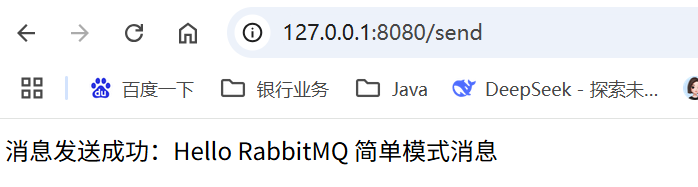
java
2026-08-17 17:22:50.272  INFO 12604 --- [nio-8080-exec-1] o.a.c.c.C.[Tomcat].[localhost].[/]       : Initializing Spring DispatcherServlet 'dispatcherServlet'
2026-08-17 17:22:50.272  INFO 12604 --- [nio-8080-exec-1] o.s.web.servlet.DispatcherServlet        : Initializing Servlet 'dispatcherServlet'
2026-08-17 17:22:50.272  INFO 12604 --- [nio-8080-exec-1] o.s.web.servlet.DispatcherServlet        : Completed initialization in 0 ms
【消费者收到消息】:Hello RabbitMQ 简单模式消息
【消息消费成功,已ACK】
2、工作队列模式
2.1 架构
java
1.生产者 → 默认交换机 → 1 个队列 → 多个消费者
2.核心关键点:同一个队列,多个消费者,消息竞争消费,一条消息只能被一个消费者拿走。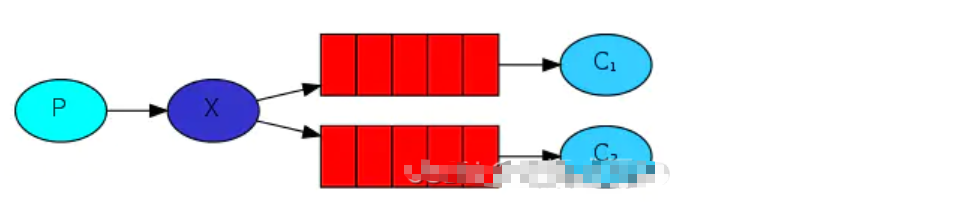
轮询分发(默认行为)
RabbitMQ 默认:队列依次把消息均衡分给消费者,不管消费者忙不忙。
消费者 1、消费者 2 轮流拿消息。
缺点:如果消费者 1 处理很慢,就会出现任务堆积,消费者 2 空闲。
公平分发(能者多劳,生产必开)
关闭自动 ACK,设置 prefetch-count=1
RabbitMQ 不要一次性预发多条消息给消费者;消费者处理完一条、手动 ACK 之后,再发下一条。
谁空闲谁干活,实现负载均衡。
使用场景
耗时任务分发,多实例消费削峰:邮件发送、文件解析、订单异步处理。
⚠️极易踩坑:
工作队列 ≠ 广播。广播需要多个队列 ;工作队列是一个队列多个消费者。
xml
<project xmlns="http://maven.apache.org/POM/4.0.0" xmlns:xsi="http://www.w3.org/2001/XMLSchema-instance"
  xsi:schemaLocation="http://maven.apache.org/POM/4.0.0 http://maven.apache.org/xsd/maven-4.0.0.xsd">
  <modelVersion>4.0.0</modelVersion>

  <parent>
    <groupId>org.springframework.boot</groupId>
    <artifactId>spring-boot-starter-parent</artifactId>
    <version>2.7.15</version>
    <relativePath/>
  </parent>

  <groupId>com.demo</groupId>
  <artifactId>rabbitmq_workqueue</artifactId>
  <version>1.0-SNAPSHOT</version>
  <packaging>jar</packaging>

  <name>rabbitmq_workqueue</name>
  <url>http://maven.apache.org</url>

  <properties>
    <project.build.sourceEncoding>UTF-8</project.build.sourceEncoding>
  </properties>

  <dependencies>
    <dependency>
      <groupId>junit</groupId>
      <artifactId>junit</artifactId>
      <version>3.8.1</version>
      <scope>test</scope>
    </dependency>
    <!-- rabbitmq -->
    <dependency>
      <groupId>org.springframework.boot</groupId>
      <artifactId>spring-boot-starter-amqp</artifactId>
    </dependency>
    <!-- web 测试接口 -->
    <dependency>
      <groupId>org.springframework.boot</groupId>
      <artifactId>spring-boot-starter-web</artifactId>
    </dependency>
  </dependencies>
</project>
xml
spring:
  rabbitmq:
    host: 127.0.0.1
    port: 5672
    username: guest
    password: guest
    virtual-host: /
    listener:
      simple:
        acknowledge-mode: manual       # 手动ACK,生产必选
        prefetch: 1                     # 每次只预取1条消息,消费完再取下一条 → 公平分发
server:
  port: 8080
config文件
java
package com.demo.config;

import org.springframework.amqp.core.Queue;
import org.springframework.context.annotation.Bean;
import org.springframework.context.annotation.Configuration;

@Configuration
public class WorkQueueConfig {

    public static final String WORK_QUEUE_NAME = "work_queue";

    /**
     * 声明工作队列,持久化队列
     */
    @Bean
    public Queue workQueue(){
        return new Queue(WORK_QUEUE_NAME, true);
    }

}
消息生产者
java
package com.demo.producer;

import com.demo.config.WorkQueueConfig;
import org.springframework.amqp.rabbit.core.RabbitTemplate;
import org.springframework.beans.factory.annotation.Autowired;
import org.springframework.web.bind.annotation.GetMapping;
import org.springframework.web.bind.annotation.RestController;

@RestController
public class WorkProducer {

    @Autowired
    private RabbitTemplate rabbitTemplate;

    @GetMapping("/sendWorkMsg")
    public String sendWorkMessage(){
        // 发送10条任务消息
        for(int i = 1 ; i <= 10 ; i++){
            String msg = "任务消息-" + i;
            // exchange = "" 默认交换机, routing-key = 队列名
            rabbitTemplate.convertAndSend("", WorkQueueConfig.WORK_QUEUE_NAME, msg);
            System.out.println("生产者发送:" + msg);
        }
        return "10条工作任务消息发送完成";
    }
}
消费者1
java
package com.demo.consumer;

import com.demo.config.WorkQueueConfig;
import com.rabbitmq.client.Channel;
import org.springframework.amqp.core.Message;
import org.springframework.amqp.rabbit.annotation.RabbitListener;
import org.springframework.stereotype.Component;

import java.io.IOException;

@Component
public class WorkConsumerOne {

    @RabbitListener(queues = WorkQueueConfig.WORK_QUEUE_NAME)
    public void consume(String msg, Message message, Channel channel) throws IOException {
        long deliveryTag = message.getMessageProperties().getDeliveryTag();
        try{
            System.out.println("【消费者‑1】收到消息:" + msg);
            // 模拟慢任务,休眠1秒
            Thread.sleep(1000);
            // 手动ACK
            channel.basicAck(deliveryTag,false);
            System.out.println("【消费者‑1】消费完成 ACK");
        }catch (Exception e){
            // 失败重回队列
            channel.basicNack(deliveryTag,false,true);
            System.out.println("【消费者‑1】消费失败,消息回队列");
        }
    }
}
消费者2
java
package com.demo.consumer;

import com.demo.config.WorkQueueConfig;
import com.rabbitmq.client.Channel;
import org.springframework.amqp.core.Message;
import org.springframework.amqp.rabbit.annotation.RabbitListener;
import org.springframework.stereotype.Component;

import java.io.IOException;

@Component
public class WorkConsumerTwo {

    @RabbitListener(queues = WorkQueueConfig.WORK_QUEUE_NAME)
    public void consume(String msg, Message message, Channel channel) throws IOException {
        long deliveryTag = message.getMessageProperties().getDeliveryTag();
        try{
            System.out.println("【消费者‑2】收到消息:" + msg);
            // 模拟快任务,休眠 0.3秒
            Thread.sleep(300);
            channel.basicAck(deliveryTag,false);
            System.out.println("【消费者‑2】消费完成 ACK");
        }catch (Exception e){
            channel.basicNack(deliveryTag,false,true);
            System.out.println("【消费者‑2】消费失败,消息回队列");
        }
    }
}
java
package com.demo;

/**
 * Hello world!
 *
 */
import org.springframework.boot.SpringApplication;
import org.springframework.boot.autoconfigure.SpringBootApplication;

@SpringBootApplication
public class RabbitWorkApplication {

    public static void main(String[] args) {
        SpringApplication.run(RabbitWorkApplication.class,args);
    }

}
消费者 1 慢、消费者 2 快;因为 prefetch=1,消费者 2 会处理更多任务,实现能者多劳。
java
http://127.0.0.1:8080/sendWorkMsg
java
2026-08-17 17:43:47.710  INFO 3336 --- [nio-8080-exec-1] o.a.c.c.C.[Tomcat].[localhost].[/]       : Initializing Spring DispatcherServlet 'dispatcherServlet'
2026-08-17 17:43:47.710  INFO 3336 --- [nio-8080-exec-1] o.s.web.servlet.DispatcherServlet        : Initializing Servlet 'dispatcherServlet'
2026-08-17 17:43:47.710  INFO 3336 --- [nio-8080-exec-1] o.s.web.servlet.DispatcherServlet        : Completed initialization in 0 ms
生产者发送:任务消息-1
生产者发送:任务消息-2
生产者发送:任务消息-3
生产者发送:任务消息-4
生产者发送:任务消息-5
生产者发送:任务消息-6
生产者发送:任务消息-7
生产者发送:任务消息-8
生产者发送:任务消息-9
生产者发送:任务消息-10
【消费者‑1】收到消息:任务消息-1
【消费者‑2】收到消息:任务消息-2
【消费者‑2】消费完成 ACK
【消费者‑2】收到消息:任务消息-3
【消费者‑2】消费完成 ACK
【消费者‑2】收到消息:任务消息-4
【消费者‑2】消费完成 ACK
【消费者‑2】收到消息:任务消息-5
【消费者‑1】消费完成 ACK
【消费者‑1】收到消息:任务消息-6
【消费者‑2】消费完成 ACK
【消费者‑2】收到消息:任务消息-7
【消费者‑2】消费完成 ACK
【消费者‑2】收到消息:任务消息-8
【消费者‑2】消费完成 ACK
【消费者‑2】收到消息:任务消息-9
【消费者‑1】消费完成 ACK
【消费者‑1】收到消息:任务消息-10
【消费者‑2】消费完成 ACK
【消费者‑1】消费完成 ACK
3、发布 / 订阅模式(Publish/Subscribe,Fanout 广播)
架构
生产者 → Fanout 交换机 → 多个队列 → 每个队列一个消费者
原理
Fanout 交换机忽略 routing‑key、binding‑key
只要队列绑定了该交换机,所有绑定队列都会收到消息副本。
一条消息生成多份副本,每个队列一份。
和工作队列本质区别
- WorkQueue:1 队列 + N 消费者 → 消息一份,竞争拿走
- 发布订阅:N 队列 + N 消费者 → 消息多份,全部收到
场景
系统通知、缓存刷新、直播间消息推送,所有订阅方都收到消息。
java
<project xmlns="http://maven.apache.org/POM/4.0.0" xmlns:xsi="http://www.w3.org/2001/XMLSchema-instance"
  xsi:schemaLocation="http://maven.apache.org/POM/4.0.0 http://maven.apache.org/xsd/maven-4.0.0.xsd">
  <modelVersion>4.0.0</modelVersion>

  <parent>
    <groupId>org.springframework.boot</groupId>
    <artifactId>spring-boot-starter-parent</artifactId>
    <version>2.7.15</version>
    <relativePath/>
  </parent>

  <groupId>com.demo</groupId>
  <artifactId>rabbit_fanout</artifactId>
  <version>1.0-SNAPSHOT</version>
  <packaging>jar</packaging>

  <name>rabbit_fanout</name>
  <url>http://maven.apache.org</url>

  <properties>
    <project.build.sourceEncoding>UTF-8</project.build.sourceEncoding>
  </properties>

  <dependencies>
    <dependency>
      <groupId>junit</groupId>
      <artifactId>junit</artifactId>
      <version>3.8.1</version>
      <scope>test</scope>
    </dependency>
    <!-- rabbitmq -->
    <dependency>
      <groupId>org.springframework.boot</groupId>
      <artifactId>spring-boot-starter-amqp</artifactId>
    </dependency>
    <!-- web 测试接口 -->
    <dependency>
      <groupId>org.springframework.boot</groupId>
      <artifactId>spring-boot-starter-web</artifactId>
    </dependency>
  </dependencies>
</project>
java
spring:
  rabbitmq:
    host: 127.0.0.1
    port: 5672
    username: guest
    password: guest
    virtual-host: /
    listener:
      simple:
        acknowledge-mode: manual
server:
  port: 8080
java
package com.demo.config;

import org.springframework.amqp.core.Binding;
import org.springframework.amqp.core.BindingBuilder;
import org.springframework.amqp.core.FanoutExchange;
import org.springframework.amqp.core.Queue;
import org.springframework.context.annotation.Bean;
import org.springframework.context.annotation.Configuration;

/**
 * 需要同时声明:Fanout 交换机 + 2 个队列 + 队列与交换机的绑定关系
 */
@Configuration
public class FanoutConfig {

    // 交换机名称
    public static final String FANOUT_EXCHANGE_NAME = "fanout_exchange_notice";
    // 两个广播队列
    public static final String QUEUE_EMAIL = "fanout_queue_email";
    public static final String QUEUE_SMS = "fanout_queue_sms";

    // 1.声明Fanout交换机
    @Bean
    public FanoutExchange fanoutExchange(){
        // 参数:交换机名,持久化,不自动删除
        return new FanoutExchange(FANOUT_EXCHANGE_NAME,true,false);
    }

    // 2.声明队列1:邮件队列
    @Bean
    public Queue emailQueue(){
        return new Queue(QUEUE_EMAIL,true);
    }

    // 3.声明队列2:短信队列
    @Bean
    public Queue smsQueue(){
        return new Queue(QUEUE_SMS,true);
    }

    // 4.绑定:邮件队列绑定fanout交换机
    @Bean
    public Binding bindingEmail(FanoutExchange fanoutExchange, Queue emailQueue){
        // fanout绑定不需要写binding‑key
        return BindingBuilder.bind(emailQueue).to(fanoutExchange);
    }

    // 5.绑定:短信队列绑定fanout交换机
    @Bean
    public Binding bindingSms(FanoutExchange fanoutExchange, Queue smsQueue){
        return BindingBuilder.bind(smsQueue).to(fanoutExchange);
    }
}
java
package com.demo.producer;

import com.demo.config.FanoutConfig;
import org.springframework.amqp.rabbit.core.RabbitTemplate;
import org.springframework.beans.factory.annotation.Autowired;
import org.springframework.web.bind.annotation.GetMapping;
import org.springframework.web.bind.annotation.RestController;

@RestController
public class FanoutProducer {

    @Autowired
    private RabbitTemplate rabbitTemplate;

    @GetMapping("/sendFanout")
    public String sendFanoutMsg(){
        String message = "【系统广播】您有一条新的活动通知";
        /*
         * 参数1:交换机名称
         * 参数2:routing‑key,fanout模式无效,随便传字符串即可,一般传""
         * 参数3:消息体
         */
        rabbitTemplate.convertAndSend(FanoutConfig.FANOUT_EXCHANGE_NAME,"",message);
        System.out.println("生产者发送广播消息:"+message);
        return "广播消息发送成功";
    }
}
java
package com.demo.consumer;

import com.demo.config.FanoutConfig;
import com.rabbitmq.client.Channel;
import org.springframework.amqp.core.Message;
import org.springframework.amqp.rabbit.annotation.RabbitListener;
import org.springframework.stereotype.Component;

import java.io.IOException;

@Component
public class EmailConsumer {

    @RabbitListener(queues = FanoutConfig.QUEUE_EMAIL)
    public void consume(String msg, Message message, Channel channel) throws IOException {
        long deliveryTag = message.getMessageProperties().getDeliveryTag();
        try{
            System.out.println("【邮件消费者】收到广播消息:"+msg);
            // 模拟发送邮件耗时
            Thread.sleep(500);
            channel.basicAck(deliveryTag,false);
            System.out.println("【邮件消费者】消费完成,已ACK");
        }catch (Exception e){
            channel.basicNack(deliveryTag,false,true);
            System.out.println("【邮件消费者】消费失败");
        }
    }
}
java
package com.demo.consumer;

import com.demo.config.FanoutConfig;
import com.rabbitmq.client.Channel;
import org.springframework.amqp.core.Message;
import org.springframework.amqp.rabbit.annotation.RabbitListener;
import org.springframework.stereotype.Component;

import java.io.IOException;

@Component
public class SmsConsumer {

    @RabbitListener(queues = FanoutConfig.QUEUE_SMS)
    public void consume(String msg, Message message, Channel channel) throws IOException {
        long deliveryTag = message.getMessageProperties().getDeliveryTag();
        try{
            System.out.println("【短信消费者】收到广播消息:"+msg);
            // 模拟发送短信耗时
            Thread.sleep(800);
            channel.basicAck(deliveryTag,false);
            System.out.println("【短信消费者】消费完成,已ACK");
        }catch (Exception e){
            channel.basicNack(deliveryTag,false,true);
            System.out.println("【短信消费者】消费失败");
        }
    }
}
java
http://127.0.0.1:8080/sendFanout
java
2026-08-17 20:09:00.550  INFO 15108 --- [nio-8080-exec-2] o.a.c.c.C.[Tomcat].[localhost].[/]       : Initializing Spring DispatcherServlet 'dispatcherServlet'
2026-08-17 20:09:00.550  INFO 15108 --- [nio-8080-exec-2] o.s.web.servlet.DispatcherServlet        : Initializing Servlet 'dispatcherServlet'
2026-08-17 20:09:00.550  INFO 15108 --- [nio-8080-exec-2] o.s.web.servlet.DispatcherServlet        : Completed initialization in 0 ms
生产者发送广播消息:【系统广播】您有一条新的活动通知
【邮件消费者】收到广播消息:【系统广播】您有一条新的活动通知
【短信消费者】收到广播消息:【系统广播】您有一条新的活动通知
【邮件消费者】消费完成,已ACK
【短信消费者】消费完成,已ACK