在电商、3C 数码或 SaaS 服务等场景中,产品对比页是帮助用户快速决策的关键工具。传统方案通常采用静态 HTML 或简单的表格布局,维护成本高、扩展性差。
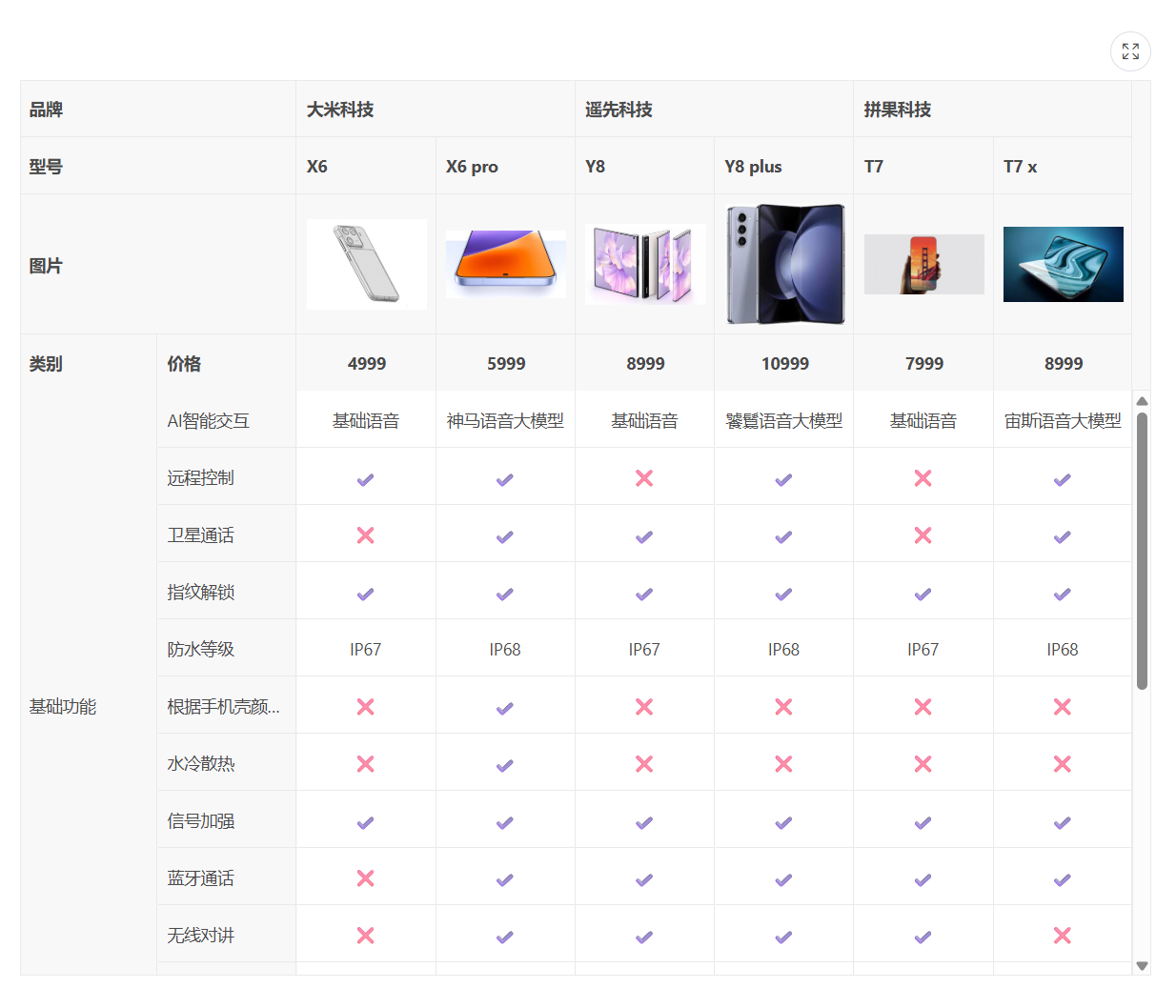
本文以手机产品对比为例,展示如何利用 vxe-table(Vue 生态最强表格组件)的高级特性,快速搭建一个多级表头、动态行合并、布尔值可视化的对比表格,并分享核心实现技巧与可优化方向。
需求分析与设计思路
- 目标:按品牌/机型,对比维度(基础功能、特色功能、高级功能)进行横向对比。
- 关键交互:
- 表头按 品牌 → 机型 → 图片 → 价格 四层嵌套展示
- 行按 类别(category) 合并,减少重复信息
- 布尔值(支持/不支持)以 ✔️ / ❌ 直观显示,文本值(如防水等级、重量)直接展示
- 支持表格缩放(toolbar 提供缩放按钮)
- 技术选型:vxe-table 的 vxe-grid 组件,因其原生支持:
- 多级表头(children 嵌套)
- 单元格合并(spanMethod)
- 自定义模板插槽(slots)
- 列与数据动态绑定
核心实现拆解
多级表头结构(columns 配置)
对比表的核心挑战在于表头维度复杂:品牌 → 机型 → 图片/价格。
vxe-table 的 children 属性支持无限级嵌套,完美映射:
javacript
columns: [
  {
    field: 'brand',
    title: '品牌',
    children: [
      {
        field: 'code',
        title: '型号',
        children: [
          {
            field: 'imgUrl',
            title: '图片',
            children: [
              { field: 'category', title: '类别' },  // 第一列:类别
              { field: 'describe', title: '价格' }    // 第二列:描述(实际是特性名称)
            ]
          }
        ]
      }
    ]
  },
  // 后续为各品牌机型列...
]
此处 category 与 describe 被嵌套在"图片"层级下,但实际表现是最左侧两列(类别与特性名称)。该设计利用了树形列结构的灵活性,将"固定列"与"动态列"统一在 columns 中管理。
行合并(spanMethod)实现类别分组
为了让 category 列(如"基础功能")跨多行显示,需使用 spanMethod 函数。
该函数接收 { row, rowIndex, column, visibleData },返回 { rowspan, colspan }。
- 实现逻辑:
- 只对 category 字段进行合并
- 若当前行与上一行值相同,则返回 { rowspan: 0, colspan: 0 }(被合并掉)
- 否则向下统计连续相同值的行数,返回对应的 rowspan
javascript
spanMethod({ row, rowIndex, column, visibleData }) {
  if (column.field === 'category') {
    const cellValue = row.category;
    const prevRow = visibleData[rowIndex - 1];
    if (prevRow && prevRow.category === cellValue) {
      return { rowspan: 0, colspan: 0 };
    }
    let count = 1;
    while (visibleData[rowIndex + count]?.category === cellValue) count++;
    return { rowspan: count, colspan: 1 };
  }
}
方式无侵入,数据源无需额外处理,且性能良好(仅在渲染时计算)。
单元格内容动态渲染(布尔值与文本混合)
对比项的值可能是字符串(如"IP68")或布尔值(如 true/false)。
我们通过插槽 cell11 ~ cell32 分别对应每个机型列,并使用工具函数 hasCheckboxCell 判断类型:
html
<template #cell11="{ row }">
  <span v-if="hasCheckboxCell(row.product11)">
    {{ row.product11 ? '✔️' : '❌' }}
  </span>
  <span v-else>{{ row.product11 }}</span>
</template>
重复的 6 个插槽模板存在冗余,后续优化会提及改进方案。
自定义标题样式
利用 cellClassName 为"类别"和"描述"列添加背景色,突出固定列:
html
cellClassName({ column }) {
  return ['category', 'describe'].includes(column.field)
    ? 'my-compare-table-body-title'
    : '';
}
代码
html
<template>
  <div>
    <vxe-grid class="my-compare-table" v-bind="gridOptions">
      <template #img11>
        <vxe-image src="https://vxeui.com/resource/productImg/m11.jpg" width="100%"></vxe-image>
      </template>

      <template #img12>
        <vxe-image src="https://vxeui.com/resource/productImg/m12.jpg" width="100%"></vxe-image>
      </template>

      <template #img21>
        <vxe-image src="https://vxeui.com/resource/productImg/m21.jpg" width="100%"></vxe-image>
      </template>

      <template #img22>
        <vxe-image src="https://vxeui.com/resource/productImg/m22.jpg" width="100%"></vxe-image>
      </template>

      <template #img31>
        <vxe-image src="https://vxeui.com/resource/productImg/m31.jpg" width="100%"></vxe-image>
      </template>

      <template #img32>
        <vxe-image src="https://vxeui.com/resource/productImg/m32.jpg" width="100%"></vxe-image>
      </template>

      <template #cell11="{ row }">
        <span v-if="hasCheckboxCell(row.product11)">{{ row.product11 ? '✔️' : '❌' }}</span>
        <span v-else>{{ row.product11 }}</span>
      </template>

      <template #cell12="{ row }">
        <span v-if="hasCheckboxCell(row.product12)">{{ row.product12 ? '✔️' : '❌' }}</span>
        <span v-else>{{ row.product12 }}</span>
      </template>

      <template #cell21="{ row }">
        <span v-if="hasCheckboxCell(row.product21)">{{ row.product21 ? '✔️' : '❌' }}</span>
        <span v-else>{{ row.product21 }}</span>
      </template>

      <template #cell22="{ row }">
        <span v-if="hasCheckboxCell(row.product22)">{{ row.product22 ? '✔️' : '❌' }}</span>
        <span v-else>{{ row.product22 }}</span>
      </template>

      <template #cell31="{ row }">
        <span v-if="hasCheckboxCell(row.product31)">{{ row.product31 ? '✔️' : '❌' }}</span>
        <span v-else>{{ row.product31 }}</span>
      </template>

      <template #cell32="{ row }">
        <span v-if="hasCheckboxCell(row.product32)">{{ row.product32 ? '✔️' : '❌' }}</span>
        <span v-else>{{ row.product32 }}</span>
      </template>
    </vxe-grid>
  </div>
</template>

<script setup>
import { reactive } from 'vue'
import XEUtils from 'xe-utils'

const gridOptions = reactive({
  border: true,
  loading: false,
  showOverflow: true,
  height: 800,
  toolbarConfig: {
    zoom: true
  },
  cellClassName({ column }) {
    if (['category', 'describe'].includes(column.field)) {
      return 'my-compare-table-body-title'
    }
    return ''
  },
  spanMethod({ row, rowIndex, column, visibleData }) {
    const spanFields = ['category']
    const cellValue = row[column.field]
    if (cellValue && spanFields.includes(column.field)) {
      const prevRow = visibleData[rowIndex - 1]
      let nextRow = visibleData[rowIndex + 1]
      if (prevRow && prevRow[column.field] === cellValue) {
        return { rowspan: 0, colspan: 0 }
      } else {
        let countRowspan = 1
        while (nextRow && nextRow[column.field] === cellValue) {
          nextRow = visibleData[++countRowspan + rowIndex]
        }
        if (countRowspan > 1) {
          return { rowspan: countRowspan, colspan: 1 }
        }
      }
    }
  },
  columns: [
    {
      field: 'brand',
      title: '品牌',
      children: [
        {
          field: 'code',
          title: '型号',
          children: [
            {
              field: 'imgUrl',
              title: '图片',
              children: [
                { field: 'category', title: '类别' },
                { field: 'describe', title: '价格' }
              ]
            }
          ]
        }
      ]
    },
    {
      field: 'product1000',
      title: '大米科技',
      children: [
        {
          field: 'product1111',
          title: 'X6',
          children: [
            {
              field: 'product1110',
              title: '',
              slots: {
                header: 'img11'
              },
              children: [
                {
                  field: 'product11',
                  title: '4999',
                  align: 'center',
                  slots: {
                    default: 'cell11'
                  }
                }
              ]
            }
          ]
        },
        {
          field: 'product1211',
          title: 'X6 pro',
          children: [
            {
              field: 'product1210',
              title: '',
              slots: {
                header: 'img12'
              },
              children: [
                {
                  field: 'product12',
                  title: '5999',
                  align: 'center',
                  slots: {
                    default: 'cell12'
                  }
                }
              ]
            }
          ]
        }
      ]
    },
    {
      field: 'product20',
      title: '遥先科技',
      children: [
        {
          field: 'product2111',
          title: 'Y8',
          children: [
            {
              field: 'product2110',
              title: '',
              slots: {
                header: 'img21'
              },
              children: [
                {
                  field: 'product21',
                  title: '8999',
                  align: 'center',
                  slots: {
                    default: 'cell21'
                  }
                }
              ]
            }
          ]
        },
        {
          field: 'product2211',
          title: 'Y8 plus',
          children: [
            {
              field: 'product2210',
              title: '',
              slots: {
                header: 'img22'
              },
              children: [
                {
                  field: 'product22',
                  title: '10999',
                  align: 'center',
                  slots: {
                    default: 'cell22'
                  }
                }
              ]
            }
          ]
        }
      ]
    },
    {
      field: 'product30',
      title: '拼果科技',
      children: [
        {
          field: 'product3111',
          title: 'T7',
          children: [
            {
              field: 'product3110',
              title: '',
              slots: {
                header: 'img31'
              },
              children: [
                {
                  field: 'product31',
                  title: '7999',
                  align: 'center',
                  slots: {
                    default: 'cell31'
                  }
                }
              ]
            }
          ]
        },
        {
          field: 'product3211',
          title: 'T7 x',
          children: [
            {
              field: 'product3210',
              title: '',
              slots: {
                header: 'img32'
              },
              children: [
                {
                  field: 'product32',
                  title: '8999',
                  align: 'center',
                  slots: {
                    default: 'cell32'
                  }
                }
              ]
            }
          ]
        }
      ]
    }
  ],
  data: [
    { id: 10000, category: '基础功能', describe: 'AI智能交互', product11: '基础语音', product12: '神马语音大模型', product21: '基础语音', product22: '饕鬄语音大模型', product31: '基础语音', product32: '宙斯语音大模型' },
    { id: 10002, category: '基础功能', describe: '远程控制', product11: true, product12: true, product21: false, product22: true, product31: false, product32: true },
    { id: 10003, category: '基础功能', describe: '卫星通话', product11: false, product12: true, product21: true, product22: true, product31: false, product32: true },
    { id: 10004, category: '基础功能', describe: '指纹解锁', product11: true, product12: true, product21: true, product22: true, product31: true, product32: true },
    { id: 10005, category: '基础功能', describe: '防水等级', product11: 'IP67', product12: 'IP68', product21: 'IP67', product22: 'IP68', product31: 'IP67', product32: 'IP68' },
    { id: 10006, category: '基础功能', describe: '根据手机壳颜色换主题', product11: false, product12: true, product21: false, product22: false, product31: false, product32: false },
    { id: 10007, category: '基础功能', describe: '水冷散热', product11: false, product12: true, product21: false, product22: false, product31: false, product32: false },
    { id: 10008, category: '基础功能', describe: '信号加强', product11: true, product12: true, product21: true, product22: true, product31: true, product32: true },
    { id: 10009, category: '基础功能', describe: '蓝牙通话', product11: false, product12: true, product21: true, product22: true, product31: true, product32: true },
    { id: 10010, category: '基础功能', describe: '无线对讲', product11: false, product12: true, product21: true, product22: true, product31: true, product32: false },
    { id: 10011, category: '基础功能', describe: '重量', product11: '249克', product12: '282克', product21: '238克', product22: '256克', product31: '226克', product32: '244克' },
    { id: 10012, category: '特色功能', describe: '屏幕分辨率', product11: '2k', product12: '4k', product21: '2k', product22: '4k', product31: '2k', product32: '2k' },
    { id: 10013, category: '特色功能', describe: '拍照像素', product11: '5000万', product12: '1亿', product21: '5000万', product22: '8000万', product31: '3000万', product32: '5000万' },
    { id: 10014, category: '特色功能', describe: '自动报警', product11: false, product12: true, product21: true, product22: true, product31: false, product32: true },
    { id: 10015, category: '特色功能', describe: '无线支付', product11: true, product12: true, product21: true, product22: true, product31: false, product32: true },
    { id: 10016, category: '特色功能', describe: '游戏模式', product11: true, product12: true, product21: true, product22: true, product31: true, product32: true },
    { id: 10017, category: '特色功能', describe: '杜比音效', product11: false, product12: true, product21: true, product22: true, product31: true, product32: true },
    { id: 10018, category: '高级功能', describe: '智能居家', product11: true, product12: true, product21: true, product22: true, product31: true, product32: true },
    { id: 10019, category: '高级功能', describe: 'wifi8', product11: true, product12: true, product21: true, product22: true, product31: true, product32: true },
    { id: 10020, category: '高级功能', describe: '无线充电', product11: true, product12: true, product21: true, product22: true, product31: true, product32: true }
  ]
})

const hasCheckboxCell = (cellValue) => {
  if (XEUtils.isBoolean(cellValue)) {
    return true
  }
  return false
}
</script>

<style lang="scss" scoped>
::v-deep(.my-compare-table) {
  .my-compare-table-body-title {
    background-color: var(--vxe-ui-table-header-background-color);
  }
}
</style>- vxe-table 的 vxe-grid 组件以极低的成本实现了复杂的对比表格需求,其核心能力包括
- 无限级嵌套表头
- 灵活的单元格合并与样式定制
- 插槽与渲染函数双轨支持