作者:来自 Elastic Jeffrey Rengifo
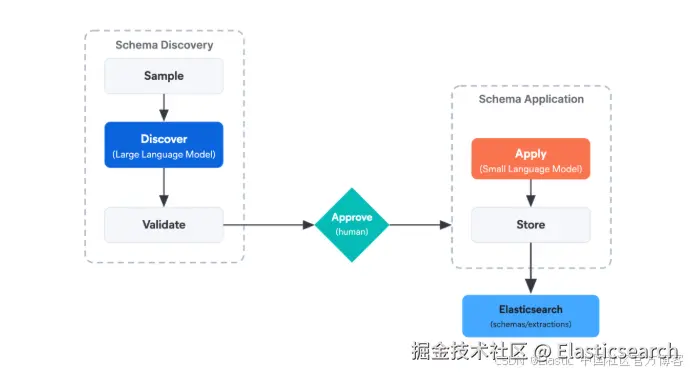
构建一个 Elastic workflow,将数据样本发送给大模型,由大模型提出分类标签。人工审核确认后,再由小模型将这些标签应用于整个数据集。
将大语言模型(LLM)分类中昂贵的部分与廉价的部分拆分开来。本文构建了一个 Elastic workflow,让 Claude Sonnet 阅读 NASA 飞行员事故报告的分层样本,并根据发现的内容提出分类标签。人工审核 schema 并确认后,再由 Mistral Small 3.1 将这些标签应用于整个数据集。路由使用 YAML,结果以结构化数据的形式写入 Elasticsearch,而这种模式适用于任何需要对自由文本进行标注的场景。
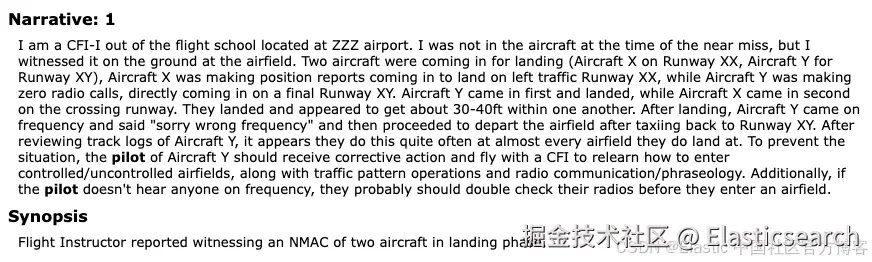
NASA 航空安全报告系统(ASRS) 报告描述了飞行过程中发生的异常事件,例如高度偏差、令人困惑的许可指令、跑道问题或机械故障。每份报告已经有一个官方类别,例如高度偏差、航向偏差或地面事件。在本文中,我们提出了一个不同的问题:这份报告揭示了撰写报告的飞行员的哪些信息? 我们希望让模型根据数据本身推断出一个 schema,根据有助于了解报告撰写者的信息对报告进行分类。然后再让第二个模型应用这些标签。
你可以在 这里找到完整的 workflow 定义和辅助脚本。
运行此 LLM 流水线所需的内容
-
Elastic Stack 9.4+ 或 Elastic Cloud Serverless。Elastic Workflows 自 9.4 起正式发布(GA)。
-
在你的部署中启用 Elastic Agent Builder。
-
一个指向 Claude Sonnet(或等效推理模型)的 Kibana 生成式 AI(GenAI)连接器。它充当规划器。
-
一个 Mistral API 密钥。我们将使用它来注册一个 Elasticsearch inference endpoint。
-
Python 3.10+,以及
elasticsearch>=9.0和pandas。数据集加载器会使用这些组件。
双层 LLM 编排如何工作
这个 workflow 有两个任务:确定应该有哪些标签,然后将这些标签应用到每份报告。
第一个任务是开放式的。 大模型读取一组具有多样性的报告样本,并提出一个由分类字段组成的小型 schema。一个字段是一种描述报告撰写者的方式,例如 attribution_style 或 procedure_orientation。每个字段都有几个允许的值,例如 self_critical、system_attributing 或 balanced。
第二个任务是可重复的。 人工批准 schema 后,小模型读取每份报告,并为每个字段选择一个值。
我们使用 Elastic Workflows,是因为这些步骤都是预先确定的:抽取报告样本、提出标签、等待批准、对每份文档进行分类,以及存储结果。将这些步骤写入 YAML,可以让整个流程具备可复现性、可观测性,并且能够以更低的成本重新运行。
为什么要在两个模型层级之间拆分 LLM 工作?
小模型可以处理分类,但 schema 发现是另一种类型的问题。它需要读取多样化的样本、发现潜在模式,并提出复杂的结构。在实际使用中,小模型往往会过度依赖表面关键词,并生成重复或互斥性不足的字段。
分类更加简单,因为 schema 已经存在,值也已经枚举出来了,任务只是为每个字段选择一个值。小模型可以可靠地处理这项任务,而且成本只是大模型的一小部分,因为它需要对整个数据集中的每份文档运行一次。
这里的_大_和_小_指的是推理能力。在本文中,Claude Sonnet 充当规划器,而 Mistral Small 3.1 充当执行器。
使用双层 LLM 流水线对 NASA 飞行员报告进行分类
我们将使用 NASA ASRS 数据库,该数据库收集来自飞行员、空中交通管制员和机械师的自愿、匿名事故报告。该数据集是公开的,报告以自由文本叙述的形式撰写。
我们想要提出的问题是:
这份报告揭示了撰写报告的飞行员的哪些信息?
规划器读取一组具有多样性的报告样本,并根据报告实际的撰写方式来判断哪些差异具有意义。
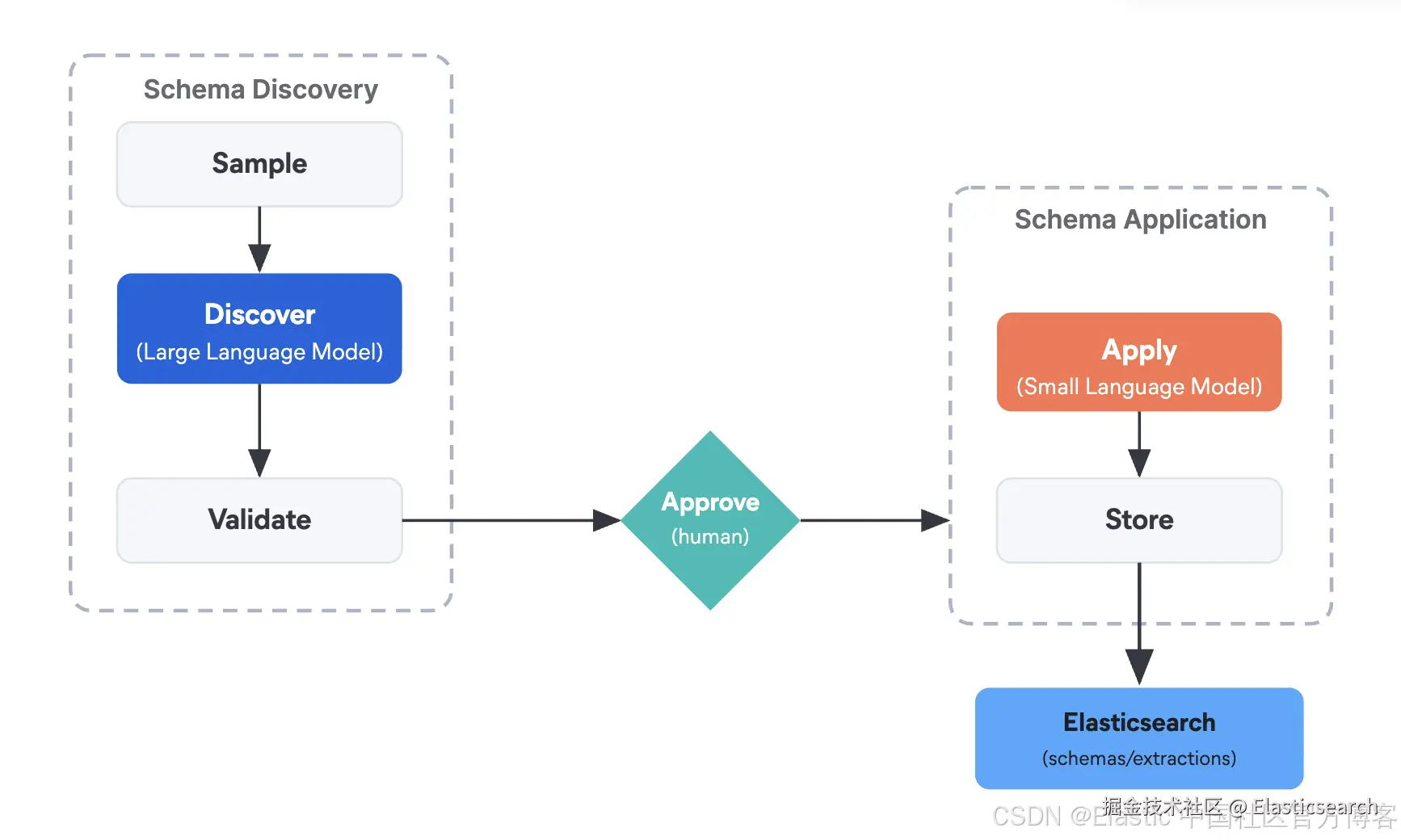
| 步骤 | 角色 | 模型层级 |
|---|---|---|
sample |
从数据集中抽取一组具有多样性的报告子集。 | (无 LLM) |
discover |
阅读问题和样本,提出由字段及枚举值组成的 schema。 | 大模型 |
approve |
人工审核提出的 schema,并进行批准或编辑。 | (通过 waitForInput 由人工完成) |
apply |
遍历整个数据集,为每份报告的每个字段分配一个值。 | 小模型 |
store |
将 schema 和每份文档的字段值写入 Elasticsearch。 |
注册 Mistral 和 Claude 为 Elasticsearch inference endpoint
小模型将使用原生的 mistral 服务集成,注册为 Elasticsearch inference endpoint。
bash
`
1. INFERENCE_ID = "mistral-small-extractor"
3. es.inference.put(
4. task_type="chat_completion",
5. inference_id=INFERENCE_ID,
6. inference_config={
7. "service": "mistral",
8. "service_settings": {
9. "api_key": MISTRAL_API_KEY,
10. "model": "mistral-small-latest",
11. # 6 RPM is conservative for the Mistral free tier to avoid 429s.
12. "rate_limit": {"requests_per_minute": 6},
13. },
14. },
15. )
`AI写代码别名 mistral-small-latest 解析为 Mistral Small 3.1。它具有 128k 的上下文窗口,并支持 JSON 模式输出。
大模型将使用一个指向 Claude Sonnet 的 AI connector。 Agent Builder UI 会引导你完成 connector 的创建。记下 connector ID,因为我们将在 workflow 中引用它。
将 NASA ASRS 事故报告索引到 Elasticsearch
ASRS 数据集使用 keyword 映射来处理用于聚合的字段,并使用 text 映射来处理模型将要读取的叙述文本。
下载 ASRS CSV 文件(该数据库会在 ASRS Database Online 页面发布季度数据提取文件),然后将其建立索引。映射如下:
json
`

1.  {
2.    "properties": {
3.      "acn":          { "type": "keyword" },
4.      "flight_phase": { "type": "keyword" },
5.      "anomaly":      { "type": "keyword" },
6.      "synopsis":     { "type": "text" },
7.      "narrative":    { "type": "text" }
8.    }
9.  }

`AI写代码映射类型根据每个字段的用途来确定。flight_phase 和 anomaly 被映射为 keyword,因为我们将对它们执行 terms 聚合来构建样本,而聚合需要精确的、未经分析的值。narrative 和 synopsis 被映射为 text,因为它们包含模型将要读取的自由文本。配套的 notebook 包含完整的加载脚本,用于读取 CSV 并批量建立文档索引。
为规划 LLM 构建分层样本
本节以及后续章节中的 YAML 代码片段都是 workflow 定义中的步骤,notebook 会通过 Workflows API 注册这些步骤。前两个步骤用于生成具有代表性的样本:它们分别按照飞行阶段和异常情况进行聚合,并使用 top_hits 从每个分组中抽取几份文档。
yaml
`
1. - name: by_phase
2. type: elasticsearch.request
3. with:
4. method: POST
5. path: "/incident_reports/_search"
6. body:
7. size: 0
8. aggs:
9. per_phase:
10. terms:
11. field: flight_phase
12. size: 8
13. aggs:
14. sampled_docs:
15. top_hits:
16. size: 5
17. _source: ["acn", "synopsis", "narrative"]
19. - name: by_anomaly
20. type: elasticsearch.request
21. with:
22. method: POST
23. path: "/incident_reports/_search"
24. body:
25. size: 0
26. aggs:
27. per_anomaly:
28. terms:
29. field: anomaly
30. size: 8
31. aggs:
32. sampled_docs:
33. top_hits:
34. size: 3
35. _source: ["acn", "synopsis", "narrative"]
`AI写代码大型 LLM 如何从数据中发现分类 schema
提示词需要同时包含问题和样本。只有问题可能会产生与数据集无关的通用标签,而只有样本则会产生描述性分组,却忽略问题的角度。
当两者同时存在,并且输出采用结构化形式时,模型会生成基于数据且面向任务的标签:由分类字段组成的 schema,每个字段包含 2 到 4 个互斥的值选项,并由样本中的证据提供支持。
下面是 workflow 中的规划器步骤:
yaml
`
1. - name: discover
2. type: ai.prompt
3. connector-id: "claude-sonnet"
4. with:
5. systemPrompt: |
6. You design categorical schemas for use by downstream classifiers. A
7. schema is a small set of fields, each with a few mutually exclusive
8. values. Every value you propose must be grounded in evidence from the
9. provided sample and must serve the stated question. You do not invent
10. values that are not supported by at least two documents in the sample.
11. You do not propose fields that a reasonable analyst could have written
12. without reading the documents.
13. prompt: |
14. Question:
15. ${{ inputs.goal }}
17. Sample documents stratified by flight phase:
18. ${{ steps.by_phase.output.aggregations.per_phase.buckets | json }}
20. Sample documents stratified by anomaly type:
21. ${{ steps.by_anomaly.output.aggregations.per_anomaly.buckets | json }}
23. Propose between 2 and 4 categorical fields that:
24. - serve the question (you can explain how)
25. - depend on patterns visible in the sample (you can cite document IDs)
26. - would not be obvious to someone who has not read the sample
28. For each field, return: name (snake_case), definition, why_useful,
29. and values (2 to 4 mutually exclusive options).
31. For each value, return: value (snake_case) and definition.
32. schema:
33. type: object
34. properties:
35. fields:
36. type: array
37. minItems: 2
38. maxItems: 4
39. items:
40. type: object
41. required: [name, definition, why_useful, values]
42. properties:
43. name: { type: string }
44. definition: { type: string }
45. why_useful: { type: string }
46. values:
47. type: array
48. minItems: 2
49. maxItems: 4
50. items:
51. type: object
52. required: [value, definition]
53. properties:
54. value: { type: string }
55. definition: { type: string }
56. temperature: 0.3
`AI写代码收起代码块结构化输出 schema 强制规定了响应的结构:
-
name:分类字段的标识符。 -
definition:该字段衡量的内容,用一句话描述。 -
why_useful:该字段如何服务于问题;这也有助于下游分类器理解其意图。 -
values:2 到 4 个互斥的选项。每个选项包含一个value和一个definition。
下面是一个生成的 schema 示例。我们可以看到报告撰写者是如何被分类的,以及模型决定创建该类别的原因。第二个模型会使用 definition 和 why_useful 字段来对文档进行分类。
bash
`
1. {
2. "fields": [
3. {
4. "name": "attribution_style",
5. "definition": "How the reporter frames responsibility for what happened.",
6. "why_useful": "Surfaces reporting culture independent of the technical event. Useful for training and safety-management programmes that want to distinguish reporter style from incident type.",
7. "values": [
8. {
9. "value": "self_critical",
10. "definition": "Assigns the cause primarily to their own action, even when external factors clearly contributed."
11. },
12. {
13. "value": "system_attributing",
14. "definition": "Frames the cause as external: ATC, equipment, weather, or organisational factors."
15. },
16. {
17. "value": "balanced",
18. "definition": "Distributes responsibility across self and system without emphasising either."
19. }
20. ]
21. },
22. {
23. "name": "procedure_orientation",
24. "definition": "How the reporter relates to written procedure.",
25. "why_useful": "Distinguishes pilots who frame events through SOPs from those who frame them through personal judgment.",
26. "values": [
27. // procedure_first, experience_first (same structure as above)
28. ]
29. }
30. ]
31. }
`AI写代码使用 waitForInput 实现人工参与的 schema 审批
现在,提出的 schema 会交给人工进行审批。Elastic Workflows 提供了一个 waitForInput 步骤,可以使用 schema 暂停 workflow、展示表单,并在提交输入后恢复执行。
waitForInput 自身没有超时设置,因此如果没有人响应,执行会无限期等待。如果希望设置时间限制,可以设置 workflow 级别的 settings.timeout;如果审核者在超时时间到达之前没有提交表单,执行就会被取消。
yaml
`
1. - name: human_gate
2. type: waitForInput
3. with:
4. message: "Review and edit the proposed schema. The approved fields will be applied across the full corpus."
5. schema:
6. type: object
7. required: [approved_fields]
8. properties:
9. approved_fields:
10. type: array
11. items:
12. type: object
13. properties:
14. name: { type: string }
15. definition: { type: string }
16. values:
17. type: array
18. items:
19. type: object
20. properties:
21. value: { type: string }
22. notes:
23. type: string
`AI写代码当 workflow 执行到这一步时,执行会暂停,Kibana UI 会显示一个"需要执行操作"的标记。点击 提供操作 会打开一个表单,审核者可以在其中粘贴或编辑 schema JSON。由于 waitForInput 无法使用前一个步骤的输出进行预填充,因此代码会轮询 discover 步骤的输出,并打印一个可以直接复制到该表单中的 JSON 代码块。
bash
`
1. discover = step_output(execution_id, "discover") # polls until the step completes
3. # Strip
4. why_useful
5. (not part of the human_gate form) and wrap in the shape
6. # expected by the waitForInput form so this is paste-ready.
7. approved_fields = [
8. {
9. "name": field["name"],
10. "definition": field["definition"],
11. "values": [
12. {"value": v["value"], "definition": v["definition"]}
13. for v in field["values"]
14. ],
15. }
16. for field in discover["content"]["fields"]
17. ]
19. print(json.dumps({"approved_fields": approved_fields, "notes": ""}, indent=2))
`AI写代码notebook 中的 step_output 辅助函数会通过 GET /api/workflows/executions/{id} 轮询执行状态,直到 discover 步骤完成,然后返回其输出。
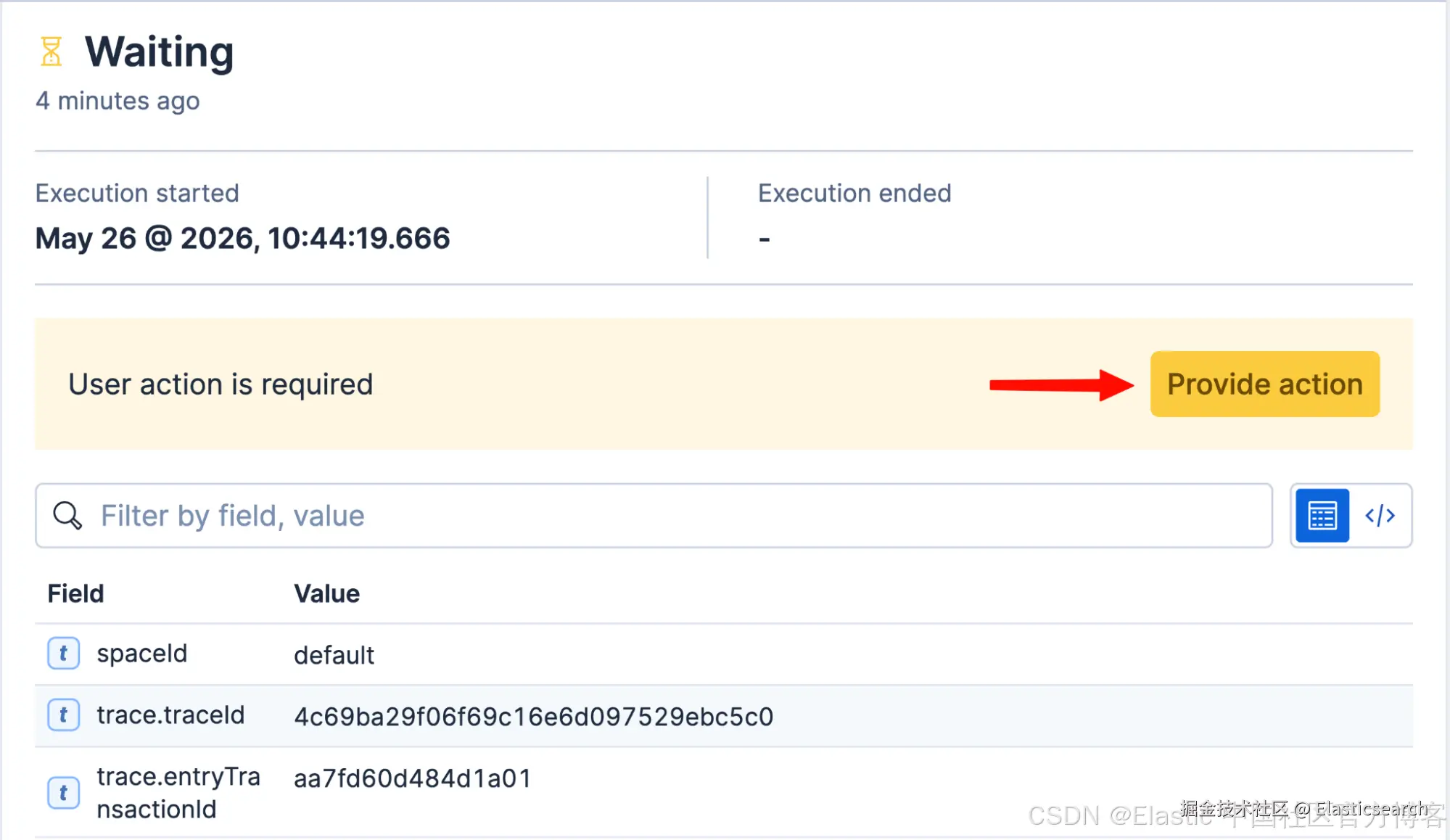
粘贴到 Kibana 中的代码 JSON 输出:
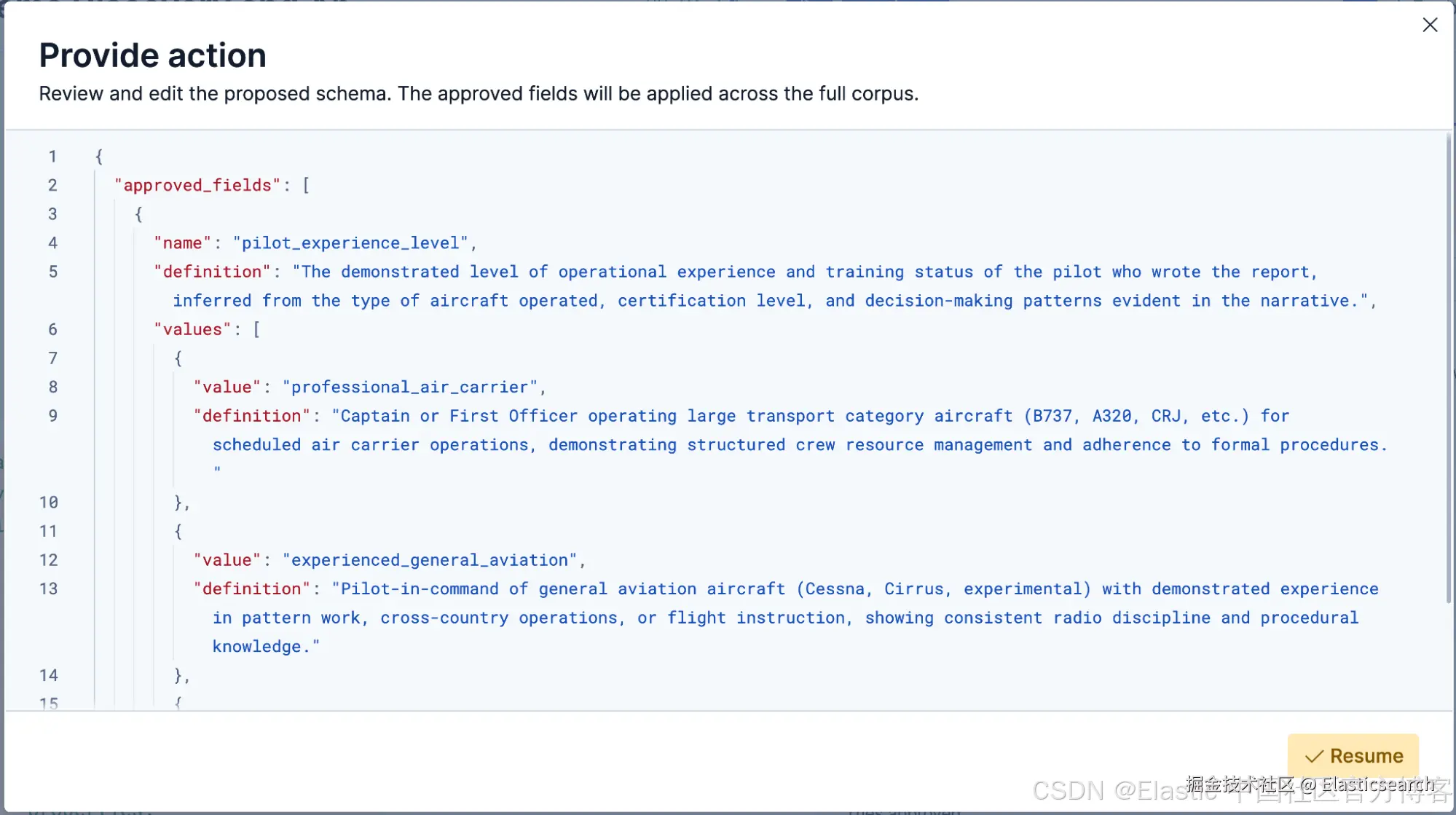
审核者可以保留有用的字段、重写不清晰的字段、合并重叠的值,并添加备注。批准后,workflow 会恢复执行,并将最终 schema 发送给执行器步骤。
对于新的数据集,请保留这个人工审核环节。等 schema 稳定后,你可以自动批准,并且只在确实需要时再进行人工审核:只将低置信度的提取结果交给人工,或者将新的发现运行结果与存储在 schemas 索引中的 schema 进行比较,仅当字段或值的变化超过阈值时才触发审核。
使用较小的 LLM 对整个数据集进行分类
当 workflow 执行到这一步时,任务中开放式的部分已经完成。从这里开始,小模型接管工作,并根据已批准的 schema 对每份报告进行分类。
yaml
`
1. - name: fetch_corpus
2. type: elasticsearch.request
3. with:
4. method: POST
5. path: "/incident_reports/_search"
6. body:
7. size: 100
8. _source: ["acn", "narrative"]
9. query:
10. match_all: {}
12. - name: classify_all
13. type: foreach
14. foreach: "${{ steps.fetch_corpus.output.hits.hits }}"
15. iteration-on-failure:
16. retry:
17. max-attempts: 5
18. delay: "3s"
19. fallback:
20. - name: notify_failure
21. type: slack_api.postMessage
22. connector-id: "team-alerts"
23. with:
24. channelNames:
25. - "#pipeline-alerts"
26. text: "Classification failed for ACN ${{ foreach.item._source.acn }} after all retries."
27. continue: true
28. steps:
29. - name: classify
30. type: ai.agent
31. inference-id: "mistral-small-extractor"
32. timeout: "120s"
33. with:
34. message: |
35. You will classify the following report against a fixed schema.
36. For each field in the schema, assign exactly one of its value
37. options, or null if none of the values clearly applies. Include
38. the short quote that supports the assignment and a confidence
39. score between 0 and 1. Set review_required to true if any field
40. returned null or any confidence is below 0.5.
42. Schema:
43. ${{ steps.human_gate.output.approved_fields | json }}
45. Report:
46. ${{ foreach.item._source.narrative }}
47. schema:
48. type: object
49. properties:
50. field_values:
51. type: object
52. additionalProperties: true
53. review_required: { type: boolean }
54. - name: write_extraction
55. type: elasticsearch.index
56. with:
57. index: extractions
58. document:
59. acn: "${{ foreach.item._source.acn }}"
60. field_values: "${{ steps.classify.output.structured_output.field_values }}"
61. review_required: "${{ steps.classify.output.structured_output.review_required }}"
`AI写代码收起代码块注意 :分类步骤使用
ai.agent而不是ai.prompt,因为 ai.agent 接受一个 inference-id ,这使它能够直接调用 Elasticsearch 的_inferenceendpoint,而ai.prompt只接受connector-id。
fetch_corpus 步骤是 workflow 中第三个 elasticsearch.request,因此有必要说明为什么我们要再次从索引中读取数据。前两个步骤(by_phase 和 by_anomaly)只抽取了一小部分分层样本,供规划器进行推理,而不是用于实际标注的数据。现在 schema 已经获得批准,fetch_corpus 会抽取我们真正希望进行分类的文档。为了让演示运行得更快,我们使用 match_all 将数量限制为 100;在实际场景中,你可以在这里对整个数据集进行分页处理。
对于每个字段,它都会返回一个值(或 null)、一个置信度以及一段简短的引用。将 JSON schema 中的 additionalProperties 设置为 true,可以让该步骤为每个字段返回一个条目,而不需要 workflow 预先知道字段名称。存储的提取结果如下所示:
bash
`
1. {
2. "acn": "2238341",
3. "field_values": {
4. "attribution_style": {
5. "value": "self_critical",
6. "confidence": 0.82,
7. "quote": "I should have caught the altitude bust earlier"
8. },
9. "procedure_orientation": {
10. "value": "procedure_first",
11. "confidence": 0.44,
12. "quote": "we ran the QRH before doing anything else"
13. }
14. },
15. "review_required": true
16. }
`AI写代码这里,review_required 为 true,因为 procedure_orientation 返回的置信度为 0.44,低于我们设定的 0.5 阈值,这正是基于置信度的质量门控会采取行动的信号。
fetch_corpus 步骤抽取需要分类的文档。foreach 步骤依次遍历这些文档,而 iteration-on-failure 负责处理错误:retry 用于处理 inference endpoint 返回的临时 API 错误,如果所有尝试都失败,fallback 步骤会向 Slack 发送消息,从而避免失败被悄无声息地忽略。(email connector 也可以采用相同的方式。)continue: true 随后允许循环继续处理下一份文档,而不是让整个运行失败。
对于生产规模的数据集,可以考虑使用 executeAsync,它是 execute 的扇出版本。
将 schema 和提取结果写回 Elasticsearch
workflow 会生成两类内容:经过批准的 schema,以及每份文档对应的字段值。store_schema 步骤紧接人工审核环节之后运行,在分类步骤进行扇出之前执行:
yaml
`

1.  - name: store_schema
2.    type: elasticsearch.index
3.    with:
4.      index: schemas
5.      document:
6.        question: "${{ inputs.goal }}"
7.        approved_fields: "${{ steps.human_gate.output.approved_fields }}"
8.        reviewer_notes: "${{ steps.human_gate.output.notes }}"

`AI写代码
每次提取都会在 foreach 循环中写入,因此结果会在生成后立即持久化,而不是等到最后再进行批量写入。
schemas 索引每次发现运行对应一个文档,其中包含问题、经过批准的字段以及审核者备注。extractions 索引则每个报告的每个 schema 版本对应一个文档。
这种双层 LLM 编排模式能为你带来什么
我们构建了一个 Elastic workflow,它从事故报告索引中抽取分层样本,将样本和一个问题一起发送给大型推理模型,由模型根据数据和用户定义的角度生成分类 schema,暂停等待人工审核,然后使用小型 Mistral 模型遍历整个数据集,为每个字段分配一个值。
经过批准的 schema 和每份文档的字段值会以结构化数据的形式写回 Elasticsearch。
这个实践的意义在于,两种不同类型的工作------schema 发现和 schema 应用------可以使用两个不同层级的模型,而 workflow 则让你能够明确记录这种路由决策。
下一步:构建你自己的 LLM 流水线
-
在你自己的数据集上试试。无论输入是事故报告、客户反馈、每周状态更新还是房产信息,这种模式都不受影响。
-
当你准备好在大规模场景下进行并行扇出后,将
foreach步骤提升为workflow.executeAsync。 -
通过 cron 触发器定期运行重新发现 workflow,这样你就可以根据不断进入的数据发现不同的 schema 变体。
-
阅读 Elastic Workflows 文档,了解完整的步骤目录。
相关阅读
-
使用 Elastic Inference Service 构建 AI agents(EIS)介绍了通过 EIS 实现更广泛的多模型连接模式,与本文所展示的由 Workflows 编排的拆分模式相互补充。
-
如何使用 Elasticsearch 构建 AI agentic workflows 从更高层面介绍了 Agent Builder 和 Workflows 如何协同工作。
-
LangExtract 和 Elasticsearch 教程 探索了另一种使用手工编写 schema 的提取模式,可以与上文介绍的先发现、再应用的方法进行对比。
原文:Elastic Workflows for human-in-the-loop LLM orchestration | Elasticsearch Labs