一.agent定义自己的工具,并绑定他,执行他。
js
//定义大模型
const model = new ChatOpenAI({
modelName: process.env.MODEL_NAME,
apiKey: process.env.OPENAI_API_KEY,
temperature: 0,
configuration: {
baseURL: process.env.OPENAI_BASE_URL
}
})
//引入工具
const tools = [
readFileTool,
writeTool,
executeCommandTool,
listDirectoryTool
]
//大模型绑定工具
const modelWithTool = model.bindTools(tools);
const messages=[
new SystemMessage(`
你是一个项目管理助手,使用工具完成任务,。。。
`),
new HumanMessage('你帮我干个啥呢')
]
//绑定工具后的大模型执行message
const response = await modelWithTool.invoke(messages);
//看一下需要执行哪个工具
for(const toolCall of response.tool_calls){
const foundTool = tools.find(t=>t.name===toolCall.name);
if(foundTool){
// 这是调用大语言模型(LLM),对应Agent的「思考/决策」环节:
const toolResult = await foundTool.invoke(toolCall.args);
messages.push(new ToolMessage({
content: toolResult,
tool_call_id: toolCall.id
}))
}
}
return messages[messages.length-1].content;代码逻辑:
- 定义工具,使用import {tool } from '@langchain/core/tools';
- 定义大模型,import {ChatOpenAI} from '@langchain/openai';
- 大模型和工具相互绑定
- 执行invoke()执行提示
- 大模型通过response.tool_calls他需要的工具,工具执行invoke()获取结果。
定义工具的办法:
js
import {tool } from '@langchain/core/tools';
import fs from 'node:fs/promises';//node之后的规范写法
import path from 'node:path';
import {spawn} from 'node:child_process';
import {z} from 'zod';

//1.读取文件
const readFileTool = tool(
  async({filePath})=>{
    const content = await fs.readFile(filePath, 'utf-8');
    return `文件内容: ${content}`
  },{
    name: 'read_file',
    description: '读取文件',
    schema: z.object({
      filePath: z.string().describe('文件路径')
    })

  }
)
二.利用MCP定义远程工具,然后使用他
服务端代码
js
#!/usr/bin/env node

import { McpServer } from "@modelcontextprotocol/sdk/server/mcp.js";
import { StdioServerTransport } from "@modelcontextprotocol/sdk/server/stdio.js";
import { z } from "zod";
import fs from "node:fs/promises";
import path from "path";
import { fileURLToPath } from "url";
import { resolve } from 'path';

const __filename = fileURLToPath(import.meta.url);
const __dirname = path.dirname(__filename);

const dataBase = {
  users: {
    '001': { id: '001', name: '张三', age: 30 },
    '002': { id: '002', name: '李四', age: 28 },
    '003': { id: '003', name: '王五', age: 35 },
    '004': { id: '004', name: '赵六', age: 32 },
    '005': { id: '005', name: '孙七', age: 29 },
    '006': { id: '006', name: '周八', age: 27 },
    '007': { id: '007', name: '吴九', age: 31 },
    '008': { id: '008', name: '郑十', age: 33 },
  }
};
// ✅ 1. 创建 MCP Server
const server = new McpServer({
  name: 'my-mcp-server',
  version: '1.0.0',
});

server.tool(
  "Query_user",
  "查询数据库中用户信息,输入用户ID,返回该用户的详细信息(id,name,age)",
  {
    userId: z.string().describe('用户 id,例如 "001"')
  },
  async ({ userId }) => {
    const user = dataBase.users[userId];
    if (!user) {
      // ✅ 严格标准格式:外层是对象,content是数组,元素必须是{type:"text", text:字符串}
      return {
        content: [
          {
            type: "text",
            text: `查询失败:用户 ${userId} 不存在`
          }
        ],
        // 可选:标记为错误结果,不影响返回格式
        isError: true
      };
    }
    return {
      content: [
        {
          type: "text",
          text: `查询成功,用户信息如下:\n${JSON.stringify(user, null, 2)}`
        }
      ]
    };
  }
);

// ✅ 2. 注册 Resource(重点)
server.resource(
  "使用指南", // resource name
  "docs://guide", // 这个是读取资源的名字,在client的时候使用
  async (uri) => {
    const filePath = resolve(__dirname, 'docs', 'guide.md');// 读取真实的本地guide.md文件(路径:当前脚本目录下的docs/guide.md)
    let content = '';
    try {
      content = await fs.readFile(filePath, 'utf-8');
    } catch (err) {
      content = err.message;
    }

    return {
      contents: [
        {
          uri: uri.href,
          mimeType: "text/plain",
          text: content
        }
      ]
    };
  }
);


// ✅ 4. 启动 Server
const transport = new StdioServerTransport();
await server.connect(transport);

console.error("✅ MCP Resource Server is running...");
客户端代码
js
import 'dotenv/config'
import { MultiServerMCPClient } from'@langchain/mcp-adapters';
import { ChatOpenAI } from'@langchain/openai';
import chalk from'chalk';
import { HumanMessage, ToolMessage } from'@langchain/core/messages'

const model = new ChatOpenAI({
  modelName:"qwen-plus",
  apiKey: process.env.OPENAI_API_KEY,
  configuration: {
  baseURL: process.env.OPENAI_BASE_URL,
}
});

const mcpClient = new MultiServerMCPClient({
    "my-mcp-server": {
      command: "node",
      args: ["src/mcp-test/my-mcp-server.mjs"],
      cwd: process.cwd(), // 强制用当前终端的工作目录作为基准,避免路径错位
      // 关键新增:显式指定stdio传输协议
      transport: "stdio"
    }

});

const tools = await mcpClient.getTools();
const modelWithTools = model.bindTools(tools);

async function runAgentWithTools(query,maxIterations = 30) {
  const messages = [
    new HumanMessage(query)
  ];

  for (let i= 0; i < maxIterations; i++) {
    console.log(chalk.bgGreen(`正在等待 AI思考...`));
    const response = await modelWithTools.invoke(messages);
    messages.push(response);

    // 检查是否有工具调用
  if (!response.tool_calls || response.tool_calls.length === 0) {
    console.log(` AI 最终回复:${response.content}`);
    return response.content;
  }


  console.log(chalk.bgBlue( `检测到 ${response.tool_calls.length} 个工具调用~`));

  // 执行工具调用
  for (const toolCall of response.tool_calls) {
    const foundTool = tools.find(t => t.name ===toolCall.name);

    if (foundTool) {
       const toolResult = await foundTool.invoke(toolCall.args);
      messages.push(new ToolMessage({
        content: toolResult,
        tool_call_id: toolCall.id,
      }));
    }else{
      console.log(chalk.bgRed(`找不到名为 ${toolCall.name} 的工具`));
      return `找不到名为 ${toolCall.name} 的工具`;
    }
  }
}
  return messages[messages.length - 1].content;
}
console.log( 12121212);
//await runAgentWithTools("查一下用户 002 的信息?");
//const res = await mcpClient.listResources("my-mcp-server");
const res = await mcpClient.readResource(
  "my-mcp-server",
  "docs://guide"//服务端有很多个读取静态资源的代码,你要说清楚是哪个资源,我这里用的是guide.md文件,如果不写,client就不知道你要读取的是谁。所以在教程里面不写是不行的
);

console.log(res)

await mcpClient.close();你自己的本地的tool,就用model.bindTools绑定就好了,现在如果是远程的tools呢?就要用到MCP了,MCP是什么就参考这个文章:cloud.tencent.com/developer/a...
他就是个协议,很像https,在互联网上的tools都可以通过MCP引进来,自己用。
1.静态资源获取
在上面代码里面
js
server.resource(
  "使用指南", // resource name
  "docs://guide", // 这个是读取资源的名字,在client的时候使用
  async (uri) => {
    const filePath = resolve(__dirname, 'docs', 'guide.md');// 读取真实的本地guide.md文件(路径:当前脚本目录下的docs/guide.md)
    let content = '';
    try {
      content = await fs.readFile(filePath, 'utf-8');
    } catch (err) {
      content = err.message;
    }

    return {
      contents: [
        {
          uri: uri.href,
          mimeType: "text/plain",
          text: content
        }
      ]
    };
  }
);
是获取静态资源的,前端调用的时候,就需要指定资源的名字

如果不指定,就不知道你想要的获取的是哪个静态资源了。
2.工具使用
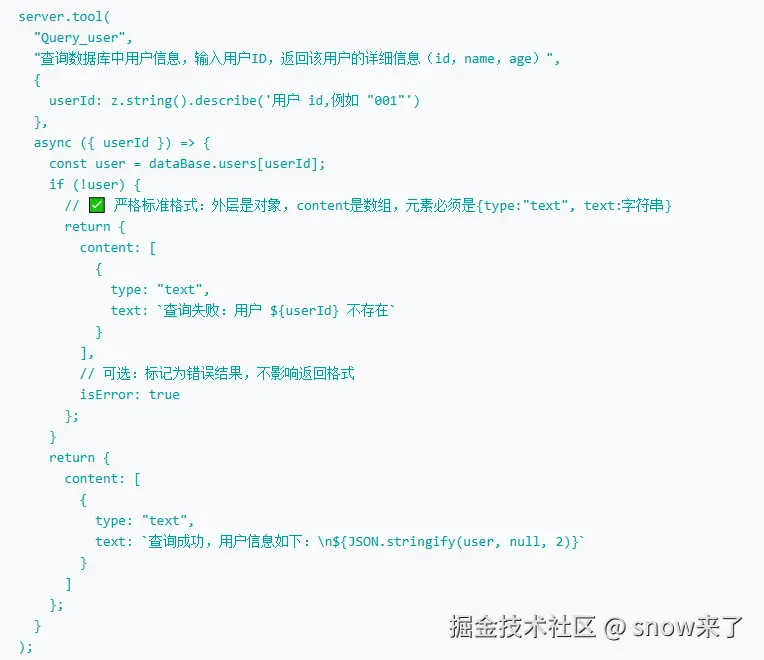
server定义了工具,还命名了工具名,但是在使用的时候,却没有指定工具名,那大模型具体使用哪个?
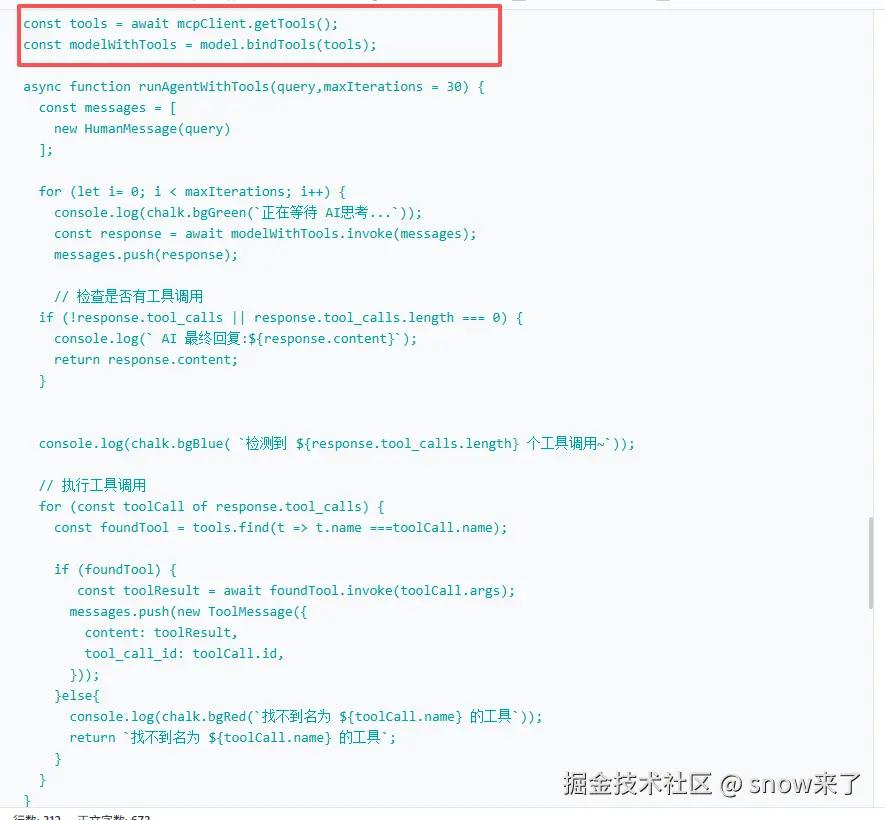
回复如下:
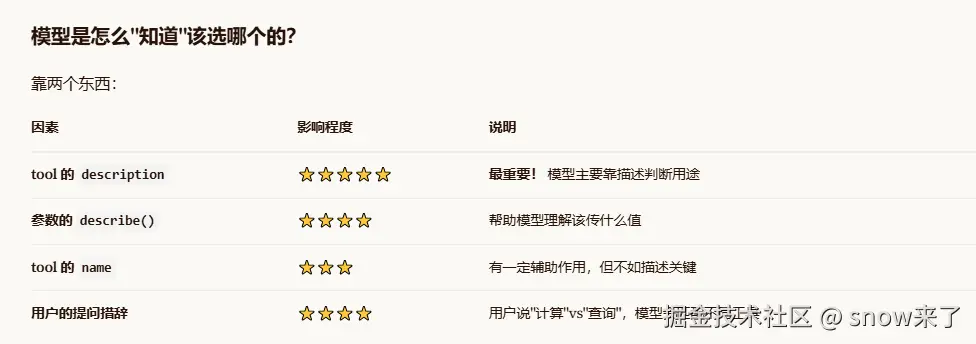
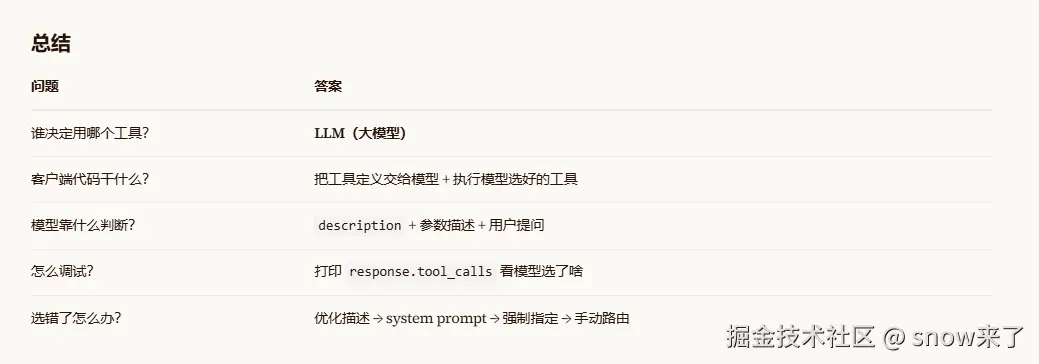
言外之意就是,工具是我开发的,工具的description很重要,大模型就是靠着description来决定到底要用哪个工具,开发者不需要手动定义。