DevExpress Blazor控件为使用C#为Blazor服务器和Blazor WebAssembly创建高影响力的用户体验,其附带了70+个原生的Blazor组件(包括DataGrid、Pivot Table、Scheduler、图表、数据编辑器和报表)。
在上文中(点击这里回顾>>)为大家介绍了DevExpress Blazor v26.1中增强的Navigation(导航)功能,本文将继续介绍新版本中Filter Builder、PDF Viewer等控件的升级功能,希望能帮助到大家~欢迎点赞关注哦,不定期更新~
DevExpress新旧版本帮助文档下载可进QQ qun获取:169725316
Blazor Filter Builder(过滤生成器)
自定义Count函数
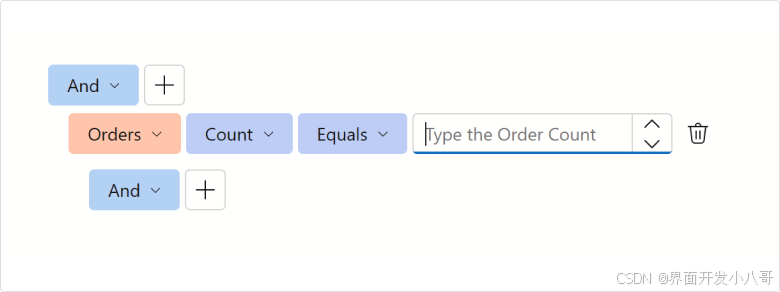
DevExpress Filter Builder组件允许您为收集字段自定义Count函数,指定EditSettings或定义ValueEditTemplate来自定义用于选择计数值的编辑器,使用ValueDisplayTemplate自定义所选值的显示方式。
以下代码段将提示文本添加到为"Orders"字段显示的计数编辑器中:
Razor
XML
<DxFilterBuilder @bind-FilterCriteria="FilterCriteria">
    <Fields>
        <DxFilterBuilderField FieldName="Orders" Caption="Orders" IsCollection="true">
            <EditSettings>
                <DxSpinEditSettings NullText="Type the Order Count" />
            </EditSettings>
            <Fields>
                <DxFilterBuilderField FieldName="OrderDate" Caption="Order Date" Type="@typeof(DateTime?)" />
                <DxFilterBuilderField FieldName="CustomerName" Caption="Customer" Type="@typeof(string)" />
                <DxFilterBuilderField FieldName="Quantity" Caption="Quantity" Type="@typeof(int)" />
            </Fields>
        </DxFilterBuilderField>
    </Fields>
</DxFilterBuilder>
切换用户交互
用户可以使用Enabled属性暂时停用DevExpress Blazor Filter Builder组件。
Blazor PDF Viewer(PDF查看器)
缩放功能增强
全新的ZoomLevelChanged事件允许用户在DevExpress Blazor PDF Viewer中放大/缩小文档时执行自定义操作。
Blazor Scheduler
编辑表单和工具提示按钮属性(v26.1.4+版本可用)
现在用户可以将标准HTML属性分配给DevExpress Blazor Scheduler会议工具提示和编辑表单中显示的按钮,直接在按钮标记中指定属性名称和值,或使用新的Attributes属性。
下面的代码将Show Appointment Edit Form和Delete Appointment按钮的tabindex属性设置为-1,因此这些按钮将从会议工具提示的键盘选项卡顺序中删除。
Razor
XML
<DxScheduler StartDate="@DateTime.Today"
             DataStorage="@DataStorage">
    <Views>
        <DxSchedulerWorkWeekView />
    </Views>
    <AppointmentTooltipHeaderTemplate>
        <div>Appointment</div>
        <DxSchedulerShowAppointmentCompactFormButton />
        <DxSchedulerShowAppointmentEditFormButton tabindex="-1" />
        <DxSchedulerDeleteAppointmentButton tabindex="-1" />
    </AppointmentTooltipHeaderTemplate>
</DxScheduler>
Blazor Themes
自动样式注册
使用v26.1,用户不再需要在Components/App.razor文件中注册PDF Viewer、Report Viewer和Rich Text Editor样式表 - DxResourceManager.RegisterTheme方法会自动添加关联的样式。
下面是v25.2代码段...
Razor
XML
<head>
    @DxResourceManager.RegisterTheme(Themes.Fluent)
    <link href="_content/DevExpress.Blazor.Reporting.Viewer/css/dx-blazor-reporting-components.fluent.css" rel="stylesheet" />
    <link href="_content/DevExpress.Blazor.Viewer/css/dx-blazor-viewer-components.fluent.css" rel="stylesheet" />
    <link href="_content/DevExpress.Blazor.RichEdit/dx-blazor-richedit.css" rel="stylesheet" />
    @* ... *@
</head>
...对于v26.1,它可以替换为方法调用:
Razor
XML
<head>
    @DxResourceManager.RegisterTheme(Themes.Fluent)
    @* ... *@
</head>