Rust+Slint 实现抽屉式侧边栏源码分享
- 一、效果展示
- 二、源码分享
- 三、实现原理
-
- 1、组件化架构设计
-
- [1.1、 基础组件继承体系](#1.1、 基础组件继承体系)
- [1.2、 属性系统](#1.2、 属性系统)
- 2、动画原理与数学计算
-
- [2.1、 极坐标系统](#2.1、 极坐标系统)
- [2.2、 双环反向旋转](#2.2、 双环反向旋转)
- [2.3、 彗星尾渐变算法](#2.3、 彗星尾渐变算法)
- [2.4 、脉冲呼吸效果](#2.4 、脉冲呼吸效果)
- [3、 视觉层次与渲染优化](#3、 视觉层次与渲染优化)
-
- [3.1、 多层渲染顺序](#3.1、 多层渲染顺序)
- [3.2、 中心光晕的三层结构](#3.2、 中心光晕的三层结构)
- [3.3 、闪烁星点的随机分布](#3.3 、闪烁星点的随机分布)
- 4、性能优化策略
-
- [4.1、 定时器优化](#4.1、 定时器优化)
- [4.2 、属性计算优化](#4.2 、属性计算优化)
- [4.3 、渲染批处理](#4.3 、渲染批处理)
- 5、可扩展性设计
-
- [5.1 、颜色主题系统](#5.1 、颜色主题系统)
- [5.2 、尺寸自适应](#5.2 、尺寸自适应)
- [5.3 、状态管理](#5.3 、状态管理)
- 6、技术亮点总结
一、效果展示
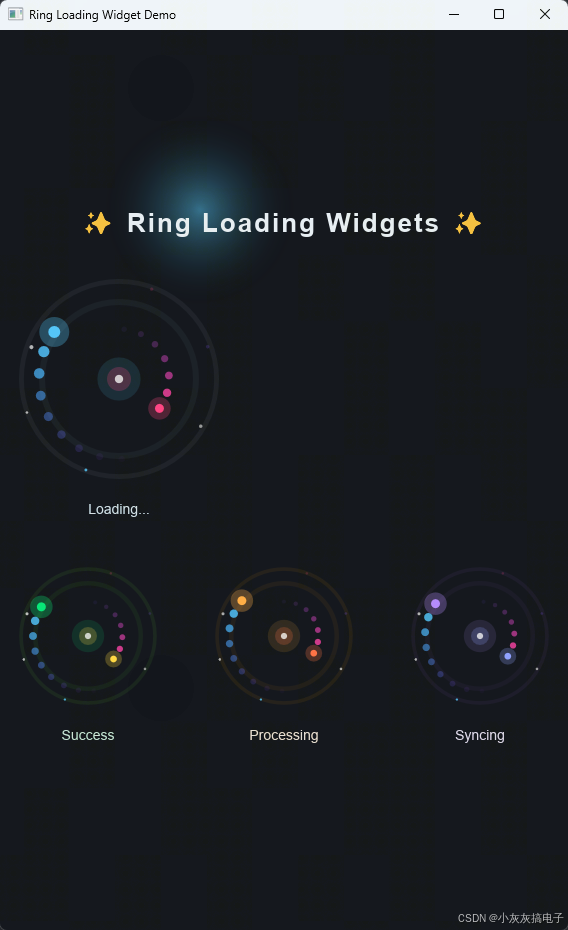
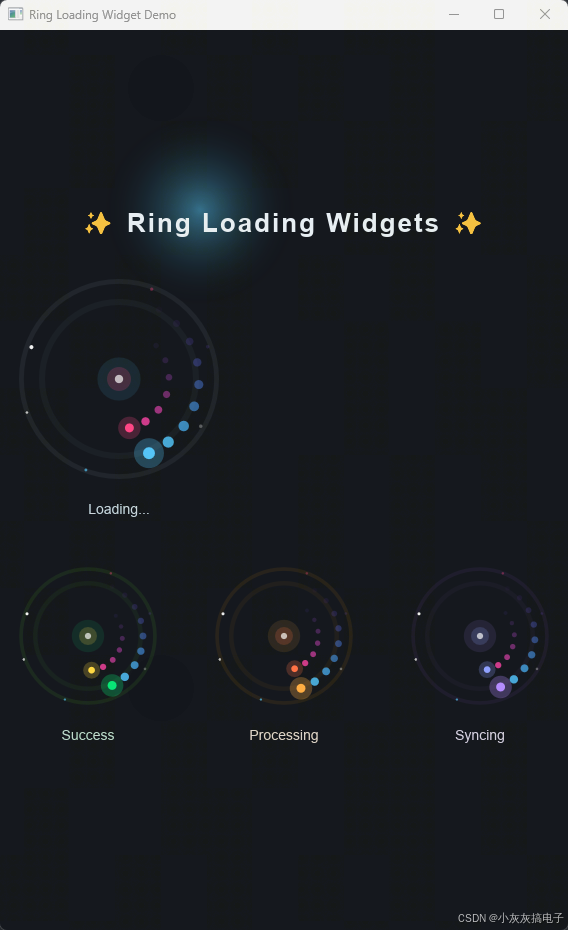
二、源码分享
1、工程结构
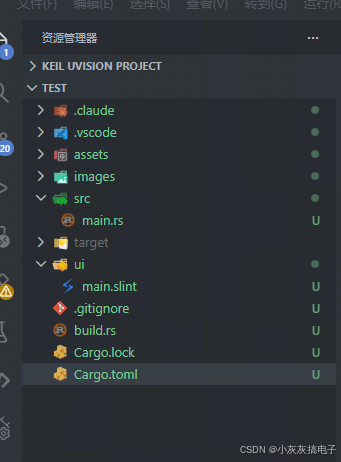
2、main.rs
rust
slint::include_modules!();

fn main() -> Result<(), slint::PlatformError> {
    let main_window = MainWindow::new()?;
    main_window.run()
}3、build.rs
rust
fn main() {
    // 编译 Slint UI
    slint_build::compile("ui/main.slint").unwrap();
}
4、main.slint
rust
// 发光点(带光晕)
component GlowDot inherits Rectangle {
    in property <color> glow-color: #4fc3f7;
    in property <length> dot-size: 8px;
    in property <float> glow-opacity: 0.3;

    width: dot-size * 2.5;
    height: dot-size * 2.5;
    border-radius: self.width / 2;
    background: glow-color;
    opacity: glow-opacity;
}

// 普通加载点
component LoadingDot inherits Rectangle {
    in property <color> dot-color: #4fc3f7;
    in property <length> dot-size: 8px;

    width: dot-size;
    height: dot-size;
    border-radius: dot-size / 2;
    background: dot-color;
}

//  sparkle 闪烁点
component Sparkle inherits Rectangle {
    in property <color> sparkle-color: #ffffff;
    in property <length> sparkle-size: 3px;
    in property <float> sparkle-opacity: 0.5;

    width: sparkle-size;
    height: sparkle-size;
    border-radius: sparkle-size / 2;
    background: sparkle-color;
    opacity: sparkle-opacity;
}

// 主环形加载组件
export component RingLoading inherits Rectangle {
    in property <color> primary-color: #4fc3f7;
    in property <color> secondary-color: #ff4081;
    in property <color> track-color: #2a3a4a;
    in property <length> ring-size: 120px;
    in property <length> dot-size: 10px;
    in property <bool> running: true;
    in property <string> label: "Loading...";

    width: ring-size + dot-size * 4 + 30px;
    height: ring-size + dot-size * 4 + 50px;
    background: transparent;

    // 旋转角度
    property <angle> outer-angle: 0deg;
    property <angle> inner-angle: 0deg;
    property <angle> pulse-phase: 0deg;

    // 中心点
    property <length> cx: self.width / 2;
    property <length> cy: (self.height - 36px) / 2;

    // 外环半径 & 内环半径
    property <length> outer-radius: ring-size / 2;
    property <length> inner-radius: ring-size / 3.2;

    // 尾巴间距
    property <angle> outer-tail-spacing: 16deg;
    property <angle> inner-tail-spacing: 20deg;

    // 脉冲值 (0~1)
    property <float> pulse: (1 + Math.sin(pulse-phase)) / 2;
    // 呼吸值 (用于轨道)
    property <float> breathe: 0.3 + pulse * 0.4;

    // ========== 外环轨道(呼吸效果) ==========
    Rectangle {
        x: cx - ring-size / 2;
        y: cy - ring-size / 2;
        width: ring-size;
        height: ring-size;
        border-radius: ring-size / 2;
        border-width: dot-size * 0.5;
        border-color: track-color;
        background: transparent;
        opacity: breathe;
    }

    // ========== 内环轨道(呼吸效果,反相) ==========
    property <float> inner-breathe: 0.7 - pulse * 0.4;
    Rectangle {
        x: cx - inner-radius * 2;
        y: cy - inner-radius * 2;
        width: inner-radius * 4;
        height: inner-radius * 4;
        border-radius: inner-radius * 2;
        border-width: dot-size * 0.4;
        border-color: track-color;
        background: transparent;
        opacity: inner-breathe;
    }

    // ========== 外环彗星尾(顺时针,蓝色系渐变) ==========
    // 光晕(在头部点后面)
    GlowDot {
        glow-color: primary-color;
        dot-size: dot-size;
        x: cx + outer-radius * Math.cos(outer-angle) - dot-size * 2.5 / 2;
        y: cy + outer-radius * Math.sin(outer-angle) - dot-size * 2.5 / 2;
        glow-opacity: 0.25 + pulse * 0.15;
    }
    // 头部点
    LoadingDot {
        dot-color: primary-color;
        dot-size: dot-size;
        x: cx + outer-radius * Math.cos(outer-angle) - dot-size / 2;
        y: cy + outer-radius * Math.sin(outer-angle) - dot-size / 2;
        opacity: 1.0;
    }
    // 尾迹点 1
    LoadingDot {
        dot-color: #49b8f0;
        dot-size: dot-size * 0.94;
        x: cx + outer-radius * Math.cos(outer-angle - outer-tail-spacing) - dot-size * 0.94 / 2;
        y: cy + outer-radius * Math.sin(outer-angle - outer-tail-spacing) - dot-size * 0.94 / 2;
        opacity: 0.88;
    }
    // 尾迹点 2
    LoadingDot {
        dot-color: #44adf3;
        dot-size: dot-size * 0.88;
        x: cx + outer-radius * Math.cos(outer-angle - outer-tail-spacing * 2) - dot-size * 0.88 / 2;
        y: cy + outer-radius * Math.sin(outer-angle - outer-tail-spacing * 2) - dot-size * 0.88 / 2;
        opacity: 0.74;
    }
    // 尾迹点 3
    LoadingDot {
        dot-color: #4499f5;
        dot-size: dot-size * 0.82;
        x: cx + outer-radius * Math.cos(outer-angle - outer-tail-spacing * 3) - dot-size * 0.82 / 2;
        y: cy + outer-radius * Math.sin(outer-angle - outer-tail-spacing * 3) - dot-size * 0.82 / 2;
        opacity: 0.58;
    }
    // 尾迹点 4
    LoadingDot {
        dot-color: #4c82f5;
        dot-size: dot-size * 0.76;
        x: cx + outer-radius * Math.cos(outer-angle - outer-tail-spacing * 4) - dot-size * 0.76 / 2;
        y: cy + outer-radius * Math.sin(outer-angle - outer-tail-spacing * 4) - dot-size * 0.76 / 2;
        opacity: 0.43;
    }
    // 尾迹点 5
    LoadingDot {
        dot-color: #5968f2;
        dot-size: dot-size * 0.7;
        x: cx + outer-radius * Math.cos(outer-angle - outer-tail-spacing * 5) - dot-size * 0.7 / 2;
        y: cy + outer-radius * Math.sin(outer-angle - outer-tail-spacing * 5) - dot-size * 0.7 / 2;
        opacity: 0.3;
    }
    // 尾迹点 6
    LoadingDot {
        dot-color: #6a50ea;
        dot-size: dot-size * 0.64;
        x: cx + outer-radius * Math.cos(outer-angle - outer-tail-spacing * 6) - dot-size * 0.64 / 2;
        y: cy + outer-radius * Math.sin(outer-angle - outer-tail-spacing * 6) - dot-size * 0.64 / 2;
        opacity: 0.18;
    }
    // 尾迹点 7
    LoadingDot {
        dot-color: #7c3be0;
        dot-size: dot-size * 0.58;
        x: cx + outer-radius * Math.cos(outer-angle - outer-tail-spacing * 7) - dot-size * 0.58 / 2;
        y: cy + outer-radius * Math.sin(outer-angle - outer-tail-spacing * 7) - dot-size * 0.58 / 2;
        opacity: 0.09;
    }
    // 尾迹点 8
    LoadingDot {
        dot-color: #8e2ad6;
        dot-size: dot-size * 0.52;
        x: cx + outer-radius * Math.cos(outer-angle - outer-tail-spacing * 8) - dot-size * 0.52 / 2;
        y: cy + outer-radius * Math.sin(outer-angle - outer-tail-spacing * 8) - dot-size * 0.52 / 2;
        opacity: 0.04;
    }

    // ========== 内环彗星尾(逆时针,粉红系渐变) ==========
    // 光晕
    GlowDot {
        glow-color: secondary-color;
        dot-size: dot-size * 0.75;
        x: cx + inner-radius * Math.cos(inner-angle) - dot-size * 0.75 * 2.5 / 2;
        y: cy + inner-radius * Math.sin(inner-angle) - dot-size * 0.75 * 2.5 / 2;
        glow-opacity: 0.2 + pulse * 0.15;
    }
    // 头部点
    LoadingDot {
        dot-color: secondary-color;
        dot-size: dot-size * 0.75;
        x: cx + inner-radius * Math.cos(inner-angle) - dot-size * 0.75 / 2;
        y: cy + inner-radius * Math.sin(inner-angle) - dot-size * 0.75 / 2;
        opacity: 1.0;
    }
    // 尾迹 1
    LoadingDot {
        dot-color: #f53d9e;
        dot-size: dot-size * 0.7;
        x: cx + inner-radius * Math.cos(inner-angle - inner-tail-spacing) - dot-size * 0.7 / 2;
        y: cy + inner-radius * Math.sin(inner-angle - inner-tail-spacing) - dot-size * 0.7 / 2;
        opacity: 0.82;
    }
    // 尾迹 2
    LoadingDot {
        dot-color: #e83db0;
        dot-size: dot-size * 0.65;
        x: cx + inner-radius * Math.cos(inner-angle - inner-tail-spacing * 2) - dot-size * 0.65 / 2;
        y: cy + inner-radius * Math.sin(inner-angle - inner-tail-spacing * 2) - dot-size * 0.65 / 2;
        opacity: 0.64;
    }
    // 尾迹 3
    LoadingDot {
        dot-color: #d43fc0;
        dot-size: dot-size * 0.6;
        x: cx + inner-radius * Math.cos(inner-angle - inner-tail-spacing * 3) - dot-size * 0.6 / 2;
        y: cy + inner-radius * Math.sin(inner-angle - inner-tail-spacing * 3) - dot-size * 0.6 / 2;
        opacity: 0.46;
    }
    // 尾迹 4
    LoadingDot {
        dot-color: #b844cc;
        dot-size: dot-size * 0.55;
        x: cx + inner-radius * Math.cos(inner-angle - inner-tail-spacing * 4) - dot-size * 0.55 / 2;
        y: cy + inner-radius * Math.sin(inner-angle - inner-tail-spacing * 4) - dot-size * 0.55 / 2;
        opacity: 0.3;
    }
    // 尾迹 5
    LoadingDot {
        dot-color: #9a48d4;
        dot-size: dot-size * 0.5;
        x: cx + inner-radius * Math.cos(inner-angle - inner-tail-spacing * 5) - dot-size * 0.5 / 2;
        y: cy + inner-radius * Math.sin(inner-angle - inner-tail-spacing * 5) - dot-size * 0.5 / 2;
        opacity: 0.17;
    }
    // 尾迹 6
    LoadingDot {
        dot-color: #7c4dff;
        dot-size: dot-size * 0.45;
        x: cx + inner-radius * Math.cos(inner-angle - inner-tail-spacing * 6) - dot-size * 0.45 / 2;
        y: cy + inner-radius * Math.sin(inner-angle - inner-tail-spacing * 6) - dot-size * 0.45 / 2;
        opacity: 0.07;
    }

    // ========== 中心脉冲光晕 ==========
    // 外层光晕
    Rectangle {
        x: cx - dot-size * 1.8;
        y: cy - dot-size * 1.8;
        width: dot-size * 3.6;
        height: dot-size * 3.6;
        border-radius: dot-size * 1.8;
        background: primary-color;
        opacity: 0.08 + pulse * 0.12;
    }
    // 内层光晕
    Rectangle {
        x: cx - dot-size * 1.0;
        y: cy - dot-size * 1.0;
        width: dot-size * 2.0;
        height: dot-size * 2.0;
        border-radius: dot-size * 1.0;
        background: secondary-color;
        opacity: 0.15 + pulse * 0.2;
    }
    // 核心点
    Rectangle {
        x: cx - dot-size * 0.35;
        y: cy - dot-size * 0.35;
        width: dot-size * 0.7;
        height: dot-size * 0.7;
        border-radius: dot-size * 0.35;
        background: #ffffff;
        opacity: 0.6 + pulse * 0.4;
    }

    // ========== 闪烁星点(外环周围) ==========
    Sparkle {
        sparkle-color: #ffffff;
        sparkle-size: dot-size * 0.3;
        x: cx + (outer-radius + dot-size * 1.2) * Math.cos(30deg) - self.sparkle-size / 2;
        y: cy + (outer-radius + dot-size * 1.2) * Math.sin(30deg) - self.sparkle-size / 2;
        sparkle-opacity: 0.2 + (1 + Math.sin(pulse-phase * 2 + 30deg)) / 2 * 0.8;
    }
    Sparkle {
        sparkle-color: #4fc3f7;
        sparkle-size: dot-size * 0.25;
        x: cx + (outer-radius + dot-size * 1.4) * Math.cos(110deg) - self.sparkle-size / 2;
        y: cy + (outer-radius + dot-size * 1.4) * Math.sin(110deg) - self.sparkle-size / 2;
        sparkle-opacity: 0.15 + (1 + Math.sin(pulse-phase * 2 + 110deg)) / 2 * 0.7;
    }
    Sparkle {
        sparkle-color: #ffffff;
        sparkle-size: dot-size * 0.35;
        x: cx + (outer-radius + dot-size * 1.1) * Math.cos(200deg) - self.sparkle-size / 2;
        y: cy + (outer-radius + dot-size * 1.1) * Math.sin(200deg) - self.sparkle-size / 2;
        sparkle-opacity: 0.1 + (1 + Math.sin(pulse-phase * 2 + 200deg)) / 2 * 0.9;
    }
    Sparkle {
        sparkle-color: #ff4081;
        sparkle-size: dot-size * 0.28;
        x: cx + (outer-radius + dot-size * 1.3) * Math.cos(290deg) - self.sparkle-size / 2;
        y: cy + (outer-radius + dot-size * 1.3) * Math.sin(290deg) - self.sparkle-size / 2;
        sparkle-opacity: 0.18 + (1 + Math.sin(pulse-phase * 2 + 290deg)) / 2 * 0.75;
    }
    Sparkle {
        sparkle-color: #ffffff;
        sparkle-size: dot-size * 0.22;
        x: cx + (outer-radius + dot-size * 1.5) * Math.cos(160deg) - self.sparkle-size / 2;
        y: cy + (outer-radius + dot-size * 1.5) * Math.sin(160deg) - self.sparkle-size / 2;
        sparkle-opacity: 0.12 + (1 + Math.sin(pulse-phase * 2 + 160deg)) / 2 * 0.6;
    }
    Sparkle {
        sparkle-color: #7c4dff;
        sparkle-size: dot-size * 0.3;
        x: cx + (outer-radius + dot-size * 1.2) * Math.cos(340deg) - self.sparkle-size / 2;
        y: cy + (outer-radius + dot-size * 1.2) * Math.sin(340deg) - self.sparkle-size / 2;
        sparkle-opacity: 0.14 + (1 + Math.sin(pulse-phase * 2 + 340deg)) / 2 * 0.7;
    }

    // ========== 标签文字(带发光效果) ==========
    // 文字光晕
    Text {
        x: -1px;
        y: parent.height - 30px;
        width: parent.width + 2px;
        height: 26px;
        horizontal-alignment: center;
        vertical-alignment: center;
        text: label;
        color: primary-color;
        font-size: 14px;
        opacity: 0.3 + pulse * 0.3;
    }
    // 主文字
    Text {
        x: 0;
        y: parent.height - 30px;
        width: parent.width;
        height: 26px;
        horizontal-alignment: center;
        vertical-alignment: center;
        text: label;
        color: #ffffff;
        font-size: 14px;
        opacity: 0.7 + pulse * 0.3;
    }

    // ========== 动画 Timer ==========
    Timer {
        interval: 16ms;
        triggered => {
            outer-angle = running ? outer-angle + 4deg : outer-angle;
            inner-angle = running ? inner-angle - 6deg : inner-angle;
            pulse-phase = running ? pulse-phase + 3deg : pulse-phase;
        }
    }
}

// ========== 主窗口 ==========
export component MainWindow inherits Window {
    preferred-width: 900px;
    preferred-height: 900px;
    title: "Ring Loading Widget Demo";
    background: #0d1117;

    // 背景装饰光点
    Rectangle {
        x: 100px;
        y: 80px;
        width: 200px;
        height: 200px;
        border-radius: 100px;
        background: @radial-gradient(circle, #4fc3f7 0%, transparent 70%);
        opacity: 0.5;
    }
    Rectangle {
        x: 600px;
        y: 600px;
        width: 250px;
        height: 250px;
        border-radius: 125px;
        background: @radial-gradient(circle, #ff4081 0%, transparent 70%);
        opacity: 0.4;
    }

    VerticalLayout {
        alignment: center;
        spacing: 30px;

        // 标题
        Text {
            text: "✨ Ring Loading Widgets ✨";
            color: #e6edf3;
            font-size: 26px;
            font-weight: 700;
            horizontal-alignment: center;
            letter-spacing: 2px;
        }

        // 主加载组件 --- 大号
        RingLoading {
            ring-size: 160px;
            dot-size: 12px;
            primary-color: #4fc3f7;
            secondary-color: #ff4081;
            track-color: #21262d;
            label: "Loading...";
        }

        // 下方三个不同风格的变体
        HorizontalLayout {
            spacing: 20px;
            alignment: center;

            // 翡翠绿 + 金色
            RingLoading {
                ring-size: 110px;
                dot-size: 9px;
                primary-color: #00e676;
                secondary-color: #ffd740;
                track-color: #1a2e1a;
                label: "Success";
            }

            // 琥珀橙 + 珊瑚红
            RingLoading {
                ring-size: 110px;
                dot-size: 9px;
                primary-color: #ffab40;
                secondary-color: #ff6e40;
                track-color: #2e2314;
                label: "Processing";
            }

            // 紫罗兰 + 靛蓝
            RingLoading {
                ring-size: 110px;
                dot-size: 9px;
                primary-color: #b388ff;
                secondary-color: #8c9eff;
                track-color: #1f1a2e;
                label: "Syncing";
            }
        }
    }
}
5、Cargo.toml
rust
[package]
name = "sokoban"
version = "0.1.0"
edition = "2024"

[dependencies]
slint = "1.16.1"

[build-dependencies]
slint-build = "1.16.1"
三、实现原理
本项目的核心是一个使用 Rust + Slint 实现的双环彗星尾加载动画组件 。下面从组件架构、动画原理、数学计算、渲染优化四个维度详细解析其实现原理。
1、组件化架构设计
1.1、 基础组件继承体系
rust
// 发光点(带光晕)
component GlowDot inherits Rectangle { ... }

// 普通加载点
component LoadingDot inherits Rectangle { ... }

// sparkle 闪烁点
component Sparkle inherits Rectangle { ... }

// 主环形加载组件
export component RingLoading inherits Rectangle { ... }设计理念:
- 继承复用 :所有视觉元素都继承自
Rectangle,利用 Slint 的组件继承机制实现样式复用 - 属性驱动 :通过
in property定义可配置参数,实现组件的高度可定制化 - 组合模式 :
RingLoading组件通过组合多个基础组件构建复杂视觉效果
1.2、 属性系统
rust
in property <color> primary-color: #4fc3f7;      // 主色(外环)
in property <color> secondary-color: #ff4081;   // 辅色(内环)
in property <color> track-color: #2a3a4a;       // 轨道颜色
in property <length> ring-size: 120px;          // 环尺寸
in property <length> dot-size: 10px;            // 点尺寸
in property <bool> running: true;               // 运行状态
in property <string> label: "Loading..."; // 标签文本关键特性:
- 类型安全:Slint 的强类型系统确保属性值的正确性
- 默认值:所有属性都有合理的默认值,开箱即用
- 响应式更新:属性变化自动触发界面重绘
2、动画原理与数学计算
2.1、 极坐标系统
组件采用极坐标系统计算点的位置,这是实现环形运动的核心:
rust
// 中心点坐标
property <length> cx: self.width / 2;
property <length> cy: (self.height - 36px) / 2;

// 外环半径 & 内环半径
property <length> outer-radius: ring-size / 2;
property <length> inner-radius: ring-size / 3.2;

// 点的极坐标位置计算
x: cx + outer-radius * Math.cos(outer-angle) - dot-size / 2;
y: cy + outer-radius * Math.sin(outer-angle) - dot-size / 2;数学公式:
- x = cx + r × cos(θ):计算点在水平方向的位置
- y = cy + r × sin(θ):计算点在垂直方向的位置
- 角度偏移 :通过
outer-angle - outer-tail-spacing * n实现彗星尾效果
2.2、 双环反向旋转
rust
// 外环:顺时针旋转(角度增加)
outer-angle = running ? outer-angle + 4deg : outer-angle;

// 内环:逆时针旋转(角度减少)
inner-angle = running ? inner-angle - 6deg : inner-angle;设计意图:
- 视觉层次:内外环反向旋转增加视觉复杂度
- 速度差异:内环(6°/帧)比外环(4°/帧)更快,形成动态对比
- 暂停支持 :
running属性控制动画启停
2.3、 彗星尾渐变算法
rust
// 外环彗星尾颜色渐变序列
primary-color → #49b8f0 → #44adf3 → #4499f5 → #4c82f5 → #5968f2 → #6a50ea → #7c3be0 → #8e2ad6

// 尺寸衰减公式
dot-size × (1.0 → 0.94 → 0.88 → 0.82 → 0.76 → 0.7 → 0.64 → 0.58 → 0.52)

// 透明度衰减公式
opacity: 1.0 → 0.88 → 0.74 → 0.58 → 0.43 → 0.3 → 0.18 → 0.09 → 0.04实现原理:
- 颜色插值:从主色向深色渐变,模拟运动拖影
- 尺寸衰减:尾部点逐渐变小,增强透视感
- 透明度衰减:尾部逐渐淡出,实现自然消失效果
2.4 、脉冲呼吸效果
rust
// 脉冲相位
property <angle> pulse-phase: 0deg;

// 脉冲值 (0~1 的正弦波)
property <float> pulse: (1 + Math.sin(pulse-phase)) / 2;

// 呼吸值 (用于轨道)
property <float> breathe: 0.3 + pulse * 0.4;

// 内环呼吸值 (反相)
property <float> inner-breathe: 0.7 - pulse * 0.4;数学原理:
- 正弦函数 :
Math.sin(pulse-phase)生成平滑的周期性变化 - 归一化 :
(1 + sin)/2将值映射到 0, 1 范围 - 反相效果:外环和内环的呼吸效果相位相反,增强视觉张力
3、 视觉层次与渲染优化
3.1、 多层渲染顺序
1. 背景装饰光点(最底层)
2. 外环轨道(带呼吸效果)
3. 内环轨道(反相呼吸效果)
4. 外环彗星尾(8个渐变点 + 光晕)
5. 内环彗星尾(6个渐变点 + 光晕)
6. 中心脉冲光晕(3层叠加)
7. 闪烁星点(6个随机位置)
8. 标签文字(光晕 + 主文字)渲染策略:
- 从底到顶:确保正确的遮挡关系
- 性能优化:静态元素(轨道)与动态元素(点)分离
- GPU 加速:Slint 利用 GPU 进行合成渲染
3.2、 中心光晕的三层结构
rust
// 外层光晕(大、低透明度)
Rectangle {
    width: dot-size * 3.6;
    opacity: 0.08 + pulse * 0.12;  // 随脉冲变化
}

// 内层光晕(中、中等透明度)
Rectangle {
    width: dot-size * 2.0;
    opacity: 0.15 + pulse * 0.2;   // 变化幅度更大
}

// 核心点(小、高亮度)
Rectangle {
    width: dot-size * 0.7;
    opacity: 0.6 + pulse * 0.4;    // 最明显的脉冲效果
}视觉增强:
- 尺寸梯度:3.6x → 2.0x → 0.7x,形成聚焦效果
- 透明度梯度:外层最淡,核心最亮
- 同步脉冲 :三层都随
pulse值变化,但变化幅度不同
3.3 、闪烁星点的随机分布
rust
// 6个星点分布在不同的角度和半径上
Sparkle {
    x: cx + (outer-radius + dot-size * 1.2) * Math.cos(30deg) - self.sparkle-size / 2;
    y: cy + (outer-radius + dot-size * 1.2) * Math.sin(30deg) - self.sparkle-size / 2;
    sparkle-opacity: 0.2 + (1 + Math.sin(pulse-phase * 2 + 30deg)) / 2 * 0.8;
}设计要点:
- 位置随机:30°、110°、200°、290°、160°、340° 等非对称角度
- 半径变化:1.1x ~ 1.5x 外环半径,增加层次感
- 相位偏移 :每个星点的脉冲相位不同 (
+30deg、+110deg等),实现错峰闪烁
4、性能优化策略
4.1、 定时器优化
rust
Timer {
    interval: 16ms;  // ≈60 FPS
    triggered => {
        outer-angle = running ? outer-angle + 4deg : outer-angle;
        inner-angle = running ? inner-angle - 6deg : inner-angle;
        pulse-phase = running ? pulse-phase + 3deg : pulse-phase;
    }
}性能考虑:
- 60 FPS:16ms 间隔提供流畅的动画体验
- 条件更新 :
running为 false 时停止角度计算,节省 CPU - 最小化重绘:只更新必要的属性,利用 Slint 的脏标记机制
4.2 、属性计算优化
rust
// 预计算中心点,避免重复计算
property <length> cx: self.width / 2;
property <length> cy: (self.height - 36px) / 2;

// 预计算半径
property <length> outer-radius: ring-size / 2;
property <length> inner-radius: ring-size / 3.2;优化策略:
- 属性缓存:频繁使用的值计算一次并缓存
- 数学简化:使用常量表达式减少运行时计算
- 布局分离:尺寸相关计算在布局阶段完成
4.3 、渲染批处理
由于所有视觉元素都是 Rectangle 的派生组件,Slint 可以:
- 批量绘制:相同类型的元素合并绘制调用
- GPU 实例化:相似几何体使用实例化渲染
- 纹理图集:小尺寸元素自动打包到纹理图集
5、可扩展性设计
5.1 、颜色主题系统
主窗口展示了四种预设主题:
rust
// 默认:蓝色 + 粉色
primary-color: #4fc3f7
secondary-color: #ff4081

// 翡翠绿 + 金色(Success 主题)
primary-color: #00e676
secondary-color: #ffd740

// 琥珀橙 + 珊瑚红(Processing 主题)
primary-color: #ffab40
secondary-color: #ff6e40

// 紫罗兰 + 靛蓝(Syncing 主题)
primary-color: #b388ff
secondary-color: #8c9eff
5.2 、尺寸自适应
rust
// 组件尺寸基于 ring-size 和 dot-size 动态计算
width: ring-size + dot-size * 4 + 30px;
height: ring-size + dot-size * 4 + 50px;

// 所有子元素尺寸都基于这两个基准参数
dot-size * 0.94    // 尾迹点1
dot-size * 3.6      // 外层光晕
ring-size / 3.2     // 内环半径
5.3 、状态管理
rust
in property <bool> running: true;      // 动画运行状态
in property <string> label: "Loading..."; // 动态标签

// 应用示例:根据状态切换标签
RingLoading {
    label: running ? "Loading..." : "Paused";
}
6、技术亮点总结
- 极坐标数学 :使用
sin/cos实现精确的环形布局 - 彗星尾算法:颜色、尺寸、透明度三重渐变模拟运动轨迹
- 脉冲呼吸效果:正弦波驱动多层元素的同步变化
- 反向旋转:内外环不同方向和速度增加视觉趣味
- 性能优化:60 FPS 定时器 + 属性缓存 + GPU 加速
- 完全可配置:颜色、尺寸、速度、标签均可通过属性调整
- 组件化设计:基础组件可独立复用,组合成复杂效果
这个加载动画组件不仅视觉效果出色,其实现也展示了 Slint 声明式 UI 在复杂动画场景下的强大表现力。通过纯声明式的代码,实现了通常需要手动 Canvas 绘制才能达到的视觉效果。
