个人主页index.html代码修改如下:
html
<!DOCTYPE html>
<html lang="zh-CN">
<head>
    <meta charset="UTF-8">
    <meta name="viewport" content="width=device-width, initial-scale=1.0">
    <title>Xuange2026 的个人主页</title>
    <style>
        * {
            margin: 0;
            padding: 0;
            box-sizing: border-box;
        }
        body {
            font-family: -apple-system, BlinkMacSystemFont, "Segoe UI", Roboto, "Helvetica Neue", Arial, sans-serif;
            height: 100vh;
            display: flex;
            background: #f5f5f5;
            overflow: hidden;
        }
        /* 左侧菜单 */
        .sidebar {
            width: 220px;
            background: #2c3e50;
            color: white;
            display: flex;
            flex-direction: column;
            overflow-y: auto;
            box-shadow: 2px 0 8px rgba(0,0,0,0.1);
            transition: width 0.3s ease;
            position: relative;
        }
        .sidebar.hidden {
            width: 0;
            overflow: hidden;
        }
        .sidebar h2 {
            padding: 20px 16px 10px;
            font-size: 18px;
            font-weight: 500;
            border-bottom: 1px solid rgba(255,255,255,0.2);
            margin-bottom: 10px;
            text-align: center;
        }
        /* 侧边栏内部收缩按钮 */
        .toggle-sidebar-inner{
            position:absolute;
            top:12px;
            right:8px;
            width:24px;
            height:24px;
            background:rgba(255,255,255,0.12);
            border:none;
            color:#fff;
            border-radius:4px;
            cursor:pointer;
            display:flex;
            align-items:center;
            justify-content:center;
        }
        .toggle-sidebar-inner:hover{
            background:rgba(255,255,255,0.22);
        }
        /* 侧边栏收起之后,悬浮在页面左侧的恢复按钮 */
        .toggle-sidebar-float{
            position:fixed;
            left:0;
            top:50%;
            transform:translateY(-50%);
            width:28px;
            height:60px;
            background:#2c3e50;
            color:white;
            border:none;
            border-radius:0 6px 6px 0;
            cursor:pointer;
            display:none;
            z-index:999;
        }
        .toggle-sidebar-float.show{
            display:flex;
            align-items:center;
            justify-content:center;
        }
        .menu-list {
            list-style: none;
            flex: 1;
            padding: 0 8px;
        }
        /* 分组标题 */
        .group-header{
            padding:10px 12px;
            margin:6px 0 2px;
            background:rgba(255,255,255,0.08);
            border-radius:6px;
            cursor:pointer;
            display:flex;
            align-items:center;
            font-size:15px;
        }
        .group-header .arrow{
            margin-right:6px;
            transition: transform 0.2s;
        }
        .group-header.collapsed .arrow{
            transform: rotate(-90deg);
        }
        .group-children{
            list-style:none;
            overflow:hidden;
            transition: height 0.24s ease;
        }
        .group-children.collapse{
            height:0 !important;
        }
        .menu-item {
            padding: 10px 14px 10px 26px;
            margin: 3px 0;
            border-radius: 6px;
            cursor: pointer;
            transition: background 0.2s;
            color: #ecf0f1;
            font-size: 14px;
            word-break: break-all;
        }
        .menu-item:hover {
            background: rgba(255,255,255,0.15);
        }
        .menu-item.active {
            background: #3498db;
            color: white;
            font-weight: 500;
        }
        /* 右侧内容区 */
        .content {
            flex: 1;
            position: relative;
            background: white;
        }
        .iframe-container {
            position: absolute;
            top: 0;
            left: 0;
            width: 100%;
            height: 100%;
            border: none;
            display: none;
        }
        .iframe-container.active {
            display: block;
        }
        .placeholder {
            display: flex;
            align-items: center;
            justify-content: center;
            height: 100%;
            color: #95a5a6;
            font-size: 20px;
        }
        .placeholder.hidden {
            display: none;
        }
        /* 秘密小圆点 */
        .secret-trigger{
			position:fixed;
			bottom:8px;
			right:8px;
			width:16px;
			height:16px;
			background:#607d8b;
			border-radius:50%;
			z-index:99999;
			cursor:pointer;
		}
		.secret-trigger:hover{
			background:#d44e6c;
		}
        /* 全屏遮罩层,用来加载独立love.html */
        .love-layer{
            position:fixed;
            inset:0;
            z-index:9999;
            display:none;
        }
        .love-layer.show{
            display:block;
        }
        .love-layer iframe{
            width:100%;
            height:100%;
            border:none;
        }
        .love-close{
            position:fixed;
            top:12px;
            right:12px;
            z-index:10001;
            background:rgba(255,255,255,0.35);
            border:1px solid #d44e6c;
            color:#d44e6c;
            padding:4px 10px;
            border-radius:8px;
            cursor:pointer;
            font-size:13px;
        }
        .love-close:hover{
            background:rgba(255,255,255,0.7);
        }
    </style>
</head>
<body>
    <div class="secret-trigger" id="secretBtn" title="秘密入口"></div>

    <div class="sidebar" id="sidebar">
        <button class="toggle-sidebar-inner" id="toggleInner">◀</button>
        <h2>常用工具</h2>
        <ul class="menu-list" id="menuList"></ul>
    </div>

    <!-- 侧边栏收起后悬浮按钮 -->
    <button class="toggle-sidebar-float" id="toggleFloat">▶</button>

    <div class="content" id="contentArea">
        <div class="placeholder" id="placeholder">👈 点击左侧菜单打开页面</div>
    </div>
    <!-- 全屏层:iframe加载独立love.html -->
    <div class="love-layer" id="loveLayer">
        <button class="love-close" id="closeLove">← 返回工具页</button>
        <iframe src="love.html"></iframe>
    </div>
    <script>
        (function() {
            // 分组数据结构:groupName分组名,collapsed初始是否折叠,children子菜单
            const groups = [
                {
                    groupName:"开发工具",
                    collapsed:false,
                    children:[
                        { name: 'JSON格式化', url: 'https://www.sojson.com/', allowIframe: true },
                        { name: '时间戳转换', url: 'https://tool.lu/timestamp/', allowIframe: true },
                        {name: 'base64编解码', url: 'https://base64.us/', allowIframe: true},
                        {name: '进制转化', url: 'https://tool.oschina.net/hexconvert/', allowIframe: true},
                        {name: '草料二维码', url: 'https://cli.im/', allowIframe: true}
                    ]
                },
                {
                    groupName:"AI工具",
                    collapsed:false,
                    children:[
                        {name: 'deepseek', url: 'https://chat.deepseek.com/', allowIframe: false},
                        {name: '豆包', url: 'https://www.doubao.com/chat', allowIframe: true},
                        {name: '文心', url: 'https://wenxin.baidu.com/?extParams=%7B%22enter_type%22%3A%22home_operate%22%7D', allowIframe: false},
                        {name: '千问', url: 'https://www.qianwen.com/?ch=tongyi_redirect', allowIframe: false}
                    ]
                },
                {
                    groupName:"刷题平台",
                    collapsed:false,
                    children:[
                        {name: '力扣', url: 'https://leetcode.cn/', allowIframe: true},
                        {name: '牛客', url: 'https://www.nowcoder.com/', allowIframe: true}
                    ]
                },
                {
                    groupName:"搜索&博客",
                    collapsed:false,
                    children:[
                        { name: '百度', url: 'https://www.baidu.com/', allowIframe: false },
                        { name: '必应', url: 'https://www.bing.com/', allowIframe: false },
                        {name: '旋哥博客', url: 'https://blog.csdn.net/u012116089?type=blog', allowIframe: false},
                        {name: 'c语言中文网', url: 'https://c.54benniao.com/', allowIframe: true}
                    ]
                },
                {
                    groupName:"代码仓库",
                    collapsed:false,
                    children:[
                        {name: 'gitee', url: 'https://gitee.com/', allowIframe: false},
                        {name: 'github', url: 'https://github.com/', allowIframe: false}
                    ]
                }
            ];

            const menuList = document.getElementById('menuList');
            const contentArea = document.getElementById('contentArea');
            const placeholder = document.getElementById('placeholder');
            const secretBtn = document.getElementById("secretBtn");
            const loveLayer = document.getElementById("loveLayer");
            const closeLove = document.getElementById("closeLove");

            const sidebar = document.getElementById('sidebar');
            const toggleInner = document.getElementById('toggleInner');
            const toggleFloat = document.getElementById('toggleFloat');

            const iframeCache = {};
            let currentActiveIndex = -1;
            let flatMenuList = []; //扁平化全部子菜单,用来索引

            //切换侧边栏显示隐藏
            function toggleSidebar(){
                sidebar.classList.toggle('hidden');
                if(sidebar.classList.contains('hidden')){
                    toggleFloat.classList.add('show');
                }else{
                    toggleFloat.classList.remove('show');
                }
            }
            toggleInner.addEventListener('click', toggleSidebar);
            toggleFloat.addEventListener('click', toggleSidebar);

            function openLove(){
                loveLayer.classList.add("show");
            }
            function closeLoveFunc(){
                loveLayer.classList.remove("show");
            }
            secretBtn.addEventListener("click", openLove);
            closeLove.addEventListener("click", closeLoveFunc);

            //渲染分组菜单
            function renderMenu() {
                menuList.innerHTML = "";
                flatMenuList = [];
                groups.forEach((group)=>{
                    const liGroup = document.createElement("li");

                    //分组标题
                    const header = document.createElement("div");
                    header.className = "group-header";
                    if(group.collapsed) header.classList.add("collapsed");
                    header.innerHTML = `<span class="arrow">▼</span><span>${group.groupName}</span>`;

                    //子菜单容器
                    const ulChild = document.createElement("ul");
                    ulChild.className = "group-children";
                    if(group.collapsed) ulChild.classList.add("collapse");

                    //点击分组标题切换折叠
                    header.addEventListener("click",()=>{
                        group.collapsed = !group.collapsed;
                        header.classList.toggle("collapsed", group.collapsed);
                        ulChild.classList.toggle("collapse", group.collapsed);
                    });

                    //渲染子项
                    group.children.forEach(childItem=>{
                        const idx = flatMenuList.length;
                        flatMenuList.push(childItem);
                        const li = document.createElement("li");
                        li.className = "menu-item";
                        li.textContent = childItem.name;
                        li.dataset.index = idx;
                        li.addEventListener('click', () => switchToMenu(idx));
                        ulChild.appendChild(li);
                    });

                    liGroup.appendChild(header);
                    liGroup.appendChild(ulChild);
                    menuList.appendChild(liGroup);
                });
            }

            function switchToMenu(index) {
                const item = flatMenuList[index];
                if(!item.allowIframe){
                    window.open(item.url, "_blank");
                    return;
                }
                if (currentActiveIndex === index) return;

                const allItems = menuList.querySelectorAll('.menu-item');
                allItems.forEach(el => el.classList.remove('active'));
                allItems[index].classList.add('active');

                placeholder.classList.add('hidden');
                if (currentActiveIndex !== -1) {
                    const prevIframe = iframeCache[currentActiveIndex];
                    if (prevIframe) prevIframe.classList.remove('active');
                }
                if (!iframeCache[index]) {
                    createIframe(index);
                }
                iframeCache[index].classList.add('active');
                currentActiveIndex = index;
            }

            function createIframe(index) {
                const iframe = document.createElement('iframe');
                iframe.className = 'iframe-container';
                iframe.src = flatMenuList[index].url;
                iframe.setAttribute('sandbox', 'allow-same-origin allow-scripts allow-popups allow-forms');
                contentArea.appendChild(iframe);
                iframeCache[index] = iframe;
            }

            renderMenu();
        })();
    </script>
</body>
</html>
测试:
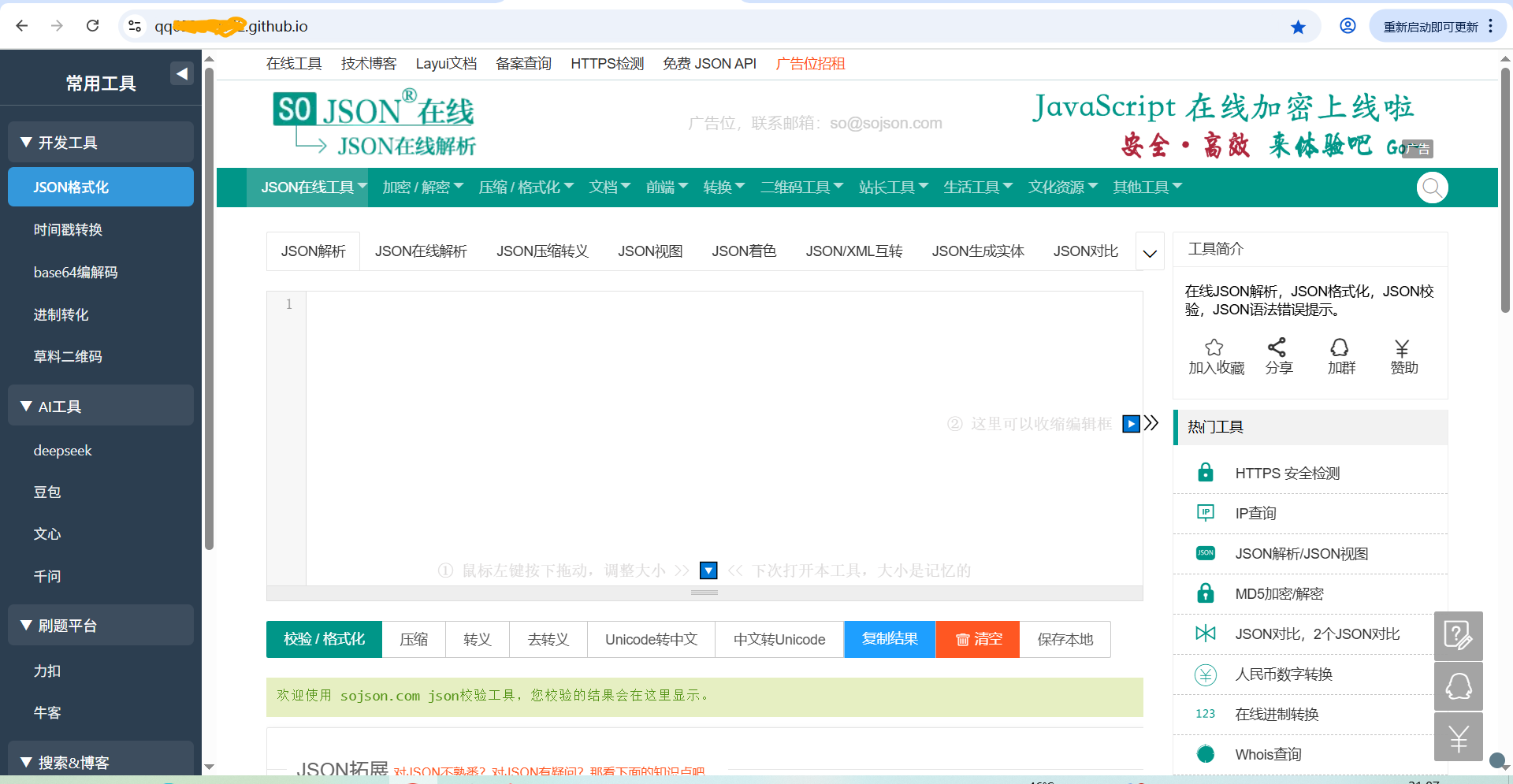
ok. 菜单加了箭头支持展开和隐藏。上面也有个箭头支持隐藏和展开菜单。