【系统安全】信息脱敏存储:场景、需求与实现方案详解
-
- 目录
- 一、为什么需要脱敏存储:合规与安全背景
-
- [1.1 法律与监管依据(国内为主)](#1.1 法律与监管依据(国内为主))
- [1.2 安全风险驱动(为什么不能只靠权限控制)](#1.2 安全风险驱动(为什么不能只靠权限控制))
- [1.3 几个关键概念先对齐](#1.3 几个关键概念先对齐)
- 二、哪些场景下有脱敏存储要求
-
- [2.1 按行业划分(哪些行业是"重灾区")](#2.1 按行业划分(哪些行业是"重灾区"))
-
- 金融(银行、保险、证券、支付)------最严格
- 医疗健康
- [电商 / 社交 / 生活服务 / 出行](#电商 / 社交 / 生活服务 / 出行)
- [物流 / 快递](#物流 / 快递)
- [运营商 / 政务 / 公共服务](#运营商 / 政务 / 公共服务)
- [企业 SaaS / HR / 招聘](#企业 SaaS / HR / 招聘)
- [跨境业务 / 出海](#跨境业务 / 出海)
- [2.2 按业务环节划分(存储只是其中一环)](#2.2 按业务环节划分(存储只是其中一环))
- [2.3 典型的"评审/检查点"长什么样](#2.3 典型的"评审/检查点"长什么样)
- 三、具体的需求长什么样(需求文档视角)
-
- [3.1 字段级脱敏/加密要求表(示例)](#3.1 字段级脱敏/加密要求表(示例))
- [3.2 常见字段的脱敏格式规范(可直接抄的规则表)](#3.2 常见字段的脱敏格式规范(可直接抄的规则表))
- [3.3 非功能性需求(NFR)](#3.3 非功能性需求(NFR))
- [3.4 需求中的"红线"(容易踩坑的点)](#3.4 需求中的"红线"(容易踩坑的点))
- 四、脱敏存储与模糊查询能共存吗
-
- [4.1 先直接回答](#4.1 先直接回答)
- [4.2 为什么会有矛盾](#4.2 为什么会有矛盾)
- [4.3 现实需求盘点:哪些模糊查询是刚需](#4.3 现实需求盘点:哪些模糊查询是刚需)
- [4.4 六种主流解决思路(先给全景,代码见第六章)](#4.4 六种主流解决思路(先给全景,代码见第六章))
- 五、实现方案全景与对比
-
- [5.1 方案总览对比矩阵](#5.1 方案总览对比矩阵)
- [⭐5.2 方案 A:应用层透明加解密(MyBatis TypeHandler / JPA AttributeConverter)](#⭐5.2 方案 A:应用层透明加解密(MyBatis TypeHandler / JPA AttributeConverter))
- [5.3 方案 B:确定性加密 + 盲索引(精确查询的答案)](#5.3 方案 B:确定性加密 + 盲索引(精确查询的答案))
- [⭐5.4 方案 C:分段明文索引(模糊查询的务实答案)](#⭐5.4 方案 C:分段明文索引(模糊查询的务实答案))
- [5.5 方案 D:ShardingSphere 数据加密](#5.5 方案 D:ShardingSphere 数据加密)
- [🚀5.6 方案 E:可搜索加密 / ES 加密分词检索](#🚀5.6 方案 E:可搜索加密 / ES 加密分词检索)
- [5.7 方案 F:FPE 保留格式加密(FF1 / FF3-1)](#5.7 方案 F:FPE 保留格式加密(FF1 / FF3-1))
- [5.8 方案 G:展示层 / 日志层脱敏(必做项,和存储加密配套)](#5.8 方案 G:展示层 / 日志层脱敏(必做项,和存储加密配套))
- [5.9 方案 H:测试环境静态脱敏](#5.9 方案 H:测试环境静态脱敏)
- [5.10 方案 I:KMS + 信封加密(Envelope Encryption)](#5.10 方案 I:KMS + 信封加密(Envelope Encryption))
- 六、详细案例(可运行代码)
-
- [🚀案例 1:MyBatis-Plus TypeHandler 字段级透明加解密(方案 A)](#🚀案例 1:MyBatis-Plus TypeHandler 字段级透明加解密(方案 A))
- [案例 2:JPA `@AttributeConverter` 透明加解密(方案 A 的 JPA 版)](#案例 2:JPA
@AttributeConverter透明加解密(方案 A 的 JPA 版)) - [案例 3:盲索引精确查询(登录 / 实名核验 / 唯一约束)(方案 B)](#案例 3:盲索引精确查询(登录 / 实名核验 / 唯一约束)(方案 B))
- [案例 4:手机尾号 / 姓名模糊查询(方案 C + 方案 E)](#案例 4:手机尾号 / 姓名模糊查询(方案 C + 方案 E))
- [案例 5:Jackson 返回脱敏注解(方案 G-展示层)](#案例 5:Jackson 返回脱敏注解(方案 G-展示层))
- [案例 6:日志脱敏(方案 G-日志层)](#案例 6:日志脱敏(方案 G-日志层))
- [案例 7:ShardingSphere 数据加密配置(方案 D)](#案例 7:ShardingSphere 数据加密配置(方案 D))
- [案例 8:FPE 保留格式加密(方案 F,以 BouncyCastle FF1 为例)](#案例 8:FPE 保留格式加密(方案 F,以 BouncyCastle FF1 为例))
- [案例 9:KMS + 信封加密落地要点(方案 I,伪代码)](#案例 9:KMS + 信封加密落地要点(方案 I,伪代码))
- [七、选型建议与落地 Checklist](#七、选型建议与落地 Checklist)
-
- [7.1 决策树](#7.1 决策树)
- [7.2 落地 Checklist(建议逐条打勾)](#7.2 落地 Checklist(建议逐条打勾))
- [7.3 常见坑(每一个都是线上事故级别)](#7.3 常见坑(每一个都是线上事故级别))
- 八、总结
- 附录:参考法规与标准
版本:v1.0 | 适用技术栈:Spring Boot 3.x / JDK 17+ / MyBatis / JPA | 关键词:数据脱敏、字段加密、密文检索、模糊查询、个人信息保护法、等保 2.0
目录
- 为什么需要脱敏存储:合规与安全背景
- 哪些场景下有脱敏存储要求
- 具体的需求长什么样(需求文档视角)
- 脱敏存储与模糊查询能共存吗
- 实现方案全景与对比
- 详细案例
- [选型建议与落地 Checklist](#选型建议与落地 Checklist)
- 总结
- 附录:参考法规与标准
一、为什么需要脱敏存储:合规与安全背景
"用户信息脱敏存储"不是某一家公司的自定义要求,而是法规合规 + 安全事件驱动共同作用的结果。理解背景,才能理解需求条文背后的动机。
1.1 法律与监管依据(国内为主)
| 法规/标准 | 与脱敏存储直接相关的要求 |
|---|---|
| 《个人信息保护法》(PIPL,2021.11 施行) | 第 51 条:对个人信息实行分类管理,采取加密、去标识化等安全技术措施;处理敏感个人信息需取得单独同意、告知必要性 |
| 《数据安全法》(2021.09 施行) | 第 27 条:数据分类分级保护,重要数据处理者应落实加密、脱敏等安全措施 |
| 《网络安全法》(2017) | 网络运营者不得泄露、篡改、毁损其收集的个人信息 |
| 等保 2.0(GB/T 22239-2019) | 三级及以上系统要求"重要数据、个人敏感信息采用加密存储"(安全计算环境-数据保密性),这是等保测评的硬性打分项 |
| 密评(GM/T 0054-2018 商用密码应用安全性评估) | 要求敏感数据使用**合规密码算法(推荐 SM 系列)**加密存储,密钥管理需符合要求 |
| 《金融数据安全 数据安全分级指南》(JR/T 0197-2020) | 金融行业将数据分为 5 级,第 3 级(敏感)以上数据存储需加密/脱敏 |
| 《银行业金融机构数据治理指引》 | 客户信息等敏感数据应脱敏、加密,且存储加密 |
| 健康医疗大数据相关办法 | 医疗健康信息(病历、检验报告)属敏感信息,存储需加密、脱敏 |
| 跨境业务 | GDPR(欧盟)第 32 条要求"假名化/加密";CCPA(加州)等同样要求合理安全措施 |
一句话总结:凡是"用户可识别信息"(直接标识符 + 准标识符)落在数据库里,主流合规框架都要求加密或去标识化存储。 这不是可选项,而是测评/审计的扣分项。
1.2 安全风险驱动(为什么不能只靠权限控制)
即使做了严格的 RBAC、白名单、VPN,纯明文存储仍有以下风险,这也是安全评审里反复被挑战的点:
- 拖库风险:数据库一旦被拖走(SQL 注入、备份泄露、云盘误同步),明文数据 = 一次性的批量泄露事件,且是不可逆的。
- 内鬼风险 :DBA、运维、外包人员拥有数据库直连权限,明文敏感字段意味着"看得见"。最小权限原则要求存储层本身不可读。
- 日志与链路追踪泄露:应用日志、SkyWalking/ELK 链路里如果打印了请求参数或实体 toString(),敏感信息会以明文进入日志平台,而日志平台的权限往往比数据库更松。
- 测试环境污染:生产数据直接 clone 到测试/开发环境,等于把用户隐私复制到了权限更弱的系统里。
- 数据共享/报送:给第三方(征信、风控、合作方)提供数据时,明文直出存在合规风险。
1.3 几个关键概念先对齐
| 概念 | 含义 | 示例 |
|---|---|---|
| 脱敏(Masking) | 用掩码/替换/泛化方式让数据不可直接识别,通常不可逆 | 138****1234 |
| 去标识化(De-identification) | 去除直接标识符,使无法单独识别个人 | 去掉姓名,只留手机号 |
| 假名化(Pseudonymization) | 用假名替换标识符,可通过映射还原 | 用户 ID 用随机 UUID 替换 |
| 加密存储(Encryption at Rest) | 用密钥可逆地变换存储内容,可逆但需密钥 | AES-256 密文 |
| 密文检索(Searchable Encryption) | 在不解密的情况下对密文进行查询的技术 | 盲索引、OPE、FPE 等 |
注意:"脱敏存储"在实际项目中通常混合了"不可逆脱敏(掩码/哈希)"和"可逆加密(AES/SM4)"两种手段,具体用哪种,取决于该字段是否需要被业务程序还原使用。
二、哪些场景下有脱敏存储要求
2.1 按行业划分(哪些行业是"重灾区")
金融(银行、保险、证券、支付)------最严格
- 手机号、身份证号、银行卡号、交易密码、CVV、PIN、征信信息、地址、收入、职业信息。
- 依据:《金融数据安全分级指南》将账户信息、鉴别信息(密码)、个人敏感信息划为 3~4 级,要求"加密存储 + 传输加密 + 展示脱敏"。
- 银行核心系统通常要求:交易密码不可逆哈希(PBKDF2/bcrypt),其他 PII 字段 AES/SM4 加密落库,柜面/网银展示一律打码。
- 密评要求:金融机构存储加密普遍要求使用 SM4 等国密算法,并完成密钥管理合规(密钥分级、定期轮换)。
医疗健康
- 姓名、身份证、联系方式、病历、诊断、检验指标、基因数据。
- 依据:《医疗机构病历管理规定》、健康医疗大数据管理办法。病历数据属于敏感个人信息,需单独同意 + 加密存储。
- 特殊点:医疗数据还涉及"科研可用性"------常见做法是研究库去标识化 + 临床库加密两套体系。
电商 / 社交 / 生活服务 / 出行
- 手机号、收货地址、实名信息、支付信息、IM 聊天记录、行踪轨迹(打车/外卖定位)。
- 电商平台通常将手机号、身份证、地址 字段加密落库;IM 类产品对聊天内容做端到端或存储加密。
- 外卖/出行类涉及行踪轨迹(敏感个人信息),是监管关注点。
物流 / 快递
- 寄件人/收件人姓名、电话、详细地址。行业标准(如《快递电子运单》相关规范)要求电子运单隐去中间字段,隐私面单就是脱敏的典型落地。
运营商 / 政务 / 公共服务
- 实名制信息(身份证、手机号、住址)、社保、公积金、税务信息。
- 政务系统等保要求普遍是三级,个保字段加密存储是测评硬项。
企业 SaaS / HR / 招聘
- 员工身份证、银行卡(发薪)、家庭住址、薪资、背调信息。
- HR 系统对薪资字段的加密需求往往比 PII 更迫切(内部可见性控制)。
跨境业务 / 出海
- GDPR 要求"假名化或加密"作为适当的技术与组织措施;CCPA 要求合理安全措施。出海产品的用户库默认就要加密。
2.2 按业务环节划分(存储只是其中一环)
脱敏要求其实贯穿全生命周期,很多项目只做了"存储加密",却漏了其他环节,评审依然不过:
#mermaid-svg-VMNBCGCh3ndMu3qp{font-family:"trebuchet ms",verdana,arial,sans-serif;font-size:16px;fill:#333;}@keyframes edge-animation-frame{from{stroke-dashoffset:0;}}@keyframes dash{to{stroke-dashoffset:0;}}#mermaid-svg-VMNBCGCh3ndMu3qp .edge-animation-slow{stroke-dasharray:9,5!important;stroke-dashoffset:900;animation:dash 50s linear infinite;stroke-linecap:round;}#mermaid-svg-VMNBCGCh3ndMu3qp .edge-animation-fast{stroke-dasharray:9,5!important;stroke-dashoffset:900;animation:dash 20s linear infinite;stroke-linecap:round;}#mermaid-svg-VMNBCGCh3ndMu3qp .error-icon{fill:#552222;}#mermaid-svg-VMNBCGCh3ndMu3qp .error-text{fill:#552222;stroke:#552222;}#mermaid-svg-VMNBCGCh3ndMu3qp .edge-thickness-normal{stroke-width:1px;}#mermaid-svg-VMNBCGCh3ndMu3qp .edge-thickness-thick{stroke-width:3.5px;}#mermaid-svg-VMNBCGCh3ndMu3qp .edge-pattern-solid{stroke-dasharray:0;}#mermaid-svg-VMNBCGCh3ndMu3qp .edge-thickness-invisible{stroke-width:0;fill:none;}#mermaid-svg-VMNBCGCh3ndMu3qp .edge-pattern-dashed{stroke-dasharray:3;}#mermaid-svg-VMNBCGCh3ndMu3qp .edge-pattern-dotted{stroke-dasharray:2;}#mermaid-svg-VMNBCGCh3ndMu3qp .marker{fill:#333333;stroke:#333333;}#mermaid-svg-VMNBCGCh3ndMu3qp .marker.cross{stroke:#333333;}#mermaid-svg-VMNBCGCh3ndMu3qp svg{font-family:"trebuchet ms",verdana,arial,sans-serif;font-size:16px;}#mermaid-svg-VMNBCGCh3ndMu3qp p{margin:0;}#mermaid-svg-VMNBCGCh3ndMu3qp .label{font-family:"trebuchet ms",verdana,arial,sans-serif;color:#333;}#mermaid-svg-VMNBCGCh3ndMu3qp .cluster-label text{fill:#333;}#mermaid-svg-VMNBCGCh3ndMu3qp .cluster-label span{color:#333;}#mermaid-svg-VMNBCGCh3ndMu3qp .cluster-label span p{background-color:transparent;}#mermaid-svg-VMNBCGCh3ndMu3qp .label text,#mermaid-svg-VMNBCGCh3ndMu3qp span{fill:#333;color:#333;}#mermaid-svg-VMNBCGCh3ndMu3qp .node rect,#mermaid-svg-VMNBCGCh3ndMu3qp .node circle,#mermaid-svg-VMNBCGCh3ndMu3qp .node ellipse,#mermaid-svg-VMNBCGCh3ndMu3qp .node polygon,#mermaid-svg-VMNBCGCh3ndMu3qp .node path{fill:#ECECFF;stroke:#9370DB;stroke-width:1px;}#mermaid-svg-VMNBCGCh3ndMu3qp .rough-node .label text,#mermaid-svg-VMNBCGCh3ndMu3qp .node .label text,#mermaid-svg-VMNBCGCh3ndMu3qp .image-shape .label,#mermaid-svg-VMNBCGCh3ndMu3qp .icon-shape .label{text-anchor:middle;}#mermaid-svg-VMNBCGCh3ndMu3qp .node .katex path{fill:#000;stroke:#000;stroke-width:1px;}#mermaid-svg-VMNBCGCh3ndMu3qp .rough-node .label,#mermaid-svg-VMNBCGCh3ndMu3qp .node .label,#mermaid-svg-VMNBCGCh3ndMu3qp .image-shape .label,#mermaid-svg-VMNBCGCh3ndMu3qp .icon-shape .label{text-align:center;}#mermaid-svg-VMNBCGCh3ndMu3qp .node.clickable{cursor:pointer;}#mermaid-svg-VMNBCGCh3ndMu3qp .root .anchor path{fill:#333333!important;stroke-width:0;stroke:#333333;}#mermaid-svg-VMNBCGCh3ndMu3qp .arrowheadPath{fill:#333333;}#mermaid-svg-VMNBCGCh3ndMu3qp .edgePath .path{stroke:#333333;stroke-width:2.0px;}#mermaid-svg-VMNBCGCh3ndMu3qp .flowchart-link{stroke:#333333;fill:none;}#mermaid-svg-VMNBCGCh3ndMu3qp .edgeLabel{background-color:rgba(232,232,232, 0.8);text-align:center;}#mermaid-svg-VMNBCGCh3ndMu3qp .edgeLabel p{background-color:rgba(232,232,232, 0.8);}#mermaid-svg-VMNBCGCh3ndMu3qp .edgeLabel rect{opacity:0.5;background-color:rgba(232,232,232, 0.8);fill:rgba(232,232,232, 0.8);}#mermaid-svg-VMNBCGCh3ndMu3qp .labelBkg{background-color:rgba(232, 232, 232, 0.5);}#mermaid-svg-VMNBCGCh3ndMu3qp .cluster rect{fill:#ffffde;stroke:#aaaa33;stroke-width:1px;}#mermaid-svg-VMNBCGCh3ndMu3qp .cluster text{fill:#333;}#mermaid-svg-VMNBCGCh3ndMu3qp .cluster span{color:#333;}#mermaid-svg-VMNBCGCh3ndMu3qp div.mermaidTooltip{position:absolute;text-align:center;max-width:200px;padding:2px;font-family:"trebuchet ms",verdana,arial,sans-serif;font-size:12px;background:hsl(80, 100%, 96.2745098039%);border:1px solid #aaaa33;border-radius:2px;pointer-events:none;z-index:100;}#mermaid-svg-VMNBCGCh3ndMu3qp .flowchartTitleText{text-anchor:middle;font-size:18px;fill:#333;}#mermaid-svg-VMNBCGCh3ndMu3qp rect.text{fill:none;stroke-width:0;}#mermaid-svg-VMNBCGCh3ndMu3qp .icon-shape,#mermaid-svg-VMNBCGCh3ndMu3qp .image-shape{background-color:rgba(232,232,232, 0.8);text-align:center;}#mermaid-svg-VMNBCGCh3ndMu3qp .icon-shape p,#mermaid-svg-VMNBCGCh3ndMu3qp .image-shape p{background-color:rgba(232,232,232, 0.8);padding:2px;}#mermaid-svg-VMNBCGCh3ndMu3qp .icon-shape .label rect,#mermaid-svg-VMNBCGCh3ndMu3qp .image-shape .label rect{opacity:0.5;background-color:rgba(232,232,232, 0.8);fill:rgba(232,232,232, 0.8);}#mermaid-svg-VMNBCGCh3ndMu3qp .label-icon{display:inline-block;height:1em;overflow:visible;vertical-align:-0.125em;}#mermaid-svg-VMNBCGCh3ndMu3qp .node .label-icon path{fill:currentColor;stroke:revert;stroke-width:revert;}#mermaid-svg-VMNBCGCh3ndMu3qp :root{--mermaid-font-family:"trebuchet ms",verdana,arial,sans-serif;} 加密/脱敏
TLS/SM4 传输加密
展示脱敏 138****1234
日志脱敏
最小授权+按需解密
归档数据同样加密
采集
传输
存储
使用/查询
展示/导出
日志/审计
销毁/归档
| 环节 | 脱敏要求示例 | 典型实现 |
|---|---|---|
| 采集 | 前端不落明文到浏览器缓存;输入框即时校验 | 前端 JS 加密 / HTTPS |
| 传输 | 敏感字段 TLS 加密,内网可加应用层加密 | HTTPS、SM4 |
| 存储(本文主题) | 数据库敏感字段加密/脱敏落库 | 应用层加解密、中间件加密 |
| 查询使用 | 查询 SQL 不暴露明文;按需解密,最小授权 | 盲索引、密文检索、解密后内存过滤 |
| 展示 | 列表/详情/导出时打码 | Jackson 序列化脱敏 |
| 日志 | 日志中不出现完整 PII | logback/log4j2 脱敏、全局 Filter |
| 审计 | 谁在何时解密了哪个字段,可追溯 | 解密切面记录审计日志 |
| 测试/开发 | 生产数据不可直接用于测试 | 静态脱敏工具/脚本 |
| 数据报送/共享 | 提供给第三方前脱敏或加密 | 脱敏网关、数据导出脱敏 |
2.3 典型的"评审/检查点"长什么样
等保三级测评或密评现场,检查人员通常会问/查:
- "你的数据库里手机号、身份证是明文吗?" ------ 直接查表。
- "加密用什么算法?密钥存在哪?多久轮换?" ------ 检查算法合规性(SM4/AES)、密钥管理(KMS/硬加密机)。
- "查询接口返回给前端的是明文还是打码?" ------ 抓包检查。
- "日志里有没有手机号?" ------ grep 生产日志。
- "测试环境数据哪来的?" ------ 检查是否有脱敏流程。
- "DBA 能直接看到用户手机号吗?" ------ 验证数据库账号权限与字段密文。
三、具体的需求长什么样(需求文档视角)
下面把"脱敏存储"翻译成可落地的需求条目,方便直接抄进 PRD / 技术方案。
3.1 字段级脱敏/加密要求表(示例)
| 字段 | 分类 | 存储方式 | 展示方式 | 是否允许模糊查询 | 备注 |
|---|---|---|---|---|---|
| 登录密码 | 鉴别信息(4 级) | 不可逆哈希(bcrypt/argon2/PBKDF2) | 永不展示 | 否 | 禁止可逆加密 |
| 支付密码/交易密码 | 鉴别信息(4 级) | 不可逆哈希 + 防爆破 | 永不展示 | 否 | 需满足密评 |
| 手机号 | 个人敏感信息(3 级) | 加密存储(AES/SM4)或 分段存储 | 138****1234 |
视业务(尾号查询较常见) | 唯一约束需特殊处理 |
| 身份证号 | 个人敏感信息(3 级) | 加密存储 | 110***********1234 |
通常禁止模糊 | 精确核验用盲索引 |
| 银行卡号 | 金融账户(4 级) | 加密存储 | 6222 **** **** 1234 |
禁止 | 通常只允许本人/授权查询 |
| 姓名 | 个人基本信息 | 加密或按需脱敏 | *某 / 张* |
常见(搜索用户) | 全文检索需分词方案 |
| 邮箱 | 个人基本信息 | 加密 | a***@qq.com |
低频 | --- |
| 收货地址 | 个人基本信息 | 加密 | 广东省深圳市**** |
禁止 | --- |
| 行踪轨迹(定位) | 敏感个人信息 | 加密 + 过期策略 | 只展示聚合/脱敏 | 禁止 | 属于强监管字段 |
| 生物特征(人脸/指纹) | 敏感个人信息 | 加密 + 特征模板 | 永不展示 | 禁止 | 只存特征,不存原始图像 |
3.2 常见字段的脱敏格式规范(可直接抄的规则表)
text
手机号:       138****1234          保留前 3 后 4
座机:         010-****5678         保留区号后 4 位
身份证号:     110***********1234   保留前 6 后 4
银行卡号:     6222 **** **** 1234  保留前 4 后 4
姓名(2字):    *某                  仅保留末字
姓名(3字+):   张* / 张*明          保留首字(和末字,视策略)
邮箱:         a***@qq.com          保留首字符和 @ 后域名
地址:         广东省深圳市****     保留省市,隐藏详细门牌
IP:           192.168.*.*          隐藏后两段
车牌号:       京A****3             保留首位和末位
微信/QQ号: ****5678 保留后 4 位注意:脱敏规则里"保留位数"不是拍脑袋定的,原则是剩余信息不足以单独识别个人(去标识化要求)。比如身份证保留前 6 后 4 是行业默认;手机号保留前 3 后 4 是运营商与金融行业通行做法。
3.3 非功能性需求(NFR)
- 算法合规:商用密码应用场景优先 SM4(对称)、SM3(哈希);或 AES-256 / SHA-256(配合 KMS)。
- 密钥管理:密钥必须与数据分离存储(KMS / 硬件加密机 / 配置文件加密),支持轮换(至少每年一次,高敏系统半年)。
- 性能:单条加解密耗时须 < 5ms;批量插入/查询不因加密导致接口超时(可异步、可缓存)。
- 可审计:解密操作可审计(谁、何时、哪个字段、目的)。
- 可用性:密钥丢失要有备份与恢复预案;禁止"一把梭"硬编码密钥在代码里。
- 兼容性:存量数据迁移方案;加密字段的索引/唯一约束/模糊查询能力要有明确取舍。
3.4 需求中的"红线"(容易踩坑的点)
- 登录/核验链路 :用户登录要用手机号+验证码、用身份证实名核验------这些是精确查询,加密后必须能等值匹配(见第四章盲索引方案)。
- 唯一性 :手机号通常要唯一(一个号一个账号)。AES-CBC/GCM 随机 IV 加密后同号不同密文,唯一索引直接失效,需要辅助列。
- 排序/去重/统计:加密后无法 ORDER BY、COUNT(DISTINCT)、GROUP BY。若产品要"按注册时间+手机号排序导出",需预先规划。
- 模糊查询:这是本文核心问题,详见第四章。
四、脱敏存储与模糊查询能共存吗
4.1 先直接回答
能共存,但"代价"必须提前设计,不存在"既随机化加密、又能任意 LIKE、还高性能"的免费午餐。 现实项目 90% 的模糊查询需求集中在手机尾号、姓名片段、邮箱域名这几类,工程上都有成熟解法。真正需要任意子串模糊搜索 + 强加密的场景(如聊天记录内容检索)才需要上可搜索加密或 ES 方案。
4.2 为什么会有矛盾
看一个简单的 SQL:
sql
SELECT * FROM user WHERE phone LIKE '138%' OR name LIKE '%张%';- 如果
phone是 AES-CBC/GCM 随机化加密 的密文(a3f9...),LIKE 完全失效------密文与明文的字符分布无关,甚至相同明文加密两次结果都不同。 - 如果
phone是 SHA-256 哈希 ,只能做等值匹配(= ?),无法做前缀/包含匹配。 - 如果
phone是 FPE(保留格式加密) ,密文还是 11 位数字,可以做前缀 LIKE(138%会匹配到一部分密文),但语义已错乱 :密文里的138不代表明文是 138 开头,会产生大量假阳性与漏检。
矛盾的本质 :数据库索引与 SQL 语义(等值/范围/前缀/包含)都建立在明文的可比较性 上;而密码学意义上的安全加密恰恰要破坏这种可比较性。
4.3 现实需求盘点:哪些模糊查询是刚需
| 场景 | 查询形式 | 刚需程度 | 说明 |
|---|---|---|---|
| 运营后台按手机号搜用户 | 尾号/全号 | ★★★★★ | 客服最常见的场景,"我帮你查下 138****1234 是哪个订单" |
| 客服按姓名找订单 | 姓名字段包含 | ★★★★ | 需要分词/首字索引 |
| 风控按身份证尾号筛查 | 后 4 位 | ★★★ | 高危名单比对常用 |
| 按邮箱域名统计 | 域名分组 | ★★ | 低频,可离线 |
| 聊天记录全文检索 | 任意子串 | ★★ | 高合规要求,需可搜索加密/ES |
| 按地址模糊搜索 | 省市筛选 | ★★★ | 通常把省市拆出来明文存储,详情加密 |
4.4 六种主流解决思路(先给全景,代码见第六章)
| 思路 | 原理 | 能支持的查询 | 代价 |
|---|---|---|---|
| ① 确定性加密 / 盲索引(HMAC 索引列) | 额外存一列 HMAC(明文) 用于等值匹配,密文列存随机化密文 |
精确等值(登录、核验、唯一约束) | 多一列存储;不支持模糊 |
| ② 分段明文索引(拆字段) | 把"可查询片段"(手机尾号 4 位、姓氏、省市区)以明文/脱敏形式单独存列 | 尾号等值/前缀、姓氏等值 | 片段也是"部分明文",风控严格场景需评估;多列冗余 |
| ③ 字符级可搜索加密 | 对明文的所有子串分别加密存倒排表,查询时加密查询词 | 任意子串包含 | 存储爆炸(N 长度串有 O(N²) 子串);通常只用于小字段 |
| ④ 保留格式加密 FPE(FF1/FF3-1) | 密文保持原格式(11 位数字),可建索引 | 等值、前缀 LIKE(有假阳性) | 前缀匹配语义错乱需二次过滤;不能做包含匹配 |
| ⑤ 明文脱敏副本 + 加密正本(双库) | 加密列存正本(可解回明文),脱敏副本列(138****1234)用于展示与粗过滤 |
打码值的前缀匹配 | 脱敏副本仍有部分信息量;模糊搜索精度受限于打码规则 |
| ⑥ 加密 + ES 倒排(密文外置检索) | MySQL 存密文,ES 存可检索的分词/脱敏片段,命中后回表取密文解密 | 任意分词检索(姓名、昵称、手机尾号) | 引入 ES 运维成本;ES 索引里也是"脱敏/片段"数据,需同样受控 |
工程实践结论:绝大多数项目 = 方案①(盲索引做精确查询)+ 方案②(拆片段做高频模糊查询)+ 方案⑤(脱敏副本做展示与粗查)+ 必要时方案⑥(ES 做全文检索)组合使用。 方案③④在特殊场景(强合规 + 无 ES)才单独使用。
五、实现方案全景与对比
5.1 方案总览对比矩阵
| 方案 | 可查询性 | 侵入性 | 性能 | 合规强度 | 适用场景 |
|---|---|---|---|---|---|
| A. MyBatis TypeHandler / JPA Converter 透明加解密 | 无(需配合其他方案) | 低(注解级) | 高(应用层加解密) | 高(密钥可控) | 绝大多数项目的基础底座 |
| B. 确定性加密 + 盲索引 | 精确等值 | 中 | 高 | 高 | 登录、实名核验、唯一约束 |
| C. 分段明文索引 | 尾号/前缀/等值 | 低-中 | 高 | 中(片段明文需评估) | 运营/客服模糊搜索 |
| D. ShardingSphere 数据加密(encrypt) | 精确等值(自动解密) | 低(配置化) | 中 | 中 | 已用 ShardingSphere 的项目,快速落地 |
| E. 可搜索加密 / ES 分词检索 | 任意分词 | 高(引入组件) | 中 | 中-高 | 全文检索类强需求 |
| F. FPE 保留格式加密 | 等值/前缀(有误差) | 低 | 中 | 高(密评认可) | 需要"格式不变"且做等值/唯一索引 |
| G. 展示层/日志层脱敏 | --- | 极低(注解/配置) | 极高 | 中(防泄露) | 所有项目必做,与存储加密配套 |
| H. 测试环境静态脱敏 | --- | 低(脚本/工具) | --- | 高 | 数据运维环节 |
| I. KMS + 信封加密 | --- | 中 | 中 | 最高(密评) | 金融、政务等高合规项目 |
⭐5.2 方案 A:应用层透明加解密(MyBatis TypeHandler / JPA AttributeConverter)
原理 :在 ORM 映射层拦截字段读写------写库时自动加密,读库时自动解密。业务代码无感知。
#mermaid-svg-XoQxgc5EFccaVynq{font-family:"trebuchet ms",verdana,arial,sans-serif;font-size:16px;fill:#333;}@keyframes edge-animation-frame{from{stroke-dashoffset:0;}}@keyframes dash{to{stroke-dashoffset:0;}}#mermaid-svg-XoQxgc5EFccaVynq .edge-animation-slow{stroke-dasharray:9,5!important;stroke-dashoffset:900;animation:dash 50s linear infinite;stroke-linecap:round;}#mermaid-svg-XoQxgc5EFccaVynq .edge-animation-fast{stroke-dasharray:9,5!important;stroke-dashoffset:900;animation:dash 20s linear infinite;stroke-linecap:round;}#mermaid-svg-XoQxgc5EFccaVynq .error-icon{fill:#552222;}#mermaid-svg-XoQxgc5EFccaVynq .error-text{fill:#552222;stroke:#552222;}#mermaid-svg-XoQxgc5EFccaVynq .edge-thickness-normal{stroke-width:1px;}#mermaid-svg-XoQxgc5EFccaVynq .edge-thickness-thick{stroke-width:3.5px;}#mermaid-svg-XoQxgc5EFccaVynq .edge-pattern-solid{stroke-dasharray:0;}#mermaid-svg-XoQxgc5EFccaVynq .edge-thickness-invisible{stroke-width:0;fill:none;}#mermaid-svg-XoQxgc5EFccaVynq .edge-pattern-dashed{stroke-dasharray:3;}#mermaid-svg-XoQxgc5EFccaVynq .edge-pattern-dotted{stroke-dasharray:2;}#mermaid-svg-XoQxgc5EFccaVynq .marker{fill:#333333;stroke:#333333;}#mermaid-svg-XoQxgc5EFccaVynq .marker.cross{stroke:#333333;}#mermaid-svg-XoQxgc5EFccaVynq svg{font-family:"trebuchet ms",verdana,arial,sans-serif;font-size:16px;}#mermaid-svg-XoQxgc5EFccaVynq p{margin:0;}#mermaid-svg-XoQxgc5EFccaVynq .label{font-family:"trebuchet ms",verdana,arial,sans-serif;color:#333;}#mermaid-svg-XoQxgc5EFccaVynq .cluster-label text{fill:#333;}#mermaid-svg-XoQxgc5EFccaVynq .cluster-label span{color:#333;}#mermaid-svg-XoQxgc5EFccaVynq .cluster-label span p{background-color:transparent;}#mermaid-svg-XoQxgc5EFccaVynq .label text,#mermaid-svg-XoQxgc5EFccaVynq span{fill:#333;color:#333;}#mermaid-svg-XoQxgc5EFccaVynq .node rect,#mermaid-svg-XoQxgc5EFccaVynq .node circle,#mermaid-svg-XoQxgc5EFccaVynq .node ellipse,#mermaid-svg-XoQxgc5EFccaVynq .node polygon,#mermaid-svg-XoQxgc5EFccaVynq .node path{fill:#ECECFF;stroke:#9370DB;stroke-width:1px;}#mermaid-svg-XoQxgc5EFccaVynq .rough-node .label text,#mermaid-svg-XoQxgc5EFccaVynq .node .label text,#mermaid-svg-XoQxgc5EFccaVynq .image-shape .label,#mermaid-svg-XoQxgc5EFccaVynq .icon-shape .label{text-anchor:middle;}#mermaid-svg-XoQxgc5EFccaVynq .node .katex path{fill:#000;stroke:#000;stroke-width:1px;}#mermaid-svg-XoQxgc5EFccaVynq .rough-node .label,#mermaid-svg-XoQxgc5EFccaVynq .node .label,#mermaid-svg-XoQxgc5EFccaVynq .image-shape .label,#mermaid-svg-XoQxgc5EFccaVynq .icon-shape .label{text-align:center;}#mermaid-svg-XoQxgc5EFccaVynq .node.clickable{cursor:pointer;}#mermaid-svg-XoQxgc5EFccaVynq .root .anchor path{fill:#333333!important;stroke-width:0;stroke:#333333;}#mermaid-svg-XoQxgc5EFccaVynq .arrowheadPath{fill:#333333;}#mermaid-svg-XoQxgc5EFccaVynq .edgePath .path{stroke:#333333;stroke-width:2.0px;}#mermaid-svg-XoQxgc5EFccaVynq .flowchart-link{stroke:#333333;fill:none;}#mermaid-svg-XoQxgc5EFccaVynq .edgeLabel{background-color:rgba(232,232,232, 0.8);text-align:center;}#mermaid-svg-XoQxgc5EFccaVynq .edgeLabel p{background-color:rgba(232,232,232, 0.8);}#mermaid-svg-XoQxgc5EFccaVynq .edgeLabel rect{opacity:0.5;background-color:rgba(232,232,232, 0.8);fill:rgba(232,232,232, 0.8);}#mermaid-svg-XoQxgc5EFccaVynq .labelBkg{background-color:rgba(232, 232, 232, 0.5);}#mermaid-svg-XoQxgc5EFccaVynq .cluster rect{fill:#ffffde;stroke:#aaaa33;stroke-width:1px;}#mermaid-svg-XoQxgc5EFccaVynq .cluster text{fill:#333;}#mermaid-svg-XoQxgc5EFccaVynq .cluster span{color:#333;}#mermaid-svg-XoQxgc5EFccaVynq div.mermaidTooltip{position:absolute;text-align:center;max-width:200px;padding:2px;font-family:"trebuchet ms",verdana,arial,sans-serif;font-size:12px;background:hsl(80, 100%, 96.2745098039%);border:1px solid #aaaa33;border-radius:2px;pointer-events:none;z-index:100;}#mermaid-svg-XoQxgc5EFccaVynq .flowchartTitleText{text-anchor:middle;font-size:18px;fill:#333;}#mermaid-svg-XoQxgc5EFccaVynq rect.text{fill:none;stroke-width:0;}#mermaid-svg-XoQxgc5EFccaVynq .icon-shape,#mermaid-svg-XoQxgc5EFccaVynq .image-shape{background-color:rgba(232,232,232, 0.8);text-align:center;}#mermaid-svg-XoQxgc5EFccaVynq .icon-shape p,#mermaid-svg-XoQxgc5EFccaVynq .image-shape p{background-color:rgba(232,232,232, 0.8);padding:2px;}#mermaid-svg-XoQxgc5EFccaVynq .icon-shape .label rect,#mermaid-svg-XoQxgc5EFccaVynq .image-shape .label rect{opacity:0.5;background-color:rgba(232,232,232, 0.8);fill:rgba(232,232,232, 0.8);}#mermaid-svg-XoQxgc5EFccaVynq .label-icon{display:inline-block;height:1em;overflow:visible;vertical-align:-0.125em;}#mermaid-svg-XoQxgc5EFccaVynq .node .label-icon path{fill:currentColor;stroke:revert;stroke-width:revert;}#mermaid-svg-XoQxgc5EFccaVynq :root{--mermaid-font-family:"trebuchet ms",verdana,arial,sans-serif;} 业务代码 user.setPhone
MyBatis TypeHandler
encrypt
DB 密文
MyBatis TypeHandler
decrypt
业务代码 user.getPhone 得到明文
- 优点:侵入小、密钥在应用层可控、可灵活组合其他方案。
- 缺点:DB 内不可查询(除非配合盲索引/分段);解密在应用层,服务实例都要能拿到密钥。
- 选型要点:加密算法建议 AES-256-GCM (认证加密,防篡改)或国密 SM4-GCM;IV 随机化,密钥来自配置中心/KMS。
5.3 方案 B:确定性加密 + 盲索引(精确查询的答案)
原理:一张表里对敏感字段建三个角色:
phone          : AES-256-GCM 随机化加密(安全存储,可解密还原)
phone_idx      : HMAC-SHA256(phone) 十六进制摘要(用于等值查询 + 唯一约束)
phone_mask : 138****1234(脱敏副本,用于展示与粗过滤)- 登录场景:
WHERE phone_idx = HMAC(input)→ 命中 → 用id回表解密出明文手机号比对(其实 HMAC 命中已等价于手机号一致)。 - 唯一约束:给
phone_idx建唯一索引。 - 安全点 :HMAC 需要独立于加密密钥的另一把密钥(索引密钥),否则攻击者可离线枚举常见手机号(手机号空间只有 1 亿量级,枚举成本低,这是盲索引方案的固有风险------通常结合加盐 + 多次迭代缓解)。
⭐5.4 方案 C:分段明文索引(模糊查询的务实答案)
原理:不加密"查询必需的片段",把敏感字段拆分:
| 列 | 内容 | 用途 |
|---|---|---|
phone |
加密密文 | 存储正本,可还原 |
phone_tail4 |
后 4 位明文 | 尾号等值查询(客服常用) |
name |
加密密文 | 存储正本 |
name_first |
姓氏明文(如 张) |
按姓筛选 |
- 查询:
SELECT * FROM user WHERE phone_tail4 = '1234'(尾号模糊的本质是后 4 位等值);更宽泛的需求再用 ES。 - 优点:SQL 简单、索引高效、性能好。
- 缺点:片段明文泄露部分信息量(后 4 位 + 区号前缀能缩小识别范围),在金融等强风控场景需要评估;片段列仍要做权限与审计。
5.5 方案 D:ShardingSphere 数据加密
Apache ShardingSphere 提供 encrypt 功能:配置"明文列 / 密文列 / 加密算法"后,应用层读写自动加解密,同时可配置**加密查询器(encrypt query)**支持密文等值查询。
yaml
rules:
  - !ENCRYPT
    tables:
      t_user:
        columns:
          phone:
            cipherColumn: phone_cipher
            plainColumn: phone_plain   # 可选,迁移期使用
            encryptorName: aes_encryptor
    encryptors:
      aes_encryptor:
        type: AES
        props:
aes-key-value: 你的AES密钥- 优点:配置化、无侵入、自带精确查询。
- 缺点:需要引入 ShardingSphere-JDBC 依赖(会接管数据源);模糊查询仍需分段/ES 配合。
- 注意:新版本中
encrypt模块已被整合进ShardingSphere-JDBC内核,使用前需确认版本 API。
🚀5.6 方案 E:可搜索加密 / ES 加密分词检索
两种路线:
- 纯可搜索加密(Searchable Encryption) :基于关键字索引------把明文切成关键字集合(如手机号后 4 位、姓名单字),对每个关键字用可搜索加密算法(如 BSW 方案、SSE)加密后存倒排索引,查询时用相同算法加密查询词检索。实现复杂、资料少,工程上国内用得不多。
- ES 分词索引(工程主流):
#mermaid-svg-1wuv1sCX3VZoCdE1{font-family:"trebuchet ms",verdana,arial,sans-serif;font-size:16px;fill:#333;}@keyframes edge-animation-frame{from{stroke-dashoffset:0;}}@keyframes dash{to{stroke-dashoffset:0;}}#mermaid-svg-1wuv1sCX3VZoCdE1 .edge-animation-slow{stroke-dasharray:9,5!important;stroke-dashoffset:900;animation:dash 50s linear infinite;stroke-linecap:round;}#mermaid-svg-1wuv1sCX3VZoCdE1 .edge-animation-fast{stroke-dasharray:9,5!important;stroke-dashoffset:900;animation:dash 20s linear infinite;stroke-linecap:round;}#mermaid-svg-1wuv1sCX3VZoCdE1 .error-icon{fill:#552222;}#mermaid-svg-1wuv1sCX3VZoCdE1 .error-text{fill:#552222;stroke:#552222;}#mermaid-svg-1wuv1sCX3VZoCdE1 .edge-thickness-normal{stroke-width:1px;}#mermaid-svg-1wuv1sCX3VZoCdE1 .edge-thickness-thick{stroke-width:3.5px;}#mermaid-svg-1wuv1sCX3VZoCdE1 .edge-pattern-solid{stroke-dasharray:0;}#mermaid-svg-1wuv1sCX3VZoCdE1 .edge-thickness-invisible{stroke-width:0;fill:none;}#mermaid-svg-1wuv1sCX3VZoCdE1 .edge-pattern-dashed{stroke-dasharray:3;}#mermaid-svg-1wuv1sCX3VZoCdE1 .edge-pattern-dotted{stroke-dasharray:2;}#mermaid-svg-1wuv1sCX3VZoCdE1 .marker{fill:#333333;stroke:#333333;}#mermaid-svg-1wuv1sCX3VZoCdE1 .marker.cross{stroke:#333333;}#mermaid-svg-1wuv1sCX3VZoCdE1 svg{font-family:"trebuchet ms",verdana,arial,sans-serif;font-size:16px;}#mermaid-svg-1wuv1sCX3VZoCdE1 p{margin:0;}#mermaid-svg-1wuv1sCX3VZoCdE1 .label{font-family:"trebuchet ms",verdana,arial,sans-serif;color:#333;}#mermaid-svg-1wuv1sCX3VZoCdE1 .cluster-label text{fill:#333;}#mermaid-svg-1wuv1sCX3VZoCdE1 .cluster-label span{color:#333;}#mermaid-svg-1wuv1sCX3VZoCdE1 .cluster-label span p{background-color:transparent;}#mermaid-svg-1wuv1sCX3VZoCdE1 .label text,#mermaid-svg-1wuv1sCX3VZoCdE1 span{fill:#333;color:#333;}#mermaid-svg-1wuv1sCX3VZoCdE1 .node rect,#mermaid-svg-1wuv1sCX3VZoCdE1 .node circle,#mermaid-svg-1wuv1sCX3VZoCdE1 .node ellipse,#mermaid-svg-1wuv1sCX3VZoCdE1 .node polygon,#mermaid-svg-1wuv1sCX3VZoCdE1 .node path{fill:#ECECFF;stroke:#9370DB;stroke-width:1px;}#mermaid-svg-1wuv1sCX3VZoCdE1 .rough-node .label text,#mermaid-svg-1wuv1sCX3VZoCdE1 .node .label text,#mermaid-svg-1wuv1sCX3VZoCdE1 .image-shape .label,#mermaid-svg-1wuv1sCX3VZoCdE1 .icon-shape .label{text-anchor:middle;}#mermaid-svg-1wuv1sCX3VZoCdE1 .node .katex path{fill:#000;stroke:#000;stroke-width:1px;}#mermaid-svg-1wuv1sCX3VZoCdE1 .rough-node .label,#mermaid-svg-1wuv1sCX3VZoCdE1 .node .label,#mermaid-svg-1wuv1sCX3VZoCdE1 .image-shape .label,#mermaid-svg-1wuv1sCX3VZoCdE1 .icon-shape .label{text-align:center;}#mermaid-svg-1wuv1sCX3VZoCdE1 .node.clickable{cursor:pointer;}#mermaid-svg-1wuv1sCX3VZoCdE1 .root .anchor path{fill:#333333!important;stroke-width:0;stroke:#333333;}#mermaid-svg-1wuv1sCX3VZoCdE1 .arrowheadPath{fill:#333333;}#mermaid-svg-1wuv1sCX3VZoCdE1 .edgePath .path{stroke:#333333;stroke-width:2.0px;}#mermaid-svg-1wuv1sCX3VZoCdE1 .flowchart-link{stroke:#333333;fill:none;}#mermaid-svg-1wuv1sCX3VZoCdE1 .edgeLabel{background-color:rgba(232,232,232, 0.8);text-align:center;}#mermaid-svg-1wuv1sCX3VZoCdE1 .edgeLabel p{background-color:rgba(232,232,232, 0.8);}#mermaid-svg-1wuv1sCX3VZoCdE1 .edgeLabel rect{opacity:0.5;background-color:rgba(232,232,232, 0.8);fill:rgba(232,232,232, 0.8);}#mermaid-svg-1wuv1sCX3VZoCdE1 .labelBkg{background-color:rgba(232, 232, 232, 0.5);}#mermaid-svg-1wuv1sCX3VZoCdE1 .cluster rect{fill:#ffffde;stroke:#aaaa33;stroke-width:1px;}#mermaid-svg-1wuv1sCX3VZoCdE1 .cluster text{fill:#333;}#mermaid-svg-1wuv1sCX3VZoCdE1 .cluster span{color:#333;}#mermaid-svg-1wuv1sCX3VZoCdE1 div.mermaidTooltip{position:absolute;text-align:center;max-width:200px;padding:2px;font-family:"trebuchet ms",verdana,arial,sans-serif;font-size:12px;background:hsl(80, 100%, 96.2745098039%);border:1px solid #aaaa33;border-radius:2px;pointer-events:none;z-index:100;}#mermaid-svg-1wuv1sCX3VZoCdE1 .flowchartTitleText{text-anchor:middle;font-size:18px;fill:#333;}#mermaid-svg-1wuv1sCX3VZoCdE1 rect.text{fill:none;stroke-width:0;}#mermaid-svg-1wuv1sCX3VZoCdE1 .icon-shape,#mermaid-svg-1wuv1sCX3VZoCdE1 .image-shape{background-color:rgba(232,232,232, 0.8);text-align:center;}#mermaid-svg-1wuv1sCX3VZoCdE1 .icon-shape p,#mermaid-svg-1wuv1sCX3VZoCdE1 .image-shape p{background-color:rgba(232,232,232, 0.8);padding:2px;}#mermaid-svg-1wuv1sCX3VZoCdE1 .icon-shape .label rect,#mermaid-svg-1wuv1sCX3VZoCdE1 .image-shape .label rect{opacity:0.5;background-color:rgba(232,232,232, 0.8);fill:rgba(232,232,232, 0.8);}#mermaid-svg-1wuv1sCX3VZoCdE1 .label-icon{display:inline-block;height:1em;overflow:visible;vertical-align:-0.125em;}#mermaid-svg-1wuv1sCX3VZoCdE1 .node .label-icon path{fill:currentColor;stroke:revert;stroke-width:revert;}#mermaid-svg-1wuv1sCX3VZoCdE1 :root{--mermaid-font-family:"trebuchet ms",verdana,arial,sans-serif;} MySQL 密文
同步任务/双写
ES 索引
存脱敏片段/分词
运营搜索: 手机尾号/姓名
ES 检索
返回主键 id
回 MySQL 取密文解密展示
- ES 里存什么?不存完整明文,而是脱敏片段 (
138****1234、张*、分词后的单字倒排)。这样即使 ES 被拖,也拿不到完整 PII。 - 优点:真正的任意分词模糊搜索、性能好。
- 缺点:引入 ES 组件、数据双写一致性、ES 索引数据仍需脱敏管控。
架构分离:
MySQL 业务库:敏感字段AES 加密存储,无明文;
ES:存放脱敏后的片段,用于后台模糊检索;ES 中不存放完整原始明文,只存用于检索的片段;
流程:
(1)新增用户:MySQL 写入 AES 密文;同时把手机号前缀、后缀、检索片段写入 ES;
(2)后台模糊查询:查询 ES 拿到 userid 列表;再回查 MySQL,解密获取完整数据;
(3)ES 绝不存储完整明文,只存储用于检索的片段。
(1)优点:
MySQL 库安全,无明文;
ES 支持复杂模糊、分词检索;
MySQL 和 ES 职责分离。
(2)缺点:引入 ES 组件,维护成本高,需要处理双写一致性。
5.7 方案 F:FPE 保留格式加密(FF1 / FF3-1)
- 原理:密文与明文同格式同长度。手机号 11 位数字加密后仍是 11 位数字;银行卡号 16 位仍是 16 位。由 NIST SP 800-38G(FF1/FF3)标准定义,国密对应 GM/T 0061(SM4 的 FPE 模式)。
- 能做什么:等值查询(密文 = 密文)、唯一索引、格式校验、旧系统兼容(字段长度不变,改库成本低)。
- 不能做什么:真正的模糊查询------前缀 LIKE 会产生假阳性(密文前缀与明文前缀无对应关系),只能"粗筛 + 解密后二次过滤",且性能差、有泄露风险(相同前缀的密文可被统计区分)。
- 适用:强合规 + 必须保持格式 + 查询以等值为主(如银行卡号、证件号)。
5.8 方案 G:展示层 / 日志层脱敏(必做项,和存储加密配套)
即使存储已加密,接口返回和日志输出仍可能泄露(实体对象在序列化/日志时被 toString)。两个必做点:
- Jackson 序列化脱敏 :自定义
@Sensitive(SensitiveType.PHONE)注解 + 序列化器,实体类字段打注解,返回给前端的 JSON 自动打码;数据库读出的明文只存在于服务内部,不越过网关。 - 日志脱敏 :logback/log4j2 自定义 PatternLayout 或 Converter,正则匹配
1[3-9]\d{9}等模式打码;或统一拦截toString()。
5.9 方案 H:测试环境静态脱敏
- 工具/手段:自研 SQL 脚本(
UPDATE t_user SET phone = CONCAT('138****', RIGHT(phone,4)))、DataX + 脱敏插件、商业脱敏平台(如久安、美创)。 - 关键点:生产→测试的每次数据流转都必须过脱敏;脱敏后的数据要保留业务可用性(保持手机号格式、保持分布特征),否则测试数据失真。
5.10 方案 I:KMS + 信封加密(Envelope Encryption)
#mermaid-svg-d4xWVqEqygpyQeTN{font-family:"trebuchet ms",verdana,arial,sans-serif;font-size:16px;fill:#333;}@keyframes edge-animation-frame{from{stroke-dashoffset:0;}}@keyframes dash{to{stroke-dashoffset:0;}}#mermaid-svg-d4xWVqEqygpyQeTN .edge-animation-slow{stroke-dasharray:9,5!important;stroke-dashoffset:900;animation:dash 50s linear infinite;stroke-linecap:round;}#mermaid-svg-d4xWVqEqygpyQeTN .edge-animation-fast{stroke-dasharray:9,5!important;stroke-dashoffset:900;animation:dash 20s linear infinite;stroke-linecap:round;}#mermaid-svg-d4xWVqEqygpyQeTN .error-icon{fill:#552222;}#mermaid-svg-d4xWVqEqygpyQeTN .error-text{fill:#552222;stroke:#552222;}#mermaid-svg-d4xWVqEqygpyQeTN .edge-thickness-normal{stroke-width:1px;}#mermaid-svg-d4xWVqEqygpyQeTN .edge-thickness-thick{stroke-width:3.5px;}#mermaid-svg-d4xWVqEqygpyQeTN .edge-pattern-solid{stroke-dasharray:0;}#mermaid-svg-d4xWVqEqygpyQeTN .edge-thickness-invisible{stroke-width:0;fill:none;}#mermaid-svg-d4xWVqEqygpyQeTN .edge-pattern-dashed{stroke-dasharray:3;}#mermaid-svg-d4xWVqEqygpyQeTN .edge-pattern-dotted{stroke-dasharray:2;}#mermaid-svg-d4xWVqEqygpyQeTN .marker{fill:#333333;stroke:#333333;}#mermaid-svg-d4xWVqEqygpyQeTN .marker.cross{stroke:#333333;}#mermaid-svg-d4xWVqEqygpyQeTN svg{font-family:"trebuchet ms",verdana,arial,sans-serif;font-size:16px;}#mermaid-svg-d4xWVqEqygpyQeTN p{margin:0;}#mermaid-svg-d4xWVqEqygpyQeTN .label{font-family:"trebuchet ms",verdana,arial,sans-serif;color:#333;}#mermaid-svg-d4xWVqEqygpyQeTN .cluster-label text{fill:#333;}#mermaid-svg-d4xWVqEqygpyQeTN .cluster-label span{color:#333;}#mermaid-svg-d4xWVqEqygpyQeTN .cluster-label span p{background-color:transparent;}#mermaid-svg-d4xWVqEqygpyQeTN .label text,#mermaid-svg-d4xWVqEqygpyQeTN span{fill:#333;color:#333;}#mermaid-svg-d4xWVqEqygpyQeTN .node rect,#mermaid-svg-d4xWVqEqygpyQeTN .node circle,#mermaid-svg-d4xWVqEqygpyQeTN .node ellipse,#mermaid-svg-d4xWVqEqygpyQeTN .node polygon,#mermaid-svg-d4xWVqEqygpyQeTN .node path{fill:#ECECFF;stroke:#9370DB;stroke-width:1px;}#mermaid-svg-d4xWVqEqygpyQeTN .rough-node .label text,#mermaid-svg-d4xWVqEqygpyQeTN .node .label text,#mermaid-svg-d4xWVqEqygpyQeTN .image-shape .label,#mermaid-svg-d4xWVqEqygpyQeTN .icon-shape .label{text-anchor:middle;}#mermaid-svg-d4xWVqEqygpyQeTN .node .katex path{fill:#000;stroke:#000;stroke-width:1px;}#mermaid-svg-d4xWVqEqygpyQeTN .rough-node .label,#mermaid-svg-d4xWVqEqygpyQeTN .node .label,#mermaid-svg-d4xWVqEqygpyQeTN .image-shape .label,#mermaid-svg-d4xWVqEqygpyQeTN .icon-shape .label{text-align:center;}#mermaid-svg-d4xWVqEqygpyQeTN .node.clickable{cursor:pointer;}#mermaid-svg-d4xWVqEqygpyQeTN .root .anchor path{fill:#333333!important;stroke-width:0;stroke:#333333;}#mermaid-svg-d4xWVqEqygpyQeTN .arrowheadPath{fill:#333333;}#mermaid-svg-d4xWVqEqygpyQeTN .edgePath .path{stroke:#333333;stroke-width:2.0px;}#mermaid-svg-d4xWVqEqygpyQeTN .flowchart-link{stroke:#333333;fill:none;}#mermaid-svg-d4xWVqEqygpyQeTN .edgeLabel{background-color:rgba(232,232,232, 0.8);text-align:center;}#mermaid-svg-d4xWVqEqygpyQeTN .edgeLabel p{background-color:rgba(232,232,232, 0.8);}#mermaid-svg-d4xWVqEqygpyQeTN .edgeLabel rect{opacity:0.5;background-color:rgba(232,232,232, 0.8);fill:rgba(232,232,232, 0.8);}#mermaid-svg-d4xWVqEqygpyQeTN .labelBkg{background-color:rgba(232, 232, 232, 0.5);}#mermaid-svg-d4xWVqEqygpyQeTN .cluster rect{fill:#ffffde;stroke:#aaaa33;stroke-width:1px;}#mermaid-svg-d4xWVqEqygpyQeTN .cluster text{fill:#333;}#mermaid-svg-d4xWVqEqygpyQeTN .cluster span{color:#333;}#mermaid-svg-d4xWVqEqygpyQeTN div.mermaidTooltip{position:absolute;text-align:center;max-width:200px;padding:2px;font-family:"trebuchet ms",verdana,arial,sans-serif;font-size:12px;background:hsl(80, 100%, 96.2745098039%);border:1px solid #aaaa33;border-radius:2px;pointer-events:none;z-index:100;}#mermaid-svg-d4xWVqEqygpyQeTN .flowchartTitleText{text-anchor:middle;font-size:18px;fill:#333;}#mermaid-svg-d4xWVqEqygpyQeTN rect.text{fill:none;stroke-width:0;}#mermaid-svg-d4xWVqEqygpyQeTN .icon-shape,#mermaid-svg-d4xWVqEqygpyQeTN .image-shape{background-color:rgba(232,232,232, 0.8);text-align:center;}#mermaid-svg-d4xWVqEqygpyQeTN .icon-shape p,#mermaid-svg-d4xWVqEqygpyQeTN .image-shape p{background-color:rgba(232,232,232, 0.8);padding:2px;}#mermaid-svg-d4xWVqEqygpyQeTN .icon-shape .label rect,#mermaid-svg-d4xWVqEqygpyQeTN .image-shape .label rect{opacity:0.5;background-color:rgba(232,232,232, 0.8);fill:rgba(232,232,232, 0.8);}#mermaid-svg-d4xWVqEqygpyQeTN .label-icon{display:inline-block;height:1em;overflow:visible;vertical-align:-0.125em;}#mermaid-svg-d4xWVqEqygpyQeTN .node .label-icon path{fill:currentColor;stroke:revert;stroke-width:revert;}#mermaid-svg-d4xWVqEqygpyQeTN :root{--mermaid-font-family:"trebuchet ms",verdana,arial,sans-serif;} 加密
加密
加密自身
KMS 主密钥 KEK
数据密钥 DEK
业务数据密文
DEK 密文, 随数据存储
解密时
用 KEK 解开 DEK
用 DEK 解开业务数据
- 好处:DEK 可以随数据迁移(密钥与数据不分离的场景可用),KEK 永远不出 KMS;支持细粒度密钥与轮换(轮换 KEK 即可)。
- 国内密评场景常用:腾讯云 KMS / 阿里云 KMS / 自建 Vault / 硬件加密机。
六、详细案例(可运行代码)
以下代码基于 Spring Boot 3.x + JDK 17 + jakarta 命名空间 ,加密工具类以 AES-256-GCM + SM4 国密 为双选项给出。项目依赖:
spring-boot-starter-web、mybatis-plus或spring-data-jpa、hutool-crypto(可选,也可纯 JDK 实现)。
🚀案例 1:MyBatis-Plus TypeHandler 字段级透明加解密(方案 A)
1.1 加密工具类(AES-256-GCM + 国密 SM4 可选)
java
package com.example.sensitive.crypto;

import javax.crypto.Cipher;
import javax.crypto.spec.GCMParameterSpec;
import javax.crypto.spec.SecretKeySpec;
import java.nio.charset.StandardCharsets;
import java.security.SecureRandom;
import java.util.Base64;

/**
 * AES-256-GCM 加解密工具。GCM 为认证加密:防窃听 + 防篡改。
 * 每个密文 = IV(12B) + 密文 + 认证标签(16B),Base64 存储。
 */
public final class AesGcmUtil {

    private static final int IV_LEN = 12;          // GCM 推荐 12 字节 IV
    private static final int TAG_LEN_BITS = 128;   // 认证标签长度
    private static final String TRANSFORM = "AES/GCM/NoPadding";
    private static final SecureRandom RANDOM = new SecureRandom();

    private AesGcmUtil() {}

    /** key 必须为 16/24/32 字节(AES-128/192/256),生产环境应从 KMS/配置中心获取 */
    public static String encrypt(String plain, byte[] key) throws Exception {
        if (plain == null || plain.isEmpty()) {
            return plain;
        }
        byte[] iv = new byte[IV_LEN];
        RANDOM.nextBytes(iv);

        Cipher cipher = Cipher.getInstance(TRANSFORM);
        cipher.init(Cipher.ENCRYPT_MODE, new SecretKeySpec(key, "AES"),
                new GCMParameterSpec(TAG_LEN_BITS, iv));

        byte[] cipherBytes = cipher.doFinal(plain.getBytes(StandardCharsets.UTF_8));
        byte[] out = new byte[IV_LEN + cipherBytes.length];
        System.arraycopy(iv, 0, out, 0, IV_LEN);
        System.arraycopy(cipherBytes, 0, out, IV_LEN, cipherBytes.length);
        return Base64.getEncoder().encodeToString(out);
    }

    public static String decrypt(String cipherText, byte[] key) throws Exception {
        if (cipherText == null || cipherText.isEmpty()) {
            return cipherText;
        }
        byte[] all = Base64.getDecoder().decode(cipherText);
        byte[] iv = new byte[IV_LEN];
        byte[] cipherBytes = new byte[all.length - IV_LEN];
        System.arraycopy(all, 0, iv, 0, IV_LEN);
        System.arraycopy(all, IV_LEN, cipherBytes, 0, cipherBytes.length);

        Cipher cipher = Cipher.getInstance(TRANSFORM);
        cipher.init(Cipher.DECRYPT_MODE, new SecretKeySpec(key, "AES"),
                new GCMParameterSpec(TAG_LEN_BITS, iv));
        byte[] plain = cipher.doFinal(cipherBytes);
        return new String(plain, StandardCharsets.UTF_8);
    }
}
1.2 自定义 TypeHandler
java
package com.example.sensitive.mybatis;

import com.example.sensitive.crypto.AesGcmUtil;
import com.example.sensitive.crypto.KeyHolder;
import org.apache.ibatis.type.BaseTypeHandler;
import org.apache.ibatis.type.JdbcType;
import org.apache.ibatis.type.MappedTypes;

import java.sql.CallableStatement;
import java.sql.PreparedStatement;
import java.sql.ResultSet;
import java.sql.SQLException;

/**
 * 透明加解密 TypeHandler:
 * - 写库:String -> 密文
 * - 读库:密文 -> String(业务代码无感知)
 */
@MappedTypes(String.class)
public class EncryptTypeHandler extends BaseTypeHandler<String> {

    @Override
    public void setNonNullParameter(PreparedStatement ps, int i, String parameter, JdbcType jdbcType)
            throws SQLException {
        try {
            ps.setString(i, AesGcmUtil.encrypt(parameter, KeyHolder.getDataKey()));
        } catch (Exception e) {
            throw new SQLException("加密失败", e);
        }
    }

    @Override
    public String getNullableResult(ResultSet rs, String columnName) throws SQLException {
        return decrypt(rs.getString(columnName));
    }

    @Override
    public String getNullableResult(ResultSet rs, int columnIndex) throws SQLException {
        return decrypt(rs.getString(columnIndex));
    }

    @Override
    public String getNullableResult(CallableStatement cs, int columnIndex) throws SQLException {
        return decrypt(cs.getString(columnIndex));
    }

    private String decrypt(String cipherText) throws SQLException {
        try {
            return AesGcmUtil.decrypt(cipherText, KeyHolder.getDataKey());
        } catch (Exception e) {
            // 注意:解密失败应打审计日志并抛出,禁止吞掉异常返回空串
            throw new SQLException("解密失败", e);
        }
    }
}
1.3 实体类使用(MyBatis-Plus)
java
package com.example.sensitive.entity;

import com.baomidou.mybatisplus.annotation.IdType;
import com.baomidou.mybatisplus.annotation.TableField;
import com.baomidou.mybatisplus.annotation.TableId;
import com.baomidou.mybatisplus.annotation.TableName;
import com.example.sensitive.mybatis.EncryptTypeHandler;

@TableName("t_user")
public class User {

    @TableId(type = IdType.AUTO)
    private Long id;

    /** 手机号:落库自动加密 */
    @TableField(typeHandler = EncryptTypeHandler.class)
    private String phone;

    /** 姓名:落库自动加密 */
    @TableField(typeHandler = EncryptTypeHandler.class)
    private String name;

    /** 普通字段不加密 */
    private String nickName;

    // getter / setter ...
}
1.4 纯 MyBatis XML 映射(非 MyBatis-Plus 也可)
xml
<resultMap id="UserMap" type="com.example.sensitive.entity.User">
    <id column="id" property="id"/>
    <!-- typeHandler 同时声明在 result 与 insert 上 -->
    <result column="phone" property="phone" typeHandler="com.example.sensitive.mybatis.EncryptTypeHandler"/>
</resultMap>

<insert id="insert" parameterType="com.example.sensitive.entity.User">
    INSERT INTO t_user (phone, name)
    VALUES (
        #{phone, typeHandler=com.example.sensitive.mybatis.EncryptTypeHandler},
        #{name, typeHandler=com.example.sensitive.mybatis.EncryptTypeHandler}
    )
</insert>
⚠️ 关键提醒:TypeHandler 方案下,任何绕过 TypeHandler 的 SQL(如
UPDATE t_user SET phone='明文')都会污染数据,需要配套代码评审 + 数据库权限最小化 + DBA 规范。
案例 2:JPA @AttributeConverter 透明加解密(方案 A 的 JPA 版)
java
package com.example.sensitive.jpa;

import com.example.sensitive.crypto.AesGcmUtil;
import com.example.sensitive.crypto.KeyHolder;
import jakarta.persistence.AttributeConverter;
import jakarta.persistence.Converter;

/**
 * JPA 透明加解密转换器。
 * 用法:在实体字段上标注 @Convert(converter = EncryptConverter.class)
 */
@Converter
public class EncryptConverter implements AttributeConverter<String, String> {

    @Override
    public String convertToDatabaseColumn(String plain) {
        try {
            return AesGcmUtil.encrypt(plain, KeyHolder.getDataKey());
        } catch (Exception e) {
            throw new IllegalStateException("加密失败", e);
        }
    }

    @Override
    public String convertToEntityAttribute(String cipher) {
        try {
            return AesGcmUtil.decrypt(cipher, KeyHolder.getDataKey());
        } catch (Exception e) {
            throw new IllegalStateException("解密失败", e);
        }
    }
}
java
@Entity
@Table(name = "t_user")
public class User {

    @Id
    @GeneratedValue(strategy = GenerationType.IDENTITY)
    private Long id;

    /** 落库自动加密,查询返回自动解密 */
    @Convert(converter = EncryptConverter.class)
    @Column(name = "phone", length = 128)
    private String phone;

    // getter / setter ...
}
案例 3:盲索引精确查询(登录 / 实名核验 / 唯一约束)(方案 B)
3.1 表结构(DDL)
sql
CREATE TABLE t_user (
    id          BIGINT PRIMARY KEY AUTO_INCREMENT,
    phone       VARCHAR(256)  NOT NULL COMMENT 'AES-GCM 密文(可还原)',
    phone_idx   CHAR(64)      NOT NULL COMMENT 'HMAC-SHA256(phone),用于精确查询与唯一约束',
    phone_mask  VARCHAR(32)   NOT NULL COMMENT '138****1234,展示用脱敏副本',
    name        VARCHAR(256)  NULL     COMMENT '姓名密文',
    name_idx    CHAR(64)      NULL     COMMENT 'HMAC(name)',
    create_time DATETIME      DEFAULT CURRENT_TIMESTAMP,
    UNIQUE KEY uk_phone_idx (phone_idx)
) ENGINE = InnoDB DEFAULT CHARSET = utf8mb4 COMMENT = '用户表(敏感字段加密存储)';
3.2 盲索引工具类(HMAC 专用密钥,与加密密钥分离)
java
package com.example.sensitive.crypto;

import javax.crypto.Mac;
import javax.crypto.spec.SecretKeySpec;
import java.nio.charset.StandardCharsets;
import java.util.HexFormat;

/**
 * 盲索引工具:HMAC-SHA256(明文) 生成可等值匹配的索引值。
 * 注意:
 * 1. indexKey 必须与数据加密密钥 KeyHolder.dataKey 不同!
 * 2. 手机号/身份证空间有限,纯 HMAC 可被离线枚举,建议加盐并迭代
 *    (如 HMAC(盐 + HMAC(盐 + 明文)),盐随机生成随行存储)。
 */
public final class BlindIndexUtil {

    private BlindIndexUtil() {}

    public static String hmac(String plain, byte[] indexKey) throws Exception {
        Mac mac = Mac.getInstance("HmacSHA256");
        mac.init(new SecretKeySpec(indexKey, "HmacSHA256"));
        byte[] digest = mac.doFinal(plain.getBytes(StandardCharsets.UTF_8));
        return HexFormat.of().formatHex(digest);   // 64 位 hex,匹配 CHAR(64)
    }
}
3.3 注册(写库三列)
java
@Service
public class UserService {

    private final UserMapper userMapper;

    public UserService(UserMapper userMapper) {
        this.userMapper = userMapper;
    }

    @Transactional
    public User register(String phone, String name) throws Exception {
        User user = new User();
        user.setPhone(AesGcmUtil.encrypt(phone, KeyHolder.getDataKey()));
        user.setPhoneIdx(BlindIndexUtil.hmac(phone, KeyHolder.getIndexKey()));
        user.setPhoneMask(DesensitizeUtil.maskPhone(phone)); // 138****1234
        user.setName(AesGcmUtil.encrypt(name, KeyHolder.getDataKey()));
        user.setNameIdx(BlindIndexUtil.hmac(name, KeyHolder.getIndexKey()));
        userMapper.insert(user);
        return user;
    }

    /** 登录:手机号 + 密码校验 */
    public User loginByPhone(String phone, String rawPassword) throws Exception {
        String idx = BlindIndexUtil.hmac(phone, KeyHolder.getIndexKey());
        User user = userMapper.selectByPhoneIdx(idx);   // 精确命中,走唯一索引
        if (user == null) {
            throw new BusinessException("用户不存在");
        }
        // 需要明文时再解密(例如给用户发短信、展示)
        String plainPhone = AesGcmUtil.decrypt(user.getPhone(), KeyHolder.getDataKey());
        if (!phone.equals(plainPhone)) {               // 双重校验,防御索引碰撞
            throw new BusinessException("手机号不匹配");
        }
        // 校验密码(bcrypt)...
        return user;
    }
}
3.4 Mapper(精确查询走索引列)
java
@Mapper
public interface UserMapper {

    /** 走 phone_idx 唯一索引,不用解密即可判断手机号是否已注册 */
    @Select("SELECT * FROM t_user WHERE phone_idx = #{idx} LIMIT 1")
    User selectByPhoneIdx(String idx);

    @Select("SELECT COUNT(*) FROM t_user WHERE phone_idx = #{idx}")
    long countByPhoneIdx(String idx);
}
3.5 唯一性校验
java
// 注册前校验:直接 COUNT 盲索引,避免先解密全表再比对
if (userMapper.countByPhoneIdx(BlindIndexUtil.hmac(phone, KeyHolder.getIndexKey())) > 0) {
    throw new BusinessException("手机号已被注册");
}
案例 4:手机尾号 / 姓名模糊查询(方案 C + 方案 E)
4.1 拆字段(方案 C,SQL 直查)
sql
-- 客服查"手机尾号 1234 的所有用户"
SELECT id, phone_mask, name_mask
FROM t_user
WHERE phone_tail4 = '1234'
ORDER BY create_time DESC
LIMIT 20;

-- 查"姓张的用户"
SELECT id, phone_mask, name_mask
FROM t_user
WHERE name_first = '张';
java
@Mapper
public interface UserMapper {

    @Select("""
            SELECT id, phone_mask, name_mask
            FROM t_user
            WHERE phone_tail4 = #{tail4}
            ORDER BY create_time DESC
            LIMIT #{limit}
            """)
    List<UserBrief> searchByPhoneTail4(String tail4, int limit);
}
说明:
phone_tail4/name_first属于"脱敏片段明文列",写入时由服务统一计算(RIGHT(phone,4)、name.substring(0,1)),并对这些列做列级权限 + 审计。
4.2 ES 分词检索(方案 E,任意模糊)
java
package com.example.sensitive.search;

import co.elastic.clients.elasticsearch.ElasticsearchClient;
import co.elastic.clients.elasticsearch.core.SearchResponse;
import co.elastic.clients.elasticsearch.core.search.Hit;
import org.springframework.stereotype.Service;

import java.util.ArrayList;
import java.util.List;

/**
 * ES 检索:MySQL 存密文,ES 只存"脱敏片段"(phone_mask / name_mask / name 分词),
 * 命中后回 MySQL 取密文解密。
 */
@Service
public class UserSearchService {

    private final ElasticsearchClient esClient;

    public UserSearchService(ElasticsearchClient esClient) {
        this.esClient = esClient;
    }

    public List<Long> searchUserIds(String keyword) throws Exception {
        // 对手机尾号:直接等值;对姓名:match 分词
        SearchResponse<UserDoc> resp = esClient.search(s -> s
                        .index("user_search")
                        .query(q -> q
                                .bool(b -> b
                                        .should(sh -> sh.match(m -> m.field("name").query(keyword)))
                                        .should(sh -> sh.term(t -> t.field("phone_tail4").value(keyword)))
                                )),
                UserDoc.class);

        List<Long> ids = new ArrayList<>();
        for (Hit<UserDoc> hit : resp.hits().hits()) {
            ids.add(hit.source().getUserId());
        }
        return ids;
    }

    /** ES 中的文档:只有脱敏片段 + 主键,绝无完整明文 */
    public static class UserDoc {
        private Long userId;
        private String name;        // 分词字段(脱敏策略:只存"姓+首字"或分词后的单字)
        private String phoneTail4;  // 尾号
        // getter / setter ...
    }
}
同步策略(MySQL → ES) :业务写入后发 MQ 事件,消费者拉取 id → 查库解密 → 脱敏 → 写 ES。保证最终一致即可。
案例 5:Jackson 返回脱敏注解(方案 G-展示层)
5.1 脱敏类型枚举
java
package com.example.sensitive.serialize;

public enum SensitiveType {
    PHONE,        // 138****1234
    ID_CARD,      // 110***********1234
    BANK_CARD,    // 6222 **** **** 1234
    NAME,         // 张* / 张*明
    EMAIL,        // a***@qq.com
    ADDRESS,      // 广东省深圳市****
    IP            // 192.168.*.*
}
5.2 注解
java
package com.example.sensitive.serialize;

import com.fasterxml.jackson.annotation.JacksonAnnotationsInside;
import com.fasterxml.jackson.databind.annotation.JsonSerialize;

import java.lang.annotation.ElementType;
import java.lang.annotation.Retention;
import java.lang.annotation.RetentionPolicy;
import java.lang.annotation.Target;

@Retention(RetentionPolicy.RUNTIME)
@Target(ElementType.FIELD)
@JacksonAnnotationsInside
@JsonSerialize(using = SensitiveJsonSerializer.class)
public @interface Sensitive {
    SensitiveType value();
}
5.3 序列化器(核心脱敏逻辑)
java
package com.example.sensitive.serialize;

import com.fasterxml.jackson.core.JsonGenerator;
import com.fasterxml.jackson.databind.BeanProperty;
import com.fasterxml.jackson.databind.JsonMappingException;
import com.fasterxml.jackson.databind.JsonSerializer;
import com.fasterxml.jackson.databind.SerializerProvider;
import com.fasterxml.jackson.databind.ser.ContextualSerializer;

import java.io.IOException;

/**
 * 展示层脱敏序列化器:controller 返回值中的敏感字段自动打码。
 * 内部服务间调用(Feign/RPC)建议走独立 DTO,不走该脱敏器。
 */
public class SensitiveJsonSerializer extends JsonSerializer<String>
        implements ContextualSerializer {

    private SensitiveType type;

    public SensitiveJsonSerializer() {
    }

    public SensitiveJsonSerializer(SensitiveType type) {
        this.type = type;
    }

    @Override
    public void serialize(String value, JsonGenerator gen, SerializerProvider serializers)
            throws IOException {
        gen.writeString(DesensitizeUtil.mask(value, type));
    }

    @Override
    public JsonSerializer<?> createContextual(SerializerProvider prov, BeanProperty property)
            throws JsonMappingException {
        Sensitive annotation = property.getAnnotation(Sensitive.class);
        return new SensitiveJsonSerializer(annotation.value());
    }
}
5.4 脱敏规则工具
java
package com.example.sensitive.serialize;

public final class DesensitizeUtil {

    private DesensitizeUtil() {}

    public static String mask(String value, SensitiveType type) {
        if (value == null || value.isEmpty()) {
            return value;
        }
        return switch (type) {
            case PHONE     -> maskPhone(value);
            case ID_CARD   -> maskIdCard(value);
            case BANK_CARD -> maskBankCard(value);
            case NAME      -> maskName(value);
            case EMAIL     -> maskEmail(value);
            case ADDRESS   -> maskAddress(value);
            case IP        -> maskIp(value);
        };
    }

    public static String maskPhone(String phone) {
        // 138****1234:保留前 3 后 4
        if (phone == null || phone.length() < 7) {
            return phone;
        }
        return phone.substring(0, 3) + "****" + phone.substring(phone.length() - 4);
    }

    public static String maskIdCard(String id) {
        // 110***********1234:保留前 6 后 4
        if (id == null || id.length() < 10) {
            return id;
        }
        return id.substring(0, 6) + "*".repeat(id.length() - 10) + id.substring(id.length() - 4);
    }

    public static String maskBankCard(String card) {
        // 6222 **** **** 1234:保留前 4 后 4
        if (card == null || card.length() < 8) {
            return card;
        }
        return card.substring(0, 4) + " **** **** " + card.substring(card.length() - 4);
    }

    public static String maskName(String name) {
        // 2 字:*某;3 字+:张* / 张*明(保留首字,其余打码)
        if (name == null || name.isEmpty()) {
            return name;
        }
        if (name.length() == 2) {
            return "*" + name.charAt(1);
        }
        return name.charAt(0) + "*".repeat(name.length() - 1);
    }

    public static String maskEmail(String email) {
        // a***@qq.com:保留首字符 + @ 后域名
        int at = email.indexOf('@');
        if (at <= 1) {
            return email;
        }
        return email.charAt(0) + "***" + email.substring(at);
    }

    public static String maskAddress(String addr) {
        // 广东省深圳市****:保留前 6 字
        if (addr == null || addr.length() <= 6) {
            return addr == null ? null : "*".repeat(addr.length());
        }
        return addr.substring(0, 6) + "****";
    }

    public static String maskIp(String ip) {
        if (ip == null) {
            return ip;
        }
        int lastDot = ip.lastIndexOf('.');
        return lastDot < 0 ? ip : ip.substring(0, lastDot) + ".*";
    }
}
5.5 实体使用
java
@Data
public class UserVO {

    private Long id;

    @Sensitive(SensitiveType.PHONE)
    private String phone;

    @Sensitive(SensitiveType.NAME)
    private String name;

    @Sensitive(SensitiveType.ID_CARD)
    private String idCard;

    @Sensitive(SensitiveType.ADDRESS)
    private String address;

    /** 不加注解的字段原样返回 */
    private String nickName;
}
输出示例:
{"id":1,"phone":"138****1234","name":"张*","idCard":"110***********1234","address":"广东省深圳市****","nickName":"老王"}
案例 6:日志脱敏(方案 G-日志层)
6.1 logback 自定义 Converter(示例:手机号、身份证、银行卡自动打码)
java
package com.example.sensitive.log;

import ch.qos.logback.classic.pattern.MessageConverter;
import ch.qos.logback.classic.spi.ILoggingEvent;

import java.util.regex.Matcher;
import java.util.regex.Pattern;

/**
 * logback 脱敏 Converter:在日志输出层统一打码,防止 PII 进入日志平台。
 * 用法:logback-spring.xml 中 <conversionRule conversionWord="safeMsg"
 *         converterClass="com.example.sensitive.log.SensitiveLogConverter"/>
 */
public class SensitiveLogConverter extends MessageConverter {

    /** 手机号:1[3-9] 开头 11 位 */
    private static final Pattern PHONE = Pattern.compile("(1[3-9]\\d)\\d{4}(\\d{4})");
    /** 身份证:18 位(留前 6 后 4) */
    private static final Pattern ID_CARD = Pattern.compile("(\\d{6})\\d{8}(\\d{3}[0-9Xx])");
    /** 银行卡:13-19 位连续数字(留前 4 后 4) */
    private static final Pattern BANK_CARD = Pattern.compile("(\\d{4})\\d{5,11}(\\d{4})");

    @Override
    public String convert(ILoggingEvent event) {
        String msg = super.convert(event);
        msg = PHONE.matcher(msg).replaceAll("$1****$2");
        msg = ID_CARD.matcher(msg).replaceAll("$1********$2");
        msg = BANK_CARD.matcher(msg).replaceAll("$1 **** **** $2");
        return msg;
    }
}
6.2 logback-spring.xml 接入
xml
<configuration>
    <conversionRule conversionWord="safeMsg"
                    converterClass="com.example.sensitive.log.SensitiveLogConverter"/>

    <appender name="CONSOLE" class="ch.qos.logback.core.ConsoleAppender">
        <encoder>
            <!-- 用 %safeMsg 替换 %msg -->
            <pattern>%d{yyyy-MM-dd HH:mm:ss.SSS} %-5level %logger{36} - %safeMsg%n</pattern>
        </encoder>
    </appender>

    <root level="INFO">
        <appender-ref ref="CONSOLE"/>
    </root>
</configuration>
6.3 补充手段:全局拦截器 + 实体 toString 脱敏
java
// 全局响应包装时也可统一脱敏(兜底方案)
@Component
public class SensitiveResponseAdvice implements ResponseBodyAdvice<Object> {

    private final ObjectMapper objectMapper;

    public SensitiveResponseAdvice(ObjectMapper objectMapper) {
        this.objectMapper = objectMapper;
    }

    @Override
    public boolean supports(MethodParameter returnType, Class<? extends HttpMessageConverter<?>> converterType) {
        return true;
    }

    @Override
    public Object beforeBodyWrite(Object body, MethodParameter returnType,
                                  MediaType selectedContentType,
                                  Class<? extends HttpMessageConverter<?>> selectedConverterType,
                                  ServerHttpRequest request, ServerHttpResponse response) {
        // 这里可对 Map/POJO 递归打码,作为 @Sensitive 注解的兜底
        return body;
    }
}工程建议:日志脱敏用正则 Converter + 不打印实体 toString + 日志字段白名单 三层防线,单靠正则永远有漏网之鱼(比如 JSON 里的
"phone":"138..."格式不同)。
案例 7:ShardingSphere 数据加密配置(方案 D)
7.1 依赖
xml
<dependency>
    <groupId>org.apache.shardingsphere</groupId>
    <artifactId>shardingsphere-jdbc-core</artifactId>
    <version>5.4.1</version>
</dependency>
7.2 YAML 配置
yaml
dataSources:
  ds:
    dataSourceClassName: com.zaxxer.hikari.HikariDataSource
    driverClassName: com.mysql.cj.jdbc.Driver
    jdbcUrl: jdbc:mysql://127.0.0.1:3306/app?useUnicode=true&characterEncoding=utf8
    username: root
    password: root

rules:
  - !ENCRYPT
    tables:
      t_user:
        columns:
          phone:
            cipherColumn: phone_cipher    # 密文列
            plainColumn: phone_plain      # 明文列(可留空,迁移期过渡用)
            encryptorName: aes_encryptor
          name:
            cipherColumn: name_cipher
            encryptorName: aes_encryptor
    encryptors:
      aes_encryptor:
        type: AES
        props:
          aes-key-value: dGVzdC1rZXktMTIzNDU2Nzg5MDEyMzQ1Ng==
7.3 效果
java
// 插入:自动加密
userMapper.insert(user);

// 精确查询:自动加密查询条件并匹配密文列
User u = userMapper.selectByPhone("13800138000");

// 查询结果:自动解密回明文
String phone = u.getPhone(); // "13800138000"
⚠️ ShardingSphere 的密文查询是等值查询 ;LIKE/范围查询默认不支持(部分版本提供
encryptLike需额外配置),模糊查询仍需方案 C/E 兜底。
案例 8:FPE 保留格式加密(方案 F,以 BouncyCastle FF1 为例)
xml
<dependency>
    <groupId>org.bouncycastle</groupId>
    <artifactId>bcprov-jdk18on</artifactId>
    <version>1.78</version>
</dependency>
java
package com.example.sensitive.crypto;

import org.bouncycastle.crypto.fpe.FPEFF1Engine;
import org.bouncycastle.crypto.fpe.FPEParameters;
import org.bouncycastle.crypto.params.KeyParameter;
import org.bouncycastle.crypto.params.ParametersWithIV;
import org.bouncycastle.util.encoders.Hex;

import java.nio.charset.StandardCharsets;

/**
 * FF1 保留格式加密:11 位数字手机号加密后仍是 11 位数字。
 * 用途:保持字段格式不变(老库兼容)、可建唯一索引、等值查询。
 * 局限:不能直接 LIKE(前缀假阳性),模糊查询需解密后二次过滤。
 */
public final class FpeUtil {

    private static final String RADIX_CHARS = "0123456789";   // 数字域

    private FpeUtil() {}

    public static String encryptNumber(String plain, byte[] fpeKey, byte[] tweak) {
        byte[] plainBytes = plain.getBytes(StandardCharsets.US_ASCII);
        byte[] out = new byte[plainBytes.length];
        FPEFF1Engine engine = new FPEFF1Engine();
        engine.init(new FPEParameters(new KeyParameter(fpeKey),
                RADIX_CHARS.length(), new ParametersWithIV(null, tweak)));
        engine.processBlock(plainBytes, 0, plainBytes.length, out, 0);
        return new String(out, StandardCharsets.US_ASCII);
    }

    public static String decryptNumber(String cipher, byte[] fpeKey, byte[] tweak) {
        return encryptNumber(cipher, fpeKey, tweak);  // FF1 加解密同一函数
    }
}
说明:FF1 加解密使用同一
processBlock(由 tweak 区分方向需要实现FPEFF1Engine的init参数方向,实际使用请参考 BC 文档设置isEncrypt);生产环境优先使用国密 GM/T 0061 SM4-FPE (如cn.gmssl或云厂商 SDK)。
案例 9:KMS + 信封加密落地要点(方案 I,伪代码)
java
@Service
public class EnvelopeCryptoService {

    private final KmsClient kmsClient;   // 腾讯云/阿里云 KMS SDK 或自建 Vault

    /**
     * 信封加密写库:
     * 1. 生成随机 DEK(数据密钥)
     * 2. 用 DEK 加密业务数据
     * 3. 调用 KMS 用 KEK(主密钥)加密 DEK
     * 4. 存 (业务密文 + DEK 密文 + 密钥版本号)
     */
    public String encrypt(String plain) {
        byte[] dek = kmsClient.generateDataKey();
        String cipher = AesGcmUtil.encrypt(plain, dek);
        String wrappedDek = kmsClient.encryptByKek(dek);   // KEK 永不出 KMS
        return KeyVersion.V1 + ":" + wrappedDek + ":" + cipher;
    }

    /**
     * 信封解密:先解 DEK,再解业务数据;支持密钥轮换(按版本取 KEK)。
     */
    public String decrypt(String stored) {
        String[] parts = stored.split(":", 3);
        byte[] dek = kmsClient.decryptByKek(parts[1], parts[0]); // 按版本选 KEK
        return AesGcmUtil.decrypt(parts[2], dek);
    }
}
七、选型建议与落地 Checklist
7.1 决策树
#mermaid-svg-YAVHEslkyw3IfTDJ{font-family:"trebuchet ms",verdana,arial,sans-serif;font-size:16px;fill:#333;}@keyframes edge-animation-frame{from{stroke-dashoffset:0;}}@keyframes dash{to{stroke-dashoffset:0;}}#mermaid-svg-YAVHEslkyw3IfTDJ .edge-animation-slow{stroke-dasharray:9,5!important;stroke-dashoffset:900;animation:dash 50s linear infinite;stroke-linecap:round;}#mermaid-svg-YAVHEslkyw3IfTDJ .edge-animation-fast{stroke-dasharray:9,5!important;stroke-dashoffset:900;animation:dash 20s linear infinite;stroke-linecap:round;}#mermaid-svg-YAVHEslkyw3IfTDJ .error-icon{fill:#552222;}#mermaid-svg-YAVHEslkyw3IfTDJ .error-text{fill:#552222;stroke:#552222;}#mermaid-svg-YAVHEslkyw3IfTDJ .edge-thickness-normal{stroke-width:1px;}#mermaid-svg-YAVHEslkyw3IfTDJ .edge-thickness-thick{stroke-width:3.5px;}#mermaid-svg-YAVHEslkyw3IfTDJ .edge-pattern-solid{stroke-dasharray:0;}#mermaid-svg-YAVHEslkyw3IfTDJ .edge-thickness-invisible{stroke-width:0;fill:none;}#mermaid-svg-YAVHEslkyw3IfTDJ .edge-pattern-dashed{stroke-dasharray:3;}#mermaid-svg-YAVHEslkyw3IfTDJ .edge-pattern-dotted{stroke-dasharray:2;}#mermaid-svg-YAVHEslkyw3IfTDJ .marker{fill:#333333;stroke:#333333;}#mermaid-svg-YAVHEslkyw3IfTDJ .marker.cross{stroke:#333333;}#mermaid-svg-YAVHEslkyw3IfTDJ svg{font-family:"trebuchet ms",verdana,arial,sans-serif;font-size:16px;}#mermaid-svg-YAVHEslkyw3IfTDJ p{margin:0;}#mermaid-svg-YAVHEslkyw3IfTDJ .label{font-family:"trebuchet ms",verdana,arial,sans-serif;color:#333;}#mermaid-svg-YAVHEslkyw3IfTDJ .cluster-label text{fill:#333;}#mermaid-svg-YAVHEslkyw3IfTDJ .cluster-label span{color:#333;}#mermaid-svg-YAVHEslkyw3IfTDJ .cluster-label span p{background-color:transparent;}#mermaid-svg-YAVHEslkyw3IfTDJ .label text,#mermaid-svg-YAVHEslkyw3IfTDJ span{fill:#333;color:#333;}#mermaid-svg-YAVHEslkyw3IfTDJ .node rect,#mermaid-svg-YAVHEslkyw3IfTDJ .node circle,#mermaid-svg-YAVHEslkyw3IfTDJ .node ellipse,#mermaid-svg-YAVHEslkyw3IfTDJ .node polygon,#mermaid-svg-YAVHEslkyw3IfTDJ .node path{fill:#ECECFF;stroke:#9370DB;stroke-width:1px;}#mermaid-svg-YAVHEslkyw3IfTDJ .rough-node .label text,#mermaid-svg-YAVHEslkyw3IfTDJ .node .label text,#mermaid-svg-YAVHEslkyw3IfTDJ .image-shape .label,#mermaid-svg-YAVHEslkyw3IfTDJ .icon-shape .label{text-anchor:middle;}#mermaid-svg-YAVHEslkyw3IfTDJ .node .katex path{fill:#000;stroke:#000;stroke-width:1px;}#mermaid-svg-YAVHEslkyw3IfTDJ .rough-node .label,#mermaid-svg-YAVHEslkyw3IfTDJ .node .label,#mermaid-svg-YAVHEslkyw3IfTDJ .image-shape .label,#mermaid-svg-YAVHEslkyw3IfTDJ .icon-shape .label{text-align:center;}#mermaid-svg-YAVHEslkyw3IfTDJ .node.clickable{cursor:pointer;}#mermaid-svg-YAVHEslkyw3IfTDJ .root .anchor path{fill:#333333!important;stroke-width:0;stroke:#333333;}#mermaid-svg-YAVHEslkyw3IfTDJ .arrowheadPath{fill:#333333;}#mermaid-svg-YAVHEslkyw3IfTDJ .edgePath .path{stroke:#333333;stroke-width:2.0px;}#mermaid-svg-YAVHEslkyw3IfTDJ .flowchart-link{stroke:#333333;fill:none;}#mermaid-svg-YAVHEslkyw3IfTDJ .edgeLabel{background-color:rgba(232,232,232, 0.8);text-align:center;}#mermaid-svg-YAVHEslkyw3IfTDJ .edgeLabel p{background-color:rgba(232,232,232, 0.8);}#mermaid-svg-YAVHEslkyw3IfTDJ .edgeLabel rect{opacity:0.5;background-color:rgba(232,232,232, 0.8);fill:rgba(232,232,232, 0.8);}#mermaid-svg-YAVHEslkyw3IfTDJ .labelBkg{background-color:rgba(232, 232, 232, 0.5);}#mermaid-svg-YAVHEslkyw3IfTDJ .cluster rect{fill:#ffffde;stroke:#aaaa33;stroke-width:1px;}#mermaid-svg-YAVHEslkyw3IfTDJ .cluster text{fill:#333;}#mermaid-svg-YAVHEslkyw3IfTDJ .cluster span{color:#333;}#mermaid-svg-YAVHEslkyw3IfTDJ div.mermaidTooltip{position:absolute;text-align:center;max-width:200px;padding:2px;font-family:"trebuchet ms",verdana,arial,sans-serif;font-size:12px;background:hsl(80, 100%, 96.2745098039%);border:1px solid #aaaa33;border-radius:2px;pointer-events:none;z-index:100;}#mermaid-svg-YAVHEslkyw3IfTDJ .flowchartTitleText{text-anchor:middle;font-size:18px;fill:#333;}#mermaid-svg-YAVHEslkyw3IfTDJ rect.text{fill:none;stroke-width:0;}#mermaid-svg-YAVHEslkyw3IfTDJ .icon-shape,#mermaid-svg-YAVHEslkyw3IfTDJ .image-shape{background-color:rgba(232,232,232, 0.8);text-align:center;}#mermaid-svg-YAVHEslkyw3IfTDJ .icon-shape p,#mermaid-svg-YAVHEslkyw3IfTDJ .image-shape p{background-color:rgba(232,232,232, 0.8);padding:2px;}#mermaid-svg-YAVHEslkyw3IfTDJ .icon-shape .label rect,#mermaid-svg-YAVHEslkyw3IfTDJ .image-shape .label rect{opacity:0.5;background-color:rgba(232,232,232, 0.8);fill:rgba(232,232,232, 0.8);}#mermaid-svg-YAVHEslkyw3IfTDJ .label-icon{display:inline-block;height:1em;overflow:visible;vertical-align:-0.125em;}#mermaid-svg-YAVHEslkyw3IfTDJ .node .label-icon path{fill:currentColor;stroke:revert;stroke-width:revert;}#mermaid-svg-YAVHEslkyw3IfTDJ :root{--mermaid-font-family:"trebuchet ms",verdana,arial,sans-serif;} 是
否
仅等值
尾号/前缀模糊
任意分词模糊
无查询需求
有敏感字段需要处理
是否合规强约束?
金融/政务/密评
KMS+信封加密 or 国密
SM4-GCM + 密钥分级
应用层 AES-GCM
TypeHandler/Converter
需要查询吗?
盲索引 HMAC 列
- 唯一约束
分段明文索引列
tail4 / first-char
ES 脱敏索引
-
回表解密
纯存储加密即可
配套: 展示层@Sensitive -
日志脱敏 + 审计
主流不是某一种方案,而是"分层组合拳",核心底座是方案 A(应用层透明加解密),再按查询需求叠加索引方案,最后用展示/日志脱敏兜底。组合结构见上图。
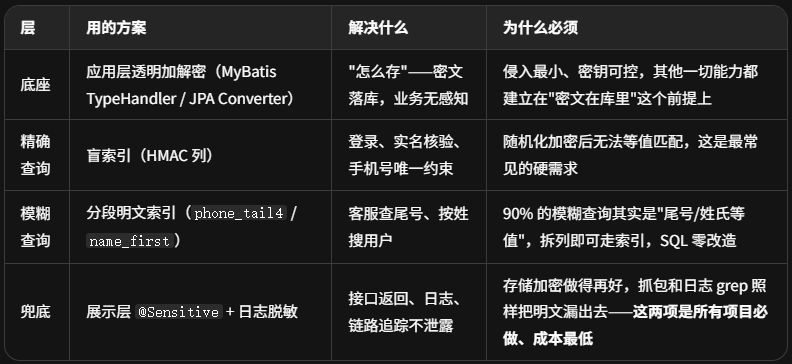
两类企业的差异(决定要不要升级)
普通互联网 / SaaS 企业(多数场景):上面这套即可满足等保三级 + 个保法。AES-256-GCM + 密钥放 KMS/配置中心,不强制国密。
金融 / 政务 / 强合规(密评):底座升级为国密 SM4-GCM、密钥管理走 KMS + 信封加密、密码字段不可逆哈希;模糊搜索如果要求任意分词,再加 ES 脱敏索引(MySQL 存密文,ES 只存脱敏片段,命中回表解密)。
落地建议(按优先级)
先做展示层 + 日志脱敏------半天工作量,立刻止血(评审抓包这关先过)
再做 TypeHandler/Converter 透明加解密------统一底座,新增字段只加注解
按查询需求补盲索引 / 分段列 / ES------每个字段逐一定:需要等值?需要模糊?不需要查询(纯存储)?
高合规项目最后升级 KMS / 国密 / 信封加密
ShardingSphere encrypt、FPE(FF1)属于特定场景的替代实现:前者适合已引入 ShardingSphere 的项目快速落地,后者适合"必须保持字段格式 + 以等值查询为主"的老库改造------但都不是通用主流。
7.2 落地 Checklist(建议逐条打勾)
- 字段盘点:输出《敏感字段清单》,标注分类分级(个保法敏感信息清单 + 金融分级 JR/T 0197)
- 算法选型:定死加密算法与模式(推荐 AES-256-GCM / SM4-GCM),禁用 ECB、DES、MD5 存密码
- 密钥管理:密钥不进代码/不进 git;KMS 或配置中心 + 加密存储;明确轮换周期与负责人
- 查询策略:逐字段确认查询需求(等值/模糊/无),据此设计盲索引列、分段列、ES 索引
- 唯一约束:有唯一需求的字段(手机号、身份证)必须建盲索引唯一键,禁止对密文列建唯一
- 展示脱敏:所有对外接口(含导出、报表、WebSocket 推送)过脱敏注解或白名单
- 日志脱敏:日志、链路追踪、异常堆栈中无完整 PII;排查三方 SDK 的自动日志
- 测试环境:生产→测试的数据流转强制静态脱敏
- 审计:解密行为、导出行为可审计(AOP + 审计表/日志)
- 迁移方案:存量明文数据的在线迁移(双写/灰度),明文列迁移期可保留但要有下线时间
- 性能验证:压测加解密链路,确认 P99 达标;评估索引代价
- 应急:密钥丢失/损坏的恢复预案;KMS 不可用时的降级策略(禁止降级为明文!)
7.3 常见坑(每一个都是线上事故级别)
| 坑 | 说明 | 规避 |
|---|---|---|
| 对加密列建普通索引/唯一索引 | 随机化加密导致索引完全失效,唯一约束形同虚设 | 盲索引列承担索引职责 |
| 密钥硬编码在代码/配置库 | 等于没加密 | KMS/配置中心,最小权限 |
| 解密失败静默返回空串 | 数据损坏被掩盖,还可能导致业务误判 | 解密失败必须告警 + 审计 |
| 只做了存储加密,接口返回明文 | 抓包即泄露,评审照样不过 | 展示层脱敏必须配套 |
| 日志打印实体 toString | 脱敏注解只作用于 JSON 序列化,toString 是另一条泄露路径 | 实体不重写 toString 或自定义脱敏 |
| 用 SHA-256 裸哈希存密码 | 无盐、可彩虹表 | bcrypt/argon2/PBKDF2 |
| HMAC 盲索引被离线枚举 | 手机号空间小,攻击者枚举 1 亿次即可建立映射 | 加盐 + 迭代 + 密钥独立 + 风控限流 |
| 双写一致性 | MySQL 与 ES/脱敏副本不同步,搜索到已注销用户 | MQ 事件 + 幂等消费 + 对账任务 |
| 存量明文未下线 | 加密只对新增数据生效,历史明文仍是泄露面 | 迁移计划里明确明文列下线时间 |
八、总结
- 场景上 :金融、医疗、政务等强监管行业是"硬要求",其他行业是"等保/个保法合规 + 防拖库/防内鬼"的普遍诉求;且脱敏要求贯穿存储、展示、日志、测试、共享全链路,不止存储一环。
- 需求上:核心是字段级分级分类 + 加密/脱敏算法合规 + 密钥管理 + 审计;同时往往伴随**精确查询(登录、核验)与模糊查询(运营/客服/风控)**的业务需求。
- 模糊查询 :可以共存,但必须提前设计。工程主流组合是 盲索引(等值)+ 分段明文索引(尾号/姓氏)+ 脱敏副本(展示/粗查)+ ES 脱敏索引(任意分词),并明确"片段明文"的风险边界。
- 实现上 :落地优先级建议------先做展示层与日志层脱敏 (成本极低、立刻止血)→ 再做应用层透明加解密 (TypeHandler/Converter,统一底座)→ 再按查询需求补盲索引/分段/ES → 高合规项目升级 KMS/国密/信封加密。
- 技术栈提醒 :本项目基于 Spring Boot 3 + JDK 17 + jakarta 命名空间,文中代码均为 jakarta 版;若仍在使用 javax,需把
jakarta.persistence换回javax.persistence。
附录:参考法规与标准
| 编号 | 名称 | 要点 |
|---|---|---|
| 法律 | 《中华人民共和国个人信息保护法》(PIPL) | 分类管理、加密/去标识化、敏感信息单独同意 |
| 法律 | 《中华人民共和国数据安全法》 | 数据分类分级、安全措施 |
| 法律 | 《中华人民共和国网络安全法》 | 防泄露、防篡改 |
| GB/T 22239-2019 | 信息安全技术 网络安全等级保护基本要求 | 三级:重要数据/敏感信息加密存储 |
| GM/T 0054-2018 | 信息系统密码应用基本要求(密评) | 算法合规(SM 系列)、密钥管理 |
| GM/T 0061-2018 | 密码模块安全要求(含 SM4-FPE 相关规范) | FPE 国密算法 |
| JR/T 0197-2020 | 金融数据安全 数据安全分级指南 | 数据分级 1~5 级,3 级以上加密存储 |
| JR/T 0198-2020 | 金融数据安全 数据生命周期安全规范 | 采集、存储、使用、共享全生命周期 |
| NIST SP 800-38G | Format-Preserving Encryption(FF1/FF3-1) | FPE 国际标准 |
| GDPR(欧盟) | 通用数据保护条例 | 假名化/加密(第 32 条) |
| 行业 | 《快递电子运单》相关行业标准 | 隐私面单、隐去中间字段 |
免责声明:本文为技术方案参考,不构成法律意见;具体合规要求请以监管部门最新规定及贵司法务/合规部门意见为准。