异常------错误处理机制
8.1 异常是什么
8.1.1 异常的基本概念
异常(Exception) 是程序运行时发生的错误或意外情况。当 Python 遇到无法继续执行的错误时,会引发(raise) 一个异常对象。如果这个异常没有被捕获(catch) 并处理,程序就会终止并显示一条错误信息(traceback)。
python
# 除零错误
1 / 0输出:
python
Traceback (most recent call last):
  File "<stdin>", line 1, in <module>
ZeroDivisionError: division by zero
8.1.2 为什么需要异常处理
没有异常处理时:程序遇到错误就直接崩溃,用户体验差,而且可能导致数据丢失或资源未释放。
有异常处理后:
-
程序可以优雅地处理错误,继续运行
-
可以向用户显示友好的错误信息
-
可以记录错误日志,便于调试
-
可以释放资源(关闭文件、网络连接等)
8.1.3 异常的本质
每个异常都是某个类的实例 。Python 内置了大量异常类,它们都继承自 Exception 基类。
python
BaseException
├── SystemExit
├── KeyboardInterrupt
├── Exception
│   ├── ZeroDivisionError
│   ├── TypeError
│   ├── ValueError
│   ├── KeyError
│   ├── IndexError
│   ├── FileNotFoundError
│   └── ...
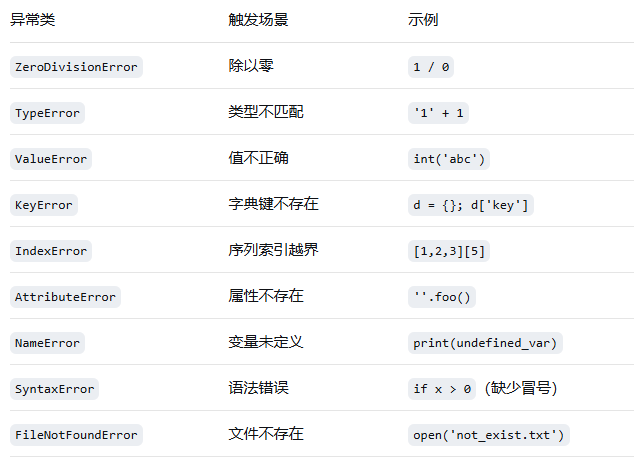
8.2 常见内置异常
8.3 引发异常:raise 语句
8.3.1 基本用法
使用 raise 语句可以主动引发异常。
python
raise Exception输出:
python
Traceback (most recent call last):
  File "<stdin>", line 1, in <module>
Exception
8.3.2 带错误消息的异常
python
raise Exception('hyperdrive overload')输出:
python
Traceback (most recent call last):
  File "<stdin>", line 1, in <module>
Exception: hyperdrive overload
8.3.3 使用内置异常类
python
raise ValueError('Invalid input: expected a number')
raise TypeError('Cannot concatenate str and int')
8.3.4 重新引发异常
在 except 子句中,可以不提供任何参数调用 raise,这样会重新引发当前捕获的异常,让它继续向上传播。
python
class MuffledCalculator:
    """带有静默模式的除法计算器"""
    def __init__(self):
        self.muffled = False

    def calc(self, expression):
        try:
            return eval(expression)
        except ZeroDivisionError:
            if self.muffled:
                print('Division by zero is illegal')
            else:
                raise   # 重新引发异常

calculator = MuffledCalculator()
calculator.muffled = True
calculator.calc('10/0')    # Division by zero is illegal

calculator.muffled = False
calculator.calc('10/0') # 重新引发 ZeroDivisionError代码解读:
-
当
muffled为True时,捕获异常并打印友好信息 -
当
muffled为False时,捕获后立即用raise重新抛出,让上层处理
8.3.5 异常链和 raise ... from ...
在处理一个异常时引发另一个异常,可以用 from 来指定异常上下文。
python
try:
    1 / 0
except ZeroDivisionError as e:
raise ValueError('Cannot divide by zero') from e输出:
python
ZeroDivisionError: division by zero
The above exception was the direct cause of the following exception:
ValueError: Cannot divide by zero
禁用异常上下文:
python
try:
    1 / 0
except ZeroDivisionError:
    raise ValueError('Cannot divide by zero') from None
这样就不会显示原始异常信息。
8.4 捕获异常:try/except 语句
8.4.1 基本用法
python
try:
    x = int(input('Enter first number: '))
    y = int(input('Enter second number: '))
    print(x / y)
except ZeroDivisionError:
print("The second number can't be zero!")运行示例:
python
Enter first number: 10
Enter second number: 0
The second number can't be zero!代码解读:
-
try块中的代码是"有风险"的代码,可能引发异常 -
except块捕获特定类型的异常,并执行错误处理代码 -
如果没有异常发生,
except块被跳过
8.4.2 捕获多种异常:多个 except 子句
python
try:
    x = int(input('Enter first number: '))
    y = int(input('Enter second number: '))
    print(x / y)
except ZeroDivisionError:
    print("Can't divide by zero!")
except TypeError:
    print("That wasn't a number, was it?")
except ValueError:
    print("Please enter valid integers.")
8.4.3 一箭双雕:一个 except 捕获多种异常
用元组 将多个异常类括起来,一个 except 子句就能捕获所有指定的异常类型。
python
try:
    x = int(input('Enter first number: '))
    y = int(input('Enter second number: '))
    print(x / y)
except (ZeroDivisionError, TypeError, ValueError) as e:
    print('Your input was invalid:', e)
注意 :异常类型两边的圆括号不能省略!
python
except ZeroDivisionError, TypeError:   # 错误!这是旧版 Python 的写法
except (ZeroDivisionError, TypeError): # 正确!
8.4.4 捕获异常对象:as e
可以在 except 中捕获异常对象本身,从中获取更多信息。
python
try:
    x = 1 / 0
except ZeroDivisionError as e:
    print('Error message:', e)
print('Error type:', type(e))输出:
python
Error message: division by zero
Error type: <class 'ZeroDivisionError'>
8.4.5 一网打尽:捕获所有异常
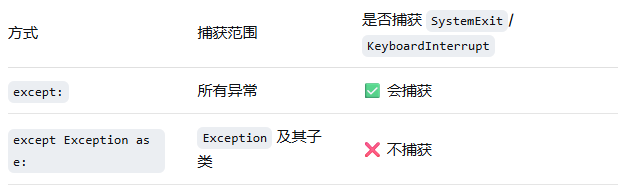
不指定任何异常类型 ,可以捕获所有异常(包括 SystemExit 和 KeyboardInterrupt):
python
try:
    x = int(input('Enter a number: '))
    y = 1 / x
except:
    print('Something went wrong!')
更安全的做法 :捕获 Exception(不包括 SystemExit 和 KeyboardInterrupt):
python
try:
    x = int(input('Enter a number: '))
    y = 1 / x
except Exception as e:
print('Something went wrong:', e)两种方式的区别:
8.5 else 子句:没有异常时执行
else 子句中的代码在 try 块没有引发任何异常时执行。
python
while True:
    try:
        x = int(input('Enter first number: '))
        y = int(input('Enter second number: '))
        value = x / y
    except Exception as e:
        print('Invalid input:', e)
        print('Please try again.')
    else:
        print('x / y is', value)
        break   # 只有没有异常时才跳出循环
运行示例:
python
Enter first number: 1
Enter second number: 0
Invalid input: division by zero
Please try again.
Enter first number: 10
Enter second number: 2
x / y is 5.0代码解读:
-
每次输入出错时,
except块执行,循环继续 -
输入正确时,
else块执行,break跳出循环 -
else让"正常流程"和"错误处理"的代码清晰分离
8.6 finally 子句:无论如何都执行
finally 子句中的代码无论是否发生异常,都会执行,适合做清理工作(关闭文件、释放连接等)。
python
x = None
try:
    x = 1 / 0
finally:
    print('Cleaning up...')
del x输出:
python
Cleaning up...
Traceback (most recent call last):
  File "<stdin>", line 2, in <module>
ZeroDivisionError: division by zero代码解读:
-
即使
try块中发生了异常,finally块仍然执行 -
执行完
finally后,异常继续向上传播 -
这里提前初始化
x = None,确保finally中del x不会因为x未定义而报错
8.6.1 组合使用
可以同时使用 try、except、else、finally:
python
try:
    result = 1 / 2
except ZeroDivisionError:
    print("Division by zero!")
else:
    print("Result:", result)
finally:
    print("Cleanup completed.")
输出:
python
Result: 0.5
Cleanup completed.
8.7 异常和函数的关系
异常会向上传播:如果在函数内没有处理,异常会传播到调用该函数的地方;如果那里也没有处理,继续向上传播到主程序;如果主程序也没有处理,程序终止并显示 traceback。
python
def faulty():
    raise Exception('Something is wrong')

def ignore_exception():
    faulty()   # 没有捕获,异常向上传播

def handle_exception():
    try:
        faulty()
    except Exception as e:
        print('Exception handled:', e)

ignore_exception()
# Traceback: Exception: Something is wrong

handle_exception()
# Exception handled: Something is wrong
8.8 异常处理的最佳实践
8.8.1 使用 try/except 还是 if?
在很多情况下,try/except 比 if 更自然 、更Pythonic。
示例1:字典键是否存在
if 方式(两次查找):
python
def describe_person(person):
    print('Name:', person['name'])
    if 'occupation' in person:     # 第一次查找
        print('Occupation:', person['occupation'])  # 第二次查找
try/except 方式(一次查找,假设键通常存在):
python
def describe_person(person):
    print('Name:', person['name'])
    try:
        print('Occupation:', person['occupation'])  # 只查找一次
    except KeyError:
        pass
示例2:检查对象是否有某属性
if 方式(使用 hasattr):
python
if hasattr(obj, 'write'):
    obj.write('Hello')
try/except 方式(更自然,符合 EAFP 原则):
python
try:
    obj.write('Hello')
except AttributeError:
    print('Object is not writeable')
8.8.2 EAFP 原则
Python 推崇 EAFP(Easier to Ask for Forgiveness than Permission) 原则,即"请求原谅比请求许可更容易"------直接尝试操作,如果失败了再处理异常,而不是先检查所有条件。
python
# LBYL(Look Before You Leap)风格:先检查后操作
if isinstance(x, int):
    y = x + 1

# EAFP 风格:直接操作,异常再处理
try:
    y = x + 1
except TypeError:
    y = None
8.9 警告(Warnings)
8.9.1 什么时候使用警告
警告用于提示不太严重的问题,程序可以继续运行,但最好引起开发者注意。
8.9.2 发出警告
使用 warnings.warn():
python
from warnings import warn

def old_function():
    warn('This function is deprecated. Please use new_function() instead.')
    return 42

old_function()输出:
python
DeprecationWarning: This function is deprecated. Please use new_function() instead.8.9.3 控制警告行为
使用 filterwarnings 来控制警告的显示方式:
python
from warnings import filterwarnings

# 忽略所有警告
filterwarnings('ignore')
old_function()   # 不显示任何警告

# 将警告转换为错误
filterwarnings('error')
old_function()   # 引发 UserWarning 异常
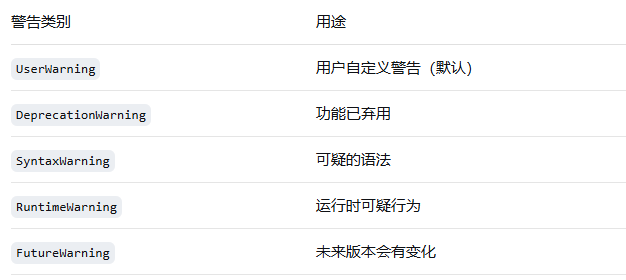
8.9.4 警告类别
python
warn('This feature will change in future', FutureWarning)8.10 自定义异常类
8.10.1 为什么要自定义异常
内置异常虽然丰富,但有时候需要更具体的异常类型来表示特定业务的错误,以便进行更精确的错误处理。
8.10.2 定义自定义异常
继承 Exception 或其子类即可:
python
class HyperdriveError(Exception):
    """超光速推进装置相关的异常"""
    pass

class HyperdriveOverloadError(HyperdriveError):
    """超光速推进装置过载异常"""
    pass

class HyperdriveCoolantError(HyperdriveError):
    """冷却系统异常"""
    pass
8.10.3 使用自定义异常
python
def start_hyperdrive(speed):
    if speed > 100:
        raise HyperdriveOverloadError(f'Speed {speed} exceeds maximum 100')
    if speed < 0:
        raise HyperdriveError('Speed cannot be negative')

try:
    start_hyperdrive(150)
except HyperdriveOverloadError as e:
    print('Overload detected:', e)
    # 采取降速措施
except HyperdriveError as e:
print('Hyperdrive error:', e)代码解读:
-
HyperdriveOverloadError是HyperdriveError的子类 -
捕获
HyperdriveError时也会捕获其所有子类 -
可以先捕获子类再捕获父类,实现更精细的错误处理