接上一篇: 组件封装注意事项
自定义列的顺序(纯前端)
我们之前做需求的时候,没想到会有列的需求变化,直接写死了UI,然后之前文章提到过的那位大佬,又提前封装了组件,导致列被重复引入,且位置很多,所以改一个可能会引发很多变化!
为了解决这个问题,大佬封装了两个组件 ,可以直接套在el-table上实现自定义列的功能,思路很好,可以给大家参考一下!
注意
这个大佬说不够完善!
实现如图:
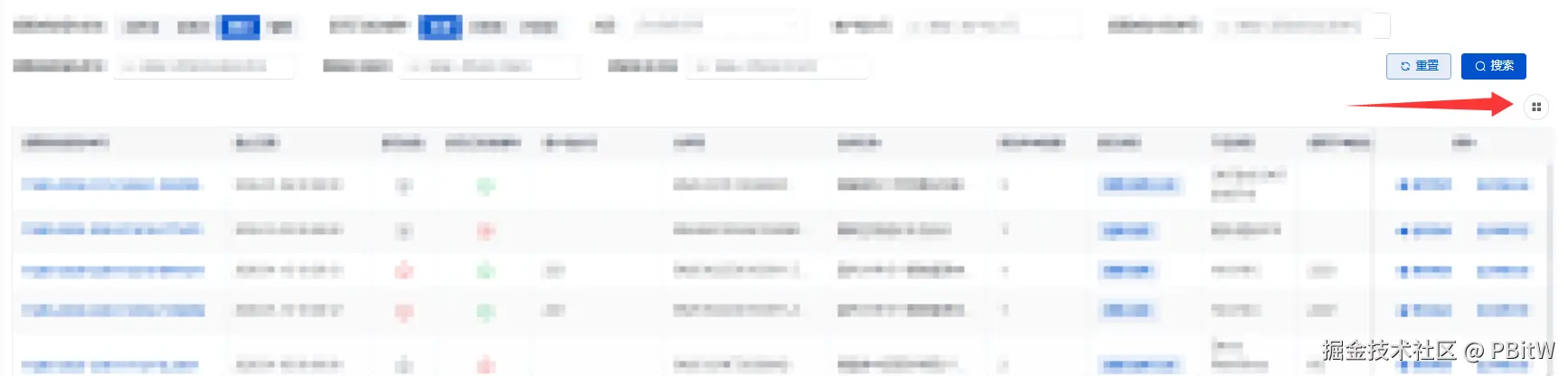
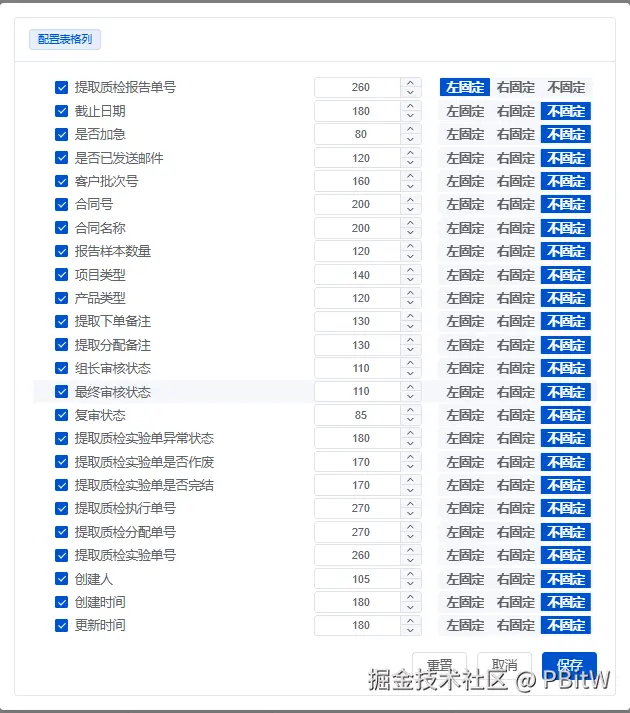
可以拖拽排序!
代码如下
ElTableTools.vue
html
<script setup>
import { createEventHook } from "@vueuse/core";
import {
  collectNestedList,
  GetColsType,
  SetColsType,
  traverseNodes
} from "@/components/TablePlugins/common/common.js";
import { cloneDeep, filter, map, includes, flatMapDeep } from "lodash-es";
import { match } from "ts-pattern";
import { useDialogEditClassStyle } from "@/hooks/useDialogEditClassStyle.js";

const getCols = createEventHook("getCols");
const setCols = createEventHook("setCols");

provide(GetColsType, getCols);

provide(SetColsType, setCols);

const props = defineProps({
  conflictSourcePageKey: {
    type: String,
    default: ""
  }
});

const sourcePageKey = props.conflictSourcePageKey || unref(inject("sourcePageKey") || ref(""));

const localStorageKey = computed(
  () => `${sourcePageKey}`
);

const backupCols = ref([]);

const cols = ref([]); //  真实的提交列,如果用户提交会保存,否者会回滚

const currentCols = ref([]); //  当前正在使用的列,数据会被直接修改

//  当检测到用户目前的列配置发送变化的时候
getCols.on(async (_cols) => {
  cols.value = collectNestedList(_cols, {
    collectFn({ node }) {
      return {
        ...node,
        isShow: true
      };
    }
  });

  backupCols.value = cloneDeep(cols.value);
  currentCols.value = cloneDeep(cols.value);
  await nextTick();
  //  尝试加载用户之前存储的配置在服务端或者浏览器本地,之后合并配置
  loadColumnsConfig({ isTriggerSetCols: true });
});

const dialogVisible = ref(false);

function handleConfirm() {
  cols.value = cloneDeep(unref(currentCols));

  const checkedKeys = new Set(unref(treeRef).getCheckedKeys());

  triggerSetCols(checkedKeys);

  saveColumnsConfig(unref(cols));

  dialogVisible.value = false;
}

function triggerSetCols(checkedKeys) {
  //  通知 ColsManager 进行更新
  const filteredCols = collectNestedList(unref(currentCols), {
    shouldCollect({ isLeaf, node, transformedChildren }) {
      if (isLeaf) {
        return checkedKeys.has(node.id);
      }
      return transformedChildren.length;
    }
  });

  setCols.trigger(filteredCols);
}

function handleCancel() {
  handleBeforeClosed(() => {
    dialogVisible.value = false;
  });
}

function handleClickCheck(data, { checkedNodes }) {
  const isShow = checkedNodes.includes(data);

  traverseNodes([data], {
    before({ node }) {
      node.isShow = isShow;
    }
  });
}

function handleOpenColsConfig() {
  dialogVisible.value = true;
  setCurrentColsChecked();
}

async function setCurrentColsChecked() {
  await nextTick();

  const checkedNodes = [];

  traverseNodes(unref(currentCols), {
    before({ node, isLeaf }) {
      if (isLeaf && node.isShow) {
        checkedNodes.push(node);
      }
    }
  });

  unref(treeRef).setCheckedNodes(checkedNodes, false);
}

// 递归获取树的所有id
function getAllIds(tree, childrenKey = "children") {
  return flatMapDeep(tree, (node) => {
    const children = node[childrenKey];
    const childIds = children ? getAllIds(children, childrenKey) : [];
    return [node.id, ...childIds];
  });
}

const toTriggerSetCols = () => {
  const labels = map(filter(unref(currentCols), "isShow"), "label");
  const checkedKeys = new Set(
    getAllIds(filter(unref(currentCols), (item) => includes(labels, item.label)))
  );
  triggerSetCols(checkedKeys);
};

async function loadColumnsConfig({ isTriggerSetCols }) {
  //  尝试从 localStorage 加载用户的列配置,并与当前的列进行合并,最后触发 setCols 进行更新
  const localColsConfig = JSON.parse(localStorage.getItem(unref(localStorageKey)) || "[]");

  if (!Array.isArray(localColsConfig) || localColsConfig.length === 0) {
    if (isTriggerSetCols) {
      toTriggerSetCols();
    }
    return;
  }

  const sourceCols = [...unref(currentCols)];
  // 由于缺少唯一标识符,只能通过label来匹配,所以先构建一个label到列配置的映射表,方便后续匹配和属性更新
  const configMap = new Map(localColsConfig.map((c) => [c.label, c]));
  const matchedNodesMap = new Map();
  const unmatchedNodesWithIndex = [];

  // 1. 更新属性并识别匹配/不匹配的列
  sourceCols.forEach((node, index) => {
    const { label } = node;
    const configItem = configMap.get(label);
    if (configItem) {
      const { fixed, width, realWidth, isShow } = configItem;
      Object.assign(node, { fixed, width, realWidth, isShow });
      matchedNodesMap.set(label, node);
    } else {
      unmatchedNodesWithIndex.push({ node, index });
    }
  });

  // 2. 根据 localColsConfig 的顺序排列匹配到的列 (舍弃不在 currentCols 中的列)
  const orderedMatchedNodes = [];
  localColsConfig.forEach((configItem) => {
    const node = matchedNodesMap.get(configItem.label);
    if (node) {
      orderedMatchedNodes.push(node);
      matchedNodesMap.delete(configItem.label); // 防止重复
    }
  });

  // 3. 将不在 localColsConfig 中的列插入回原来的位置 (保持位置不变)
  const finalCols = [...orderedMatchedNodes];
  // 按原索引排序以确保插入位置正确
  unmatchedNodesWithIndex.sort((a, b) => a.index - b.index);
  unmatchedNodesWithIndex.forEach(({ node, index }) => {
    const insertPos = Math.min(index, finalCols.length);
    finalCols.splice(insertPos, 0, node);
  });

  currentCols.value = finalCols;

  await nextTick();
  if (isTriggerSetCols) {
    toTriggerSetCols();
  }
}

function saveColumnsConfig(cols) {
  //  Save entire tree which include propName width fixed and isShow props
  localStorage.setItem(unref(localStorageKey), JSON.stringify(unref(cols)));
}

function resetColumnsConfig() {
  currentCols.value = cloneDeep(unref(backupCols));
  setCurrentColsChecked();
}

const treeRef = ref();

function allowDrop(draggingNode, dropNode, type) {
  return match(type)
    .with("inner", () => {
      return false;
    })
    .with("prev", "next", () => {
      return draggingNode.level === dropNode.level;
    })
    .exhaustive();
}

const fixedOpts = [
  { label: "左固定", value: "left" },
  { label: "右固定", value: "right" },
  { label: "不固定", value: false }
];

function getWidth(data) {
  return data.width ?? data.realWidth;
}

function changeWidth(data, nv) {
  data.width = nv;
}

function handleBeforeClosed(done) {
  // currentCols.value = cloneDeep(cols.value);
  loadColumnsConfig({ isTriggerSetCols: false });
  done();
}

const { dialogProps, cardProps, footerProps } = useDialogEditClassStyle();

function closeDialog() {}
</script>

<template>
  <div class="mb-2 mr-1 flex justify-end">
    <slot name="left"></slot>
    <el-tooltip content="自定义列配置">
      <el-button icon="menu" circle @click="handleOpenColsConfig" />
    </el-tooltip>

    <slot name="right"></slot>
  </div>

  <el-dialog
    :before-close="handleBeforeClosed"
    append-to-body
    v-bind="dialogProps"
    width="700"
    v-model="dialogVisible"
    @closed="closeDialog"
  >
    <el-card v-bind="cardProps">
      <template #header>
        <div class="flex justify-between">
          <el-tag type="primary">配置表格列</el-tag>
        </div>
      </template>

      <div>
        <section class="flex flex-col gap-y-3">
          <el-tree
            ref="treeRef"
            @check="handleClickCheck"
            show-checkbox
            :data="currentCols"
            draggable
            default-expand-all
            node-key="id"
            :allow-drop="allowDrop"
          >
            <template #default="{ node, data }">
              <div class="flex w-full items-center gap-x-2">
                <div class="flex-1">{{ node.label }}</div>

                <div class="w-[130px]">
                  <el-input-number
                    controls-position="right"
                    @click.stop
                    :model-value="getWidth(data)"
                    @change="(nv) => changeWidth(data, nv)"
                    v-if="node.isLeaf"
                    size="small"
                  />
                  <div class="grid place-items-center" v-else>-</div>
                </div>

                <div class="w-44">
                  <el-segmented
                    v-if="node.level === 1"
                    v-model="data.fixed"
                    :options="fixedOpts"
                    size="small"
                  />

                  <div class="grid place-items-center" v-else>-</div>
                </div>
              </div>
            </template>
          </el-tree>
        </section>

        <div v-bind="footerProps">
          <el-button plain @click="resetColumnsConfig">重置</el-button>
          <el-button @click="handleCancel">取消</el-button>
          <el-button type="primary" @click="handleConfirm()">保存</el-button>
        </div>
      </div>
    </el-card>
  </el-dialog>

  <div class="table-tools-content-body">
    <slot name="default"></slot>
  </div>
</template>

<style scoped lang="scss">
.table-tools-content-body {
  // flex: 1;
  display: flex;
  flex-direction: column;
  /* 允许父元素收缩,不被内容撑高 */
  min-height: 0;
}
</style>
common.js
js
import { noop } from "lodash-es";

export const GetColsType = Symbol("getCols");
export const SetColsType = Symbol("setCols");

export function traverseNodes(
  nodes,
  { before = noop, after = noop, childrenName = "children" } = {}
) {
  function _traverseNodes(nodes, level) {
    if (!Array.isArray(nodes)) {
      return;
    }

    for (const node of nodes) {
      const children = Reflect.get(node, childrenName);
      const isLeaf = !children;

      before({ node, isLeaf, level });
      _traverseNodes(children, level + 1);
      after({ node, isLeaf, level });
    }
  }

  _traverseNodes(nodes, 0);
}

export function collectNestedList(
  list,
  { childrenName = "children", collectFn, shouldCollect } = {}
) {
  collectFn ??= ({ node }) => node;
  shouldCollect ??= (..._args) => true;

  function _collectNestedList(cols, level, parent) {
    if (!Array.isArray(cols)) {
      return null;
    }

    const res = [];

    for (const col of cols) {
      const { [childrenName]: children } = col;
      const isLeaf = !children;

      const transformedChildren = _collectNestedList(children, level + 1, col);

      const transformedNode = collectFn({
        node: {
          ...col,
          [childrenName]: transformedChildren
        },
        isLeaf,
        level,
        parent
      });

      if (shouldCollect({ isLeaf, node: col, level, parent, transformedChildren })) {
        res.push(transformedNode);
      }
    }

    return res;
  }

  return _collectNestedList(list, 0, null);
}
useDialogEditClassStyle.js
js
export function useDialogEditClassStyle() {
  const dialogProps = ref({
    showClose: false,
    headerClass: "p-0",
    footerClass: "p-0"
  });

  const cardProps = ref({
    headerClass: "!py-3",
    bodyClass: "!pb-0",
    shadow: "never"
  });

  const footerProps = ref({
    className: "flex h-16 shrink-0 items-center justify-end rounded "
  });

  return {
    dialogProps,
    cardProps,
    footerProps
  };
}
ElColumnsManager.vue
html
<script lang="jsx" setup>
import { getCurrentInstance, onBeforeUnmount, onMounted } from "vue";
import { createEventHook, watchDebounced } from "@vueuse/core";
import { cloneDeep, isNil, omitBy } from "lodash-es";
import { match, P } from "ts-pattern";
import {
  collectNestedList,
  GetColsType,
  SetColsType
} from "@/components/TablePlugins/common/common.js";

const props = defineProps({
  /**
   * 最后的渲染时机用户可能修改某些配置
   * @param {[]} columns
   * @returns {[]}
   */
  columnsRewrite: {
    type: Function,
    default: (columns) => columns
  }
});

const instance = getCurrentInstance();

const owner = computed(() => {
  let parent = instance.parent;
  while (parent && !parent.tableId) {
    parent = parent.parent;
  }
  return parent;
});

const renderTableCtx = ref();

function getRenderTableCtx() {
  const { store } = unref(owner);
  renderTableCtx.value = {
    _self: unref(owner),
    store
  };
}

onMounted(getRenderTableCtx);

const refTableRef = ref();
const cols = ref([]); //  origin cols from slots
const currentCols = ref([]); // would be edited by user

const getCols = inject(GetColsType, createEventHook("_getCols"));
const setCols = inject(SetColsType, createEventHook("_setCols"));

setCols?.on((cols) => {
  console.log("on set cols", cols);
  currentCols.value = cols;
});

function emitColsChange() {
  function transformCols(cols) {
    return collectNestedList(cols, {
      collectFn({ node }) {
        return {
          ...node
        };
      }
    });
  }

  getCols?.trigger(transformCols(unref(cols)));
}

const cellIndexMap = shallowRef(new Map());

// 监听 refTableRef 的 columns变化,在某些情况下,特别是表格列是动态加载的情况下,此类监听会循环触发很多次
// 修改为根据label, property, width, fixed四个维度缓存表格列配置,以此来判断表格是否发生变动
let virtualTableLocalMark = [];
watchDebounced(
  () => {
    const { columns } = unref(refTableRef) ?? {};
    return columns;
  },
  (columns) => {
    const currentVirtualTableLocalMark = [];
    // 根据 label, property, width, fixed 四个维度缓存表格列配置
    columns.map((item) => {
      const { label, property, width, fixed } = item;
      currentVirtualTableLocalMark.push([label, property, width, fixed].join("-"));
    });
    if (virtualTableLocalMark.join(",") !== currentVirtualTableLocalMark.join(",")) {
      virtualTableLocalMark = cloneDeep(currentVirtualTableLocalMark);

      cols.value = currentCols.value = columns;
      // console.log(unref(cols));

      cellIndexMap.value = calcCellIndex(unref(cols));
      // console.log(cellIndexMap.value);
      emitColsChange();
    }
  },
  {
    deep: true,
    debounce: 1
  }
);

function calcCellIndex(cols) {
  let curCellIndex = 0;
  const cellIndexMap = new Map();

  function traverse(cols) {
    if (!Array.isArray(cols)) {
      return;
    }

    for (const col of cols) {
      if (!col.children) {
        //  leaf node
        cellIndexMap.set(col.id, curCellIndex);
        curCellIndex += 1;
      }

      // before()
      traverse(col.children);
      // after()
    }
  }

  traverse(cols);

  return cellIndexMap;
}

function RenderCellWrapper({ renderCell, row, $index, column }) {
  const cellIndex = unref(cellIndexMap).get(column.id);

  const { _self, store } = unref(renderTableCtx);

  //  bug:第一次执行的时候可能还没有拿到row,这时不应该渲染
  if (Object.keys(row).length === 0) {
    return h("div");
  }

  const data = {
    $index,
    cellIndex, //  分析el源码并调试观察不难看出这个相当于tree的子节点开始来数的
    column,
    expanded: false,
    row,
    store,
    _self
  };

  return renderCell(data).children; //  避免渲染两次 div.cell
}

function RenderColumns({ columns }) {
  if (!unref(renderTableCtx)) {
    return;
  }

  return columns.map((column) => {
    const {
      property,
      label,
      width,
      minWidth,
      maxWidth,
      children,
      renderCell,
      fixed,
      renderHeader,
      ...rest
    } = column;

    const props = omitNil({ prop: property, label, width, minWidth, maxWidth, fixed });
    // 为每一列提供唯一的 key,避免 VDOM 基于位置复用导致列属性(如 filters、filterMethod)串列
    return (
      <el-table-column key={column.id ?? property ?? label} {...Object.assign({}, props, rest)}>
        {{
          header: ({ column, $index }) =>
            renderHeader({
              $index,
              column,
              ...rest,
              ...unref(renderTableCtx)
            }),
          default: ({ row, $index }) =>
            match(children)
              .with(P.array(P._), () => <RenderColumns columns={children} />)
              .otherwise(() => <RenderCellWrapper {...{ row, $index, renderCell, column }} />)
        }}
      </el-table-column>
    );
  });
}

function omitNil(obj) {
  return omitBy(obj, isNil);
}

const finalRenderColumns = computed(() => {
  const { columnsRewrite } = props;
  return columnsRewrite(unref(currentCols));
});

onBeforeUnmount(() => {
  virtualTableLocalMark = [];
});
</script>

<template>
  <RenderColumns :columns="finalRenderColumns" />

  <el-table ref="refTableRef" :data="[]" class="hidden">
    <slot name="default"></slot>
  </el-table>
</template>
使用方式
js
<ElTableTools>
  <el-table>
    ......el-table-column

    <ElColumnsManager>
      ......需要排序的el-table-column
    </ElColumnsManager>

    ......el-table-column
  </el-table>
</ElTableTools>