一、实验目的
- 理解 logrotate 的作用:自动压缩、切割、清理旧日志,防止日志撑爆磁盘
- 掌握 logrotate 配置文件的编写方法(
/etc/logrotate.d/下的规则文件) - 实际验证各参数的效果:
daily、rotate、compress、delaycompress、missingok、notifempty、create、postrotate - 理解"自动化"机制:logrotate 本身不定时,靠 cron 每天触发
- 建立运维意识:日志管理不能靠手动,必须自动化
二、实验环境
- 系统:CentOS 7(yum 源已切换阿里云归档镜像)
- 应用:Nginx
- 工具:logrotate + cron
三、实验步骤
步骤 1:启动服务并制造访问日志
bash
systemctl start nginx
for i in {1..100}; do curl -s http://127.0.0.1 > /dev/null; done
wc -l /var/log/nginx/access.log
输出: 101 行------这就是轮转的"原料"。
步骤 2:编写 logrotate 配置文件
bash
vim /etc/logrotate.d/nginx
ini
/var/log/nginx/access.log /var/log/nginx/error.log {
    daily
    rotate 7
    compress
    delaycompress
    missingok
    notifempty
    create 644 nginx adm
    sharedscripts
    postrotate
        if [ -f /var/run/nginx.pid ]; then
            kill -USR1 `cat /var/run/nginx.pid`
        fi
    endscript
}
步骤 3:测试加载(debug 模式)
bash
logrotate -d /etc/logrotate.d/nginx看到 considering log /var/log/nginx/access.log 说明配置没问题。
步骤 4:第一次强制轮转
bash
logrotate -f /etc/logrotate.d/nginx
ls -lh /var/log/nginx/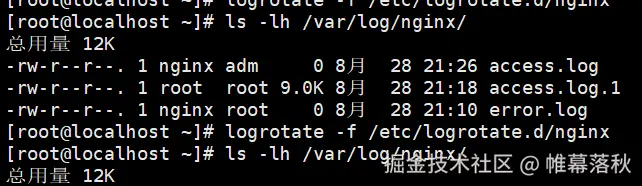
| 现象 | 对应参数 | 说明 |
|---|---|---|
| 新的 access.log 属主是 nginx:adm、权限 -rw-r--r-- | create 644 nginx adm |
轮转后按指定权限属主重建日志 ✅ |
| access.log.1 还是 9.0K、没变 .gz | delaycompress |
等下一次轮转才压缩 ✅ |
| error.log 是空的、没有 error.log.1 | notifempty |
空日志不轮转 ✅ |
步骤 5:第二次轮转(意外收获:验证 notifempty)
bash
logrotate -f /etc/logrotate.d/nginx
ls -lh /var/log/nginx/
现象: 输出一模一样,什么都没发生。
原因: 第一次轮转后新 access.log 是空的(0 字节),notifempty 检查到空日志直接跳过------再次验证 notifempty 在工作。
步骤 6:制造新日志再轮转(验证 compress)
bash
for i in {1..50}; do curl -s http://127.0.0.1 > /dev/null; done
wc -l /var/log/nginx/access.log # 输出:50
logrotate -f /etc/logrotate.d/nginx
ls -lh /var/log/nginx/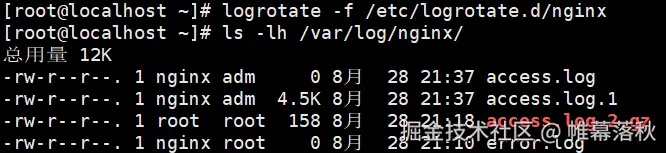 效果: 之前 9.0K 的日志被压缩成 158 字节 (压缩率 98%),
compress 实锤生效。
| 文件 | 说明 |
|---|---|
| access.log(空,nginx:adm) | create 新建的当前日志 |
| access.log.1(4.5K,未压缩) | delaycompress:等下次才压缩 |
| access.log.2.gz(158 字节) | compress:上上次的已压缩 |
| error.log(空) | notifempty:一直跳过 |
步骤 7:模拟 8 天,验证 rotate 7 上限
bash
for i in {1..8}; do
echo "log line $i" >> /var/log/nginx/access.log
logrotate -f /etc/logrotate.d/nginx
done
ls /var/log/nginx/ | grep access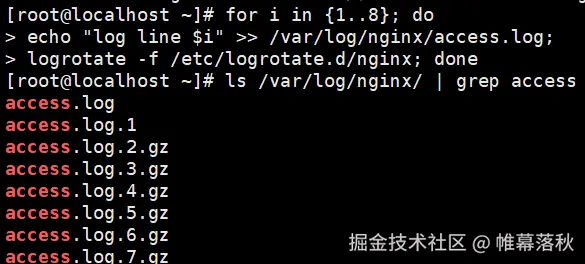 预期: 只看到 access.log + access.log.1 ~ access.log.7.gz,没有 .8 ------最旧的一份被自动删除,
rotate 7 生效。
步骤 8:验证 postrotate(nginx 正常写新日志)
bash
curl -s http://127.0.0.1 > /dev/null
tail -n 2 /var/log/nginx/access.log
能看到新访问记录写入 access.log,说明 kill -USR1 让 nginx 重新打开了新日志文件。
步骤 9:理解自动化机制
bash
cat /etc/cron.daily/logrotatelogrotate 每天凌晨由 cron 自动执行------配置写好就不用管了。
四、实验现象汇总
| 参数 | 验证证据 |
|---|---|
daily |
配置中声明,cron 每天触发 |
rotate 7 |
循环 8 次后只有 7 份历史 |
compress |
9.0K → 158 字节 |
delaycompress |
.1 保持未压缩 |
missingok / notifempty |
空日志跳过(error.log) |
create 644 nginx adm |
新日志属主 nginx:adm、权限 644 |
postrotate |
轮转后 curl 仍写入 access.log |
五、实验总结
1. logrotate 的本质:
日志轮转 = 触发 → 检查 → 改名 → 压缩 → 通知服务 → 清理,每天自动循环一次,让磁盘只保留最近 N 份日志。
2. 参数记忆口诀:
rotate 7管"留几份",compress管"压不压",delaycompress管"晚点压"missingok管"没有也不报错",notifempty管"空的就不切"create管"切完建新文件",postrotate管"切完通知服务"
3. 踩过的两个坑(也是知识点):
- 空日志不轮转 :
notifempty生效时,连续-f看似"没反应",要先有日志才能轮转 - delaycompress 的副作用 :历史中最新一份永远是
.1未压缩,压缩的是更早的
4. 运维意义:
日志不管理的下场是磁盘被撑爆、业务中断;配置一次 logrotate,就能永久自动化------用最小的成本,避免最大的事故。