请求头是浏览器发给服务器的"自我介绍",响应头是服务器回给浏览器的"回复说明"
响应头
服务器处理完请求后,返回给浏览器的"附加信息"。
常见响应头
| 响应头名称 | 作用 | 示例值 |
|---|---|---|
Content-Type |
返回数据的格式 | application/json |
Content-Length |
返回数据的字节大小 | 1024 |
Access-Control-Allow-Origin |
允许跨域访问的来源(CORS) | http://localhost:5500 |
Set-Cookie |
设置Cookie | sessionId=abc123; Path=/ |
Cache-Control |
缓存策略 | no-cache, max-age=3600 |
Server |
服务器信息 | Express |
Status |
状态码说明 | 200 OK |
http
HTTP/1.1 200 OK
Content-Type: application/json
Content-Length: 15
Access-Control-Allow-Origin: http://localhost:5500
Cache-Control: no-cache

{"code":200}
请求头
浏览器发起请求时,自动携带的"附加信息"。
常见请求头
| 请求头名称 | 作用 | 示例值 |
|---|---|---|
Host |
请求的目标服务器 | localhost:3000 |
User-Agent |
浏览器身份标识 | Mozilla/5.0 (Windows NT 10.0; Win64; x64) AppleWebKit/537.36 |
Accept |
客户端能接收的数据格式 | application/json, text/html |
Accept-Encoding |
客户端支持的压缩方式 | gzip, deflate, br |
Content-Type |
请求体的数据格式(POST/PUT时) | application/json |
Authorization |
身份认证令牌 | Bearer eyJhbGciOiJIUzI1NiIs... |
Cookie |
携带的Cookie信息 | sessionId=abc123 |
Origin |
请求来源(跨域时重要) | http://localhost:5500 |
http
GET /info HTTP/1.1
Host: localhost:3000
User-Agent: Mozilla/5.0 Chrome/120.0
Accept: application/json
Origin: http://localhost:5500
Cookie: sessionId=abc123
响应头和请求头的区别
| 对比项 | 请求头 | 响应头 |
|---|---|---|
| 发送方 | 浏览器(客户端) | 服务器 |
| 接收方 | 服务器 | 浏览器(客户端) |
| 作用 | 告诉服务器"我是谁、要什么" | 告诉浏览器"给你什么、什么规则" |
| 谁设置 | 浏览器自动设置,JS可修改 | 服务器代码设置 |
| 关键字段 | Host、Origin、Cookie、Authorization |
Content-Type、Access-Control-Allow-Origin、Set-Cookie |
在开发中,你只需要根据场景选择需要的请求头即可,不需要全部记住。比如,进行跨域请求时重点关注 Origin;发送 POST 请求时重点关注 Content-Type 和 Authorization。
响应头和跨域之间的关系
- cors
跨域资源共享(Cross-Origin Resource Sharing,CORS)是一种机制,用于在浏览器中实现跨域请求访问资源的权限控制。当一个网页通过 XMLHttpRequest 或 Fetch API 发起跨域请求时,浏览器会根据同源策略(Same-Origin Policy)进行限制。同源策略要求请求的源(协议、域名和端口)必须与资源的源相同,否则请求会被浏览器拒绝
右键Open with Live Server,直接打开http://127.0.0.1:5500/http-req-res-header/index.html,修改为http://localhost:5500/http-req-res-header/index.html
你用 Live Server 打开 HTML 文件时:
- 页面地址 :
http://127.0.0.1:5500/index.html(或localhost:5500) - 接口地址 :
http://localhost:3000/info
端口不同(5500 vs 3000),浏览器认为是跨域请求,所以报 CORS 错误。
为什么 Live Server 会用 5500 端口?
Live Server 是一个轻量级开发服务器,默认端口是 5500 ,用于托管静态 HTML 文件。你的页面通过它访问,而接口跑在 3000 端口,两者端口不同 → 跨域。
html
<!DOCTYPE html>
<html lang="en">
<head>
    <meta charset="UTF-8">
    <meta name="viewport" content="width=device-width, initial-scale=1.0">
    <title>Document</title>
</head>
<body>
    <script>
        fetch('http://localhost:3000/info').then(res=>{
            return res.json()
        }).then(res=>{
            console.log(res)
        })
    </script>
</body>
</html>
js
import express from 'express'
const app = express()
// app.use((req, res, next) => {
//     res.setHeader('Access-Control-Allow-Origin', 'http://localhost:5500')
//     next()
// })
app.get('/info', (req, res) => {
    res.json({
        code: 200
    })
})
app.listen(3000, () => {
    // console.log('http://localhost:3000')
})
发现是有报错的 根据同源策略我们看到协议一样,域名一样,但是端口不一致,端口也无法一致,会有冲突,否则就是前后端不分离的项目,前后端代码放在一起,只用一个端口,不过我们是分离的没法这么做。
这时候我们就需要后端支持一下,跨域请求资源放行
js
import express from 'express'
const app = express()
app.use((req, res, next) => {
    res.setHeader('Access-Control-Allow-Origin', 'http://localhost:5500')
    next()
})
app.get('/info', (req, res) => {
    res.json({
        code: 200
    })
})
app.listen(3000, () => {
    // console.log('http://localhost:3000')
})
请求方法支持
我们服务端默认只支持 GET POST HEAD OPTIONS 请求
例如我们遵循restFul 要支持PATCH 或者其他请求
增加patch
js
import express from 'express'
const app = express()
app.use((req, res, next) => {
    res.setHeader('Access-Control-Allow-Origin', 'http://localhost:5500')
    res.setHeader('Access-Control-Allow-Methods', 'POST, GET, OPTIONS, DELETE, PATCH')
    next()
})
// app.get('/info', (req, res) => {
//     res.json({
//         code: 200
//     })
// })
app.patch('/info', (req, res) => {
    res.json({
        code: 200
    })
})
app.listen(3000, () => {
    console.log('http://localhost:3000')
})
html
<!DOCTYPE html>
<html lang="en">
<head>
    <meta charset="UTF-8">
    <meta name="viewport" content="width=device-width, initial-scale=1.0">
    <title>Document</title>
</head>
<body>
    <script>
        // fetch('http://localhost:3000/info').then(res=>{
        //     return res.json()
        // }).then(res=>{
        //     console.log(res)
        // })

         fetch('http://localhost:3000/info',{
            method:'PATCH',
        }).then(res=>{
            return res.json()
        }).then(res=>{
            console.log(res)
        })
    </script>
</body>
</html>
在请求头加上这行即可!
js
res.setHeader('Access-Control-Allow-Methods', 'POST, GET, OPTIONS, DELETE, PATCH')要注意app.js这个文件中要加上patch请求,html文件中请求也要加上patch请求
预检请求
js
   fetch('http://localhost:3000/info',{
            method:'POST',
            headers: {
                'Content-Type': 'application/json'
            },
            body: JSON.stringify({name: 'xmzs'})
        }).then(res=>{
            return res.json()
        }).then(res=>{
            console.log(res)
        })
js
import express from 'express'
const app = express()
app.use((req, res, next) => {
    res.setHeader('Access-Control-Allow-Origin', 'http://localhost:5500')
    res.setHeader('Access-Control-Allow-Methods', 'POST, GET, OPTIONS, DELETE, PATCH')
   // res.setHeader('Access-Control-Allow-Headers', 'Content-Type')
    next()
})
// app.get('/info', (req, res) => {
//     res.json({
//         code: 200
//     })
// })
app.post('/info', (req, res) => {
    try {
        // 处理请求
        res.json({ code: 200 })
    } catch (error) {
        res.status(500).json({ code: 500, message: error.message })
    }
})
app.listen(3000, () => {
    console.log('http://localhost:3000')
})
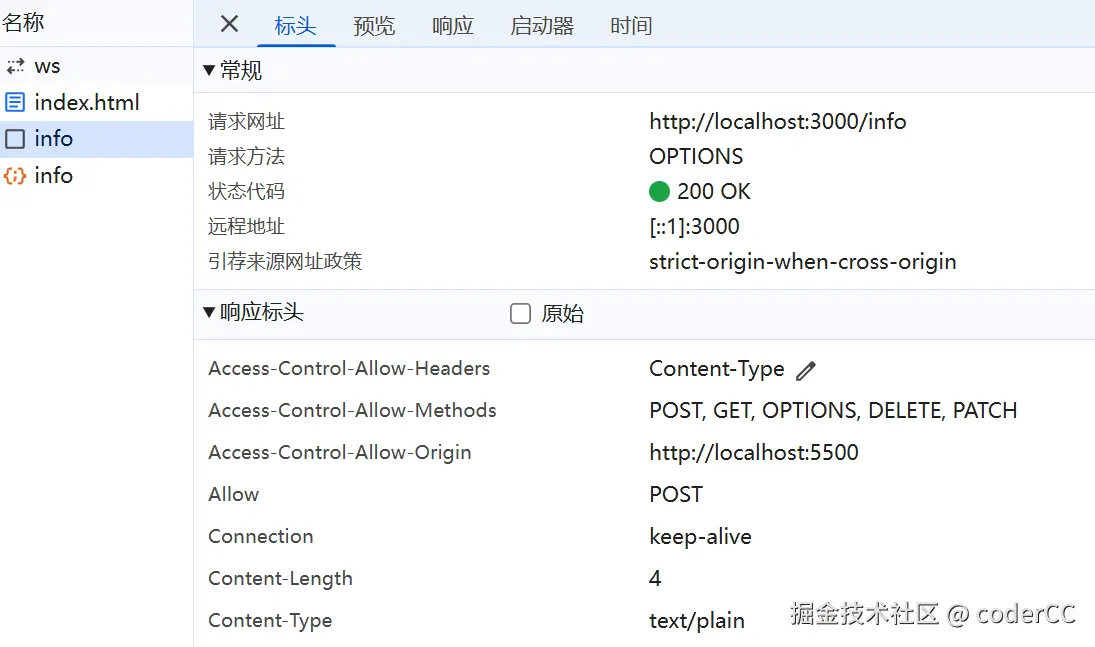
发现报错了!!

因为 application/json 不属于cors 范畴需要手动支持
res.setHeader('Access-Control-Allow-Headers', 'Content-Type')
解决办法:去掉以上这行注释即可!

自定义响应头
在我们做需求的时候,可能会碰到后端自定义响应头
业务场景:传递"元数据"而非数据体
最常见的情况。后端返回了JSON/XML数据体,但想把数据体之外的状态信息(比如分页、签名)也传给前端。
- 分页信息 :返回列表数据时,把
X-Total-Count(总条数)、X-Page(当前页)放在响应头,而不是塞进JSON体里。这样前端分页组件可以直接从响应头读取,数据体保持干净。------这个放在响应头还是响应体里还是要看框架!!- 文件下载信息 :下载文件时,自定义
X-File-Name(原始文件名)或X-File-Size,方便前端在下载进度条或保存对话框中显示。- 业务状态码 :有些架构不把业务错误码放在HTTP状态码(如200/500)里,而是在响应头自定义
X-Business-Code,专门表示"库存不足""积分不够"等业务异常,让前端统一拦截处理。
什么时候该用自定义响应头,而不是放Body里?
当这个字段是"请求级别的控制信息"时,放Header;当它是"业务数据本身"时,放Body。
比如,X-Total-Count 是对这批数据的描述(控制分页组件),不是数据本身,所以放Header。而"用户名""订单金额"是业务数据,放Body。
一个需要注意的坑
前端(尤其是浏览器中的JavaScript)只能读取部分响应头 。默认暴露的只有 Cache-Control、Content-Language、Content-Type、Expires、Last-Modified、Pragma。
如果你的自定义头是 X-Custom-Header,后端必须在响应头里加上:
http
makefile
Access-Control-Expose-Headers: X-Custom-Header, X-Total-Count否则前端 getResponseHeader('X-Custom-Header') 会拿不到值,这是跨域安全策略(CORS)的限制。
好了言归正传!!
js
app.get('/info', (req, res) => {
    res.set('xmzs', '1')
    res.json({
        code: 200
    })
})
前端如何取呢?
js
fetch('http://localhost:3000/info').then(res=>{
            const headers = res.headers
            console.log(headers.get('xmzs'))
            return res.json()
        }).then(res=>{
            console.log(res)
        })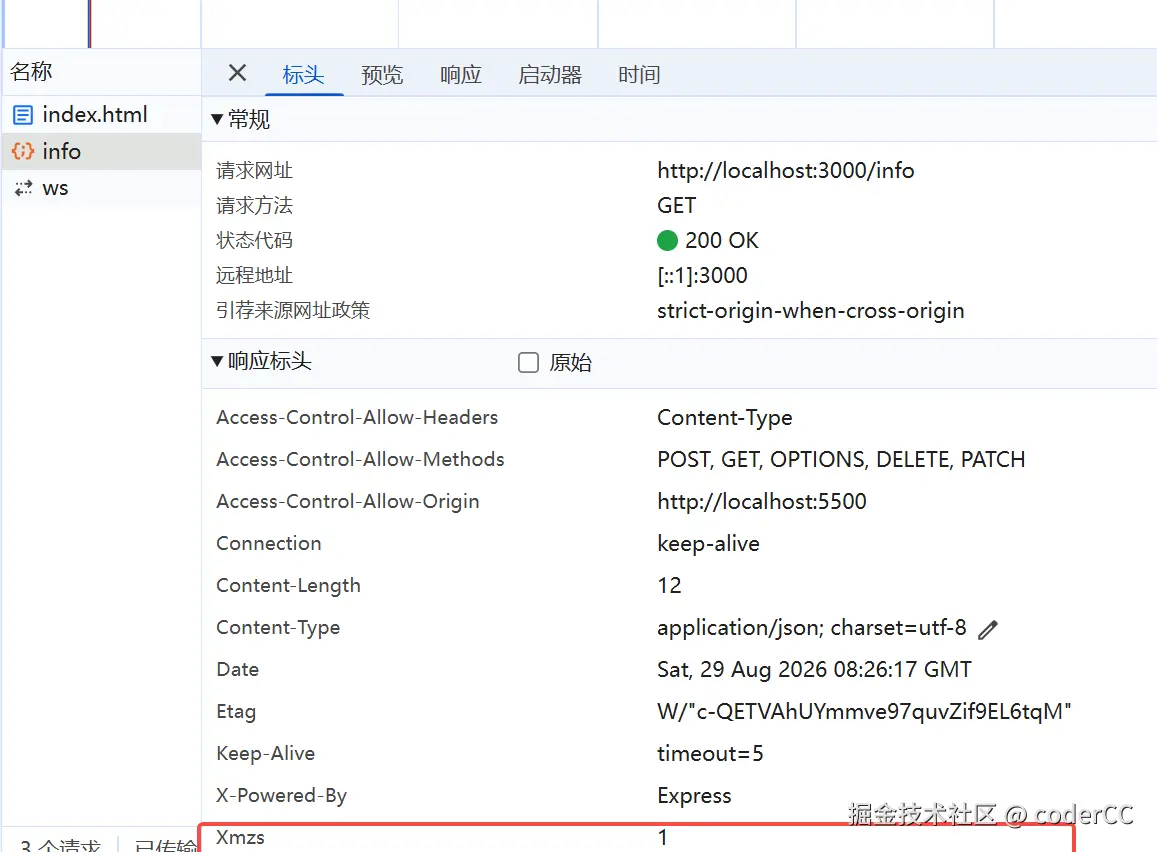
发现是null 这是因为后端没有抛出该响应头所以后端需要增加抛出的一个字段
js
app.get('/info', (req, res) => {
    res.set('xmzs', '1')
    res.setHeader('Access-Control-Expose-Headers', 'xmzs')
    res.json({
        code: 200
    })
})
这样就会返回1了!!
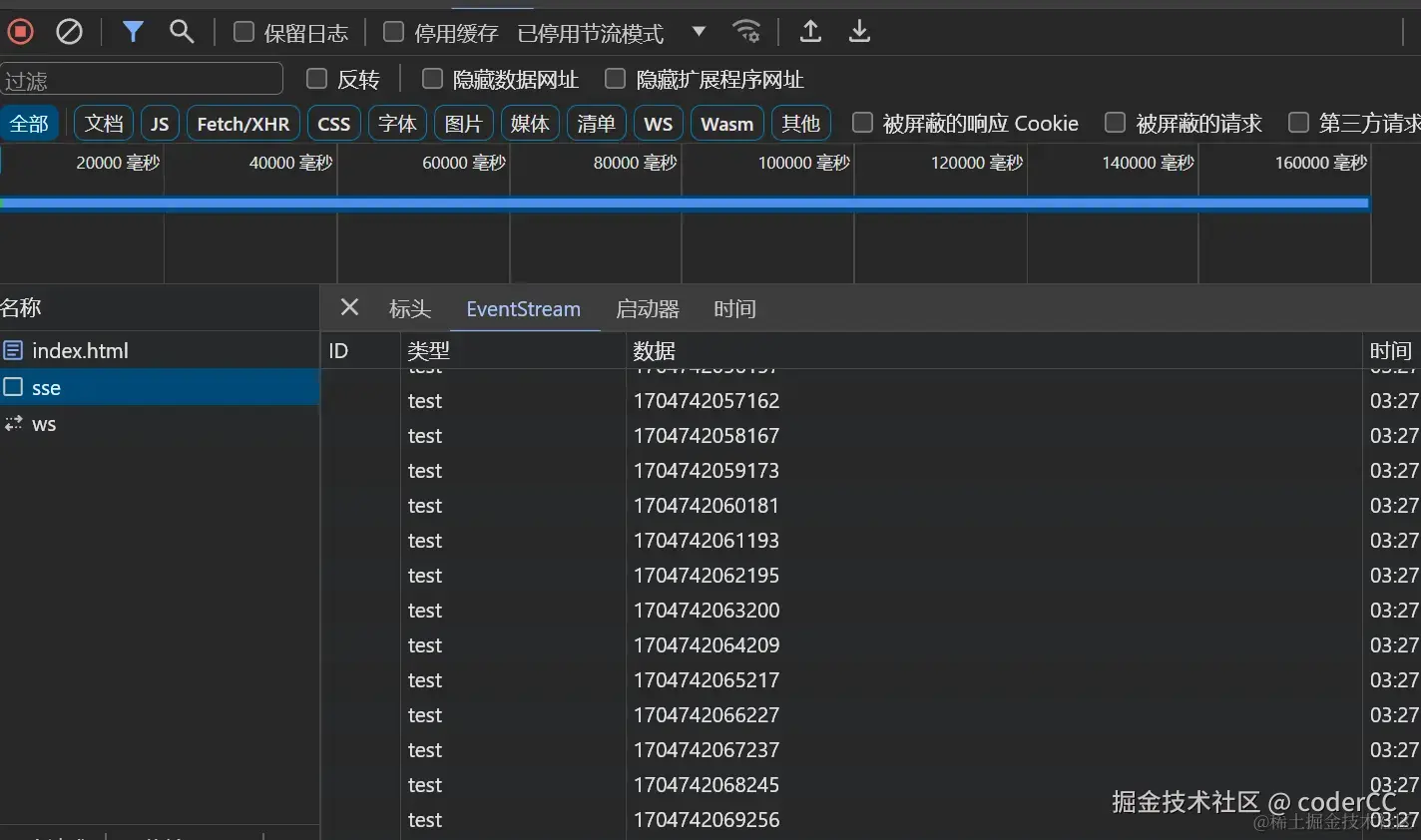
SSE技术
Server-Sent Events(SSE)是一种在客户端和服务器之间实现单向事件流的机制,允许服务器主动向客户端发送事件数据。在 SSE 中,可以使用自定义事件(Custom Events)来发送具有特定类型的事件数据。
webSocket属于全双工通讯,也就是前端可以给后端实时发送,后端也可以给前端实时发送,SSE属于单工通讯,后端可以给前端实时发送
- express 增加该响应头
text/event-stream就变成了sse event 事件名称 data 发送的数据
js
app.get('/sse',(req,res)=>{
    res.setHeader('Content-Type', 'text/event-stream')
    res.status(200)
    setInterval(() => {
        res.write('event: test\n')
        res.write('data: ' + new Date().getTime() + '\n\n')
    }, 1000)
})
前端接受
js
const sse = new EventSource('http://localhost:3000/sse')
sse.addEventListener('test', (event) => {
    console.log(event.data)
})