bash
#include "stm32f10x.h"

int main(void)
{
	RCC->APB2ENR = 0x00000010;
	GPIOC->CRH = 0x00300000;
	GPIOC->ODR = 0x00002000;
	while (1){

	}
}
建立工程文件夹,Keil中新建工程,选择型号工程文件夹里建立Start、Library、User等文件夹,复制固件库里面的文件到工程文件夹
工程里对应建立Start、Library、User等同名称的分组,然后将文件夹内的文件添加到工程分组里
工程选项,C/C++,IncludePaths内声明所有包含头文件的文件夹工程选项,C/C++,Define内定义USE_STDPERIPH_DRIVER工程选项,Debug,下拉列表选择对应调试器,Settings,FlashDownload里勾选Reset and Run
STM32 学习笔记:软件安装与新建工程
对应课程:
[2-1] 软件安装、[2-2] 新建工程整理日期:2026-08-29
学习状态:已听课,代码已校正
芯片:STM32F103C8T6
开发方式:Keil MDK + STM32F10x 标准外设库
1. 本节学习目标
完成本节后,应能够:
- 说清 Keil、器件支持包、ST-LINK 驱动和 CH340 驱动的作用;
- 独立建立 STM32F103C8T6 的 Keil 工程;
- 理解
Start、Library、User三类文件的职责; - 正确选择 STM32F103C8T6 的启动文件;
- 配置 Include Paths、预处理宏和 ST-LINK 下载选项;
- 分别用寄存器和标准外设库控制 PC13 输出高低电平;
- 理解程序从复位到进入
main()的基本过程。
2. 开发环境由哪些部分组成
| 组件 | 作用 | 缺少时的典型表现 |
|---|---|---|
| Keil MDK / µVision | 编辑、编译、链接和下载工程 | 无法构建 ARM 工程 |
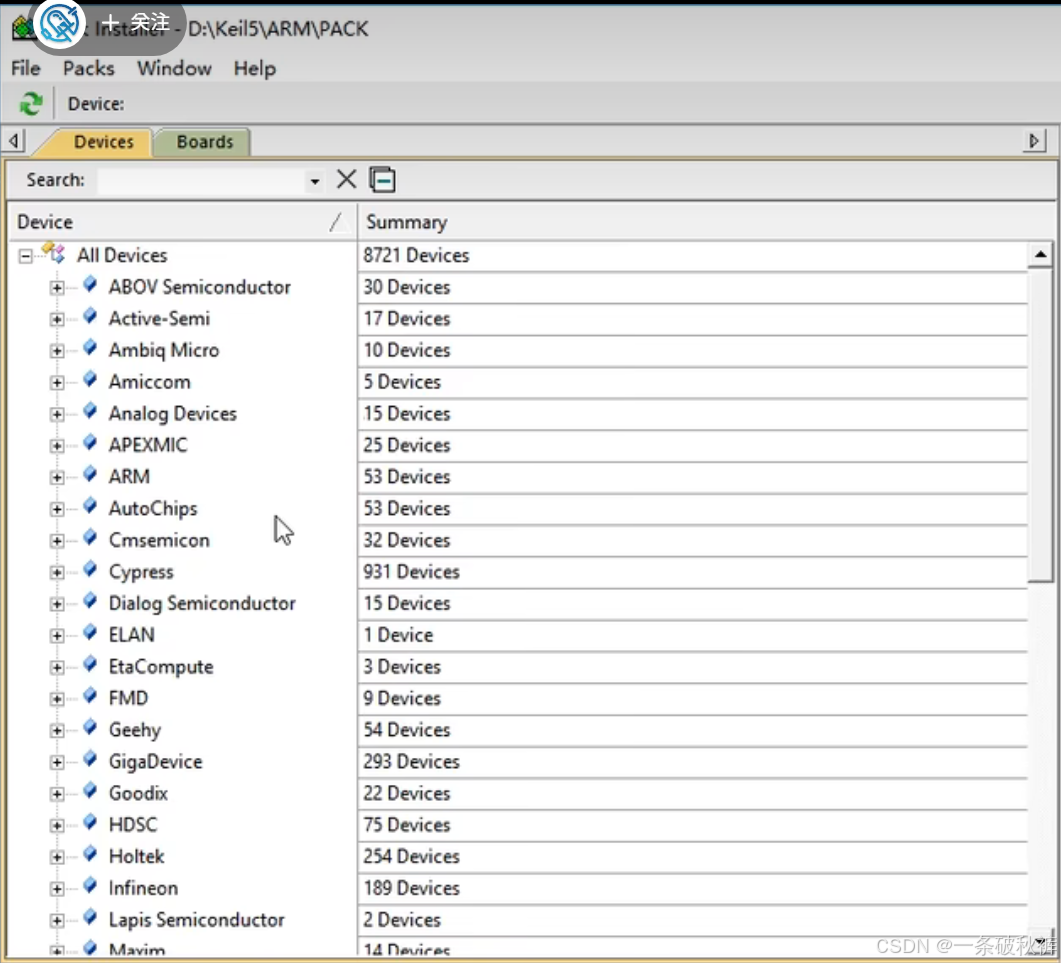
| STM32F1 Device Family Pack | 提供 STM32F1 器件描述与工程支持 | 新建工程时找不到 STM32F103C8 |
| STM32F10x 标准外设库 | 提供启动、CMSIS、寄存器描述及外设函数 | 不能调用 GPIO_Init 等库函数 |
| ST-LINK 驱动 | 让电脑识别 ST-LINK 下载器 | 设备管理器出现感叹号,Keil 无法连接目标板 |
| CH340 驱动 | 让电脑识别 USB 转串口模块 | 没有对应 COM 口 |
!NOTE
软件授权应采用学校、公司或个人合法许可证。录音中涉及的非正式注册操作不属于 STM32 知识点,因此不在学习笔记中展开。
2.1 推荐安装检查
- Keil 能正常启动;
- 新建工程时可以搜索到
STM32F103C8; - 插入 ST-LINK 后,设备管理器中没有黄色感叹号;
- 插入 CH340 后,设备管理器中出现正常的串口;
- Keil 编辑器编码设置为 UTF-8,中文注释显示正常。
3. 三种 STM32 开发方式
3.1 寄存器开发
直接给寄存器写入数据,最接近硬件,适合理解底层原理;但 STM32 寄存器多、配置复杂,工程开发中容易出错。
3.2 标准外设库开发
ST 将常用寄存器配置封装成函数,例如:
c
RCC_APB2PeriphClockCmd(RCC_APB2Periph_GPIOC, ENABLE);函数内部最终仍然操作寄存器,但代码语义清晰,参数也有类型约束。本课程采用这种方式。
3.3 HAL 库开发
HAL 通常与 STM32CubeMX 配合,可以通过图形界面快速生成初始化代码,适合现代 STM32 项目。本课程先使用标准外设库理解基础,之后再学习 HAL 会更容易。
#mermaid-svg-uRc0Sc1OylzItKVQ{font-family:"trebuchet ms",verdana,arial,sans-serif;font-size:16px;fill:#333;}@keyframes edge-animation-frame{from{stroke-dashoffset:0;}}@keyframes dash{to{stroke-dashoffset:0;}}#mermaid-svg-uRc0Sc1OylzItKVQ .edge-animation-slow{stroke-dasharray:9,5!important;stroke-dashoffset:900;animation:dash 50s linear infinite;stroke-linecap:round;}#mermaid-svg-uRc0Sc1OylzItKVQ .edge-animation-fast{stroke-dasharray:9,5!important;stroke-dashoffset:900;animation:dash 20s linear infinite;stroke-linecap:round;}#mermaid-svg-uRc0Sc1OylzItKVQ .error-icon{fill:#552222;}#mermaid-svg-uRc0Sc1OylzItKVQ .error-text{fill:#552222;stroke:#552222;}#mermaid-svg-uRc0Sc1OylzItKVQ .edge-thickness-normal{stroke-width:1px;}#mermaid-svg-uRc0Sc1OylzItKVQ .edge-thickness-thick{stroke-width:3.5px;}#mermaid-svg-uRc0Sc1OylzItKVQ .edge-pattern-solid{stroke-dasharray:0;}#mermaid-svg-uRc0Sc1OylzItKVQ .edge-thickness-invisible{stroke-width:0;fill:none;}#mermaid-svg-uRc0Sc1OylzItKVQ .edge-pattern-dashed{stroke-dasharray:3;}#mermaid-svg-uRc0Sc1OylzItKVQ .edge-pattern-dotted{stroke-dasharray:2;}#mermaid-svg-uRc0Sc1OylzItKVQ .marker{fill:#333333;stroke:#333333;}#mermaid-svg-uRc0Sc1OylzItKVQ .marker.cross{stroke:#333333;}#mermaid-svg-uRc0Sc1OylzItKVQ svg{font-family:"trebuchet ms",verdana,arial,sans-serif;font-size:16px;}#mermaid-svg-uRc0Sc1OylzItKVQ p{margin:0;}#mermaid-svg-uRc0Sc1OylzItKVQ .label{font-family:"trebuchet ms",verdana,arial,sans-serif;color:#333;}#mermaid-svg-uRc0Sc1OylzItKVQ .cluster-label text{fill:#333;}#mermaid-svg-uRc0Sc1OylzItKVQ .cluster-label span{color:#333;}#mermaid-svg-uRc0Sc1OylzItKVQ .cluster-label span p{background-color:transparent;}#mermaid-svg-uRc0Sc1OylzItKVQ .label text,#mermaid-svg-uRc0Sc1OylzItKVQ span{fill:#333;color:#333;}#mermaid-svg-uRc0Sc1OylzItKVQ .node rect,#mermaid-svg-uRc0Sc1OylzItKVQ .node circle,#mermaid-svg-uRc0Sc1OylzItKVQ .node ellipse,#mermaid-svg-uRc0Sc1OylzItKVQ .node polygon,#mermaid-svg-uRc0Sc1OylzItKVQ .node path{fill:#ECECFF;stroke:#9370DB;stroke-width:1px;}#mermaid-svg-uRc0Sc1OylzItKVQ .rough-node .label text,#mermaid-svg-uRc0Sc1OylzItKVQ .node .label text,#mermaid-svg-uRc0Sc1OylzItKVQ .image-shape .label,#mermaid-svg-uRc0Sc1OylzItKVQ .icon-shape .label{text-anchor:middle;}#mermaid-svg-uRc0Sc1OylzItKVQ .node .katex path{fill:#000;stroke:#000;stroke-width:1px;}#mermaid-svg-uRc0Sc1OylzItKVQ .rough-node .label,#mermaid-svg-uRc0Sc1OylzItKVQ .node .label,#mermaid-svg-uRc0Sc1OylzItKVQ .image-shape .label,#mermaid-svg-uRc0Sc1OylzItKVQ .icon-shape .label{text-align:center;}#mermaid-svg-uRc0Sc1OylzItKVQ .node.clickable{cursor:pointer;}#mermaid-svg-uRc0Sc1OylzItKVQ .root .anchor path{fill:#333333!important;stroke-width:0;stroke:#333333;}#mermaid-svg-uRc0Sc1OylzItKVQ .arrowheadPath{fill:#333333;}#mermaid-svg-uRc0Sc1OylzItKVQ .edgePath .path{stroke:#333333;stroke-width:2.0px;}#mermaid-svg-uRc0Sc1OylzItKVQ .flowchart-link{stroke:#333333;fill:none;}#mermaid-svg-uRc0Sc1OylzItKVQ .edgeLabel{background-color:rgba(232,232,232, 0.8);text-align:center;}#mermaid-svg-uRc0Sc1OylzItKVQ .edgeLabel p{background-color:rgba(232,232,232, 0.8);}#mermaid-svg-uRc0Sc1OylzItKVQ .edgeLabel rect{opacity:0.5;background-color:rgba(232,232,232, 0.8);fill:rgba(232,232,232, 0.8);}#mermaid-svg-uRc0Sc1OylzItKVQ .labelBkg{background-color:rgba(232, 232, 232, 0.5);}#mermaid-svg-uRc0Sc1OylzItKVQ .cluster rect{fill:#ffffde;stroke:#aaaa33;stroke-width:1px;}#mermaid-svg-uRc0Sc1OylzItKVQ .cluster text{fill:#333;}#mermaid-svg-uRc0Sc1OylzItKVQ .cluster span{color:#333;}#mermaid-svg-uRc0Sc1OylzItKVQ div.mermaidTooltip{position:absolute;text-align:center;max-width:200px;padding:2px;font-family:"trebuchet ms",verdana,arial,sans-serif;font-size:12px;background:hsl(80, 100%, 96.2745098039%);border:1px solid #aaaa33;border-radius:2px;pointer-events:none;z-index:100;}#mermaid-svg-uRc0Sc1OylzItKVQ .flowchartTitleText{text-anchor:middle;font-size:18px;fill:#333;}#mermaid-svg-uRc0Sc1OylzItKVQ rect.text{fill:none;stroke-width:0;}#mermaid-svg-uRc0Sc1OylzItKVQ .icon-shape,#mermaid-svg-uRc0Sc1OylzItKVQ .image-shape{background-color:rgba(232,232,232, 0.8);text-align:center;}#mermaid-svg-uRc0Sc1OylzItKVQ .icon-shape p,#mermaid-svg-uRc0Sc1OylzItKVQ .image-shape p{background-color:rgba(232,232,232, 0.8);padding:2px;}#mermaid-svg-uRc0Sc1OylzItKVQ .icon-shape .label rect,#mermaid-svg-uRc0Sc1OylzItKVQ .image-shape .label rect{opacity:0.5;background-color:rgba(232,232,232, 0.8);fill:rgba(232,232,232, 0.8);}#mermaid-svg-uRc0Sc1OylzItKVQ .label-icon{display:inline-block;height:1em;overflow:visible;vertical-align:-0.125em;}#mermaid-svg-uRc0Sc1OylzItKVQ .node .label-icon path{fill:currentColor;stroke:revert;stroke-width:revert;}#mermaid-svg-uRc0Sc1OylzItKVQ :root{--mermaid-font-family:"trebuchet ms",verdana,arial,sans-serif;} 用户程序
直接操作寄存器
标准外设库函数
HAL 库
STM32 硬件
4. 标准库工程目录
建议每个工程都保持自包含:将需要的文件复制到当前工程目录,不要直接引用工程外部某个可能移动的固件库路径。
text
Project/
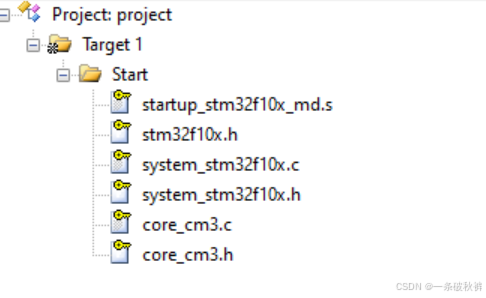
├─ Start/                  # 启动、CMSIS、系统和芯片寄存器描述
│  ├─ startup_stm32f10x_md.s
│  ├─ system_stm32f10x.c
│  ├─ system_stm32f10x.h
│  ├─ stm32f10x.h
│  ├─ core_cm3.c
│  └─ core_cm3.h
├─ Library/                # STM32F10x 标准外设库
│  ├─ misc.c / misc.h
│  ├─ stm32f10x_gpio.c / .h
│  ├─ stm32f10x_rcc.c / .h
│  └─ 其他 stm32f10x_xxx.c / .h
├─ User/                   # 用户可修改代码
│  ├─ main.c
│  ├─ stm32f10x_conf.h
│  ├─ stm32f10x_it.c
│  └─ stm32f10x_it.h
├─ Project.uvprojx         # Keil 工程文件
└─ Project.uvoptx          # Keil 工程选项
4.1 物理文件夹与 Keil 分组的区别
- 文件夹是磁盘上的真实目录,用于保存文件;
- Group 是 Keil 工程窗口中的逻辑分类;
- Keil 不会因为磁盘上存在文件夹,就自动把其中的文件加入工程;
- 两边最好使用相同名称:
Start、Library、User。
#mermaid-svg-zTa5nlVLX76aicGN{font-family:"trebuchet ms",verdana,arial,sans-serif;font-size:16px;fill:#333;}@keyframes edge-animation-frame{from{stroke-dashoffset:0;}}@keyframes dash{to{stroke-dashoffset:0;}}#mermaid-svg-zTa5nlVLX76aicGN .edge-animation-slow{stroke-dasharray:9,5!important;stroke-dashoffset:900;animation:dash 50s linear infinite;stroke-linecap:round;}#mermaid-svg-zTa5nlVLX76aicGN .edge-animation-fast{stroke-dasharray:9,5!important;stroke-dashoffset:900;animation:dash 20s linear infinite;stroke-linecap:round;}#mermaid-svg-zTa5nlVLX76aicGN .error-icon{fill:#552222;}#mermaid-svg-zTa5nlVLX76aicGN .error-text{fill:#552222;stroke:#552222;}#mermaid-svg-zTa5nlVLX76aicGN .edge-thickness-normal{stroke-width:1px;}#mermaid-svg-zTa5nlVLX76aicGN .edge-thickness-thick{stroke-width:3.5px;}#mermaid-svg-zTa5nlVLX76aicGN .edge-pattern-solid{stroke-dasharray:0;}#mermaid-svg-zTa5nlVLX76aicGN .edge-thickness-invisible{stroke-width:0;fill:none;}#mermaid-svg-zTa5nlVLX76aicGN .edge-pattern-dashed{stroke-dasharray:3;}#mermaid-svg-zTa5nlVLX76aicGN .edge-pattern-dotted{stroke-dasharray:2;}#mermaid-svg-zTa5nlVLX76aicGN .marker{fill:#333333;stroke:#333333;}#mermaid-svg-zTa5nlVLX76aicGN .marker.cross{stroke:#333333;}#mermaid-svg-zTa5nlVLX76aicGN svg{font-family:"trebuchet ms",verdana,arial,sans-serif;font-size:16px;}#mermaid-svg-zTa5nlVLX76aicGN p{margin:0;}#mermaid-svg-zTa5nlVLX76aicGN .label{font-family:"trebuchet ms",verdana,arial,sans-serif;color:#333;}#mermaid-svg-zTa5nlVLX76aicGN .cluster-label text{fill:#333;}#mermaid-svg-zTa5nlVLX76aicGN .cluster-label span{color:#333;}#mermaid-svg-zTa5nlVLX76aicGN .cluster-label span p{background-color:transparent;}#mermaid-svg-zTa5nlVLX76aicGN .label text,#mermaid-svg-zTa5nlVLX76aicGN span{fill:#333;color:#333;}#mermaid-svg-zTa5nlVLX76aicGN .node rect,#mermaid-svg-zTa5nlVLX76aicGN .node circle,#mermaid-svg-zTa5nlVLX76aicGN .node ellipse,#mermaid-svg-zTa5nlVLX76aicGN .node polygon,#mermaid-svg-zTa5nlVLX76aicGN .node path{fill:#ECECFF;stroke:#9370DB;stroke-width:1px;}#mermaid-svg-zTa5nlVLX76aicGN .rough-node .label text,#mermaid-svg-zTa5nlVLX76aicGN .node .label text,#mermaid-svg-zTa5nlVLX76aicGN .image-shape .label,#mermaid-svg-zTa5nlVLX76aicGN .icon-shape .label{text-anchor:middle;}#mermaid-svg-zTa5nlVLX76aicGN .node .katex path{fill:#000;stroke:#000;stroke-width:1px;}#mermaid-svg-zTa5nlVLX76aicGN .rough-node .label,#mermaid-svg-zTa5nlVLX76aicGN .node .label,#mermaid-svg-zTa5nlVLX76aicGN .image-shape .label,#mermaid-svg-zTa5nlVLX76aicGN .icon-shape .label{text-align:center;}#mermaid-svg-zTa5nlVLX76aicGN .node.clickable{cursor:pointer;}#mermaid-svg-zTa5nlVLX76aicGN .root .anchor path{fill:#333333!important;stroke-width:0;stroke:#333333;}#mermaid-svg-zTa5nlVLX76aicGN .arrowheadPath{fill:#333333;}#mermaid-svg-zTa5nlVLX76aicGN .edgePath .path{stroke:#333333;stroke-width:2.0px;}#mermaid-svg-zTa5nlVLX76aicGN .flowchart-link{stroke:#333333;fill:none;}#mermaid-svg-zTa5nlVLX76aicGN .edgeLabel{background-color:rgba(232,232,232, 0.8);text-align:center;}#mermaid-svg-zTa5nlVLX76aicGN .edgeLabel p{background-color:rgba(232,232,232, 0.8);}#mermaid-svg-zTa5nlVLX76aicGN .edgeLabel rect{opacity:0.5;background-color:rgba(232,232,232, 0.8);fill:rgba(232,232,232, 0.8);}#mermaid-svg-zTa5nlVLX76aicGN .labelBkg{background-color:rgba(232, 232, 232, 0.5);}#mermaid-svg-zTa5nlVLX76aicGN .cluster rect{fill:#ffffde;stroke:#aaaa33;stroke-width:1px;}#mermaid-svg-zTa5nlVLX76aicGN .cluster text{fill:#333;}#mermaid-svg-zTa5nlVLX76aicGN .cluster span{color:#333;}#mermaid-svg-zTa5nlVLX76aicGN div.mermaidTooltip{position:absolute;text-align:center;max-width:200px;padding:2px;font-family:"trebuchet ms",verdana,arial,sans-serif;font-size:12px;background:hsl(80, 100%, 96.2745098039%);border:1px solid #aaaa33;border-radius:2px;pointer-events:none;z-index:100;}#mermaid-svg-zTa5nlVLX76aicGN .flowchartTitleText{text-anchor:middle;font-size:18px;fill:#333;}#mermaid-svg-zTa5nlVLX76aicGN rect.text{fill:none;stroke-width:0;}#mermaid-svg-zTa5nlVLX76aicGN .icon-shape,#mermaid-svg-zTa5nlVLX76aicGN .image-shape{background-color:rgba(232,232,232, 0.8);text-align:center;}#mermaid-svg-zTa5nlVLX76aicGN .icon-shape p,#mermaid-svg-zTa5nlVLX76aicGN .image-shape p{background-color:rgba(232,232,232, 0.8);padding:2px;}#mermaid-svg-zTa5nlVLX76aicGN .icon-shape .label rect,#mermaid-svg-zTa5nlVLX76aicGN .image-shape .label rect{opacity:0.5;background-color:rgba(232,232,232, 0.8);fill:rgba(232,232,232, 0.8);}#mermaid-svg-zTa5nlVLX76aicGN .label-icon{display:inline-block;height:1em;overflow:visible;vertical-align:-0.125em;}#mermaid-svg-zTa5nlVLX76aicGN .node .label-icon path{fill:currentColor;stroke:revert;stroke-width:revert;}#mermaid-svg-zTa5nlVLX76aicGN :root{--mermaid-font-family:"trebuchet ms",verdana,arial,sans-serif;} Add Existing Files
磁盘文件夹
Keil 工程分组
Start 文件夹
Start Group
Library 文件夹
Library Group
User 文件夹
User Group
5. 创建工程的完整步骤
步骤 1:建立工程目录
建立一个名称稳定、能表示实验内容的工程文件夹。工程名后期不宜频繁修改,因为 Keil 工程文件和部分输出路径会引用它。
步骤 2:在 Keil 中新建工程
- 选择
Project -> New µVision Project; - 将工程保存在刚建立的工程目录;
- 搜索并选择
STM32F103C8; - 暂时关闭自动运行时环境选择窗口,本课程手动组织标准库工程。
步骤 3:准备 Start 文件
从固件库复制以下内容到工程的 Start 文件夹:
- 对应型号的启动文件
startup_stm32f10x_md.s; system_stm32f10x.c、system_stm32f10x.h;stm32f10x.h;core_cm3.c、core_cm3.h。
在 Keil 中建立 Start Group,把这些文件加入分组。启动文件有很多个,当前工程只能加入与芯片类别匹配的一个。
步骤 4:建立最小 User 目录
- 在磁盘建立
User文件夹; - 在 Keil 建立
UserGroup; - 新建
main.c并保存在User文件夹; - 写入最小主函数并编译。
c
#include "stm32f10x.h"

int main(void)
{
    while (1)
    {
    }
}
此时工程只具备寄存器开发基础,还没有完整接入标准外设库。
步骤 5:加入 Library 文件
从标准外设库的驱动目录复制:
src中的.c文件;inc中的.h文件;misc.c和misc.h。
将它们放入工程的 Library 文件夹,并加入 Keil 的 Library Group。
教学工程为了查阅方便,可以把
.h文件也加入 Group;头文件本身不会单独参与编译。
步骤 6:加入 User 配置文件
从官方模板复制到 User:
stm32f10x_conf.h:集中包含启用的标准库外设头文件;stm32f10x_it.c:中断服务函数实现;stm32f10x_it.h:中断服务函数声明。
步骤 7:配置 Include Paths
进入:
Options for Target -> C/C++ -> Include Paths
至少加入:
text
Start
Library
User
Include Path 的作用是告诉编译器到哪里寻找 #include 引用的头文件。文件被加入 Keil Group,不代表编译器自动知道头文件搜索路径。
步骤 8:定义标准库宏
进入:
Options for Target -> C/C++ -> Define
加入:
text
USE_STDPERIPH_DRIVER它会使 stm32f10x.h 包含 stm32f10x_conf.h,从而接入标准外设库头文件。
部分工程还会看到与芯片密度有关的宏,例如 STM32F10X_MD。如果 Keil 选择器件后已经自动定义,就不需要重复添加;遇到条件编译问题时再检查。
步骤 9:配置 ST-LINK
进入:
Options for Target -> Debug;- 调试器选择
ST-Link Debugger; - 点击
Settings; - 在
Flash Download中勾选Reset and Run。
勾选后,下载完成会自动复位并运行,无需每次手动按复位键。
步骤 10:编译和下载
理想结果:
text
0 Error(s), 0 Warning(s)随后点击 Download,将程序写入芯片。若连接失败,依次检查供电、共地、SWDIO、SWCLK、驱动、调试器选择和 Flash 算法。
5.1 工程建立流程图
#mermaid-svg-Y0aug8XF0rqFBHfA{font-family:"trebuchet ms",verdana,arial,sans-serif;font-size:16px;fill:#333;}@keyframes edge-animation-frame{from{stroke-dashoffset:0;}}@keyframes dash{to{stroke-dashoffset:0;}}#mermaid-svg-Y0aug8XF0rqFBHfA .edge-animation-slow{stroke-dasharray:9,5!important;stroke-dashoffset:900;animation:dash 50s linear infinite;stroke-linecap:round;}#mermaid-svg-Y0aug8XF0rqFBHfA .edge-animation-fast{stroke-dasharray:9,5!important;stroke-dashoffset:900;animation:dash 20s linear infinite;stroke-linecap:round;}#mermaid-svg-Y0aug8XF0rqFBHfA .error-icon{fill:#552222;}#mermaid-svg-Y0aug8XF0rqFBHfA .error-text{fill:#552222;stroke:#552222;}#mermaid-svg-Y0aug8XF0rqFBHfA .edge-thickness-normal{stroke-width:1px;}#mermaid-svg-Y0aug8XF0rqFBHfA .edge-thickness-thick{stroke-width:3.5px;}#mermaid-svg-Y0aug8XF0rqFBHfA .edge-pattern-solid{stroke-dasharray:0;}#mermaid-svg-Y0aug8XF0rqFBHfA .edge-thickness-invisible{stroke-width:0;fill:none;}#mermaid-svg-Y0aug8XF0rqFBHfA .edge-pattern-dashed{stroke-dasharray:3;}#mermaid-svg-Y0aug8XF0rqFBHfA .edge-pattern-dotted{stroke-dasharray:2;}#mermaid-svg-Y0aug8XF0rqFBHfA .marker{fill:#333333;stroke:#333333;}#mermaid-svg-Y0aug8XF0rqFBHfA .marker.cross{stroke:#333333;}#mermaid-svg-Y0aug8XF0rqFBHfA svg{font-family:"trebuchet ms",verdana,arial,sans-serif;font-size:16px;}#mermaid-svg-Y0aug8XF0rqFBHfA p{margin:0;}#mermaid-svg-Y0aug8XF0rqFBHfA .label{font-family:"trebuchet ms",verdana,arial,sans-serif;color:#333;}#mermaid-svg-Y0aug8XF0rqFBHfA .cluster-label text{fill:#333;}#mermaid-svg-Y0aug8XF0rqFBHfA .cluster-label span{color:#333;}#mermaid-svg-Y0aug8XF0rqFBHfA .cluster-label span p{background-color:transparent;}#mermaid-svg-Y0aug8XF0rqFBHfA .label text,#mermaid-svg-Y0aug8XF0rqFBHfA span{fill:#333;color:#333;}#mermaid-svg-Y0aug8XF0rqFBHfA .node rect,#mermaid-svg-Y0aug8XF0rqFBHfA .node circle,#mermaid-svg-Y0aug8XF0rqFBHfA .node ellipse,#mermaid-svg-Y0aug8XF0rqFBHfA .node polygon,#mermaid-svg-Y0aug8XF0rqFBHfA .node path{fill:#ECECFF;stroke:#9370DB;stroke-width:1px;}#mermaid-svg-Y0aug8XF0rqFBHfA .rough-node .label text,#mermaid-svg-Y0aug8XF0rqFBHfA .node .label text,#mermaid-svg-Y0aug8XF0rqFBHfA .image-shape .label,#mermaid-svg-Y0aug8XF0rqFBHfA .icon-shape .label{text-anchor:middle;}#mermaid-svg-Y0aug8XF0rqFBHfA .node .katex path{fill:#000;stroke:#000;stroke-width:1px;}#mermaid-svg-Y0aug8XF0rqFBHfA .rough-node .label,#mermaid-svg-Y0aug8XF0rqFBHfA .node .label,#mermaid-svg-Y0aug8XF0rqFBHfA .image-shape .label,#mermaid-svg-Y0aug8XF0rqFBHfA .icon-shape .label{text-align:center;}#mermaid-svg-Y0aug8XF0rqFBHfA .node.clickable{cursor:pointer;}#mermaid-svg-Y0aug8XF0rqFBHfA .root .anchor path{fill:#333333!important;stroke-width:0;stroke:#333333;}#mermaid-svg-Y0aug8XF0rqFBHfA .arrowheadPath{fill:#333333;}#mermaid-svg-Y0aug8XF0rqFBHfA .edgePath .path{stroke:#333333;stroke-width:2.0px;}#mermaid-svg-Y0aug8XF0rqFBHfA .flowchart-link{stroke:#333333;fill:none;}#mermaid-svg-Y0aug8XF0rqFBHfA .edgeLabel{background-color:rgba(232,232,232, 0.8);text-align:center;}#mermaid-svg-Y0aug8XF0rqFBHfA .edgeLabel p{background-color:rgba(232,232,232, 0.8);}#mermaid-svg-Y0aug8XF0rqFBHfA .edgeLabel rect{opacity:0.5;background-color:rgba(232,232,232, 0.8);fill:rgba(232,232,232, 0.8);}#mermaid-svg-Y0aug8XF0rqFBHfA .labelBkg{background-color:rgba(232, 232, 232, 0.5);}#mermaid-svg-Y0aug8XF0rqFBHfA .cluster rect{fill:#ffffde;stroke:#aaaa33;stroke-width:1px;}#mermaid-svg-Y0aug8XF0rqFBHfA .cluster text{fill:#333;}#mermaid-svg-Y0aug8XF0rqFBHfA .cluster span{color:#333;}#mermaid-svg-Y0aug8XF0rqFBHfA div.mermaidTooltip{position:absolute;text-align:center;max-width:200px;padding:2px;font-family:"trebuchet ms",verdana,arial,sans-serif;font-size:12px;background:hsl(80, 100%, 96.2745098039%);border:1px solid #aaaa33;border-radius:2px;pointer-events:none;z-index:100;}#mermaid-svg-Y0aug8XF0rqFBHfA .flowchartTitleText{text-anchor:middle;font-size:18px;fill:#333;}#mermaid-svg-Y0aug8XF0rqFBHfA rect.text{fill:none;stroke-width:0;}#mermaid-svg-Y0aug8XF0rqFBHfA .icon-shape,#mermaid-svg-Y0aug8XF0rqFBHfA .image-shape{background-color:rgba(232,232,232, 0.8);text-align:center;}#mermaid-svg-Y0aug8XF0rqFBHfA .icon-shape p,#mermaid-svg-Y0aug8XF0rqFBHfA .image-shape p{background-color:rgba(232,232,232, 0.8);padding:2px;}#mermaid-svg-Y0aug8XF0rqFBHfA .icon-shape .label rect,#mermaid-svg-Y0aug8XF0rqFBHfA .image-shape .label rect{opacity:0.5;background-color:rgba(232,232,232, 0.8);fill:rgba(232,232,232, 0.8);}#mermaid-svg-Y0aug8XF0rqFBHfA .label-icon{display:inline-block;height:1em;overflow:visible;vertical-align:-0.125em;}#mermaid-svg-Y0aug8XF0rqFBHfA .node .label-icon path{fill:currentColor;stroke:revert;stroke-width:revert;}#mermaid-svg-Y0aug8XF0rqFBHfA :root{--mermaid-font-family:"trebuchet ms",verdana,arial,sans-serif;} 否
是
建立工程文件夹
Keil 新建工程并选择 STM32F103C8
建立 Start / Library / User 文件夹
从固件库复制对应文件
Keil 建立同名 Group
将文件加入对应 Group
配置 Include Paths
Define: USE_STDPERIPH_DRIVER
选择 ST-Link Debugger
Flash Download 勾选 Reset and Run
编译
0 错误?
根据首个错误排查
下载并验证
6. 启动文件如何选择
STM32F10x 的启动文件按照产品类型和 Flash 容量分类。
| 后缀 | 含义 | 典型 Flash 范围/系列 |
|---|---|---|
ld |
Low density | 小容量 |
md |
Medium density | 16~128 KB 的常规 F101/F102/F103 产品 |
hd |
High density | 256~512 KB |
xl |
XL density | 大于 512 KB |
*_vl |
Value line | STM32F100 超值系列,再按容量区分 |
cl |
Connectivity line | STM32F105/F107 互联型 |
STM32F103C8T6 的 Flash 为 64 KB,属于中容量产品,因此选择:
text
startup_stm32f10x_md.s!WARNING
一个工程不要同时加入多个启动文件,否则会出现重复定义中断向量表或复位入口等链接错误。
7. 程序从复位到 main 的执行过程
STM32 程序并不是上电后直接跳到 main()。
main() C 运行库 SystemInit() startup_stm32f10x_md.s 芯片上电/复位 main() C 运行库 SystemInit() startup_stm32f10x_md.s 芯片上电/复位 #mermaid-svg-6PXiev32QZsKLQMh{font-family:"trebuchet ms",verdana,arial,sans-serif;font-size:16px;fill:#333;}@keyframes edge-animation-frame{from{stroke-dashoffset:0;}}@keyframes dash{to{stroke-dashoffset:0;}}#mermaid-svg-6PXiev32QZsKLQMh .edge-animation-slow{stroke-dasharray:9,5!important;stroke-dashoffset:900;animation:dash 50s linear infinite;stroke-linecap:round;}#mermaid-svg-6PXiev32QZsKLQMh .edge-animation-fast{stroke-dasharray:9,5!important;stroke-dashoffset:900;animation:dash 20s linear infinite;stroke-linecap:round;}#mermaid-svg-6PXiev32QZsKLQMh .error-icon{fill:#552222;}#mermaid-svg-6PXiev32QZsKLQMh .error-text{fill:#552222;stroke:#552222;}#mermaid-svg-6PXiev32QZsKLQMh .edge-thickness-normal{stroke-width:1px;}#mermaid-svg-6PXiev32QZsKLQMh .edge-thickness-thick{stroke-width:3.5px;}#mermaid-svg-6PXiev32QZsKLQMh .edge-pattern-solid{stroke-dasharray:0;}#mermaid-svg-6PXiev32QZsKLQMh .edge-thickness-invisible{stroke-width:0;fill:none;}#mermaid-svg-6PXiev32QZsKLQMh .edge-pattern-dashed{stroke-dasharray:3;}#mermaid-svg-6PXiev32QZsKLQMh .edge-pattern-dotted{stroke-dasharray:2;}#mermaid-svg-6PXiev32QZsKLQMh .marker{fill:#333333;stroke:#333333;}#mermaid-svg-6PXiev32QZsKLQMh .marker.cross{stroke:#333333;}#mermaid-svg-6PXiev32QZsKLQMh svg{font-family:"trebuchet ms",verdana,arial,sans-serif;font-size:16px;}#mermaid-svg-6PXiev32QZsKLQMh p{margin:0;}#mermaid-svg-6PXiev32QZsKLQMh .actor{stroke:hsl(259.6261682243, 59.7765363128%, 87.9019607843%);fill:#ECECFF;}#mermaid-svg-6PXiev32QZsKLQMh text.actor>tspan{fill:black;stroke:none;}#mermaid-svg-6PXiev32QZsKLQMh .actor-line{stroke:hsl(259.6261682243, 59.7765363128%, 87.9019607843%);}#mermaid-svg-6PXiev32QZsKLQMh .innerArc{stroke-width:1.5;stroke-dasharray:none;}#mermaid-svg-6PXiev32QZsKLQMh .messageLine0{stroke-width:1.5;stroke-dasharray:none;stroke:#333;}#mermaid-svg-6PXiev32QZsKLQMh .messageLine1{stroke-width:1.5;stroke-dasharray:2,2;stroke:#333;}#mermaid-svg-6PXiev32QZsKLQMh #arrowhead path{fill:#333;stroke:#333;}#mermaid-svg-6PXiev32QZsKLQMh .sequenceNumber{fill:white;}#mermaid-svg-6PXiev32QZsKLQMh #sequencenumber{fill:#333;}#mermaid-svg-6PXiev32QZsKLQMh #crosshead path{fill:#333;stroke:#333;}#mermaid-svg-6PXiev32QZsKLQMh .messageText{fill:#333;stroke:none;}#mermaid-svg-6PXiev32QZsKLQMh .labelBox{stroke:hsl(259.6261682243, 59.7765363128%, 87.9019607843%);fill:#ECECFF;}#mermaid-svg-6PXiev32QZsKLQMh .labelText,#mermaid-svg-6PXiev32QZsKLQMh .labelText>tspan{fill:black;stroke:none;}#mermaid-svg-6PXiev32QZsKLQMh .loopText,#mermaid-svg-6PXiev32QZsKLQMh .loopText>tspan{fill:black;stroke:none;}#mermaid-svg-6PXiev32QZsKLQMh .loopLine{stroke-width:2px;stroke-dasharray:2,2;stroke:hsl(259.6261682243, 59.7765363128%, 87.9019607843%);fill:hsl(259.6261682243, 59.7765363128%, 87.9019607843%);}#mermaid-svg-6PXiev32QZsKLQMh .note{stroke:#aaaa33;fill:#fff5ad;}#mermaid-svg-6PXiev32QZsKLQMh .noteText,#mermaid-svg-6PXiev32QZsKLQMh .noteText>tspan{fill:black;stroke:none;}#mermaid-svg-6PXiev32QZsKLQMh .activation0{fill:#f4f4f4;stroke:#666;}#mermaid-svg-6PXiev32QZsKLQMh .activation1{fill:#f4f4f4;stroke:#666;}#mermaid-svg-6PXiev32QZsKLQMh .activation2{fill:#f4f4f4;stroke:#666;}#mermaid-svg-6PXiev32QZsKLQMh .actorPopupMenu{position:absolute;}#mermaid-svg-6PXiev32QZsKLQMh .actorPopupMenuPanel{position:absolute;fill:#ECECFF;box-shadow:0px 8px 16px 0px rgba(0,0,0,0.2);filter:drop-shadow(3px 5px 2px rgb(0 0 0 / 0.4));}#mermaid-svg-6PXiev32QZsKLQMh .actor-man line{stroke:hsl(259.6261682243, 59.7765363128%, 87.9019607843%);fill:#ECECFF;}#mermaid-svg-6PXiev32QZsKLQMh .actor-man circle,#mermaid-svg-6PXiev32QZsKLQMh line{stroke:hsl(259.6261682243, 59.7765363128%, 87.9019607843%);fill:#ECECFF;stroke-width:2px;}#mermaid-svg-6PXiev32QZsKLQMh :root{--mermaid-font-family:"trebuchet ms",verdana,arial,sans-serif;} 从向量表取得初始栈顶和 Reset_Handler配置基础时钟与系统状态初始化 .data / .bss 等运行环境调用 main()进入 while(1)
关键文件职责:
startup_stm32f10x_md.s:中断向量表、复位入口、默认中断处理;system_stm32f10x.c:实现SystemInit(),完成基础系统时钟配置;core_cm3.*:Cortex-M3 内核与内核外设支持;stm32f10x.h:STM32F10x 外设寄存器地址和位定义;stm32f10x_it.*:用户中断服务函数;stm32f10x_conf.h:选择并包含标准库外设头文件;stm32f10x_xxx.c/.h:各外设的标准库实现与声明;main.c:用户程序入口和主循环。
8. 寄存器方式控制 PC13
课程演示代码:
c
#include "stm32f10x.h"

int main(void)
{
    RCC->APB2ENR = 0x00000010;
    GPIOC->CRH = 0x00300000;
    GPIOC->ODR = 0x00002000;

    while (1)
    {
    }
}
8.1 三句代码分别做了什么
RCC->APB2ENR = 0x00000010;- 将 APB2 外设时钟使能寄存器的第 4 位写 1;
- 即开启 GPIOC 时钟。
GPIOC->CRH = 0x00300000;CRH配置 PC8~PC15;- PC13 对应
CRH[23:20]; MODE13=11,输出速度 50 MHz;CNF13=00,通用推挽输出。
GPIOC->ODR = 0x00002000;- 将 ODR 第 13 位写 1;
- PC13 输出高电平。
8.2 更安全的按位写法
原写法用 = 覆盖整个寄存器,可能意外改变其他外设时钟或 GPIO 配置。学习寄存器时更推荐只修改目标位:
c
#include "stm32f10x.h"

int main(void)
{
    /* 1. 开启 GPIOC 时钟,只修改 IOPCEN 位 */
    RCC->APB2ENR |= RCC_APB2ENR_IOPCEN;

    /* 2. 配置 PC13:先清除 CNF13/MODE13,再设为 50 MHz 推挽输出 */
    GPIOC->CRH &= ~(GPIO_CRH_MODE13 | GPIO_CRH_CNF13);
    GPIOC->CRH |= GPIO_CRH_MODE13;

    /* 3. PC13 输出低电平;常见核心板的 PC13 LED 为低电平点亮 */
    GPIOC->BRR = GPIO_BRR_BR13;

    while (1)
    {
    }
}
若要熄灭低电平点亮的 LED,可写:
c
GPIOC->BSRR = GPIO_BSRR_BS13;BSRR/BRR 只改变指定引脚,通常比直接改整个 ODR 更安全。
9. 标准外设库方式控制 PC13
你提供的转写代码经过语法校正后如下:
c
#include "stm32f10x.h"

int main(void)
{
    GPIO_InitTypeDef GPIO_InitStructure;

    /* 1. 开启 GPIOC 时钟 */
    RCC_APB2PeriphClockCmd(RCC_APB2Periph_GPIOC, ENABLE);

    /* 2. 配置 PC13 为 50 MHz 通用推挽输出 */
    GPIO_InitStructure.GPIO_Mode = GPIO_Mode_Out_PP;
    GPIO_InitStructure.GPIO_Pin = GPIO_Pin_13;
    GPIO_InitStructure.GPIO_Speed = GPIO_Speed_50MHz;
    GPIO_Init(GPIOC, &GPIO_InitStructure);

    /* 3. 选择一种电平输出 */
    GPIO_ResetBits(GPIOC, GPIO_Pin_13);  /* 低电平:常见板载 LED 点亮 */
    /* GPIO_SetBits(GPIOC, GPIO_Pin_13); */ /* 高电平:常见板载 LED 熄灭 */

    while (1)
    {
    }
}
9.1 初始化结构体
c
GPIO_InitTypeDef GPIO_InitStructure;这句只是在内存中创建配置变量,还没有修改 GPIO。随后依次填入:
GPIO_Mode:输入/输出以及电气模式;GPIO_Pin:需要配置的引脚,可用|同时选择多个;GPIO_Speed:输出模式下的最大翻转速度。
最后通过:
c
GPIO_Init(GPIOC, &GPIO_InitStructure);把结构体地址交给库函数,库函数据此配置 GPIOC 寄存器。
9.2 & 为什么不能省略
GPIO_Init() 的第二个参数是 GPIO_InitTypeDef *,即指向结构体的指针。&GPIO_InitStructure 表示取得这个结构体变量的地址。
9.3 高低电平函数
c
GPIO_SetBits(GPIOC, GPIO_Pin_13);    /* 输出高电平 */
GPIO_ResetBits(GPIOC, GPIO_Pin_13);  /* 输出低电平 */
"Set" 和 "Reset" 描述的是引脚电平,不直接等于 LED 的亮和灭。LED 是否低电平点亮取决于硬件接法。
10. 寄存器与库函数的对应关系
| 任务 | 寄存器方式 | 标准库方式 |
|---|---|---|
| 开启 GPIOC 时钟 | 设置 RCC->APB2ENR 的 IOPCEN 位 |
RCC_APB2PeriphClockCmd(...) |
| 配置 PC13 模式 | 设置 GPIOC->CRH 的 MODE13/CNF13 |
填写 GPIO_InitTypeDef 后调用 GPIO_Init() |
| 输出高电平 | GPIOC->BSRR = GPIO_BSRR_BS13 |
GPIO_SetBits(...) |
| 输出低电平 | GPIOC->BRR = GPIO_BRR_BR13 |
GPIO_ResetBits(...) |
#mermaid-svg-5MaGCMqNXehjE9Ew{font-family:"trebuchet ms",verdana,arial,sans-serif;font-size:16px;fill:#333;}@keyframes edge-animation-frame{from{stroke-dashoffset:0;}}@keyframes dash{to{stroke-dashoffset:0;}}#mermaid-svg-5MaGCMqNXehjE9Ew .edge-animation-slow{stroke-dasharray:9,5!important;stroke-dashoffset:900;animation:dash 50s linear infinite;stroke-linecap:round;}#mermaid-svg-5MaGCMqNXehjE9Ew .edge-animation-fast{stroke-dasharray:9,5!important;stroke-dashoffset:900;animation:dash 20s linear infinite;stroke-linecap:round;}#mermaid-svg-5MaGCMqNXehjE9Ew .error-icon{fill:#552222;}#mermaid-svg-5MaGCMqNXehjE9Ew .error-text{fill:#552222;stroke:#552222;}#mermaid-svg-5MaGCMqNXehjE9Ew .edge-thickness-normal{stroke-width:1px;}#mermaid-svg-5MaGCMqNXehjE9Ew .edge-thickness-thick{stroke-width:3.5px;}#mermaid-svg-5MaGCMqNXehjE9Ew .edge-pattern-solid{stroke-dasharray:0;}#mermaid-svg-5MaGCMqNXehjE9Ew .edge-thickness-invisible{stroke-width:0;fill:none;}#mermaid-svg-5MaGCMqNXehjE9Ew .edge-pattern-dashed{stroke-dasharray:3;}#mermaid-svg-5MaGCMqNXehjE9Ew .edge-pattern-dotted{stroke-dasharray:2;}#mermaid-svg-5MaGCMqNXehjE9Ew .marker{fill:#333333;stroke:#333333;}#mermaid-svg-5MaGCMqNXehjE9Ew .marker.cross{stroke:#333333;}#mermaid-svg-5MaGCMqNXehjE9Ew svg{font-family:"trebuchet ms",verdana,arial,sans-serif;font-size:16px;}#mermaid-svg-5MaGCMqNXehjE9Ew p{margin:0;}#mermaid-svg-5MaGCMqNXehjE9Ew .label{font-family:"trebuchet ms",verdana,arial,sans-serif;color:#333;}#mermaid-svg-5MaGCMqNXehjE9Ew .cluster-label text{fill:#333;}#mermaid-svg-5MaGCMqNXehjE9Ew .cluster-label span{color:#333;}#mermaid-svg-5MaGCMqNXehjE9Ew .cluster-label span p{background-color:transparent;}#mermaid-svg-5MaGCMqNXehjE9Ew .label text,#mermaid-svg-5MaGCMqNXehjE9Ew span{fill:#333;color:#333;}#mermaid-svg-5MaGCMqNXehjE9Ew .node rect,#mermaid-svg-5MaGCMqNXehjE9Ew .node circle,#mermaid-svg-5MaGCMqNXehjE9Ew .node ellipse,#mermaid-svg-5MaGCMqNXehjE9Ew .node polygon,#mermaid-svg-5MaGCMqNXehjE9Ew .node path{fill:#ECECFF;stroke:#9370DB;stroke-width:1px;}#mermaid-svg-5MaGCMqNXehjE9Ew .rough-node .label text,#mermaid-svg-5MaGCMqNXehjE9Ew .node .label text,#mermaid-svg-5MaGCMqNXehjE9Ew .image-shape .label,#mermaid-svg-5MaGCMqNXehjE9Ew .icon-shape .label{text-anchor:middle;}#mermaid-svg-5MaGCMqNXehjE9Ew .node .katex path{fill:#000;stroke:#000;stroke-width:1px;}#mermaid-svg-5MaGCMqNXehjE9Ew .rough-node .label,#mermaid-svg-5MaGCMqNXehjE9Ew .node .label,#mermaid-svg-5MaGCMqNXehjE9Ew .image-shape .label,#mermaid-svg-5MaGCMqNXehjE9Ew .icon-shape .label{text-align:center;}#mermaid-svg-5MaGCMqNXehjE9Ew .node.clickable{cursor:pointer;}#mermaid-svg-5MaGCMqNXehjE9Ew .root .anchor path{fill:#333333!important;stroke-width:0;stroke:#333333;}#mermaid-svg-5MaGCMqNXehjE9Ew .arrowheadPath{fill:#333333;}#mermaid-svg-5MaGCMqNXehjE9Ew .edgePath .path{stroke:#333333;stroke-width:2.0px;}#mermaid-svg-5MaGCMqNXehjE9Ew .flowchart-link{stroke:#333333;fill:none;}#mermaid-svg-5MaGCMqNXehjE9Ew .edgeLabel{background-color:rgba(232,232,232, 0.8);text-align:center;}#mermaid-svg-5MaGCMqNXehjE9Ew .edgeLabel p{background-color:rgba(232,232,232, 0.8);}#mermaid-svg-5MaGCMqNXehjE9Ew .edgeLabel rect{opacity:0.5;background-color:rgba(232,232,232, 0.8);fill:rgba(232,232,232, 0.8);}#mermaid-svg-5MaGCMqNXehjE9Ew .labelBkg{background-color:rgba(232, 232, 232, 0.5);}#mermaid-svg-5MaGCMqNXehjE9Ew .cluster rect{fill:#ffffde;stroke:#aaaa33;stroke-width:1px;}#mermaid-svg-5MaGCMqNXehjE9Ew .cluster text{fill:#333;}#mermaid-svg-5MaGCMqNXehjE9Ew .cluster span{color:#333;}#mermaid-svg-5MaGCMqNXehjE9Ew div.mermaidTooltip{position:absolute;text-align:center;max-width:200px;padding:2px;font-family:"trebuchet ms",verdana,arial,sans-serif;font-size:12px;background:hsl(80, 100%, 96.2745098039%);border:1px solid #aaaa33;border-radius:2px;pointer-events:none;z-index:100;}#mermaid-svg-5MaGCMqNXehjE9Ew .flowchartTitleText{text-anchor:middle;font-size:18px;fill:#333;}#mermaid-svg-5MaGCMqNXehjE9Ew rect.text{fill:none;stroke-width:0;}#mermaid-svg-5MaGCMqNXehjE9Ew .icon-shape,#mermaid-svg-5MaGCMqNXehjE9Ew .image-shape{background-color:rgba(232,232,232, 0.8);text-align:center;}#mermaid-svg-5MaGCMqNXehjE9Ew .icon-shape p,#mermaid-svg-5MaGCMqNXehjE9Ew .image-shape p{background-color:rgba(232,232,232, 0.8);padding:2px;}#mermaid-svg-5MaGCMqNXehjE9Ew .icon-shape .label rect,#mermaid-svg-5MaGCMqNXehjE9Ew .image-shape .label rect{opacity:0.5;background-color:rgba(232,232,232, 0.8);fill:rgba(232,232,232, 0.8);}#mermaid-svg-5MaGCMqNXehjE9Ew .label-icon{display:inline-block;height:1em;overflow:visible;vertical-align:-0.125em;}#mermaid-svg-5MaGCMqNXehjE9Ew .node .label-icon path{fill:currentColor;stroke:revert;stroke-width:revert;}#mermaid-svg-5MaGCMqNXehjE9Ew :root{--mermaid-font-family:"trebuchet ms",verdana,arial,sans-serif;} 库函数调用
RCC_APB2PeriphClockCmd
GPIO_Init
GPIO_SetBits / ResetBits
RCC->APB2ENR
GPIOC->CRH
GPIOC->BSRR / BRR
GPIOC 硬件
标准库没有绕开寄存器,它只是把寄存器配置封装成更易读、更不容易写错的接口。
11. 常见错误排查
11.1 找不到头文件
典型提示:
text
cannot open source input file "stm32f10x.h"检查:
- 头文件是否真的在工程目录;
Start、Library、User是否加入 Include Paths;- 路径拼写和相对位置是否正确。
11.2 找不到库函数实现
典型提示:链接阶段出现 Undefined symbol。
检查:
- 对应
.c文件是否加入 Keil Group; - 是否只复制了
inc头文件,却漏掉src实现文件; - 文件是否被设置为不参与构建。
11.3 重复定义中断向量或 Reset_Handler
检查是否同时加入了多个 startup_stm32f10x_*.s。
11.4 标准库函数或类型不可见
检查:
- 是否定义
USE_STDPERIPH_DRIVER; stm32f10x_conf.h是否存在并在 User 路径中;stm32f10x_conf.h是否包含对应外设头文件。
11.5 ST-LINK 无法连接
依次检查:
- 板子是否获得稳定的 3.3 V;
- ST-LINK 与目标板是否共地;
- SWDIO 与 SWCLK 是否接反;
- Debug 中是否选择 ST-Link Debugger;
- ST-LINK 驱动是否正常;
- 尝试按住复位后连接,防止旧程序关闭调试口;
- 必要时使用系统 Bootloader 恢复程序。
11.6 下载成功但 LED 状态相反
PC13 板载 LED 往往采用"引脚灌电流"的接法:
text
PC13 = 0 -> LED 亮
PC13 = 1 -> LED 灭
先看原理图,不要把"高电平"机械理解为"点亮"。
12. 本节知识闭环
#mermaid-svg-pzpVrjSVZqKSCpS8{font-family:"trebuchet ms",verdana,arial,sans-serif;font-size:16px;fill:#333;}@keyframes edge-animation-frame{from{stroke-dashoffset:0;}}@keyframes dash{to{stroke-dashoffset:0;}}#mermaid-svg-pzpVrjSVZqKSCpS8 .edge-animation-slow{stroke-dasharray:9,5!important;stroke-dashoffset:900;animation:dash 50s linear infinite;stroke-linecap:round;}#mermaid-svg-pzpVrjSVZqKSCpS8 .edge-animation-fast{stroke-dasharray:9,5!important;stroke-dashoffset:900;animation:dash 20s linear infinite;stroke-linecap:round;}#mermaid-svg-pzpVrjSVZqKSCpS8 .error-icon{fill:#552222;}#mermaid-svg-pzpVrjSVZqKSCpS8 .error-text{fill:#552222;stroke:#552222;}#mermaid-svg-pzpVrjSVZqKSCpS8 .edge-thickness-normal{stroke-width:1px;}#mermaid-svg-pzpVrjSVZqKSCpS8 .edge-thickness-thick{stroke-width:3.5px;}#mermaid-svg-pzpVrjSVZqKSCpS8 .edge-pattern-solid{stroke-dasharray:0;}#mermaid-svg-pzpVrjSVZqKSCpS8 .edge-thickness-invisible{stroke-width:0;fill:none;}#mermaid-svg-pzpVrjSVZqKSCpS8 .edge-pattern-dashed{stroke-dasharray:3;}#mermaid-svg-pzpVrjSVZqKSCpS8 .edge-pattern-dotted{stroke-dasharray:2;}#mermaid-svg-pzpVrjSVZqKSCpS8 .marker{fill:#333333;stroke:#333333;}#mermaid-svg-pzpVrjSVZqKSCpS8 .marker.cross{stroke:#333333;}#mermaid-svg-pzpVrjSVZqKSCpS8 svg{font-family:"trebuchet ms",verdana,arial,sans-serif;font-size:16px;}#mermaid-svg-pzpVrjSVZqKSCpS8 p{margin:0;}#mermaid-svg-pzpVrjSVZqKSCpS8 .edge{stroke-width:3;}#mermaid-svg-pzpVrjSVZqKSCpS8 .section--1 rect,#mermaid-svg-pzpVrjSVZqKSCpS8 .section--1 path,#mermaid-svg-pzpVrjSVZqKSCpS8 .section--1 circle,#mermaid-svg-pzpVrjSVZqKSCpS8 .section--1 polygon,#mermaid-svg-pzpVrjSVZqKSCpS8 .section--1 path{fill:hsl(240, 100%, 76.2745098039%);}#mermaid-svg-pzpVrjSVZqKSCpS8 .section--1 text{fill:#ffffff;}#mermaid-svg-pzpVrjSVZqKSCpS8 .node-icon--1{font-size:40px;color:#ffffff;}#mermaid-svg-pzpVrjSVZqKSCpS8 .section-edge--1{stroke:hsl(240, 100%, 76.2745098039%);}#mermaid-svg-pzpVrjSVZqKSCpS8 .edge-depth--1{stroke-width:17;}#mermaid-svg-pzpVrjSVZqKSCpS8 .section--1 line{stroke:hsl(60, 100%, 86.2745098039%);stroke-width:3;}#mermaid-svg-pzpVrjSVZqKSCpS8 .disabled,#mermaid-svg-pzpVrjSVZqKSCpS8 .disabled circle,#mermaid-svg-pzpVrjSVZqKSCpS8 .disabled text{fill:lightgray;}#mermaid-svg-pzpVrjSVZqKSCpS8 .disabled text{fill:#efefef;}#mermaid-svg-pzpVrjSVZqKSCpS8 .section-0 rect,#mermaid-svg-pzpVrjSVZqKSCpS8 .section-0 path,#mermaid-svg-pzpVrjSVZqKSCpS8 .section-0 circle,#mermaid-svg-pzpVrjSVZqKSCpS8 .section-0 polygon,#mermaid-svg-pzpVrjSVZqKSCpS8 .section-0 path{fill:hsl(60, 100%, 73.5294117647%);}#mermaid-svg-pzpVrjSVZqKSCpS8 .section-0 text{fill:black;}#mermaid-svg-pzpVrjSVZqKSCpS8 .node-icon-0{font-size:40px;color:black;}#mermaid-svg-pzpVrjSVZqKSCpS8 .section-edge-0{stroke:hsl(60, 100%, 73.5294117647%);}#mermaid-svg-pzpVrjSVZqKSCpS8 .edge-depth-0{stroke-width:14;}#mermaid-svg-pzpVrjSVZqKSCpS8 .section-0 line{stroke:hsl(240, 100%, 83.5294117647%);stroke-width:3;}#mermaid-svg-pzpVrjSVZqKSCpS8 .disabled,#mermaid-svg-pzpVrjSVZqKSCpS8 .disabled circle,#mermaid-svg-pzpVrjSVZqKSCpS8 .disabled text{fill:lightgray;}#mermaid-svg-pzpVrjSVZqKSCpS8 .disabled text{fill:#efefef;}#mermaid-svg-pzpVrjSVZqKSCpS8 .section-1 rect,#mermaid-svg-pzpVrjSVZqKSCpS8 .section-1 path,#mermaid-svg-pzpVrjSVZqKSCpS8 .section-1 circle,#mermaid-svg-pzpVrjSVZqKSCpS8 .section-1 polygon,#mermaid-svg-pzpVrjSVZqKSCpS8 .section-1 path{fill:hsl(80, 100%, 76.2745098039%);}#mermaid-svg-pzpVrjSVZqKSCpS8 .section-1 text{fill:black;}#mermaid-svg-pzpVrjSVZqKSCpS8 .node-icon-1{font-size:40px;color:black;}#mermaid-svg-pzpVrjSVZqKSCpS8 .section-edge-1{stroke:hsl(80, 100%, 76.2745098039%);}#mermaid-svg-pzpVrjSVZqKSCpS8 .edge-depth-1{stroke-width:11;}#mermaid-svg-pzpVrjSVZqKSCpS8 .section-1 line{stroke:hsl(260, 100%, 86.2745098039%);stroke-width:3;}#mermaid-svg-pzpVrjSVZqKSCpS8 .disabled,#mermaid-svg-pzpVrjSVZqKSCpS8 .disabled circle,#mermaid-svg-pzpVrjSVZqKSCpS8 .disabled text{fill:lightgray;}#mermaid-svg-pzpVrjSVZqKSCpS8 .disabled text{fill:#efefef;}#mermaid-svg-pzpVrjSVZqKSCpS8 .section-2 rect,#mermaid-svg-pzpVrjSVZqKSCpS8 .section-2 path,#mermaid-svg-pzpVrjSVZqKSCpS8 .section-2 circle,#mermaid-svg-pzpVrjSVZqKSCpS8 .section-2 polygon,#mermaid-svg-pzpVrjSVZqKSCpS8 .section-2 path{fill:hsl(270, 100%, 76.2745098039%);}#mermaid-svg-pzpVrjSVZqKSCpS8 .section-2 text{fill:#ffffff;}#mermaid-svg-pzpVrjSVZqKSCpS8 .node-icon-2{font-size:40px;color:#ffffff;}#mermaid-svg-pzpVrjSVZqKSCpS8 .section-edge-2{stroke:hsl(270, 100%, 76.2745098039%);}#mermaid-svg-pzpVrjSVZqKSCpS8 .edge-depth-2{stroke-width:8;}#mermaid-svg-pzpVrjSVZqKSCpS8 .section-2 line{stroke:hsl(90, 100%, 86.2745098039%);stroke-width:3;}#mermaid-svg-pzpVrjSVZqKSCpS8 .disabled,#mermaid-svg-pzpVrjSVZqKSCpS8 .disabled circle,#mermaid-svg-pzpVrjSVZqKSCpS8 .disabled text{fill:lightgray;}#mermaid-svg-pzpVrjSVZqKSCpS8 .disabled text{fill:#efefef;}#mermaid-svg-pzpVrjSVZqKSCpS8 .section-3 rect,#mermaid-svg-pzpVrjSVZqKSCpS8 .section-3 path,#mermaid-svg-pzpVrjSVZqKSCpS8 .section-3 circle,#mermaid-svg-pzpVrjSVZqKSCpS8 .section-3 polygon,#mermaid-svg-pzpVrjSVZqKSCpS8 .section-3 path{fill:hsl(300, 100%, 76.2745098039%);}#mermaid-svg-pzpVrjSVZqKSCpS8 .section-3 text{fill:black;}#mermaid-svg-pzpVrjSVZqKSCpS8 .node-icon-3{font-size:40px;color:black;}#mermaid-svg-pzpVrjSVZqKSCpS8 .section-edge-3{stroke:hsl(300, 100%, 76.2745098039%);}#mermaid-svg-pzpVrjSVZqKSCpS8 .edge-depth-3{stroke-width:5;}#mermaid-svg-pzpVrjSVZqKSCpS8 .section-3 line{stroke:hsl(120, 100%, 86.2745098039%);stroke-width:3;}#mermaid-svg-pzpVrjSVZqKSCpS8 .disabled,#mermaid-svg-pzpVrjSVZqKSCpS8 .disabled circle,#mermaid-svg-pzpVrjSVZqKSCpS8 .disabled text{fill:lightgray;}#mermaid-svg-pzpVrjSVZqKSCpS8 .disabled text{fill:#efefef;}#mermaid-svg-pzpVrjSVZqKSCpS8 .section-4 rect,#mermaid-svg-pzpVrjSVZqKSCpS8 .section-4 path,#mermaid-svg-pzpVrjSVZqKSCpS8 .section-4 circle,#mermaid-svg-pzpVrjSVZqKSCpS8 .section-4 polygon,#mermaid-svg-pzpVrjSVZqKSCpS8 .section-4 path{fill:hsl(330, 100%, 76.2745098039%);}#mermaid-svg-pzpVrjSVZqKSCpS8 .section-4 text{fill:black;}#mermaid-svg-pzpVrjSVZqKSCpS8 .node-icon-4{font-size:40px;color:black;}#mermaid-svg-pzpVrjSVZqKSCpS8 .section-edge-4{stroke:hsl(330, 100%, 76.2745098039%);}#mermaid-svg-pzpVrjSVZqKSCpS8 .edge-depth-4{stroke-width:2;}#mermaid-svg-pzpVrjSVZqKSCpS8 .section-4 line{stroke:hsl(150, 100%, 86.2745098039%);stroke-width:3;}#mermaid-svg-pzpVrjSVZqKSCpS8 .disabled,#mermaid-svg-pzpVrjSVZqKSCpS8 .disabled circle,#mermaid-svg-pzpVrjSVZqKSCpS8 .disabled text{fill:lightgray;}#mermaid-svg-pzpVrjSVZqKSCpS8 .disabled text{fill:#efefef;}#mermaid-svg-pzpVrjSVZqKSCpS8 .section-5 rect,#mermaid-svg-pzpVrjSVZqKSCpS8 .section-5 path,#mermaid-svg-pzpVrjSVZqKSCpS8 .section-5 circle,#mermaid-svg-pzpVrjSVZqKSCpS8 .section-5 polygon,#mermaid-svg-pzpVrjSVZqKSCpS8 .section-5 path{fill:hsl(0, 100%, 76.2745098039%);}#mermaid-svg-pzpVrjSVZqKSCpS8 .section-5 text{fill:black;}#mermaid-svg-pzpVrjSVZqKSCpS8 .node-icon-5{font-size:40px;color:black;}#mermaid-svg-pzpVrjSVZqKSCpS8 .section-edge-5{stroke:hsl(0, 100%, 76.2745098039%);}#mermaid-svg-pzpVrjSVZqKSCpS8 .edge-depth-5{stroke-width:-1;}#mermaid-svg-pzpVrjSVZqKSCpS8 .section-5 line{stroke:hsl(180, 100%, 86.2745098039%);stroke-width:3;}#mermaid-svg-pzpVrjSVZqKSCpS8 .disabled,#mermaid-svg-pzpVrjSVZqKSCpS8 .disabled circle,#mermaid-svg-pzpVrjSVZqKSCpS8 .disabled text{fill:lightgray;}#mermaid-svg-pzpVrjSVZqKSCpS8 .disabled text{fill:#efefef;}#mermaid-svg-pzpVrjSVZqKSCpS8 .section-6 rect,#mermaid-svg-pzpVrjSVZqKSCpS8 .section-6 path,#mermaid-svg-pzpVrjSVZqKSCpS8 .section-6 circle,#mermaid-svg-pzpVrjSVZqKSCpS8 .section-6 polygon,#mermaid-svg-pzpVrjSVZqKSCpS8 .section-6 path{fill:hsl(30, 100%, 76.2745098039%);}#mermaid-svg-pzpVrjSVZqKSCpS8 .section-6 text{fill:black;}#mermaid-svg-pzpVrjSVZqKSCpS8 .node-icon-6{font-size:40px;color:black;}#mermaid-svg-pzpVrjSVZqKSCpS8 .section-edge-6{stroke:hsl(30, 100%, 76.2745098039%);}#mermaid-svg-pzpVrjSVZqKSCpS8 .edge-depth-6{stroke-width:-4;}#mermaid-svg-pzpVrjSVZqKSCpS8 .section-6 line{stroke:hsl(210, 100%, 86.2745098039%);stroke-width:3;}#mermaid-svg-pzpVrjSVZqKSCpS8 .disabled,#mermaid-svg-pzpVrjSVZqKSCpS8 .disabled circle,#mermaid-svg-pzpVrjSVZqKSCpS8 .disabled text{fill:lightgray;}#mermaid-svg-pzpVrjSVZqKSCpS8 .disabled text{fill:#efefef;}#mermaid-svg-pzpVrjSVZqKSCpS8 .section-7 rect,#mermaid-svg-pzpVrjSVZqKSCpS8 .section-7 path,#mermaid-svg-pzpVrjSVZqKSCpS8 .section-7 circle,#mermaid-svg-pzpVrjSVZqKSCpS8 .section-7 polygon,#mermaid-svg-pzpVrjSVZqKSCpS8 .section-7 path{fill:hsl(90, 100%, 76.2745098039%);}#mermaid-svg-pzpVrjSVZqKSCpS8 .section-7 text{fill:black;}#mermaid-svg-pzpVrjSVZqKSCpS8 .node-icon-7{font-size:40px;color:black;}#mermaid-svg-pzpVrjSVZqKSCpS8 .section-edge-7{stroke:hsl(90, 100%, 76.2745098039%);}#mermaid-svg-pzpVrjSVZqKSCpS8 .edge-depth-7{stroke-width:-7;}#mermaid-svg-pzpVrjSVZqKSCpS8 .section-7 line{stroke:hsl(270, 100%, 86.2745098039%);stroke-width:3;}#mermaid-svg-pzpVrjSVZqKSCpS8 .disabled,#mermaid-svg-pzpVrjSVZqKSCpS8 .disabled circle,#mermaid-svg-pzpVrjSVZqKSCpS8 .disabled text{fill:lightgray;}#mermaid-svg-pzpVrjSVZqKSCpS8 .disabled text{fill:#efefef;}#mermaid-svg-pzpVrjSVZqKSCpS8 .section-8 rect,#mermaid-svg-pzpVrjSVZqKSCpS8 .section-8 path,#mermaid-svg-pzpVrjSVZqKSCpS8 .section-8 circle,#mermaid-svg-pzpVrjSVZqKSCpS8 .section-8 polygon,#mermaid-svg-pzpVrjSVZqKSCpS8 .section-8 path{fill:hsl(150, 100%, 76.2745098039%);}#mermaid-svg-pzpVrjSVZqKSCpS8 .section-8 text{fill:black;}#mermaid-svg-pzpVrjSVZqKSCpS8 .node-icon-8{font-size:40px;color:black;}#mermaid-svg-pzpVrjSVZqKSCpS8 .section-edge-8{stroke:hsl(150, 100%, 76.2745098039%);}#mermaid-svg-pzpVrjSVZqKSCpS8 .edge-depth-8{stroke-width:-10;}#mermaid-svg-pzpVrjSVZqKSCpS8 .section-8 line{stroke:hsl(330, 100%, 86.2745098039%);stroke-width:3;}#mermaid-svg-pzpVrjSVZqKSCpS8 .disabled,#mermaid-svg-pzpVrjSVZqKSCpS8 .disabled circle,#mermaid-svg-pzpVrjSVZqKSCpS8 .disabled text{fill:lightgray;}#mermaid-svg-pzpVrjSVZqKSCpS8 .disabled text{fill:#efefef;}#mermaid-svg-pzpVrjSVZqKSCpS8 .section-9 rect,#mermaid-svg-pzpVrjSVZqKSCpS8 .section-9 path,#mermaid-svg-pzpVrjSVZqKSCpS8 .section-9 circle,#mermaid-svg-pzpVrjSVZqKSCpS8 .section-9 polygon,#mermaid-svg-pzpVrjSVZqKSCpS8 .section-9 path{fill:hsl(180, 100%, 76.2745098039%);}#mermaid-svg-pzpVrjSVZqKSCpS8 .section-9 text{fill:black;}#mermaid-svg-pzpVrjSVZqKSCpS8 .node-icon-9{font-size:40px;color:black;}#mermaid-svg-pzpVrjSVZqKSCpS8 .section-edge-9{stroke:hsl(180, 100%, 76.2745098039%);}#mermaid-svg-pzpVrjSVZqKSCpS8 .edge-depth-9{stroke-width:-13;}#mermaid-svg-pzpVrjSVZqKSCpS8 .section-9 line{stroke:hsl(0, 100%, 86.2745098039%);stroke-width:3;}#mermaid-svg-pzpVrjSVZqKSCpS8 .disabled,#mermaid-svg-pzpVrjSVZqKSCpS8 .disabled circle,#mermaid-svg-pzpVrjSVZqKSCpS8 .disabled text{fill:lightgray;}#mermaid-svg-pzpVrjSVZqKSCpS8 .disabled text{fill:#efefef;}#mermaid-svg-pzpVrjSVZqKSCpS8 .section-10 rect,#mermaid-svg-pzpVrjSVZqKSCpS8 .section-10 path,#mermaid-svg-pzpVrjSVZqKSCpS8 .section-10 circle,#mermaid-svg-pzpVrjSVZqKSCpS8 .section-10 polygon,#mermaid-svg-pzpVrjSVZqKSCpS8 .section-10 path{fill:hsl(210, 100%, 76.2745098039%);}#mermaid-svg-pzpVrjSVZqKSCpS8 .section-10 text{fill:black;}#mermaid-svg-pzpVrjSVZqKSCpS8 .node-icon-10{font-size:40px;color:black;}#mermaid-svg-pzpVrjSVZqKSCpS8 .section-edge-10{stroke:hsl(210, 100%, 76.2745098039%);}#mermaid-svg-pzpVrjSVZqKSCpS8 .edge-depth-10{stroke-width:-16;}#mermaid-svg-pzpVrjSVZqKSCpS8 .section-10 line{stroke:hsl(30, 100%, 86.2745098039%);stroke-width:3;}#mermaid-svg-pzpVrjSVZqKSCpS8 .disabled,#mermaid-svg-pzpVrjSVZqKSCpS8 .disabled circle,#mermaid-svg-pzpVrjSVZqKSCpS8 .disabled text{fill:lightgray;}#mermaid-svg-pzpVrjSVZqKSCpS8 .disabled text{fill:#efefef;}#mermaid-svg-pzpVrjSVZqKSCpS8 .section-root rect,#mermaid-svg-pzpVrjSVZqKSCpS8 .section-root path,#mermaid-svg-pzpVrjSVZqKSCpS8 .section-root circle,#mermaid-svg-pzpVrjSVZqKSCpS8 .section-root polygon{fill:hsl(240, 100%, 46.2745098039%);}#mermaid-svg-pzpVrjSVZqKSCpS8 .section-root text{fill:#ffffff;}#mermaid-svg-pzpVrjSVZqKSCpS8 .section-root span{color:#ffffff;}#mermaid-svg-pzpVrjSVZqKSCpS8 .section-2 span{color:#ffffff;}#mermaid-svg-pzpVrjSVZqKSCpS8 .icon-container{height:100%;display:flex;justify-content:center;align-items:center;}#mermaid-svg-pzpVrjSVZqKSCpS8 .edge{fill:none;}#mermaid-svg-pzpVrjSVZqKSCpS8 .mindmap-node-label{dy:1em;alignment-baseline:middle;text-anchor:middle;dominant-baseline:middle;text-align:center;}#mermaid-svg-pzpVrjSVZqKSCpS8 :root{--mermaid-font-family:"trebuchet ms",verdana,arial,sans-serif;} 建立标准库工程
软件环境
Keil MDK
STM32F1 Device Pack
ST-LINK驱动
CH340驱动
工程目录
Start
Library
User
工程选项
Include Paths
USE_STDPERIPH_DRIVER
ST-Link Debugger
Reset and Run
程序执行
启动文件
SystemInit
C运行库
main
GPIO测试
RCC开时钟
配置PC13
输出高低电平
12.1 必须记住的工程口诀
建目录、选芯片、拷文件、建分组、加文件、配路径、定宏、选下载器、编译下载。
13. 复习问题
- Keil Group 和磁盘文件夹有什么区别?
- 为什么工程所需文件应复制到工程目录,而不是直接引用外部固件库?
- STM32F103C8T6 为什么选择
startup_stm32f10x_md.s? USE_STDPERIPH_DRIVER起什么作用?- Include Paths 与"把文件加入 Group"分别解决什么问题?
- 芯片复位后,执行
main()之前发生了什么? GPIO_Init(GPIOC, &GPIO_InitStructure)中的&是什么?- 直接用
GPIOC->ODR = ...有什么风险? - 为什么 PC13 输出低电平时板载 LED 反而可能点亮?
- 下载成功后为什么建议勾选
Reset and Run?
13.1 实践检查单
- 从空目录独立新建一次 STM32F103C8T6 标准库工程;
- 工程编译达到 0 Error、0 Warning;
- 能说明 Start、Library、User 中每类文件的用途;
- 能用寄存器方式控制 PC13;
- 能用标准库方式控制 PC13;
- 能通过原理图判断 LED 是高电平还是低电平点亮;
- 故意删除一个 Include Path,观察并记录编译错误,再恢复;
- 故意注释
USE_STDPERIPH_DRIVER,观察其对包含关系的影响。
14. 项目资料索引
- 上一篇:
01_STM32简介与学习路线.md - 本节转写原文:
D:/2026-08-29 19_5 软件安装 新建工程_原文.docx - 配套工程模板:
../程序源码/STM32Project-有注释版/2-1 STM32工程模板/ - GPIO LED 工程:
../程序源码/STM32Project-有注释版/3-1 LED闪烁/ - 标准外设库:
../固件库/STM32F10x_StdPeriph_Lib_V3.5.0/ - 程序修改说明:
../程序源码/程序修改说明.pdf
本文以听课转写为讲解顺序,并根据项目内有注释版工程校正函数名、结构体、启动文件和代码语法。精确的器件支持包版本及软件界面可能因 Keil 版本不同而变化。