引言
前几篇数据都是存在内存里的------App重启数据就丢了。本篇用 @ohos.data.preferences 实现数据的本地持久化,确保数据在App重启后仍然存在。
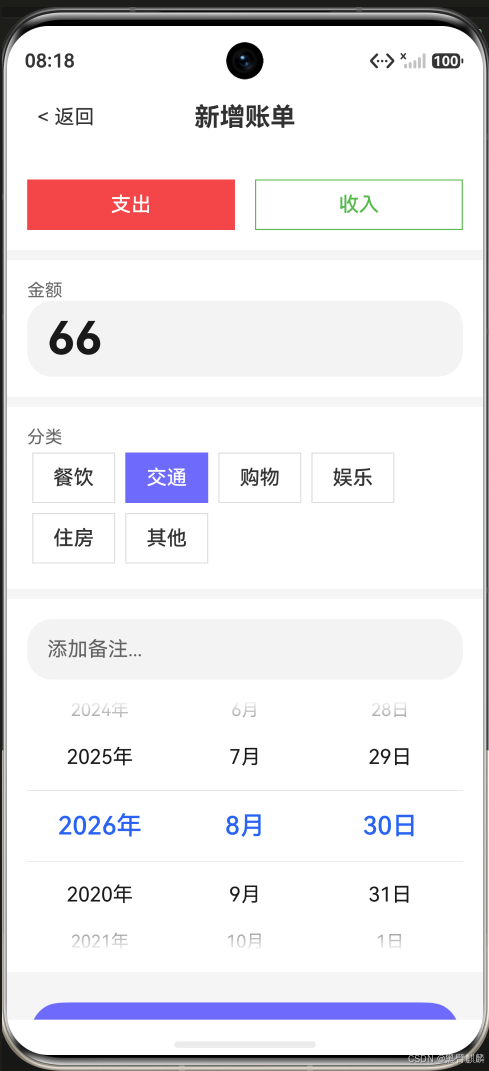
先看本次要持久化的数据------新增一笔 66 元交通账单:
一、持久化方案
#mermaid-svg-mMzmlFsFsCU4G9Ar{font-family:"trebuchet ms",verdana,arial,sans-serif;font-size:16px;fill:#333;}@keyframes edge-animation-frame{from{stroke-dashoffset:0;}}@keyframes dash{to{stroke-dashoffset:0;}}#mermaid-svg-mMzmlFsFsCU4G9Ar .edge-animation-slow{stroke-dasharray:9,5!important;stroke-dashoffset:900;animation:dash 50s linear infinite;stroke-linecap:round;}#mermaid-svg-mMzmlFsFsCU4G9Ar .edge-animation-fast{stroke-dasharray:9,5!important;stroke-dashoffset:900;animation:dash 20s linear infinite;stroke-linecap:round;}#mermaid-svg-mMzmlFsFsCU4G9Ar .error-icon{fill:#552222;}#mermaid-svg-mMzmlFsFsCU4G9Ar .error-text{fill:#552222;stroke:#552222;}#mermaid-svg-mMzmlFsFsCU4G9Ar .edge-thickness-normal{stroke-width:1px;}#mermaid-svg-mMzmlFsFsCU4G9Ar .edge-thickness-thick{stroke-width:3.5px;}#mermaid-svg-mMzmlFsFsCU4G9Ar .edge-pattern-solid{stroke-dasharray:0;}#mermaid-svg-mMzmlFsFsCU4G9Ar .edge-thickness-invisible{stroke-width:0;fill:none;}#mermaid-svg-mMzmlFsFsCU4G9Ar .edge-pattern-dashed{stroke-dasharray:3;}#mermaid-svg-mMzmlFsFsCU4G9Ar .edge-pattern-dotted{stroke-dasharray:2;}#mermaid-svg-mMzmlFsFsCU4G9Ar .marker{fill:#333333;stroke:#333333;}#mermaid-svg-mMzmlFsFsCU4G9Ar .marker.cross{stroke:#333333;}#mermaid-svg-mMzmlFsFsCU4G9Ar svg{font-family:"trebuchet ms",verdana,arial,sans-serif;font-size:16px;}#mermaid-svg-mMzmlFsFsCU4G9Ar p{margin:0;}#mermaid-svg-mMzmlFsFsCU4G9Ar .label{font-family:"trebuchet ms",verdana,arial,sans-serif;color:#333;}#mermaid-svg-mMzmlFsFsCU4G9Ar .cluster-label text{fill:#333;}#mermaid-svg-mMzmlFsFsCU4G9Ar .cluster-label span{color:#333;}#mermaid-svg-mMzmlFsFsCU4G9Ar .cluster-label span p{background-color:transparent;}#mermaid-svg-mMzmlFsFsCU4G9Ar .label text,#mermaid-svg-mMzmlFsFsCU4G9Ar span{fill:#333;color:#333;}#mermaid-svg-mMzmlFsFsCU4G9Ar .node rect,#mermaid-svg-mMzmlFsFsCU4G9Ar .node circle,#mermaid-svg-mMzmlFsFsCU4G9Ar .node ellipse,#mermaid-svg-mMzmlFsFsCU4G9Ar .node polygon,#mermaid-svg-mMzmlFsFsCU4G9Ar .node path{fill:#ECECFF;stroke:#9370DB;stroke-width:1px;}#mermaid-svg-mMzmlFsFsCU4G9Ar .rough-node .label text,#mermaid-svg-mMzmlFsFsCU4G9Ar .node .label text,#mermaid-svg-mMzmlFsFsCU4G9Ar .image-shape .label,#mermaid-svg-mMzmlFsFsCU4G9Ar .icon-shape .label{text-anchor:middle;}#mermaid-svg-mMzmlFsFsCU4G9Ar .node .katex path{fill:#000;stroke:#000;stroke-width:1px;}#mermaid-svg-mMzmlFsFsCU4G9Ar .rough-node .label,#mermaid-svg-mMzmlFsFsCU4G9Ar .node .label,#mermaid-svg-mMzmlFsFsCU4G9Ar .image-shape .label,#mermaid-svg-mMzmlFsFsCU4G9Ar .icon-shape .label{text-align:center;}#mermaid-svg-mMzmlFsFsCU4G9Ar .node.clickable{cursor:pointer;}#mermaid-svg-mMzmlFsFsCU4G9Ar .root .anchor path{fill:#333333!important;stroke-width:0;stroke:#333333;}#mermaid-svg-mMzmlFsFsCU4G9Ar .arrowheadPath{fill:#333333;}#mermaid-svg-mMzmlFsFsCU4G9Ar .edgePath .path{stroke:#333333;stroke-width:2.0px;}#mermaid-svg-mMzmlFsFsCU4G9Ar .flowchart-link{stroke:#333333;fill:none;}#mermaid-svg-mMzmlFsFsCU4G9Ar .edgeLabel{background-color:rgba(232,232,232, 0.8);text-align:center;}#mermaid-svg-mMzmlFsFsCU4G9Ar .edgeLabel p{background-color:rgba(232,232,232, 0.8);}#mermaid-svg-mMzmlFsFsCU4G9Ar .edgeLabel rect{opacity:0.5;background-color:rgba(232,232,232, 0.8);fill:rgba(232,232,232, 0.8);}#mermaid-svg-mMzmlFsFsCU4G9Ar .labelBkg{background-color:rgba(232, 232, 232, 0.5);}#mermaid-svg-mMzmlFsFsCU4G9Ar .cluster rect{fill:#ffffde;stroke:#aaaa33;stroke-width:1px;}#mermaid-svg-mMzmlFsFsCU4G9Ar .cluster text{fill:#333;}#mermaid-svg-mMzmlFsFsCU4G9Ar .cluster span{color:#333;}#mermaid-svg-mMzmlFsFsCU4G9Ar div.mermaidTooltip{position:absolute;text-align:center;max-width:200px;padding:2px;font-family:"trebuchet ms",verdana,arial,sans-serif;font-size:12px;background:hsl(80, 100%, 96.2745098039%);border:1px solid #aaaa33;border-radius:2px;pointer-events:none;z-index:100;}#mermaid-svg-mMzmlFsFsCU4G9Ar .flowchartTitleText{text-anchor:middle;font-size:18px;fill:#333;}#mermaid-svg-mMzmlFsFsCU4G9Ar rect.text{fill:none;stroke-width:0;}#mermaid-svg-mMzmlFsFsCU4G9Ar .icon-shape,#mermaid-svg-mMzmlFsFsCU4G9Ar .image-shape{background-color:rgba(232,232,232, 0.8);text-align:center;}#mermaid-svg-mMzmlFsFsCU4G9Ar .icon-shape p,#mermaid-svg-mMzmlFsFsCU4G9Ar .image-shape p{background-color:rgba(232,232,232, 0.8);padding:2px;}#mermaid-svg-mMzmlFsFsCU4G9Ar .icon-shape .label rect,#mermaid-svg-mMzmlFsFsCU4G9Ar .image-shape .label rect{opacity:0.5;background-color:rgba(232,232,232, 0.8);fill:rgba(232,232,232, 0.8);}#mermaid-svg-mMzmlFsFsCU4G9Ar .label-icon{display:inline-block;height:1em;overflow:visible;vertical-align:-0.125em;}#mermaid-svg-mMzmlFsFsCU4G9Ar .node .label-icon path{fill:currentColor;stroke:revert;stroke-width:revert;}#mermaid-svg-mMzmlFsFsCU4G9Ar :root{--mermaid-font-family:"trebuchet ms",verdana,arial,sans-serif;} 新增/编辑/删除
查询
应用启动
从Preferences
加载账单数据
内存中操作BillStore
同步到Preferences
flushSync落盘
直接从内存返回
二、实现持久化 Store
typescript
// store/PersistentBillStore.ts
import preferences from '@ohos.data.preferences';
import { BillItem, BillItemInput, BillType, BillCategory } from '../model/BillItem';

export class PersistentBillStore {
  private bills: BillItem[] = [];
  private prefs: preferences.Preferences | null = null;
  private isReady: boolean = false;
  private pendingQueue: Array<() => void> = [];

  // 初始化:加载Preferences
  async init(context: Context): Promise<void> {
    this.prefs = await preferences.getPreferences(context, 'easy_account');

    // 从Preferences读取序列化数据
    const jsonStr = this.prefs.getSync('bills_data', '[]') as string;
    try {
      this.bills = JSON.parse(jsonStr);
    } catch {
      this.bills = [];
    }

    this.isReady = true;
    // 执行等待队列
    this.pendingQueue.forEach(fn => fn());
    this.pendingQueue = [];
  }

  // 保存到磁盘
  private save(): void {
    if (!this.prefs) return;
    const jsonStr = JSON.stringify(this.bills);
    this.prefs.putSync('bills_data', jsonStr);
    this.prefs.flushSync();
  }

  // 等待初始化完成
  private ensureReady(): Promise<void> {
    if (this.isReady) return Promise.resolve();
    return new Promise(resolve => {
      this.pendingQueue.push(() => resolve());
    });
  }

  // 增删改查
  async getAll(): Promise<BillItem[]> {
    await this.ensureReady();
    return [...this.bills];
  }

  getById(id: string): BillItem | undefined {
    return this.bills.find(b => b.id === id);
  }

  add(bill: BillItemInput): BillItem {
    // ArkTS 不支持对象展开,逐字段构造
    const newBill: BillItem = {
      type: bill.type,
      category: bill.category,
      amount: bill.amount,
      note: bill.note,
      date: bill.date,
      id: Date.now().toString(36) + Math.random().toString(36).substring(2, 7),
      createTime: Date.now()
    };
    this.bills.unshift(newBill);
    this.save();
    return newBill;
  }

  update(id: string, updates: Partial<BillItem>): boolean {
    const idx = this.bills.findIndex(b => b.id === id);
    if (idx === -1) return false;
    // ArkTS 不支持对象展开合并,改为逐字段判断更新
    if (updates.type !== undefined) {
      this.bills[idx].type = updates.type;
    }
    if (updates.category !== undefined) {
      this.bills[idx].category = updates.category;
    }
    if (updates.amount !== undefined) {
      this.bills[idx].amount = updates.amount;
    }
    if (updates.note !== undefined) {
      this.bills[idx].note = updates.note;
    }
    if (updates.date !== undefined) {
      this.bills[idx].date = updates.date;
    }
    this.save();
    return true;
  }

  delete(id: string): boolean {
    const idx = this.bills.findIndex(b => b.id === id);
    if (idx === -1) return false;
    this.bills.splice(idx, 1);
    this.save();
    return true;
  }

  // 数据迁移(版本升级时)
  migrateIfNeeded(): void {
    const version = this.prefs?.getSync('data_version', 1) as number;
    if (version < 2) {
      // v1 → v2 迁移逻辑
      this.prefs?.putSync('data_version', 2);
      this.prefs?.flushSync();
    }
  }
}

// 导出全局单例
export const persistentStore = new PersistentBillStore();
三、在 App 入口初始化
typescript
// entryability/EntryAbility.ets
import { persistentStore } from '../store/PersistentBillStore';

export default class EntryAbility extends UIAbility {
  async onCreate(want: Want, launchParam: AbilityConstant.LaunchParam) {
    // 在 Ability 创建时初始化持久化
    await persistentStore.init(this.context);
    console.log('账单数据加载完成');
  }
}
四、首页加载持久化数据
typescript
// pages/HomePage.ets 修改
import { persistentStore } from '../store/PersistentBillStore';

@Entry
@Component
struct HomePage {
  @State bills: BillItem[] = [];
  @State isLoading: boolean = true;

  async aboutToAppear() {
    this.isLoading = true;
    // 从持久化存储加载数据
    this.bills = await persistentStore.getAll();
    this.isLoading = false;
  }

  build() {
    Stack() {
      if (this.isLoading) {
        // 加载中显示骨架屏
        LoadingPlaceholder()
      } else {
        // 正常内容
        this.MainContent()
      }
    }
  }
}
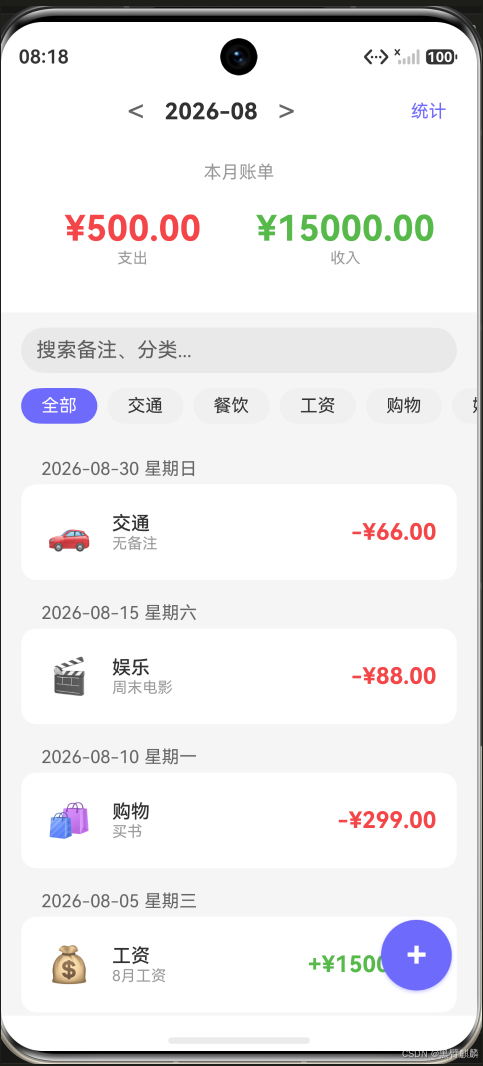
新增成功后首页同步更新------支出从 ¥434 变为 ¥500,新账单出现在列表顶部:
五、迁移内存数据
如果你之前用内存版 BillStore 已经有数据了,需要一个迁移入口:
typescript
// utils/MigrateData.ts
import { billStore } from '../store/BillStore';
import { persistentStore } from '../store/PersistentBillStore';

export async function migrateFromMemory() {
  const memoryBills = billStore.getAll();
  if (memoryBills.length === 0) return;

  const existBills = await persistentStore.getAll();
  if (existBills.length > 0) return; // 已经有数据了

  // 将内存数据写入持久化
  for (const bill of memoryBills) {
    persistentStore.add({
      type: bill.type,
      category: bill.category,
      amount: bill.amount,
      note: bill.note,
      date: bill.date
    });
  }
  console.log(`已迁移 ${memoryBills.length} 条数据到持久化存储`);
}
六、数据导出验证
调试时可以查看 Preferences 存储的文件:
沙箱路径: /data/storage/el2/base/preferences/easy_account.xml打开后能看到序列化的 JSON 数据:
xml
<?xml version="1.0" encoding="UTF-8" standalone="no"?>
<preferences>
  <string name="bills_data">[{"id":"xxx","type":"expense",...}]</string>
  <int name="data_version" value="2"/>
</preferences>
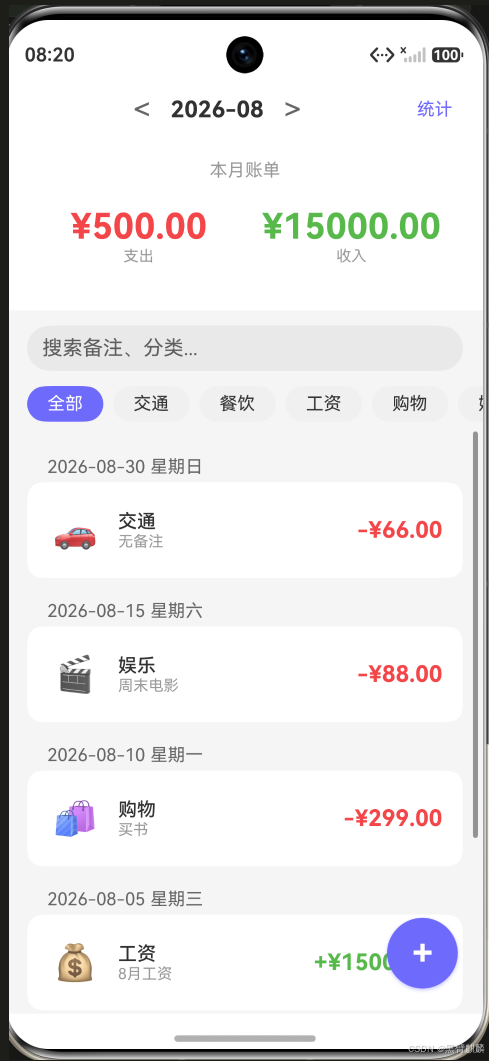
完全关闭 App 后重新启动------66 元交通账单、¥500 支出、¥15000 收入原样恢复,数据真正"存得住"了:
七、异常处理
typescript
// 保存失败时重试
private saveWithRetry(maxRetries = 3): boolean {
  for (let i = 0; i < maxRetries; i++) {
    try {
      this.save();
      return true;
    } catch (e) {
      console.error(`保存失败(第${i + 1}次):`, e.message);
    }
  }
  console.error('保存失败,已达最大重试次数');
  return false;
}
总结
本篇实现了:
- Preferences 持久化:增删改自动同步到磁盘
- 异步初始化:Ability 创建时加载数据
- 版本迁移:支持数据格式升级
- 异常处理:保存失败自动重试
- 数据验证:可直接查看沙箱 XML 文件
从这篇开始,随手账本的数据就真正"存得住"了。下篇实现数据导出与分享功能。