引言
最后一篇了。App开发完到发布前,有一堆"隐形工作"要做:检查权限配置、清理调试日志、检查性能和UI细节。本篇提供一个完整的发布检查清单,确保随手账本能够顺利上架。
一、发布检查清单
#mermaid-svg-6AYkH7CCDCWQz8NS{font-family:"trebuchet ms",verdana,arial,sans-serif;font-size:16px;fill:#333;}@keyframes edge-animation-frame{from{stroke-dashoffset:0;}}@keyframes dash{to{stroke-dashoffset:0;}}#mermaid-svg-6AYkH7CCDCWQz8NS .edge-animation-slow{stroke-dasharray:9,5!important;stroke-dashoffset:900;animation:dash 50s linear infinite;stroke-linecap:round;}#mermaid-svg-6AYkH7CCDCWQz8NS .edge-animation-fast{stroke-dasharray:9,5!important;stroke-dashoffset:900;animation:dash 20s linear infinite;stroke-linecap:round;}#mermaid-svg-6AYkH7CCDCWQz8NS .error-icon{fill:#552222;}#mermaid-svg-6AYkH7CCDCWQz8NS .error-text{fill:#552222;stroke:#552222;}#mermaid-svg-6AYkH7CCDCWQz8NS .edge-thickness-normal{stroke-width:1px;}#mermaid-svg-6AYkH7CCDCWQz8NS .edge-thickness-thick{stroke-width:3.5px;}#mermaid-svg-6AYkH7CCDCWQz8NS .edge-pattern-solid{stroke-dasharray:0;}#mermaid-svg-6AYkH7CCDCWQz8NS .edge-thickness-invisible{stroke-width:0;fill:none;}#mermaid-svg-6AYkH7CCDCWQz8NS .edge-pattern-dashed{stroke-dasharray:3;}#mermaid-svg-6AYkH7CCDCWQz8NS .edge-pattern-dotted{stroke-dasharray:2;}#mermaid-svg-6AYkH7CCDCWQz8NS .marker{fill:#333333;stroke:#333333;}#mermaid-svg-6AYkH7CCDCWQz8NS .marker.cross{stroke:#333333;}#mermaid-svg-6AYkH7CCDCWQz8NS svg{font-family:"trebuchet ms",verdana,arial,sans-serif;font-size:16px;}#mermaid-svg-6AYkH7CCDCWQz8NS p{margin:0;}#mermaid-svg-6AYkH7CCDCWQz8NS .label{font-family:"trebuchet ms",verdana,arial,sans-serif;color:#333;}#mermaid-svg-6AYkH7CCDCWQz8NS .cluster-label text{fill:#333;}#mermaid-svg-6AYkH7CCDCWQz8NS .cluster-label span{color:#333;}#mermaid-svg-6AYkH7CCDCWQz8NS .cluster-label span p{background-color:transparent;}#mermaid-svg-6AYkH7CCDCWQz8NS .label text,#mermaid-svg-6AYkH7CCDCWQz8NS span{fill:#333;color:#333;}#mermaid-svg-6AYkH7CCDCWQz8NS .node rect,#mermaid-svg-6AYkH7CCDCWQz8NS .node circle,#mermaid-svg-6AYkH7CCDCWQz8NS .node ellipse,#mermaid-svg-6AYkH7CCDCWQz8NS .node polygon,#mermaid-svg-6AYkH7CCDCWQz8NS .node path{fill:#ECECFF;stroke:#9370DB;stroke-width:1px;}#mermaid-svg-6AYkH7CCDCWQz8NS .rough-node .label text,#mermaid-svg-6AYkH7CCDCWQz8NS .node .label text,#mermaid-svg-6AYkH7CCDCWQz8NS .image-shape .label,#mermaid-svg-6AYkH7CCDCWQz8NS .icon-shape .label{text-anchor:middle;}#mermaid-svg-6AYkH7CCDCWQz8NS .node .katex path{fill:#000;stroke:#000;stroke-width:1px;}#mermaid-svg-6AYkH7CCDCWQz8NS .rough-node .label,#mermaid-svg-6AYkH7CCDCWQz8NS .node .label,#mermaid-svg-6AYkH7CCDCWQz8NS .image-shape .label,#mermaid-svg-6AYkH7CCDCWQz8NS .icon-shape .label{text-align:center;}#mermaid-svg-6AYkH7CCDCWQz8NS .node.clickable{cursor:pointer;}#mermaid-svg-6AYkH7CCDCWQz8NS .root .anchor path{fill:#333333!important;stroke-width:0;stroke:#333333;}#mermaid-svg-6AYkH7CCDCWQz8NS .arrowheadPath{fill:#333333;}#mermaid-svg-6AYkH7CCDCWQz8NS .edgePath .path{stroke:#333333;stroke-width:2.0px;}#mermaid-svg-6AYkH7CCDCWQz8NS .flowchart-link{stroke:#333333;fill:none;}#mermaid-svg-6AYkH7CCDCWQz8NS .edgeLabel{background-color:rgba(232,232,232, 0.8);text-align:center;}#mermaid-svg-6AYkH7CCDCWQz8NS .edgeLabel p{background-color:rgba(232,232,232, 0.8);}#mermaid-svg-6AYkH7CCDCWQz8NS .edgeLabel rect{opacity:0.5;background-color:rgba(232,232,232, 0.8);fill:rgba(232,232,232, 0.8);}#mermaid-svg-6AYkH7CCDCWQz8NS .labelBkg{background-color:rgba(232, 232, 232, 0.5);}#mermaid-svg-6AYkH7CCDCWQz8NS .cluster rect{fill:#ffffde;stroke:#aaaa33;stroke-width:1px;}#mermaid-svg-6AYkH7CCDCWQz8NS .cluster text{fill:#333;}#mermaid-svg-6AYkH7CCDCWQz8NS .cluster span{color:#333;}#mermaid-svg-6AYkH7CCDCWQz8NS div.mermaidTooltip{position:absolute;text-align:center;max-width:200px;padding:2px;font-family:"trebuchet ms",verdana,arial,sans-serif;font-size:12px;background:hsl(80, 100%, 96.2745098039%);border:1px solid #aaaa33;border-radius:2px;pointer-events:none;z-index:100;}#mermaid-svg-6AYkH7CCDCWQz8NS .flowchartTitleText{text-anchor:middle;font-size:18px;fill:#333;}#mermaid-svg-6AYkH7CCDCWQz8NS rect.text{fill:none;stroke-width:0;}#mermaid-svg-6AYkH7CCDCWQz8NS .icon-shape,#mermaid-svg-6AYkH7CCDCWQz8NS .image-shape{background-color:rgba(232,232,232, 0.8);text-align:center;}#mermaid-svg-6AYkH7CCDCWQz8NS .icon-shape p,#mermaid-svg-6AYkH7CCDCWQz8NS .image-shape p{background-color:rgba(232,232,232, 0.8);padding:2px;}#mermaid-svg-6AYkH7CCDCWQz8NS .icon-shape .label rect,#mermaid-svg-6AYkH7CCDCWQz8NS .image-shape .label rect{opacity:0.5;background-color:rgba(232,232,232, 0.8);fill:rgba(232,232,232, 0.8);}#mermaid-svg-6AYkH7CCDCWQz8NS .label-icon{display:inline-block;height:1em;overflow:visible;vertical-align:-0.125em;}#mermaid-svg-6AYkH7CCDCWQz8NS .node .label-icon path{fill:currentColor;stroke:revert;stroke-width:revert;}#mermaid-svg-6AYkH7CCDCWQz8NS :root{--mermaid-font-family:"trebuchet ms",verdana,arial,sans-serif;} 发布检查
功能完整性
UI/UX一致性
性能与安全
配置与打包
CRUD全部可用
搜索筛选正常
导出/导入正常
主题切换正常
数据持久化正常
空状态有引导
加载有骨架屏
暗色模式完整
交互反馈完善
无内存泄漏
文件操作异常处理
Preferences 关闭监听
权限最小化
签名配置
HAP大小优化
二、功能验收
typescript
// test/FunctionTest.ets - 功能自检
export class FunctionTest {
  // 验证所有CRUD操作
  testCRUD(): boolean {
    const testBill = persistentStore.add({
      type: BillType.EXPENSE,
      category: BillCategory.FOOD,
      amount: 100,
      note: '测试',
      date: '2026-08-01'
    });

    // 验证新增
    const found = persistentStore.getById(testBill.id);
    console.assert(found !== undefined, '新增失败');

    // 验证编辑
    persistentStore.update(testBill.id, { amount: 200 });
    const updated = persistentStore.getById(testBill.id);
    console.assert(updated?.amount === 200, '编辑失败');

    // 验证删除
    persistentStore.delete(testBill.id);
    const deleted = persistentStore.getById(testBill.id);
    console.assert(deleted === undefined, '删除失败');

    return true;
  }

  // 验证数据持久化
  async testPersistence(): Promise<boolean> {
    const before = await persistentStore.getAll();
    // 模拟重启:重新初始化
    await persistentStore.init(getContext(this));
    const after = await persistentStore.getAll();
    console.assert(before.length === after.length, '持久化数据不一致');
    return true;
  }
}
三、UI 一致性检查
3.1 颜色/字体/间距
typescript
// theme/DesignTokens.ets - 设计规范统一
export class DesignTokens {
  // 圆角
  static readonly RADIUS_SMALL = 8;
  static readonly RADIUS_MEDIUM = 12;
  static readonly RADIUS_LARGE = 16;
  static readonly RADIUS_FULL = 24;

  // 间距
  static readonly SPACING_XS = 4;
  static readonly SPACING_SM = 8;
  static readonly SPACING_MD = 16;
  static readonly SPACING_LG = 24;
  static readonly SPACING_XL = 32;

  // 字号
  static readonly FONT_SMALL = 12;
  static readonly FONT_BODY = 14;
  static readonly FONT_MEDIUM = 16;
  static readonly FONT_LARGE = 20;
  static readonly FONT_XLARGE = 28;

  // 阴影
  static readonly SHADOW_LIGHT = {
    radius: 4,
    color: 'rgba(0,0,0,0.05)',
    offsetX: 0,
    offsetY: 2
  };
}
3.2 交互反馈检查
typescript
// 检查点
const interactionChecks = [
  '按钮点击有视觉反馈(颜色变化/缩放)',
  '列表滑动流畅无卡顿',
  '空状态有引导文字',
  '加载中有骨架屏或Loading指示器',
  '弹窗点击遮罩可关闭',
  '输入框有焦点状态',
  'Toast提示显示位置正确',
  '暗色模式切换后所有页面一致',
];
四、性能优化
4.1 列表性能
typescript
// 使用 LazyForEach 替代 ForEach(大量数据时)
import { LazyForEach } from '@kit.ArkUI';

@Builder
BillList() {
  List() {
    LazyForEach(this.dataSource, (item: BillItem) => {
      ListItem() {
        BillCard({ bill: item })
      }
    }, (item: BillItem) => item.id)
  }
  .cachedCount(10) // 预缓存10个
}
4.2 资源优化
json
// 检查 module.json5 中不必要的权限
{
  "requestPermissions": [
    // 只保留真正需要的权限
    {
      "name": "ohos.permission.INTERNET"  // 去掉不必要的权限
    }
  ]
}
五、HAP 打包配置
json
// build-profile.json5
{
  "app": {
    "bundleName": "com.example.easyaccount",
    "vendor": "yourname",
    "version": {
      "code": 1000001,       // 主版本1位 + 次版本2位 + 补丁3位
      "name": "1.0.0"
    },
    "apiVersion": {
      "compatible": 11,      // 最低兼容版本
      "target": 14           // 目标版本
    }
  }
}
六、隐私与安全
6.1 数据清理
typescript
// pages/SettingsPage.ets - 清除所有数据
private clearAllData() {
  AlertDialog.show({
    title: '清除所有数据',
    message: '此操作不可恢复,确定要清空所有账单吗?',
    primaryButton: {
      value: '取消',
      action: () => {}
    },
    secondaryButton: {
      value: '确认清除',
      fontColor: '#FF4444',
      action: () => {
        persistentStore.clearAll();  // 清空所有数据
        this.bills = [];
        // 跳回首页
        router.clear();
      }
    }
  });
}
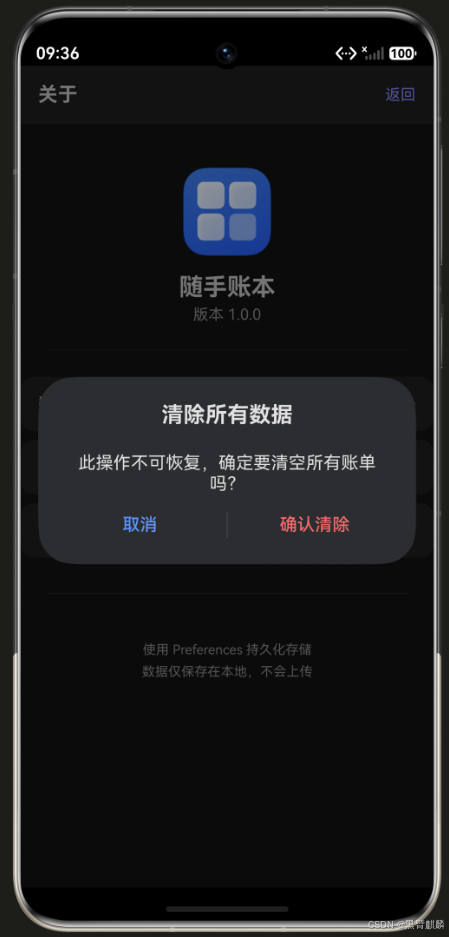
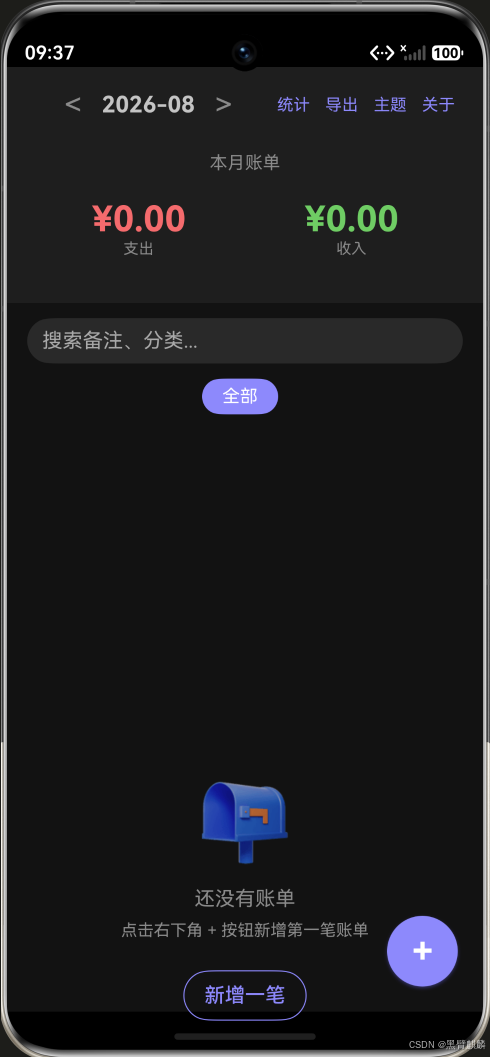
清除数据前弹二次确认,确认后回到首页显示空状态:
6.2 生命周期清理
typescript
aboutToDisappear() {
  // 移除所有监听,防止内存泄漏
  themeStore.unsubscribeAll();
  if (this.prefs) {
    try { this.prefs.off('change'); } catch (e) { /* ignore */ }
  }
  clearInterval(this.timerId);
}
七、应用信息页面
typescript
// pages/AboutPage.ets
@Entry
@Component
struct AboutPage {
  build() {
    Column() {
      Image($r('app.media.app_icon'))
        .width(80)
        .height(80)
        .borderRadius(16)
        .margin({ top: 40, bottom: 16 })

      Text('随手账本')
        .fontSize(22)
        .fontWeight(FontWeight.Bold)

      Text('版本 1.0.0')
        .fontSize(14)
        .fontColor('#999')
        .margin({ top: 4 })

      Divider().margin(24)

      this.SettingItem('数据导出', () => { router.pushUrl({ url: 'pages/ExportPage' }) })
      this.SettingItem('主题设置', () => { router.pushUrl({ url: 'pages/ThemeSettings' }) })
      this.SettingItem('清除所有数据', () => { this.clearAllData() })

      Divider().margin(24)

      Text('使用 @ohos.data.preferences 持久化存储\n数据仅保存在本地,不会上传')
        .fontSize(12)
        .fontColor('#BBB')
        .textAlign(TextAlign.Center)
        .margin({ top: 16 })
        .lineHeight(20)
    }
    .width('100%')
    .height('100%')
    .backgroundColor('#F5F5F5')
  }
}
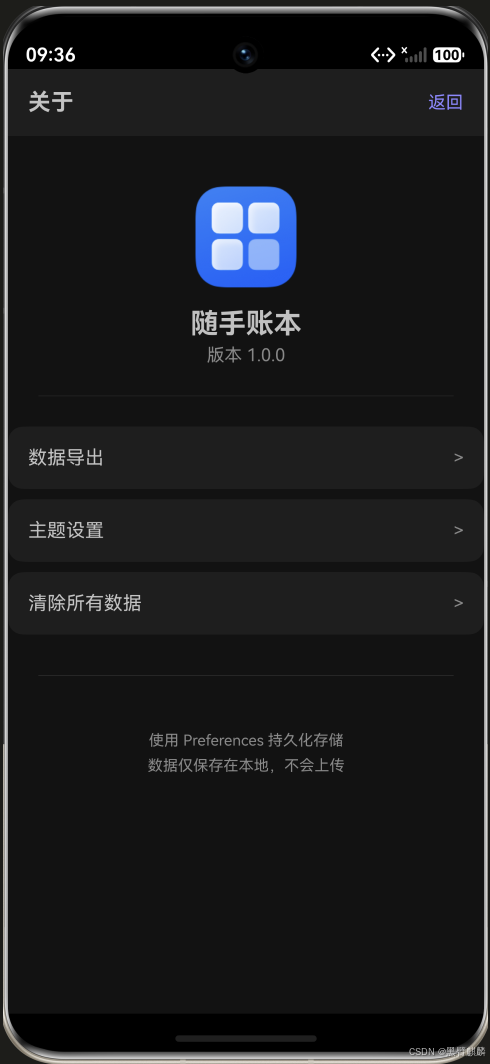
应用信息页实拍------图标、版本号、三个设置项(数据导出/主题设置/清除所有数据)与本地存储隐私说明:
八、最终验收清单
| 编号 | 检查项 | 状态 |
|---|---|---|
| 1 | 账单新增/编辑/删除 | ✅ |
| 2 | 搜索筛选联动 | ✅ |
| 3 | 分类统计图表 | ✅ |
| 4 | 数据持久化(重启不丢) | ✅ |
| 5 | CSV导出/分享 | ✅ |
| 6 | 骨架屏加载状态 | ✅ |
| 7 | 空状态引导 | ✅ |
| 8 | 暗色模式切换 | ✅ |
| 9 | 月度切换 | ✅ |
| 10 | 首次引导 | ✅ |
| 11 | 应用信息页(导出/主题/清除数据) | ✅ |
总结 · 整个系列回顾
10篇实战系列到此完成!随手账本从零到发布,涵盖了:
| 篇 | 功能 | 关键词 |
|---|---|---|
| 11 | 项目搭建 & 数据模型 | Stage模型、BillItem |
| 12 | 首页布局 & 列表渲染 | 日期分组、BillCard |
| 13 | 新增账单 & 表单校验 | 类型切换、金额校验 |
| 14 | 编辑 & 删除账单 | 路由传参、二次确认 |
| 15 | 搜索筛选 & 分类统计 | 关键词搜索、分类排行 |
| 16 | Preferences 持久化 | 数据落盘、异步加载 |
| 17 | 数据导出 & 分享 | CSV导出、文件分享 |
| 18 | 暗色模式 & 主题切换 | 系统跟随、强调色 |
| 19 | 骨架屏 & 空状态 | 加载动画、引导页 |
| 20 | 发布检查 & 最终验收 | 清单检查、性能优化 |
现在去把你的App打包上架吧!🚀