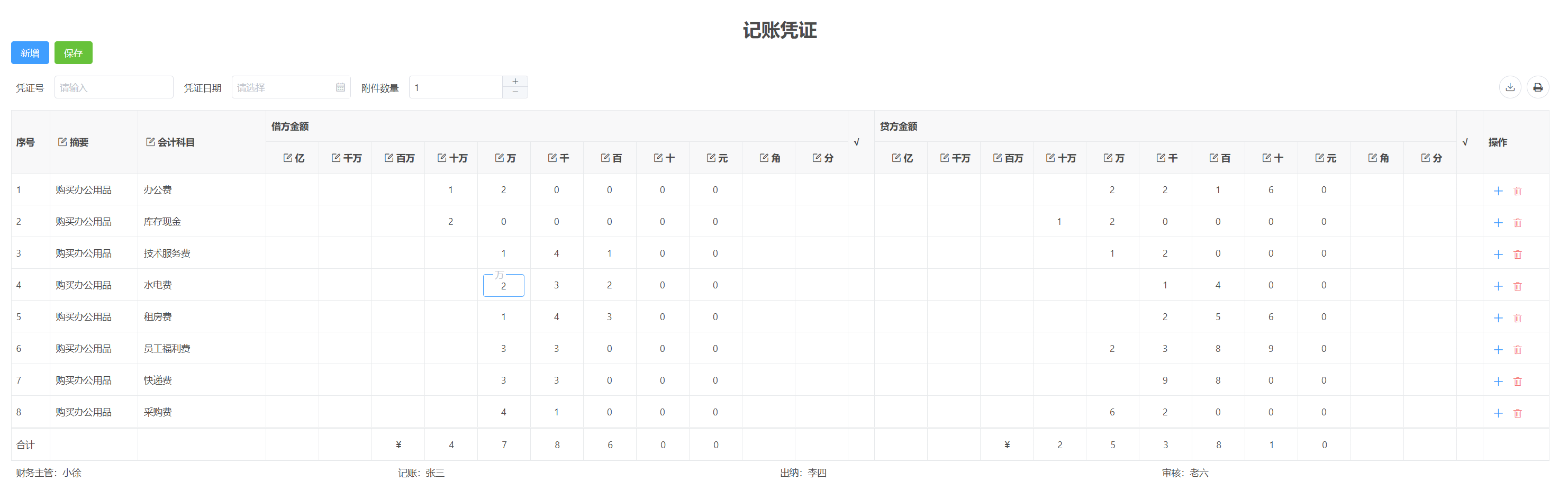
在财务管理系统、ERP 或会计软件中,记账凭证是核心数据载体。其典型格式要求借方金额和贷方金额按"亿、千万、百万、十万、万、千、百、十、元、角、分"拆分成独立列显示,便于人工核对与纸质打印。同时,凭证需要支持动态增删行、实时汇总,以及打印时包含凭证头尾信息。
本文将基于 vxe-table(vxe-grid)构建一个完整的记账凭证编辑表格,涵盖金额按位拆分/合并、自动合计、工具栏集成表单、增删行操作及自定义打印等核心功能,并提供可直接运行的代码。
设计思路
- 金额列拆分展示
- 借方金额和贷方金额各拆分为 11 个子列(亿~分),每个子列使用 VxeNumberInput 仅允许输入 0~9 的数字,且不显示增减按钮(controls: false)。
- 数据模型中,每个子列对应一个对象属性(如 debtorObj.p9、debtorObj.p8 ...),方便分别绑定。
- 数据双向转换
- 加载数据时,将数值金额(如 120000.00)转换为各子位对象(handleSpitAmount)。
- 保存或汇总时,将各子位对象合并回数值金额(handleJoinAmount)。
- 合计行自动更新
- 表格底部显示一行"合计",其借方/贷方金额为所有行的求和结果,同样按位拆分显示。
- 每次编辑结束后(editClosed 事件)重新计算合计。
- 增删行操作
- 每行右侧提供"添加"和"删除"按钮,用于在当前行前插入新行或删除当前行。
- 工具栏提供"新增"按钮,在末尾追加空行。
- 打印自定义
- 利用 printConfig.beforePrintMethod 在打印内容前后插入凭证头(如凭证号、日期)和脚(如财务主管、记账人等),形成完整凭证页。
- 工具栏集成
- 在表格工具栏的 buttons 插槽中放置一个 vxe-form,用于输入凭证号、日期和附件数量,这些信息将参与打印。
关键代码实现
金额拆分与合并工具函数
javascript
// 拆分:将数值金额(如 123456.78)拆分为各数位对象
const handleSpitAmount = (amount, isUnit) => {
  const str = XEUtils.toValueString(XEUtils.toNumber(amount) || '')
  const [pStr, mStr] = `${isUnit ? '¥' : ''}${str}`.split('.')
  const restObj = { p9: '', p8: '', p7: '', p6: '', p5: '', p4: '', p3: '', p2: '', p1: '', m1: '', m2: '' }
  if (pStr) {
    pStr.split('').reverse().forEach((val, i) => {
      restObj[`p${i + 1}`] = `${val || 0}`
    })
  }
  if (mStr) {
    mStr.split('').forEach((val, i) => {
      restObj[`m${i + 1}`] = `${val || 0}`
    })
  }
  return restObj
}

// 合并:将各数位对象合并为数值金额
const handleJoinAmount = (obj) => {
  const strArr = [
    obj.p9 || 0, obj.p8 || 0, obj.p7 || 0, obj.p6 || 0,
    obj.p5 || 0, obj.p4 || 0, obj.p3 || 0, obj.p2 || 0,
    obj.p1 || 0, '.', obj.m2 || 0, obj.m1 || 0
  ]
  return XEUtils.toNumber(strArr.join(''))
}
注意:拆分时整数部分逆序处理(个位对应 p1,十位对应 p2......亿位对应 p9),小数部分按顺序(角对应 m1,分对应 m2)。
表格列定义(借方/贷方金额子列)
javascript
// 以借方金额为例,贷方金额结构完全相同
{
  field: 'debtorAmount',
  title: '借方金额',
  children: [
    { field: 'debtorObj.p9', title: '亿', width: 80, editRender: { name: 'VxeNumberInput', props: { type: 'integer', max: 9, controls: false, maxLength: 1, align: 'center' } } },
    // ... p8, p7 ... 直到分
  ]
}
每个子列绑定 debtorObj.p9 等属性,并且输入控件限制为 0~9 的整数,确保每位只能填一个数字。
合计行动态更新
- 在 footerData 中定义合计行(对象引用 footerRow),其 debtorObj 和 creditObj 同样存储各数位值。
- 每次编辑关闭(editClosed)或增删行后调用 updateFooter(),遍历所有行,累加各行的数值金额(通过 handleJoinAmount 转换),再用 handleSpitAmount 生成合计对象并赋值给 footerRow。
javascript
const updateFooter = () => {
  nextTick(() => {
    const $grid = gridRef.value
    if ($grid) {
      const fullData = $grid.getFullData()
      let countDebtorAmount = 0, countCreditAmount = 0
      fullData.forEach(row => {
        row.debtorAmount = handleJoinAmount(row.debtorObj)
        row.creditAmount = handleJoinAmount(row.creditObj)
        countDebtorAmount += row.debtorAmount
        countCreditAmount += row.creditAmount
      })
      footerRow.debtorObj = handleSpitAmount(countDebtorAmount, true)
      footerRow.creditObj = handleSpitAmount(countCreditAmount, true)
    }
  })
}
增删行操作
- 新增行:addEvent 在表格末尾插入空白行,并更新合计。
- 行内添加/删除:通过插槽 active 提供按钮,调用 insertAt(row) 在当前行前插入,或 remove(row) 删除该行。
javascript
const insertRow = async (row) => {
  await $grid.insertAt({}, row)  // 在 row 之前插入
  updateFooter()
}
const removeRow = async (row) => {
  await $grid.remove(row)
  updateFooter()
}
自定义打印
printConfig.beforePrintMethod 允许在打印 HTML 前后插入自定义内容。本例将凭证头(topElemRef)和凭证脚(bottomElemRef)的 HTML 拼接到打印内容中,实现完整的凭证页面。
javascript
printConfig: {
  beforePrintMethod({ html }) {
      const topEl = topElemRef.value
    const topHtml = topEl ? topEl.outerHTML : ''
    const bottomEl = bottomElemRef.value
    const bottomHtml = bottomEl ? bottomEl.outerHTML : ''
    return `${topHtml}${html}${bottomHtml}`
  }
}
代码
html
<template>
  <div>
    <div ref="topElemRef">
      <h1 style="text-align: center">记账凭证</h1>
    </div>

    <div>
      <vxe-button status="primary" @click="addEvent">新增</vxe-button>
      <vxe-button status="success" @click="saveEvent">保存</vxe-button>
    </div>

    <vxe-grid ref="gridRef" v-bind="gridOptions" v-on="gridEvents">
      <template #toolbarButtons>
        <vxe-form :data="formData">
          <vxe-form-item title="凭证号" field="certNO" :item-render="{ name: 'VxeInput' }"></vxe-form-item>
          <vxe-form-item title="凭证日期" field="certDate" :item-render="{ name: 'VxeDatePicker' }"></vxe-form-item>
          <vxe-form-item title="附件数量" field="fileNumber" :item-render="{ name: 'VxeNumberInput', props: { type: 'integer' } }"></vxe-form-item>
        </vxe-form>
      </template>

      <template #active="{ row }">
        <vxe-button mode="text" status="primary" icon="vxe-icon-add" @click="insertRow(row)"></vxe-button>
        <vxe-button mode="text" status="error" icon="vxe-icon-delete" @click="removeRow(row)"></vxe-button>
      </template>
    </vxe-grid>

    <div ref="bottomElemRef" style="display: flex; padding: 8px">
      <div style="width: 25%">财务主管:小徐</div>
      <div style="width: 25%">记账:张三</div>
      <div style="width: 25%">出纳:李四</div>
      <div style="width: 25%">审核:老六</div>
    </div>
  </div>
</template>

<script setup>
import { ref, reactive, nextTick } from 'vue'
import { VxeUI } from 'vxe-table'
import XEUtils from 'xe-utils'

const gridRef = ref()
const topElemRef = ref()
const bottomElemRef = ref()

const formData = reactive({
  certNO: '',
  certDate: '',
  fileNumber: 1
})

const footerRow = reactive({
  seq: '合计',
  debtorObj: {},
  creditObj: {}
})

const gridOptions = reactive({
  border: true,
  showOverflow: true,
  showFooter: true,
  keepSource: true,
  height: 600,
  printConfig: {
    beforePrintMethod({ html }) {
      const topEl = topElemRef.value
      const topHtml = topEl ? topEl.outerHTML : ''
      const bottomEl = bottomElemRef.value
      const bottomHtml = bottomEl ? bottomEl.outerHTML : ''
      return `${topHtml}${html}${bottomHtml}`
    }
  },
  exportConfig: {},
  columnConfig: {
    resizable: true
  },
  toolbarConfig: {
    export: true,
    print: true,
    slots: {
      buttons: 'toolbarButtons'
    }
  },
  editConfig: {
    mode: 'cell',
    trigger: 'click',
    showStatus: true
  },
  data: [],
  footerData: [footerRow],
  columns: [
    { field: 'seq', type: 'seq', width: 60 },
    { field: 'summary', title: '摘要', minWidth: 120, editRender: { name: 'VxeInput' } },
    { field: 'subject', title: '会计科目', minWidth: 180, editRender: { name: 'VxeInput' } },
    {
      field: 'debtorAmount',
      title: '借方金额',
      children: [
        { field: 'debtorObj.p9', title: '亿', width: 80, align: 'center', editRender: { name: 'VxeNumberInput', props: { type: 'integer', max: 9, floatContent: '亿', controls: false, maxLength: 1, align: 'center' } } },
        { field: 'debtorObj.p8', title: '千万', width: 80, align: 'center', editRender: { name: 'VxeNumberInput', props: { type: 'integer', max: 9, floatContent: '千万', controls: false, maxLength: 1, align: 'center' } } },
        { field: 'debtorObj.p7', title: '百万', width: 80, align: 'center', editRender: { name: 'VxeNumberInput', props: { type: 'integer', max: 9, floatContent: '百万', controls: false, maxLength: 1, align: 'center' } } },
        { field: 'debtorObj.p6', title: '十万', width: 80, align: 'center', editRender: { name: 'VxeNumberInput', props: { type: 'integer', max: 9, floatContent: '十万', controls: false, maxLength: 1, align: 'center' } } },
        { field: 'debtorObj.p5', title: '万', width: 80, align: 'center', editRender: { name: 'VxeNumberInput', props: { type: 'integer', max: 9, floatContent: '万', controls: false, maxLength: 1, align: 'center' } } },
        { field: 'debtorObj.p4', title: '千', width: 80, align: 'center', editRender: { name: 'VxeNumberInput', props: { type: 'integer', max: 9, floatContent: '千', controls: false, maxLength: 1, align: 'center' } } },
        { field: 'debtorObj.p3', title: '百', width: 80, align: 'center', editRender: { name: 'VxeNumberInput', props: { type: 'integer', max: 9, floatContent: '百', controls: false, maxLength: 1, align: 'center' } } },
        { field: 'debtorObj.p2', title: '十', width: 80, align: 'center', editRender: { name: 'VxeNumberInput', props: { type: 'integer', max: 9, floatContent: '十', controls: false, maxLength: 1, align: 'center' } } },
        { field: 'debtorObj.p1', title: '元', width: 80, align: 'center', editRender: { name: 'VxeNumberInput', props: { type: 'integer', max: 9, floatContent: '元', controls: false, maxLength: 1, align: 'center' } } },
        { field: 'debtorObj.m1', title: '角', width: 80, align: 'center', editRender: { name: 'VxeNumberInput', props: { type: 'integer', max: 9, floatContent: '角', controls: false, maxLength: 1, align: 'center' } } },
        { field: 'debtorObj.m2', title: '分', width: 80, align: 'center', editRender: { name: 'VxeNumberInput', props: { type: 'integer', max: 9, floatContent: '分', controls: false, maxLength: 1, align: 'center' } } }
      ]
    },
    { field: 'x1', title: '√', width: 40 },
    {
      field: 'creditAmount',
      title: '贷方金额',
      children: [
        { field: 'creditObj.p9', title: '亿', width: 80, align: 'center', editRender: { name: 'VxeNumberInput', props: { type: 'integer', max: 9, floatContent: '亿', controls: false, maxLength: 1, align: 'center' } } },
        { field: 'creditObj.p8', title: '千万', width: 80, align: 'center', editRender: { name: 'VxeNumberInput', props: { type: 'integer', max: 9, floatContent: '千万', controls: false, maxLength: 1, align: 'center' } } },
        { field: 'creditObj.p7', title: '百万', width: 80, align: 'center', editRender: { name: 'VxeNumberInput', props: { type: 'integer', max: 9, floatContent: '百万', controls: false, maxLength: 1, align: 'center' } } },
        { field: 'creditObj.p6', title: '十万', width: 80, align: 'center', editRender: { name: 'VxeNumberInput', props: { type: 'integer', max: 9, floatContent: '十万', controls: false, maxLength: 1, align: 'center' } } },
        { field: 'creditObj.p5', title: '万', width: 80, align: 'center', editRender: { name: 'VxeNumberInput', props: { type: 'integer', max: 9, floatContent: '万', controls: false, maxLength: 1, align: 'center' } } },
        { field: 'creditObj.p4', title: '千', width: 80, align: 'center', editRender: { name: 'VxeNumberInput', props: { type: 'integer', max: 9, floatContent: '千', controls: false, maxLength: 1, align: 'center' } } },
        { field: 'creditObj.p3', title: '百', width: 80, align: 'center', editRender: { name: 'VxeNumberInput', props: { type: 'integer', max: 9, floatContent: '百', controls: false, maxLength: 1, align: 'center' } } },
        { field: 'creditObj.p2', title: '十', width: 80, align: 'center', editRender: { name: 'VxeNumberInput', props: { type: 'integer', max: 9, floatContent: '十', controls: false, maxLength: 1, align: 'center' } } },
        { field: 'creditObj.p1', title: '元', width: 80, align: 'center', editRender: { name: 'VxeNumberInput', props: { type: 'integer', max: 9, floatContent: '元', controls: false, maxLength: 1, align: 'center' } } },
        { field: 'creditObj.m1', title: '角', width: 80, align: 'center', editRender: { name: 'VxeNumberInput', props: { type: 'integer', max: 9, floatContent: '角', controls: false, maxLength: 1, align: 'center' } } },
        { field: 'creditObj.m2', title: '分', width: 80, align: 'center', editRender: { name: 'VxeNumberInput', props: { type: 'integer', max: 9, floatContent: '分', controls: false, maxLength: 1, align: 'center' } } }
      ]
    },
    { field: 'x2', title: '√', width: 40 },
    { field: 'active', title: '操作', width: 100, fixed: 'right', slots: { default: 'active' } }
  ]
})
const gridEvents = {
  editClosed() {
    updateFooter()
  }
}

const list = [
  { id: 10001, summary: '购买办公用品', subject: '办公费', debtorAmount: 120000, creditAmount: 0 },
  { id: 10002, summary: '购买办公用品', subject: '库存现金', debtorAmount: 0, creditAmount: 120000 }
]

const handleSpitAmount = (amount, isUnit) => {
  const str = XEUtils.toValueString(XEUtils.toNumber(amount) || '')
  const [pStr, mStr] = `${isUnit ? '¥' : ''}${str}`.split('.')
  const restObj = {
    p9: '',
    p8: '',
    p7: '',
    p6: '',
    p5: '',
    p4: '',
    p3: '',
    p2: '',
    p1: '',
    m1: '',
    m2: ''
  }
  if (pStr) {
    pStr
      .split('')
      .reverse()
      .forEach((val, i) => {
        restObj[`p${i + 1}`] = `${val || 0}`
      })
  }
  if (mStr) {
    mStr.split('').forEach((val, i) => {
      restObj[`m${i + 1}`] = `${val || 0}`
    })
  }
  return restObj
}

const handleJoinAmount = (obj) => {
  const strArr = [obj.p9 || 0, obj.p8 || 0, obj.p7 || 0, obj.p6 || 0, obj.p5 || 0, obj.p4 || 0, obj.p3 || 0, obj.p2 || 0, obj.p1 || 0, '.', obj.m2 || 0, obj.m1 || 0]
  return XEUtils.toNumber(strArr.join(''))
}

const handleData = (list) => {
  return list.map((item) => {
    return {
      ...item,
      debtorObj: handleSpitAmount(item.debtorAmount, false),
      creditObj: handleSpitAmount(item.creditAmount, false)
    }
  })
}

const loadList = (list) => {
  gridOptions.data = handleData(list)
  nextTick(() => {
    updateFooter()
  })
}

const updateFooter = () => {
  nextTick(() => {
    const $grid = gridRef.value
    if ($grid) {
      const fullData = $grid.getFullData()
      let countDebtorAmount = 0
      let countCreditAmount = 0
      fullData.forEach((row) => {
        row.debtorAmount = handleJoinAmount(row.debtorObj)
        row.creditAmount = handleJoinAmount(row.creditObj)
        countDebtorAmount += row.debtorAmount
        countCreditAmount += row.creditAmount
      })
      footerRow.debtorObj = handleSpitAmount(countDebtorAmount, true)
      footerRow.creditObj = handleSpitAmount(countCreditAmount, true)
    }
  })
}

const addEvent = async () => {
  const $grid = gridRef.value
  if ($grid) {
    const record = {}
    await $grid.insertAt(record, -1)
    updateFooter()
  }
}

const insertRow = async (row) => {
  const $grid = gridRef.value
  if ($grid) {
    const record = {}
    await $grid.insertAt(record, row)
    updateFooter()
  }
}

const removeRow = async (row) => {
  const $grid = gridRef.value
  if ($grid) {
    await $grid.remove(row)
    updateFooter()
  }
}

// 模拟后端接口保存
const saveEvent = () => {
  const $grid = gridRef.value
  if ($grid) {
    const fullData = $grid.getFullData()
    const rest = fullData.map((item) => {
      return {
        id: item.id,
        summary: item.summary,
        subject: item.subject,
        debtorAmount: handleJoinAmount(item.debtorObj),
        creditAmount: handleJoinAmount(item.creditObj)
      }
    })
    VxeUI.modal.message({
      content: '保存成功',
      status: 'success'
    })
    loadList(rest)
    console.log(rest)
  }
}

loadList(list)
</script>
常见避坑
- 数据校验
- 每个金额位限制 0~9,确保不会出现非数字字符。
- 合计行可通过 footerData 的 align 属性设置对齐方式,但本例中合计行使用了 seq: '合计',其他列会显示拆分后的金额,无需额外处理。
- 性能优化
- 若凭证行数较多(>100),建议开启虚拟滚动 virtualYConfig,但需注意 footerData 会固定在底部,虚拟滚动不影响合计行显示。
- 保存逻辑
- 保存前将所有行数据合并为常规金额字段,再提交后端。本例在保存时重新加载数据以模拟持久化,实际项目中可直接发送 rest 数据。
- 打印样式
- 打印时自定义内容(头/脚)默认样式可能与表格不协调,建议在全局 CSS 中为打印媒体定义合适样式(如隐藏按钮、调整边距)。
利用 vxe-table 的编辑渲染器、脚部合计、自定义打印以及插槽机制,实现了一个功能完备的记账凭证编辑表格。核心在于将金额拆分为独立数字位进行输入,并通过双向转换保持数据一致性。该方案可直接应用于财务模块,也可用于任何需要按位录入数值的场景(如预算填报、报价单)。