html
<!--
 使用方式:

 <button  @click="openVoiceInput">语音输入</button>

 import VoiceInput from '@/components/VoiceInput.vue';
 const voiceDialog = ref(null);

 // 语音输入打开和输入内容返回
 const openVoiceInput = async () => {
   try {
    // 调用 show 方法打开弹窗,返回 Promise
    const text = await voiceDialog.value.show();
    console.log('识别成功:', text);
   } catch (error) {
     if (error === 'cancel') {
       console.log('用户取消');
     } else {
       console.error('识别失败:', error);
     }
   }
 };
 // 语音错误提示
 const handleError = (error) => {
   console.error('语音识别错误:', error);
 };
 -->
<template>
  <!-- 弹窗遮罩 -->
  <Teleport to="body">
    <Transition name="fade">
      <div
        v-if="visible"
        class="dialog-overlay"
        @click.self="handleOverlayClick"
      >
        <div class="dialog-container">
          <div class="dialog-content">
            <!-- 头部 -->
            <div class="dialog-header">
              <h3 class="dialog-title">
                <span class="mic-icon">🎙️</span>
                语音输入
              </h3>
              <button class="close-btn" @click="handleClose">✕</button>
            </div>

            <!-- 主体 -->
            <div class="dialog-body">
              <!-- 长按录音按钮 -->
              <div class="record-section">
								<!-- 识别结果 -->
								<div class="result-section" v-if="transcript || interimTranscript">
								  <div class="result-content">
								    <div class="interim-text" v-if="interimTranscript && !hasResult">
								      {{ interimTranscript }}
								      <span class="cursor-blink">|</span>
								    </div>
								    <div class="final-text" v-if="transcript">
								      {{ transcript }}
								    </div>
								  </div>
								</div>
								<!-- 长按录音按钮 -->
                <button
                  class="record-btn"
                  :class="{
                    'is-recording': isRecording,
                    'is-loading': isLoading,
                    'is-success': hasResult,
                    'is-error': hasError,
                  }"
                  @mousedown="startRecord"
                  @mouseup="stopRecord"
                  @mouseleave="stopRecord"
                  @touchstart.prevent="startRecord"
                  @touchend.prevent="stopRecord"
                  @touchcancel="stopRecord"
                  :disabled="!isSupported || isLoading || hasResult"
                >
                  <span class="record-icon">
                    <span v-if="isLoading">⏳</span>
                    <span v-else-if="isRecording">🎤</span>
                    <span v-else-if="hasResult">✅</span>
                    <span v-else-if="hasError">❌</span>
                    <span v-else>🎙️</span>
                  </span>
                  <span class="record-text">
                    <span v-if="isLoading">初始化中...</span>
                    <span v-else-if="isRecording">松手结束录音</span>
                    <span v-else-if="hasResult">识别完成</span>
                    <span v-else-if="hasError">出错了</span>
                    <span v-else>按住说话</span>
                  </span>
                </button>

                <!-- 状态提示 -->
                <div class="status-hint" v-if="!hasResult && !hasError">
                  <span class="hint-dot" :class="{ 'is-active': isRecording }"></span>
                  <span v-if="isRecording" class="hint-text recording">
                    🔴 录音中... 松手后自动识别
                  </span>
                  <span v-else class="hint-text">按住按钮开始说话</span>
                </div>

                <!-- 错误提示 -->
                <div class="error-section" v-if="errorMessage">
                  <span class="error-icon">⚠️</span>
                  {{ errorMessage }}
                  <button class="retry-btn" @click="retry">重试</button>
                </div>

                <!-- 进度条 -->
                <div class="progress-bar" v-if="isRecording || isLoading">
                  <div class="progress-fill" :style="{ width: progressWidth }"></div>
                </div>
              </div>
            </div>

            <!-- 底部 -->
            <div class="dialog-footer">
              <button class="btn btn-secondary" @click="handleClose">
                取消
              </button>
              <button
                v-if="hasResult"
                class="btn btn-success"
                @click="confirmResult"
              >
                ✓ 确认使用
              </button>
            </div>
          </div>
        </div>
      </div>
    </Transition>
  </Teleport>
</template>

<script setup>
import { ref, computed, onUnmounted, watch } from 'vue';

// -------- Props --------
const props = defineProps({
  lang: {
    type: String,
    default: 'zh-CN',
  },
  maxRecordTime: {
    type: Number,
    default: 30000,
  },
  waitAfterRelease: {
    type: Number,
    default: 1000,
  },
  closeOnOverlay: {
    type: Boolean,
    default: true,
  },
});

// -------- Emits --------
const emit = defineEmits(['confirm', 'cancel', 'error']);

// -------- 状态 --------
const visible = ref(false);
const transcript = ref('');
const interimTranscript = ref('');
const isRecording = ref(false);
const isLoading = ref(false);
const hasError = ref(false);
const errorMessage = ref('');
const hasResult = ref(false);
const progressWidth = ref('0%');

let recognition = null;
let recordTimer = null;
let progressTimer = null;
let waitTimer = null;
let resolvePromise = null;
let rejectPromise = null;
let isManualStop = false;
let recordStartTime = 0;

// 浏览器支持
const isSupported = computed(() => {
  return 'webkitSpeechRecognition' in window || 'SpeechRecognition' in window;
});

// -------- 工具函数:去掉所有符号(只保留中文、英文、数字) --------
const removeAllSymbols = (text) => {
  // 1. 去掉所有标点符号(中英文)
  // 2. 去掉所有特殊符号(@#$%^&*等)
  // 3. 去掉所有空格、换行、制表符
  // 4. 只保留中文、英文、数字
  return text.replace(/[^\u4e00-\u9fa5a-zA-Z0-9]/g, '');
};

// -------- 核心方法 --------
const initRecognition = () => {
  if (!isSupported.value) {
    setError('当前浏览器不支持语音识别');
    return null;
  }

  const SpeechRecognition = window.SpeechRecognition || window.webkitSpeechRecognition;
  const instance = new SpeechRecognition();

  instance.lang = props.lang;
  instance.continuous = false;
  instance.interimResults = true;
  instance.maxAlternatives = 1;

  instance.onresult = (event) => {
    let finalText = '';
    let interimText = '';

    for (let i = event.resultIndex; i < event.results.length; i++) {
      const text = event.results[i][0].transcript.trim();
      if (event.results[i].isFinal) {
        finalText += text;
      } else {
        interimText += text;
      }
    }

    // 去掉所有符号
    if (interimText) {
      interimTranscript.value = removeAllSymbols(interimText);
    }

    if (finalText) {
      transcript.value = removeAllSymbols(finalText);
      hasResult.value = true;
    }
  };

  instance.onstart = () => {
    isRecording.value = true;
    isLoading.value = false;
    hasError.value = false;
    errorMessage.value = '';
    isManualStop = false;
    recordStartTime = Date.now();
    startProgressTimer();
  };

  instance.onend = () => {
    isRecording.value = false;
    clearInterval(progressTimer);

    if (transcript.value && !hasError.value) {
      startWaitAndClose();
    } else if (!hasResult.value && !hasError.value && !isManualStop) {
      setError('没有检测到语音,请重试');
    }
  };

  instance.onerror = (event) => {
    console.error('语音识别错误:', event.error);

    if (event.error === 'aborted' || event.error === 'no-speech') {
      return;
    }

    let message = '识别出错';
    switch (event.error) {
      case 'not-allowed':
        message = '请允许使用麦克风权限';
        break;
      case 'audio-capture':
        message = '无法捕获音频,请检查麦克风';
        break;
      case 'network':
        message = '网络连接异常,请检查网络';
        break;
      default:
        message = `识别错误: ${event.error}`;
    }

    setError(message);
    emit('error', { error: event.error, message });
    isRecording.value = false;
    clearInterval(progressTimer);
  };

  return instance;
};

// 开始录音(长按)
const startRecord = () => {
  if (!isSupported.value) {
    setError('浏览器不支持语音识别');
    return;
  }

  if (isRecording.value || isLoading.value || hasResult.value) return;

  clearResult();

  try {
    isLoading.value = true;
    progressWidth.value = '0%';

    if (recognition) {
      try {
        recognition.abort();
      } catch (e) {}
    }

    recognition = initRecognition();
    if (!recognition) {
      isLoading.value = false;
      return;
    }

    recognition.start();

    clearTimeout(recordTimer);
    recordTimer = setTimeout(() => {
      if (isRecording.value) {
        stopRecord();
      }
    }, props.maxRecordTime);

  } catch (error) {
    isLoading.value = false;
    setError('启动失败: ' + error.message);
  }
};

// 停止录音(松开)
const stopRecord = () => {
  if (!isRecording.value) return;

  isManualStop = true;
  clearTimeout(recordTimer);
  clearInterval(progressTimer);

  if (recognition) {
    try {
      recognition.stop();
    } catch (e) {}
  }

  isRecording.value = false;
};

// 等待并关闭
const startWaitAndClose = () => {
  clearTimeout(waitTimer);
  interimTranscript.value = '⏳ 识别完成,即将关闭...';

  waitTimer = setTimeout(() => {
    if (transcript.value) {
      confirmResult();
    }
  }, props.waitAfterRelease);
};

// 进度条
const startProgressTimer = () => {
  clearInterval(progressTimer);
  const startTime = Date.now();

  progressTimer = setInterval(() => {
    const elapsed = Date.now() - startTime;
    const progress = Math.min((elapsed / props.maxRecordTime) * 100, 100);
    progressWidth.value = progress + '%';

    if (progress >= 100) {
      clearInterval(progressTimer);
    }
  }, 50);
};

// 确认结果
const confirmResult = () => {
  if (transcript.value) {
    emit('confirm', transcript.value);
    if (resolvePromise) {
      resolvePromise(transcript.value);
    }
    closeDialog();
  }
};

// 关闭弹窗
const closeDialog = () => {
  clearTimeout(recordTimer);
  clearTimeout(waitTimer);
  clearInterval(progressTimer);

  if (isRecording.value) {
    isManualStop = true;
    if (recognition) {
      try {
        recognition.stop();
      } catch (e) {}
    }
    isRecording.value = false;
  }

  visible.value = false;

  if (rejectPromise) {
    rejectPromise('cancel');
  }
};

// 处理遮罩点击
const handleOverlayClick = () => {
  if (props.closeOnOverlay && !isRecording.value) {
    handleClose();
  }
};

// 处理关闭
const handleClose = () => {
  emit('cancel');
  closeDialog();
};

// 重试
const retry = () => {
  clearResult();
  setTimeout(() => {
    startRecord();
  }, 300);
};

// 清空结果
const clearResult = () => {
  transcript.value = '';
  interimTranscript.value = '';
  hasResult.value = false;
  hasError.value = false;
  errorMessage.value = '';
  progressWidth.value = '0%';
  clearTimeout(waitTimer);
  clearInterval(progressTimer);
};

// 设置错误
const setError = (message) => {
  hasError.value = true;
  errorMessage.value = message;
  isRecording.value = false;
  isLoading.value = false;
  clearInterval(progressTimer);
};

// -------- 对外暴露的方法 --------
const show = () => {
  return new Promise((resolve, reject) => {
    if (!isSupported.value) {
      reject('浏览器不支持语音识别');
      return;
    }

    resolvePromise = resolve;
    rejectPromise = reject;

    visible.value = true;
    clearResult();
  });
};

const hide = () => {
  closeDialog();
};

// -------- 生命周期 --------
onUnmounted(() => {
  closeDialog();
  if (recognition) {
    try {
      recognition.abort();
    } catch (e) {}
    recognition = null;
  }
});

watch(visible, (newVal) => {
  if (!newVal) {
    clearTimeout(recordTimer);
    clearTimeout(waitTimer);
    clearInterval(progressTimer);
    if (isRecording.value) {
      isManualStop = true;
      if (recognition) {
        try {
          recognition.stop();
        } catch (e) {}
      }
      isRecording.value = false;
    }
  }
});

// -------- 暴露方法 --------
defineExpose({
  show,
  hide,
  isSupported,
});
</script>

<style scoped>
/* ===== 弹窗遮罩 ===== */
.dialog-overlay {
  position: fixed;
  top: 0;
  left: 0;
  right: 0;
  bottom: 0;
  background: rgba(0, 0, 0, 0.6);
  backdrop-filter: blur(12px);
  -webkit-backdrop-filter: blur(12px);
  display: flex;
  align-items: center;
  justify-content: center;
  z-index: 9999;
  padding: 20px;
}

/* ===== 弹窗容器 ===== */
.dialog-container {
  width: 100%;
  max-width: 480px;
  max-height: 90vh;
  animation: slideUp 0.3s ease-out;
}

@keyframes slideUp {
  from {
    opacity: 0;
    transform: translateY(40px) scale(0.95);
  }
  to {
    opacity: 1;
    transform: translateY(0) scale(1);
  }
}

.dialog-content {
  background: white;
  border-radius: 24px;
  box-shadow: 0 25px 60px rgba(0, 0, 0, 0.3);
  overflow: hidden;
  display: flex;
  flex-direction: column;
}

/* ===== 头部 ===== */
.dialog-header {
  display: flex;
  align-items: center;
  justify-content: space-between;
  padding: 20px 24px;
  border-bottom: 1px solid #f0f0f0;
}

.dialog-title {
  margin: 0;
  font-size: 20px;
  font-weight: 700;
  color: #1a1a2e;
  display: flex;
  align-items: center;
  gap: 10px;
}

.mic-icon {
  font-size: 24px;
}

.close-btn {
  width: 32px;
  height: 32px;
  border: none;
  background: #f5f5f5;
  border-radius: 50%;
  font-size: 18px;
  color: #666;
  cursor: pointer;
  transition: all 0.2s;
  display: flex;
  align-items: center;
  justify-content: center;
}

.close-btn:hover {
  background: #e8e8e8;
  color: #333;
  transform: rotate(90deg);
}

/* ===== 主体 ===== */
.dialog-body {
  padding: 32px 24px 24px;
  flex: 1;
  display: flex;
  flex-direction: column;
  align-items: center;
}

/* ===== 录音区域 ===== */
.record-section {
  width: 100%;
  display: flex;
  flex-direction: column;
  align-items: center;
  gap: 20px;
}

/* 录音按钮 */
.record-btn {
  width: 160px;
  height: 160px;
  border-radius: 50%;
  border: none;
  background: linear-gradient(135deg, #667eea 0%, #764ba2 100%);
  color: white;
  cursor: pointer;
  transition: all 0.3s ease;
  display: flex;
  flex-direction: column;
  align-items: center;
  justify-content: center;
  gap: 8px;
  box-shadow: 0 4px 20px rgba(102, 126, 234, 0.3);
  position: relative;
  user-select: none;
  -webkit-user-select: none;
  touch-action: none;
}

.record-btn:hover:not(:disabled):not(.is-recording) {
  transform: scale(1.05);
  box-shadow: 0 6px 30px rgba(102, 126, 234, 0.4);
}

.record-btn:active:not(:disabled):not(.is-recording) {
  transform: scale(0.95);
}

.record-btn:disabled {
  opacity: 0.6;
  cursor: not-allowed;
}

.record-btn.is-recording {
  background: linear-gradient(135deg, #dc3545 0%, #c82333 100%);
  animation: pulse 1.2s ease-in-out infinite;
  box-shadow: 0 4px 30px rgba(220, 53, 69, 0.5);
  transform: scale(1.08);
}

.record-btn.is-loading {
  background: linear-gradient(135deg, #ffc107 0%, #e0a800 100%);
  animation: spin 1s linear infinite;
}

.record-btn.is-success {
  background: linear-gradient(135deg, #28a745 0%, #1e7e34 100%);
  animation: successPulse 0.6s ease;
}

.record-btn.is-error {
  background: linear-gradient(135deg, #fd7e14 0%, #dc6b0a 100%);
  animation: shake 0.5s ease;
}

@keyframes pulse {
  0%, 100% {
    box-shadow: 0 4px 30px rgba(220, 53, 69, 0.5);
    transform: scale(1.08);
  }
  50% {
    box-shadow: 0 4px 50px rgba(220, 53, 69, 0.7);
    transform: scale(1.12);
  }
}

@keyframes successPulse {
  0% {
    transform: scale(0.9);
  }
  50% {
    transform: scale(1.15);
  }
  100% {
    transform: scale(1);
  }
}

@keyframes shake {
  0%, 100% {
    transform: translateX(0);
  }
  25% {
    transform: translateX(-10px);
  }
  75% {
    transform: translateX(10px);
  }
}

@keyframes spin {
  0% {
    transform: rotate(0deg);
  }
  100% {
    transform: rotate(360deg);
  }
}

/* 按钮内部内容 */
.record-icon {
  font-size: 48px;
  line-height: 1;
}

.record-text {
  font-size: 14px;
  font-weight: 600;
  opacity: 0.9;
}

/* 状态提示 */
.status-hint {
  display: flex;
  align-items: center;
  gap: 10px;
  font-size: 14px;
  color: #666;
  min-height: 24px;
}

.hint-dot {
  width: 8px;
  height: 8px;
  border-radius: 50%;
  background: #adb5bd;
  transition: background 0.3s;
}

.hint-dot.is-active {
  background: #dc3545;
  animation: blink 0.8s ease-in-out infinite;
}

@keyframes blink {
  0%, 100% {
    opacity: 1;
  }
  50% {
    opacity: 0.2;
  }
}

.hint-text.recording {
  color: #dc3545;
  font-weight: 600;
}

/* 进度条 */
.progress-bar {
  width: 100%;
  max-width: 300px;
  height: 4px;
  background: #e9ecef;
  border-radius: 4px;
  overflow: hidden;
}

.progress-fill {
  height: 100%;
  background: linear-gradient(90deg, #667eea, #764ba2);
  transition: width 0.1s linear;
  border-radius: 4px;
}

.record-btn.is-recording .progress-fill {
  background: linear-gradient(90deg, #dc3545, #ff6b6b);
}

/* 结果区域 */
.result-section {
  width: 100%;
  background: #f8f9fa;
  border-radius: 12px;
  padding: 16px;
  min-height: 50px;
}

.result-content {
  font-size: 16px;
  line-height: 1.6;
  color: #1a1a2e;
}

.interim-text {
  color: #6c757d;
  font-style: italic;
}

.cursor-blink {
  display: inline-block;
  animation: cursorBlink 0.8s step-end infinite;
  color: #4a6cf7;
}

@keyframes cursorBlink {
  0%, 100% {
    opacity: 1;
  }
  50% {
    opacity: 0;
  }
}

.final-text {
  font-weight: 500;
  color: #1a1a2e;
  font-size: 18px;
}

/* 错误区域 */
.error-section {
  width: 100%;
  padding: 12px 16px;
  background: #fff5f5;
  border-radius: 10px;
  border-left: 4px solid #dc3545;
  color: #721c24;
  font-size: 14px;
  display: flex;
  align-items: center;
  gap: 10px;
}

.error-icon {
  font-size: 18px;
}

.retry-btn {
  margin-left: auto;
  padding: 4px 16px;
  background: #dc3545;
  color: white;
  border: none;
  border-radius: 6px;
  font-size: 13px;
  cursor: pointer;
  transition: background 0.2s;
}

.retry-btn:hover {
  background: #c82333;
}

/* ===== 底部 ===== */
.dialog-footer {
  padding: 16px 24px;
  border-top: 1px solid #f0f0f0;
  display: flex;
  gap: 12px;
  justify-content: flex-end;
}

.btn {
  padding: 10px 24px;
  border: none;
  border-radius: 10px;
  font-size: 15px;
  font-weight: 600;
  cursor: pointer;
  transition: all 0.2s;
}

.btn:disabled {
  opacity: 0.5;
  cursor: not-allowed;
}

.btn-secondary {
  background: #f0f0f0;
  color: #666;
}

.btn-secondary:hover:not(:disabled) {
  background: #e0e0e0;
}

.btn-success {
  background: #28a745;
  color: white;
}

.btn-success:hover:not(:disabled) {
  background: #218838;
  transform: translateY(-2px);
}

/* ===== 过渡动画 ===== */
.fade-enter-active,
.fade-leave-active {
  transition: opacity 0.3s ease;
}

.fade-enter-from,
.fade-leave-to {
  opacity: 0;
}

.fade-enter-active .dialog-container,
.fade-leave-active .dialog-container {
  transition: transform 0.3s ease, opacity 0.3s ease;
}

.fade-enter-from .dialog-container,
.fade-leave-to .dialog-container {
  transform: translateY(40px) scale(0.95);
  opacity: 0;
}

/* ===== 响应式 ===== */
@media (max-width: 640px) {
  .dialog-container {
    max-width: 100%;
    margin: 10px;
  }

  .dialog-body {
    padding: 24px 16px;
  }

  .record-btn {
    width: 130px;
    height: 130px;
  }

  .record-icon {
    font-size: 40px;
  }

  .record-text {
    font-size: 12px;
  }

  .dialog-footer {
    flex-wrap: wrap;
  }

  .btn {
    flex: 1;
    min-width: 80px;
    text-align: center;
  }
}
</style>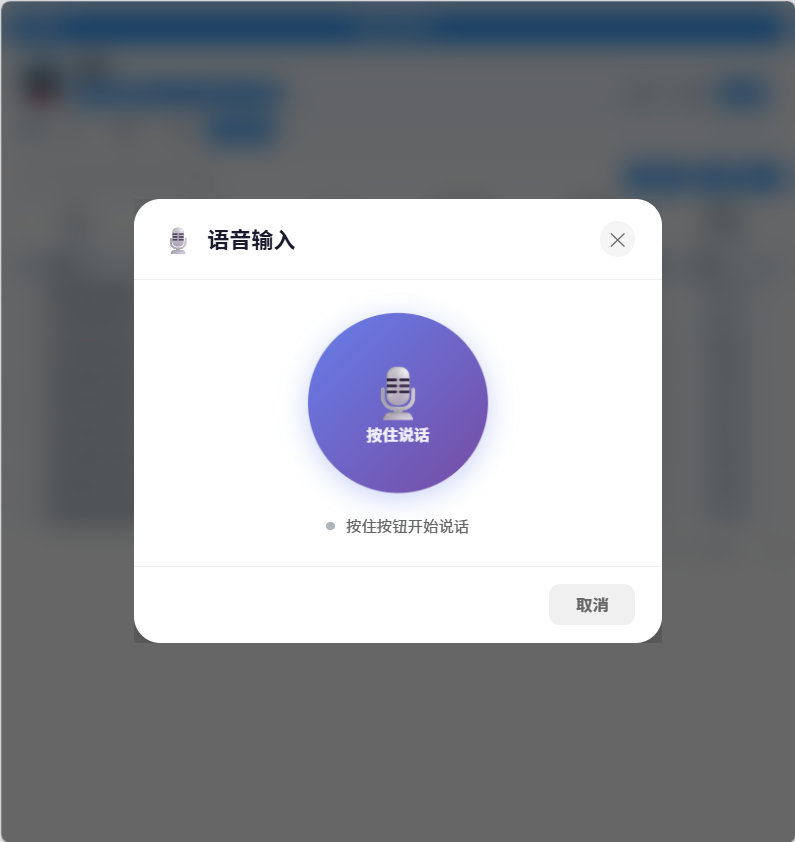
我还做了符号过滤,这里根据需求可以去掉。