目录
- [1. 存否和值选择器](#1. 存否和值选择器)
- [2. 子字符串匹配选择器](#2. 子字符串匹配选择器)
- [3. 大小写敏感](#3. 大小写敏感)
- 参考
1. 存否和值选择器
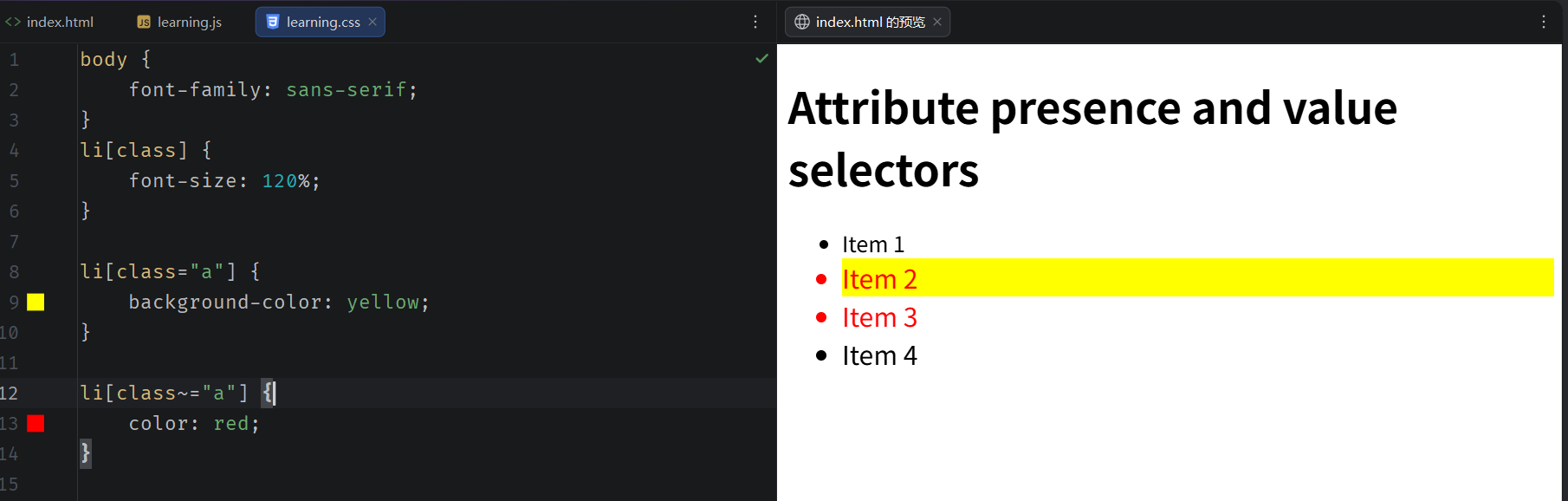
这些选择器允许基于一个元素自身是否存在或者基于各式不同的按属性值的匹配来选择元素。
| 选择器 | 示例 | 描述 |
|---|---|---|
| attr | atitle | 匹配带有一个名为attr的属性的元素 |
| attr=value | ahref="https://example.com" | 匹配带有一个名为attr的属性的元素,其attr属性的值为value |
| attr\~=value | pclass\~="special" | 匹配带有attr属性、且属性值是以空格分隔的单词列表的元素------列表中恰好有一个词完整等于value |
| attr|=value | divlang|="zh" | 匹配带有attr属性、且属性值正好等于value、或者以value开头并紧跟一个连字符(-)的元素 |
html
<!doctype html>
<html lang="zh-CN">
<head>
    <meta charset="utf-8" />
    <title>开始学习 CSS</title>
    <link rel="stylesheet" href="learning.css" />
</head>

<body>
<h1>Attribute presence and value selectors</h1>
<ul>
    <li>Item 1</li>
    <li class="a">Item 2</li>
    <li class="a b">Item 3</li>
    <li class="ab">Item 4</li>
</ul>
</body>
</html>
css
body {
  font-family: sans-serif;
}
li[class] {
  font-size: 120%;
}

li[class="a"] {
  background-color: yellow;
}

li[class~="a"] {
  color: red;
}
2. 子字符串匹配选择器
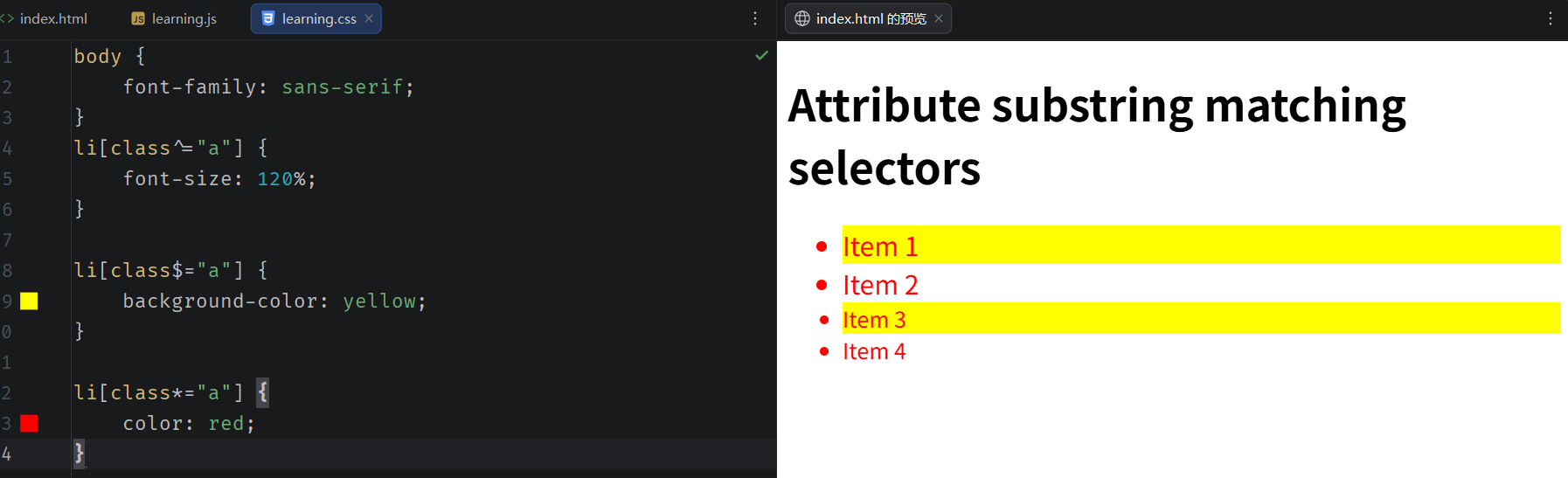
这些选择器让更高级的属性的值的字符串的匹配变得可行。例如,如果你有box-warning和box-error类,想把开头为"box-"字符串的每个物件都匹配上的话,你可以用class\^="box-"来把它们都选中。
| 选择器 | 示例 | 描述 |
|---|---|---|
| attr\^=value | liclass\^="box-" | 匹配带有一个名为attr的属性的元素,其值开头为value子字符串 |
| attr$=value | liclass$="-box" | 匹配带有一个名为attr的属性的元素,其值结尾为value子字符串 |
| attr\*=value | liclass\*="box" | 匹配带有一个名为attr的属性的元素,其值的字符串中任何地方至少出现一次value字符串 |
html
<!doctype html>
<html lang="en-US">
<head>
    <meta charset="utf-8" />
    <title>learning CSS</title>
    <link rel="stylesheet" href="learning.css" />
</head>

<body>
<h1>Attribute substring matching selectors</h1>
<ul>
    <li class="a">Item 1</li>
    <li class="ab">Item 2</li>
    <li class="bca">Item 3</li>
    <li class="bcabc">Item 4</li>
</ul>
</body>
</html>
css
body {
  font-family: sans-serif;
}
li[class^="a"] {
  font-size: 120%;
}

li[class$="a"] {
  background-color: yellow;
}

li[class*="a"] {
  color: red;
}
3. 大小写敏感
如果你想在大小写不敏感的情况下,匹配属性值的话,你可以在闭合括号之前,使用i值。这个标记告诉浏览器,要以大小写不敏感的方式匹配ASCII字符。没有了这个标记的话,值会按照文档语言对大小写的处理方式,进行匹配------HTML中是大小写敏感的。
html
<!doctype html>
<html lang="en-US">
<head>
    <meta charset="utf-8" />
    <title>learning CSS</title>
    <link rel="stylesheet" href="learning.css" />
</head>

<body>
<h1>Case-insensitivity</h1>
<ul>
    <li class="a">Item 1</li>
    <li class="A">Item 2</li>
    <li class="Ab">Item 3</li>
</ul>
</body>
</html>
css
li[class^="a"] {
    background-color: yellow;
}

li[class^="a" i] {
    color: red;
}
参考
1、属性选择器