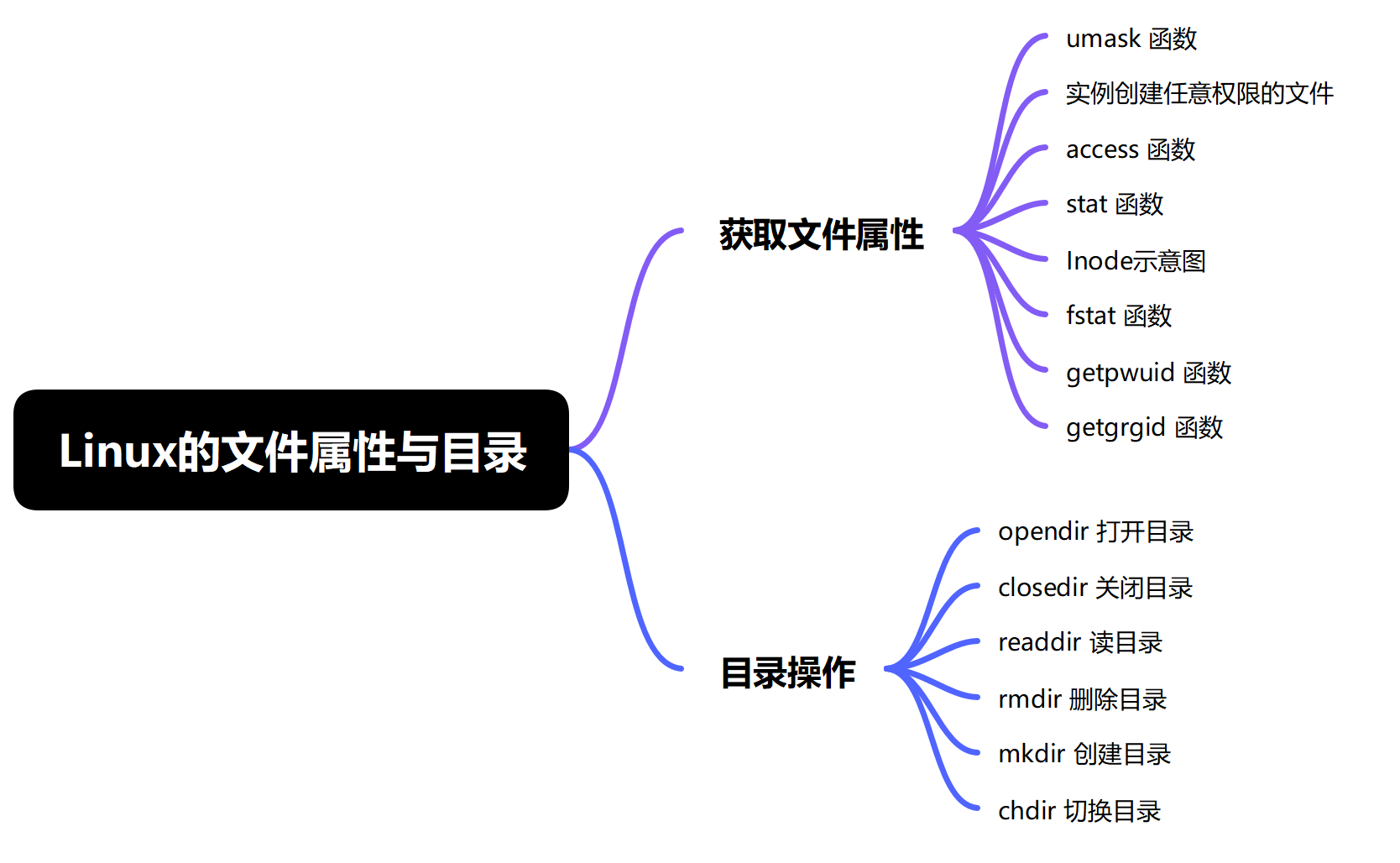
一、获取文件属性
1、umask 函数
cpp
mode_t umask(mode_t mask);函数功能:权限屏蔽
函数参数:【mask】给的屏蔽位。例如 : 0111 的屏蔽位, 将来的文件权限
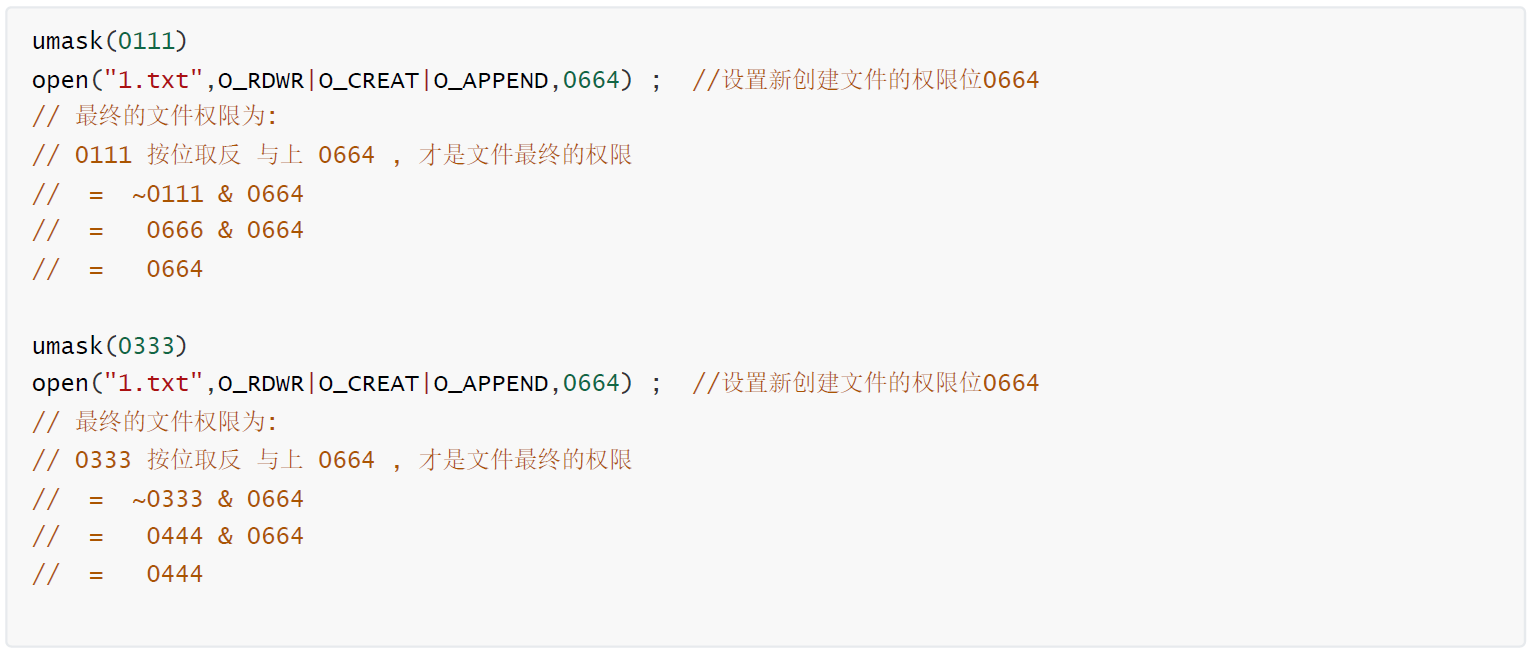
函数返回值:成功返回,之前屏蔽位的值,This system call always succeeds and the previous value of the mask is returned.
2、实例创建任意权限的文件
cpp
#include <stdio.h>
#include <stdlib.h>
#include <sys/types.h>
#include <sys/stat.h>
#include <fcntl.h>
#include <unistd.h>
int main(int argc, char const *argv[])
{
    int fd1, fd2, fd3;
    // 获取umask的值
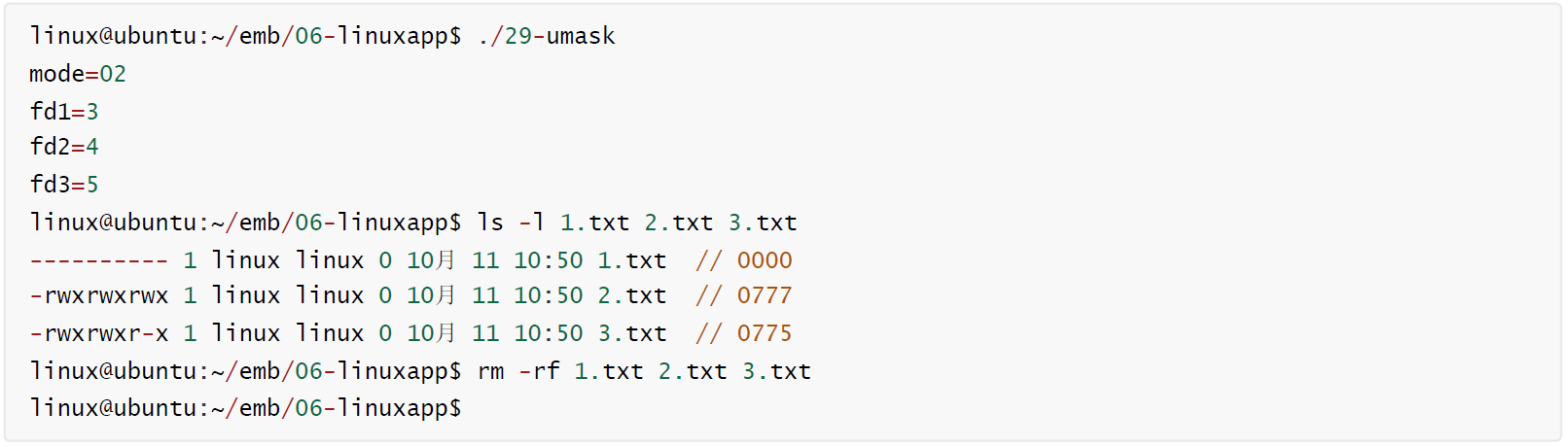
    mode_t mode = umask(0777) ;
    printf("mode=%#o\n",mode);

    // 最终文件的权限:
    // = ~0777 & 0664
    // = 0000 & 0664
    // = 0000
    fd1 = open("1.txt", O_RDWR | O_CREAT | O_TRUNC, 0664); // "w+"
    if (fd1 < 0)
    {
        perror("open");
        exit(-1);
    }

    umask(0);
    // 最终文件的权限:
    // = ~0000 & 0777
    // = 0777 & 0777
    // = 0777
    fd2 = open("2.txt", O_RDWR | O_CREAT | O_TRUNC, 0777); // "w+"
    if (fd2 < 0)
    {
        perror("open");
        exit(-1);
    }

    umask(2);
    // 最终文件的权限:
    // = ~0002 & 0777
    // = 0775 & 0777
    // = 0775
    fd3 = open("3.txt", O_RDWR | O_CREAT | O_TRUNC, 0777); // "w+"
    if (fd3 < 0)
    {
        perror("open");
        exit(-1);
    }
    printf("fd1=%d\n", fd1); // 文件表述符,一个非负整数,0,1,2,默认使用
    printf("fd2=%d\n", fd2); // 文件表述符,一个非负整数,0,1,2,默认使用
    printf("fd3=%d\n", fd3); // 文件表述符,一个非负整数,0,1,2,默认使用
    close(fd1);
    close(fd2);
    close(fd3);

    return 0;
}
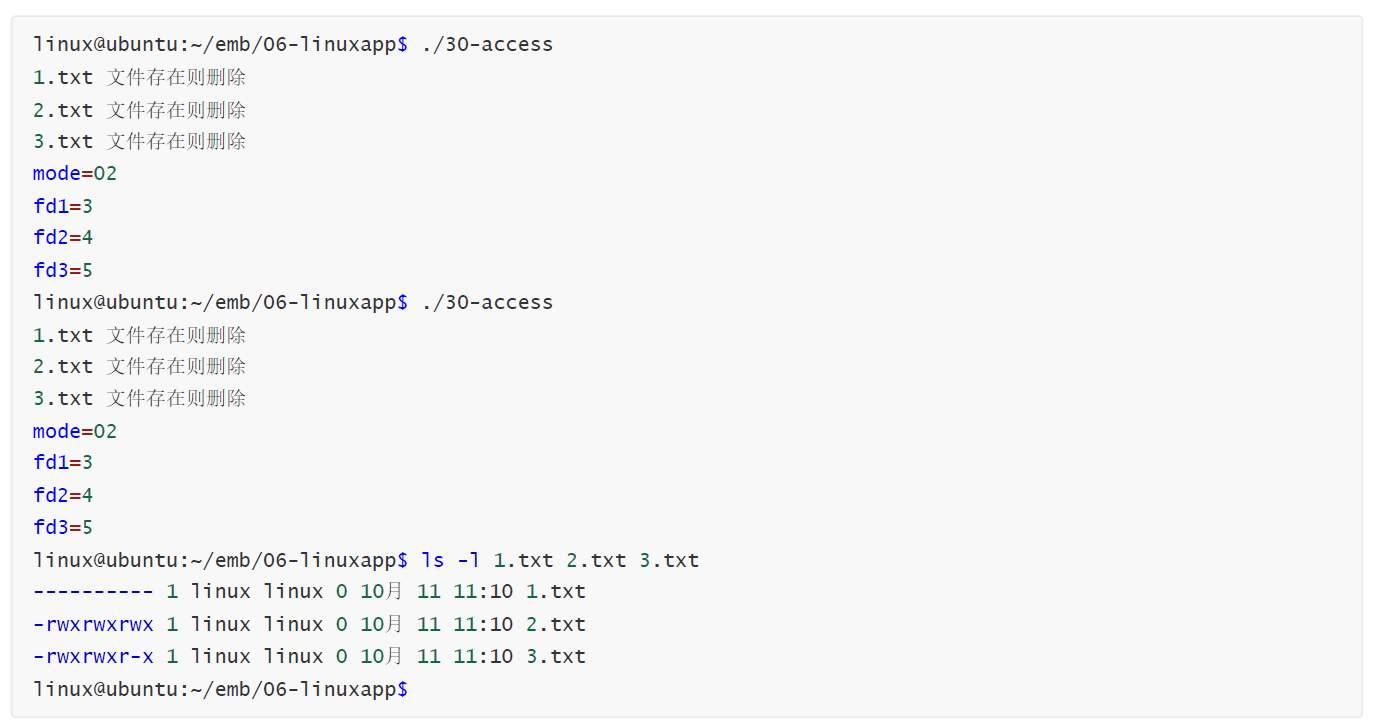
2、access 函数
cpp
int access(const char *pathname, int mode);函数功能:检查一个文件的权限(可读, 可写,可执行, 是否存在)
函数参数:【pathname 】要检查的文件名;【mode】F_OK : 测试文件是否存在,R_OK : 可读,W_OK : 可写,X_OK. : 可执行
返回值:成功返回,0;失败返回,-1 并设置errno;On success (all requested permissions granted, or mode is F_OK and the file exists), zero is returned. On error (at least one bit in mode asked for a permission that is denied, or mode is F_OK and the file does not exist, or some other error occurred), -1 is returned, and errno is set appropriately.
3、stat 函数
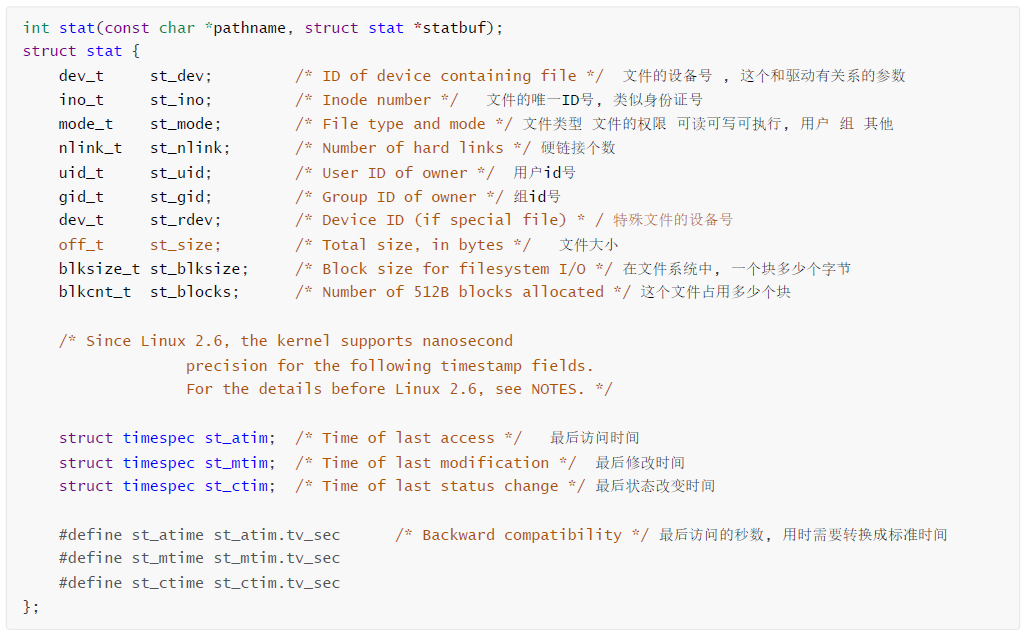
函数功能:获取文件的属性信息
函数参数:【pathname 】文件名;【statbuf】保存文件属性信息的结构体指针
函数返回值:成功返回,0,On success, zero is returned;失败返回 :-1 并设置errno,On error, -1 is returned, and errno is set appropriately.
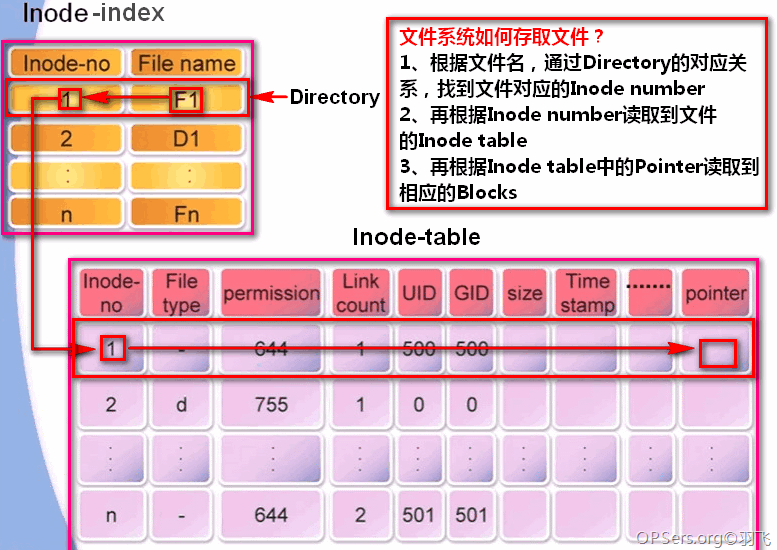
4、Inode示意图
文件系统的分区表,文件名类似人的姓名,Inode 号类似人的身份证号
5、fstat 函数
cpp
int fstat(int fd, struct stat *statbuf);函数功能:获取已经打开文件的属性信息
函数参数:【fd】已经打开的文件;【statbuf】保存文件属性信息的结构体指针
函数返回值:成功返回0,On success, zero is returned;失败返回-1 并设置errno,On error, -1 is returned, and errno is set appropriately.
6、getpwuid 函数
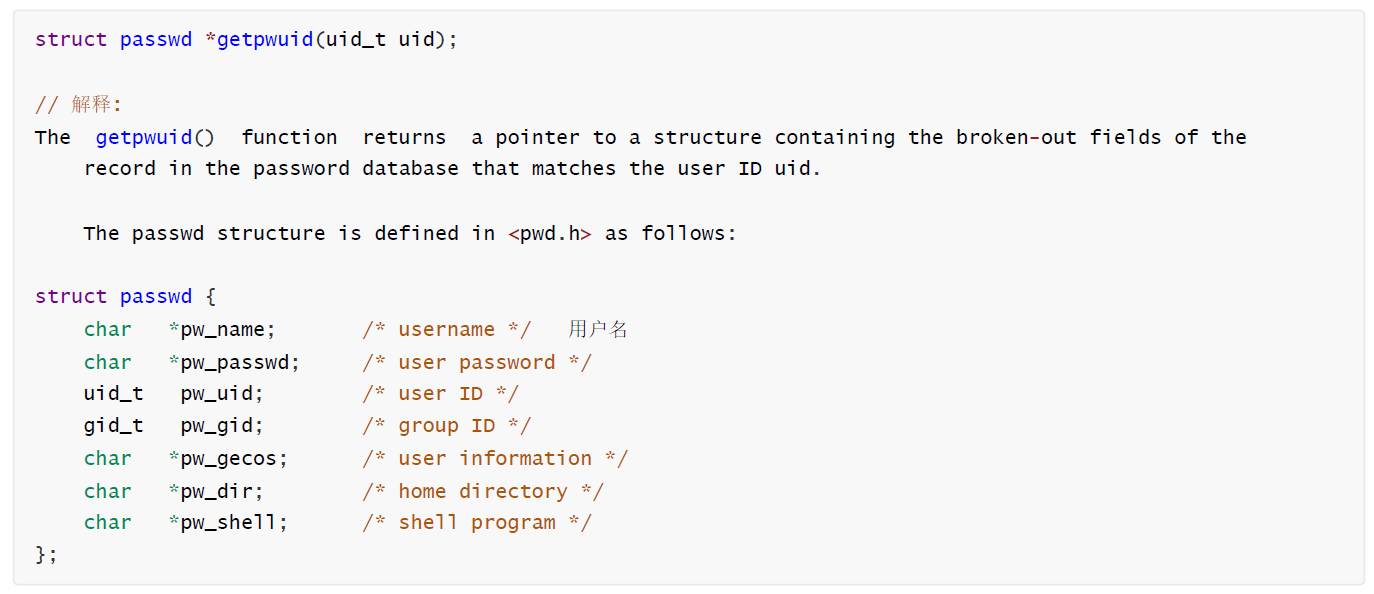
函数功能:根据文件的uid来获取用户名
函数参数:【uid】文件的所有者的id号
函数返回值:成功返回,结构体的首地址;失败返回,NULL 并设置errno
7、getgrgid 函数
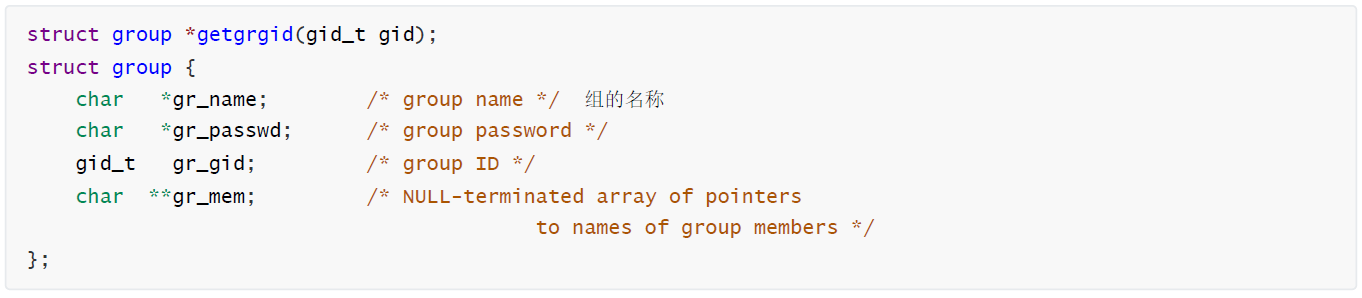
函数功能:根据文件的gid来获取组的用户名
函数参数:【gid】文件的所有组的id号
函数返回值:成功返回,结构体的首地址;失败返回,NULL 并设置errno
使用stat函数来实现stat命令的功能
cpp
#include <stdio.h>
#include <sys/stat.h>
#include <unistd.h>
#include <stdlib.h>
#include <string.h>
#include <sys/types.h>
#include <fcntl.h>
#include <pwd.h>
#include <grp.h>
#include <time.h>

// 计算时区的函数
int get_timezone()
{
    // 获取当前的时间  , 时间是基于 1970-01-01 00:00:00  到今年的时间秒数
    time_t t1 = time(NULL);

    struct tm *tm = gmtime(&t1); // 这个函数输出的是 基准时间 , 英国时间 , 时区是 +0000

    time_t t2 = mktime(tm); // 这个函数将 tm 结构体转换为时间秒数

    // t1 +0800 的时间  中国时间
    // t2 +0000 的时间  英国时间
    //printf("t1 = %ld, t2 = %ld\n", t1, t2);

    return (t1 - t2) / 36;
}

int main(int argc, char const *argv[])
{

    if (argc != 2)
    {
        printf("Usage: %s <filename>\n", argv[0]);
        return -1;
    }

    struct stat st;
    if (stat(argv[1], &st) < 0)
    {
        perror("stat");
        return -1;
    }

    //
    printf("文件:%s\n", argv[1]);
    printf("大小:%ld\t\t", st.st_size);
    printf("块:%ld\t\t", st.st_blocks);
    printf("IO 块大小:%ld\t", st.st_blksize);

    // 判断文件类型
    if (S_ISREG(st.st_mode))
    {
        printf("普通文件\n");
    }
    else if (S_ISDIR(st.st_mode))
    {
        printf("目录文件\n");
    }
    else if (S_ISCHR(st.st_mode))
    {
        printf("字符设备文件\n");
    }
    else if (S_ISBLK(st.st_mode))
    {
        printf("块设备文件\n");
    }
    else if (S_ISFIFO(st.st_mode))
    {
        printf("管道文件\n");
    }
    else if (S_ISLNK(st.st_mode))
    {
        printf("符号链接文件\n");
    }
    else if (S_ISSOCK(st.st_mode))
    {
        printf("套接字文件\n");
    }
    else
    {
        printf("未知文件类型\n");
    }

    printf("设备:%lxh/%ldd\t", st.st_dev, st.st_dev);
    printf("Inode:%ld\t", st.st_ino);
    printf("硬链接:%ld\n", st.st_nlink);

    // 权限
    printf("权限:(%#o/", st.st_mode & 0777);

    // 判断文件类型 bcd-lsp
    if (S_ISREG(st.st_mode))
    {
        printf("-");
    }
    else if (S_ISDIR(st.st_mode))
    {
        printf("d");
    }
    else if (S_ISCHR(st.st_mode))
    {
        printf("c");
    }
    else if (S_ISBLK(st.st_mode))
    {
        printf("b");
    }
    else if (S_ISFIFO(st.st_mode))
    {
        printf("p");
    }
    else if (S_ISLNK(st.st_mode))
    {
        printf("l");
    }
    else if (S_ISSOCK(st.st_mode))
    {
        printf("s");
    }
    else
    {
        printf("?");
    }

    // 权限 rwx-rwx-rwx
    if (st.st_mode & S_IRUSR)
        printf("r");
    else
        printf("-");
    if (st.st_mode & S_IWUSR)
        printf("w");
    else
        printf("-");
    if (st.st_mode & S_IXUSR)
        printf("x");
    else
        printf("-");

    if (st.st_mode & S_IRGRP)
        printf("r");
    else
        printf("-");
    if (st.st_mode & S_IWGRP)
        printf("w");
    else
        printf("-");
    if (st.st_mode & S_IXGRP)
        printf("x");
    else
        printf("-");

    if (st.st_mode & S_IROTH)
        printf("r");
    else
        printf("-");
    if (st.st_mode & S_IWOTH)
        printf("w");
    else
        printf("-");
    if (st.st_mode & S_IXOTH)
        printf("x");
    else
        printf("-");
    printf(")\t");

    // 按照如下输出: Uid: ( 1000/   linux)
    struct passwd *pwd = getpwuid(st.st_uid);
    printf("Uid: ( %d/   %s)\t", st.st_uid, pwd->pw_name);

    // 按照如下输出: Gid: ( 1000/   linux)
    struct group *grp = getgrgid(st.st_gid);
    printf("Gid: ( %d/   %s)\n", st.st_gid, grp->gr_name);

    // 按照如下输出: 访问时间:2026-01-01 14:19:27.904854493 +0800
    // 使用 strftime 格式化时间

    int timezone = get_timezone(); // 把时区单独提取出来进行保存, 因为在 get_timezone有对时间进行操作的函数。
    char time_str[128] = {0};
    strftime(time_str, sizeof(time_str), "%Y-%m-%d %H:%M:%S", localtime(&st.st_atime));
    printf("访问时间:%s.%09ld %+05d\n", time_str,st.st_atim.tv_nsec,timezone);

    // 按照如下输出: 修改时间:2026-01-01 14:19:27.904854493 +0800
    strftime(time_str, sizeof(time_str), "%Y-%m-%d %H:%M:%S", localtime(&st.st_mtime));
    printf("修改时间:%s.%09ld %+05d\n", time_str,st.st_mtim.tv_nsec,timezone);

    // 按照如下输出: 状态时间:2026-01-01 14:19:27.904854493 +0800
    strftime(time_str, sizeof(time_str), "%Y-%m-%d %H:%M:%S", localtime(&st.st_ctime));
    printf("状态时间:%s.%09ld %+05d\n", time_str,st.st_ctim.tv_nsec,timezone);

    // 创建时间:2025-12-31 14:08:07.683888538 +0800
    strftime(time_str, sizeof(time_str), "%Y-%m-%d %H:%M:%S", localtime(&st.st_mtime));
    printf("创建时间:%s.%09ld %+05d\n", time_str,st.st_mtim.tv_nsec,timezone);

    return 0;
}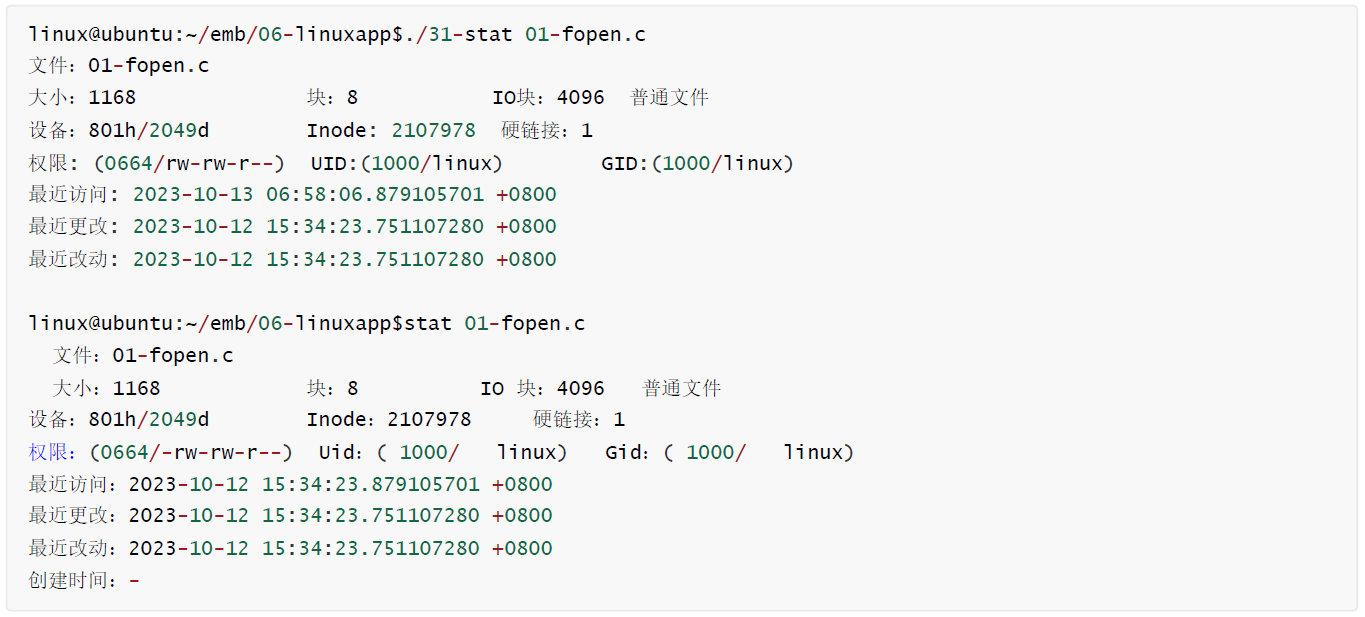
这个程序有bug, 问题是命令输出的时间和我们自己写的程序时间不一致
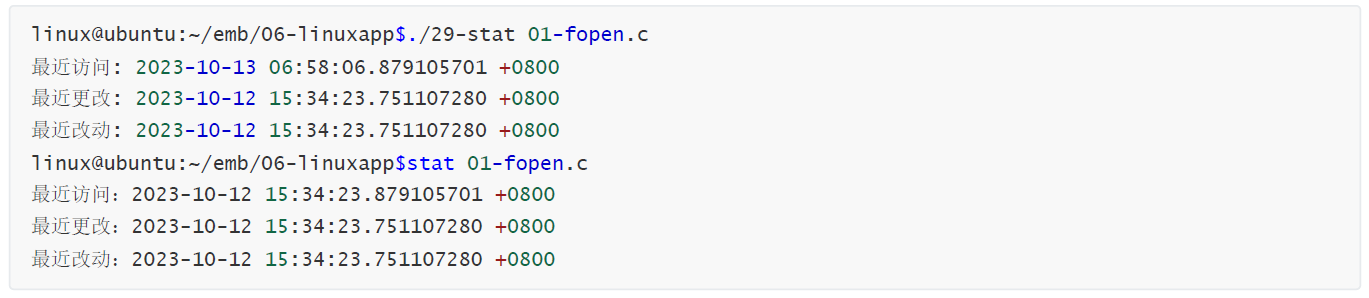
问题解决核心代码
cpp
int timezone = get_timezone(); // 把时区单独提取出来进行保存, 因为在 get_timezone有对时间进行操作的函数。

struct tm *tmp = localtime(&st.st_atime); // st_atime 就是秒数 最后访问时间
printf("最近访问: %04d-%02d-%02d %02d:%02d:%02d.%09ld %+05d\n", tmp->tm_year + 1900, tmp->tm_mon + 1, tmp->tm_mday, tmp->tm_hour, tmp->tm_min, tmp->tm_sec, st.st_atim.tv_nsec, timezone);

tmp = localtime(&st.st_mtime); // st_mtime 就是秒数 最后更改时间
printf("最近更改: %04d-%02d-%02d %02d:%02d:%02d.%09ld %+05d\n", tmp->tm_year + 1900, tmp->tm_mon + 1, tmp->tm_mday, tmp->tm_hour, tmp->tm_min, tmp->tm_sec, st.st_mtim.tv_nsec, timezone);

tmp = localtime(&st.st_ctime); // st_ctime 就是秒数 最后状态改动时间
printf("最近改动: %04d-%02d-%02d %02d:%02d:%02d.%09ld %+05d\n", tmp->tm_year + 1900, tmp->tm_mon + 1, tmp->tm_mday, tmp->tm_hour, tmp->tm_min, tmp->tm_sec, st.st_ctim.tv_nsec, timezone);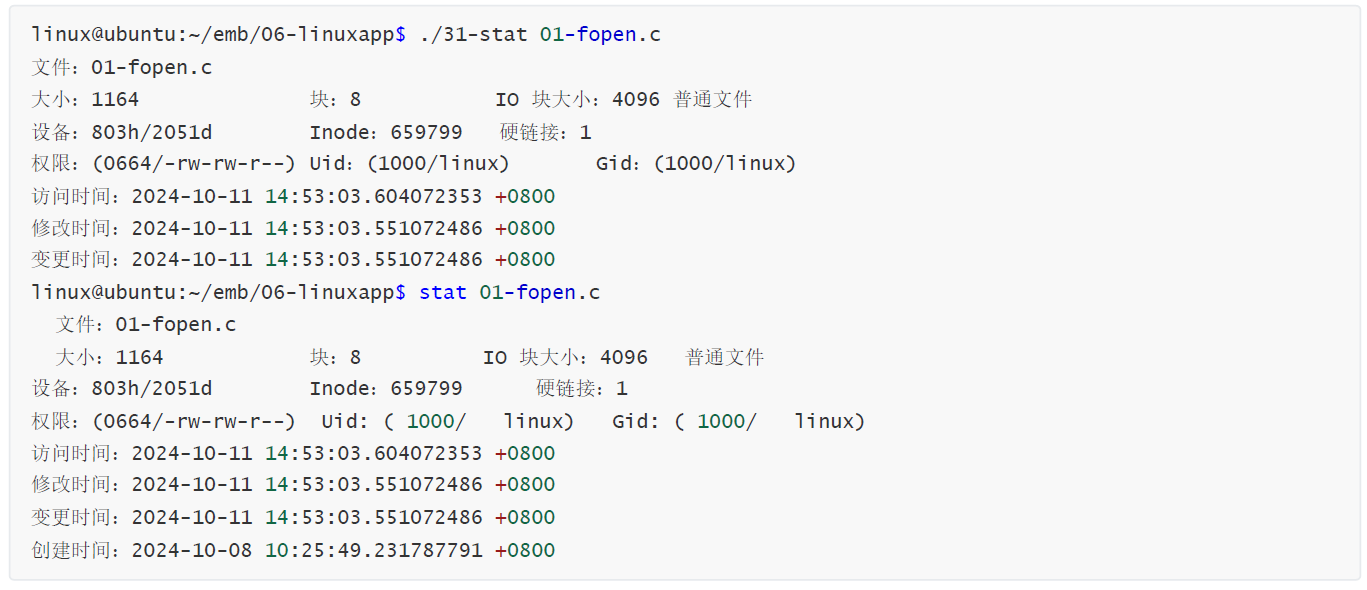
二、目录操作
1、opendir 打开目录
cpp
DIR *opendir(const char *name);
/* This is the data type of directory stream objects.
The actual structure is opaque to users. */
typedef struct __dirstream DIR;
函数功能:打开指定的目录
函数参数:【name】要打开目录的名称
函数返回值:成功返回,结构体的首地址;失败返回,NULL 并设置errno,On error, NULL is returned, and errno is set appropriately.
2、closedir 关闭目录
cpp
int closedir(DIR *dirp);函数功能:关闭已经打开的目录
函数参数:【dirp】要关闭的目录指针
函数返回值:成功返回0,失败返回-1 并设置errno,On error, -1 is returned, and errno is set appropriately.
3、readdir 读目录
cpp
struct dirent *readdir(DIR *dirp);
struct dirent {
    ino_t d_ino; /* Inode number */
    off_t d_off; /* Not an offset; see below */
    unsigned short d_reclen; /* Length of this record */
    unsigned char d_type; /* Type of file; not supported by all filesystem types */
    char d_name[256]; /* Null-terminated filename */ 目录中的内容 , 目录内有子目录或文件名
};
函数功能:读已经打开的目录
函数参数:【dirp】要读目录的指针
函数返回值:成功返回,结构体的首地址;NULL 表示目录读完 , 不设置errno;If the end of the directory stream is reached, NULL is returned and errno is not changed。失败返回,NULL 并设置errno,If an error occurs, NULL is returned and errno is set appropriately.
4、rmdir 删除目录
cpp
int rmdir(const char *pathname);函数功能:删除指定的目录
函数参数:【pathname】要删除的目录
函数返回值:成功返回0,On success, zero is returned;失败返回,-1并设置errno,On error, -1 is returned, and errno is set appropriately.
5、mkdir 创建目录
cpp
int mkdir(const char *pathname, mode_t mode);函数功能:用给定的权限创建一个目录
函数参数:【pathname】要创建的目录;【mode】创建目录的权限, 和open函数的权限一样
函数返回值:成功返回0,On success, zero is returned。失败返回-1并设置errno,On error, -1 is returned, and errno is set appropriately.
6、chdir 切换目录
cpp
int chdir(const char *path);函数功能:切换目录, 等同于命令的cd
函数参数:【path】要切换的目录
函数返回值:成功返回0,On success, zero is returned。失败返回,-1并设置errno,On error, -1 is returned, and errno is set appropriately.
使用opendir, readdir , closedir 读取目录中的内容
cpp
#include <stdio.h>
#include <stdlib.h>
#include <string.h>
#include <sys/types.h>
#include <sys/stat.h>
#include <fcntl.h>
#include <unistd.h>
#include <dirent.h>

int main(int argc, char const *argv[])
{
    if (argc != 2)
    {
        printf("Usage: %s <dirname>\n", argv[0]);
        return -1;
    }

    DIR *dir = opendir(argv[1]);
    if (dir == NULL)
    {
        perror("opendir");
        return -1;
    }
    struct dirent *dent = NULL;
    while ((dent = readdir(dir)) != NULL)
    {
        // 过滤掉 .
        if (strncmp(dent->d_name, ".", 1) == 0) continue;
        printf("%s  ", dent->d_name);
    }
    printf("\n");
    closedir(dir);

    return 0;
}