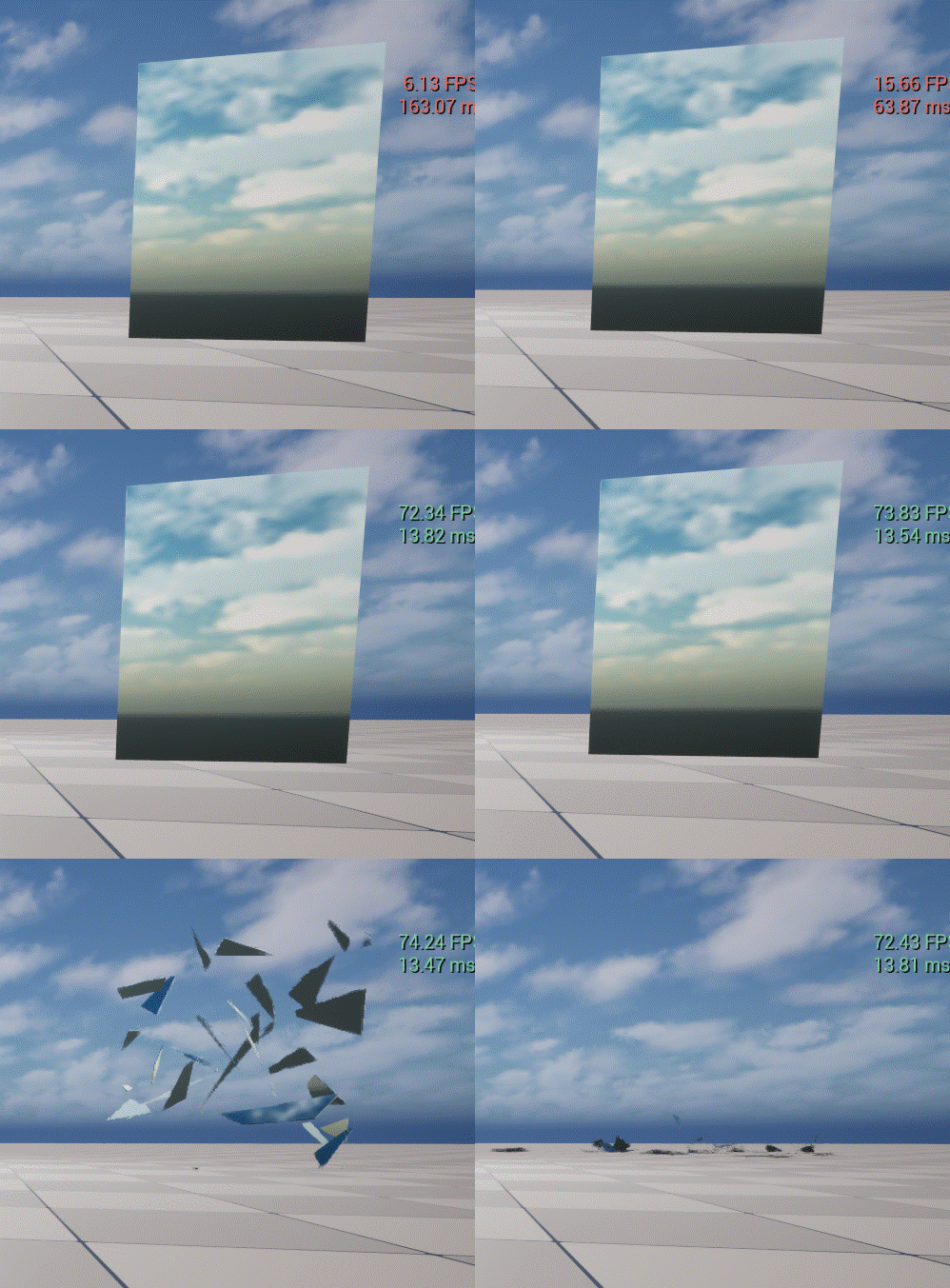
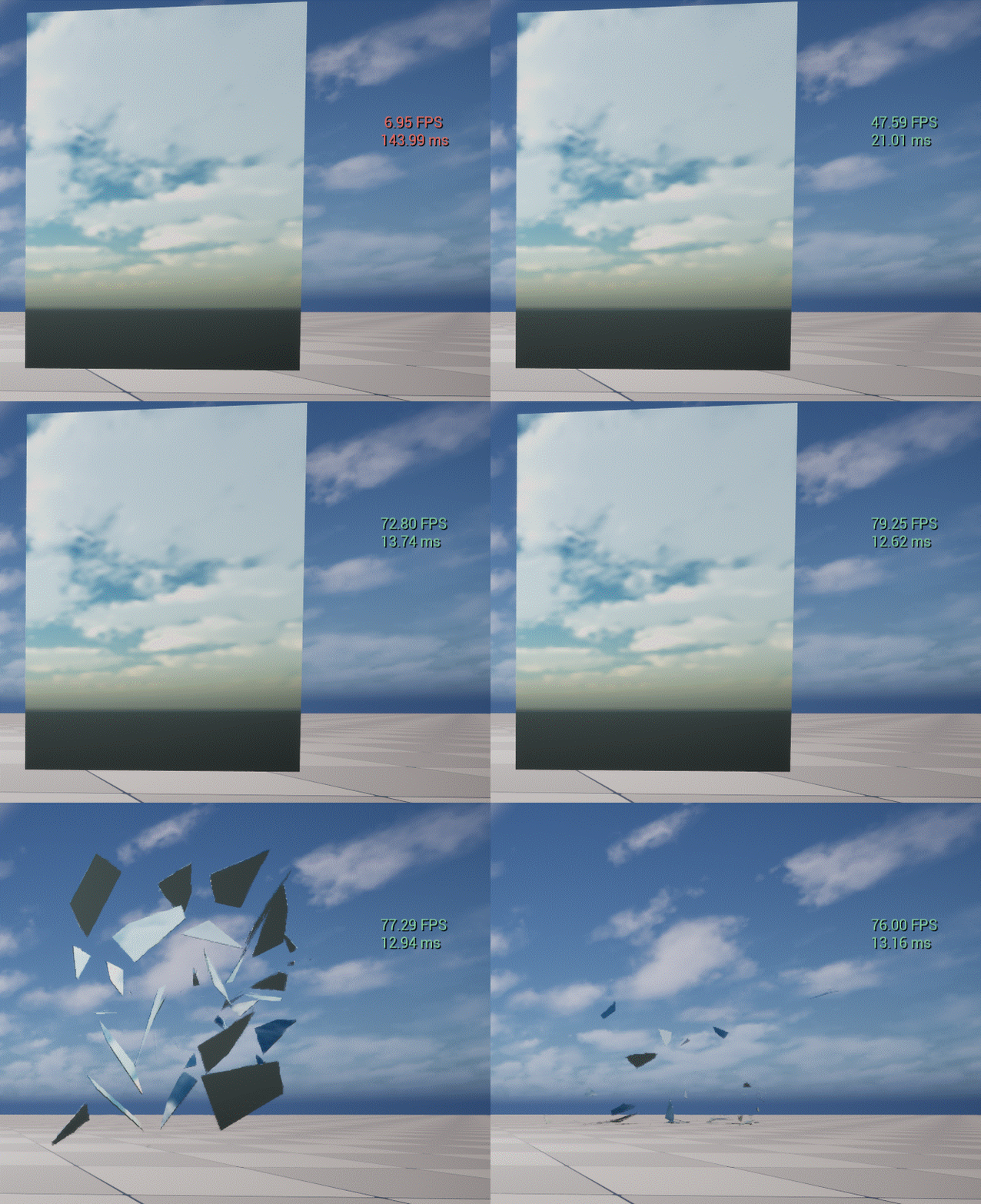
玻璃击碎完整流程
射线命中玻璃
    ↓
保存命中点、射击方向、Seed、冲量
    ↓
生成二维碎片轮廓
    ↓
异步生成三维 Mesh 和碰撞数据
    ↓
回到 Game Thread 创建碎片组件
    ↓
分批启用物理并施加冲量
    ↓
隐藏完整玻璃
我们从接口位置来看看执行的流程
void URuntimeGlassDestructionBPLibrary::BreakGlassFromHit(
	ARuntimeGlassPaneActor* GlassPane,
	const FHitResult& Hit,
	int32 Seed,
	float ShotImpulse)
{
	if (!GlassPane)
	{
		return;
	}

	GlassPane->BreakFromHitResult(
		Hit,
		Seed,
		ShotImpulse);
}
首先暴漏接口到Library里面,让上层能够直接调用函数库的内容,直接做出破碎效果。
第一个参数是击中的玻璃Actor
Hit击中的信息
ShotDirection物体击中的方向
Seed击中后生成的随机种子,可按照一定程度上调整生成裂缝的形态
ShotImpluse击中的冲量的是多少
void ARuntimeGlassPaneActor::BreakFromHitResult(
    const FHitResult& Hit,
    int32 Seed,
    float InShotImpulse)
{
    // Prefer the actual trace travel direction when the hit result contains
    // a valid trace. This avoids depending on a Blueprint vector whose
    // orientation may be reversed or expressed in the wrong space.
    FVector ResolvedShotDirection = Hit.TraceEnd - Hit.TraceStart;
    if (ResolvedShotDirection.IsNearlyZero())
    {
        FVector ViewLocation;
        FRotator ViewRotation;

        if (UWorld* World = GetWorld())
        {
            if (APlayerController* PlayerController = World->GetFirstPlayerController())
            {
                PlayerController->GetPlayerViewPoint(ViewLocation, ViewRotation);
                ResolvedShotDirection = ViewRotation.Vector();
            }
        }
    }

    BreakAtWorldPoint(Hit.ImpactPoint, ResolvedShotDirection, Seed, InShotImpulse);
}
如果射出去的物体和击中的物体距离为接近0,那么就用视口的向前向量作为击中的位置
void ARuntimeGlassPaneActor::BreakAtWorldPoint(
    FVector WorldHitPoint,
    FVector ShotDirection,
    int32 Seed,
    float InShotImpulse)
{
    if (bBroken) return;

    const int32 ResolvedRayCount = FMath::Clamp(RayCount, 3, 128);
    const int32 ResolvedRingCount = FMath::Clamp(RingCount, 1, 128);
    const float ResolvedAngleJitter = AngleJitter;
    const float ResolvedRadiusJitter = RadiusJitter;
    const float ResolvedMinShardArea = FMath::Max(0.0f, MinShardArea);
    constexpr int32 AbsoluteMaxShardCount = 4096;
    const float ResolvedShotImpulse = InShotImpulse >= 0.0f ? InShotImpulse : ShotImpulse;
    const float ResolvedShardMassKg = ShardMassKg;
    const float ResolvedCrackGap = CrackGap;
    const int32 ResolvedSeed = Seed > 0 ? Seed : FMath::RandRange(1, MAX_int32);

    bBroken = true;
    SetActorTickEnabled(true);

    if (bEnableShardShardCollision)
    {
        FRuntimeGlassDestructionModule::Get().EnsureShardContactModification(GetWorld());
    }

    IntactGlass->SetCollisionEnabled(ECollisionEnabled::NoCollision);

    // ShotDirection is the projectile travel direction in world space. Use it
    // consistently for both translation and torque without guessing or
    // reversing the caller's vector.
    FVector SafeShotDir = ShotDirection.GetSafeNormal();
    if (SafeShotDir.IsNearlyZero())
    {
        FVector ViewLocation;
        FRotator ViewRotation;
        if (UWorld* World = GetWorld())
        {
            if (APlayerController* PlayerController = World->GetFirstPlayerController())
            {
                PlayerController->GetPlayerViewPoint(ViewLocation, ViewRotation);
                SafeShotDir = ViewRotation.Vector().GetSafeNormal();
            }
        }
    }

    const FTransform PaneTransform = IntactGlass ? IntactGlass->GetComponentTransform() : GetActorTransform();
    const FVector LocalHit3 = PaneTransform.InverseTransformPosition(WorldHitPoint);
    FVector2D LocalHit(LocalHit3.X, LocalHit3.Y);
    LocalHit.X = FMath::Clamp(LocalHit.X, -Width * 0.5f + 0.1f, Width * 0.5f - 0.1f);
    LocalHit.Y = FMath::Clamp(LocalHit.Y, -Height * 0.5f + 0.1f, Height * 0.5f - 0.1f);

    TArray<FRuntimeGlassShard2D> GeneratedShards;
    GenerateShards(LocalHit, ResolvedSeed, ResolvedRayCount, ResolvedRingCount, ResolvedAngleJitter, ResolvedRadiusJitter, ResolvedMinShardArea, AbsoluteMaxShardCount, GeneratedShards);

    if (GeneratedShards.Num() < 3)
    {
        bBroken = false;
        bPendingHideIntactGlass = false;
        IntactHandoffElapsed = 0.0f;
        IntactGlass->SetCollisionEnabled(ECollisionEnabled::QueryAndPhysics);
        return;
    }

    RuntimeGlass::FAsyncShardBuildInput BuildInput;
    BuildInput.GeneratedShards = MoveTemp(GeneratedShards);
    BuildInput.LocalHit = LocalHit;
    BuildInput.WorldHitPoint = WorldHitPoint;
    BuildInput.ShotDirection = SafeShotDir;
    BuildInput.PaneTransform = PaneTransform;
    BuildInput.IntactRelativeTransform = IntactGlass ? IntactGlass->GetRelativeTransform() : FTransform::Identity;
    BuildInput.PaneWidth = Width;
    BuildInput.PaneHeight = Height;
    BuildInput.ShardThickness = GetLocalThicknessForComponent(IntactGlass);
    BuildInput.CrackGap = ResolvedCrackGap;
    BuildInput.GlassMassKg = ResolvedShardMassKg;
    BuildInput.ShotImpulse = ResolvedShotImpulse;
    BuildInput.bDoubleSidedGeometry = bBuildDoubleSidedGeometry;
    BuildInput.bInvertMeshNormals = bInvertMeshNormals;
    // Keep these values local to the build dispatch so stale UE-generated
    // headers from an incremental build cannot make the module fail with an
    // undeclared Actor member. The runtime build path still uses one convex
    // proxy per physical shard.
    BuildInput.Generation = ++AsyncShardBuildGeneration;

    bPendingHideIntactGlass = true;
    IntactHandoffElapsed = 0.0f;
    SetActorTickInterval(0.05f);

    const TWeakObjectPtr<ARuntimeGlassPaneActor> WeakThis(this);
    Async(EAsyncExecution::ThreadPool, [WeakThis, Input = MoveTemp(BuildInput)]() mutable
    {
        TSharedRef<FRuntimeGlassAsyncBuildResult, ESPMode::ThreadSafe> Result =
            MakeShared<FRuntimeGlassAsyncBuildResult, ESPMode::ThreadSafe>(
                RuntimeGlass::BuildShardDataAsync(MoveTemp(Input)));
        AsyncTask(ENamedThreads::GameThread, [WeakThis, Result]() mutable
        {
            if (ARuntimeGlassPaneActor* Actor = WeakThis.Get())
            {
                Actor->FinalizeAsyncShardBuild(MoveTemp(*Result));
            }
        });
    });

    return;

}
上面过长,分解来看,先看这一段:
    const int32 ResolvedRayCount = FMath::Clamp(RayCount, 3, 128);
    const int32 ResolvedRingCount = FMath::Clamp(RingCount, 1, 128);
    const float ResolvedAngleJitter = AngleJitter;
    const float ResolvedRadiusJitter = RadiusJitter;
    const float ResolvedMinShardArea = FMath::Max(0.0f, MinShardArea);
    constexpr int32 AbsoluteMaxShardCount = 4096;
    const float ResolvedShotImpulse = InShotImpulse >= 0.0f ? InShotImpulse : ShotImpulse;
    const float ResolvedShardMassKg = ShardMassKg;
    const float ResolvedCrackGap = CrackGap;
const int32 ResolvedSeed = Seed > 0 ? Seed : FMath::RandRange(1, MAX_int32);| 变量 | 含义 |
|---|---|
ResolvedRayCount |
放射方向数量。决定从命中点向外生成多少条裂缝方向。范围限制为 3 ~ 128。越大,碎片越多、图案越细、生成成本越高。 |
ResolvedRingCount |
环形层数。决定从命中点向外生成多少圈碎片。范围限制为 1 ~ 128。越大,径向碎片越多。 |
ResolvedAngleJitter |
角度随机扰动。让每条放射裂缝不完全均匀,避免生成规则的轮辐状图案。当前代码只读取 AngleJitter,具体安全限制在 GenerateShards() 中继续处理。 |
ResolvedRadiusJitter |
半径随机扰动。控制每一圈裂缝距离的随机变化,使碎片大小不那么规则。当前代码只读取 RadiusJitter,具体限制在 GenerateShards() 中处理。 |
ResolvedMinShardArea |
碎片最小面积。面积小于该值的碎片会被过滤,避免生成过小、退化或不稳定的碎片。最小不会低于 0。 |
AbsoluteMaxShardCount |
本次破碎允许生成的硬上限,固定为 4096。它是代码级安全阈值,不是蓝图可调参数,用于防止 Ray 和 Ring 设置过高导致碎片爆炸式增长。 |
ResolvedShotImpulse |
碎片受到的初始冲量大小。InShotImpulse >= 0 时使用函数传入值,否则使用 Actor 上的 ShotImpulse。它影响碎片飞散力度,不是方向,也不是直接速度。 |
ResolvedShardMassKg |
玻璃整体质量,单位为千克。后续会根据每个碎片的面积比例分配质量。质量越大,在相同冲量下碎片速度越低。 |
ResolvedCrackGap |
碎片之间的裂缝间隙或分离距离。用于生成破碎后的视觉裂缝效果和碎片间距。 |
ResolvedSeed |
随机种子。用于保证破碎图案可复现。Seed > 0 时使用传入种子;Seed <= 0 时随机生成一个种子。 |
再来看这一段代码:
if (bEnableShardShardCollision)
{
    FRuntimeGlassDestructionModule::Get().EnsureShardContactModification(GetWorld());
}

void FRuntimeGlassDestructionModule::EnsureShardContactModification(UWorld* World)
{
	if (!Impl || !World || Impl->WorldCallbacks.Contains(World))
	{
		return;
	}

	FPhysScene* PhysicsScene = World->GetPhysicsScene();
	Chaos::FPhysicsSolver* Solver = PhysicsScene ? PhysicsScene->GetSolver() : nullptr;
	if (!Solver)
	{
		return;
	}

	FImpl::FWorldCallback& Entry = Impl->WorldCallbacks.Add(World);
	Entry.Solver = Solver;
	Entry.Callback = Solver->CreateAndRegisterSimCallbackObject_External<RuntimeGlassDestruction::FShardContactModificationCallback>();
}
首先这个Impl是这个类型:TUniquePtr<FImpl> Impl;,Flmpl是自定义类型,具体如下:
struct FRuntimeGlassDestructionModule::FImpl
{
	struct FWorldCallback
	{
		Chaos::FPhysicsSolver* Solver = nullptr;
		RuntimeGlassDestruction::FShardContactModificationCallback* Callback = nullptr;
	};

	TMap<UWorld*, FWorldCallback> WorldCallbacks;

	struct FWorldShardPool
	{
		TWeakObjectPtr<AActor> Owner;
		TArray<TWeakObjectPtr<UDynamicMeshComponent>> Available;
	};

	TMap<UWorld*, FWorldShardPool> WorldShardPools;

	AActor* GetOrCreatePoolOwner(UWorld* World)
	{
		if (!World)
		{
			return nullptr;
		}

		FWorldShardPool& Pool = WorldShardPools.FindOrAdd(World);
		if (AActor* ExistingOwner = Pool.Owner.Get())
		{
			return ExistingOwner;
		}

		FActorSpawnParameters SpawnParameters;
		SpawnParameters.Name = MakeUniqueObjectName(
			World->PersistentLevel,
			AActor::StaticClass(),
			TEXT("RuntimeGlassShardPool"));
		SpawnParameters.ObjectFlags = RF_Transient;
		SpawnParameters.SpawnCollisionHandlingOverride = ESpawnActorCollisionHandlingMethod::AlwaysSpawn;
		AActor* Owner = World->SpawnActor<AActor>(AActor::StaticClass(), FTransform::Identity, SpawnParameters);
		if (Owner)
		{
			Owner->SetActorTickEnabled(false);
			Owner->SetCanBeDamaged(false);
			Pool.Owner = Owner;
		}
		return Owner;
	}

	void Remove(UWorld* World)
	{
		FWorldCallback Entry;
		if (WorldCallbacks.RemoveAndCopyValue(World, Entry) && Entry.Solver && Entry.Callback)
		{
			Entry.Solver->UnregisterAndFreeSimCallbackObject_External(Entry.Callback);
		}
		WorldShardPools.Remove(World);
	}

	void RemoveAll()
	{
		for (const TPair<UWorld*, FWorldCallback>& Pair : WorldCallbacks)
		{
			if (Pair.Value.Solver && Pair.Value.Callback)
			{
				Pair.Value.Solver->UnregisterAndFreeSimCallbackObject_External(Pair.Value.Callback);
			}
		}
		WorldCallbacks.Reset();
		for (TPair<UWorld*, FWorldShardPool>& Pair : WorldShardPools)
		{
			if (AActor* Owner = Pair.Value.Owner.Get())
			{
				Owner->Destroy();
			}
		}
		WorldShardPools.Reset();
	}
};
1. FWorldCallback
struct FWorldCallback
{
    Chaos::FPhysicsSolver* Solver = nullptr;
    RuntimeGlassDestruction::FShardContactModificationCallback* Callback = nullptr;
};
这是一个"物理回调注册记录"。
Chaos::FPhysicsSolver*表示一个指向 Chaos 物理求解器对象的指针。是Chaos 的物理求解器,负责实际执行物理模拟。
FPhysicsSolver 负责的内容包括:
- 刚体位置和旋转更新
- 速度和加速度计算
- 重力
- 碰撞检测
- 碰撞接触处理
- 摩擦和弹性
- 物理约束
- 睡眠和唤醒
- Chaos 物理回调
玻璃插件通过它注册:
FShardContactModificationCallback于是 Chaos 在处理碰撞时会进入:
OnContactModification_Internal(...)然后插件可以修改玻璃碎片之间的:
Restitution
DynamicFriction
StaticFriction
这个回调是为了处理之前玻璃碎片碰撞过后导致有些玻璃直接按照碰撞速度的反方向飞了,视觉上不像玻璃破碎的感觉
WorldCallbacks
TMap<UWorld*, FWorldCallback> WorldCallbacks;这是一个按世界保存物理回调的 Map。
例如:
World_A -> Solver_A + Callback_A
World_B -> Solver_B + Callback_B
为什么要按 UWorld* 保存?
因为 Unreal 中可能同时存在多个 World:
- 游戏运行世界
- PIE 世界
- 编辑器世界
- 预览世界
- 多人联机客户端世界
- Dedicated Server 世界
不同 World 通常对应不同的物理场景和 Solver,所以不能只保存一个全局回调。
它也用于防止重复注册:
if (WorldCallbacks.Contains(World))
{
    return;
}
FWorldShardPool
struct FWorldShardPool
{
    TWeakObjectPtr<AActor> Owner;
    TArray<TWeakObjectPtr<UDynamicMeshComponent>> Available;
};
这是一个"每个世界的碎片组件对象池"。
Owner:
TWeakObjectPtr<AActor> Owner;保存对象池专属 Actor。
这个 Actor 不是游戏逻辑 Actor,而是一个隐藏的临时宿主,用来承载动态创建的 UDynamicMeshComponent。
Available:
TArray<TWeakObjectPtr<UDynamicMeshComponent>> Available;保存当前没有使用、可以重新利用的碎片组件。
碎片破碎后不会直接销毁组件,而是:
隐藏组件
关闭物理
关闭碰撞
从当前 Actor 脱离
放回 Available
下次破碎时再取出来使用。
WorldShardPools
TMap<UWorld*, FWorldShardPool> WorldShardPools;按世界保存碎片对象池。
数据关系大概是:
World_A
  ├─ Physics Callback
  └─ Shard Component Pool
       ├─ Owner Actor
       ├─ Available Component 0
       ├─ Available Component 1
       └─ Available Component 2

World_B
  ├─ Physics Callback
  └─ Shard Component Pool
每个世界使用自己的组件池,避免不同 World 之间复用错误的组件或物理对象。
GetOrCreatePoolOwner
AActor* GetOrCreatePoolOwner(UWorld* World)这个函数负责获取或创建对象池的宿主 Actor。
为什么需要那么多UWorld呢?
游戏运行世界
编辑器预览世界
PIE 测试世界
模拟运行世界
Dedicated Server 世界
客户端世界
它们虽然可能来自同一个关卡,但不是同一个物理世界。
void FRuntimeGlassDestructionModule::EnsureShardContactModification(UWorld* World)
{
	if (!Impl || !World || Impl->WorldCallbacks.Contains(World))
	{
		return;
	}

	FPhysScene* PhysicsScene = World->GetPhysicsScene();
	Chaos::FPhysicsSolver* Solver = PhysicsScene ? PhysicsScene->GetSolver() : nullptr;
	if (!Solver)
	{
		return;
	}

	FImpl::FWorldCallback& Entry = Impl->WorldCallbacks.Add(World);
	Entry.Solver = Solver;
	Entry.Callback = Solver->CreateAndRegisterSimCallbackObject_External<RuntimeGlassDestruction::FShardContactModificationCallback>();
}
回到这段代码,必须保证Impl存在,World存在,且World没有在Impl里面注册过才执行函数剩余逻辑
剩下逻辑简单点就是在Impl里面去注册这个World
作用是:
从当前
UWorld找到它对应的 Chaos 物理场景,再从物理场景中找到 Chaos Solver,最后把玻璃碎片碰撞回调注册进去。
const FTransform PaneTransform = IntactGlass ? IntactGlass->GetComponentTransform() : GetActorTransform();
const FVector LocalHit3 = PaneTransform.InverseTransformPosition(WorldHitPoint);
FVector2D LocalHit(LocalHit3.X, LocalHit3.Y);
LocalHit.X = FMath::Clamp(LocalHit.X, -Width * 0.5f + 0.1f, Width * 0.5f - 0.1f);
LocalHit.Y = FMath::Clamp(LocalHit.Y, -Height * 0.5f + 0.1f, Height * 0.5f - 0.1f);
这里做本地坐标的转化
TArray<FRuntimeGlassShard2D> GeneratedShards;
GenerateShards(LocalHit, ResolvedSeed, ResolvedRayCount, ResolvedRingCount, ResolvedAngleJitter, ResolvedRadiusJitter, ResolvedMinShardArea, AbsoluteMaxShardCount, GeneratedShards);
我们进去看看GenerateShards是如何生成碎片的
void ARuntimeGlassPaneActor::GenerateShards(FVector2D LocalHitPoint, int32 Seed, int32 InRayCount, int32 InRingCount, float InAngleJitter, float InRadiusJitter, float InMinShardArea, int32 InMaxShardCount, TArray<FRuntimeGlassShard2D>& OutShards) const
{
    OutShards.Reset();

    FRandomStream Rand(Seed);

    // Keep the requested counts stable. The shard budget remains a safety
    // ceiling, but it must not silently randomize the user-facing pattern.
    const int32 SafeMaxShardCount = FMath::Clamp(InMaxShardCount, 3, 4096);
    const int32 Rays = FMath::Clamp(InRayCount, 3, 128);
    const int32 MaxRingsForShardBudget = FMath::Max(1, SafeMaxShardCount / Rays);
    const int32 Rings = FMath::Clamp(InRingCount, 1, FMath::Min(128, MaxRingsForShardBudget));
    OutShards.Reserve(FMath::Min(SafeMaxShardCount, Rays * Rings));
    const float OuterRadius = GetOuterRadius();
    const float Step = UE_TWO_PI / Rays;
    const float VisualAngleJitter = FMath::Max(InAngleJitter, 0.32f);
    const float VisualRadiusJitter = FMath::Max(InRadiusJitter, 0.45f);
    const float SafeAngleJitter = FMath::Min(FMath::Max(0.0f, VisualAngleJitter), Step * 0.68f);
    const float SafeRadiusJitter = FMath::Clamp(VisualRadiusJitter, 0.0f, 0.9f);

    const float BaseAngleOffset = Rand.FRandRange(0.0f, Step);
    const float RadiusExponent = Rand.FRandRange(0.85f, 2.35f);

    TArray<float> Angles;
    Angles.Reserve(Rays);
    TArray<float> RayWeights;
    RayWeights.Reserve(Rays);
    TArray<float> RayRadiusScales;
    RayRadiusScales.Reserve(Rays);
    TArray<float> RayBends;
    RayBends.Reserve(Rays);
    TArray<float> RayRadiusExponents;
    RayRadiusExponents.Reserve(Rays);
    TArray<float> RayInnerBiases;
    RayInnerBiases.Reserve(Rays);
    float TotalWeight = 0.0f;
    for (int32 i = 0; i < Rays; ++i)
    {
        const float Weight = Rand.FRandRange(0.55f, 1.65f);
        RayWeights.Add(Weight);
        RayRadiusScales.Add(Rand.FRandRange(0.48f, 1.62f));
        RayBends.Add(Rand.FRandRange(-SafeAngleJitter * 1.35f, SafeAngleJitter * 1.35f));
        RayRadiusExponents.Add(Rand.FRandRange(0.72f, 2.65f));
        RayInnerBiases.Add(Rand.FRandRange(0.35f, 1.75f));
        TotalWeight += Weight;
    }

    float AccumulatedAngle = BaseAngleOffset;
    for (int32 i = 0; i < Rays; ++i)
    {
        Angles.Add(AccumulatedAngle + Rand.FRandRange(-SafeAngleJitter, SafeAngleJitter));
        AccumulatedAngle += UE_TWO_PI * (RayWeights[i] / FMath::Max(TotalWeight, KINDA_SMALL_NUMBER));
    }
    // Keep every per-ray parameter paired with its angle. Sorting only the
    // angles makes neighboring rays inherit another ray's bend/radius data,
    // which can create self-intersecting shard polygons and broken triangles.
    TArray<int32> RayOrder;
    RayOrder.Reserve(Rays);
    for (int32 i = 0; i < Rays; ++i)
    {
        RayOrder.Add(i);
    }
    RayOrder.Sort([&Angles](int32 A, int32 B)
    {
        return Angles[A] < Angles[B];
    });

    TArray<float> SortedAngles;
    TArray<float> SortedRadiusScales;
    TArray<float> SortedBends;
    TArray<float> SortedRadiusExponents;
    TArray<float> SortedInnerBiases;
    SortedAngles.Reserve(Rays);
    SortedRadiusScales.Reserve(Rays);
    SortedBends.Reserve(Rays);
    SortedRadiusExponents.Reserve(Rays);
    SortedInnerBiases.Reserve(Rays);
    for (int32 SortedIndex : RayOrder)
    {
        SortedAngles.Add(Angles[SortedIndex]);
        SortedRadiusScales.Add(RayRadiusScales[SortedIndex]);
        SortedBends.Add(RayBends[SortedIndex]);
        SortedRadiusExponents.Add(RayRadiusExponents[SortedIndex]);
        SortedInnerBiases.Add(RayInnerBiases[SortedIndex]);
    }
    Angles = MoveTemp(SortedAngles);
    RayRadiusScales = MoveTemp(SortedRadiusScales);
    RayBends = MoveTemp(SortedBends);
    RayRadiusExponents = MoveTemp(SortedRadiusExponents);
    RayInnerBiases = MoveTemp(SortedInnerBiases);

    TArray<TArray<FVector2D>> Points;
    Points.SetNum(Rays);

    for (int32 i = 0; i < Rays; ++i)
    {
        Points[i].SetNum(Rings + 1);
        Points[i][0] = LocalHitPoint;

        float PrevRadius = 0.0f;
        for (int32 r = 1; r <= Rings; ++r)
        {
            const float T = float(r) / float(Rings);
            const float RayT = FMath::Clamp(FMath::Pow(T, RayInnerBiases[i]), 0.0f, 1.0f);
            const float MixedRadiusExponent = FMath::Lerp(RadiusExponent, RayRadiusExponents[i], FMath::Sin(T * UE_PI));
            float Radius = OuterRadius * FMath::Pow(RayT, MixedRadiusExponent);

            if (r < Rings)
            {
                const float RingBias = FMath::Lerp(0.85f, 1.0f, T);
                Radius *= Rand.FRandRange(1.0f - SafeRadiusJitter * RingBias, 1.0f + SafeRadiusJitter * RingBias);
                Radius *= FMath::Lerp(1.0f, RayRadiusScales[i], RingBias);
                Radius += Rand.FRandRange(-OuterRadius, OuterRadius) * 0.035f * (1.0f - T);
            }
            else
            {
                Radius = OuterRadius;
            }

            Radius = FMath::Max(Radius, PrevRadius + 2.0f);
            PrevRadius = Radius;

            // Keep each ray on one angular line across all rings. Per-ray
            // bending can cross a neighboring ray at an intermediate ring,
            // producing self-intersecting cells and overlapping render faces.
            const float Angle = Angles[i];
            Points[i][r] = LocalHitPoint + FVector2D(FMath::Cos(Angle), FMath::Sin(Angle)) * Radius;
        }
    }

    auto AddShard = [this, &OutShards, InMinShardArea](const TArray<FVector2D>& Source)
    {
        TArray<FVector2D> Clipped;
        if (!ClipToPane(Source, Width, Height, Clipped)) return;

        const double Area = SignedArea(Clipped);
        const double MinimumArea = FMath::Max<double>(RuntimeGlass::DegenerateShardArea, InMinShardArea);
        if (FMath::Abs(Area) <= MinimumArea) return;

        if (Area < 0.0)
        {
            Algo::Reverse(Clipped);
        }

        FRuntimeGlassShard2D& NewShard = OutShards.AddDefaulted_GetRef();
        NewShard.Points = MoveTemp(Clipped);
    };

    for (int32 i = 0; i < Rays; ++i)
    {
        const int32 Next = (i + 1) % Rays;

        TArray<FVector2D> Center;
        Center.Add(LocalHitPoint);
        Center.Add(Points[i][1]);
        Center.Add(Points[Next][1]);
        AddShard(Center);

        for (int32 r = 1; r < Rings; ++r)
        {
            TArray<FVector2D> Cell;
            Cell.Add(Points[i][r]);
            Cell.Add(Points[i][r + 1]);
            Cell.Add(Points[Next][r + 1]);
            Cell.Add(Points[Next][r]);
            AddShard(Cell);
        }
    }
}
GenerateShards() 的整体职责是:
根据命中点、射线数量、环数量和随机参数,在玻璃局部二维平面中生成一组不规则的 2D 碎片 Polygon。
它只负责"生成碎片轮廓",还没有创建 3D Mesh、碰撞体或物理刚体。
流程为下:
输入参数
    ↓
限制参数范围
    ↓
创建可复现的随机数
    ↓
生成不规则射线角度
    ↓
为每条射线生成多层环点
    ↓
相邻点拼成三角形/四边形
    ↓
裁剪到玻璃矩形
    ↓
过滤过小碎片
    ↓
输出 FRuntimeGlassShard2D我有在之前的文章讲过上面这套流程具体对应代码:UE5 通过Dynamic Mesh制作实时子弹击中玻璃破碎效果-CSDN博客
if (GeneratedShards.Num() < 3)
{
    bBroken = false;
    bPendingHideIntactGlass = false;
    IntactHandoffElapsed = 0.0f;
    IntactGlass->SetCollisionEnabled(ECollisionEnabled::QueryAndPhysics);
    return;
}
如果生成的碎片不够,就关闭所有参数支持破碎效果
RuntimeGlass::FAsyncShardBuildInput BuildInput;
BuildInput.GeneratedShards = MoveTemp(GeneratedShards);
BuildInput.LocalHit = LocalHit;
BuildInput.WorldHitPoint = WorldHitPoint;
BuildInput.ShotDirection = SafeShotDir;
BuildInput.PaneTransform = PaneTransform;
BuildInput.IntactRelativeTransform = IntactGlass ? IntactGlass->GetRelativeTransform() : FTransform::Identity;
BuildInput.PaneWidth = Width;
BuildInput.PaneHeight = Height;
BuildInput.ShardThickness = GetLocalThicknessForComponent(IntactGlass);
BuildInput.CrackGap = ResolvedCrackGap;
BuildInput.GlassMassKg = ResolvedShardMassKg;
BuildInput.ShotImpulse = ResolvedShotImpulse;
BuildInput.bDoubleSidedGeometry = bBuildDoubleSidedGeometry;
BuildInput.bInvertMeshNormals = bInvertMeshNormals;

BuildInput.Generation = ++AsyncShardBuildGeneration;

bPendingHideIntactGlass = true;
IntactHandoffElapsed = 0.0f;
SetActorTickInterval(0.05f);

const TWeakObjectPtr<ARuntimeGlassPaneActor> WeakThis(this);
Async(EAsyncExecution::ThreadPool, [WeakThis, Input = MoveTemp(BuildInput)]() mutable
{
    TSharedRef<FRuntimeGlassAsyncBuildResult, ESPMode::ThreadSafe> Result =
        MakeShared<FRuntimeGlassAsyncBuildResult, ESPMode::ThreadSafe>(
            RuntimeGlass::BuildShardDataAsync(MoveTemp(Input)));
    AsyncTask(ENamedThreads::GameThread, [WeakThis, Result]() mutable
    {
        if (ARuntimeGlassPaneActor* Actor = WeakThis.Get())
        {
            Actor->FinalizeAsyncShardBuild(MoveTemp(*Result));
        }
    });
});
整体流程:
2D 碎片
   ↓
封装构建参数
   ↓
后台线程异步生成 Mesh 和碰撞体
   ↓
回到 GameThread
   ↓
创建/提交碎片组件
   ↓
启用物理
MoveTemp(GeneratedShards)
BuildInput.GeneratedShards =
    MoveTemp(GeneratedShards);
这里不是复制数组,而是把 GeneratedShards 的内部数据所有权转移给 BuildInput。
转移后:
GeneratedShards 不再拥有原数组内容
BuildInput.GeneratedShards 接管这些数据
这么做是为了避免复制大量碎片点数据。
后面还能看到:
Input = MoveTemp(BuildInput)以及:
BuildShardDataAsync(MoveTemp(Input))整个过程都在转移所有权,尽量避免数组复制。
3. Generation 版本号
BuildInput.Generation =
    ++AsyncShardBuildGeneration;
这是异步任务的版本号,用来防止旧任务覆盖新状态。
例如:
第一次破碎:Generation = 1
调用 ResetGlass()
第二次破碎:Generation = 2
如果第一次异步任务很慢,第二次任务已经开始,第一次任务完成后就不能再提交旧结果。
在完成函数中会检查:
if (!bBroken ||
    Result.Generation != AsyncShardBuildGeneration)
{
    return;
}
也就是:
Actor 已经重置了       -> 丢弃旧结果
结果版本不是当前版本   -> 丢弃旧结果
这可以避免异步任务产生过期数据。
保存弱引用
const TWeakObjectPtr<ARuntimeGlassPaneActor>
    WeakThis(this);
异步线程不能直接强持有 Actor。
如果 Actor 在异步任务完成之前被销毁,例如:
关卡切换
Actor 被删除
World 被清理
Reset 流程结束
那么异步任务完成后不能再访问这个 Actor。
使用:
TWeakObjectPtr可以安全检查:
if (ARuntimeGlassPaneActor* Actor =
    WeakThis.Get())
如果 Actor 已经不存在,Get() 会返回空指针,不会访问无效对象。
把任务放到线程池
Async(
    EAsyncExecution::ThreadPool,
    [WeakThis, Input = MoveTemp(BuildInput)]() mutable
    {
        ...
    });
这里把任务放到线程池中执行。
Lambda 捕获了:
WeakThis
Input = MoveTemp(BuildInput)
也就是:
弱引用 Actor
异步构建输入数据
后台线程中执行:
RuntimeGlass::BuildShardDataAsync(
    MoveTemp(Input));
这个函数负责做比较重的计算,例如:
- 计算每个碎片中心
- 计算碎片面积
- 计算质量分配
- 计算冲量
- 计算旋转
- 构建 3D Dynamic Mesh
- 构建碰撞几何
- 排序碎片提交顺序
这些工作放到线程池,可以避免全部阻塞游戏线程。
static FRuntimeGlassAsyncBuildResult BuildShardDataAsync(FAsyncShardBuildInput&& Input)
{
    FRuntimeGlassAsyncBuildResult Result;
    Result.Generation = Input.Generation;

    float MaxHitDistance = 1.0f;
    const FVector2D PaneCorners[] =
    {
        FVector2D(-Input.PaneWidth * 0.5f, -Input.PaneHeight * 0.5f),
        FVector2D( Input.PaneWidth * 0.5f, -Input.PaneHeight * 0.5f),
        FVector2D( Input.PaneWidth * 0.5f,  Input.PaneHeight * 0.5f),
        FVector2D(-Input.PaneWidth * 0.5f,  Input.PaneHeight * 0.5f)
    };
    for (const FVector2D& Corner : PaneCorners)
    {
        MaxHitDistance = FMath::Max(MaxHitDistance, FVector2D::Distance(Corner, Input.LocalHit));
    }

    TArray<FPreparedShardData> PreparedShards;
    PreparedShards.SetNum(Input.GeneratedShards.Num());
    double TotalShardArea = 0.0;
    double TotalImpulseWeight = 0.0;
    for (int32 ShardIndex = 0; ShardIndex < Input.GeneratedShards.Num(); ++ShardIndex)
    {
        const FRuntimeGlassShard2D& Shard = Input.GeneratedShards[ShardIndex];
        FPreparedShardData& Prepared = PreparedShards[ShardIndex];
        Prepared.Center = PolygonCentroid(Shard.Points);
        Prepared.Area = FMath::Max(FMath::Abs(PolygonSignedArea(Shard.Points)), 0.0001);
        Prepared.NormalizedHitDistance = FMath::Clamp(
            FVector2D::Distance(Prepared.Center, Input.LocalHit) / MaxHitDistance,
            0.0f,
            1.0f);
        const float HitFalloff = FMath::Lerp(
            1.0f,
            0.70f,
            FMath::Pow(Prepared.NormalizedHitDistance, 1.15f));
        Prepared.ImpulseWeight = Prepared.Area * HitFalloff;
        TotalShardArea += Prepared.Area;
        TotalImpulseWeight += Prepared.ImpulseWeight;
    }
    const float SafeGlassMassKg = FMath::Clamp(Input.GlassMassKg, 0.001f, 10000.0f);
    const float SafeTotalImpulse = FMath::Clamp(Input.ShotImpulse, 0.0f, 1000000.0f);
    const float ImpulseStrength = FMath::Clamp(
        SafeTotalImpulse / FMath::Max(SafeGlassMassKg * 2000.0f, 1.0f),
        0.0f,
        1.0f);
    const float MaxScatterAngleDegrees = FMath::Lerp(10.0f, 18.0f, ImpulseStrength);
    const float SafeCrackGap = FMath::Clamp(Input.CrackGap, 0.0f, 8.0f);
    const float CollisionInset = 0.08f + SafeCrackGap * 0.04f;

    ParallelFor(Input.GeneratedShards.Num(), [&Input, &PreparedShards, TotalShardArea, TotalImpulseWeight, SafeGlassMassKg, SafeTotalImpulse, MaxScatterAngleDegrees, SafeCrackGap, CollisionInset](int32 ShardIndex)
    {
        const FRuntimeGlassShard2D& Shard = Input.GeneratedShards[ShardIndex];
        FPreparedShardData& Prepared = PreparedShards[ShardIndex];
        TArray<FVector2D> CenteredPoints;
        CenteredPoints.Reserve(Shard.Points.Num());
        const float InsetDistance = SafeCrackGap * 0.5f;
        for (const FVector2D& Point : Shard.Points)
        {
            const FVector2D FromCenter = Point - Prepared.Center;
            const float PointDistance = FromCenter.Size();
            const float InsetScale = InsetDistance > 0.0f && PointDistance > KINDA_SMALL_NUMBER
                ? FMath::Max(0.15f, 1.0f - InsetDistance / PointDistance)
                : 1.0f;
            CenteredPoints.Add(FromCenter * InsetScale);
        }

        BuildMesh(
            CenteredPoints,
            Input.ShardThickness,
            Input.bDoubleSidedGeometry,
            Input.bInvertMeshNormals,
            Prepared.Center,
            Input.PaneWidth,
            Input.PaneHeight,
            Prepared.Mesh);
        const float AreaRatio = static_cast<float>(Prepared.Area / FMath::Max(TotalShardArea, 0.0001));
        // Tiny concave pieces do not benefit visually from multiple convex
        // prisms. A single hull keeps them as real rigid bodies while
        // reducing shape count, contact generation and cooking work.
        // Every shard that can be simulated must have a physical proxy.
        // Distant shards are simplified by using this single convex hull,
        // but they remain dynamic so the hit impulse is not lost.
        Prepared.CollisionGeometry = BuildConvexCollision(
            CenteredPoints,
            Input.ShardThickness,
            CollisionInset);

        const float ImpulseRatio = static_cast<float>(Prepared.ImpulseWeight / FMath::Max(TotalImpulseWeight, 0.0001));
        const float SafeShardMassKg = FMath::Max(SafeGlassMassKg * AreaRatio, UE_SMALL_NUMBER);
        Prepared.ShardImpulse = FMath::Clamp(SafeTotalImpulse * ImpulseRatio, 0.0f, 1000000.0f);
        Prepared.WorldCenter = Input.PaneTransform.TransformPosition(FVector(Prepared.Center.X, Prepared.Center.Y, 0.0));
        Prepared.LeverArm = Prepared.WorldCenter - Input.WorldHitPoint;
        Prepared.HitDistance = Prepared.LeverArm.Size();

        const FVector LocalRadial(Prepared.Center.X - Input.LocalHit.X, Prepared.Center.Y - Input.LocalHit.Y, 0.0f);
        FVector WorldRadial = Input.PaneTransform.TransformVector(LocalRadial);
        WorldRadial -= Input.ShotDirection * FVector::DotProduct(WorldRadial, Input.ShotDirection);
        WorldRadial = WorldRadial.GetSafeNormal();
        const float ScatterAngleDegrees = FMath::Clamp(
            MaxScatterAngleDegrees * FMath::Pow(FMath::Clamp(Prepared.NormalizedHitDistance, 0.0f, 1.0f), 0.85f),
            0.0f,
            18.0f);
        const float ScatterTangent = FMath::Tan(FMath::DegreesToRadians(ScatterAngleDegrees));
        FVector ImpulseDirection = (Input.ShotDirection + WorldRadial * ScatterTangent).GetSafeNormal();
        if (FVector::DotProduct(ImpulseDirection, Input.ShotDirection) <= KINDA_SMALL_NUMBER)
        {
            ImpulseDirection = Input.ShotDirection;
        }

        FRuntimeGlassAnimatingShard& Motion = Prepared.Motion;
        Motion.AppliedImpulse = ImpulseDirection * Prepared.ShardImpulse;
        const FVector DeltaVelocity = Motion.AppliedImpulse / SafeShardMassKg;
        Motion.ImpactDeltaVelocity = Input.ShotDirection * FVector::DotProduct(DeltaVelocity, Input.ShotDirection);
        Motion.RadialDeltaVelocity = DeltaVelocity - Motion.ImpactDeltaVelocity;
        Motion.ShardArea = FMath::Abs(static_cast<float>(Prepared.Area));
        Motion.ShardMassKg = SafeShardMassKg;
        Motion.ScatterAngleDegrees = ScatterAngleDegrees;
        Motion.TorqueImpulse = FVector::CrossProduct(Prepared.LeverArm, Motion.AppliedImpulse);
        Motion.TorqueAxis = Motion.TorqueImpulse.GetSafeNormal();
        if (Motion.TorqueAxis.IsNearlyZero())
        {
            Motion.TorqueAxis = FVector(Prepared.Center.Y, -Prepared.Center.X, Prepared.Center.X + Prepared.Center.Y).GetSafeNormal();
        }
        if (Motion.TorqueAxis.IsNearlyZero()) Motion.TorqueAxis = FVector::UpVector;

        const float ShardRadius = FMath::Max(1.0f, FMath::Sqrt(Motion.ShardArea / UE_PI));
        Motion.InertiaKgCm2 = FMath::Max(0.01f, SafeShardMassKg * ShardRadius * ShardRadius * 0.5f);
        constexpr float TorqueTransferEfficiency = 0.25f;
        const FVector AngularVelocityRadians = Motion.TorqueImpulse * TorqueTransferEfficiency / Motion.InertiaKgCm2;
        const float AngularVelocityLimit = FMath::DegreesToRadians(1800.0f);
        Motion.AngularVelocityDegrees = AngularVelocityRadians.GetClampedToMaxSize(AngularVelocityLimit) * (180.0f / UE_PI);
        Prepared.ForwardDot = FVector::DotProduct(ImpulseDirection, Input.ShotDirection);
    });
    TArray<int32, TInlineAllocator<256>> CommitOrder;
    CommitOrder.SetNumUninitialized(PreparedShards.Num());
    for (int32 Index = 0; Index < PreparedShards.Num(); ++Index) CommitOrder[Index] = Index;
    CommitOrder.Sort([&PreparedShards](int32 AIndex, int32 BIndex)
    {
        const FPreparedShardData& A = PreparedShards[AIndex];
        const FPreparedShardData& B = PreparedShards[BIndex];
        if (!FMath::IsNearlyEqual(A.NormalizedHitDistance, B.NormalizedHitDistance))
        {
            return A.NormalizedHitDistance < B.NormalizedHitDistance;
        }
        return A.Motion.ShardArea > B.Motion.ShardArea;
    });
    Result.Commits.Reserve(PreparedShards.Num());
    for (const int32 PreparedIndex : CommitOrder)
    {
        FPreparedShardData& Prepared = PreparedShards[PreparedIndex];
        FRuntimeGlassPendingShardCommit& Pending = Result.Commits.AddDefaulted_GetRef();
        Pending.Mesh = MoveTemp(Prepared.Mesh);
        Pending.CollisionGeometry = MoveTemp(Prepared.CollisionGeometry);
        Pending.Motion = MoveTemp(Prepared.Motion);
        Pending.RelativeTransform = FTransform(
            Input.IntactRelativeTransform.GetRotation(),
            Input.IntactRelativeTransform.TransformPosition(FVector(Prepared.Center.X, Prepared.Center.Y, 0.0f)),
            Input.IntactRelativeTransform.GetScale3D());
        Pending.Center = Prepared.Center;
        Pending.WorldCenter = Prepared.WorldCenter;
        Pending.LeverArm = Prepared.LeverArm;
        Pending.HitDistance = Prepared.HitDistance;
        Pending.NormalizedHitDistance = Prepared.NormalizedHitDistance;
        Pending.ForwardDot = Prepared.ForwardDot;
        Pending.ShardImpulse = Prepared.ShardImpulse;
    }
    return Result;
}
GenerateShards是不是相当于GenerateShards生成的是2D的碎块,BuildMesh才生成三维的玻璃模型,增加了厚度
计算命中点到玻璃边缘的最大距离
float MaxHitDistance = 1.0f;
const FVector2D PaneCorners[] =
{
    FVector2D(-Input.PaneWidth * 0.5f, -Input.PaneHeight * 0.5f),
    FVector2D( Input.PaneWidth * 0.5f, -Input.PaneHeight * 0.5f),
    FVector2D( Input.PaneWidth * 0.5f,  Input.PaneHeight * 0.5f),
    FVector2D(-Input.PaneWidth * 0.5f,  Input.PaneHeight * 0.5f)
};
这里得到玻璃平面的四个角点,然后计算命中点到四个角的距离,取最大值。
MaxHitDistance = FMath::Max(
    MaxHitDistance,
    FVector2D::Distance(Corner, Input.LocalHit));
目的是把每个碎片距离命中点的距离归一化到 0~1:
0.0 = 靠近命中点
1.0 = 靠近玻璃最远区域
后面会利用这个数值控制:
-
碎片受到的冲量
-
碎片的散射角度
-
碎片运动方向
TArray
PreparedShards;
PreparedShards.SetNum(Input.GeneratedShards.Num());
这里为每个二维碎片创建一个准备数据结构。
每个 FPreparedShardData 会保存:
- 碎片中心
- 碎片面积
- 命中距离
- 碎片质量
- 碎片冲量
- 3D Mesh
- 碰撞几何体
- 运动数据
然后遍历所有二维碎片。
Prepared.Center = PolygonCentroid(Shard.Points);Shard.Points 是碎片 polygon 的二维顶点。
PolygonCentroid 计算多边形中心,用于:
-
把碎片网格移动到自己的局部原点
-
计算碎片的世界位置
-
计算旋转力臂
-
生成碎片的局部变换
Prepared.Area = FMath::Max(
FMath::Abs(PolygonSignedArea(Shard.Points)),
0.0001);
这里计算每个碎片的面积。
面积后面用于分配:
- 碎片质量
- 碎片总冲量
- 碎片运动强度
0.0001 是防止面积为零,避免后续除零或产生异常数据。
计算碎片距离命中点的归一化值
Prepared.NormalizedHitDistance =
    FMath::Clamp(
        FVector2D::Distance(
            Prepared.Center,
            Input.LocalHit) / MaxHitDistance,
        0.0f,
        1.0f);
这个值表示碎片距离命中点有多远:
NormalizedHitDistance = 0.0
碎片中心就在命中点附近

NormalizedHitDistance = 1.0
碎片中心接近玻璃最远位置
计算命中衰减
const float HitFalloff = FMath::Lerp(
    1.0f,
    0.70f,
    FMath::Pow(
        Prepared.NormalizedHitDistance,
        1.15f));
命中点附近的碎片衰减值接近 1.0,远处碎片衰减值最低约为 0.7。
也就是说:
- 命中点附近碎片得到更多冲量
- 远处碎片仍然会受到冲量,但稍微弱一些
然后计算最终冲量权重:
Prepared.ImpulseWeight =
    Prepared.Area * HitFalloff;
冲量权重同时考虑:
- 碎片面积
- 距离命中点的距离
因此大碎片通常获得更大冲量,命中点附近的碎片也会获得更高比例的冲量。
根据冲量计算最大散射角
const float ImpulseStrength =
    FMath::Clamp(
        SafeTotalImpulse /
        FMath::Max(
            SafeGlassMassKg * 2000.0f,
            1.0f),
        0.0f,
        1.0f);
这里大致计算:
射击冲量 / 玻璃质量冲量越大、玻璃质量越小,ImpulseStrength 越高。
然后把最大散射角控制在 10~18 度之间:
const float MaxScatterAngleDegrees =
    FMath::Lerp(
        10.0f,
        18.0f,
        ImpulseStrength);
结果是:
- 小冲量:碎片方向更接近子弹方向
- 大冲量:碎片向四周散开的角度
使用 ParallelFor 并行处理碎片
ParallelFor(
    Input.GeneratedShards.Num(),
    [...](int32 ShardIndex)
    {
        ...
    });
这里对每个碎片进行并行计算。
这样做的原因是每个碎片的数据基本相互独立,适合同时处理,可以减少碎片数量较多时的计算时间。
每个并行任务只写:
PreparedShards[ShardIndex]不同碎片不会同时写同一个数组元素,因此能够保证线程安全。
这部分不能直接操作:
ActorUObjectUActorComponentUWorld- 游戏线程资源
因为它运行在异步线程中。
外层 Async
Async(EAsyncExecution::ThreadPool, []()
{
    BuildShardDataAsync(...);
});
作用是把整个碎片构建任务从游戏线程移到一个后台工作线程:
游戏线程
   └─ 不等待,继续运行游戏

后台线程 A
   └─ 执行 BuildShardDataAsync
      ├─ 处理碎片 0
      ├─ 处理碎片 1
      ├─ 处理碎片 2
      └─ 处理碎片 3
如果函数内部使用普通 for,虽然不会阻塞游戏线程,但所有碎片仍然由后台线程 A 逐个处理。
它解决的是:
不要让碎片构建阻塞游戏线程。
ParallelFor
ParallelFor(Input.GeneratedShards.Num(), ...);作用是把所有碎片分配给多个工作线程同时处理:
后台线程 A:碎片 0、4、8
后台线程 B:碎片 1、5、9
后台线程 C:碎片 2、6、10
后台线程 D:碎片 3、7、11
它解决的是:
加快整个碎片构建任务的完成速度。
所以关系是:
Async
└─ 把整个任务移出游戏线程
   └─ ParallelFor
      └─ 使用多个线程同时处理多个碎片
把异步线程生成好的碎片数据,切回 UE 游戏线程,然后交给 Actor 完成组件创建和物理初始化。
AsyncTask(
    ENamedThreads::GameThread,
    [WeakThis, Result]() mutable
    {
        if (ARuntimeGlassPaneActor* Actor = WeakThis.Get())
        {
            Actor->FinalizeAsyncShardBuild(
                MoveTemp(*Result));
        }
    });
1. 切换到游戏线程
AsyncTask(ENamedThreads::GameThread, ...)

void ARuntimeGlassPaneActor::FinalizeAsyncShardBuild(FRuntimeGlassAsyncBuildResult&& Result)
{
    if (!bBroken || Result.Generation != AsyncShardBuildGeneration)
    {
        return;
    }

    if (Result.Commits.Num() < 3)
    {
        bBroken = false;
        bPendingHideIntactGlass = false;
        IntactHandoffElapsed = 0.0f;
        IntactGlass->SetCollisionEnabled(ECollisionEnabled::QueryAndPhysics);
        SetActorTickEnabled(false);
        return;
    }

    PendingShardCommits = MoveTemp(Result.Commits);
    PendingShardCommitIndex = 0;

    Shards.Reserve(Shards.Num() + PendingShardCommits.Num());
    AnimatingShards.Reserve(AnimatingShards.Num() + PendingShardCommits.Num());
    CachedShardMaterial = GlassMaterial;
    CachedShardCutMaterial = CutSurfaceMaterial;
    if (IntactGlass)
    {
        if (!CachedShardMaterial)
        {
            CachedShardMaterial = IntactGlass->GetMaterial(RuntimeGlass::PaneMaterialID);
        }
        if (!CachedShardCutMaterial)
        {
            CachedShardCutMaterial = IntactGlass->GetMaterial(RuntimeGlass::CutSurfaceMaterialID);
        }
    }
    if (!CachedShardMaterial)
    {
        CachedShardMaterial = UMaterial::GetDefaultMaterial(MD_Surface);
    }
    if (!CachedShardCutMaterial)
    {
        CachedShardCutMaterial = CachedShardMaterial;
    }
    CachedShardMaterialSet.Reset(2);
    CachedShardMaterialSet.Add(CachedShardMaterial);
    CachedShardMaterialSet.Add(CachedShardCutMaterial);

    PendingAsyncCookElapsed = 0.0f;
    ProcessPendingShardCommits(
        FMath::Clamp(InitialMeshCommits, 1, 256),
        FMath::Clamp(InitialMeshCommitTimeBudgetMs, 0.1f, 8.0f));

    bPendingHideIntactGlass = true;
    IntactHandoffElapsed = 0.0f;
    SetActorTickInterval(0.0f);
}
整体流程:
后台线程生成碎片数据
        |
        v
FinalizeAsyncShardBuild
        |
        ├─ 检查任务是否有效
        ├─ 检查碎片数量
        ├─ 准备材质
        ├─ 建立待提交队列
        └─ 分批创建碎片组件