目录
[二、FastAPI ORM介绍](#二、FastAPI ORM介绍)
[2.1 什么是 ORM](#2.1 什么是 ORM)
[2.2 ORM 的优势](#2.2 ORM 的优势)
[2.3 ORM 常用框架](#2.3 ORM 常用框架)
[2.4 ORM的使用流程](#2.4 ORM的使用流程)
[三、FastAPI ORM 使用](#三、FastAPI ORM 使用)
[3.1 前置准备](#3.1 前置准备)
[3.1.1 安装依赖包](#3.1.1 安装依赖包)
[3.2 ORM 基本使用](#3.2 ORM 基本使用)
[3.2.1 创建数据库](#3.2.1 创建数据库)
[3.2.2 创建会话工厂](#3.2.2 创建会话工厂)
[3.2.3 新增数据](#3.2.3 新增数据)
[3.2.4 修改数据](#3.2.4 修改数据)
[3.2.5 查询所有数据](#3.2.5 查询所有数据)
[3.2.6 数据删除](#3.2.6 数据删除)
[3.3 ORM 数据查询操作](#3.3 ORM 数据查询操作)
[3.3.1 查询全部](#3.3.1 查询全部)
[3.3.2 根据ID查询单条数据](#3.3.2 根据ID查询单条数据)
[3.3.3 范围查询](#3.3.3 范围查询)
[3.3.4 模糊查询](#3.3.4 模糊查询)
[3.3.5 多条件组合查询](#3.3.5 多条件组合查询)
[3.3.6 分页+模糊查询](#3.3.6 分页+模糊查询)
[3.3.7 聚合查询](#3.3.7 聚合查询)
一、前言
在实际的项目开发中,一般都是需要连接数据库并操作数据库、数据表的,如何让开发人员减少编写sql的时间从而更加聚焦于业务逻辑的编写呢?不同的开发语言都有一套自身的操作语言,通俗来说也叫ORM,比如Java中的JPA,Mybatis等,在Python中也有很多成熟的ORM框架,本文详细介绍下如何在FastAPI 中结合ORM框架操作mysql数据库和表。
二、FastAPI ORM介绍
2.1 什么是 ORM
ORM(Object-RelationalMapping,对象关系映射)是一种编程技术,用于在面向对象编程语言和关系型数据库之间建立映射。它允许开发者通过操作对象的方式与数据库进行交互,而无需直接编写复杂的SQL语句。
2.2 ORM 的优势
ORM具有如下优势:
-
减少重复的SQL代码
-
代码更简洁易读
-
自动处理数据库连接和事务
-
自动防止SQL注入攻击
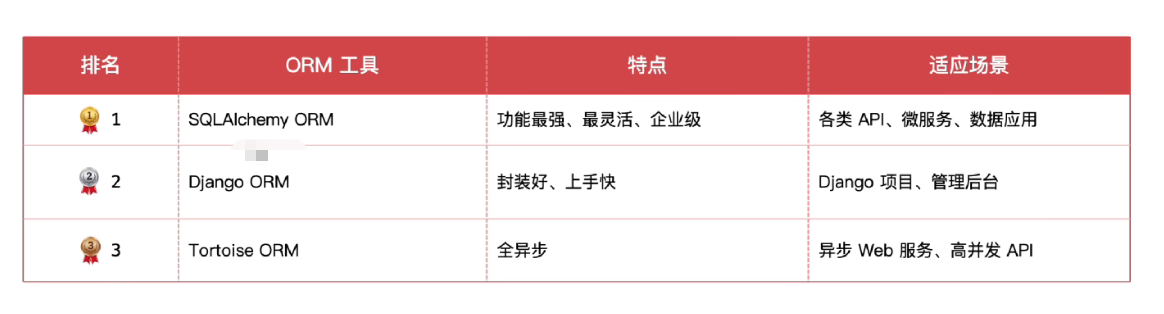
2.3 ORM 常用框架
下图列举了Python 中比较主流的ORM框架
2.4 ORM的使用流程
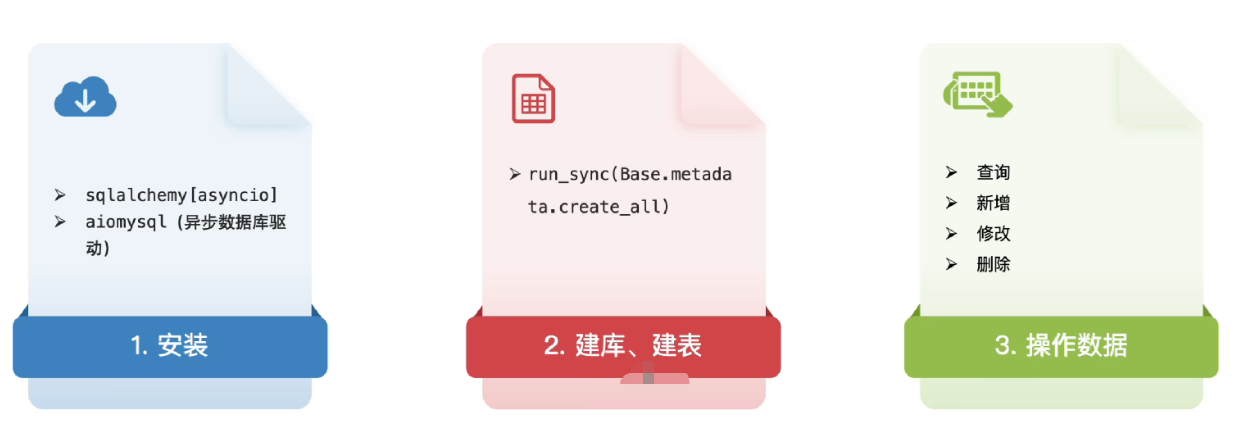
在开发中使用ORM通常为如下流程
三、FastAPI ORM 使用
接下来通过实际操作演示下如何在FastAPI 中使用ORM框架。
3.1 前置准备
3.1.1 安装依赖包
提前安装sqlalchemy这个包
bash
pip install "sqlalchemy[asyncio]" -i https://pypi.org/simple
再安装aiomysql驱动包
python
pip install aiomysql -i https://pypi.org/simple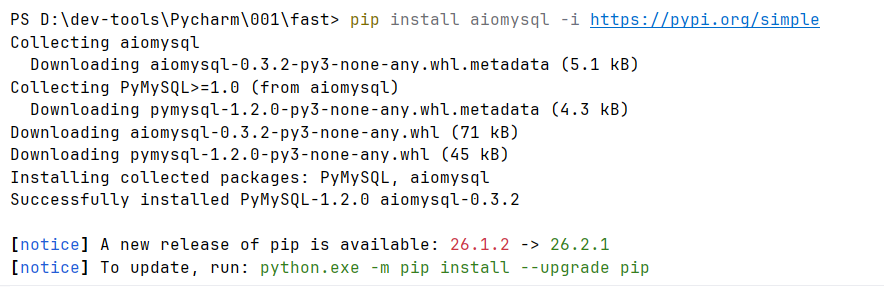
3.2 ORM 基本使用
3.2.1 创建数据库
可以基于sqlalchemy直接创建业务开发中需要使用的数据表,使用ORM创建数据表的流程如下

1、创建数据库引擎
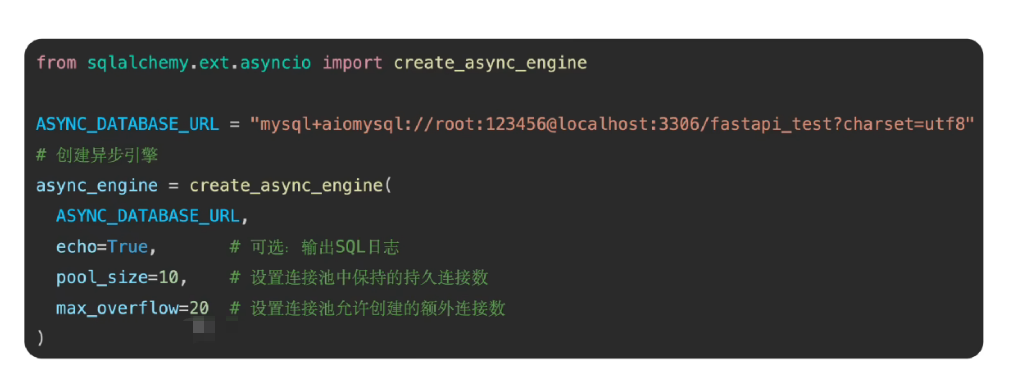
这一步最重要的就是需要配置操作数据库的连接信息,比如连接地址,数据库账号,密码等信息
使用create_async_engine 创建异步引擎,下图是核心的创建数据库连接代码
如下是完整的代码
python
from fastapi import FastAPI, Request,Query,Depends
from sqlalchemy.ext.asyncio import create_async_engine

app = FastAPI()

# 1、创建异步引擎
DATABASE_URL = "mysql+pymysql://用户名:密码@主机地址:3306/数据库名?charset=utf8mb4"
create_async_engine(
    DATABASE_URL,
    echo=True,
    pool_size=10,
    max_overflow=10
)
2、定义模型类
-
基类,继承 DeclarativeBase(包含通用属性和字段的映射)
-
定义数据库表对应的模型类
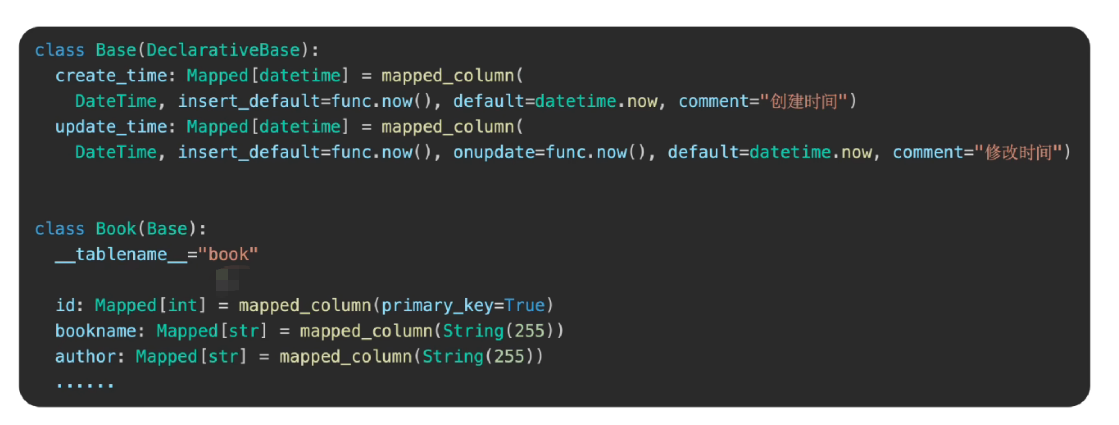
如下是完整的示例代码
python
# 2、定义模型类
class Base(DeclarativeBase):
    create_time: Mapped[datetime] = mapped_column(DateTime, insert_default=func.now(),default=func.now,
                                                  comment="创建时间"),
    update_time: Mapped[datetime] = mapped_column(DateTime, insert_default=func.now(), default=func.now,
                                                  onupdate= func.now,comment="更新时间")
# 继承基本模型
class Book(Base):
    __tablename__ = "book",
    id: Mapped[int] = mapped_column(primary_key=True,comment="书籍表ID"),
    bookname: Mapped[str] = mapped_column(String(255),comment="书名"),
    author: Mapped[str] = mapped_column(String(255),comment="作者"),
    price: Mapped[float] = mapped_column(Float, comment="价格"),
    publisher: Mapped[str] = mapped_column(String(255), comment="出版社")
3、创建数据库表
-
从连接池获取异步连接,开启事务,执行ORM操作
-
FastAPI应用启动时,自动创建数据库表
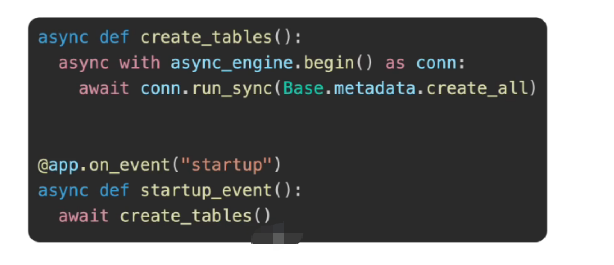
如下是完整的示例代码
python
from fastapi import FastAPI, Depends
from contextlib import asynccontextmanager
from sqlalchemy.ext.asyncio import create_async_engine, AsyncSession
from sqlalchemy.orm import DeclarativeBase, Mapped, mapped_column, sessionmaker
from sqlalchemy import DateTime, String, Float
from sqlalchemy import func
from datetime import datetime

# 1、创建异步引擎 - 使用 asyncmy 驱动
DATABASE_URL = "mysql+asyncmy://账号:密码@数据库地址/sqlarmy?charset=utf8mb4"

async_engine = create_async_engine(
    DATABASE_URL,
    echo=True,
    pool_size=10,
    max_overflow=20,
    pool_pre_ping=True
)

# 创建异步会话工厂
AsyncSessionLocal = sessionmaker(
    async_engine,
    class_=AsyncSession,
    expire_on_commit=False
)

# 2、定义模型类
class Base(DeclarativeBase):
    create_time: Mapped[datetime] = mapped_column(
        DateTime,
        insert_default=func.now(),
        default=func.now,
        comment="创建时间"
    )
    update_time: Mapped[datetime] = mapped_column(
        DateTime,
        insert_default=func.now(),
        default=func.now,
        onupdate=func.now,
        comment="更新时间"
    )

class Book(Base):
    __tablename__ = "book"

    id: Mapped[int] = mapped_column(primary_key=True,autoincrement=True,comment="书籍表ID")
    bookname: Mapped[str] = mapped_column(String(255), comment="书名")
    author: Mapped[str] = mapped_column(String(255), comment="作者")
    price: Mapped[float] = mapped_column(Float, comment="价格")
    publisher: Mapped[str] = mapped_column(String(255), comment="出版社")

# 3、定义 lifespan 上下文管理器
@asynccontextmanager
async def lifespan(app: FastAPI):
    # 启动时执行:创建数据库表
    async with async_engine.begin() as conn:
        await conn.run_sync(Base.metadata.create_all)
    print("✅ 数据库表创建成功!")

    yield  # 应用运行期间

    # 关闭时执行:清理资源(可选)
    await async_engine.dispose()
    print("✅ 数据库连接已关闭!")

# 4、创建 FastAPI 应用,传入 lifespan
app = FastAPI(
    title="书籍管理API",
    version="1.0.0",
    lifespan=lifespan  # 使用新的 lifespan 方式
)
运行一下代码,通过日志可以看到数据表创建成功了
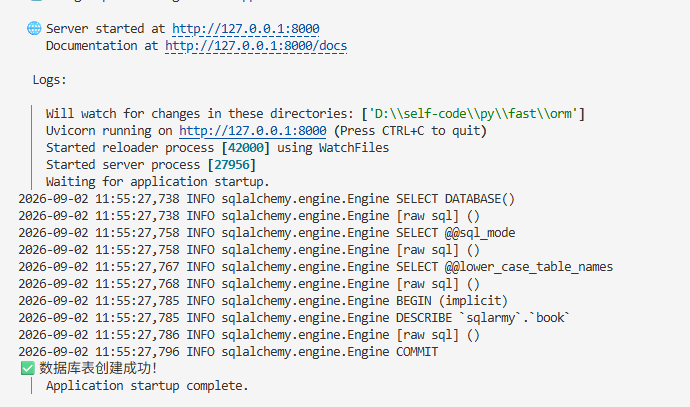
建表mysql表,已经创建出来了

3.2.2 创建会话工厂
核心:创建依赖项,使用Depends注入到处理函数,这一步目的是将数据库的会话连接注入到具体的查询方法中以便连接数据库使用
python
# 创建异步会话工厂
AsyncSessionLocal = sessionmaker(
    async_engine,
    class_=AsyncSession,
    expire_on_commit=False
)

# 创建 FastAPI 应用,传入 lifespan
app = FastAPI(
    title="书籍管理API",
    version="1.0.0",
    lifespan=lifespan  # 使用新的 lifespan 方式
)

# 依赖注入:获取数据库会话
async def get_db():
    async with AsyncSessionLocal() as session:
        try:
            yield session
        finally:
            await session.close()
3.2.3 新增数据
给创建的表新增一条数据
python
@app.post("/books/add")
async def create_book(
    bookname: str,
    author: str,
    price: float,
    publisher: str,
    db: AsyncSession = Depends(get_db)
):
    new_book = Book(
        bookname=bookname,
        author=author,
        price=price,
        publisher=publisher
    )

    db.add(new_book)
    await db.commit()
    await db.refresh(new_book)

    return {
        "code": 200,
        "message": "创建成功",
        "data": {
            "id": new_book.id,
            "bookname": new_book.bookname,
            "author": new_book.author,
            "price": new_book.price,
            "publisher": new_book.publisher
        }
    }
调用一下接口
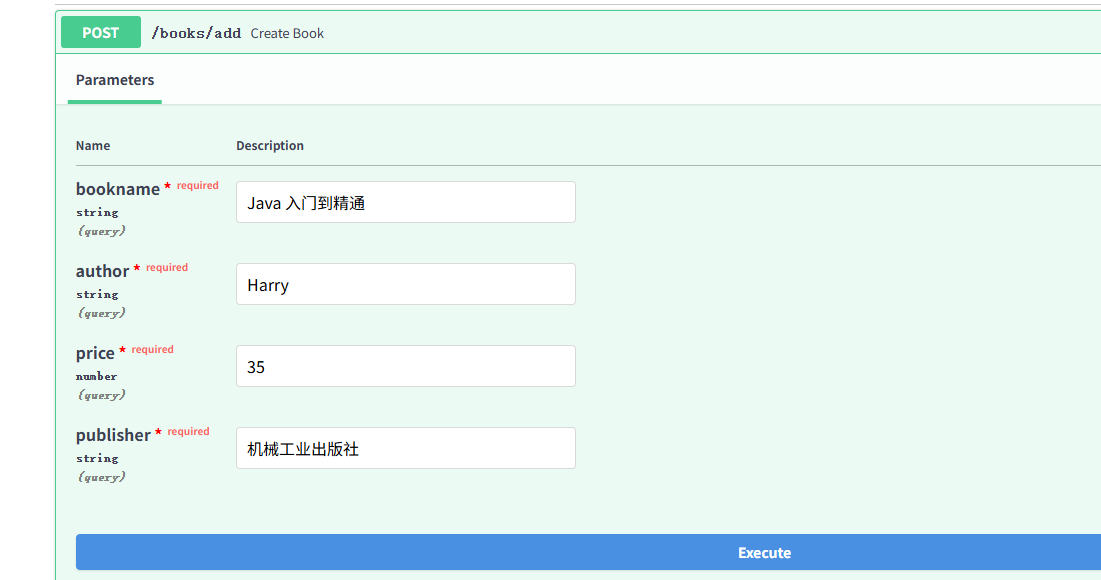
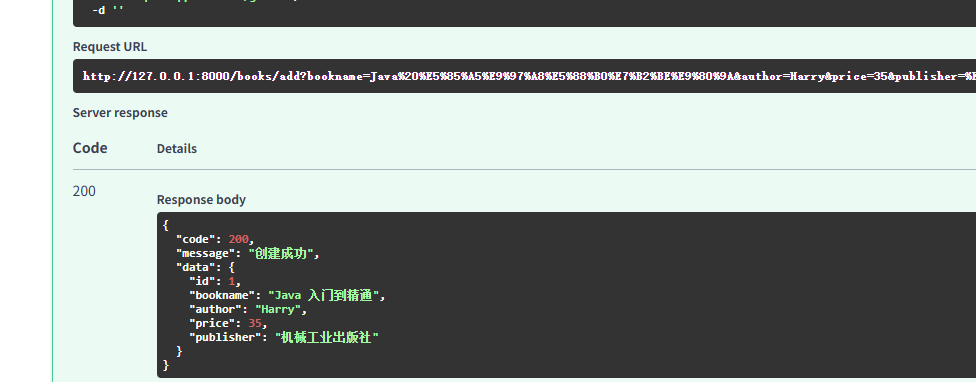
执行成功后在表检查下,数据已经成功插入了

3.2.4 修改数据
一般来说,开发中比较多的是根据主键ID值对数据进行修改,如下代码
python
# 更新书籍
@app.put("/books/{book_id}")
async def update_book(
        book_id: int,
        bookname: str = None,
        author: str = None,
        price: float = None,
        publisher: str = None,
        db: AsyncSession = Depends(get_db)
):
    from sqlalchemy import select

    result = await db.execute(select(Book).where(Book.id == book_id))
    book = result.scalar_one_or_none()

    if not book:
        return {"code": 404, "message": "书籍不存在"}

    # 更新字段
    if bookname is not None:
        book.bookname = bookname
    if author is not None:
        book.author = author
    if price is not None:
        book.price = price
    if publisher is not None:
        book.publisher = publisher

    await db.commit()
    await db.refresh(book)

    return {
        "code": 200,
        "message": "更新成功",
        "data": {
            "id": book.id,
            "bookname": book.bookname,
            "author": book.author,
            "price": book.price,
            "publisher": book.publisher
        }
    }
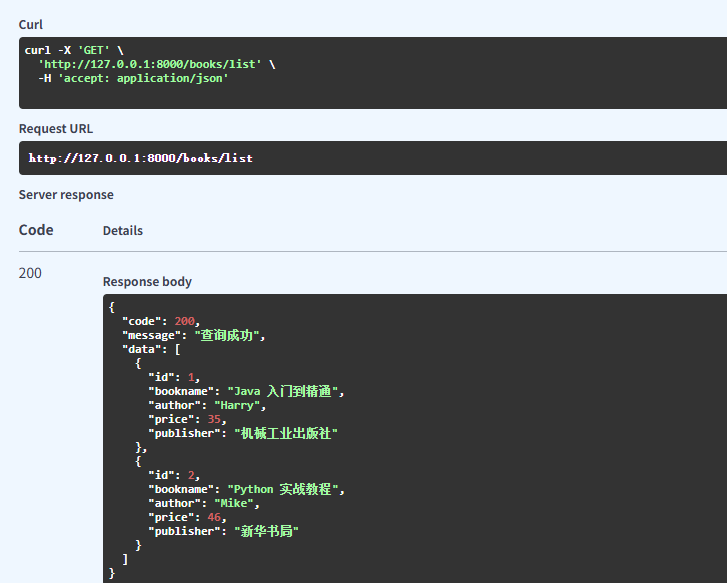
3.2.5 查询所有数据
查询是日常业务中的高频使用场景,如下是几个常用的查询场景
1、查询所有
python
@app.get("/books/list")
async def get_books(db: AsyncSession = Depends(get_db)):
    from sqlalchemy import select

    result = await db.execute(select(Book))
    books = result.scalars().all()

    return {
        "code": 200,
        "message": "查询成功",
        "data": [
            {
                "id": book.id,
                "bookname": book.bookname,
                "author": book.author,
                "price": book.price,
                "publisher": book.publisher
            }
            for book in books
        ]
    }
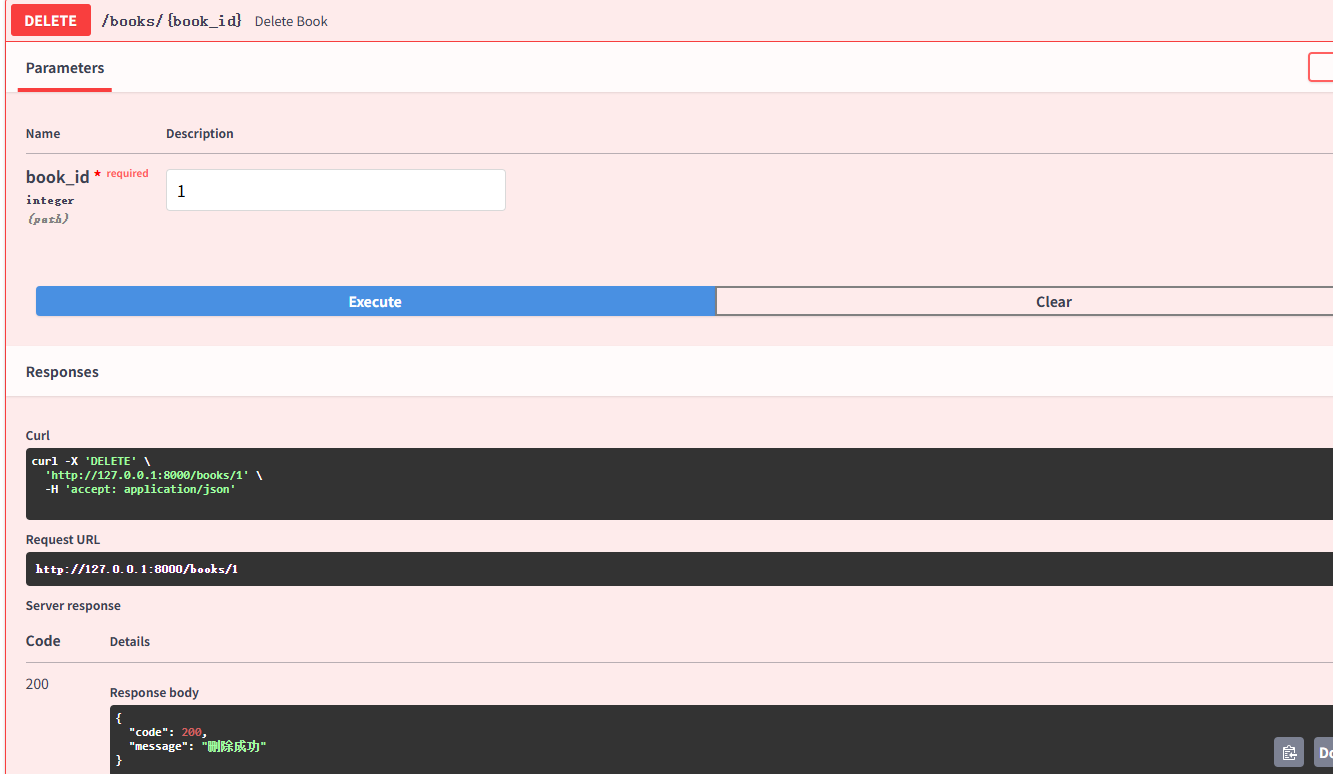
3.2.6 数据删除
使用主键值对数据做删除,如下代码:
python
# 更新书籍
@app.put("/books/{book_id}")
async def update_book(
        book_id: int,
        bookname: str = None,
        author: str = None,
        price: float = None,
        publisher: str = None,
        db: AsyncSession = Depends(get_db)
):
    from sqlalchemy import select

    result = await db.execute(select(Book).where(Book.id == book_id))
    book = result.scalar_one_or_none()

    if not book:
        return {"code": 404, "message": "书籍不存在"}

    # 更新字段
    if bookname is not None:
        book.bookname = bookname
    if author is not None:
        book.author = author
    if price is not None:
        book.price = price
    if publisher is not None:
        book.publisher = publisher

    await db.commit()
    await db.refresh(book)

    return {
        "code": 200,
        "message": "更新成功",
        "data": {
            "id": book.id,
            "bookname": book.bookname,
            "author": book.author,
            "price": book.price,
            "publisher": book.publisher
        }
    }
3.3 ORM 数据查询操作
查询mysql表的数据是日常业务中高频使用的场景,务必需要深入掌握,下面通过一些实际操作案例详细说明。
3.3.1 查询全部
不带条件的查询出所有数据,查出来的是一个列表数据
- 一旦查询的数据比较多的时候,一般不建议这么做,而是采用分页的方式去查
python
@app.get("/books/list")
async def get_books(db: AsyncSession = Depends(get_db)):
    from sqlalchemy import select

    result = await db.execute(select(Book))
    books = result.scalars().all()
    return {
        "code": 200,
        "message": "查询成功",
        "data": [
            {
                "id": book.id,
                "bookname": book.bookname,
                "author": book.author,
                "price": book.price,
                "publisher": book.publisher
            }
            for book in books
        ]
    }
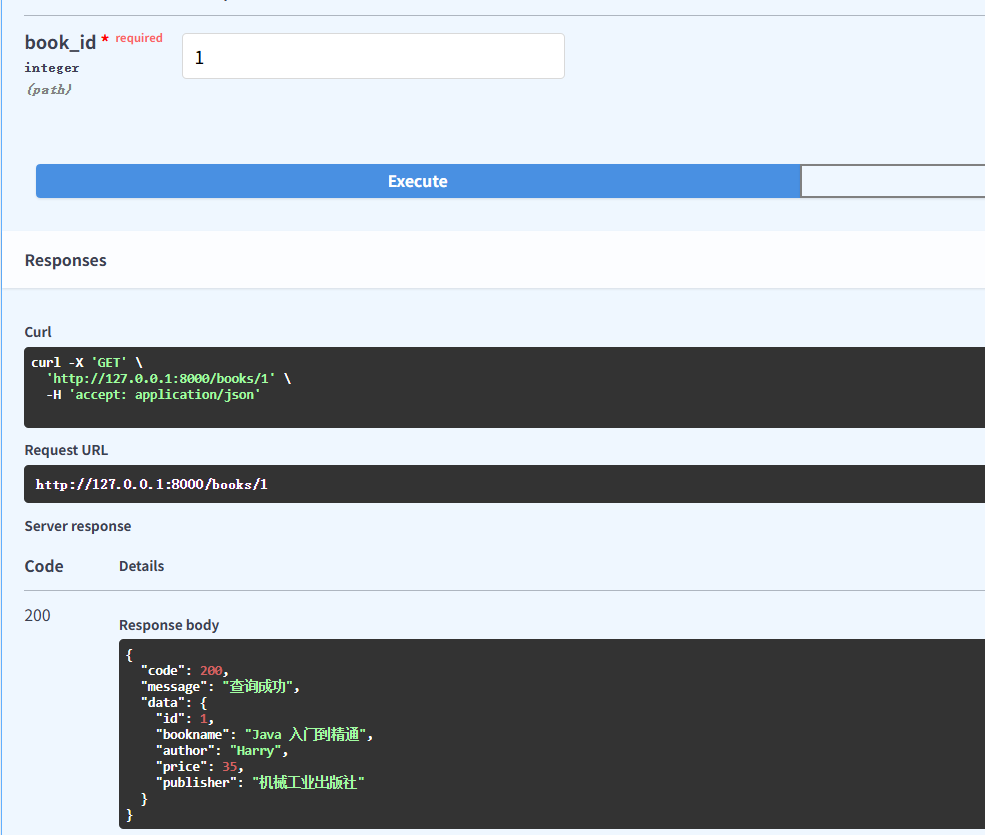
3.3.2 根据ID查询单条数据
在系统中经常需要根据ID查询某个数据的详情,就需要用到这种方式
python
# 根据ID查询书籍
@app.get("/books/{book_id}")
async def get_book(book_id: int, db: AsyncSession = Depends(get_db)):
    from sqlalchemy import select

    result = await db.execute(select(Book).where(Book.id == book_id))
    book = result.scalar_one_or_none()

    if not book:
        return {"code": 404, "message": "书籍不存在"}

    return {
        "code": 200,
        "message": "查询成功",
        "data": {
            "id": book.id,
            "bookname": book.bookname,
            "author": book.author,
            "price": book.price,
            "publisher": book.publisher
        }
    }
补充:
- 如果是从列表中获取一个,也可以这么写:result.scalars().first()
3.3.3 范围查询
查询价格大于40的数据
python
@app.get("/books-query")
async def query_book(db: AsyncSession = Depends(get_db)):
    from sqlalchemy import select
    result = await db.execute(select(Book).where(Book.price >= 40))
    return result.scalars().all()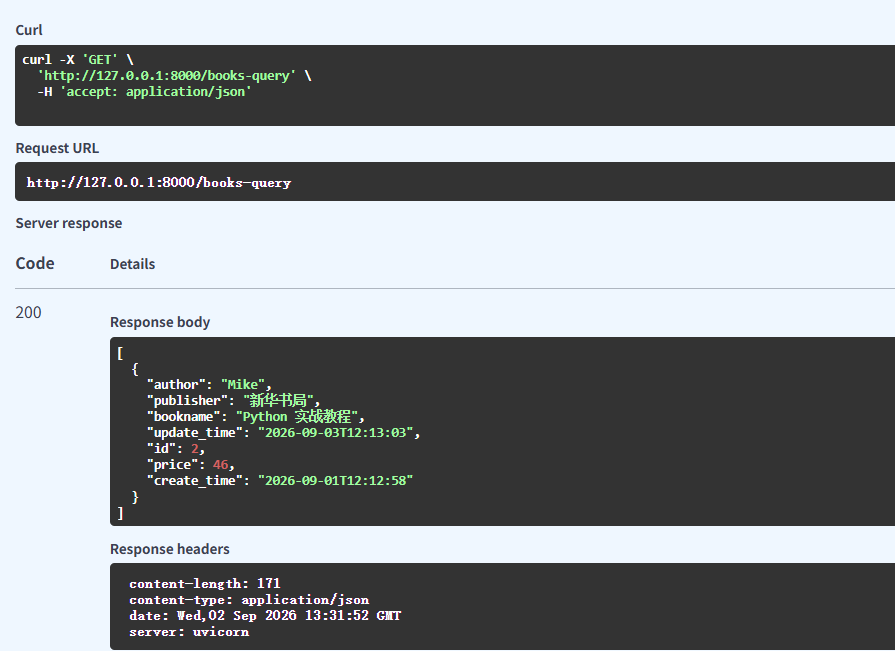
3.3.4 模糊查询
模糊查询通常使用like 关键字查询
python
# 查询书名包含 "Python" 的书籍
@app.get("/books/search/")
async def search_books(
        keyword: str = Query(..., description="搜索关键词"),
        db: AsyncSession = Depends(get_db)
):
    from sqlalchemy import select
    # 使用 like:%keyword% 表示包含
    result = await db.execute(
        select(Book).where(Book.bookname.like(f"%{keyword}%"))
    )
    books = result.scalars().all()
    return {"code": 200, "message": "查询成功", "data": books}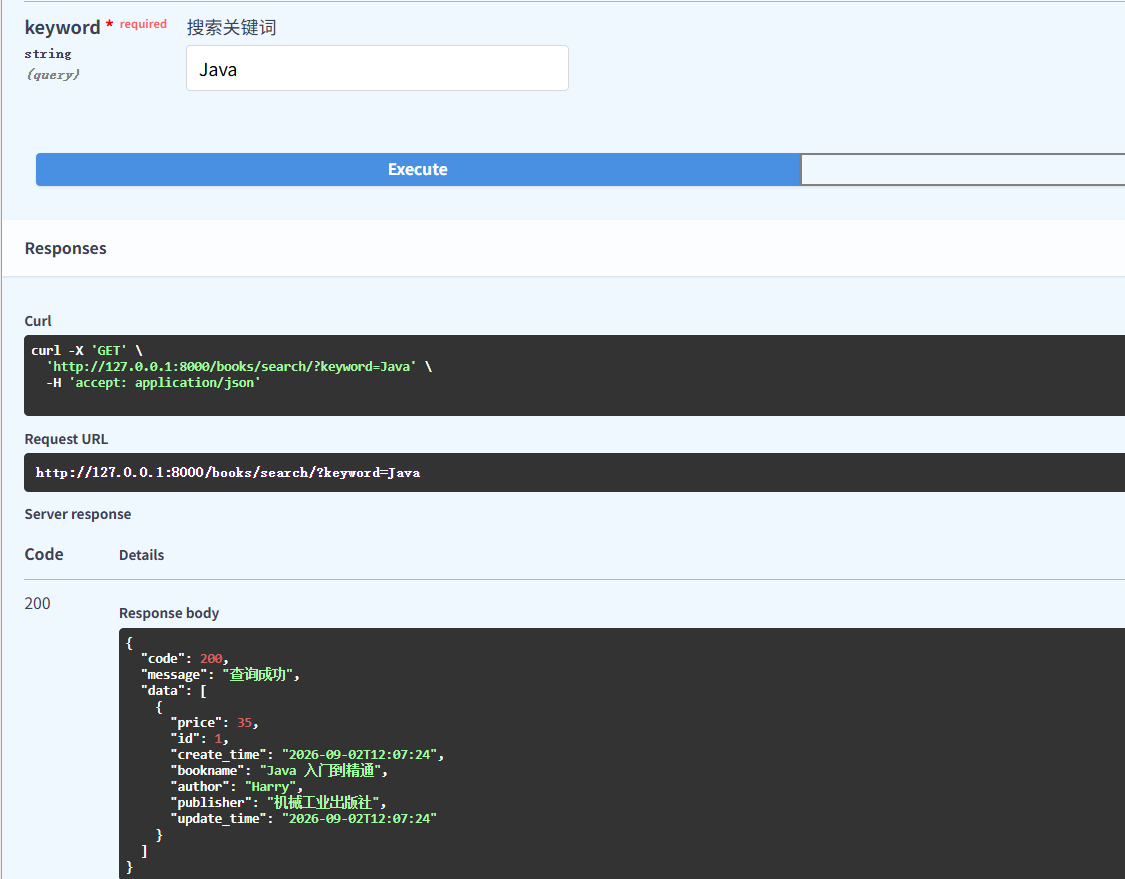
3.3.5 多条件组合查询
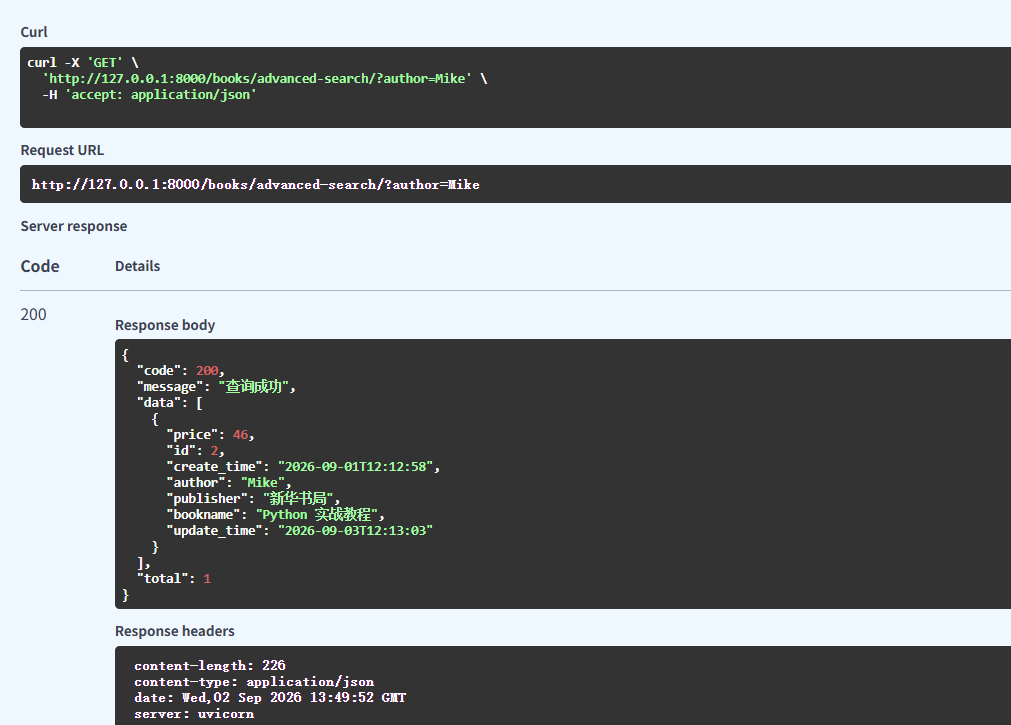
多条件组合查询也是经常用到的查询场景,即不同的条件组合在一起拼成一个sql去数据表查询
python
@app.get("/books/advanced-search/")
async def advanced_search(
        keyword: str = Query(None, description="关键词"),
        author: str = Query(None, description="作者"),
        min_price: float = Query(None, description="最低价格"),
        max_price: float = Query(None, description="最高价格"),
        publisher: str = Query(None, description="出版社"),
        db: AsyncSession = Depends(get_db)
):
    # 构建查询条件
    conditions = []

    if keyword:
        conditions.append(
            or_(
                Book.bookname.like(f"%{keyword}%"),
                Book.author.like(f"%{keyword}%"),
                Book.publisher.like(f"%{keyword}%")
            )
        )

    if author:
        conditions.append(Book.author.like(f"%{author}%"))

    if publisher:
        conditions.append(Book.publisher.like(f"%{publisher}%"))

    if min_price is not None:
        conditions.append(Book.price >= min_price)

    if max_price is not None:
        conditions.append(Book.price <= max_price)

    # 执行查询
    query = select(Book)
    if conditions:
        query = query.where(and_(*conditions))

    result = await db.execute(query)
    books = result.scalars().all()

    return {
        "code": 200,
        "message": "查询成功",
        "data": books,
        "total": len(books)
    }
3.3.6 分页+模糊查询
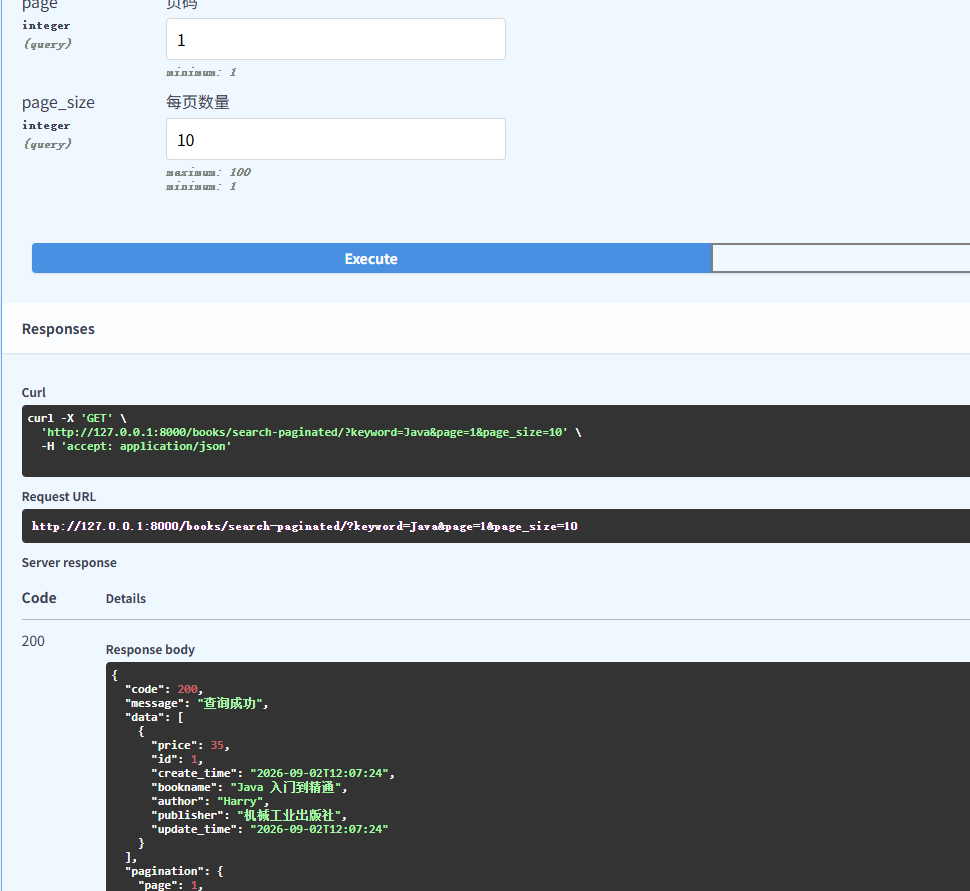
应该说分页在日常开发中做列表查询的场景非常多
python
from sqlalchemy import select, or_, func


@app.get("/books/search-paginated/")
async def search_books_paginated(
        keyword: str = Query(..., description="搜索关键词"),
        page: int = Query(1, ge=1, description="页码"),
        page_size: int = Query(10, ge=1, le=100, description="每页数量"),
        db: AsyncSession = Depends(get_db)
):
    # 计算偏移量
    offset = (page - 1) * page_size

    # 构建查询条件
    condition = or_(
        Book.bookname.like(f"%{keyword}%"),
        Book.author.like(f"%{keyword}%"),
        Book.publisher.like(f"%{keyword}%")
    )

    # 查询总数
    count_query = select(func.count()).select_from(Book).where(condition)
    total = await db.scalar(count_query)

    # 查询数据
    query = select(Book).where(condition).offset(offset).limit(page_size)
    result = await db.execute(query)
    books = result.scalars().all()

    return {
        "code": 200,
        "message": "查询成功",
        "data": books,
        "pagination": {
            "page": page,
            "page_size": page_size,
            "total": total,
            "total_pages": (total + page_size - 1) // page_size
        }
    }
分页查询也可以下面这样写,这是一种更通用的做法
python
from sqlalchemy import select, func

@app.get("/books/paginated/")
async def get_books_paginated(
    page: int = Query(1, ge=1, description="页码"),
    page_size: int = Query(10, ge=1, le=100, description="每页数量"),
    db: AsyncSession = Depends(get_db)
):
    # 计算偏移量
    offset = (page - 1) * page_size

    # 查询数据
    result = await db.execute(
        select(Book)
        .order_by(Book.id)
        .offset(offset)
        .limit(page_size)
    )
    books = result.scalars().all()

    # 查询总数
    total = await db.scalar(select(func.count()).select_from(Book))

    return {
        "code": 200,
        "data": books,
        "pagination": {
            "page": page,
            "page_size": page_size,
            "total": total,
            "total_pages": (total + page_size - 1) // page_size,
            "has_next": page * page_size < total,
            "has_prev": page > 1
        }
    }
3.3.7 聚合查询
在对数据表的数据进行各类聚合查询时,会用到,比如sum求和,count计数等,下面是常用的聚合函数的写法
python
from sqlalchemy import select, func, and_, or_
from sqlalchemy import distinct


# 统计总数
@app.get("/books/stats/count/")
async def get_count(db: AsyncSession = Depends(get_db)):
    # COUNT(*)
    total = await db.scalar(select(func.count()).select_from(Book))

    # COUNT(字段) - 不计NULL
    count_name = await db.scalar(select(func.count(Book.bookname)))

    # COUNT(DISTINCT 字段)
    distinct_authors = await db.scalar(select(func.count(distinct(Book.author))))

    return {
        "code": 200,
        "data": {
            "total_books": total,
            "count_name": count_name,
            "distinct_authors": distinct_authors
        }
    }


# 求和、平均值、最大值、最小值
@app.get("/books/stats/price/")
async def get_price_stats(db: AsyncSession = Depends(get_db)):
    result = await db.execute(
        select(
            func.sum(Book.price).label("total_price"),
            func.avg(Book.price).label("avg_price"),
            func.max(Book.price).label("max_price"),
            func.min(Book.price).label("min_price")
        )
    )
    stats = result.first()

    return {
        "code": 200,
        "data": {
            "总价格": float(stats.total_price) if stats.total_price else 0,
            "平均价格": round(float(stats.avg_price), 2) if stats.avg_price else 0,
            "最高价格": float(stats.max_price) if stats.max_price else 0,
            "最低价格": float(stats.min_price) if stats.min_price else 0
        }
    }
分组统计,GROUP BY 分组聚合,这也是经常在数据分析中使用到
python
@app.get("/books/stats/by-author/")
async def stats_by_author(db: AsyncSession = Depends(get_db)):
    result = await db.execute(
        select(
            Book.author,
            func.count(Book.id).label("book_count"),
            func.avg(Book.price).label("avg_price"),
            func.sum(Book.price).label("total_price"),
            func.max(Book.price).label("max_price"),
            func.min(Book.price).label("min_price")
        ).group_by(Book.author)
        .order_by(func.count(Book.id).desc())  # 按数量降序
    )
    authors = result.all()

    return {
        "code": 200,
        "data": [
            {
                "author": row.author,
                "book_count": row.book_count,
                "avg_price": round(float(row.avg_price), 2) if row.avg_price else 0,
                "total_price": float(row.total_price) if row.total_price else 0,
                "max_price": float(row.max_price) if row.max_price else 0,
                "min_price": float(row.min_price) if row.min_price else 0
            }
            for row in authors
        ]
    }
四、写在文末
本文通过较大的篇幅详细介绍了如何在FastAPI 中使用ORM操作mysql表的各种场景,有兴趣的同学还可以基于此继续进行深入的研究,本篇到此结束,感谢观看。