AndroidKMP之网络请求
1.前言:
前面2篇讲解过KMP初探和瀑布流,感觉KMP还是挺有意思的,这篇主要讲解KMP中的网络请求实现和遇到的问题,直接上代码。
2.项目总览:
ruby
KMPWanDemo/
├─ androidApp/ # Android壳模块,只负责Activity,无业务
├─ desktopApp/ # JVM桌面壳,只负责窗口入口
├─ iosApp/ # iOS壳,ComposeUIViewController入口
├─ webApp/ # WasmJs/JS网页壳,ComposeViewport入口
└─ shared/ # 核心跨平台业务模块
└─ src
├─ commonMain
│ ├─ composeResources/ # compose‑resources资源(字体、图片)
│ │ └─ font/
│ └─ kotlin/com/example/kmpwandemo
│ ├─ data # 数据模型层(序列化实体)
│ │ ├─ Article.kt
│ │ └─ ArticleListResponse.kt
│ ├─ net # 网络工厂、expect声明、日志工具
│ │ ├─ HttpClientFactory.kt // expect fun createKtorHttpClient()
│ │ └─ AppLogger.kt // expect日志封装
│ ├─ http # Repository业务仓库层
│ │ └─ WanRepository.kt
│ ├─ ui # Compose UI全部页面组件
│ │ ├─ screen
│ │ │ └─ ArticleListScreen.kt
│ │ └─ component # 可复用小组件
│ │ └─ ArticleItem.kt
│ ├─ viewmodel # MVI ViewModel
│ │ └─ ArticleListViewModel.kt
│ ├─ theme # 主题、字体、Typography
│ │ ├─ AppFonts.kt
│ │ └─ FontProvider.kt
│ ├─ App.kt # 根Compose组件
│ └─ Platform.kt // expect fun getWanBaseUrl()
│
├─ androidMain/kotlin/com/example/kmpwandemo
│ ├─ net
│ │ ├─ HttpClientFactory.android.kt // actual 客户端 okhttp
│ │ └─ AppLogger.android.kt
│ └─ Platform.android.kt // actual getWanBaseUrl
│
├─ jvmMain/kotlin/com/example/kmpwandemo
│ ├─ net
│ │ ├─ HttpClientFactory.jvm.kt // actual 客户端 java
│ │ └─ AppLogger.jvm.kt
│ └─ Platform.jvm.kt // actual getWanBaseUrl【桌面】
│
├─ iosMain/kotlin/com/example/kmpwandemo
│ ├─ net
│ │ ├─ HttpClientFactory.ios.kt
│ │ └─ AppLogger.ios.kt
│ └─ Platform.ios.kt
│
├─ jsMain/kotlin/com/example/kmpwandemo
│ ├─ net
│ │ ├─ HttpClientFactory.js.kt
│ │ └─ AppLogger.js.kt
│ └─ Platform.js.kt
│
└─ wasmJsMain/kotlin/com/example/kmpwandemo
├─ net
│ ├─ HttpClientFactory.wasm.kt
│ └─ AppLogger.wasm.kt
└─ Platform.wasm.kt
3.项目架构:
技术栈:Kotlin Multiplatform + Compose Multiplatform (M3) + Ktor + ViewModel (MVI) + expect‑actual 多平台适配
支持:Android / JVM 桌面 /iOS/ JS / WasmJs
资源:compose‑resources 字体资源,全部封装于 common 层,各平台不直接访问Res
4.分层简要回顾:
| 分层 | 职责 |
|---|---|
| data | kotlinx‑serialization 数据实体 |
| net | 多平台 HttpClient 工厂、日志 expect‑actual |
| http | Repository,封装 suspend 网络请求 |
| viewmodel | MVI:Intent + UiState + ViewModel,持有 Repository |
| ui/screen | 页面 Composable,收集状态,分发 Intent |
| ui/component | 通用 UI 子组件 |
| theme | 字体、Typography、颜色主题 |
5.遇到问题:
5.1 问题1Serializable序列化失败
原因:导入了错误的依赖包和插件
kotlin
package com.example.kmpwandemo.data
import kotlinx.serialization.Serializable @Serializable data class WanResponse<T>( val data: T, val errorCode: Int, val errorMsg: String ) @Serializable data class Article( val id: Long, val title: String, val author: String, val desc: String, val link: String ) @Serializable data class ArticleListData( val datas: List<Article>, val total: Int ) @Serializable data class ArticleListResponse( val data: ArticleListData, val errorCode: Int, val errorMsg: String ) package com.example.kmpwandemo.http import com.example.kmpwandemo.data.ArticleListData import com.example.kmpwandemo.data.ArticleListResponse import com.example.kmpwandemo.data.WanResponse import [com.example.kmpwandemo.net](https://com.example.kmpwandemo.net).createKtorHttpClient import io.ktor.client.HttpClient import io.ktor.client.call.body import io.ktor.client.plugins.contentnegotiation.ContentNegotiation import io.ktor.client.request.get import io.ktor.serialization.kotlinx.json.json import kotlinx.serialization.json.Json import io.ktor.client.plugins.logging.* class WanRepository { private val httpClient: HttpClient = createKtorHttpClient().config { install(Logging){ level = LogLevel.BODY } install(ContentNegotiation) { json(Json { ignoreUnknownKeys = true prettyPrint = false isLenient = true }) } } suspend fun getArticleList(page: Int): ArticleListResponse { val resp = httpClient.get("https://www.wanandroid.com/article/list/$page/json") return resp.body ()} }
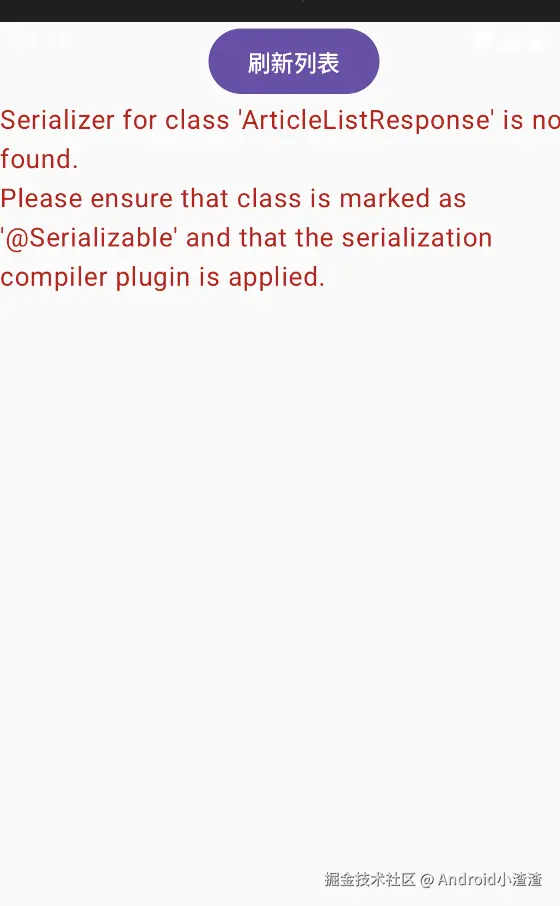
解决方法:
在libs.versions.toml加上Serialization插件配置:
统一使用org.jetbrains.kotlin.plugin.serialization
ini
[versions]
agp = "9.3.0"
android-compileSdk = "37"
android-minSdk = "26"
android-targetSdk = "36"
androidx-activity = "1.13.0"
androidx-appcompat = "1.8.0"
androidx-core = "1.19.0"
androidx-espresso = "3.7.0"
androidx-lifecycle = "2.11.0-beta01"
androidx-testExt = "1.3.0"
composeMultiplatform = "1.11.1"
junit = "4.13.2"
kotlin = "2.4.10"
kotlin-wrappers = "2026.8.4"
kotlinx-coroutines = "1.11.0"
ktor = "3.5.2"
ktorClientLogging = "3.5.2"
material3 = "1.11.0-alpha07"
coroutines = "1.9.0"
lifecycle-viewmodel = "2.8.6"
[libraries]
kotlin-test = { module = "org.jetbrains.kotlin:kotlin-test", version.ref = "kotlin" }
kotlin-testJunit = { module = "org.jetbrains.kotlin:kotlin-test-junit", version.ref = "kotlin" }
junit = { module = "junit:junit", version.ref = "junit" }
androidx-core-ktx = { module = "androidx.core:core-ktx", version.ref = "androidx-core" }
androidx-testExt-junit = { module = "androidx.test.ext:junit", version.ref = "androidx-testExt" }
androidx-espresso-core = { module = "androidx.test.espresso:espresso-core", version.ref = "androidx-espresso" }
androidx-appcompat = { module = "androidx.appcompat:appcompat", version.ref = "androidx-appcompat" }
androidx-activity-compose = { module = "androidx.activity:activity-compose", version.ref = "androidx-activity" }
compose-uiTooling = { module = "org.jetbrains.compose.ui:ui-tooling", version.ref = "composeMultiplatform" }
androidx-lifecycle-viewmodelCompose = { module = "org.jetbrains.androidx.lifecycle:lifecycle-viewmodel-compose", version.ref = "androidx-lifecycle" }
androidx-lifecycle-runtimeCompose = { module = "org.jetbrains.androidx.lifecycle:lifecycle-runtime-compose", version.ref = "androidx-lifecycle" }
compose-runtime = { module = "org.jetbrains.compose.runtime:runtime", version.ref = "composeMultiplatform" }
compose-foundation = { module = "org.jetbrains.compose.foundation:foundation", version.ref = "composeMultiplatform" }
compose-material3 = { module = "org.jetbrains.compose.material3:material3", version.ref = "material3" }
compose-ui = { module = "org.jetbrains.compose.ui:ui", version.ref = "composeMultiplatform" }
compose-components-resources = { module = "org.jetbrains.compose.components:components-resources", version.ref = "composeMultiplatform" }
compose-uiToolingPreview = { module = "org.jetbrains.compose.ui:ui-tooling-preview", version.ref = "composeMultiplatform" }
kotlinx-coroutinesSwing = { module = "org.jetbrains.kotlinx:kotlinx-coroutines-swing", version.ref = "kotlinx-coroutines" }
kotlinx-serialization-json = { module = "org.jetbrains.kotlinx:kotlinx-serialization-json", version.ref = "kotlinx-coroutines" }
wrappers-browser = { module = "org.jetbrains.kotlin-wrappers:kotlin-browser", version.ref = "kotlin-wrappers" }
ktor-client-core = { module = "io.ktor:ktor-client-core", version.ref = "ktor" }
ktor-client-okhttp = { module = "io.ktor:ktor-client-okhttp", version.ref = "ktor" }
ktor-client-js = { module = "io.ktor:ktor-client-js", version.ref = "ktor" }
ktor-client-darwin = { module = "io.ktor:ktor-client-darwin", version.ref = "ktor" }
ktor-client-content-negotiation = { module = "io.ktor:ktor-client-content-negotiation", version.ref = "ktor" }
ktor-serialization-kotlinx-json = { module = "io.ktor:ktor-serialization-kotlinx-json", version.ref = "ktor" }
ktor-client-cio = { module = "io.ktor:ktor-client-cio", version.ref = "ktor" }
ktor-client-android = { module = "io.ktor:ktor-client-android", version.ref = "ktor" }
ktor-client-wasm = { module = "io.ktor:ktor-client-js-wasm-js", version.ref = "ktor" }
ktor-client-java = { module = "io.ktor:ktor-client-java", version.ref = "ktor" }
ktor-client-logging = { module = "io.ktor:ktor-client-logging", version.ref = "ktorClientLogging" }
kotlinx-coroutines-core = { module = "org.jetbrains.kotlinx:kotlinx-coroutines-core", version.ref = "coroutines" }
[plugins]
androidApplication = { id = "com.android.application", version.ref = "agp" }
androidMultiplatformLibrary = { id = "com.android.kotlin.multiplatform.library", version.ref = "agp" }
composeMultiplatform = { id = "org.jetbrains.compose", version.ref = "composeMultiplatform" }
composeCompiler = { id = "org.jetbrains.kotlin.plugin.compose", version.ref = "kotlin" }
kotlinJvm = { id = "org.jetbrains.kotlin.jvm", version.ref = "kotlin" }
kotlinMultiplatform = { id = "org.jetbrains.kotlin.multiplatform", version.ref = "kotlin" }
kotlinSerialization = { id = "org.jetbrains.kotlin.plugin.serialization", version.ref = "kotlin" }在shared模块添加依赖:
scss
plugins {
    alias(libs.plugins.kotlinMultiplatform)
    alias(libs.plugins.androidMultiplatformLibrary)
    alias(libs.plugins.composeMultiplatform)
    alias(libs.plugins.composeCompiler)
    alias(libs.plugins.kotlinSerialization)
}
5.2 问题2桌面端报错:
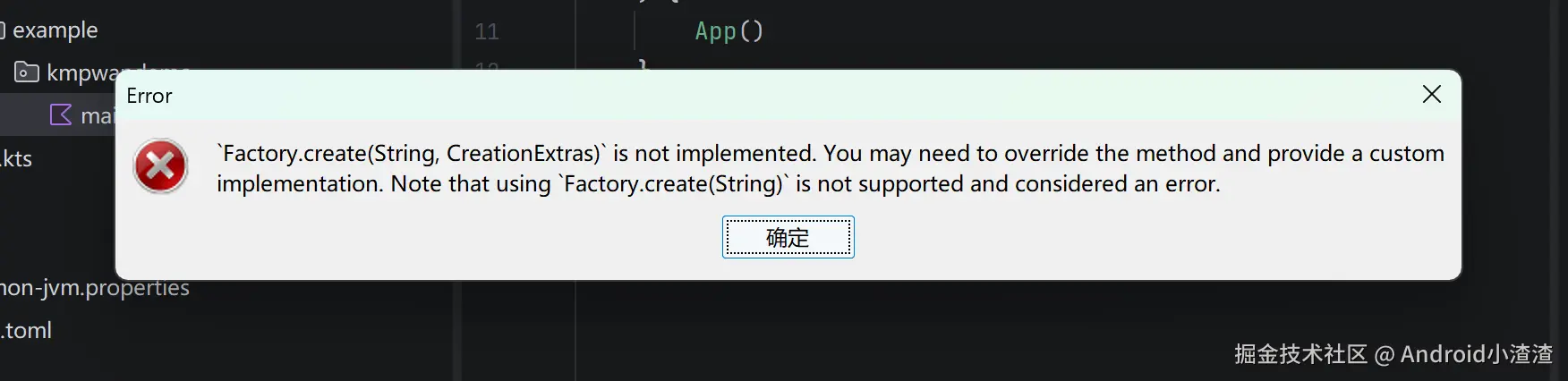
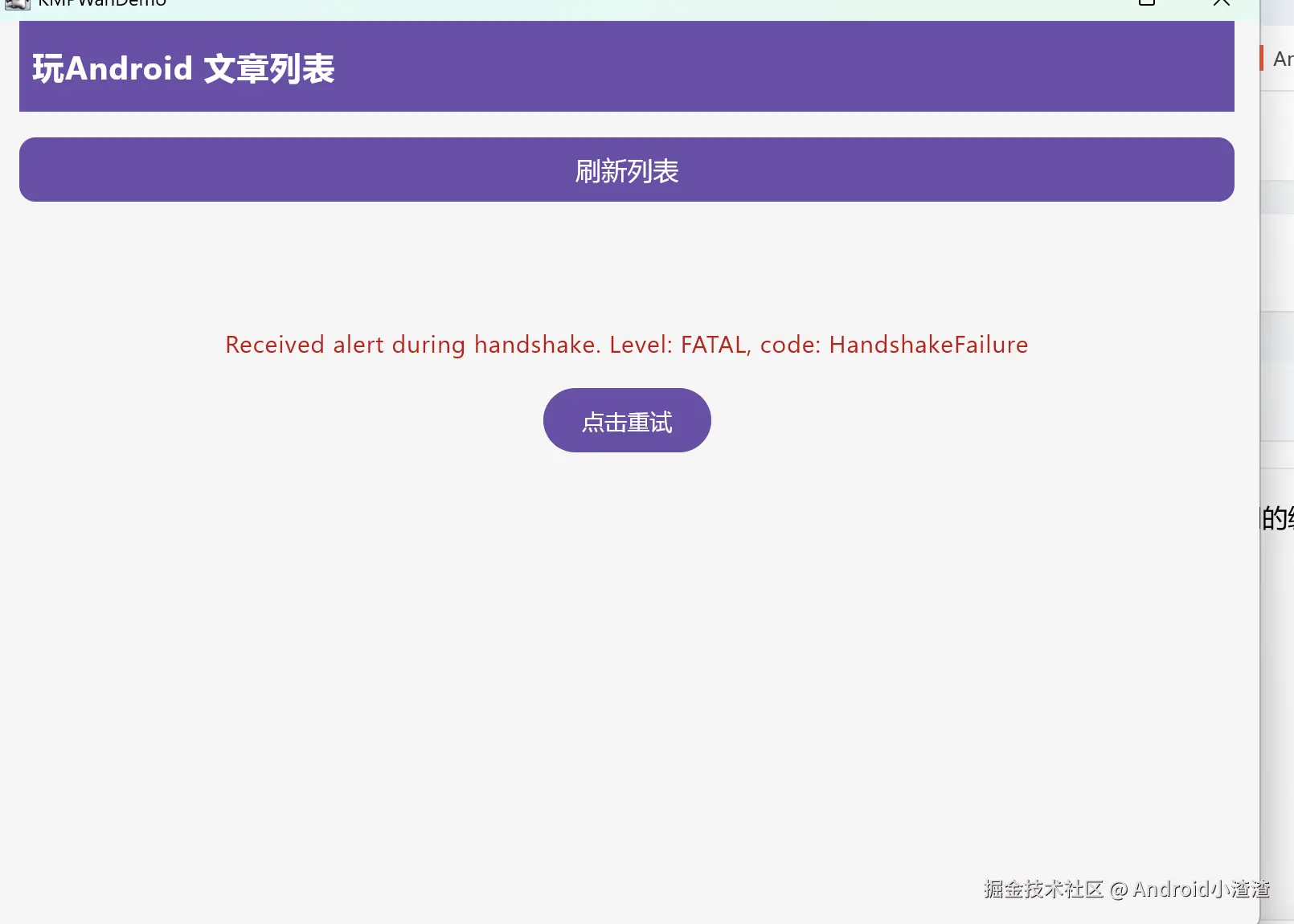
根因:Ktor CIO 引擎在 JVM 桌面端的 TLS 实现兼容性差,访问 wanandroid 的 HTTPS 时握手失败。这是 CIO 引擎的已知问题。
修复桌面端改用Java引擎
JVM 平台有 3 个引擎可选:CIO、Java、OkHttp。桌面端推荐用 ktor-client-java,基于 JDK 内置 HttpClient,TLS 兼容性最好。

scss
jvmMain.dependencies {
    //implementation(libs.ktor.client.cio)
    implementation(libs.ktor.client.java)
}
5.3 问题3Ktor导包错误
原因:jsMain、webMain、jvm平台Ktor导包错误
ruby
1:40:31: Executing 'wasmJsBrowserDevelopmentRun'...
Executing tasks: [wasmJsBrowserDevelopmentRun] in project D:\workspce\KMPWanDemo\webApp
Reusing configuration cache.
>
> Task :shared:convertXmlValueResourcesForWebMain NO-SOURCE
> Task :shared:generateExpectResourceCollectorsForCommonMain UP-TO-DATE
> Task :kotlinWasmKotlinNpmCachesSetup
> Task :shared:copyNonXmlValueResourcesForWasmJsMain NO-SOURCE
> Task :shared:generateComposeResClass UP-TO-DATE
> Task :webApp:kmpPartiallyResolvedDependenciesChecker
> Task :shared:convertXmlValueResourcesForWasmJsMain NO-SOURCE
> Task :shared:kmpPartiallyResolvedDependenciesChecker
> Task :shared:checkWasmJsMainComposeLibrariesCompatibility
> Task :shared:copyNonXmlValueResourcesForWebMain NO-SOURCE
> Task :webApp:checkKotlinGradlePluginConfigurationErrors SKIPPED
> Task :webApp:checkWasmJsMainComposeLibrariesCompatibility
> Task :webApp:convertXmlValueResourcesForWasmJsMain NO-SOURCE
> Task :shared:checkKotlinGradlePluginConfigurationErrors SKIPPED
> Task :shared:convertXmlValueResourcesForCommonMain NO-SOURCE
> Task :webApp:generateComposeResClass SKIPPED
> Task :webApp:convertXmlValueResourcesForCommonMain NO-SOURCE
> Task :shared:prepareComposeResourcesTaskForWasmJsMain NO-SOURCE
> Task :webApp:generateExpectResourceCollectorsForCommonMain SKIPPED
> Task :webApp:copyNonXmlValueResourcesForCommonMain NO-SOURCE
> Task :webApp:convertXmlValueResourcesForWebMain NO-SOURCE
> Task :shared:generateResourceAccessorsForWasmJsMain NO-SOURCE
> Task :webApp:copyNonXmlValueResourcesForWasmJsMain NO-SOURCE
> Task :webApp:copyNonXmlValueResourcesForWebMain NO-SOURCE
> Task :webApp:unpackSkikoWasmRuntime UP-TO-DATE
> Task :shared:prepareComposeResourcesTaskForWebMain NO-SOURCE
> Task :shared:copyNonXmlValueResourcesForCommonMain UP-TO-DATE
> Task :kotlinWasmRestoreYarnLock
> Task :webApp:processSkikoRuntimeForKWasm UP-TO-DATE
> Task :shared:generateResourceAccessorsForWebMain NO-SOURCE
> Task :webApp:prepareComposeResourcesTaskForWebMain NO-SOURCE
> Task :webApp:prepareComposeResourcesTaskForCommonMain NO-SOURCE
> Task :webApp:generateResourceAccessorsForWebMain SKIPPED
> Task :webApp:generateResourceAccessorsForCommonMain SKIPPED
> Task :webApp:prepareComposeResourcesTaskForWasmJsMain NO-SOURCE
> Task :webApp:generateResourceAccessorsForWasmJsMain SKIPPED
> Task :webApp:generateActualResourceCollectorsForWasmJsMain SKIPPED
> Task :shared:prepareComposeResourcesTaskForCommonMain UP-TO-DATE
> Task :webApp:assembleWasmJsMainResources UP-TO-DATE
> Task :shared:wasmJsPackageJson UP-TO-DATE
> Task :shared:generateResourceAccessorsForCommonMain UP-TO-DATE
> Task :shared:generateActualResourceCollectorsForWasmJsMain UP-TO-DATE
> Task :shared:assembleWasmJsMainResources UP-TO-DATE
> Task :webApp:wasmJsResolveSelfResourcesCopyHierarchicalMultiplatformResources UP-TO-DATE
> Task :shared:wasmJsCopyHierarchicalMultiplatformResources UP-TO-DATE
> Task :webApp:wasmJsPackageJson UP-TO-DATE
> Task :shared:wasmJsZipMultiplatformResourcesForPublication UP-TO-DATE
> Task :shared:wasmJsTestPackageJson UP-TO-DATE
> Task :webApp:wasmJsResolveResourcesFromDependencies UP-TO-DATE
> Task :webApp:wasmJsTestPackageJson UP-TO-DATE
> Task :webApp:wasmJsAggregateResources UP-TO-DATE
> Task :webApp:wasmJsProcessResources UP-TO-DATE
> Task :shared:wasmJsPublicPackageJson UP-TO-DATE
> Task :shared:compileKotlinWasmJs UP-TO-DATE
> Task :webApp:wasmJsPublicPackageJson UP-TO-DATE
> Task :webApp:compileKotlinWasmJs UP-TO-DATE
> Task :webApp:wasmJsMainClasses UP-TO-DATE
> Task :webApp:wasmJsTestPublicPackageJson UP-TO-DATE
> Task :shared:wasmJsTestPublicPackageJson UP-TO-DATE
> Task :kotlinWasmPackageJsonUmbrella UP-TO-DATE
> Task :wasmRootPackageJson UP-TO-DATE
> Task :webApp:compileDevelopmentExecutableKotlinWasmJs UP-TO-DATE
> Task :webApp:wasmJsDevelopmentExecutableCompileSync UP-TO-DATE
> Task :kotlinWasmNodeJsSetup UP-TO-DATE
> Task :kotlinWasmYarnSetup UP-TO-DATE
> Task :kotlinWasmNpmInstall UP-TO-DATE
> Task :kotlinWasmStoreYarnLock UP-TO-DATE
> Task :kotlinWasmToolingSetup UP-TO-DATE
> Task :webApp:wasmJsBrowserDevelopmentRun
> [webpack-dev-server] Project is running at:
> [webpack-dev-server] Loopback: [http://localhost:8080/](http://localhost:8080/), http://[::1]:8080/
> [webpack-dev-server] On Your Network (IPv4): [http://169.254.16.140:8080/](http://169.254.16.140:8080/)
> [webpack-dev-server] Content not from webpack is served from 'D:\workspce\KMPWanDemo\build\wasm\packages\KMPWanDemo-webApp\kotlin, D:\workspce\KMPWanDemo\webApp\build\processedResources\wasmJs\main, D:\workspce\KMPWanDemo' directory
> Critical dependency: the request of a dependency is an expression
> webpack 5.101.3 compiled with 1 warning in 786 ms
> asset 72436c62c9a3a9ce2d78.wasm 24.2 MiB [emitted] [immutable] [from: kotlin/KMPWanDemo-webApp.wasm] (auxiliary name: main)
> asset 6e23e5428398b92da386.wasm 8.25 MiB [emitted] [immutable] [from: kotlin/skiko.wasm] (auxiliary name: main)
> asset webApp.js 3.85 MiB [emitted] (name: main)
> runtime modules 30.1 KiB 13 modules
> javascript modules 1.44 MiB
> modules by path C:/Users/Cloud/.kotlin/kotlin-npm-tooling/yarn/e49be039833f93cd8352f956b903151a...(truncated) 114 KiB
> modules by path C:/Users/Cloud/.kotlin/kotlin-npm-tooling/yarn/e49be039833f93cd8352f956b903151a/...(truncated) 90.2 KiB 8 modules
> modules by path C:/Users/Cloud/.kotlin/kotlin-npm-tooling/yarn/e49be039833f93cd8352f956b903151a/...(truncated) 5.17 KiB 4 modules
> C:\Users\Cloud.kotlin\kotlin-npm-tooling\yarn\e49be039833f93cd8352f956b903151a...(truncated) 14.5 KiB [built] [code generated]
> C:\Users\Cloud.kotlin\kotlin-npm-tooling\yarn\e49be039833f93cd8352f956b903151a...(truncated) 4.16 KiB [built] [code generated]
> modules by path ./kotlin/ 971 KiB
> modules by path ./kotlin/*.mjs 966 KiB 4 modules
> ./kotlin/custom-formatters.js 5.06 KiB [built] [code generated]
> ./kotlin/ lazy strict namespace object 160 bytes [built] [code generated]
> ../../node_modules/@js-joda/core/dist/js-joda.esm.js 392 KiB [built] [code generated]
> asset modules 32.5 MiB (asset) 84 bytes (javascript)
> ./kotlin/KMPWanDemo-webApp.wasm 24.2 MiB (asset) 42 bytes (javascript) [built] [code generated]
> ./kotlin/skiko.wasm 8.25 MiB (asset) 42 bytes (javascript) [built] [code generated]
解决方法:
scss
androidMain.dependencies {
    implementation(libs.compose.uiToolingPreview)
    implementation(libs.compose.uiTooling)
    implementation(libs.ktor.client.okhttp)
}
webMain.dependencies{
    implementation(libs.ktor.client.js)
}
jvmMain.dependencies {
    //implementation(libs.ktor.client.cio)
    implementation(libs.ktor.client.java)
}
jsMain.dependencies {
    implementation(libs.wrappers.browser)
    implementation(libs.ktor.client.js)
}
iosMain.dependencies{
        implementation(libs.ktor.client.darwin)
}
wasmJsMain.dependencies {
    implementation(libs.ktor.client.wasm) //wasm浏览器引擎
}
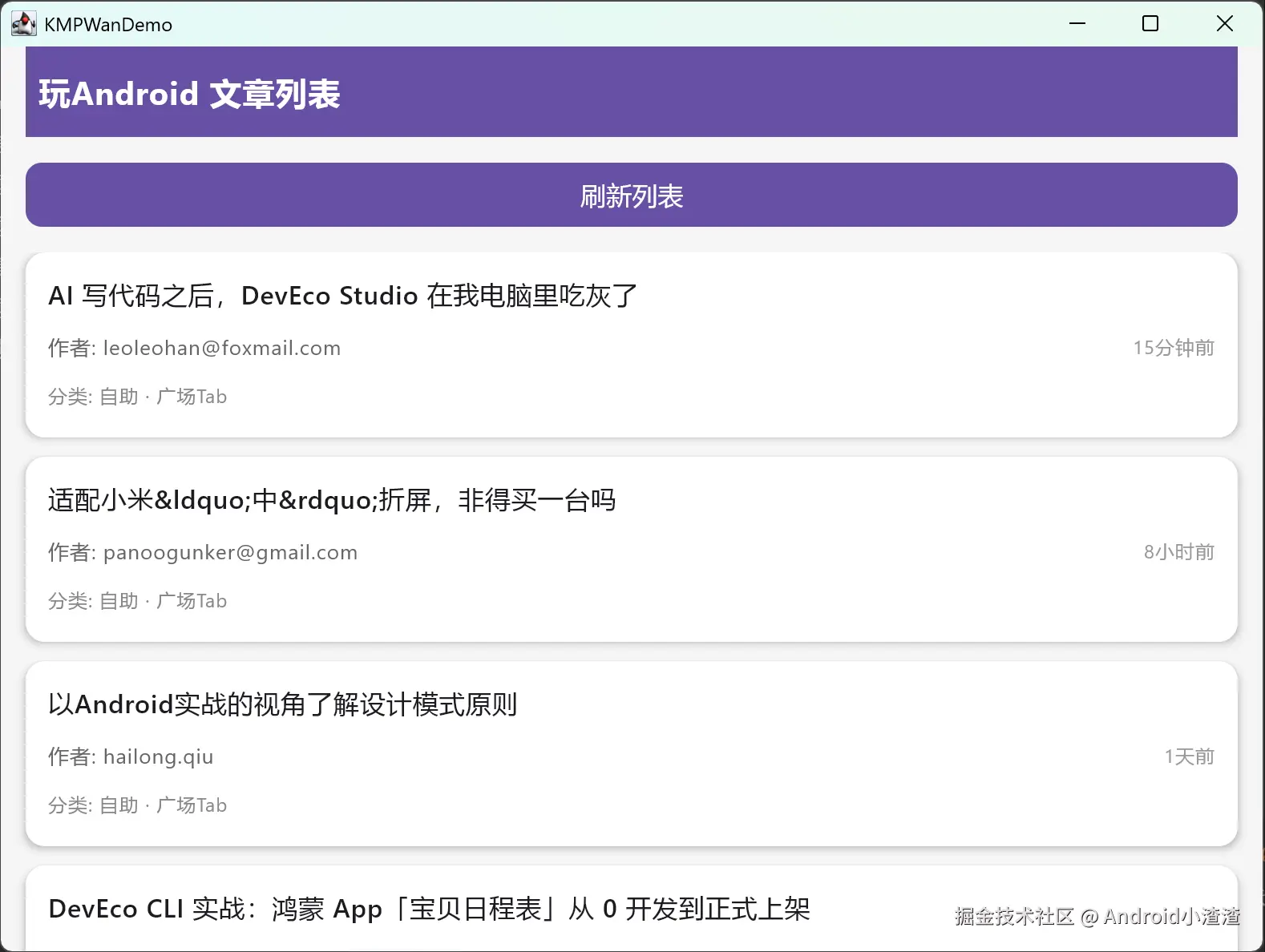
运行效果:
5.4 问题4WasmJs浏览器跨域:
markdown
> wanandroid 接口 `https://www.wanandroid.com/article/list/0/json` **没有配置 CORS 允许浏览器跨域**
> 浏览器 Wasm 环境发起网络请求,直接报 CORS blocked,请求直接失败。
- Android/JVM 桌面:不存在浏览器 CORS 限制,可以正常请求
- WasmJs (浏览器):受浏览器同源策略,**直接访问 wanandroid 接口会被拦截**解决方法:
在webApp新建webpack.config.d目录------新建一个webpack.config.js文件。
lua
config.devServer = config.devServer || {}
config.devServer.proxy = {
    '/api': {
        target: 'https://www.wanandroid.com',
        changeOrigin: true,
        pathRewrite: { '^/api': '' }
    }
}
5.5 Web端网络请求失败:
解决方法:使用npm开启代理,下载node.js,导入本地环境,前端同学应该玩得很溜,这里就不展开讲解详细步骤了.
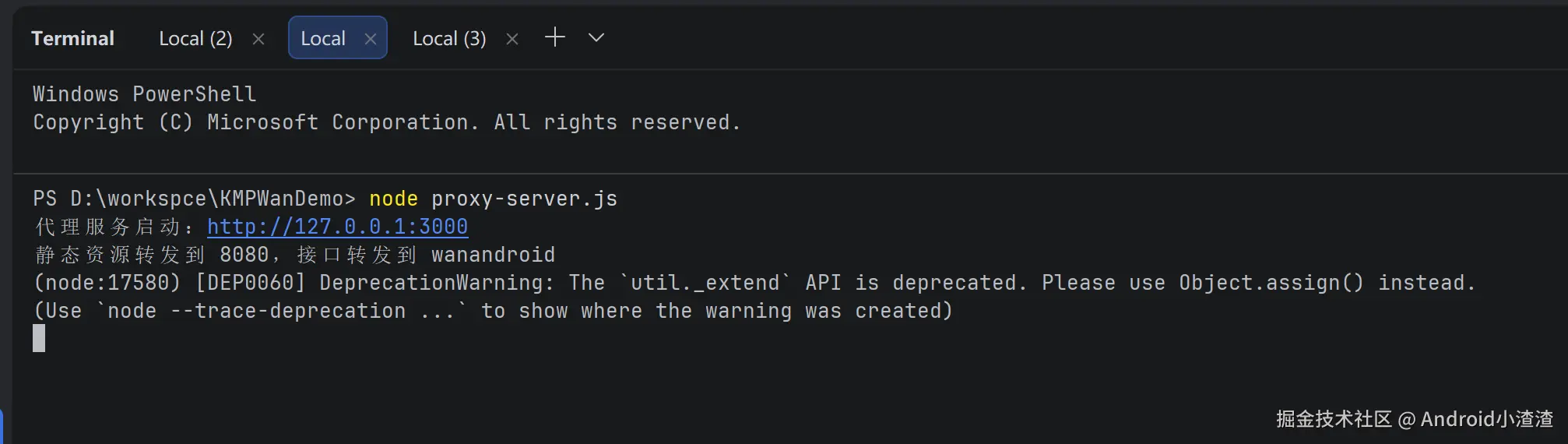
arduino
PS D:\workspce\KMPWanDemo> npm install
PS D:\workspce\KMPWanDemo> npm install http-proxy
PS D:\workspce\KMPWanDemo> node proxy-server.js
代理服务启动:http://127.0.0.1:3000
静态资源转发到 8080,接口转发到 wanandroid
在项目根目录有一个代理文件:proxy-server.js
javascript
const http = require('http');
const httpProxy = require('http-proxy');

const proxy = httpProxy.createProxyServer({
    target: 'https://www.wanandroid.com',
    changeOrigin: true
});

// 拦截代理返回响应,强制json接口utf‑8
proxy.on('proxyRes', function (proxyRes, req, res) {
    if (req.url.startsWith("/wan")) {
        // 强制设置json编码
        proxyRes.headers['content-type'] = 'application/json; charset=utf-8';
        // 清除可能乱码的旧头
        delete proxyRes.headers['content-encoding'];
    }
});

// 捕获代理异常,防止崩溃
proxy.on('error', function (err, req, res) {
    if (!res.headersSent) {
        res.writeHead(500, { 'Content-Type': 'text/plain;charset=utf-8' });
    }
    res.end("Proxy error: " + err.message);
});

const server = http.createServer((req, res) => {
    if (req.url.startsWith("/wan")) {
        req.url = req.url.replace("/wan", "");
        proxy.web(req, res);
    } else {
        // wasmJs开发服务 8080
        proxy.web(req, res, {
            target: "http://127.0.0.1:8080"
        });
    }
});

server.listen(3000, "127.0.0.1", () => {
    console.log("代理服务启动:http://127.0.0.1:3000");
    console.log("静态资源转发到 8080,接口转发到 wanandroid");
});
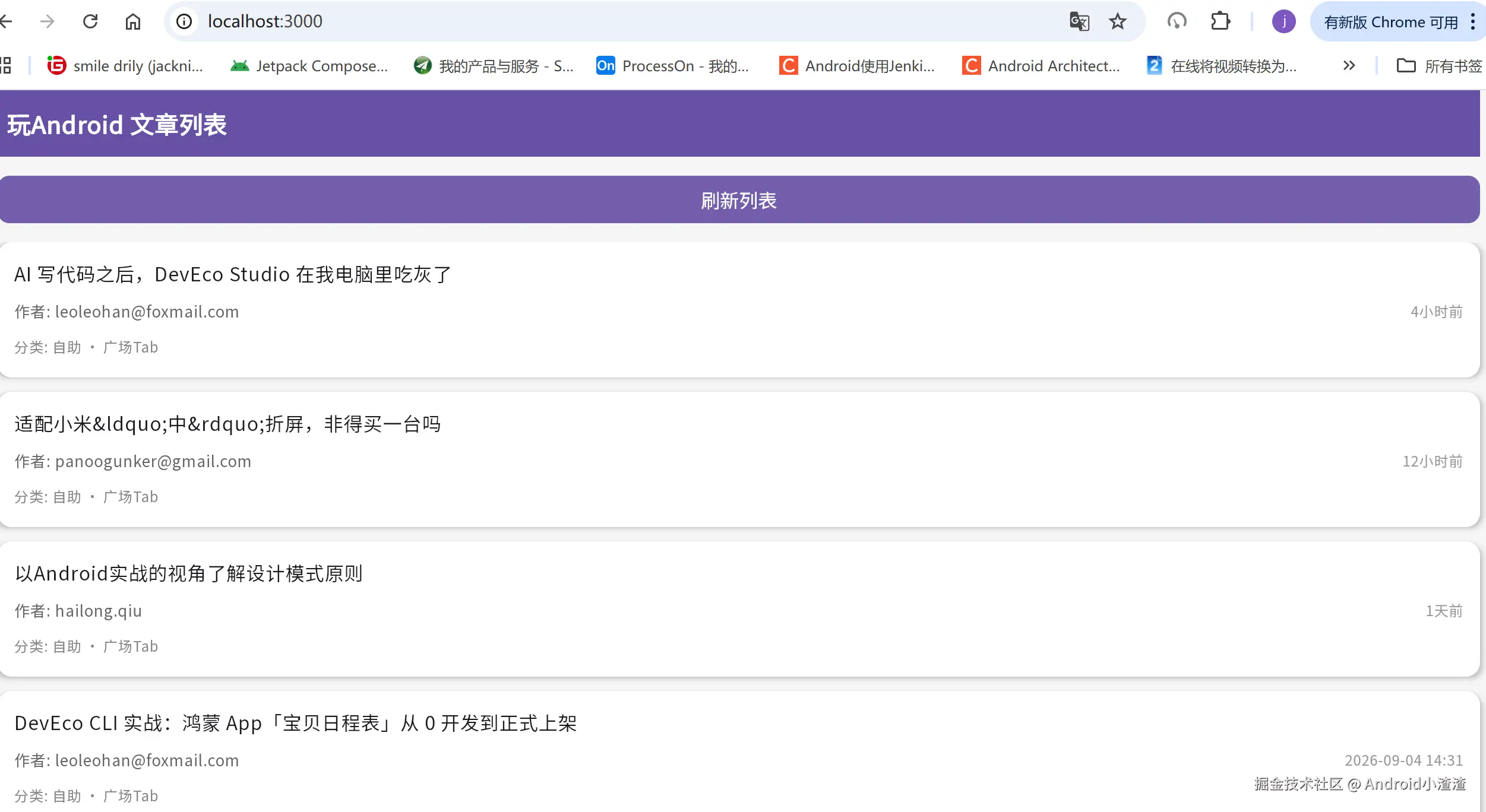
由于我是本地运行的,端口号代理的是3000,所以运行的时候也要修改端口号,不改会报错
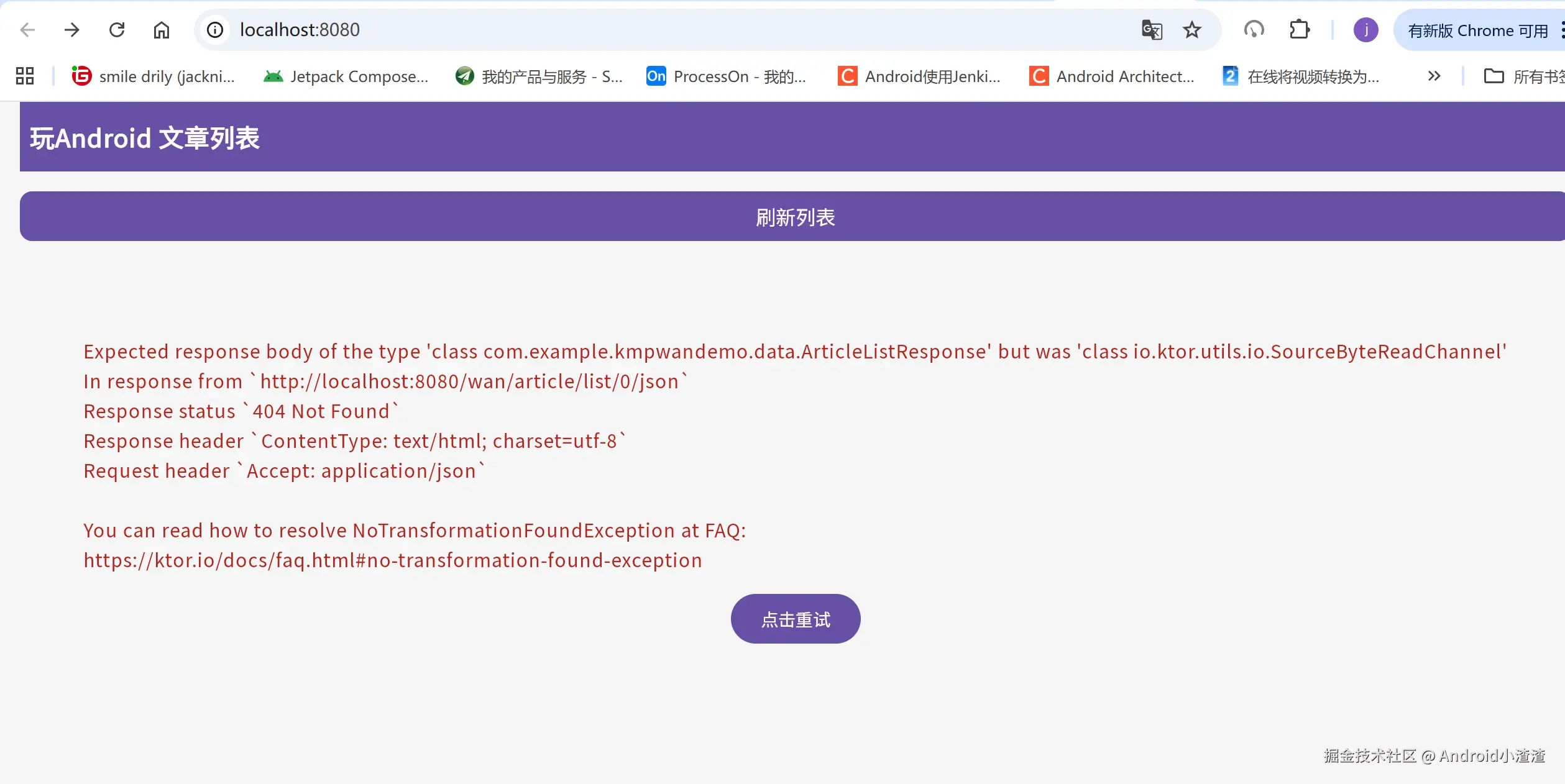
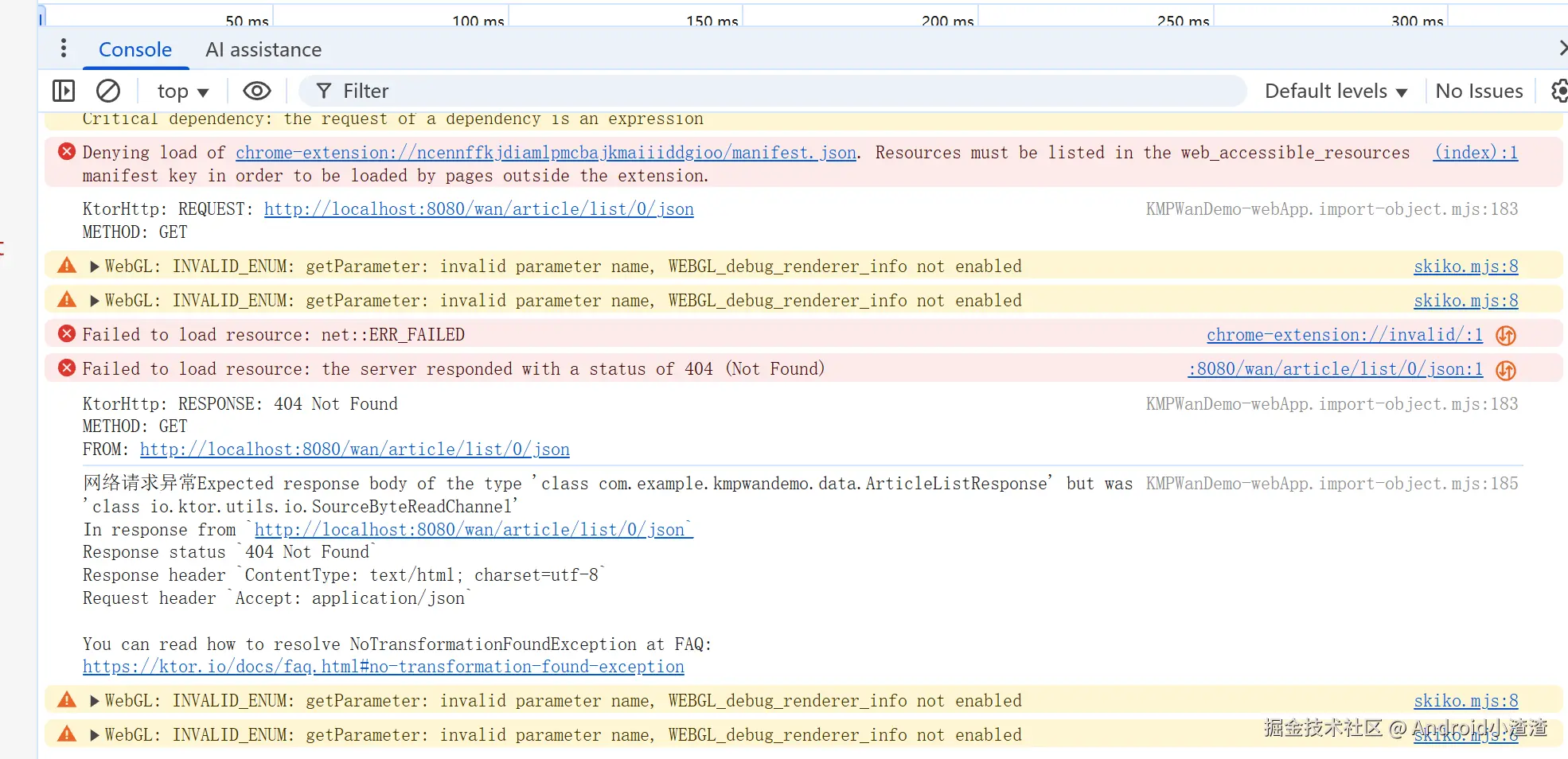
这里的端口根据你自己的测试代码来修改,改成一致即可
5.6 web端请求显示乱码:
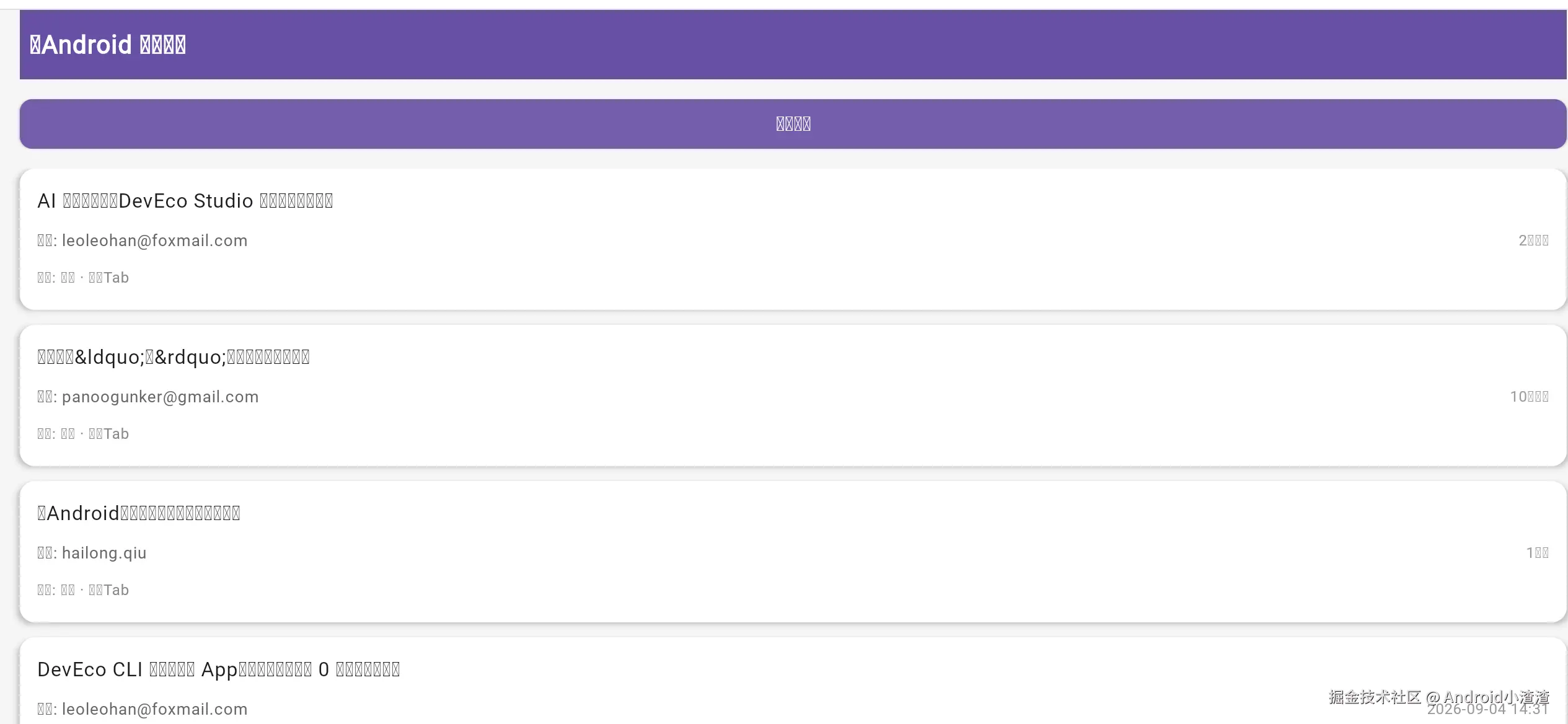
修改Index.html和webApp都不行,最后使用本地的字体,在commonMain封装:
scss
package com.example.kmpwandemo

import androidx.compose.material3.Typography
import androidx.compose.ui.text.font.FontFamily
import androidx.compose.ui.text.font.FontWeight
import kmpwandemo.shared.generated.resources.NotoSansSC_Regular
import kmpwandemo.shared.generated.resources.Res
import org.jetbrains.compose.resources.Font

val AppTypography = Typography().copy(
    displayLarge = Typography().displayLarge.copy(fontFamily = FontFamily.Default),
    displayMedium = Typography().displayMedium.copy(fontFamily = FontFamily.Default),
    displaySmall = Typography().displaySmall.copy(fontFamily = FontFamily.Default),
    headlineLarge = Typography().headlineLarge.copy(fontFamily = FontFamily.Default),
    headlineMedium = Typography().headlineMedium.copy(fontFamily = FontFamily.Default),
    headlineSmall = Typography().headlineSmall.copy(fontFamily = FontFamily.Default),
    titleLarge = Typography().titleLarge.copy(fontFamily = FontFamily.Default),
    titleMedium = Typography().titleMedium.copy(fontFamily = FontFamily.Default),
    titleSmall = Typography().titleSmall.copy(fontFamily = FontFamily.Default),
    bodyLarge = Typography().bodyLarge.copy(fontFamily = FontFamily.Default),
    bodyMedium = Typography().bodyMedium.copy(fontFamily = FontFamily.Default),
    bodySmall = Typography().bodySmall.copy(fontFamily = FontFamily.Default),
    labelLarge = Typography().labelLarge.copy(fontFamily = FontFamily.Default),
    labelMedium = Typography().labelMedium.copy(fontFamily = FontFamily.Default),
    labelSmall = Typography().labelSmall.copy(fontFamily = FontFamily.Default),
)
ini
package com.example.kmpwandemo

import androidx.compose.runtime.Composable
import androidx.compose.runtime.remember
import androidx.compose.ui.text.font.FontFamily
import androidx.compose.ui.text.font.FontWeight
import kmpwandemo.shared.generated.resources.NotoSansSC_Regular
import org.jetbrains.compose.resources.Font
import kmpwandemo.shared.generated.resources.Res

@Composable
fun rememberNotoSansFontFamily(): FontFamily {
    val font = Font(
        resource = Res.font.NotoSansSC_Regular,
        weight = FontWeight.Normal
    )
    return FontFamily(font)
}

@Composable
fun rememberCustomTypography() : androidx.compose.material3.Typography {
    val family = rememberNotoSansFontFamily()
    return remember(AppTypography, family) {
        AppTypography.copy(
            displayLarge = AppTypography.displayLarge.copy(fontFamily = family),
            displayMedium = AppTypography.displayMedium.copy(fontFamily = family),
            displaySmall = AppTypography.displaySmall.copy(fontFamily = family),
            headlineLarge = AppTypography.headlineLarge.copy(fontFamily = family),
            headlineMedium = AppTypography.headlineMedium.copy(fontFamily = family),
            headlineSmall = AppTypography.headlineSmall.copy(fontFamily = family),
            titleLarge = AppTypography.titleLarge.copy(fontFamily = family),
            titleMedium = AppTypography.titleMedium.copy(fontFamily = family),
            titleSmall = AppTypography.titleSmall.copy(fontFamily = family),
            bodyLarge = AppTypography.bodyLarge.copy(fontFamily = family),
            bodyMedium = AppTypography.bodyMedium.copy(fontFamily = family),
            bodySmall = AppTypography.bodySmall.copy(fontFamily = family),
            labelLarge = AppTypography.labelLarge.copy(fontFamily = family),
            labelMedium = AppTypography.labelMedium.copy(fontFamily = family),
            labelSmall = AppTypography.labelSmall.copy(fontFamily = family),
        )
    }
}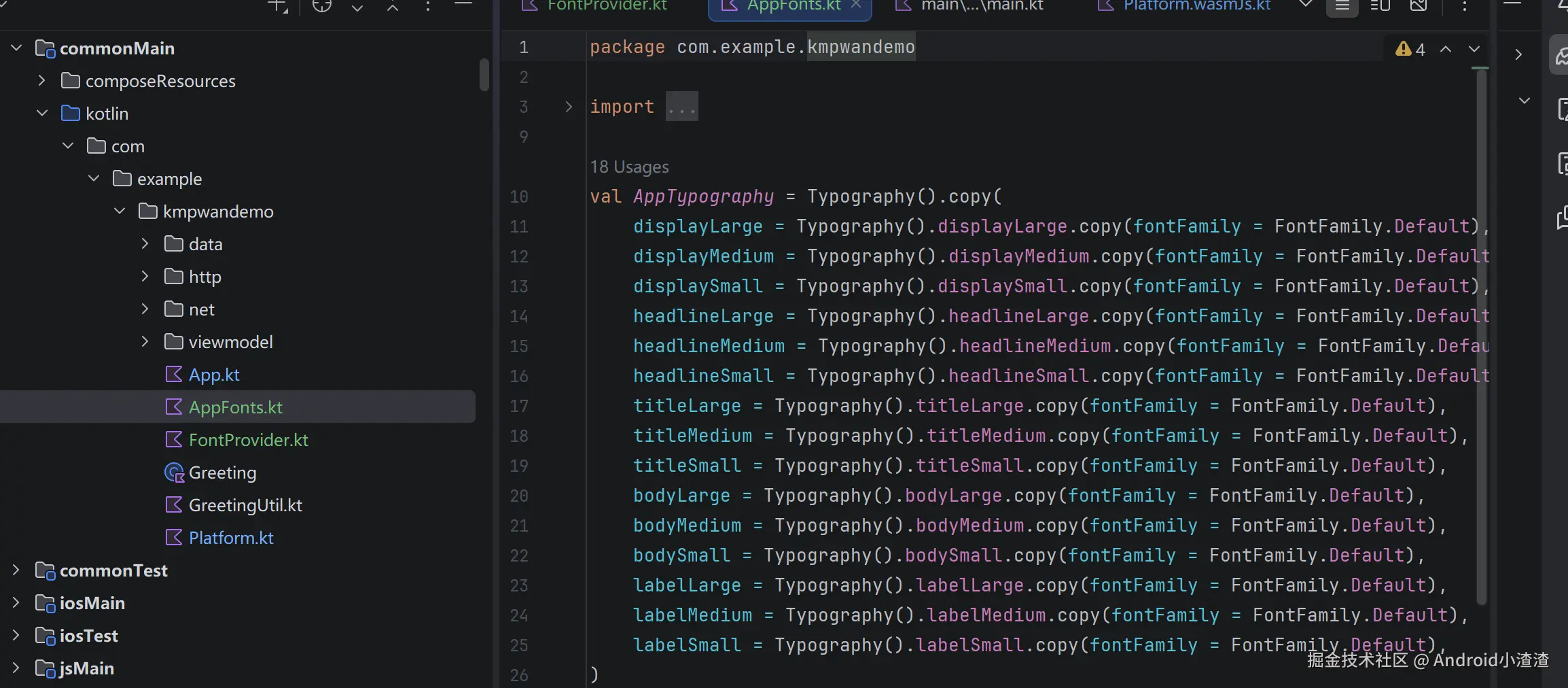
这里为了统一把Android、web、桌面端都修改成一个字体
web端修改:
kotlin
package com.example.kmpwandemo

import androidx.compose.ui.ExperimentalComposeUiApi
import androidx.compose.ui.window.ComposeViewport
import androidx.compose.material3.MaterialTheme
import com.example.kmpwandemo.viewmodel.ArticleListScreen

@OptIn(ExperimentalComposeUiApi::class)
fun main() {
    ComposeViewport {
        val customTypography = rememberCustomTypography()
        MaterialTheme(typography = customTypography) {
            ArticleListScreen()
        }
    }
}
Android端修改:
kotlin
package com.example.kmpwandemo

import android.os.Bundle
import androidx.activity.ComponentActivity
import androidx.activity.compose.setContent
import androidx.activity.enableEdgeToEdge
import androidx.compose.material3.MaterialTheme
import androidx.compose.runtime.Composable
import androidx.compose.ui.tooling.preview.Preview
import com.example.kmpwandemo.viewmodel.ArticleListScreen

class MainActivity : ComponentActivity() {
    override fun onCreate(savedInstanceState: Bundle?) {
        enableEdgeToEdge()
        super.onCreate(savedInstanceState)

        setContent {
            val customTypography = rememberCustomTypography()
            MaterialTheme(typography = customTypography) {
                ArticleListScreen()
            }
        }
    }
}

@Preview
@Composable
fun AppAndroidPreview() {
    val customTypography = rememberCustomTypography()
    MaterialTheme(typography = customTypography) {
        ArticleListScreen()
    }
}
桌面端修改:
kotlin
package com.example.kmpwandemo

import androidx.compose.material3.MaterialTheme
import androidx.compose.ui.window.Window
import androidx.compose.ui.window.application
import com.example.kmpwandemo.viewmodel.ArticleListScreen

fun main() = application {
    Window(
        onCloseRequest = ::exitApplication,
        title = "KMPWanDemo",
    ) {
        val customTypography = rememberCustomTypography()
        MaterialTheme(typography = customTypography) {
            ArticleListScreen()
        }
    }
}
6.主界面:
kotlin
package com.example.kmpwandemo

import androidx.compose.material3.MaterialTheme
import androidx.compose.runtime.*
import androidx.compose.ui.tooling.preview.Preview
import com.example.kmpwandemo.viewmodel.ArticleListScreen

@Composable
@Preview
fun App() {
    MaterialTheme(typography = AppTypography) {
        ArticleListScreen()
    }
}
ini
package com.example.kmpwandemo.viewmodel
import androidx.compose.foundation.background
import androidx.compose.foundation.layout.Arrangement
import androidx.compose.foundation.layout.Box
import androidx.compose.foundation.layout.Column
import androidx.compose.foundation.layout.Row
import androidx.compose.foundation.layout.Spacer
import androidx.compose.foundation.layout.WindowInsets
import androidx.compose.foundation.layout.fillMaxSize
import androidx.compose.foundation.layout.fillMaxWidth
import androidx.compose.foundation.layout.height
import androidx.compose.foundation.layout.padding
import androidx.compose.foundation.layout.statusBars
import androidx.compose.foundation.layout.windowInsetsPadding
import androidx.compose.foundation.lazy.LazyColumn
import androidx.compose.foundation.lazy.items
import androidx.compose.foundation.shape.RoundedCornerShape
import androidx.compose.material3.Button
import androidx.compose.material3.ButtonDefaults
import androidx.compose.material3.Card
import androidx.compose.material3.CardDefaults
import androidx.compose.material3.CircularProgressIndicator
import androidx.compose.material3.MaterialTheme
import androidx.compose.material3.Surface
import androidx.compose.material3.Text
import androidx.compose.runtime.Composable
import androidx.compose.runtime.getValue
import androidx.compose.ui.Alignment
import androidx.compose.ui.Modifier
import androidx.compose.ui.graphics.Color
import androidx.compose.ui.text.font.FontWeight
import androidx.compose.ui.text.style.TextOverflow
import androidx.compose.ui.unit.dp
import androidx.compose.ui.unit.sp
import androidx.lifecycle.compose.collectAsStateWithLifecycle
import androidx.lifecycle.viewmodel.compose.viewModel
import com.example.kmpwandemo.data.Article
import com.example.kmpwandemo.net.createKtorHttpClient
@Composable
fun ArticleListScreen() {
val viewModel: ArticleListViewModel = viewModel{
ArticleListViewModel(createKtorHttpClient())
}
val uiState by viewModel.uiState.collectAsStateWithLifecycle()
// 背景色统一
Box(
modifier = Modifier
.fillMaxSize()
.background(Color(0xFFF5F5F5))
.windowInsetsPadding(WindowInsets.statusBars)
) {
Column(
modifier = Modifier
.fillMaxSize()
.padding(horizontal = 16.dp)
) {
// 顶部标题栏
Surface(
color = MaterialTheme.colorScheme.primary,
modifier = Modifier.fillMaxWidth()
) {
Column(
modifier = Modifier.padding(vertical = 16.dp, horizontal = 8.dp)
) {
Text(
text = "玩Android 文章列表",
fontSize = 20.sp,
fontWeight = FontWeight.Bold,
color = Color.White
)
}
}
// 刷新按钮
Button(
onClick = { viewModel.dispatch(ArticleIntent.Refresh) },
modifier = Modifier
.fillMaxWidth()
.padding(vertical = 12.dp),
colors = ButtonDefaults.buttonColors(
containerColor = MaterialTheme.colorScheme.primary
),
shape = RoundedCornerShape(10.dp)
) {
Text("刷新列表", fontSize = 16.sp)
}
when (val state = uiState) {
is ArticleUiState.Loading -> {
Box(
modifier = Modifier
.fillMaxWidth()
.padding(top = 60.dp),
contentAlignment = Alignment.Center
) {
CircularProgressIndicator(color = MaterialTheme.colorScheme.primary)
}
}
is ArticleUiState.Error -> {
// 错误状态 + 重试
Column(
modifier = Modifier
.fillMaxWidth()
.padding(top = 60.dp),
horizontalAlignment = Alignment.CenterHorizontally
) {
Text(
text = state.msg,
color = MaterialTheme.colorScheme.error,
fontSize = 15.sp
)
Spacer(modifier = Modifier.height(12.dp))
Button(onClick = { viewModel.dispatch(ArticleIntent.Refresh) }) {
Text("点击重试")
}
}
}
is ArticleUiState.Success -> {
if (state.list.isEmpty()) {
Box(
modifier = Modifier.fillMaxWidth().padding(top = 80.dp),
contentAlignment = Alignment.Center
) {
Text("暂无数据", color = Color.Gray, fontSize = 16.sp)
}
} else {
LazyColumn(
verticalArrangement = Arrangement.spacedBy(12.dp),
modifier = Modifier.fillMaxWidth()
) {
items(state.list) { article ->
ArticleItem(article)
}
}
}
}
}
}
}
}
@Composable
fun ArticleItem(article: Article) {
val author = article.author.ifBlank { article.shareUser }
Card(
modifier = Modifier
.fillMaxWidth(),
shape = RoundedCornerShape(12.dp),
elevation = CardDefaults.cardElevation(defaultElevation = 3.dp),
colors = CardDefaults.cardColors(containerColor = Color.White)
) {
Column(modifier = Modifier.padding(14.dp)) {
// 标题
Text(
text = article.title,
fontSize = 16.sp,
fontWeight = FontWeight.Medium,
maxLines = 2,
overflow = TextOverflow.Ellipsis
)
Spacer(modifier = Modifier.height(8.dp))
// 作者 + 时间
Row(
modifier = Modifier.fillMaxWidth(),
verticalAlignment = Alignment.CenterVertically
) {
// 作者
Text(
text = if (author.isNotBlank()) "作者: $author" else "匿名",
fontSize = 13.sp,
color = Color(0xFF666666),
modifier = Modifier.weight(1f),
maxLines = 1,
overflow = TextOverflow.Ellipsis
)
// 时间
Text(
text = article.niceDate,
fontSize = 12.sp,
color = Color(0xFF999999)
)
}
// 章节信息
if (article.chapterName.isNotBlank()) {
Spacer(modifier = Modifier.height(6.dp))
Text(
text = "分类: ${article.chapterName} · ${article.superChapterName}",
fontSize = 12.sp,
color = Color(0xFF888888)
)
}
}
}
}7.网络请求:
kotlin
package com.example.kmpwandemo.net

import io.ktor.client.HttpClient

expect fun createKtorHttpClient(): HttpClient
kotlin
package com.example.kmpwandemo.http

import com.example.kmpwandemo.data.ArticleListData
import com.example.kmpwandemo.data.ArticleListResponse
import com.example.kmpwandemo.getWanBaseUrl
import com.example.kmpwandemo.net.createKtorHttpClient
import io.ktor.client.HttpClient
import io.ktor.client.call.body
import io.ktor.client.plugins.contentnegotiation.ContentNegotiation
import io.ktor.client.request.get
import io.ktor.serialization.kotlinx.json.json
import kotlinx.serialization.json.Json
import io.ktor.client.plugins.logging.*
/**
 * 自定义Ktor日志,KMP全平台,Android输出Logcat,其他平台System.out
 */
class KtorCustomLogger : Logger {
    override fun log(message: String) {
        // Android Studio Logcat过滤标签:KtorHttp
        println("KtorHttp: $message")
    }
}

class WanRepository {
    private val httpClient: HttpClient = createKtorHttpClient().config {
        install(Logging){
            logger = KtorCustomLogger()
            level = LogLevel.INFO
        }
        install(ContentNegotiation) {
            json(Json {
                ignoreUnknownKeys = true
                prettyPrint = false
                isLenient = true
            })
        }
    }

    suspend fun getArticleList(page: Int): ArticleListResponse {
        val url = "${getWanBaseUrl()}/article/list/$page/json"
        val resp = httpClient.get(url)
        return resp.body()
    }
}
kotlin
package com.example.kmpwandemo.viewmodel
import androidx.lifecycle.ViewModel
import androidx.lifecycle.viewModelScope
import com.example.kmpwandemo.data.Article
import com.example.kmpwandemo.http.WanRepository
import io.ktor.client.HttpClient
import kotlinx.coroutines.flow.MutableStateFlow
import kotlinx.coroutines.flow.StateFlow
import kotlinx.coroutines.flow.asStateFlow
import kotlinx.coroutines.launch
// MVI Intent:UI发出的动作
sealed class ArticleIntent {
object Refresh : ArticleIntent()
}
// MVI UiState:页面状态
sealed class ArticleUiState {
object Loading : ArticleUiState()
data class Success(val list: List<Article>) : ArticleUiState()
data class Error(val msg: String) : ArticleUiState()
}
class ArticleListViewModel(createKtorHttpClient: HttpClient) : ViewModel() {
private val repo = WanRepository()
private val _uiState = MutableStateFlow<ArticleUiState>(ArticleUiState.Loading)
val uiState: StateFlow<ArticleUiState> = _uiState.asStateFlow()
// 接收UI Intent
fun dispatch(intent: ArticleIntent) {
when (intent) {
ArticleIntent.Refresh -> loadArticleList()
}
}
private fun loadArticleList() {
viewModelScope.launch {
_uiState.value = ArticleUiState.Loading
try {
val res = repo.getArticleList(0)
if (res.errorCode == 0) {
_uiState.value = ArticleUiState.Success(res.data.datas)
} else {
_uiState.value = ArticleUiState.Error(res.errorMsg)
}
} catch (e: Exception) {
_uiState.value = ArticleUiState.Error(e.message ?: "网络请求异常")
print("网络请求异常"+e.message)
}
}
}
init {
dispatch(ArticleIntent.Refresh)
}
}8.效果截图:
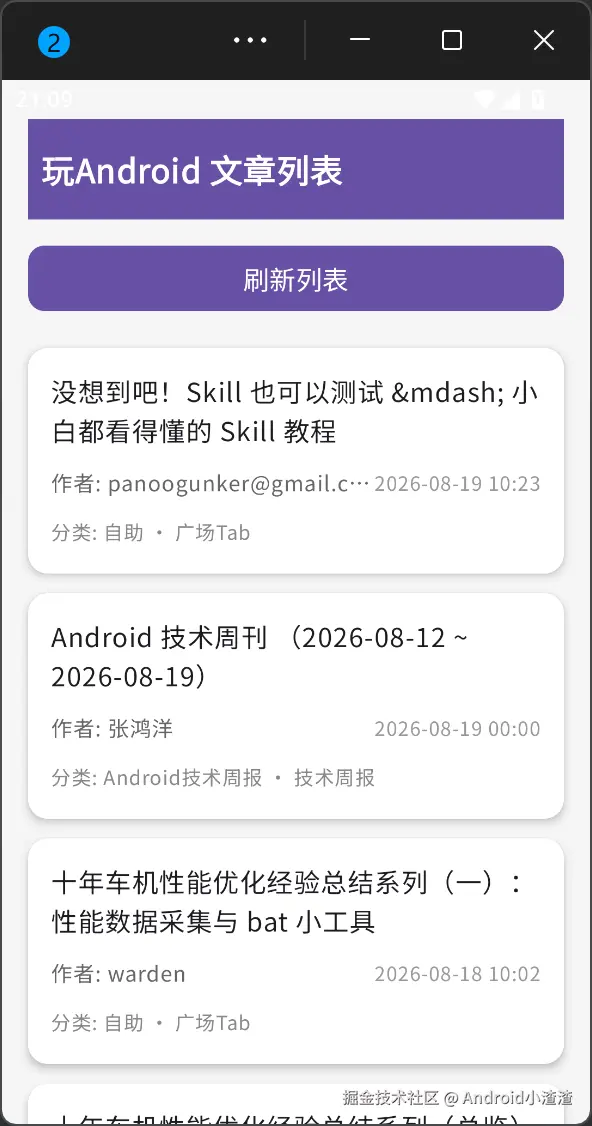
Android端:
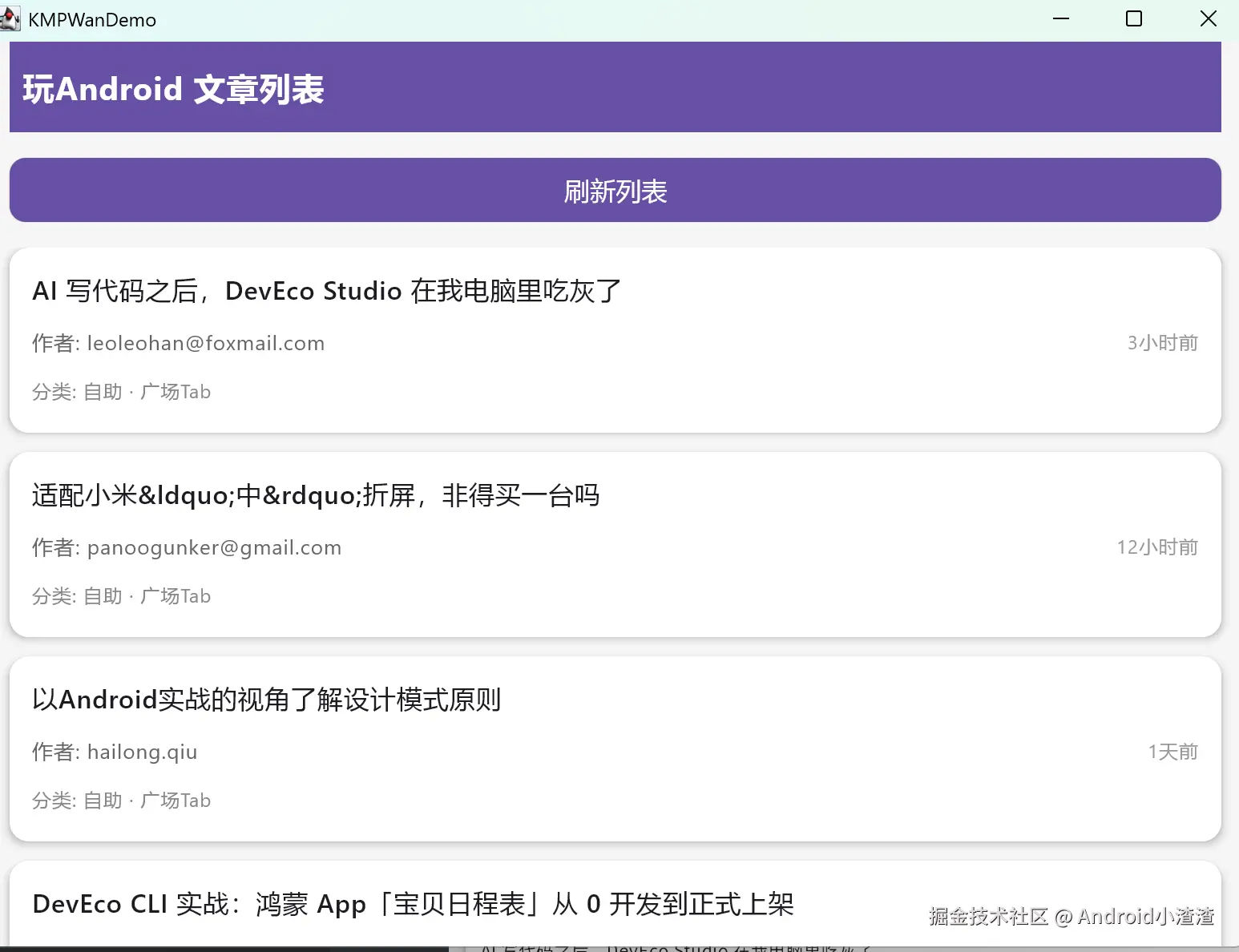
桌面端:
web端:
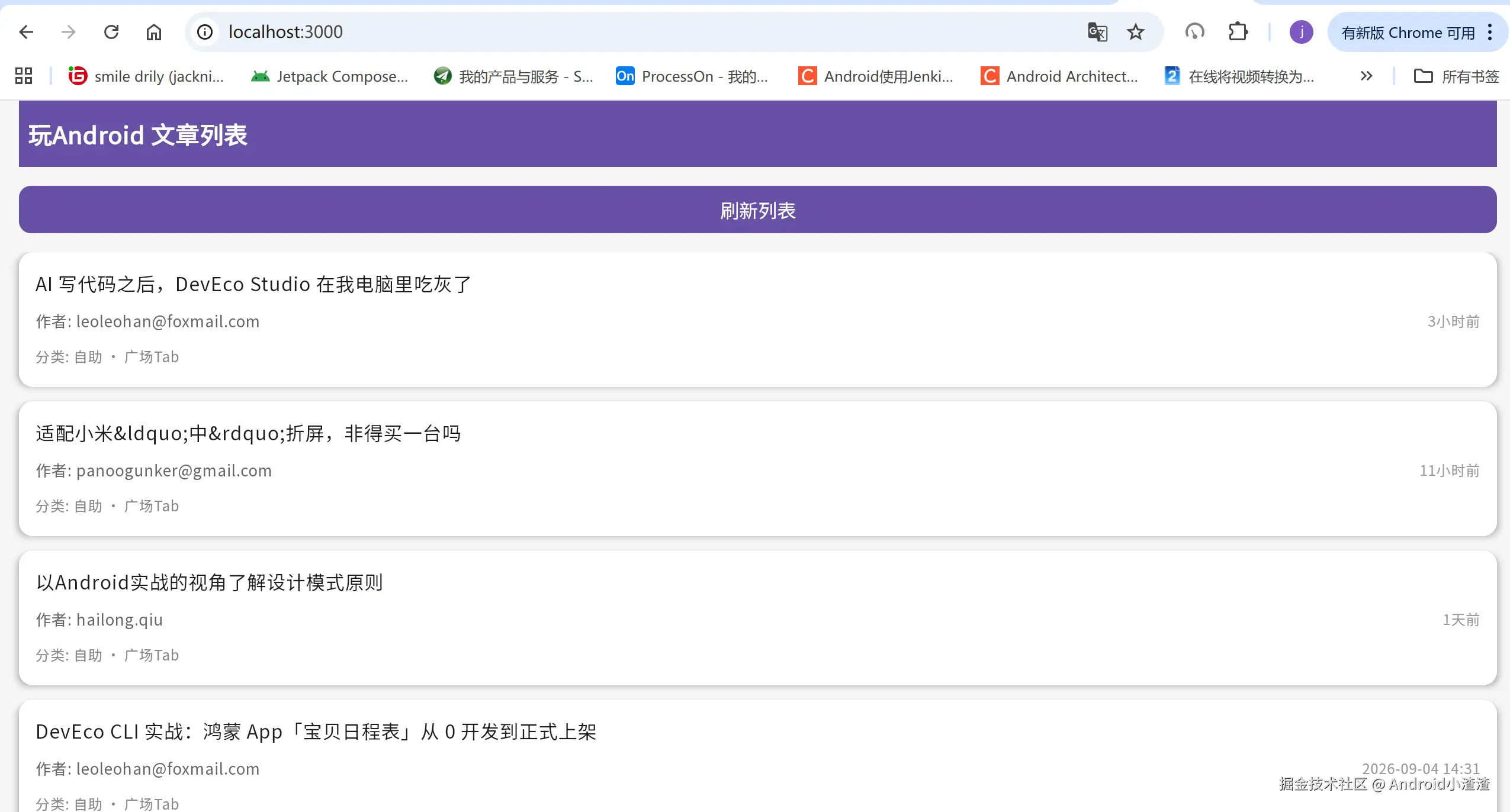
9.总结:
项目概况
基于 Kotlin Multiplatform + Compose Multiplatform (M3) + Ktor + MVI 架构 实现跨平台玩 Android文章列表Demo,一套代码同时运行在 Android、JVM 桌面、iOS、JS、WasmJs 五个平台。
采用分层架构:data数据实体‑net多平台网络工厂‑http仓库层Repository‑viewmodel(MVI)‑ui界面层;利用expect‑actual完成平台差异化实现;compose‑resources统一管理字体资源,壳子模块只做入口,不掺杂业务逻辑。
核心实现要点
- 多平台 Ktor 网络 通过
expect fun createKtorHttpClient():HttpClient做声明,各平台源集提供对应 actual 引擎实现:
- Android:
ktor‑client‑okhttp - JVM 桌面:
ktor‑client‑java(规避 CIO 引擎 TLS 握手兼容问题) - iOS:
ktor‑client‑darwin - JS/WasmJs:
ktor‑client‑js/ktor‑client‑wasm
2.序列化 引入kotlin‑plugin‑serialization插件,使用@Serializable注解定义实体,Ktor 安装ContentNegotiation完成 JSON 解析。
3.MVI 单向数据流
sealed class ArticleIntent:定义用户行为(刷新)sealed class ArticleUiState:统一页面状态:Loading / Success / Error- ViewModel 持有 Repository,
viewModelScope执行协程网络;UI 层collectAsStateWithLifecycle监听状态渲染页面。
4.跨平台字体统一 把 NotoSansSC 中文字体放入commonMain/composeResources,封装rememberCustomTypography()对外暴露,所有壳模块 (Android / 桌面 / Web) 统一使用该 Typography,解决 WasmJs 网页中文乱码 ,壳模块禁止直接访问Res,规避 internal 访问报错。
踩坑清单 & 解决方案
| 问题 | 现象 | 解决方案 |
|---|---|---|
| 1. 序列化失败 | @Serializable 不生效 | toml 配置kotlinSerialization插件,shared 模块应用该插件 |
| 2.JVM 桌面网络 HTTPS 握手失败 | CIO 引擎 TLS 兼容性差 | jvmMain 使用ktor‑client‑java引擎,放弃 cio |
| 3.WasmJs 浏览器 CORS 跨域 | 浏览器拦截 wanandroid 接口请求 | 两种方案:①webpack devServer 代理;②独立 node 代理服务器转发接口请求,访问代理地址 |
| 4.WasmJs 中文乱码 | 网页端中文显示方框乱码 | common 层引入中文字体,封装 Typography,所有平台统一应用该字体 |
| 5.expect‑actual 编译报错 | no actual declaration for JVM |
每个 expect,所有 target 平台必须补齐 actual 实现,极易漏掉 jvmMain 桌面端 |
| 6.Ktor 引擎导包错误 | 各平台使用错误 http 引擎 | 各个 sourceSets 分别引入对应平台 ktor 客户端依赖,commonMain 只引入ktor‑client‑core核心包 |
整个过程调试和完整跑下来还是很有意思的,感觉回到的刚学开发的时候,遇到各种问题,哈哈!!当然后期可以把js部署在远程服务器,js乱码问题肯定还有更优方案,这里就不研究了,后面有时间再玩玩,大佬们如果有更好的方案可以直接提出,我会努力改进,ai时代既要合理利用ai,还要跟进新技术,未来KMP应该还是会有很大发展,纯属个人爱好。