文章目录
- 前言
- 一、报错的原因
- 二、处理步骤
-
- [1.先验证系统 Git 是否正常](#1.先验证系统 Git 是否正常)
- [2.IDEA 设置指定 git 完整路径](#2.IDEA 设置指定 git 完整路径)
- [3.Test 按钮仍然 no response](#3.Test 按钮仍然 no response)
-
- [3.1 清除idea 缓存](#3.1 清除idea 缓存)
- [3.2 杀死所有idea 进程](#3.2 杀死所有idea 进程)
- 总结
前言
Idea 中经常出现,git 拉取代码报错,提示找不到git 命令,而电脑上明明已经按照了git;命令行 git --version 正常能用,但是 IDEA 内 pull/commit/diff、变更列表全部失效;右下角报红,经常休眠 / 重启电脑后突然出现。
一、报错的原因
报错的提示语如下:
c
Cannot check the working tree for unmerged files because of an error.
Cannot Run Git: Cannot identify version of Git executable: no response
报错原因:
IDEA 调用本地 git.exe 完全没有返回响应,IDE 的 Git 集成失效,Idea 报git 错误
二、处理步骤
1.先验证系统 Git 是否正常
打开 Windows cmd / PowerShell,执行::
c
git --version正常:输出版本号,说明 Git 本体没问题,问题只在 IDEA 配置 / 进程 / 缓存
❌ 报错不是内部命令:Git 没装或者没加到系统 PATH,重装 Git,安装时勾选 Git from the command line and also from 3rd‑party software
2.IDEA 设置指定 git 完整路径
File → Settings → Version Control → Git不要填git.exe,写完整绝对路径
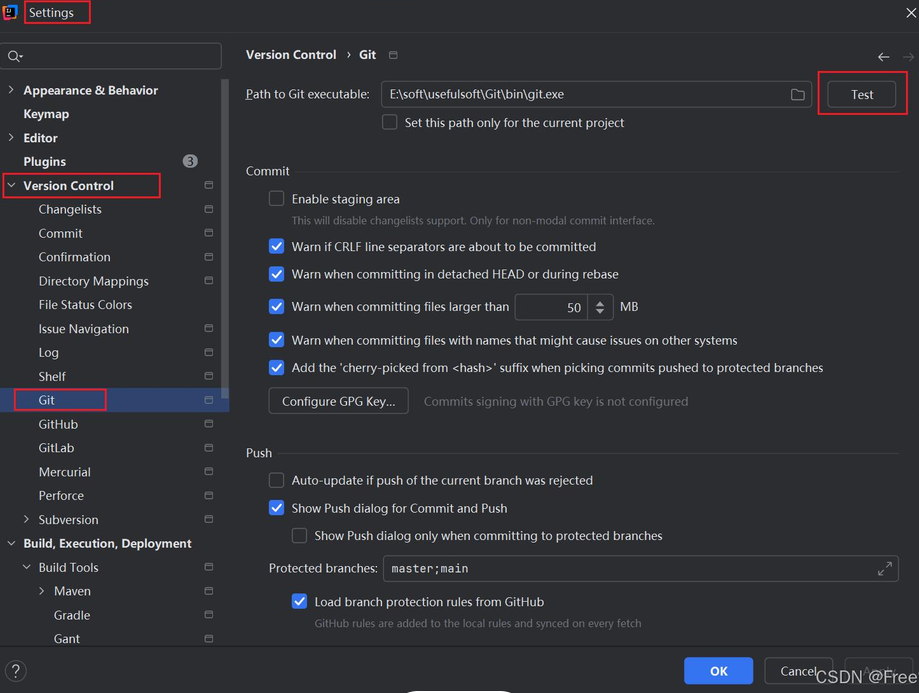
点右侧 Test
- ✅下方出现 Git version x.x.x → OK 保存,基本修复
- ❌Test 仍然无响应、超时 →往下继续处理
3.Test 按钮仍然 no response
3.1 清除idea 缓存
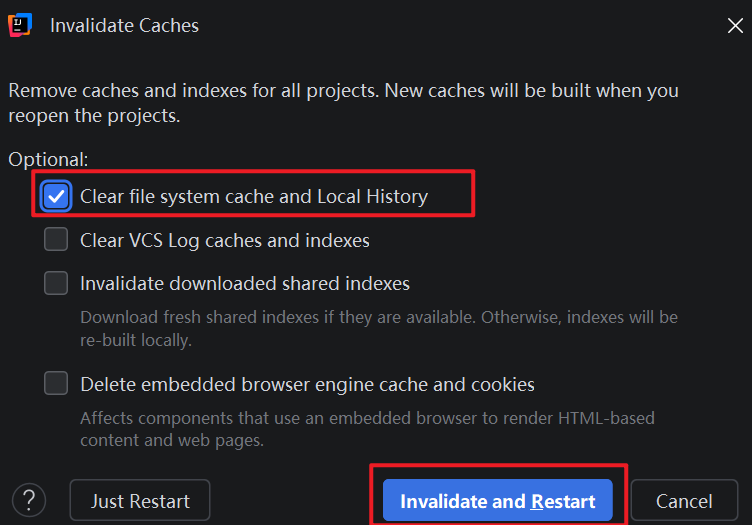
清除 IDEA 缓存重启 File → Invalidate Caches,勾选:Clear file system cache and local history → Invalidate and Restart
3.2 杀死所有idea 进程
杀掉残留 Java/Git 后台进程,Windows 任务管理器,结束所有:
git.exejava.exe(IDEA 相关)
完全关闭 IDEA,再重新打开项目。
总结
Idea 中git 不工作,首先通过命令行窗口:git --version 确定本身电脑按照的git 环境是否出问题,如果能正常显示版本,则为idea 中git 问题,则尝试重启Idea ,重新test 验证git 有效性。