专栏 :Python 自动化测试从入门到实战
适读人群 :测试工程师 / Python 开发者 / DevOps 入门
预计阅读:12 分钟
一、上接第 5 篇
在 第 5 篇《pytest 插件生态与 Allure 报告》 中,我们解决了:
- pytest 插件生态与选型
- Allure 企业级测试报告
- 注解三板斧(feature / story / step)
本篇进入 L4 收官阶段,回答一个落地问题:
如何让 pytest 在每次提交后自动运行、自动出报告、自动归档?
答案就是 CI/CD ------ 本文以 GitHub Actions 为例。
二、为什么需要 CI/CD?
没有 CI 时,测试靠"自觉":
| 场景 | 没有 CI | 有 CI |
|---|---|---|
| 提交代码 | 本地跑没跑不知道 | 每次 push 自动跑 |
| 测试报告 | 散落在本地 | 统一归档、可追溯 |
| 失败反馈 | 靠人发现 | PR 直接标红 |
| 回归 | 上线前突击 | 每次都全量回归 |
CI/CD = 把"人肉执行"变成"自动流水线"
三、核心概念(5 分钟入门)
| 概念 | 含义 |
|---|---|
| Workflow | 整个自动化流程(一个 YAML 文件) |
| Job | 一组串行步骤,运行在 Runner 上 |
| Step | Job 里的单个命令 |
| Runner | 执行 Job 的机器(GitHub 托管或自建) |
| Artifact | 流程产物(报告、截图等) |
触发方式:push、pull_request、定时(cron)、手动(workflow_dispatch)。
四、项目结构(沿用专栏体系)
pytest-series/
├── .github/
│   └── workflows/
│       └── test.yml          ← CI 配置(本文核心)
├── src/
│   └── calculator.py
├── tests/
│   ├── conftest.py
│   ├── test_calculator.py
│   └── test_allure.py
├── requirements.txt
├── pytest.ini
└── README.md
沿用 src/calculator.py + tests/ 结构,pytest.ini 在第 5 篇基础上增量追加 CI 相关配置。
五、第一个 Workflow:跑通 pytest
.github/workflows/test.yml
yaml
name: pytest-ci

on:
  push:
    branches: [main]
  pull_request:
    branches: [main]

jobs:
  test:
    runs-on: ubuntu-latest
    strategy:
      matrix:
        python-version: ["3.10", "3.11", "3.12"]

    steps:
      - name: Checkout code
        uses: actions/checkout@v4

      - name: Set up Python ${{ matrix.python-version }}
        uses: actions/setup-python@v5
        with:
          python-version: ${{ matrix.python-version }}

      - name: Install dependencies
        run: |
          python -m pip install --upgrade pip
          pip install -r requirements.txt

      - name: Run pytest
run: pytest tests/ -v要点:
strategy.matrix:多 Python 版本并行测试actions/checkout@v4:拉取代码(固定大版本,避免静默升级)- 每一步都有
name:失败时能快速定位
六、集成 Allure 报告(承接第 5 篇)
yaml
      - name: Run tests with Allure
        run: |
          pytest tests/ --alluredir=allure-results

      - name: Generate Allure report
        uses: simple-elf/allure-report-action@v1.7
        with:
          allure_results: allure-results
          allure_report: allure-report

      - name: Upload Allure report as artifact
        uses: actions/upload-artifact@v4
        with:
          name: allure-report-${{ matrix.python-version }}
          path: allure-report
产物可在 GitHub Actions 页面的 "Artifacts" 区下载,完整保留 Overview / Behaviors / Timeline 五大页签。
七、覆盖率 + 失败重试
覆盖率
yaml
      - name: Run with coverage
        run: |
          pytest tests/ --cov=src --cov-report=xml

      - name: Upload coverage to Codecov
        uses: codecov/codecov-action@v4
        with:
          file: ./coverage.xml
失败重试(稳定性验证)
yaml
      - name: Run flaky tests with retry
        run: |
          pytest tests/ --reruns 3 --reruns-delay 2
💡
--reruns来自 第 5 篇 提到的pytest-rerunfailures插件。
八、Workflow 架构图
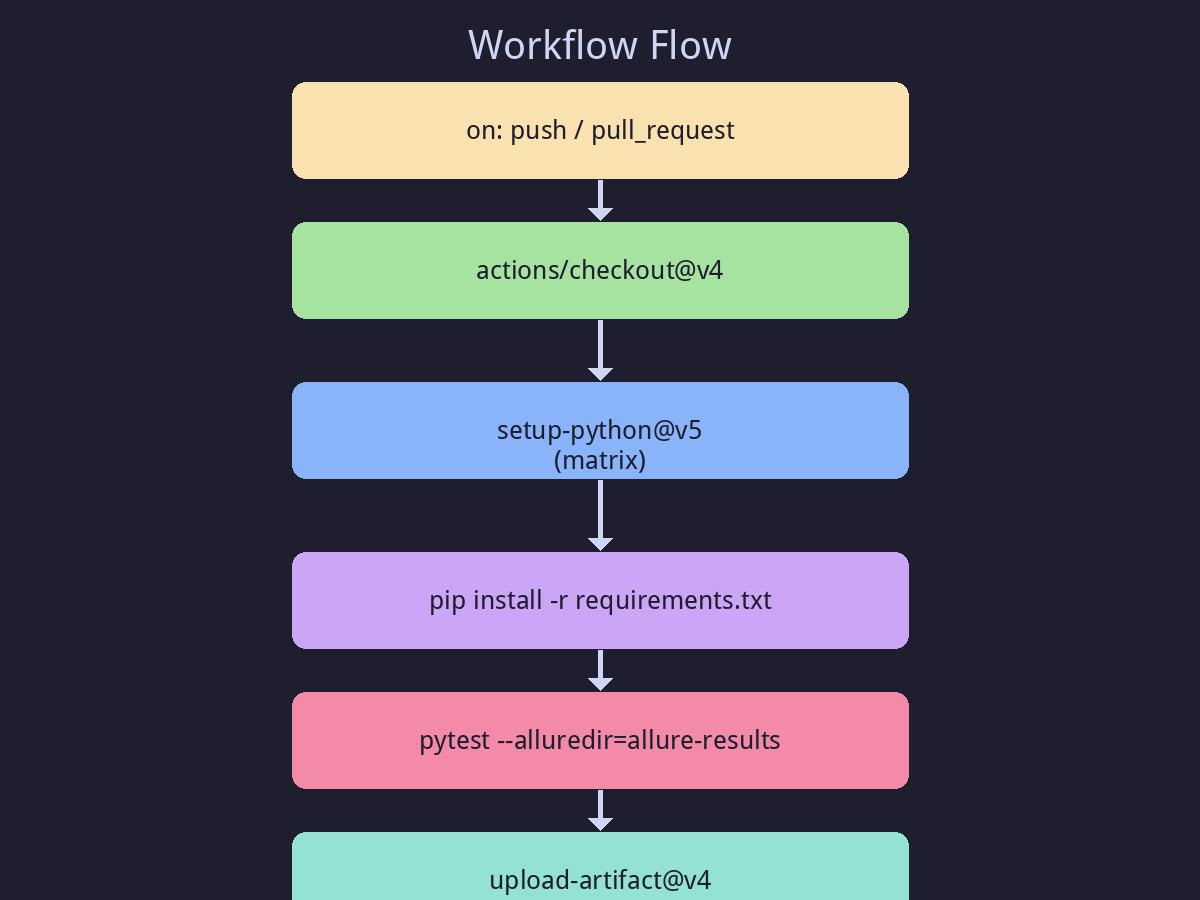
完整流水线:代码提交 → 多版本测试 → Allure 报告 → 覆盖率 → 产物归档 → 状态回写 PR。
九、矩阵策略详解(多环境测试)
yaml
strategy:
  matrix:
    python-version: ["3.10", "3.11", "3.12"]
    os: [ubuntu-latest, windows-latest]
    exclude:
      - os: windows-latest
        python-version: "3.10"
组合爆炸警告 :3 × 2 = 6 个 Job 并行,注意 Runner 分钟数配额(公开仓库免费)。
十、缓存依赖(加速构建)
yaml
      - name: Cache pip
        uses: actions/cache@v4
        with:
          path: ~/.cache/pip
          key: ${{ runner.os }}-pip-${{ hashFiles('requirements.txt') }}
          restore-keys: |
            ${{ runner.os }}-pip-
首次构建后,后续耗时通常降低 30%~60%。
十一、PR 质量门禁(Status Check)
GitHub 会在 PR 页面显示每个 Job 的 ✅/❌,配合 branch protection rules:
- 必须所有 CI 通过才能合并
- 必须有人 Review
- 必须 up-to-date with base
这就是"提交门禁",防止破窗效应。
十二、Pipeline 流程图
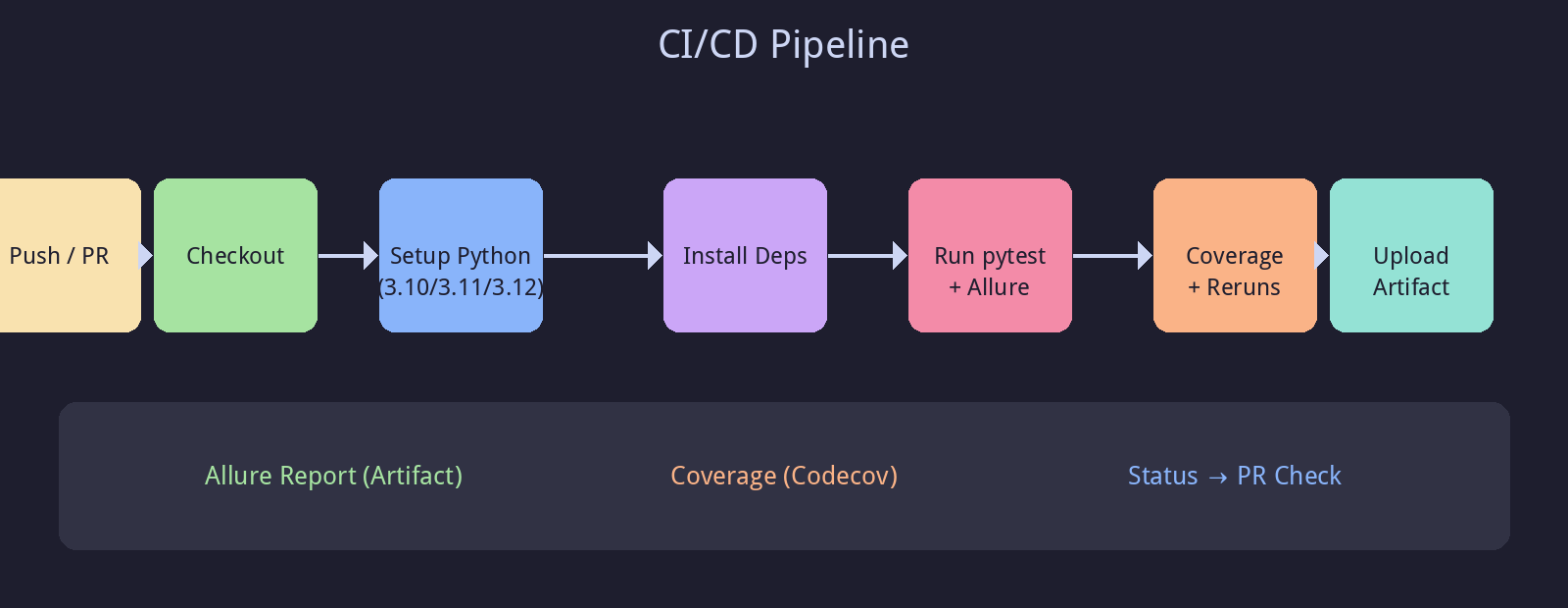
从 push/PR 触发,到 Checkout → 装环境 → 跑测试 → 出报告 → 归档产物的完整链路。
十三、 secrets 与敏感配置
yaml
      - name: Run with API key
        env:
          API_KEY: ${{ secrets.API_KEY }}
        run: pytest tests/
永远不要把密钥写进代码或 YAML,统一放在 GitHub Settings → Secrets and variables → Actions。
十四、完整 Workflow 一览
yaml
name: pytest-full-pipeline

on:
  push:
    branches: [main]
  pull_request:
    branches: [main]
  workflow_dispatch:

jobs:
  test:
    runs-on: ubuntu-latest
    strategy:
      matrix:
        python-version: ["3.10", "3.11", "3.12"]
    steps:
      - uses: actions/checkout@v4
      - uses: actions/setup-python@v5
        with:
          python-version: ${{ matrix.python-version }}
      - run: pip install -r requirements.txt
      - name: Run tests + Allure
        run: pytest tests/ --alluredir=allure-results
      - name: Upload report
        uses: actions/upload-artifact@v4
        with:
          name: allure-report-${{ matrix.python-version }}
          path: allure-report
十五、小结
✅ CI/CD = 把测试从"人肉"变成"自动流水线"
✅ GitHub Actions 核心是 Workflow / Job / Step 三层
✅ 矩阵策略实现多 Python × 多 OS 并行
✅ Allure 报告作为 Artifact 归档 ,全程可追溯
✅ secrets 管理敏感信息,PR 状态门禁保证质量
十六、下一篇预告
👉 《Docker 化测试环境:一致性交付》
你将学到:
- Dockerfile 打包测试环境
- docker-compose 编排服务
- CI 中复用同一镜像,实现"本地 = 线上"