在第3步中,我们成功让 Agent 跑通了"思考-调用工具-观察-回答"的闭环。但是在实际产品中(如 ChatGPT),用户不仅能看到最终答案,还能实时看到模型"正在调用网页搜索"、"正在执行代码"等中间状态。
为了将黑盒式的 Agent Loop 变得透明可观测,我们需要引入事件驱动(Event-Driven)的架构,第1步就是定义规范化的内部状态事件 (RunEvent)。
1. 为什么需要 RunEvent?
如果代码只是一个简单的 return final_answer,前端页面在几秒甚至十几秒的等待中只能显示一个无聊的 Loading 圈。 通过定义 RunEvent,Agent 可以在执行的不同阶段向外"广播"自己的状态。
事件流的好处:
- 前端反馈:实时更新 UI,如"正在思考..."、"工具执行中..."。
- 打字机效果:流式传输生成的文本 (Tokens)。
- 日志与调试:方便后端记录执行轨迹,追踪是哪一步出了错。
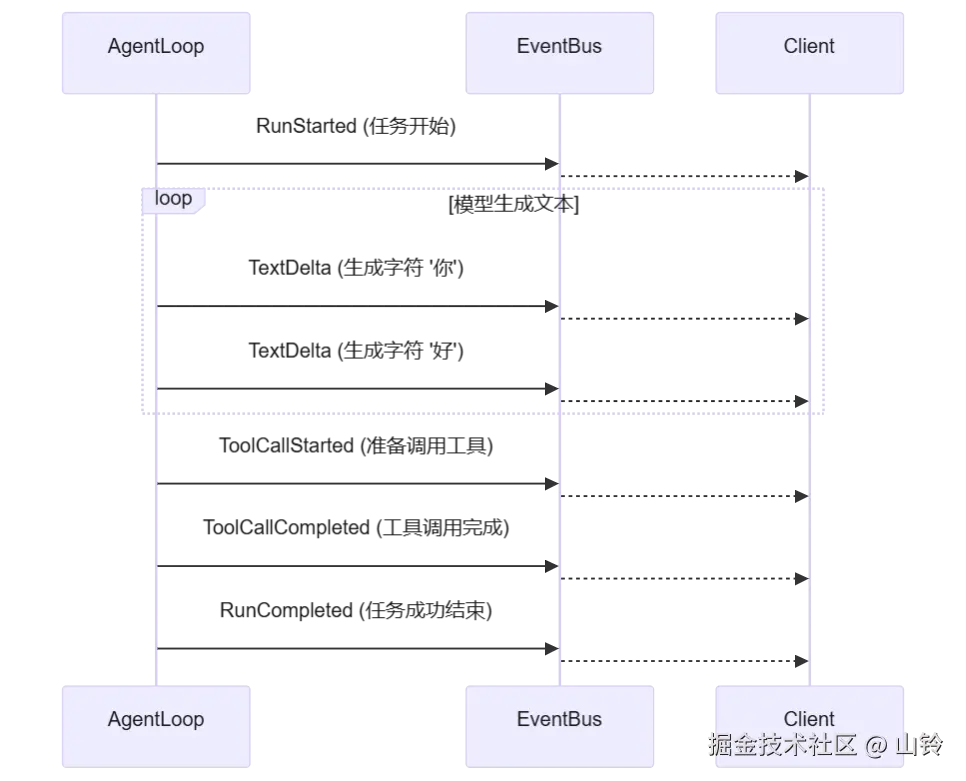
2. 核心生命周期事件图
一个典型的 Agent Run 生命周期会触发以下事件:
3. Python 模型定义
我们推荐使用 Python 的 pydantic 库来定义强类型的事件结构。这不仅便于序列化为 JSON 供前端消费,也能保证后端代码的严谨性。
python
from enum import Enum
from typing import Any, Dict, Optional
from pydantic import BaseModel, Field
from datetime import datetime

class RunEventName(str, Enum):
    """定义所有可能的事件类型"""
    RUN_STARTED = "run.started"
    RUN_COMPLETED = "run.completed"
    RUN_FAILED = "run.failed"

    TEXT_DELTA = "text.delta"

    TOOL_CALL_STARTED = "tool_call.started"
    TOOL_CALL_COMPLETED = "tool_call.completed"

class BaseRunEvent(BaseModel):
    """事件基类"""
    run_id: str = Field(..., description="当前运行实例的唯一ID")
    event: RunEventName = Field(..., description="事件类型")
    created_at: datetime = Field(default_factory=datetime.utcnow)

# 1. 运行开始与结束事件
class RunStartedEvent(BaseRunEvent):
    event: RunEventName = RunEventName.RUN_STARTED
    input_query: str

class RunCompletedEvent(BaseRunEvent):
    event: RunEventName = RunEventName.RUN_COMPLETED
    final_output: str

class RunFailedEvent(BaseRunEvent):
    event: RunEventName = RunEventName.RUN_FAILED
    error_message: str

# 2. 文本流式事件
class TextDeltaEvent(BaseRunEvent):
    event: RunEventName = RunEventName.TEXT_DELTA
    text: str = Field(..., description="增量文本 token")

# 3. 工具调用事件
class ToolCallStartedEvent(BaseRunEvent):
    event: RunEventName = RunEventName.TOOL_CALL_STARTED
    tool_name: str
    tool_args: Dict[str, Any]

class ToolCallCompletedEvent(BaseRunEvent):
    event: RunEventName = RunEventName.TOOL_CALL_COMPLETED
    tool_name: str
    tool_result: str
4. 在 Agent Loop 中触发事件
修改我们第3步中的 Agent Loop,将 print() 替换为触发(Yield)这些事件:
python
from typing import Generator

class ObservableAgent:
    def run_stream(self, run_id: str, user_input: str) -> Generator[BaseRunEvent, None, None]:
        # 任务开始
        yield RunStartedEvent(run_id=run_id, input_query=user_input)

        try:
            # 伪代码:流式生成与工具调用拦截
            # ...
            # 当模型流式吐出文字时:
            yield TextDeltaEvent(run_id=run_id, text="北")
            yield TextDeltaEvent(run_id=run_id, text="京")

            # 当模型决定调用工具时:
            yield ToolCallStartedEvent(run_id=run_id, tool_name="get_weather", tool_args={"location": "北京"})
            # 执行工具...
            yield ToolCallCompletedEvent(run_id=run_id, tool_name="get_weather", tool_result="晴天")

            # 任务完成
            yield RunCompletedEvent(run_id=run_id, final_output="北京今天是晴天。")

        except Exception as e:
            yield RunFailedEvent(run_id=run_id, error_message=str(e))
总结
通过定义规范化的 RunEvent,我们将 Agent 从一个阻塞的黑盒变成了一个透明的事件源。这种设计不仅解耦了核心逻辑与展示层,还为后续的功能扩展打下了坚实基础。
那么,产生的这些对话历史和状态事件应该存放在哪里呢?下一篇,我们将介绍如何实现 Run Store (内存版) 来追踪和管理这些状态。