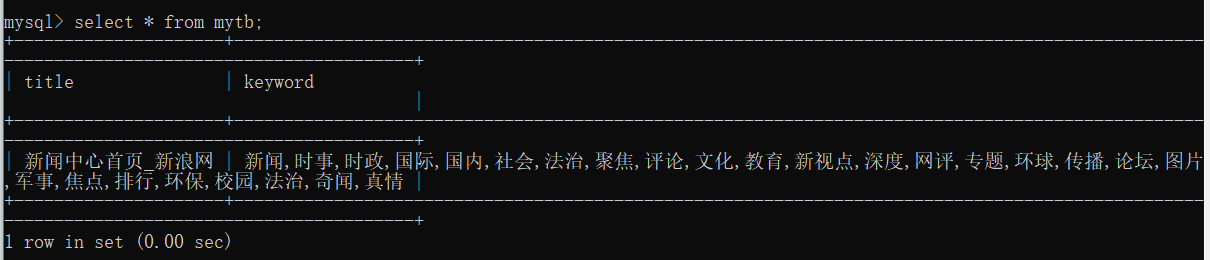
目标:构建一个爬虫项目,获取新浪新闻网站中多个新闻网页中的标题和关键词等信息,将数据写入到数据库。
代码:
- 创建一个scrapy项目testdb 命令: scrapy startproject testdb
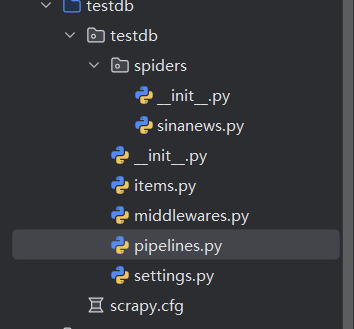
- 修改items.py文件
python
import scrapy


class TestdbItem(scrapy.Item):
    # define the fields for your item here like:
    # name = scrapy.Field()
    name = scrapy.Field()
keyword = scrapy.Field()- 创建数据库和表:
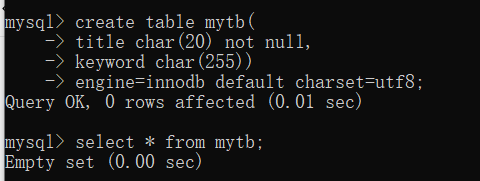
create table mytb(
title CHAR(20) NOT NULL,
keyword CHAR(255)
)engine=innodb default charset=utf8;
- 修改pipeline文件:
python
import pymysql

class TestdbPipeline:
    def __init__(self):
        self.con=pymysql.connect(host='localhost',user='root',passwd='root',db='test',charset='utf8')
        self.cursor = self.con.cursor()


    def process_item(self, item, spider):
        name = item['name'][0]
        keyword = item['keyword'][0]
        print(name,keyword)
        sql="insert into mytb(title,keyword) values('"+name+"','"+keyword+"')"
        self.cursor.execute(sql)
        self.con.commit()
        return item
    def close_spider(self,spider):
self.cursor.close()- 修改settings文件:
python
ITEM_PIPELINES = {
   "testdb.pipelines.TestdbPipeline": 300,
}- 创建爬虫文件:sinanews.py
命令:scrapy genspider -t basic sinanews sina.com.cn
python
import scrapy
from testdb.items import TestdbItem

class TestSinaNews(scrapy.Spider):
    name = 'sinanews'
    allowed_domains = ['sina.com.cn']
    start_urls = ('https://news.sina.com.cn/',)

    def parse(self, response):
        item = TestdbItem()
        item['name'] = response.xpath("/html/head/title/text()").extract()
        item['keyword'] = response.xpath("/html/head/meta[@name='keywords']/@content").extract()
        yield item
运行:命令:scrapy crawl sinanews --nolog