Androidiot开发之猫脸识别
1.猫脸识别简单流程:
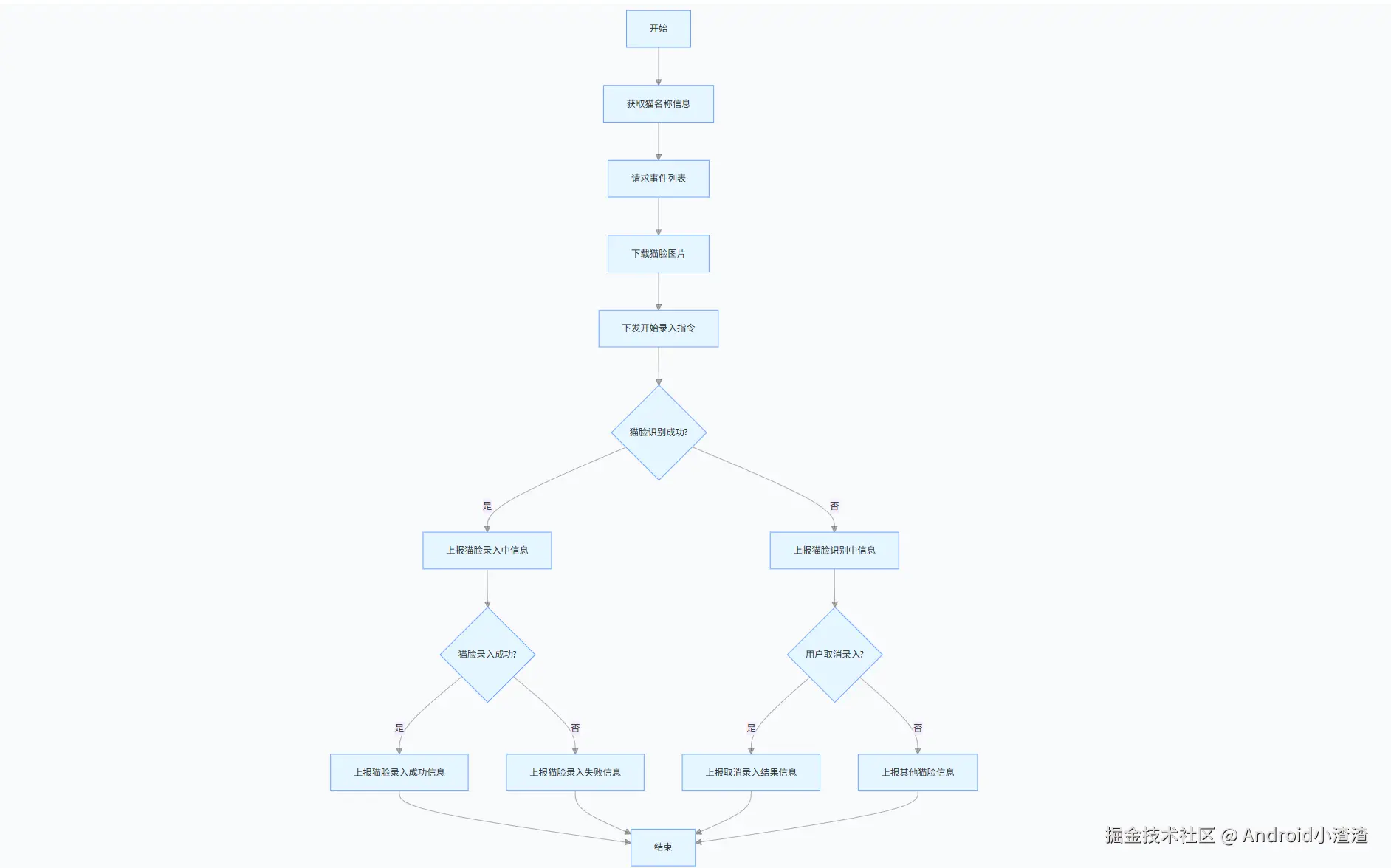
2.猫脸识别设备端所有指令:
lua
属性名称:CatFace
下发示例:
{"CatFace": ""<1718966407,archive><startcat,猫名>""} --开始猫脸录入
{"CatFace": ""<1718966407,archivecat>""}--取消猫脸录入
{"CatFace": ""<1718966407,deletecat><猫脸ID>""} --删除猫脸
上报示例:
{"CatFace": "<1718966407,searchcat>"} --猫脸识别中
{"CatFace": "<1718966407,archivecat>"} --猫脸录入中
{"CatFace": "<1718966407,archivecat><suc,猫名,猫脸ID>"} --猫脸录入成功
{"CatFace": "<1718966407,archivecat><err,timeout>"} --猫脸录入失败-原因:超时
{"CatFace": "<1718966407,archivecat><err,too_many>"} --猫脸录入失败-原因:画面中有太多猫
{"CatFace": "<1718966407,archivecat><err,sdk>"} --猫脸录入失败-原因:算法录入失败
{"CatFace": "<1718966407,deletecat><suc,猫脸ID>"} --删除猫脸成功
{"CatFace": "<1718966407,deletecat><err,猫脸ID>"} --删除猫脸失败属性名称:CatFace
3.获取登录用户当前宠物信息:
在下发开始录入人脸的时候需要猫名称
kotlin
getAiPetInfo("5")
fun getAiPetInfo(type: String) {
val post = EasyHttp.post(this)
post.api(AiPetInfoApi().setArguments(type, HawkUtil.getUserId()))
post.request(object : OnHttpListener<HttpData<AiPetInfoApi.Bean>> {
override fun onSucceed(result: HttpData<AiPetInfoApi.Bean>?) {
result?.let { it ->
it.data?.petInfo?.forEach {
catNickName = it.pet_name
}
}
}
override fun onFail(e: Exception?) {
LogUtil.e(e?.message)
}
})
}4.获取阿里云事件列表:
参考文档地址:
help.aliyun.com/document_de...
这里开始时间当前时间,结束时间是以当前时间为准取之前24小时内数据
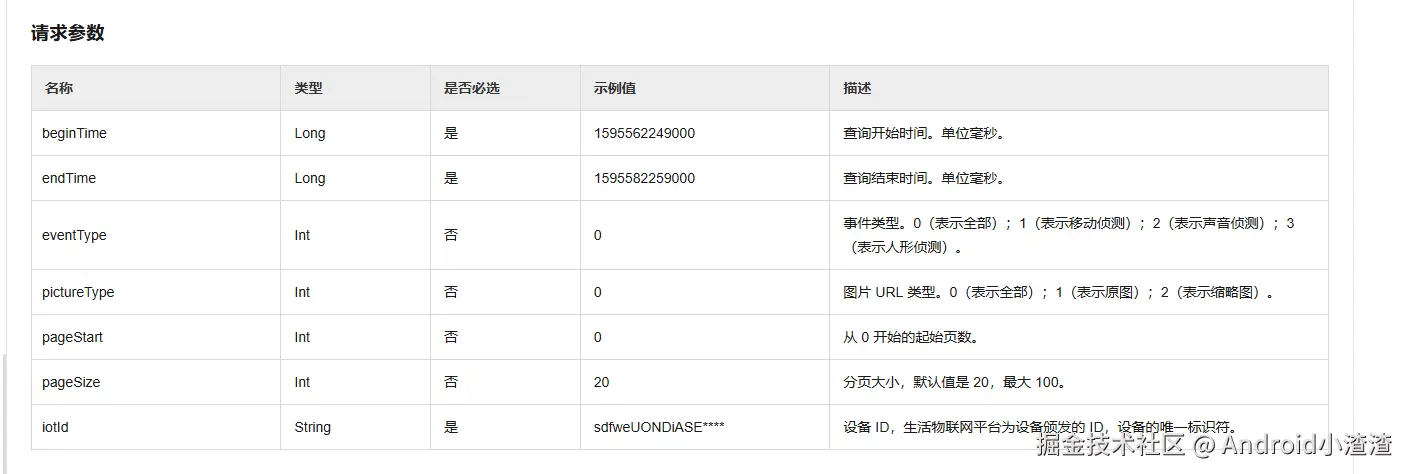
请求参数:
deviceId、startTime、endTime、开始页码、事件类型、图片类型
kotlin
private fun getEventData() {
// 计算startTime / endTime
val now = Calendar.getInstance()
val endTime = now.timeInMillis
// 将now设为24小时之前
now.add(Calendar.HOUR_OF_DAY, -24)
val startTime = now.timeInMillis
LogUtil.d(TAG, "===开始时间为 $startTime: ===结束时间为 $endTime===")
FyIot.getInstance()
.getEventList(equipmentBean?.dev_id, startTime, endTime, 0, 11018, 0, object :
CommonCallback() {
override fun onSuccess(data: Any?, code: Int) {
super.onSuccess(data, code)
val rawJson = Gson().toJson(data)
LogUtils.d(TAG, "===事件请求成功===${rawJson}")
val eventListData = parseEventDataManual(rawJson)
if (eventListData.isNotEmpty()) {
downloadMultiImages(eventListData, this@EquipmentCatFaceActivity)
} else {
LogUtils.w(TAG, "无可用事件数据")
ToastUtils.showShort("猫脸图片为空")
}
}
override fun onError(msg: String?, code: Int) {
super.onError(msg, code)
LogUtil.d(TAG, "===事件请求失败===$msg")
}
})
}5.获取到事件列表后下载猫脸图片:
这里的图片是多张,存储到系统目录,DCIM、DownLoad等都可以,存储时以时间和猫id命名
kotlin
fun downloadMultiImages(eventList: List<EventDetail>, context: Context) {
    val okHttpClient = OkHttpClient()
    val faceDir = FileUtils.getCatFaceImageSaveDir()
    // 遍历每个事件下载图片
    eventList.forEach { eventDetail ->
        val picUrl = eventDetail.eventPicUrl ?: ""
        if (TextUtils.isEmpty(picUrl)) {
            LogUtil.w(TAG, "事件${eventDetail.eventId}图片URL为空,跳过下载")
            return@forEach
        }
        // 解析猫ID和格式化时间
        val catId = RegexUtils.parseCatId(eventDetail.eventData)
        val formatTime = RegexUtils.formatEventTime(eventDetail.eventTime)
        val fileName = if (TextUtils.isEmpty(catId)) {
            "${formatTime}_pet_image.jpg"
        } else {
            "${formatTime}_${catId}.jpg"
        }
        val imageFile = File(faceDir, fileName)
        // 防止重复下载(若文件已存在则跳过)
        if (imageFile.exists()) {
            LogUtil.d(TAG, "图片已存在,跳过下载:${imageFile.absolutePath}")
            Handler(Looper.getMainLooper()).post {
                updateImageAdapter(imageFile)
            }
            return@forEach
        }
        val request = Request.Builder().url(picUrl).build()
        okHttpClient.newCall(request).enqueue(object : okhttp3.Callback {
            override fun onFailure(call: Call, e: IOException) {
                LogUtil.e(TAG, "图片下载失败($fileName):${e.message}")
            }
            override fun onResponse(call: Call, response: Response) {
                if (!response.isSuccessful) {
                    LogUtil.e(TAG, "响应失败($fileName):${response.code}")
                    return
                }
                val inputStream = response.body?.byteStream() ?: run {
                    LogUtil.e(TAG, "图片流为空($fileName)")
                    return
                }
                var outputStream: FileOutputStream? = null
                try {
                    outputStream = FileOutputStream(imageFile)
                    // 复制流(use自动关闭)
                    inputStream.use { input ->
                        outputStream.use { output ->
                            input.copyTo(output)
                        }
                    }
                    LogUtil.d(TAG, "图片保存到DCIM成功:${imageFile.absolutePath}")
                    // 通知系统相册扫描新图片
                    FileUtils.scanImageToGallery(context, imageFile)
                    Handler(Looper.getMainLooper()).post {
                        updateImageAdapter(imageFile)
                    }
                } catch (e: Exception) {
                    LogUtil.e(TAG, "保存图片失败($fileName):${e.message}")
                    if (imageFile.exists()) {
                        imageFile.delete()
                    }
                } finally {
                    try {
                        inputStream.close()
                        outputStream?.close()
                    } catch (e: IOException) {
                        LogUtil.e(TAG, "关闭流失败:${e.message}")
                    }
                }
            }
        })
    }
}
6.目前App有3个指令发送:
6.1 获取猫id:
在设备上报的猫脸录入成功事件中获取猫id
kotlin
fun extractSucId(jsonLine: String): String? {
if (!jsonLine.contains("<suc,")) return null
val regex = """<suc,[^,>]*,([^>]+)>""".toRegex()
val match = regex.find(jsonLine)
return match?.groups?.get(1)?.value?.replace("[", "")
?.replace("]", "")
}
/**
* 解析一个 List<String>,返回所有能成功提取到的 sucId。
*/
fun parseSucEntries(lines: List<String>): List<String> {
return lines.mapNotNull { line -> extractSucId(line) }
}
6.2 开始录入指令:
kotlin
{"CatFace": ""<1718966407,archive><startcat,猫名>""} --开始猫脸录入
val timestamp = (System.currentTimeMillis() / 1000).toString()
val command = "<$timestamp,archive><startcat,$catNickName>"
val instructionValue = ""$command""
FyIot.sendInstructToFy(
iotId,
"CatFace",
instructionValue,
object : CommonCallback() {
override fun onSuccess(data: Any?, code: Int) {
LogUtil.d(TAG, "猫脸开始录入指令发送成功 $data")
}
override fun onError(msg: String?, code: Int) {
LogUtil.e(TAG, "猫脸开始录入指令发送失败: $msg")
}
})
6.3 取消录入指令:
kotlin
{"CatFace": ""<1718966407,archivecat>""}--取消猫脸录入
val timestamp = (System.currentTimeMillis() / 1000).toString()
val command = "<$timestamp,archive><cancel>"
val instructionValue = ""$command""
FyIot.sendInstructToFy(
iotId,
"CatFace",
instructionValue,
object : CommonCallback() {
override fun onSuccess(data: Any?, code: Int) {
LogUtil.d(TAG, "猫脸取消录入指令发送成功 $code")
}
override fun onError(msg: String?, code: Int) {
LogUtil.e(TAG, "猫脸取消录入指令发送失败: $msg")
}
})6.4 删除猫脸指令:
删除猫脸时需要拿到设备上报的猫id,没有id时提示用户没有录入猫脸
kotlin
{"CatFace": ""<1718966407,deletecat><猫脸ID>""} --删除猫脸
val timestamp = (System.currentTimeMillis() / 1000).toString()
val command = "<$timestamp,deletecat><${deleteCatId}>"
val instructionValue = ""$command""
FyIot.sendInstructToFy(
iotId,
"CatFace",
instructionValue,
object : CommonCallback() {
override fun onSuccess(data: Any?, code: Int) {
LogUtil.d(TAG, "删除猫脸指令发送成功 $code")
}
override fun onError(msg: String?, code: Int) {
LogUtil.e(TAG, "删除猫脸指令发送失败: $msg")
toast("删除猫脸指令发送失败: $msg")
}
})7.用户操作提示:
当用户在App上操作后需要把设备操作的状态上报给App,然后App解析提示用户
kotlin
override fun onDpUpdate(
    devId: String?,
    dpStr: String?,
    type: String?,
    pos: Int
) {
    handleCatFaceResultSafe(dpStr)
    val targetValue = RegexUtils.extractSucId(dpStr.toString())
    LogUtil.d(TAG, "猫脸id为:$targetValue")
    if (targetValue != null) {
        deleteCatId = targetValue
        HawkUtil.setCatId(deleteCatId)
    }
}
8.正则工具类:
kotlin
object RegexUtils {
    private val TAG = RegexUtils::class.java.name
    fun extractSucId(jsonLine: String): String? {
        if (!jsonLine.contains("<suc,")) return null
        val regex = """<suc,[^,>]*,([^>]+)>""".toRegex()
        val match = regex.find(jsonLine)
        return match?.groups?.get(1)?.value?.replace("[", "")
            ?.replace("]", "")
    }

    /**
     * 解析eventData中的猫ID
     * 输入:<1764831962,search><AE6E5131D75CDAA36A9C14AC0859327B>
     * 输出:AE6E5131D75CDAA36A9C14AC0859327B(无则返回空)
     */
    fun parseCatId(eventData: String?): String {
        if (TextUtils.isEmpty(eventData)) return ""
        val pattern = Regex("<([^>]*)>")
        val matches = pattern.findAll(eventData ?: "").toList()
        return if (matches.size >= 2) {
            matches[1].groupValues[1]
        } else {
            "" // 无猫ID时返回空
        }
    }


**
 * 解析 "猫脸" 返回的 dpStr JSON, 根据命令 + 状态弹提示
 * 支持如下几种情况:
 *  - search + run "猫脸识别中"
 *  - archive + run "猫脸录入中"
 *  - archive + suc + 有 ID  → "猫脸录入成功"
 *  - archive + err + 错误原因 → "猫脸录入失败: 原因 XXX"
 *  - delete + suc           → "删除猫脸成功"
 *  - delete + err           → "删除猫脸失败"
 *
 * @param dpStr JSON 字符串,例如:
 *   {"CatFace":"<1718966407,archivecat><suc,猫名,猫脸ID>"}
 *   或者 {"CatFace":"<...><err,timeout>"}
 * @param context 用于弹 Toast
 * @return Boolean --- true 表示解析到有效命令 (无论成功失败),false 表示解析失败 / 格式不匹配
 */
fun Context.handleCatFaceResultSafe(dpStr: String?): Boolean {
    if (dpStr.isNullOrBlank()) {
        LogUtil.d(TAG, "dpStr is null or blank")
        return false
    }
    LogUtil.d(TAG, "Raw dpStr: $dpStr")
    try {
        val json = JSONObject(dpStr)
        val raw = json.optString("value", null)
        if (raw.isNullOrEmpty()) {
            LogUtil.d(TAG, "No "value" key or empty value")
            return false
        }
        LogUtil.d(TAG, "raw value: $raw")
        val runPattern = """<\d+,(search|archive)><run>""".toRegex()
        runPattern.find(raw)?.let { match ->
            val cmd = match.groups[1]?.value
            when (cmd) {
                "search" -> toast("猫脸识别中...")
                "archive" -> toast("猫脸录入中...")
                else -> toast("处理中...")
            }
            return true
        }
        val pattern = """<\d+,(archive|delete)><(suc|err),([^,>]*)(?:,([^>]+))?>""".toRegex()
        val match = pattern.find(raw)
        if (match == null) {
            LogUtil.d(TAG, "Regex did not match raw string")
            return false
        }
        val command = match.groups[1]?.value
        val status = match.groups[2]?.value
        val info = match.groups[3]?.value
        val id = match.groups[4]?.value
        LogUtil.d(TAG, "Parsed: command=$command, status=$status, info=$info, id=$id")
        when (command) {
            "archive" -> {
                when (status) {
                    "suc" -> {
                        if (!id.isNullOrEmpty()) {
                            toast("猫脸录入成功 (ID: $id)")
                        } else {
                            toast("猫脸录入成功")
                        }
                    }
                    "err" -> {
                        toast("猫脸录入失败:$info")
                    }
                }
            }
            "delete" -> {
                when (status) {
                    "suc" -> toast("删除猫脸成功")
                    "err" -> toast("删除猫脸失败")
                }
            }
            else -> return false
        }
        return true
    } catch (e: Exception) {
        LogUtil.e(TAG, "Exception parsing dpStr ${e.message}")
        return false
    }
}

fun Context.toast(message: CharSequence, duration: Int = Toast.LENGTH_SHORT) {
    Toast.makeText(this, message, duration).show()
}
}
9.功能亮点与异常适配
- 全流程闭环:实现用户信息获取、设备指令控制、云端数据拉取、本地资源处理、用户反馈提示的完整闭环,业务逻辑完整无断层;
- 数据精准关联:通过唯一猫脸ID串联设备数据、云端事件、本地图片资源,实现单只猫咪数据精准匹配与管理;
- 完善异常处理:覆盖网络请求失败、图片URL为空、文件读写异常、设备指令报错、数据解析异常等各类场景,同时细化业务异常原因,便于问题定位与用户提示;
- 用户体验优化:自动化填充宠物昵称、自动去重下载、实时状态反馈、系统相册同步,大幅简化用户操作;
- 标准化可扩展:指令格式、数据解析、接口请求逻辑统一封装,代码解耦性高,可快速扩展多猫识别、历史记录查询、图片管理等衍生功能。
10.总结:
- 该AndroidIoT猫脸识别功能,深度结合物联网设备通信能力与阿里云云端服务能力,
- 通过标准化的设备指令交互、精准的正则数据解析、规范的云端事件拉取与本地化资源处理,
- 稳定实现了猫咪人脸录入、删除、识别监测、事件图片留存、状态实时反馈等核心业务。
- 整套方案逻辑清晰、异常适配完善、交互体验良好,代码可复用性与扩展性强,完整满足智能宠物IoT设备的猫脸识别业务需求,实现了移动端、设备端、云端三方的数据高效协同。
- 目前只是简单测试阶段,没有处理多只猫咪的情况,是和硬件部门联调后固定放一只猫,当然在手机上把猫咪头像对着摄像头可以获取到一只猫脸,也可以使用真实的猫咪对着摄像头,这些是后面待开发的功能.