拆解 Tool Calling Agent:从裸写闭环到 LangGraph 安全状态机实现
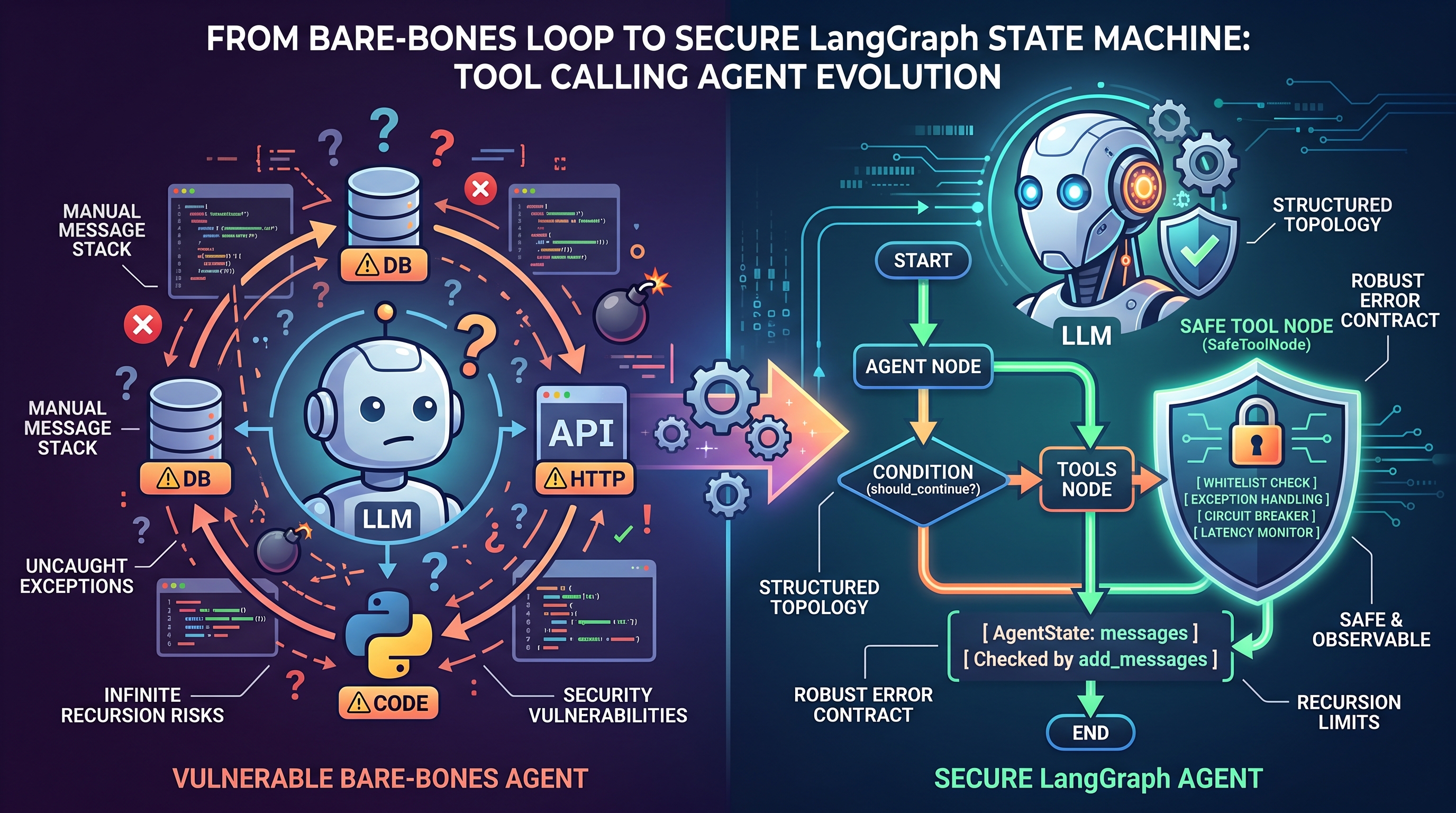
很多刚接触 Agent 开发的同学常有一个直觉误区:以为把函数"注册"给大模型后,模型就能自己运行代码并拿回结果。实际上,当前主流的大语言模型(无论 GPT-4o、Claude 还是开源的 Qwen、DeepSeek)本质上仍是一个纯文本概率生成器,它根本没有操作系统级的执行上下文。
模型不执行任何代码。它只负责在理解上下文后,生成一段符合约定的结构化调用意图(Function Calling / Tool Calls);真正搬砖跑 Python 代码、发 HTTP 请求、查数据库的,始终是我们的后端进程。
理解这一点,是写出生产可用 Agent 的分水岭。今天我从零手写一个工具调用闭环讲起,顺藤摸瓜拆解 LangGraph 的 ToolNode 与状态流转,最后落地一套包含白名单、异常兜底与可观测性的安全工具节点。
工具调用的三要素与底层消息契约
在 LangChain 体系下,我们通常用 @tool 装饰器定义一个工具:
python
from langchain_core.tools import tool

@tool
def query_order(order_id: str) -> str:
    """根据订单号查询订单状态。
    当用户询问订单状态、物流进度或发货情况时调用此工具。
    """
    orders = {
        "1001": {"status": "已发货", "logistics": "顺丰速运"},
        "1002": {"status": "未发货", "logistics": None},
    }
    order = orders.get(order_id)
    if not order:
        return f"工具执行失败:订单 {order_id} 不存在,请核对订单号。"

return f"订单 {order_id} 状态:{order['status']},物流:{order['logistics'] or '暂无'}。"定义一个生产级工具时,三要素缺一不可:
- Name:函数的命名,语义必须清晰。
- Description(Docstring):模型判断"要不要调、何时调"的唯一先验知识。Prompt 中如果工具职责边界模糊,模型就会出现"幻觉乱调"或"视而不见"。
- Args Schema:参数类型与命名(基于 Pydantic / Type Hints),决定了模型输出 JSON 时的 Key 及格式。
当我们将工具绑定到模型:
python
llm_with_tools = llm.bind_tools([query_order])这步操作仅仅是在向模型发起 API 请求时,把工具的 JSON Schema 注入到了请求体中。
关键响应:tool_calls
模型如果判定需要调用工具,其返回的 AIMessage.content 往往为空(或仅有一句引言),核心载荷在 AIMessage.tool_calls 中:
json
[
  {
    "name": "query_order",
    "args": {"order_id": "1001"},
    "id": "call_981ad07b_8e12"
  }
]
这里的 id(tool_call_id)是模型调用的全局唯一追踪凭证。在模型并行发起多次工具调用时,后端必须凭借此 ID 把每个函数的执行结果精准对齐。
裸写一个工具调用闭环
在不依赖任何 Agent 框架的高级抽象(如 create_react_agent)之前,一个纯 Python 的工具调用循环长成这样:
本地工具函数 大语言模型 业务运行时 (Python) 本地工具函数 大语言模型 业务运行时 (Python) #mermaid-svg-1dhYG8c3uB7Vq6yB{font-family:"trebuchet ms",verdana,arial,sans-serif;font-size:16px;fill:#333;}@keyframes edge-animation-frame{from{stroke-dashoffset:0;}}@keyframes dash{to{stroke-dashoffset:0;}}#mermaid-svg-1dhYG8c3uB7Vq6yB .edge-animation-slow{stroke-dasharray:9,5!important;stroke-dashoffset:900;animation:dash 50s linear infinite;stroke-linecap:round;}#mermaid-svg-1dhYG8c3uB7Vq6yB .edge-animation-fast{stroke-dasharray:9,5!important;stroke-dashoffset:900;animation:dash 20s linear infinite;stroke-linecap:round;}#mermaid-svg-1dhYG8c3uB7Vq6yB .error-icon{fill:#552222;}#mermaid-svg-1dhYG8c3uB7Vq6yB .error-text{fill:#552222;stroke:#552222;}#mermaid-svg-1dhYG8c3uB7Vq6yB .edge-thickness-normal{stroke-width:1px;}#mermaid-svg-1dhYG8c3uB7Vq6yB .edge-thickness-thick{stroke-width:3.5px;}#mermaid-svg-1dhYG8c3uB7Vq6yB .edge-pattern-solid{stroke-dasharray:0;}#mermaid-svg-1dhYG8c3uB7Vq6yB .edge-thickness-invisible{stroke-width:0;fill:none;}#mermaid-svg-1dhYG8c3uB7Vq6yB .edge-pattern-dashed{stroke-dasharray:3;}#mermaid-svg-1dhYG8c3uB7Vq6yB .edge-pattern-dotted{stroke-dasharray:2;}#mermaid-svg-1dhYG8c3uB7Vq6yB .marker{fill:#333333;stroke:#333333;}#mermaid-svg-1dhYG8c3uB7Vq6yB .marker.cross{stroke:#333333;}#mermaid-svg-1dhYG8c3uB7Vq6yB svg{font-family:"trebuchet ms",verdana,arial,sans-serif;font-size:16px;}#mermaid-svg-1dhYG8c3uB7Vq6yB p{margin:0;}#mermaid-svg-1dhYG8c3uB7Vq6yB .actor{stroke:hsl(259.6261682243, 59.7765363128%, 87.9019607843%);fill:#ECECFF;}#mermaid-svg-1dhYG8c3uB7Vq6yB text.actor>tspan{fill:black;stroke:none;}#mermaid-svg-1dhYG8c3uB7Vq6yB .actor-line{stroke:hsl(259.6261682243, 59.7765363128%, 87.9019607843%);}#mermaid-svg-1dhYG8c3uB7Vq6yB .innerArc{stroke-width:1.5;stroke-dasharray:none;}#mermaid-svg-1dhYG8c3uB7Vq6yB .messageLine0{stroke-width:1.5;stroke-dasharray:none;stroke:#333;}#mermaid-svg-1dhYG8c3uB7Vq6yB .messageLine1{stroke-width:1.5;stroke-dasharray:2,2;stroke:#333;}#mermaid-svg-1dhYG8c3uB7Vq6yB #arrowhead path{fill:#333;stroke:#333;}#mermaid-svg-1dhYG8c3uB7Vq6yB .sequenceNumber{fill:white;}#mermaid-svg-1dhYG8c3uB7Vq6yB #sequencenumber{fill:#333;}#mermaid-svg-1dhYG8c3uB7Vq6yB #crosshead path{fill:#333;stroke:#333;}#mermaid-svg-1dhYG8c3uB7Vq6yB .messageText{fill:#333;stroke:none;}#mermaid-svg-1dhYG8c3uB7Vq6yB .labelBox{stroke:hsl(259.6261682243, 59.7765363128%, 87.9019607843%);fill:#ECECFF;}#mermaid-svg-1dhYG8c3uB7Vq6yB .labelText,#mermaid-svg-1dhYG8c3uB7Vq6yB .labelText>tspan{fill:black;stroke:none;}#mermaid-svg-1dhYG8c3uB7Vq6yB .loopText,#mermaid-svg-1dhYG8c3uB7Vq6yB .loopText>tspan{fill:black;stroke:none;}#mermaid-svg-1dhYG8c3uB7Vq6yB .loopLine{stroke-width:2px;stroke-dasharray:2,2;stroke:hsl(259.6261682243, 59.7765363128%, 87.9019607843%);fill:hsl(259.6261682243, 59.7765363128%, 87.9019607843%);}#mermaid-svg-1dhYG8c3uB7Vq6yB .note{stroke:#aaaa33;fill:#fff5ad;}#mermaid-svg-1dhYG8c3uB7Vq6yB .noteText,#mermaid-svg-1dhYG8c3uB7Vq6yB .noteText>tspan{fill:black;stroke:none;}#mermaid-svg-1dhYG8c3uB7Vq6yB .activation0{fill:#f4f4f4;stroke:#666;}#mermaid-svg-1dhYG8c3uB7Vq6yB .activation1{fill:#f4f4f4;stroke:#666;}#mermaid-svg-1dhYG8c3uB7Vq6yB .activation2{fill:#f4f4f4;stroke:#666;}#mermaid-svg-1dhYG8c3uB7Vq6yB .actorPopupMenu{position:absolute;}#mermaid-svg-1dhYG8c3uB7Vq6yB .actorPopupMenuPanel{position:absolute;fill:#ECECFF;box-shadow:0px 8px 16px 0px rgba(0,0,0,0.2);filter:drop-shadow(3px 5px 2px rgb(0 0 0 / 0.4));}#mermaid-svg-1dhYG8c3uB7Vq6yB .actor-man line{stroke:hsl(259.6261682243, 59.7765363128%, 87.9019607843%);fill:#ECECFF;}#mermaid-svg-1dhYG8c3uB7Vq6yB .actor-man circle,#mermaid-svg-1dhYG8c3uB7Vq6yB line{stroke:hsl(259.6261682243, 59.7765363128%, 87.9019607843%);fill:#ECECFF;stroke-width:2px;}#mermaid-svg-1dhYG8c3uB7Vq6yB :root{--mermaid-font-family:"trebuchet ms",verdana,arial,sans-serif;} 用户 "查一下订单 1001"1发送 HumanMessage2返回 AIMessage (带 tool_calls 与 id)3解析 args 并执行 query_order("1001")4返回结果字符串5追加 ToolMessage (带 tool_call_id)6返回 AIMessage (最终总结文本,无 tool_calls)7返回最终回答8 用户
用代码还原这个状态转移过程:
python
from typing import List
from langchain_core.messages import BaseMessage, HumanMessage, ToolMessage

def run_native_agent(question: str, tools: list, max_steps: int = 5) -> str:
    tools_by_name = {t.name: t for t in tools}
    llm_with_tools = llm.bind_tools(tools)

    # 显式维护的消息堆栈
    messages: List[BaseMessage] = [HumanMessage(content=question)]

    for step in range(max_steps):
        ai_message = llm_with_tools.invoke(messages)
        messages.append(ai_message)

        # 终止条件:模型认为信息已充足,不再产出工具调用
        if not ai_message.tool_calls:
            return str(ai_message.content)

        # 遍历执行所有调用的工具(支持模型单轮并行调用多个工具)
        for tool_call in ai_message.tool_calls:
            tool_name = tool_call["name"]
            tool_args = tool_call["args"]
            tool_call_id = tool_call["id"]

            selected_tool = tools_by_name.get(tool_name)
            if not selected_tool:
                tool_output = f"Error: Tool {tool_name} not found."
            else:
                tool_output = selected_tool.invoke(tool_args)

            # 核心:必须使用 ToolMessage 且附带对应的 tool_call_id 进行回传
            messages.append(
                ToolMessage(
                    content=str(tool_output),
                    tool_call_id=tool_call_id
                )
            )

    return "任务超出最大迭代步数,已中断。"
这段代码揭示了 Agent 的底层通信协议:
HumanMessage进入。- 产出包含
tool_calls的AIMessage。 - 执行器产出带
tool_call_id的ToolMessage并入栈。 - 再次携带全量上下文调用模型,直至模型输出终态文本。
使用 LangGraph 进行拓扑图重构
裸写循环在业务简单时很直接,但一旦引入条件路由、多 Agent 协作、状态持久化或人工介入(Human-in-the-loop),纯循环控制流会迅速恶化为不可维护的"面条代码"。
LangGraph 将上述过程抽象为有向状态图:
#mermaid-svg-8nhggp6XmdVRUFfL{font-family:"trebuchet ms",verdana,arial,sans-serif;font-size:16px;fill:#333;}@keyframes edge-animation-frame{from{stroke-dashoffset:0;}}@keyframes dash{to{stroke-dashoffset:0;}}#mermaid-svg-8nhggp6XmdVRUFfL .edge-animation-slow{stroke-dasharray:9,5!important;stroke-dashoffset:900;animation:dash 50s linear infinite;stroke-linecap:round;}#mermaid-svg-8nhggp6XmdVRUFfL .edge-animation-fast{stroke-dasharray:9,5!important;stroke-dashoffset:900;animation:dash 20s linear infinite;stroke-linecap:round;}#mermaid-svg-8nhggp6XmdVRUFfL .error-icon{fill:#552222;}#mermaid-svg-8nhggp6XmdVRUFfL .error-text{fill:#552222;stroke:#552222;}#mermaid-svg-8nhggp6XmdVRUFfL .edge-thickness-normal{stroke-width:1px;}#mermaid-svg-8nhggp6XmdVRUFfL .edge-thickness-thick{stroke-width:3.5px;}#mermaid-svg-8nhggp6XmdVRUFfL .edge-pattern-solid{stroke-dasharray:0;}#mermaid-svg-8nhggp6XmdVRUFfL .edge-thickness-invisible{stroke-width:0;fill:none;}#mermaid-svg-8nhggp6XmdVRUFfL .edge-pattern-dashed{stroke-dasharray:3;}#mermaid-svg-8nhggp6XmdVRUFfL .edge-pattern-dotted{stroke-dasharray:2;}#mermaid-svg-8nhggp6XmdVRUFfL .marker{fill:#333333;stroke:#333333;}#mermaid-svg-8nhggp6XmdVRUFfL .marker.cross{stroke:#333333;}#mermaid-svg-8nhggp6XmdVRUFfL svg{font-family:"trebuchet ms",verdana,arial,sans-serif;font-size:16px;}#mermaid-svg-8nhggp6XmdVRUFfL p{margin:0;}#mermaid-svg-8nhggp6XmdVRUFfL .label{font-family:"trebuchet ms",verdana,arial,sans-serif;color:#333;}#mermaid-svg-8nhggp6XmdVRUFfL .cluster-label text{fill:#333;}#mermaid-svg-8nhggp6XmdVRUFfL .cluster-label span{color:#333;}#mermaid-svg-8nhggp6XmdVRUFfL .cluster-label span p{background-color:transparent;}#mermaid-svg-8nhggp6XmdVRUFfL .label text,#mermaid-svg-8nhggp6XmdVRUFfL span{fill:#333;color:#333;}#mermaid-svg-8nhggp6XmdVRUFfL .node rect,#mermaid-svg-8nhggp6XmdVRUFfL .node circle,#mermaid-svg-8nhggp6XmdVRUFfL .node ellipse,#mermaid-svg-8nhggp6XmdVRUFfL .node polygon,#mermaid-svg-8nhggp6XmdVRUFfL .node path{fill:#ECECFF;stroke:#9370DB;stroke-width:1px;}#mermaid-svg-8nhggp6XmdVRUFfL .rough-node .label text,#mermaid-svg-8nhggp6XmdVRUFfL .node .label text,#mermaid-svg-8nhggp6XmdVRUFfL .image-shape .label,#mermaid-svg-8nhggp6XmdVRUFfL .icon-shape .label{text-anchor:middle;}#mermaid-svg-8nhggp6XmdVRUFfL .node .katex path{fill:#000;stroke:#000;stroke-width:1px;}#mermaid-svg-8nhggp6XmdVRUFfL .rough-node .label,#mermaid-svg-8nhggp6XmdVRUFfL .node .label,#mermaid-svg-8nhggp6XmdVRUFfL .image-shape .label,#mermaid-svg-8nhggp6XmdVRUFfL .icon-shape .label{text-align:center;}#mermaid-svg-8nhggp6XmdVRUFfL .node.clickable{cursor:pointer;}#mermaid-svg-8nhggp6XmdVRUFfL .root .anchor path{fill:#333333!important;stroke-width:0;stroke:#333333;}#mermaid-svg-8nhggp6XmdVRUFfL .arrowheadPath{fill:#333333;}#mermaid-svg-8nhggp6XmdVRUFfL .edgePath .path{stroke:#333333;stroke-width:2.0px;}#mermaid-svg-8nhggp6XmdVRUFfL .flowchart-link{stroke:#333333;fill:none;}#mermaid-svg-8nhggp6XmdVRUFfL .edgeLabel{background-color:rgba(232,232,232, 0.8);text-align:center;}#mermaid-svg-8nhggp6XmdVRUFfL .edgeLabel p{background-color:rgba(232,232,232, 0.8);}#mermaid-svg-8nhggp6XmdVRUFfL .edgeLabel rect{opacity:0.5;background-color:rgba(232,232,232, 0.8);fill:rgba(232,232,232, 0.8);}#mermaid-svg-8nhggp6XmdVRUFfL .labelBkg{background-color:rgba(232, 232, 232, 0.5);}#mermaid-svg-8nhggp6XmdVRUFfL .cluster rect{fill:#ffffde;stroke:#aaaa33;stroke-width:1px;}#mermaid-svg-8nhggp6XmdVRUFfL .cluster text{fill:#333;}#mermaid-svg-8nhggp6XmdVRUFfL .cluster span{color:#333;}#mermaid-svg-8nhggp6XmdVRUFfL div.mermaidTooltip{position:absolute;text-align:center;max-width:200px;padding:2px;font-family:"trebuchet ms",verdana,arial,sans-serif;font-size:12px;background:hsl(80, 100%, 96.2745098039%);border:1px solid #aaaa33;border-radius:2px;pointer-events:none;z-index:100;}#mermaid-svg-8nhggp6XmdVRUFfL .flowchartTitleText{text-anchor:middle;font-size:18px;fill:#333;}#mermaid-svg-8nhggp6XmdVRUFfL rect.text{fill:none;stroke-width:0;}#mermaid-svg-8nhggp6XmdVRUFfL .icon-shape,#mermaid-svg-8nhggp6XmdVRUFfL .image-shape{background-color:rgba(232,232,232, 0.8);text-align:center;}#mermaid-svg-8nhggp6XmdVRUFfL .icon-shape p,#mermaid-svg-8nhggp6XmdVRUFfL .image-shape p{background-color:rgba(232,232,232, 0.8);padding:2px;}#mermaid-svg-8nhggp6XmdVRUFfL .icon-shape .label rect,#mermaid-svg-8nhggp6XmdVRUFfL .image-shape .label rect{opacity:0.5;background-color:rgba(232,232,232, 0.8);fill:rgba(232,232,232, 0.8);}#mermaid-svg-8nhggp6XmdVRUFfL .label-icon{display:inline-block;height:1em;overflow:visible;vertical-align:-0.125em;}#mermaid-svg-8nhggp6XmdVRUFfL .node .label-icon path{fill:currentColor;stroke:revert;stroke-width:revert;}#mermaid-svg-8nhggp6XmdVRUFfL :root{--mermaid-font-family:"trebuchet ms",verdana,arial,sans-serif;} 有 tool_calls
无 tool_calls
START
agent 节点
should_continue?
tools 节点
END
1. 状态定义与 Reducer 语义
在 LangGraph 中,状态由 TypedDict 定义。消息列表绝不能被后续节点的返回值直接覆盖,必须使用 add_messages 进行追加合并:
python
from typing import Annotated, TypedDict
from langgraph.graph.message import add_messages
from langchain_core.messages import BaseMessage

class AgentState(TypedDict):
    # add_messages 告诉图:节点返回的 messages 切片要 append 到现有列表中,而不是 overwrite
    messages: Annotated[list[BaseMessage], add_messages]
2. 核心节点与条件边
python
from langgraph.graph import StateGraph, START, END
from langgraph.prebuilt import ToolNode

# 1. Agent 节点:负责接收当前状态,调用 LLM,返回新的 AIMessage
def agent_node(state: AgentState):
    response = llm_with_tools.invoke(state["messages"])
    return {"messages": [response]}

# 2. 条件路由边:负责判断是转向工具节点还是终结
def should_continue(state: AgentState) -> str:
    last_message = state["messages"][-1]
    if getattr(last_message, "tool_calls", None):
        return "tools"
    return END

# 3. 构建拓扑图
workflow = StateGraph(AgentState)

workflow.add_node("agent", agent_node)
workflow.add_node("tools", ToolNode(tools)) # 官方预置的 ToolNode

workflow.add_edge(START, "agent")
workflow.add_conditional_edges(
    "agent",
    should_continue,
    {
        "tools": "tools",
        END: END
    }
)
# 闭环:工具执行完毕后,控制权必须交还给 agent 节点继续推理
workflow.add_edge("tools", "agent")

app = workflow.compile()
走出实验室:构建工业级 SafeToolNode
官方提供的 ToolNode 虽好,但在真实生产环境直接使用仍存在隐患:
- 模型幻觉风险:调用未经授权的函数。
- 异常蔓延风险:工具抛出未捕获异常(如 DB 超时、网络波动),直接导致整个 Agent 链路 Crash。
- 黑盒排障成本:缺乏调用延迟、参数详情与执行状态的结构化观测。
因此,我们需要手写一个 SafeToolNode 来接管工具的执行。
1. 错误契约设计:失败不要抛异常
如果工具内部报错直接 raise Exception,整个图执行就会中断退栈。正确的做法是将错误转化为字符串返回,给模型自我纠错或调整策略的机会。
- 错误做法:
raise ValueError("订单不存在")→\rightarrow→ 导致服务 500。 - 正确做法:
return "工具执行失败:未查询到该订单,请检查订单编号后重试。"→\rightarrow→ 模型收到后,可能会礼貌地回复用户:"我查询了库中未找到订单 1001,请问您的单号是否有误?"
2. 实现具备白名单与耗时监控的节点
python
import time
from typing import Set
from langchain_core.messages import ToolMessage

ALLOWED_TOOLS: Set[str] = {"query_order", "create_ticket", "get_weather"}

def execute_tool_safely(tool_call: dict, tools_map: dict) -> ToolMessage:
    tool_name = tool_call.get("name", "")
    tool_args = tool_call.get("args", {})
    tool_call_id = tool_call.get("id", "")

    start_time = time.perf_counter()
    success = False
    content = ""

    try:
        # 安全防御:白名单拦截
        if tool_name not in ALLOWED_TOOLS:
            content = f"SecurityError: 工具 [{tool_name}] 不在允许调用的白名单内。"
        elif tool_name not in tools_map:
            content = f"LookupError: 运行时未找到工具 [{tool_name}] 的注册实例。"
        else:
            # 正常调用
            raw_result = tools_map[tool_name].invoke(tool_args)
            content = str(raw_result)
            success = not content.startswith("工具执行失败")
    except Exception as e:
        # 运行时兜底,防止崩溃
        content = f"RuntimeError: 执行工具 [{tool_name}] 时发生异常: {str(e)}"
        success = False
    finally:
        elapsed = time.perf_counter() - start_time
        # 生产环境中替换为结构化 loguru 或接入 APM 追踪
        print(f"[TOOL TRACE] ID: {tool_call_id} | Name: {tool_name} | "
              f"Success: {success} | Latency: {elapsed:.4f}s")

    return ToolMessage(
        content=content,
        tool_call_id=tool_call_id
    )

def safe_tool_node(state: AgentState):
    last_message = state["messages"][-1]
    tools_map = {t.name: t for t in tools}

    # 提取所有工具调用并并发/顺序执行
    tool_messages = [
        execute_tool_safely(tc, tools_map)
        for tc in getattr(last_message, "tool_calls", [])
    ]

    return {"messages": tool_messages}
最后在建图时,将原有的预置节点替换为安全节点:
python
workflow.add_node("tools", safe_tool_node)防御性设计:死循环熔断机制
由于 Agent 状态图本质是一个循环有向图(Cyclic Graph),一旦模型遇到理解不了的工具输出,或者 Prompt 中的引导不够明确,模型可能陷入无限自言自语调工具的死锁:
agent -> tools -> agent -> tools -> ...
这不仅会快速消耗掉 API 配额,还会引发调用超时。在 LangGraph 中,调用时必须传入执行轮数上限(Recursion Limit):
python
response = app.invoke(
    {
        "messages": [HumanMessage(content="帮我查一下订单 1001 的物流状态")]
    },
    config={
        # 设置整个图流转的最大步数阈值(节点跳转次数)
        "recursion_limit": 12
    }
)
一旦内部跳转次数超过 recursion_limit,框架会直接抛出 GraphRecursionError,我们可以在最外层 API 网关处捕获该异常,对用户做降级或转人工处理。
思考与实践总结
从工程视角来看,Tool Calling Agent 的控制面与数据面界限非常清晰:
- 大模型负责决策(Control Plane):基于静态上下文和动态执行历史,推演下一跳应该走向终点还是走向外部执行。
- 状态图负责执行(Data Plane) :LangGraph 借助
Annotated[list, add_messages]提供增量内存模型,利用Conditional Edge映射控制转移,借助外部代码拦截完成真正的 I/O 操作。
把工具调用当做一次跨系统 RPC 来看待:必须做白名单准入、必须做出入参序列化映射、必须做全局唯一 Trace 跟踪(tool_call_id),并且必须把所有错误吞吐在业务错误模型中,而不是任由异常击穿上下文。
顺着这个思路再往前走一步:如果某个工具的执行需要消耗极长的时间(例如跑一次大数据离线分析),或者该工具涉及高风险操作(例如转账、删库),我们该如何在 LangGraph 现有的图拓扑中挂起当前执行线程,等待外部信号唤醒?这将是状态持久化(Checkpointer)与人工确认(Human-in-the-loop)要解决的问题。