Python 桌面预警监控工具:安卫士设备实时监测面板(带Matplotlib趋势图+动态告警闪烁)
前言
最近在运维安卫士安全盾设备,被攻击的时候设备数量上限,不可能一直盯着吧。总得解放双眼,所以就写了这个脚本,但达到阈值的时候发出 警报声。
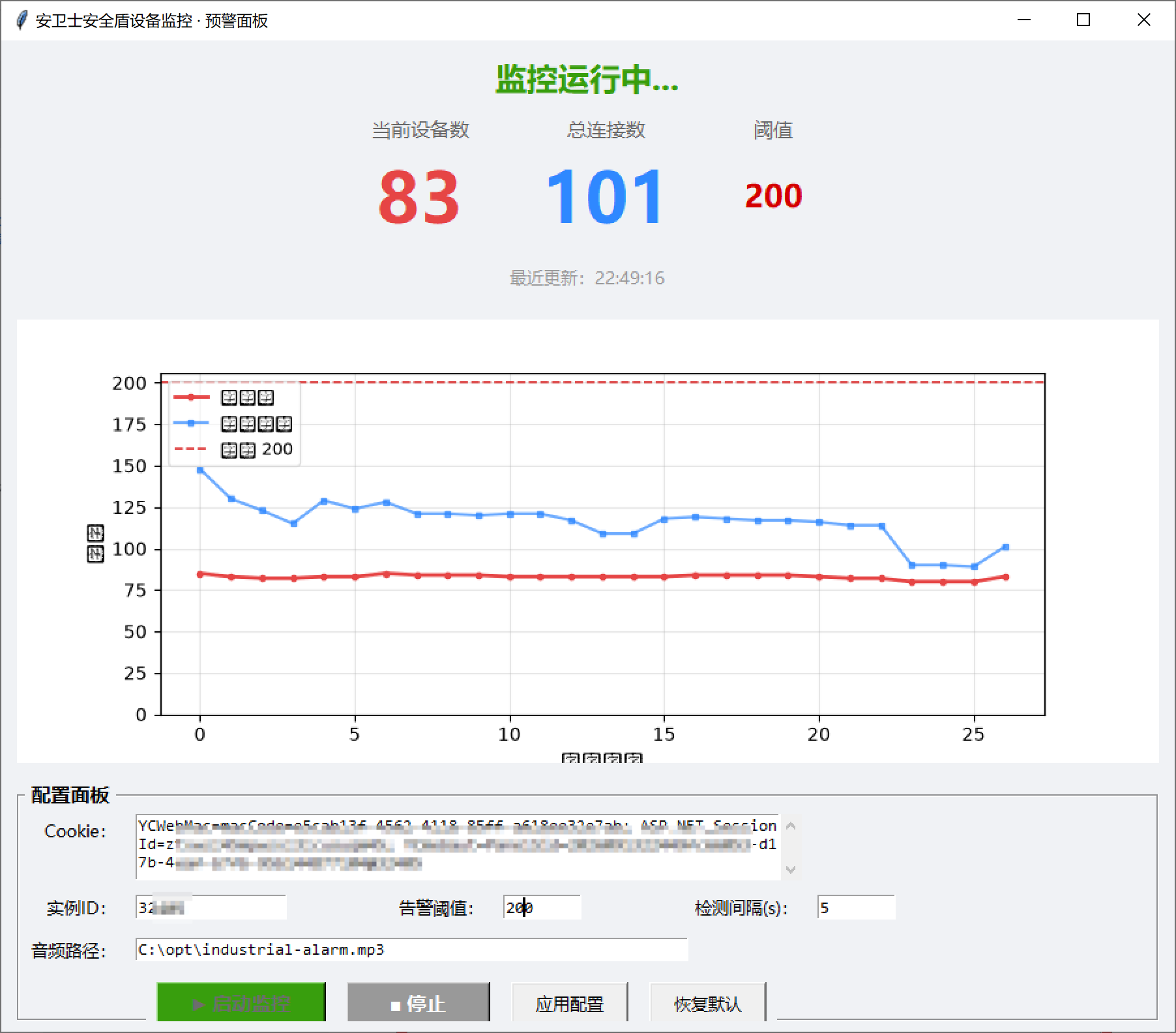
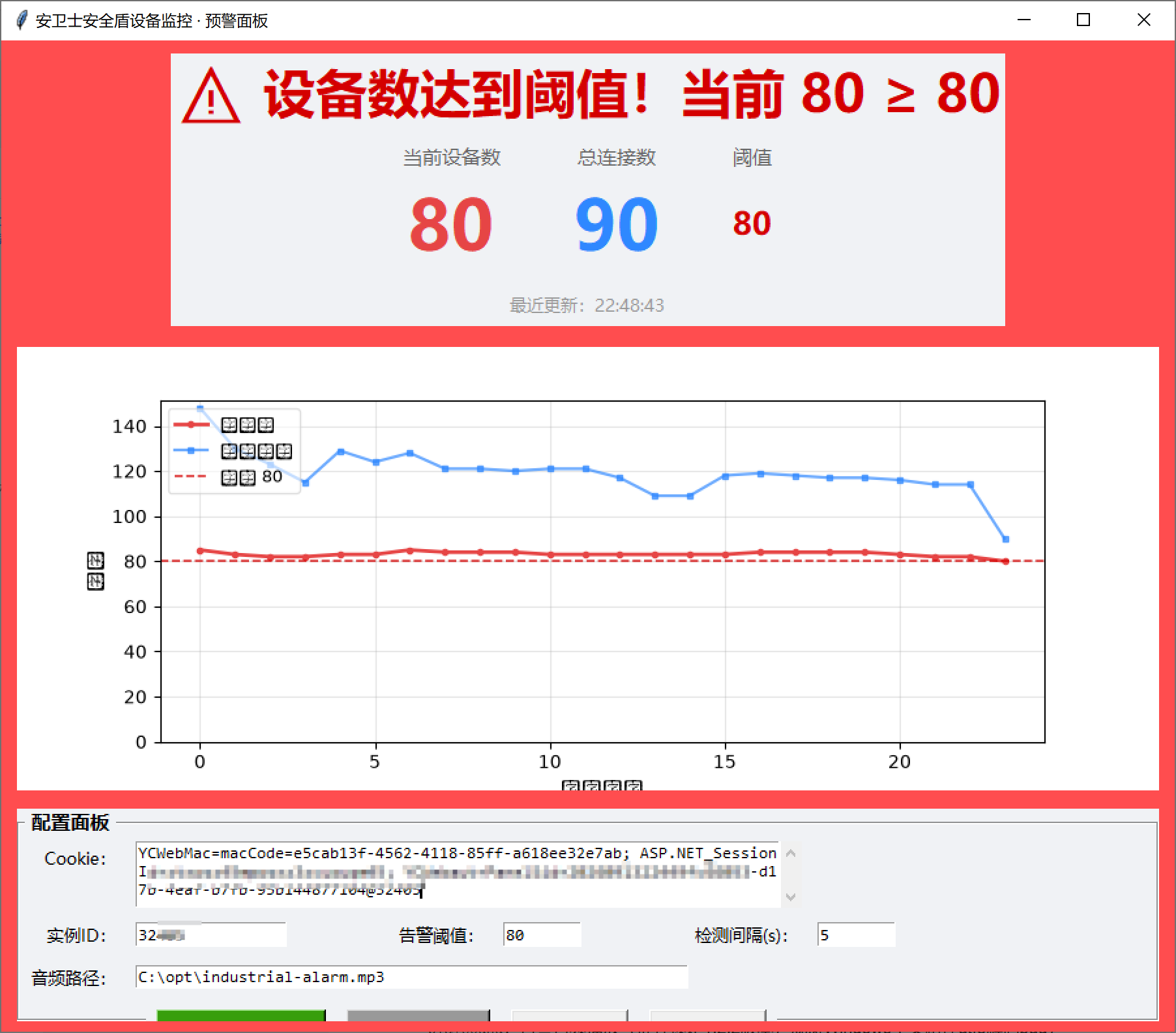
于是用 Python + Tkinter + Matplotlib 写了一个本地桌面预警面板,特性:
- 网页接口轮询拉取设备、连接数据
- 内置可视化折线图,记录历史数据趋势
- 可视化配置面板,Cookie、告警阈值、检测间隔直接在界面修改,不用改源码
- 超限告警效果:窗口红白交替闪烁 + 告警文字动态缩放跳动 + 播放告警音频
- 接口异常(Cookie失效、返回非JSON)同样触发告警,防止监控失联
- 配置持久化,参数自动保存到本地
config.json,重启程序不丢失
适用场景:机房设备监控、Web在线终端接入数量监控,只要是接口返回数字指标,都可以快速改造复用。
技术栈
requests:HTTP 请求,轮询接口获取数据tkinter:Python 内置GUI,无需额外前端框架matplotlib:绘制实时折线图,嵌入桌面窗口playsound:告警音频播放(推荐锁定1.2.2版本,规避Windows中文路径utf8解码bug)threading:后台轮询线程,不阻塞UI渲染json:持久化保存配置
完整源码
config.json
python
{
  "cookie": "xxx",
  "instance_id": "111",
  "threshold": 200,
  "interval": 5,
  "audio_path": "C:\\opt\\industrial-alarm.mp3"
}
保存为 anweishi_monitor_gui.py
python
# -*- coding: utf-8 -*-
"""
安卫士安全盾设备监控 ------ 可视化预警版
功能:
  1. 实时显示当前设备数、总连接数 + 历史趋势折线图(matplotlib 嵌入 tkinter)
  2. 配置面板:界面直接修改 Cookie / 阈值 / 检测间隔 / 实例ID / 音频路径
  3. 异常预警:整窗背景红白交替闪烁 + 警告文字缩小放大动画
  4. 配置自动保存到脚本同目录 config.json,下次启动自动读取
用法:
  pip install requests playsound matplotlib
  (如播放音频报编码错:pip install playsound==1.2.2)
"""
import requests
import random
import json
import time
import os
import threading
import tkinter as tk
from tkinter import scrolledtext, messagebox
from playsound import playsound

import matplotlib
matplotlib.use("TkAgg")
from matplotlib.figure import Figure
from matplotlib.backends.backend_tkagg import FigureCanvasTkAgg

# ===================== 默认配置(首次运行 / config.json 不存在时使用)=====================
DEFAULT_CONFIG = {
    "cookie": "xxx",
    "instance_id": "111",
    "threshold": 30,
    "interval": 30,
    "audio_path": r"C:\opt\industrial-alarm.mp3",
}
CONFIG_FILE = os.path.join(os.path.dirname(os.path.abspath(__file__)), "config.json")

# 全局运行状态
CFG = dict(DEFAULT_CONFIG)          # 当前生效配置
monitor_running = False             # 监控线程开关
monitor_thread = None
history_client = []                 # 历史设备数
history_link = []                   # 历史连接数
history_time = []                   # 历史时间
MAX_POINTS = 100                    # 图表最多保留点数
alert_active = False                # 是否处于告警状态
flash_active = False                # 闪烁动画开关

# ===================== 配置读写 =====================
def load_config():
    global CFG
    if os.path.exists(CONFIG_FILE):
        try:
            with open(CONFIG_FILE, "r", encoding="utf-8") as f:
                loaded = json.load(f)
            for k in CFG:
                if k in loaded:
                    CFG[k] = loaded[k]
        except Exception as e:
            print(f"读取配置失败,使用默认值:{e}")

def save_config():
    try:
        with open(CONFIG_FILE, "w", encoding="utf-8") as f:
            json.dump(CFG, f, ensure_ascii=False, indent=2)
    except Exception as e:
        messagebox.showwarning("提示", f"配置保存失败:{e}")

# ===================== 音频播放(带兜底) =====================
def play_alert():
    try:
        if os.path.exists(CFG["audio_path"]):
            playsound(CFG["audio_path"])
        else:
            messagebox.showwarning("提示", f"音频文件不存在:{CFG['audio_path']}")
    except Exception as e:
        # 播放失败时用系统蜂鸣兜底,保证能提醒到
        try:
            import winsound
            winsound.MessageBeep()
        except Exception:
            pass
        print(f"播放音频失败:{e}")

# ===================== 接口检测 =====================
def check_anweishi():
    global alert_active
    base_url = "https://cp.anweishi.com/WH/ajax_WH.aspx"
    params = {
        "whatDo": "getLinkCountInfoObj",
        "WHInstanceInfoID": CFG["instance_id"],
        "ranttttt": random.random(),
    }
    headers = {
        "Cookie": CFG["cookie"],
        "User-Agent": "Mozilla/5.0 (Windows NT 10.0; Win64; x64) AppleWebKit/537.36 (KHTML, like Gecko) Chrome/120.0.0.0 Safari/537.36",
        "Referer": "https://cp.anweishi.com/WH/WH_Index.aspx",
    }
    try:
        resp = requests.post(base_url, params=params, data=None, headers=headers, timeout=10)
        text = resp.text.strip()
        try:
            data = json.loads(text)
        except json.JSONDecodeError:
            root.after(0, trigger_alert, "接口返回非JSON,疑似会话失效!")
            return

        clientNum = int(data["clientNum"])
        linkCount = int(data["NowLinkCount"])
        now = time.strftime("%H:%M:%S")

        # 更新历史数据
        history_client.append(clientNum)
        history_link.append(linkCount)
        history_time.append(now)
        if len(history_client) > MAX_POINTS:
            history_client.pop(0)
            history_link.pop(0)
            history_time.pop(0)

        # 更新UI(主线程)
        root.after(0, lambda: update_ui(clientNum, linkCount, now))

        # 阈值判断
        if clientNum >= int(CFG["threshold"]):
            root.after(0, trigger_alert, f"设备数达到阈值!当前 {clientNum} ≥ {CFG['threshold']}")
        else:
            root.after(0, clear_alert)
    except Exception as e:
        root.after(0, trigger_alert, f"请求异常:{e}")

def monitor_loop():
    while monitor_running:
        check_anweishi()
        time.sleep(int(CFG["interval"]))

# ===================== UI 更新 =====================
def update_ui(clientNum, linkCount, now):
    lab_client.config(text=str(clientNum))
    lab_link.config(text=str(linkCount))
    lab_time.config(text=f"最近更新:{now}")
    draw_chart()

def draw_chart():
    ax.clear()
    if history_client:
        xs = list(range(len(history_client)))
        ax.plot(xs, history_client, color="#e64545", linewidth=2, marker="o",
                markersize=3, label="设备数")
        ax.plot(xs, history_link, color="#2f88ff", linewidth=1.6, marker="s",
                markersize=3, alpha=0.7, label="总连接数")
        # 阈值线
        ax.axhline(y=int(CFG["threshold"]), color="#d40000", linestyle="--",
                   linewidth=1.2, alpha=0.8, label=f"阈值 {CFG['threshold']}")
        ax.set_ylim(bottom=0)
        ax.set_xlabel("检测次数")
        ax.set_ylabel("数量")
        ax.legend(loc="upper left", fontsize=9, framealpha=0.6)
        ax.grid(True, alpha=0.3)
    canvas.draw_idle()

def trigger_alert(msg):
    global alert_active
    if not alert_active:
        alert_active = True
        warn_label.config(text=f"⚠ {msg}")
        start_flash()
        # 单独线程播放,不阻塞UI
        threading.Thread(target=play_alert, daemon=True).start()

def clear_alert():
    global alert_active
    if alert_active:
        alert_active = False
        stop_flash()
        warn_label.config(text="运行正常", fg="#389e0d")

# ===================== 闪烁 + 缩放动画 =====================
flash_count = 0

def start_flash():
    global flash_active, flash_count
    flash_active = True
    flash_count = 0
    animate_flash()

def animate_flash():
    global flash_active, flash_count
    if not flash_active:
        return
    flash_count += 1
    # 背景红白交替
    bg = "#ff4d4f" if flash_count % 2 == 0 else "#ffffff"
    root.config(bg=bg)
    # 警告文字 16 -> 30 -> 16 循环(变小变大)
    sizes = [16, 20, 24, 28, 30, 28, 24, 20]
    size = sizes[flash_count % len(sizes)]
    warn_label.config(font=("微软雅黑", size, "bold"), fg="#d40000")
    root.after(250, animate_flash)

def stop_flash():
    global flash_active
    flash_active = False
    root.config(bg="#f0f2f5")
    warn_label.config(font=("微软雅黑", 18, "bold"))

# ===================== 启停 =====================
def start_monitor():
    global monitor_running, monitor_thread
    if monitor_running:
        return
    # 应用当前面板配置
    apply_config(silent=True)
    monitor_running = True
    monitor_thread = threading.Thread(target=monitor_loop, daemon=True)
    monitor_thread.start()
    btn_start.config(state="disabled")
    btn_stop.config(state="normal")
    warn_label.config(text="监控运行中...", fg="#389e0d")

def stop_monitor():
    global monitor_running
    monitor_running = False
    btn_start.config(state="normal")
    btn_stop.config(state="disabled")
    clear_alert()
    warn_label.config(text="已停止")

# ===================== 配置面板 =====================
def apply_config(silent=False):
    """把面板输入写入 CFG 并保存"""
    try:
        cookie = txt_cookie.get("1.0", "end").strip()
        instance_id = ent_instance.get().strip()
        threshold = int(ent_threshold.get().strip())
        interval = int(ent_interval.get().strip())
        audio_path = ent_audio.get().strip()
        if not cookie or not instance_id or not audio_path:
            raise ValueError("Cookie / 实例ID / 音频路径不能为空")
        CFG.update({
            "cookie": cookie,
            "instance_id": instance_id,
            "threshold": threshold,
            "interval": interval,
            "audio_path": audio_path,
        })
        save_config()
        lab_threshold_now.config(text=str(threshold))
        if not silent:
            messagebox.showinfo("提示", "配置已应用并保存")
    except ValueError as e:
        if not silent:
            messagebox.showerror("配置错误", str(e))

def reset_config():
    """恢复默认配置到面板"""
    txt_cookie.delete("1.0", "end")
    txt_cookie.insert("1.0", DEFAULT_CONFIG["cookie"])
    ent_instance.delete(0, "end")
    ent_instance.insert(0, DEFAULT_CONFIG["instance_id"])
    ent_threshold.delete(0, "end")
    ent_threshold.insert(0, str(DEFAULT_CONFIG["threshold"]))
    ent_interval.delete(0, "end")
    ent_interval.insert(0, str(DEFAULT_CONFIG["interval"]))
    ent_audio.delete(0, "end")
    ent_audio.insert(0, DEFAULT_CONFIG["audio_path"])

def on_close():
    global monitor_running
    monitor_running = False
    root.destroy()

# ===================== 界面搭建 =====================
load_config()
root = tk.Tk()
root.title("安卫士安全盾设备监控 · 预警面板")
root.geometry("900x760")
root.config(bg="#f0f2f5")
root.protocol("WM_DELETE_WINDOW", on_close)

# ---------- 顶部:状态 + 警告文字 ----------
frame_status = tk.Frame(root, bg="#f0f2f5")
frame_status.pack(pady=10)

warn_label = tk.Label(frame_status, text="运行正常", font=("微软雅黑", 18, "bold"),
                      fg="#389e0d", bg="#f0f2f5")
warn_label.pack()

frame_nums = tk.Frame(frame_status, bg="#f0f2f5")
frame_nums.pack(pady=8)
tk.Label(frame_nums, text="当前设备数", font=("微软雅黑", 11), bg="#f0f2f5", fg="#666").grid(row=0, column=0, padx=25)
tk.Label(frame_nums, text="总连接数", font=("微软雅黑", 11), bg="#f0f2f5", fg="#666").grid(row=0, column=1, padx=25)
lab_client = tk.Label(frame_nums, text="--", font=("微软雅黑", 40, "bold"), fg="#e64545", bg="#f0f2f5")
lab_client.grid(row=1, column=0, padx=25)
lab_link = tk.Label(frame_nums, text="--", font=("微软雅黑", 40, "bold"), fg="#2f88ff", bg="#f0f2f5")
lab_link.grid(row=1, column=1, padx=25)
lab_threshold_now = tk.Label(frame_nums, text=str(CFG["threshold"]), font=("微软雅黑", 18, "bold"),
                             fg="#d40000", bg="#f0f2f5")
lab_threshold_now.grid(row=1, column=2, padx=25)
tk.Label(frame_nums, text="阈值", font=("微软雅黑", 11), bg="#f0f2f5", fg="#666").grid(row=0, column=2, padx=25)
lab_time = tk.Label(frame_status, text="等待检测...", font=("微软雅黑", 10), bg="#f0f2f5", fg="#999")
lab_time.pack(pady=4)

# ---------- 中部:折线图 ----------
frame_chart = tk.Frame(root, bg="white")
frame_chart.pack(padx=12, pady=6, fill="both", expand=True)
fig = Figure(figsize=(8, 3.4), dpi=100)
fig.patch.set_facecolor("white")
ax = fig.add_subplot(111)
canvas = FigureCanvasTkAgg(fig, master=frame_chart)
canvas.get_tk_widget().pack(fill="both", expand=True)

# ---------- 底部:配置面板 ----------
frame_cfg = tk.LabelFrame(root, text=" 配置面板 ", font=("微软雅黑", 11, "bold"), bg="#f0f2f5")
frame_cfg.pack(padx=12, pady=8, fill="x")

tk.Label(frame_cfg, text="Cookie:", bg="#f0f2f5", font=("微软雅黑", 10)).grid(row=0, column=0, sticky="ne", padx=6, pady=4)
txt_cookie = scrolledtext.ScrolledText(frame_cfg, width=70, height=3, font=("Consolas", 9))
txt_cookie.grid(row=0, column=1, columnspan=4, padx=6, pady=4)
txt_cookie.insert("1.0", CFG["cookie"])

tk.Label(frame_cfg, text="实例ID:", bg="#f0f2f5", font=("微软雅黑", 10)).grid(row=1, column=0, sticky="e", padx=6, pady=4)
ent_instance = tk.Entry(frame_cfg, width=16, font=("Consolas", 10))
ent_instance.grid(row=1, column=1, sticky="w", padx=6)
ent_instance.insert(0, CFG["instance_id"])

tk.Label(frame_cfg, text="告警阈值:", bg="#f0f2f5", font=("微软雅黑", 10)).grid(row=1, column=2, sticky="e", padx=6)
ent_threshold = tk.Entry(frame_cfg, width=8, font=("Consolas", 10))
ent_threshold.grid(row=1, column=3, sticky="w", padx=6)
ent_threshold.insert(0, str(CFG["threshold"]))

tk.Label(frame_cfg, text="检测间隔(s):", bg="#f0f2f5", font=("微软雅黑", 10)).grid(row=1, column=4, sticky="e", padx=6)
ent_interval = tk.Entry(frame_cfg, width=8, font=("Consolas", 10))
ent_interval.grid(row=1, column=5, sticky="w", padx=6)
ent_interval.insert(0, str(CFG["interval"]))

tk.Label(frame_cfg, text="音频路径:", bg="#f0f2f5", font=("微软雅黑", 10)).grid(row=2, column=0, sticky="e", padx=6, pady=4)
ent_audio = tk.Entry(frame_cfg, width=60, font=("Consolas", 9))
ent_audio.grid(row=2, column=1, columnspan=4, sticky="w", padx=6, pady=4)
ent_audio.insert(0, CFG["audio_path"])

# 按钮区
frame_btns = tk.Frame(frame_cfg, bg="#f0f2f5")
frame_btns.grid(row=3, column=0, columnspan=6, pady=8)
btn_start = tk.Button(frame_btns, text="▶ 启动监控", command=start_monitor, width=12,
                      bg="#389e0d", fg="white", font=("微软雅黑", 11, "bold"))
btn_start.grid(row=0, column=0, padx=8)
btn_stop = tk.Button(frame_btns, text="■ 停止", command=stop_monitor, width=10,
                     bg="#999", fg="white", font=("微软雅黑", 11, "bold"), state="disabled")
btn_stop.grid(row=0, column=1, padx=8)
btn_apply = tk.Button(frame_btns, text="应用配置", command=lambda: apply_config(), width=10,
                      font=("微软雅黑", 10))
btn_apply.grid(row=0, column=2, padx=8)
btn_reset = tk.Button(frame_btns, text="恢复默认", command=reset_config, width=10,
                      font=("微软雅黑", 10))
btn_reset.grid(row=0, column=3, padx=8)

root.mainloop()
环境部署
1. 安装依赖(PowerShell)
pip install requests playsound==1.2.2 matplotlib --no-cache-dir重点:playsound固定1.2.2版本,新版存在Windows路径utf8解码报错。
2. 运行程序
python
py anweishi_monitor_gui.py- 在配置面板填入后台Cookie、修改告警阈值、轮询间隔
- 点击【应用配置】保存
- 点击【启动监控】开始轮询采集数据
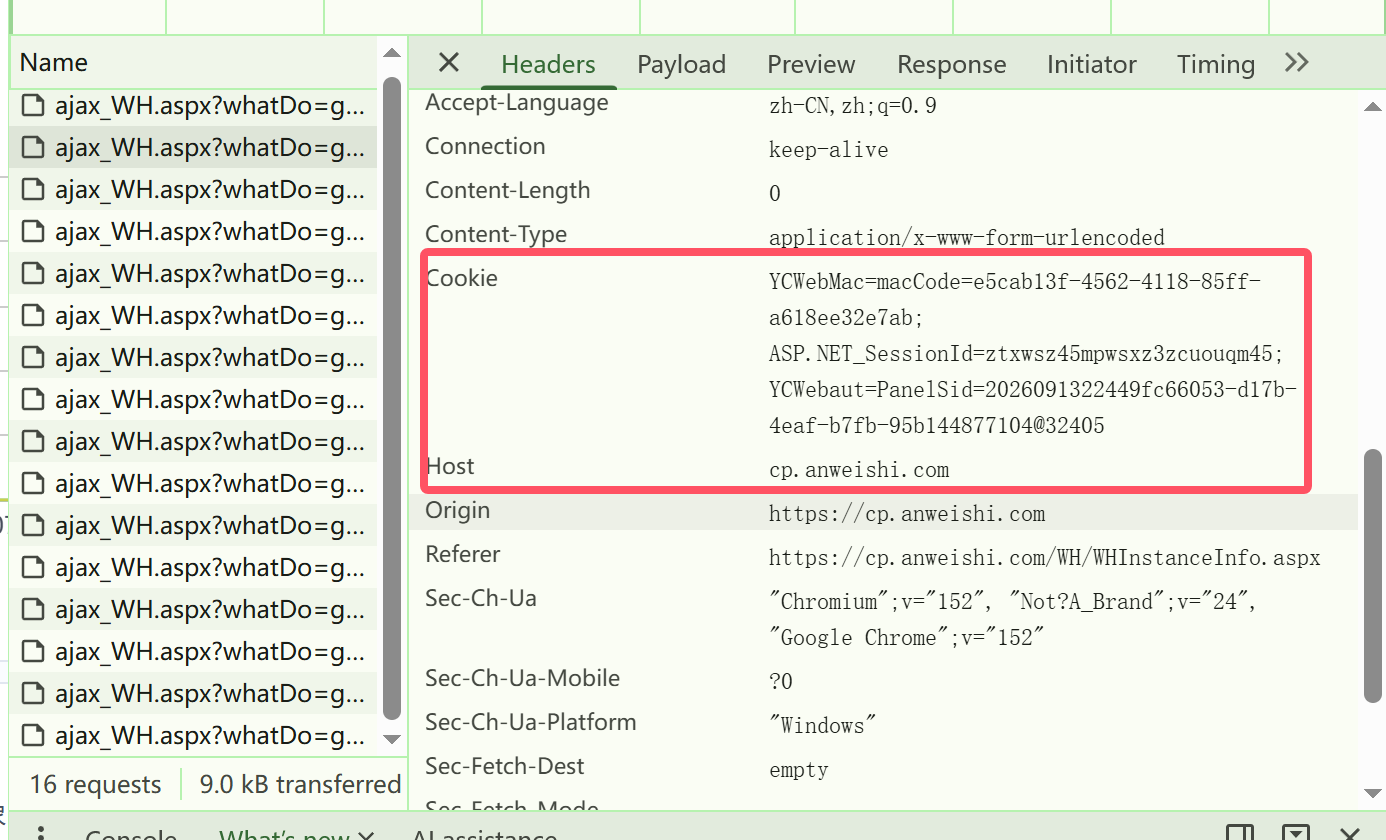
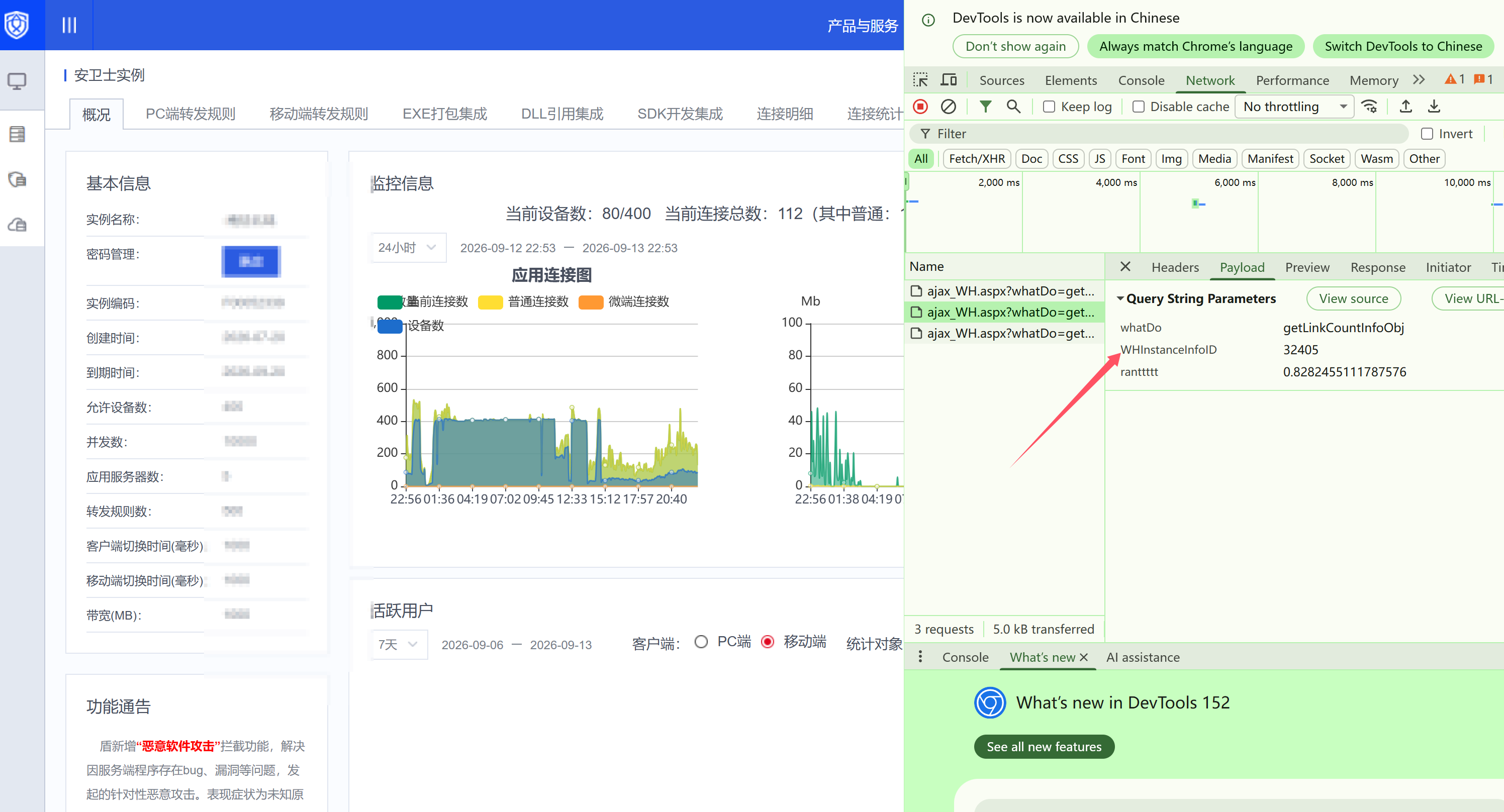
3. Cookie和instance_id获取方式
功能说明
- 实时指标:界面顶部展示当前设备数、总连接数、告警阈值
- 趋势折线图:设备数、总连接数双曲线,红色虚线代表告警阈值;最多保留最近100个采样点
- 配置面板 :直接修改Cookie、阈值、检测间隔,保存写入
config.json,下次打开自动加载 - 告警机制
- 设备数超过阈值:窗口红白交替闪烁 + 告警文字随机缩放跳动 + 播放警报音频
- 接口异常、Cookie失效、返回非JSON:同样触发告警,音频兜底(音频文件损坏自动切换系统蜂鸣)
- 多线程:数据采集在子线程执行,图表和UI不会卡顿卡死
打包exe(可选,无python环境机器直接运行)
pip install pyinstaller
pyinstaller -F -w anweishi_monitor_gui.py-F:打包成单个exe-w:隐藏黑色控制台窗口