文章目录
- 一、前言
- [二、Spring AI](#二、Spring AI)
- [三、 简单示例](#三、 简单示例)
- 四、关键组件
-
- [1. ChatModel & ChatClient](#1. ChatModel & ChatClient)
-
- [1.1 ChatClient 的参数](#1.1 ChatClient 的参数)
- [2. ChatMemory & ChatMemoryRepository](#2. ChatMemory & ChatMemoryRepository)
-
- [2.1 ChatMemory](#2.1 ChatMemory)
- [2.2 ChatMemoryRepository](#2.2 ChatMemoryRepository)
- [3. Advisor](#3. Advisor)
- [4. Tool 调用](#4. Tool 调用)
-
- [4.1. Tool 的注入](#4.1. Tool 的注入)
- [4.2. ToolCallback](#4.2. ToolCallback)
- [4.3. ToolCallingAdvisor](#4.3. ToolCallingAdvisor)
- [4.4 Tool 调用示例](#4.4 Tool 调用示例)
- 五、参考内容
一、前言
本系列作为 AI 系列内容,内容预计会相当发散,仅做个人笔记。
本系列完整代码 :spring-ai-hwl
本篇完整代码 :spring-ai-hwl/spring-ai-01-base
在 【LangChain4j 01】【基本使用】 及其系列文章中,我们介绍了 LangChain4j 的基本使用。那么这里我们来介绍下 Spring AI 2.0 的基本使用。
本篇仅介绍 Spring AI 的基本使用,目的是后续使用 Spring AI 为基础的文章做铺垫,所以不会像 LangChain4j 那样详细介绍每一个特性。
本篇代码使用版本如下:
xml
    <properties>
        <!-- Spring Boot -->
        <spring-boot.version>4.1.1</spring-boot.version>
        <!-- Spring AI,需单独引入 BOM,Boot BOM 不管理该版本 -->
        <spring-ai.version>2.0.1</spring-ai.version>
    </properties>

    <dependencyManagement>
        <dependencies>
            <dependency>
                <groupId>org.springframework.boot</groupId>
                <artifactId>spring-boot-dependencies</artifactId>
                <version>${spring-boot.version}</version>
                <type>pom</type>
                <scope>import</scope>
            </dependency>
            <!-- Spring AI 依赖清单,加载 BOM 后统一管理版本 -->
            <dependency>
                <groupId>org.springframework.ai</groupId>
                <artifactId>spring-ai-bom</artifactId>
                <version>${spring-ai.version}</version>
                <type>pom</type>
                <scope>import</scope>
            </dependency>
           </dependencies>
    </dependencyManagement>
二、Spring AI
Spring AI 与 LangChain4j 很大的不同是。 LangChain4j 将各个组件拆分的很细,开发者只需要实现对应的接口即可,流程链路的组装交由 LangChain4j 来完成。
本篇涉及内容完整代码 :spring-ai-hwl/spring-ai-01-base
而 Spring AI 则是全权托管给开发者 :Spring AI 提供了 Advisor 接口,通过实现 Advisor 接口来自定义 AI 调用前后的逻辑。
Advisor 我们下面会详细介绍 。
Spring AI 也提供了 ChatClient、ChatModel、ChatMemory 等接口我们可以通过这些接口完成基础的 LLM 调用。
三、 简单示例
我们搭建一个简单的 Spring AI 框架,以实现基础的 LLM 对话功能。关键代码如下:
-
yaml 配置
javaspring: application: name: spring-ai-base ai: openai: # DeepSeek 兼容 OpenAI 协议 base-url: https://api.deepseek.com # 环境变量中获取 API Key,建议在运行时设置 api-key: ${DEEPSEEK_API_KEY} chat: model: deepseek-v4-flash temperature: 0.7 model: embedding: none image: none moderation: none audio: speech: none transcription: none -
基本配置
java@Configuration public class SpringAIBaseConfig { /** * 对话记忆:滑动窗口,保留最近10轮消息(可修改),内存存储 */ @Bean public ChatMemory chatMemory() { return MessageWindowChatMemory.builder() .maxMessages(10) .chatMemoryRepository(new InMemoryChatMemoryRepository()) .build(); } /** * ChatModel 的高级封装 */ @Bean public ChatClient chatClient(OpenAiChatModel openAiChatModel, ChatMemory chatMemory) { return ChatClient.builder(openAiChatModel) .defaultSystem("你是专业的怼人高手") .defaultAdvisors(MessageChatMemoryAdvisor.builder(chatMemory).build()) .build(); } } -
调用实现
java@Service public class BaseLlmServiceImpl implements BaseLlmService { @Resource private OpenAiChatModel chatModel; @Resource private ChatClient chatClient; @Override public String chat(String userMessage) { return chatModel.call(userMessage); } @Override public Flux<String> streamChat(String message) { return chatModel.stream(message); } }
基于上面的代码,我们便可以实现一个简单的基于 Spring AI 的 LLM 调用。
四、关键组件
上面的示例中我们在注入 ChatClient 的时候依赖于两个参数 :ChatModel 和 ChatMemory, 同时还构建了 Advisor 对象。下面我们简单来介绍这些内容
java
    @Bean
    public ChatClient chatClient(OpenAiChatModel openAiChatModel, ChatMemory chatMemory) {
        return ChatClient.builder(openAiChatModel)
                .defaultSystem("你是专业的怼人高手")
                .defaultAdvisors(MessageChatMemoryAdvisor.builder(chatMemory).build())
                .build();
    }
1. ChatModel & ChatClient
由于各家模型的请求响应标准不尽相同,因此针对不同的LLM提供商,需要构建不同的请求方式,基于上述原因,Spring AI 抽象出了ChatModel 接口,其作用是对外统一成 Prompt 进、ChatResponse 出。
ChatModel 的接口定义如下:
java
public interface ChatModel extends Model<Prompt, ChatResponse>, StreamingChatModel {

	default @Nullable String call(String message) {
		Prompt prompt = new Prompt(new UserMessage(message));
		Generation generation = call(prompt).getResult();
		return (generation != null) ? generation.getOutput().getText() : "";
	}

	default @Nullable String call(Message... messages) {
		Prompt prompt = new Prompt(Arrays.asList(messages));
		Generation generation = call(prompt).getResult();
		return (generation != null) ? generation.getOutput().getText() : "";
	}

	@Override
	ChatResponse call(Prompt prompt);

	/**
	 * Gets the chat options for this model.
	 * @return the chat options
	 * @since 2.0.0
	 */
	default ChatOptions getOptions() {
		return ChatOptions.builder().build();
	}

	/**
	 * @deprecated use {@link #getOptions()} instead.
	 */
	@Deprecated(forRemoval = true)
	default ChatOptions getDefaultOptions() {
		return getOptions();
	}

	default Flux<ChatResponse> stream(Prompt prompt) {
		throw new UnsupportedOperationException("streaming is not supported");
	}

}
ChatModel 的能力是完成一次 LLM 调用,并不能支持我们实际业务需要,因此在 ChatModel 的基础上, Spring AI 提供了 ChatClient ,作为 ChatModel 的上层封装,在其基础上提供了业务编排能力,如 Advisor、Tool 等。
ChatClient 接口定义如下 :
java
public interface ChatClient {
    ...

    ChatClientRequestSpec prompt();

    ChatClientRequestSpec prompt(String content);

    ChatClientRequestSpec prompt(Prompt prompt);

    Builder mutate();

    ....
}
1.1 ChatClient 的参数
ChatClient 可以通过构造器 ChatClient#builder 方式构建,在构建的时候存在多种默认值设置,这些参数值在实际发起调用的时候也可以进行赋值,但是其赋值后的处理策略并不相同,有的是覆盖 默认值,有的则是合并默认值。
java
@Bean
public ChatClient chatClient(OpenAiChatModel openAiChatModel, ChatMemory chatMemory) {
    return ChatClient.builder(openAiChatModel)
            .defaultSystem("你是专业的怼人高手")
            .defaultUser()
            .defaultAdvisors(MessageChatMemoryAdvisor.builder(chatMemory).build())
            .defaultOptions(ChatOptions.builder()
                    .temperature(0.7)
                    .model("deepseek-v4-flash"))
            .defaultTools()
            .defaultToolContext()
            .defaultTemplateRenderer()
            .build();
}


-------

// 发起调用时,可以通过诸如 system()、user()、tools() 等方法来对参数进行重新赋值,
// 这里的  system()、user() 会覆盖 default 参数,而 tools 则是跟 default 参数合并,具体见下面【调用赋值策略】
@Override
public String chatWithTools(String userMessage, String conversationId) {
    log.info("[BaseLlmService][chatWithTools, conversationId={}, query={}]", conversationId, userMessage);
    return chatClient.prompt()
            .system("你是助手,需要当前时间或天气时必须调用已提供的工具,再根据工具结果回答。")
            .user(userMessage)
            .tools(currentDateTimeToolCallback, currentWeatherToolCallback)
            .advisors(a -> a.param(ChatMemory.CONVERSATION_ID, conversationId))
            .advisors(new LogAdvisor())
            .call()
            .content();
}
上面各个参数的具体作用以及合并策略如下:
| 方法名 | 作用 | 调用时对应方法 | 调用赋值策略 |
|---|---|---|---|
defaultSystem |
默认系统人设 | .system(...) |
覆盖 |
defaultUser |
默认用户消息,少用 | .user(...) |
覆盖 |
defaultOptions |
默认温度、模型名等 | .options(...) |
覆盖 |
defaultTools |
每次都带上的工具 | .tools(...) |
合并 |
defaultToolContext |
工具执行时能读到的上下文 Map | .toolContext(...) |
合并(同 key 覆盖) |
defaultAdvisors |
默认 Advisor 链 | .advisors(...) |
合并 |
defaultTemplateRenderer |
Prompt 模板引擎,默认 StringTemplate | .templateRenderer(...) |
覆盖 |
2. ChatMemory & ChatMemoryRepository
| 接口 | 职责 |
|---|---|
ChatMemory |
add / get / clear;决定窗口大小、淘汰规则、是否保住 SystemMessage |
ChatMemoryRepository |
只做消息的写入、按会话取出、删除,不决定裁剪 |
2.1 ChatMemory
ChatMemory 接口定义如下,其提供的能力就是按照会话 id 对消息进行 CURD 。
Spring AI 默认提供了 MessageWindowChatMemory 的实现,该实现即使通过消息窗口的形式将保存指定长度的消息列表。
java
public interface ChatMemory {

    /**
     * The key to retrieve the chat memory conversation id from the context.
     */
    String CONVERSATION_ID = "chat_memory_conversation_id";

    /**
     * Save the specified message in the chat memory for the specified conversation.
     */
    default void add(String conversationId, Message message) {
        Assert.hasText(conversationId, "conversationId cannot be null or empty");
        Assert.notNull(message, "message cannot be null");
        this.add(conversationId, List.of(message));
    }

    /**
     * Save the specified messages in the chat memory for the specified conversation.
     */
    void add(String conversationId, List<Message> messages);

    /**
     * Get the messages in the chat memory for the specified conversation.
     */
    List<Message> get(String conversationId);

    /**
     * Clear the chat memory for the specified conversation.
     */
    void clear(String conversationId);

}
2.2 ChatMemoryRepository
ChatMemoryRepository 用于持久化 Message :ChatMemory 决定了哪些消息要存取删,ChatMemoryRepository决定了从哪存取删。
Spring AI 提供 InMemoryChatMemoryRepository 的默认实现,默认将 Message 存储到内存中,我们可以扩展到存储到 DB 或者 Redis 中。
ChatMemoryRepository 接口定义如下。
java
/**
 * A repository for storing and retrieving chat messages.
 *
 * @author Thomas Vitale
 * @since 1.0.0
 */
public interface ChatMemoryRepository {

	List<String> findConversationIds();

	List<Message> findByConversationId(String conversationId);

	/**
	 * Replaces all the existing messages for the given conversation ID with the provided
	 * messages.
	 */
	void saveAll(String conversationId, List<Message> messages);

	void deleteByConversationId(String conversationId);

}
3. Advisor
Spring AI 直接提供了 Advisor 接口来供开发者扩展。Advisor 是 ChatClient 的拦截器链,它挂在 ChatClient 和 ChatModel 之间,在请求发出前改 Prompt、调用后处理响应。
可以简单将 Advisor 理解为 切面的形式, Spring AI 在 LLM 调用前后进行了切面增强。(从 Advisor 的类名在 Spring AOP 的 Advisor 完全一样就可理解)。
需要注意 :直接调 ChatModel 不会走这条链,Advisor 功能是 ChatClient 扩展的功能
Advisor 存在子类 CallAdvisor、StreamAdvisor 分别对应普通调用和流式调用的增强。我们一般使用 BaseAdvisor 来实现。BaseAdvisor 定义如下:
java
public interface BaseAdvisor extends CallAdvisor, StreamAdvisor {

	Scheduler DEFAULT_SCHEDULER = Schedulers.boundedElastic();

	@Override
	default ChatClientResponse adviseCall(ChatClientRequest chatClientRequest, CallAdvisorChain callAdvisorChain) {
		Assert.notNull(chatClientRequest, "chatClientRequest cannot be null");
		Assert.notNull(callAdvisorChain, "callAdvisorChain cannot be null");

		ChatClientRequest processedChatClientRequest = before(chatClientRequest, callAdvisorChain);
		ChatClientResponse chatClientResponse = callAdvisorChain.nextCall(processedChatClientRequest);
		return after(chatClientResponse, callAdvisorChain);
	}

	@Override
	default Flux<ChatClientResponse> adviseStream(ChatClientRequest chatClientRequest,
			StreamAdvisorChain streamAdvisorChain) {
		Assert.notNull(chatClientRequest, "chatClientRequest cannot be null");
		Assert.notNull(streamAdvisorChain, "streamAdvisorChain cannot be null");
		Assert.notNull(getScheduler(), "scheduler cannot be null");

		Flux<ChatClientResponse> chatClientResponseFlux = Mono.just(chatClientRequest)
			.publishOn(getScheduler())
			.map(request -> this.before(request, streamAdvisorChain))
			.flatMapMany(streamAdvisorChain::nextStream);

		return chatClientResponseFlux.map(response -> {
			if (AdvisorUtils.onFinishReason().test(response)) {
				response = after(response, streamAdvisorChain);
			}
			return response;
		}).onErrorResume(error -> Flux.error(new IllegalStateException("Stream processing failed", error)));
	}

	@Override
	default String getName() {
		return this.getClass().getSimpleName();
	}

	/**
	 * Logic to be executed before the rest of the advisor chain is called.
	 */
	ChatClientRequest before(ChatClientRequest chatClientRequest, AdvisorChain advisorChain);

	/**
	 * Logic to be executed after the rest of the advisor chain is called.
	 */
	ChatClientResponse after(ChatClientResponse chatClientResponse, AdvisorChain advisorChain);

	/**
	 * Scheduler used for processing the advisor logic when streaming.
	 */
	default Scheduler getScheduler() {
		return DEFAULT_SCHEDULER;
	}

}
可以看到 BaseAdvisor 的逻辑并不复杂 :
- 提供了 BaseAdvisor#before 和 BaseAdvisor#after 方法供子类实现
- 在 BaseAdvisor#adviseCall 和 BaseAdvisor#adviseStream 方法发起 LLM 调用前后调用扩展方法。
需要注意 Advisor 本身是 Ordered 子类,需要我们实现 Ordered#getOrder 方法以用于多个 Advisor 进行排序调用:值越小越靠外层
Spring AI 内置 Advisor 有很多,如:
| Advisor | 作用 |
|---|---|
MessageChatMemoryAdvisor |
从 ChatMemory 取历史,作为消息列表塞进 Prompt;调用后再写回 |
VectorStoreChatMemoryAdvisor |
历史走向量检索,以文本追加到 system |
QuestionAnswerAdvisor |
Naive RAG:向量库检索后增强提问 |
RetrievalAugmentationAdvisor |
模块化 RAG |
ToolCallingAdvisor |
工具调用循环;ChatClient 默认会自动注册 |
SafeGuardAdvisor |
内容安全拦截 |
ReReadingAdvisor |
把用户问题再读一遍,加强推理 |
4. Tool 调用
Spring AI 提供了 Function Calling 功能,可用于工具调用。
4.1. Tool 的注入
Spring AI 提供了 Tool 调用 功能,有三种方式:
-
Tool 注解形式 :通过
@Tool注解的形式声明一个 Tool。javaclass DateTimeTools { @Tool(description = "获取用户时区下的当前日期时间") String getCurrentDateTime() { return LocalDateTime.now().toString(); } @Tool(description = "按 ISO-8601 时间设置闹钟") void setAlarm(@ToolParam(description = "闹钟时间") String time) { // 真正做事 } } ------------------------------------------ // 调用时在 Client 上指定 Tool,框架扫 @Tool 生成 ToolCallback。 chatClient.prompt().user("上海").tools(new DemoTools()).call().content(); -
MethodToolCallback :当想将已有方法封装为 Tool,但是已有方法并没有 @Tool 注解 或者 不想修改源码时,可以通过 MethodToolCallback 方式,如下。
java/** * 把已有方法包装成 Tool。 */ @Bean public ToolCallback currentDateTimeToolCallback() { Method method = ReflectionUtils.findMethod(DemoTools.class, "getCurrentDateTime"); return MethodToolCallback.builder() .toolDefinition(ToolDefinitions.builder(method) .description("获取当前日期和时间") .build()) .toolMethod(method) .toolObject(new DemoTools()) .build(); } -
FunctionToolCallback :没有现成方法对象,或入参是一个类型(JSON Schema 从 inputType 生成)时
java/** * 把 Function 包装成 Tool。 */ @Bean public ToolCallback currentWeatherToolCallback() { return FunctionToolCallback.builder("getCurrentWeather", (WeatherQuery query) -> new DemoTools().getWeather(query)) .description("查询指定城市的当前天气") .inputType(WeatherQuery.class) .build(); }
4.2. ToolCallback
上面三种方式无论哪一种,对 Spring AI 来说底层都相同 :将 Tool 封装成 ToolCallback 对象,ToolCallback 的定义如下:
java
/**
 * Represents a tool whose execution can be triggered by an AI model.
 *
 * @author Thomas Vitale
 * @since 1.0.0
 */
public interface ToolCallback {

	Log logger = LogFactory.getLog(ToolCallback.class);

	/**
	 * Definition used by the AI model to determine when and how to call the tool.
	 */
	ToolDefinition getToolDefinition();

	/**
	 * Metadata providing additional information on how to handle the tool.
	 */
	default ToolMetadata getToolMetadata() {
		return ToolMetadata.builder().build();
	}

	/**
	 * Execute tool with the given input and return the result to send back to the AI
	 * model.
	 */
	String call(String toolInput);

	/**
	 * Execute tool with the given input and context, and return the result to send back
	 * to the AI model.
	 */
	default String call(String toolInput, @Nullable ToolContext toolContext) {
		if (toolContext != null && !toolContext.getContext().isEmpty()) {
			if (logger.isInfoEnabled()) {
				logger.info("By default the tool context is not used,  "
						+ "override the method 'call(String toolInput, ToolContext toolcontext)' to support the use of tool context."
						+ "Review the ToolCallback implementation for " + getToolDefinition().name());
			}
		}
		return call(toolInput);
	}

}
根据定义可以看到 ToolCallback 有如下几个作用 :
-
通过 ToolDefinition 向 LLM 描述 Tool 的定义,如下:
- name:这次请求里唯一
- description:模型靠它决定调不调
- inputSchema:参数的 JSON Schema
-
通过 ToolMetadata 决定 Tool 执行策略 :该策略并不会给 LLM 使用,而是 Tool 调用结束后 Spring AI 的判断依据,如 returnDirect 表示 Tool 调用后的返回策略(同轮若调了多个工具,必须全部
returnDirect=true" 才会短路) :- false(默认):结果再给模型,让它组织回答
- true:结果直接返回调用方,少一轮模型调用
-
通过 call 方法完成 Tool 的调用。
4.3. ToolCallingAdvisor
上面 ToolCallback 完成了 Tool 的调用封装,此时还需要将 ToolCallback 加入到 LLM 调用链路中,此时则是通过 ToolCallingAdvisor 完成的。
ToolCallingAdvisor本身也是一个 Advisor,在有 Tool 时会自动进链,我们也可以通过继承ToolCallingAdvisor的方式来进一步扩展 Tool 的加载逻辑。
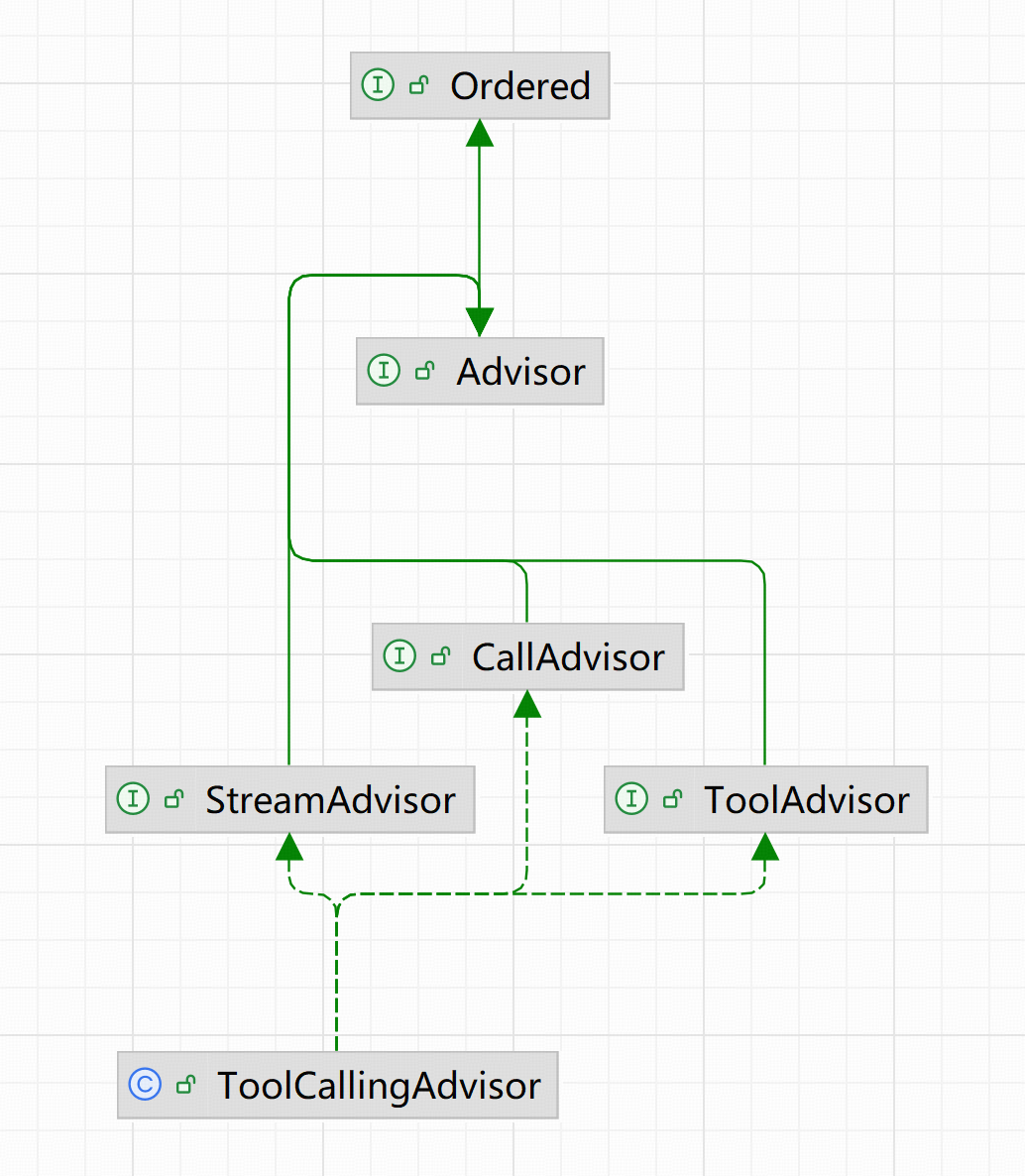
我们这里简述 ToolCallingAdvisor 的实现方式:
ToolCallingAdvisor 中存在 ToolCallingAdvisor#adviseCall 和 ToolCallingAdvisor# adviseStream 两个方法分别用于普通调用和流式调用两种方式,二者的实现思路基本相同,因此我们这里以 ToolCallingAdvisor#adviseCall 来做解释说明。
ToolCallingAdvisor#adviseCall 注释版如下:
java
@Override
public ChatClientResponse adviseCall(ChatClientRequest chatClientRequest, CallAdvisorChain callAdvisorChain) {
    Assert.notNull(callAdvisorChain, "callAdvisorChain must not be null");
    Assert.notNull(chatClientRequest, "chatClientRequest must not be null");

    ChatOptions options = chatClientRequest.prompt().getOptions();
    // 判断是否支持 Tool 调用,如果不支持,直接跳到下一个 Advisor
    if (!(options instanceof ToolCallingChatOptions toolCallingChatOptions)) {
        return callAdvisorChain.nextCall(chatClientRequest);
    }

    // 扩展点:整个工具循环开始前,可以用于修改请求内容
    chatClientRequest = this.doInitializeLoop(chatClientRequest, callAdvisorChain);

    // 本回合完整历史,给 ToolCallingManager 计次;与下面可能裁剪的 instructions 分开
    // fullTurnHistory : 完整的 Tool 调用历史
    // instructions : 裁剪后的 Tool 调用历史
    // 在下面 doGetNextInstructionsForToolCall 方法中会根据 conversationHistoryEnabled 参数判断(默认 true):
    // - 为 true: Advisor 自己拼完整历史再调模型
    // - 为 false:Advisor 不拼,交给循环里面的 Memory Advisor,避免同一段历史写两遍
    var instructions = chatClientRequest.prompt().getInstructions();

    var fullTurnHistory = instructions;

    ChatClientResponse chatClientResponse = null;
    UsageAccumulator usageAccumulator = new UsageAccumulator();

    boolean isToolCall = false;

    // 【关键点1 : Tool 调用循环】
    do {
        // 本轮发给模型的 Prompt:当前 instructions + 工具定义(在 options 里)
        var processedChatClientRequest = ChatClientRequest.builder()
                .prompt(new Prompt(instructions, toolCallingChatOptions))
                .context(chatClientRequest.context())
                .build();

        // 扩展点:每一轮模型调用前
        processedChatClientRequest = this.doBeforeCall(processedChatClientRequest, callAdvisorChain);

        // doBeforeCall 可能改过 options(例如动态注入工具),执行工具时必须用改完后的那份
        toolCallingChatOptions = (ToolCallingChatOptions) processedChatClientRequest.prompt().getOptions();
        Assert.notNull(toolCallingChatOptions,
                "redundant check that should never fail (doBeforeCall must not change the options type away from ToolCallingChatOptions), but here to help NullAway");

        【关键点2 :Advisor 链路执行】
        // 递归:拷贝不含自己的下游链再 nextCall → 其余 Advisor → ChatModel
        // 这里需要注意的是 :这里的执行会将下游 Advisor 一并执行,比如如果 Advisor 链路是 A -> ToolCallingAdvisor -> B -> C , 这里每次循环都会执行 B、C
        chatClientResponse = callAdvisorChain.copy(this).nextCall(processedChatClientRequest);

        // 扩展点:每一轮模型返回后
        chatClientResponse = this.doAfterCall(chatClientResponse, callAdvisorChain);

        ChatResponse chatResponse = chatClientResponse.chatResponse();
        usageAccumulator.addRoundResponse(chatResponse);
        // 默认:chatResponse != null && chatResponse.hasToolCalls()
        isToolCall = this.toolExecutionEligibilityChecker.isToolCallResponse(chatResponse);

        // 如果需要 Tool 调用,则进入代码块
        if (isToolCall) {
            Assert.notNull(chatResponse, "redundant check that should never fail, but here to help NullAway");

            ToolExecutionResult toolExecutionResult;
            try {
                【关键点3 :Tool 调用顺序】
                // 执行本轮全部 toolCalls(一轮里可以有多个工具)
                // LLM 一次性可能返回多个要调用的 Tool,但是本身并不要求 Tool 的调用顺序,由调用方自行决定
                toolExecutionResult = this.toolCallingManager
                        .executeToolCalls(new Prompt(fullTurnHistory, toolCallingChatOptions), chatResponse);
            }
            catch (ToolCallLimitExceededException ex) {
                // 次数超限:封装成一条 generation 返回调用方,不再回模型
                chatClientResponse = chatClientResponse.mutate()
                        .chatResponse(ChatResponse.builder()
                                .from(chatResponse)
                                .generations(List.of(ex.buildGeneration()))
                                .build())
                        .build();
                break;
            }

            // 保存完整会话历史
            fullTurnHistory = toolExecutionResult.conversationHistory();

            //【关键点4 :Tool returnDirect】
            // 如果 tool 要求调用后直接返回则直接返回
            // 默认情况下 Tools 的结果会交由 LLM 整理后再返回最终结果,但是在一些情况下 Tools 的调用结果就是最终答案,就可以通过这样让 Tools 调用结果直接返回。
            if (toolExecutionResult.returnDirect()) {
                // 工具声明 returnDirect:结果直接给调用方,不再喂回模型
                chatClientResponse = chatClientResponse.mutate()
                        .chatResponse(ChatResponse.builder()
                                .from(chatResponse)
                                .generations(ToolExecutionResult.buildGenerations(toolExecutionResult))
                                .build())
                        .build();
                break;
            }

            // 【关键点5 :History 拼接】
            // 把 TOOL 结果写进下一轮 messages,再进入 while
            // 这里会根据 conversationHistoryEnabled 判断是否对消息进行截取
            // - true:默认值。Advisor 自己拼完整历史再调模型
            // - false:Advisor 不拼,交给循环里面的 Memory Advisor,避免同一段历史写两遍。这种情况下,AdvisorChain 下游一定要有 Memory Advisor 来处理历史记录
            // DefaultChatClient 如果发现记忆 Advisor 的 order 在 ToolCallingAdvisor 后面(进了循环),会自动把这个关掉。
            // 自己 new ToolCallingAdvisor 的话,进循环挂记忆就要自己调 disableInternalConversationHistory()。
            instructions = this.doGetNextInstructionsForToolCall(processedChatClientRequest, chatClientResponse,
                    toolExecutionResult);
        }

    }
    while (isToolCall); // 模型不再要工具则结束

    // 把多轮 token 用量累加到最终响应
    chatClientResponse = usageAccumulator.applyAccumulatedUsage(chatClientResponse);
    // 扩展点:整个循环结束
    return this.doFinalizeLoop(chatClientResponse, callAdvisorChain);
}

protected List<Message> doGetNextInstructionsForToolCall(ChatClientRequest chatClientRequest,
        ChatClientResponse chatClientResponse, ToolExecutionResult toolExecutionResult) {
    // 如果 conversationHistoryEnabled = false (默认 true),则下轮循环只往下传 system + 最后一条消息,完整的信息交由下游的 ChatMemory Adv
    if (!this.conversationHistoryEnabled) {
        List<Message> history = toolExecutionResult.conversationHistory();
        if (history.isEmpty()) {
            return history;
        }
        return List.of(chatClientRequest.prompt().getSystemMessage(), history.get(history.size() - 1));
    }

    return toolExecutionResult.conversationHistory();
}
上面的代码注释已经写的很清楚的了,下面对注释中的几个关键点更近一步的说明:
首先明确两个概念 :
- 一次 Trace 是一次完整的 Agent 执行:从用户发起请求,到框架给出最终回复。这期间模型可能被调用多次(例如中间穿插 Tool),这些都属于同一条 Trace,而不是多次 Trace。
- 一次 Turn 是 Trace 内部的一轮交互。在有 Tool 的场景里,模型发起一次工具调用并拿到结果,通常记为一轮 Turn。一条 Trace 由一轮或多轮 Turn 组成。
可以简单记为 :一次用户请求 = 一条 Trace;这条 Trace 里每用一次 Tool,就多一轮 Turn。没有 Tool 时,Trace 仍然只有一条,只是 Turn 为 0 或只算一轮模型对话,
-
关键点1 : Tool 调用循环
通过上面的代码我们可以看到 ToolCallingAdvisor#adviseCall 中的 Tool 调用是一个 do...while 循环。通常情况下, LLM 无法在一次回复中将后续需要调用的 Tool 确定好,因此常见情况下是 LLM 发现缺失数据,要求调用 ToolA; 调用方执行 ToolA 将执行结果连同已有对话再喂回给 LLM;LLM 得到数据后如果判断数据仍不足得出接口,可能会再次要求调用 ToolB。如此反复,直到 LLM 不再要Tool,直接给出最终回答。所以 Tool 调用必须做成循环,而不是单次请求。
而这里的循环的每一圈可以看作一轮 Turn:先打一次模型,若返回里带了 toolCalls,就在本圈消化掉(一轮里可以是 0 个、1 个或多个 Tool,如果一次 LLM 调用了多个 Tool 调用,那么这些 Tool 调用都只算一次 Turn。),再决定要不要进入下一圈。整段
adviseCall从进入循环到退出,是一条 Trace,里面可以包含一轮或多轮 Turn。 -
关键点2 :Advisor 链路执行
callAdvisorChain.copy(this).nextCall(...)会复制一条 不含当前 ToolCallingAdvisor 的下游链路,再往下走,最终打到 ChatModel。而上面的【关键点1】我们知道 Tool 的调用是一个 do...while 循环,也就是这里可能会被多次调用,即挂在 ToolCallingAdvisor 后面的 Advisor,每一轮调用都会再执行一次,不是整条 Trace 只跑一次。假设 AdvisorChain 是 A -> ToolCallingAdvisor -> B -> C -> ChatModel 的顺序,则:
- A 在进 adviseCall 之前跑过,不在环里,整条 Trace 只执行一次
- 如果执行多次 Turn,则每一轮 Turn 都会再跑 B -> C -> ChatModel。
- 这里的 B、C 就会被执行多次。
这里需要注意 :
- Advisor 继承了 Order 接口,我们可以通其方法控制 Advisor 的执行顺序:Order 值越小,越在外层。
- 日志、观测、记忆等 Advisor 如果挂在 ToolCallingAdvisor后面,会按 Turn 次数执行;挂在它前面,只在进循环前跑一次,看不见后面几轮的 TOOL 消息。 因此这里一般可以将日志和观测挂载在 ToolCallingAdvisor 以确保日志和观测的完整性。而对于记忆来说,则存在两种情况:
- 记忆挂在 ToolCallingAdvisor 后面(在循环内):每轮 Turn 都会执行。这时不能再让 ToolCallingAdvisor 自己拼完整历史,否则同一段对话写两遍。DefaultChatClient 发现记忆在后面,会自动关掉内部拼历史;自己 new 的话要手动
disableInternalConversationHistory - 记忆挂在 ToolCallingAdvisor 前面(在循环前):只在第一轮前补一次历史。环内各 Turn 要靠 Advisor 自己带着 fullTurnHistory / instructions 往下传
- 记忆挂在 ToolCallingAdvisor 后面(在循环内):每轮 Turn 都会执行。这时不能再让 ToolCallingAdvisor 自己拼完整历史,否则同一段对话写两遍。DefaultChatClient 发现记忆在后面,会自动关掉内部拼历史;自己 new 的话要手动
- ToolCallingAdvisor 放在 Chain 的最后(order 最大、最靠近模型)时,工具环还在转,但环外面的 Advisor 只能看见「进环前那一次请求」和「出环后那一次最终结果」,看不见中间每一轮 Turn。
-
关键点3 :Tool 调用顺序
LLM 一轮调用带会多个
toolCalls,但其只指定要执行的 Tool ,但并不干涉 Tool 的执行方式(执行顺序、串行并行等)。Tool 执行的具体规则由调用方自己决定(顺序和调度在ToolCallingManager.executeToolCalls中。注意这些 Tool 仍属于 同一轮 Turn,不是多条 Trace,也不是多轮 do/while)。默认情况下,Spring AI 通过 DefaultToolCallingManager 按照 LLM 返回的 Tool 数组的顺序串行的。我们可以通过自定义 ToolCallingManager 的方式来实现 Tool 的并行执行。
同时有些 Tool 会指定
returnDirect方式,这里因为某些情况下我们是期望将 Tool 的执行结果直接作为最终结果返回的,则可以用该参数执行与 LangChain4j 的 dev.langchain4j.agent.tool.ReturnBehavior 作用相同
-
关键点4 :Tool returnDirect
默认情况下, Tool 的执行结果会写回 message,然后再调用一次 LLM 来整理成最终回答。但是某些情况下 Tool 的输出本身就是最终答案(如 查余额、检索原文等),此时并不需要再喂回给 LLM (再喂回也只是多一轮 Turn),因此我们可以通过对 Tool 指定属性 returnDirect = true,让 Tool 执行结束直接将结果返回给调用方。
需要注意 :如果是多个 Tool 同时出现在一轮 Turn,那么需要本轮所有的 Tool returnDirect 都为 ture;只要有一个 Tool returnDirect 为 false ,整体结果都会重新喂回给 LLM 。
-
关键点5 :History 拼接
在上面的代码中,有两个变量:
fullTurnHistory:完整对话,只给ToolCallingManager计次、执行工具。不做裁剪instructions:下一轮真正发给模型和下游 Advisor 的 messages,在doGetNextInstructionsForToolCall方法中会跟根据情况决定是否裁剪对话记录。
我们在 关键点2 中提到了, Memory Advisor 在 ToolCallingAdvisor 前后有两种情况,需要不同的处理方式,在
doGetNextInstructionsForToolCall中会处理该情况,而doGetNextInstructionsForToolCall 中会判断conversationHistoryEnabled是否启用:- 如果启用(true),则 ToolCallingAdvisor 直接携带完整记忆到下游(这个时候要确保下游没有 Memory Advisor,否则会导致重复拼接记忆)。
- 如果不启用(false),则只返回 system + 最后一条消息 给下游 Advisor,完整记忆交由下游 Memory Advisor 来拼接(这个时候要保证下游存在 Memory Advisor ,否则会导致记忆丢失)。
而默认情况下
conversationHistoryEnabled= ture,默认的 Advisor 也符合这个顺序( MessageChatMemoryAdvisor 在 ToolCallingAdvisor 外层,也就是 ToolCallingAdvisor 下游没有 Memory Advisor),我们可以通过 ToolCallingAdvisor.builder() 构造时根据实际情况指定 conversationHistoryEnabled 的值。
综上,我们给出一个 调用时序图,如下:
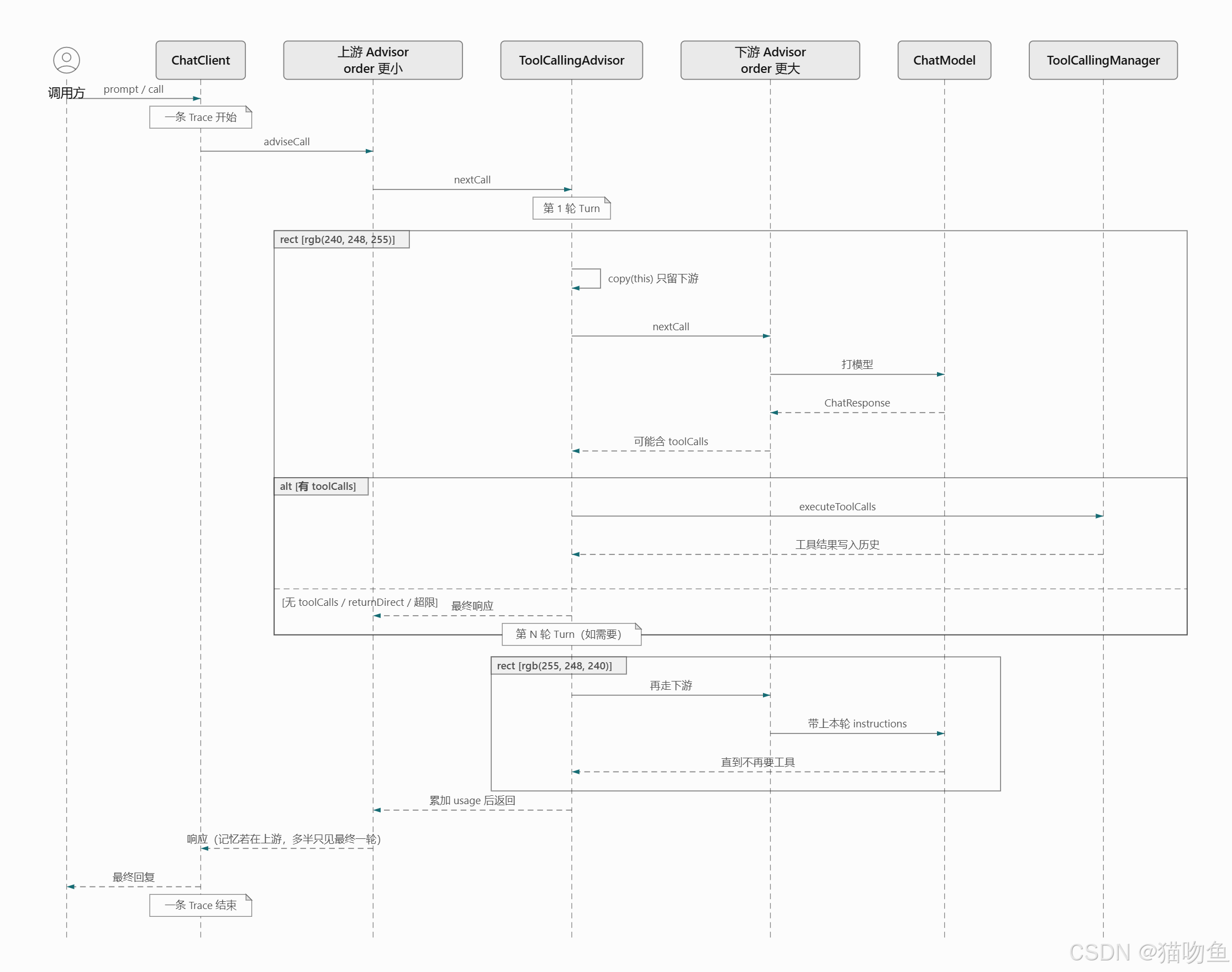
4.4 Tool 调用示例
-
定义两个演示 Tool
javapublic class DemoTools { /** * 返回当前日期时间。 */ public String getCurrentDateTime() { return LocalDateTime.now().toString(); } /** * 按城市返回示例天气。 */ public String getWeather(WeatherQuery query) { return query.getCity() + " 当前晴,气温 24°C(示例数据)"; } } public class WeatherQuery { /** * 城市名。 */ private String city; public String getCity() { return city; } public void setCity(String city) { this.city = city; } } -
将 Tool 包装注入容器中
java/** * 把已有方法包装成 Tool。 */ @Bean public ToolCallback currentDateTimeToolCallback() { Method method = ReflectionUtils.findMethod(DemoTools.class, "getCurrentDateTime"); return MethodToolCallback.builder() .toolDefinition(ToolDefinitions.builder(method) .description("获取当前日期和时间") .build()) .toolMethod(method) .toolObject(new DemoTools()) .build(); } /** * 把 Function 包装成 Tool。 */ @Bean public ToolCallback currentWeatherToolCallback() { return FunctionToolCallback.builder("getCurrentWeather", (WeatherQuery query) -> new DemoTools().getWeather(query)) .description("查询指定城市的当前天气") .inputType(WeatherQuery.class) .build(); } -
调用示例
java@Resource private ChatClient chatClient; /** * MethodToolCallback 示例。 */ @Resource(name = "currentDateTimeToolCallback") private ToolCallback currentDateTimeToolCallback; /** * FunctionToolCallback 示例。 */ @Resource(name = "currentWeatherToolCallback") private ToolCallback currentWeatherToolCallback; @Override public String chatWithTools(String userMessage, String conversationId) { log.info("[BaseLlmService][chatWithTools, conversationId={}, query={}]", conversationId, userMessage); return chatClient.prompt() .system("你是助手,需要当前时间或天气时必须调用已提供的工具,再根据工具结果回答。") .user(userMessage) .tools(currentDateTimeToolCallback, currentWeatherToolCallback) .advisors(a -> a.param(ChatMemory.CONVERSATION_ID, conversationId)) .advisors(new LogAdvisor()) .call() .content(); }