ClipPath
ClipPath:按照自定义路径(Path)裁剪子组件,只保留路径内部的区域,外部直接裁掉(透明)。
同类裁剪组件对比:
ClipRect:矩形裁剪ClipRRect:圆角矩形ClipOval:椭圆 / 圆形- ClipPath:任意自定义 Path,最灵活
基础结构
swift
ClipPath({
  Key? key,
  required CustomClipper<Path> clipper, // ✅核心:裁剪器,返回Path
  Clip clipBehavior = Clip.antiAlias, // 抗锯齿,antiAlias抗锯齿,hardEdge无抗锯齿
  Widget? child, // 要被裁剪的子组件
})
重点:必须写一个继承 CustomClipper<Path> 的类,重写 2 个方法
getClip(Size size):根据子组件尺寸,返回裁剪 PathshouldReclip(CustomClipper<Path> oldClipper):判断是否需要重新裁剪(性能优化)
moveTo(100,200)。默认是(0,0)开始,这里表示切换开始点。
arduino
Widget buildClipPathWidget() {
  return ClipPath(
    clipper: MyClipper1(),
    child: Container(color: Colors.red, width: 200, height: 200),
  );
}

class MyClipper1 extends CustomClipper<Path> {
  @override
  Path getClip(Size size) {
    Path path = Path();
    path.moveTo(size.width / 2, 0);
    path.lineTo(0, size.height);
    path.lineTo(size.width, size.height);
    path.close();
    return path;
  }

  // 是否需要重新裁剪,如果路径没有修改,可以不重新裁剪
  @override
  bool shouldReclip(covariant CustomClipper<Path> oldClipper) {
    return false;
  }
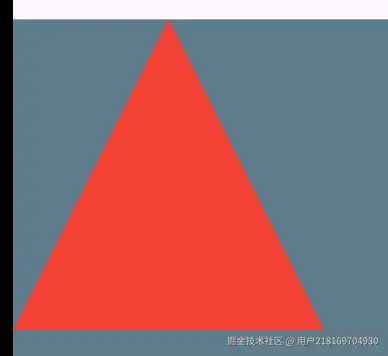
}
也可以用这个做动画
scala
import 'dart:async';

import 'package:flutter/material.dart';

void main() {
  runApp(MaterialApp(home: HomePage()));
}

class HomePage extends StatefulWidget {
  HomePage({Key? key}) : super(key: key);

  @override
  _HomePageState createState() => _HomePageState();
}

class ItemState {
  bool isExpanded = false;
}

class _HomePageState extends State<HomePage> {
  List<ItemState> itemStates = [];
  _HomePageState() {
    for (int i = 0; i < 2; i++) {
      itemStates.add(ItemState());
    }
  }

  double height = 0;
  Timer? _timer;
  double step = 0.5;
  @override
  initState() {
    super.initState();
    height = 0;
    _timer = Timer.periodic(Duration(milliseconds: 10), (timer) {
      setState(() {
        height += step;
        if (height > 100) {
          step = -0.5;
        } else if (height < 0) {
          step = 0.5;
        }
        debugPrint("height: $height");
      });
    });
  }

  var res = "no result";
  @override
  Widget build(BuildContext context) {
    return Scaffold(
      appBar: AppBar(title: Text("贝塞尔曲线")),
      body: Container(
        // 如果不设置alignment,ExpansionTile就是全屏的
        alignment: Alignment.topLeft,
        color: Colors.blueGrey,
        width: MediaQuery.of(context).size.width,
        height: MediaQuery.of(context).size.height,
        child: buildClipPathWidget(context, height),
      ),
    );
  }

  @override
  dispose() {
    _timer?.cancel();
    super.dispose();
  }
}

Widget buildClipPathWidget(BuildContext context, double height) {
  return ClipPath(
    clipper: MyClipper3(height),
    child: Container(
      color: Colors.red,
      width: MediaQuery.of(context).size.width,
      height: 200,
    ),
  );
}

class MyClipper1 extends CustomClipper<Path> {
  @override
  Path getClip(Size size) {
    Path path = Path();
    path.moveTo(size.width / 2, 0);
    path.lineTo(0, size.height);
    path.lineTo(size.width, size.height);
    path.close();
    return path;
  }

  // 是否需要重新裁剪,如果路径没有修改,可以不重新裁剪
  // 开发阶段,这里改成true。不然修改了路径,视图不会刷新
  @override
  bool shouldReclip(covariant CustomClipper<Path> oldClipper) {
    return true;
  }
}

class MyClipper2 extends CustomClipper<Path> {
  @override
  Path getClip(Size size) {
    Path path = Path();
    path.lineTo(0, size.height - 30);
    // path.lineTo(size.width, size.height);
    // 添加贝塞尔曲线
    path.quadraticBezierTo(
      size.width / 2,
      size.height,
      size.width,
      size.height - 30,
    );
    path.lineTo(size.width, size.height - 30);
    path.lineTo(size.width, 0);
    path.close();
    return path;
  }

  // 是否需要重新裁剪,如果路径没有修改,可以不重新裁剪
  @override
  bool shouldReclip(covariant CustomClipper<Path> oldClipper) {
    return true;
  }
}

class MyClipper3 extends CustomClipper<Path> {
  double height;
  MyClipper3(this.height);
  @override
  Path getClip(Size size) {
    Path path = Path();
    path.lineTo(0, size.height - 30);
    // path.lineTo(size.width, size.height);
    // 添加贝塞尔曲线
    path.quadraticBezierTo(
      size.width / 2,
      size.height - 30 + height,
      size.width,
      size.height - 30,
    );
    path.lineTo(size.width, size.height + 100);
    path.lineTo(size.width, 0);
    path.close();
    return path;
  }

  // 是否需要重新裁剪,如果路径没有修改,可以不重新裁剪
  @override
  bool shouldReclip(MyClipper3 oldClipper) {
    return oldClipper.height != height;
  }
}