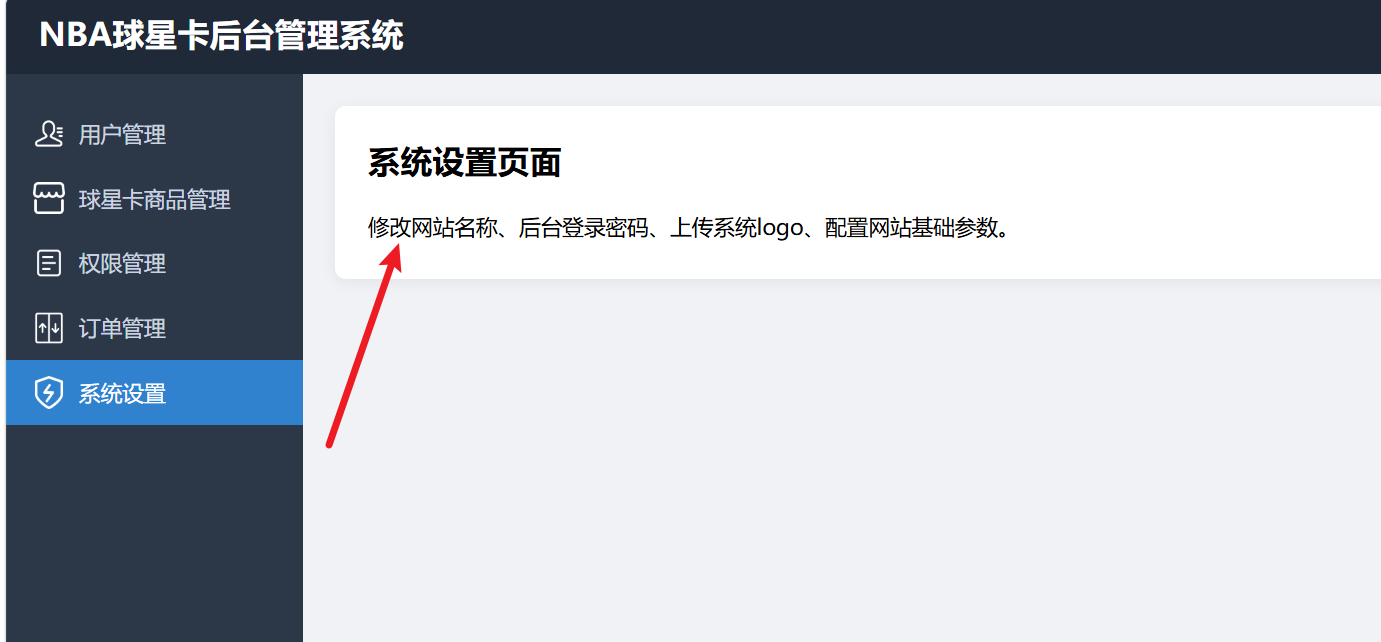
1、Layout.vue
html
<template>
    <div class="layout-wrap">
        <!--顶部头部-->
        <header class="layout-header">
            <h2>NBA球星卡后台管理系统</h2>
        </header>
        <div class="layout-body">
            <!--侧边栏-->
            <aside class="layout-sidebar">
                <router-link class="menu-item" to="/users">
                    <img src="/images/admin/user.png" alt="">
                    <span>用户管理</span>
                </router-link>
                <router-link class="menu-item" to="/goods">
                    <img src="/images/admin/goods.png" alt="">
                    <span>球星卡商品管理</span>
                </router-link>
                <router-link class="menu-item" to="/rights">
                    <img src="/images/admin/right.png" alt="">
                    <span>权限管理</span>
                </router-link>
                <router-link class="menu-item" to="/orders">
                    <img src="/images/admin/order.png" alt="">
                    <span>订单管理</span>
                </router-link>
                <router-link class="menu-item" to="/settings">
                    <img src="/images/admin/setting.png" alt="">
                    <span>系统设置</span>
                </router-link>
            </aside>
            <!--主内容区域,路由出口-->
            <main class="layout-main">
                <router-view />
            </main>
        </div>
    </div>
</template>

<script>
export default {
    name: "MainLayout"
}
</script>

<style scoped>
.layout-wrap {
    height: 100vh;
    display: flex;
    flex-direction: column;
    overflow: hidden;
}

.layout-header {
    height: 60px;
    background: #1f2937;
    color: #fff;
    line-height: 60px;
    padding: 0 24px;
}

.layout-body {
    display: flex;
    flex: 1;
}

.layout-sidebar {
    width: 220px;
    background: #2c3748;
    padding-top: 20px;
}

.menu-item {
    display: flex;
    align-items: center;
    gap: 10px;
    height: 48px;
    padding: 0 20px;
    color: #cbd5e0;
    text-decoration: none;
}

.menu-item img {
    width: 24px;
    height: 24px;
}

.menu-item:hover {
    background: #3a4a63;
    color: #fff;
}

.menu-item.router-link-active {
    background: #3182ce;
    color: white;
}

.layout-main {
    flex: 1;
    padding: 24px;
    overflow: auto;
}
</style>
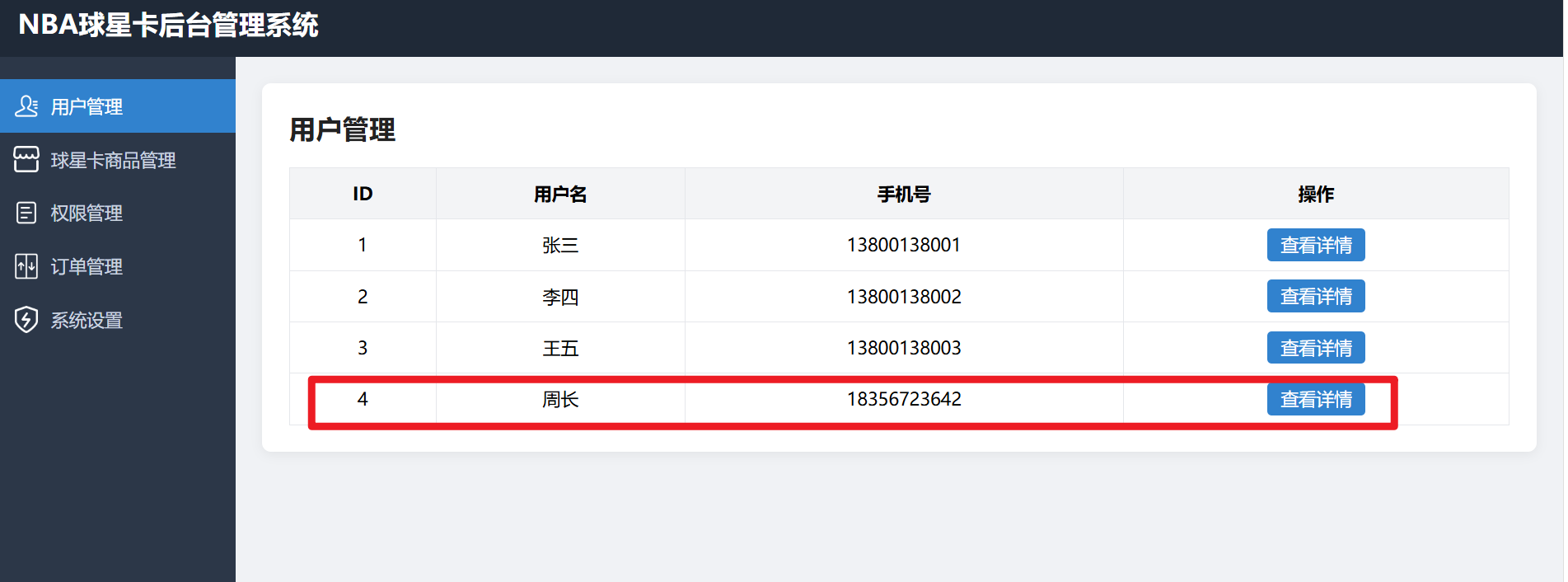
2、Users.vue
html
<template>
    <div class="page-box">
        <h2>用户管理</h2>
        <div class="table-wrap">
            <table>
                <thead>
                    <tr>
                        <th>ID</th>
                        <th>用户名</th>
                        <th>手机号</th>
                        <th>操作</th>
                    </tr>
                </thead>
                <tbody>
                    <tr v-for="item in userList" :key="item.id">
                        <td>{{ item.id }}</td>
                        <td>{{ item.name }}</td>
                        <td>{{ item.phone }}</td>
                        <td>
                            <router-link class="btn" :to="'/userinfo/' + item.id">查看详情</router-link>
                        </td>
                    </tr>
                </tbody>
            </table>
        </div>
    </div>
</template>
<script>
export default {
    name: "UserList",
    data() {
        return {
            userList: [
                { id: 1, name: "张三", phone: "13800138001" },
                { id: 2, name: "李四", phone: "13800138002" },
                { id: 3, name: "王五", phone: "13800138003" },
                { id: 4, name: "周长", phone: "18356723642" }
            ]
        }
    }
}
</script>
<style scoped>
.page-box {
    background: #fff;
    padding: 24px;
    border-radius: 8px;
    box-shadow: 0 2px 10px #00000010;
}

h2 {
    margin-bottom: 20px;
    color: #222;
}

table {
    width: 100%;
    border-collapse: collapse;
}

th,
td {
    border: 1px solid #e5e7eb;
    padding: 12px;
    text-align: center;
}

th {
    background: #f3f4f6;
}

.btn {
    padding: 4px 12px;
    background: #3182ce;
    color: white;
    text-decoration: none;
    border-radius: 4px;
}
</style>
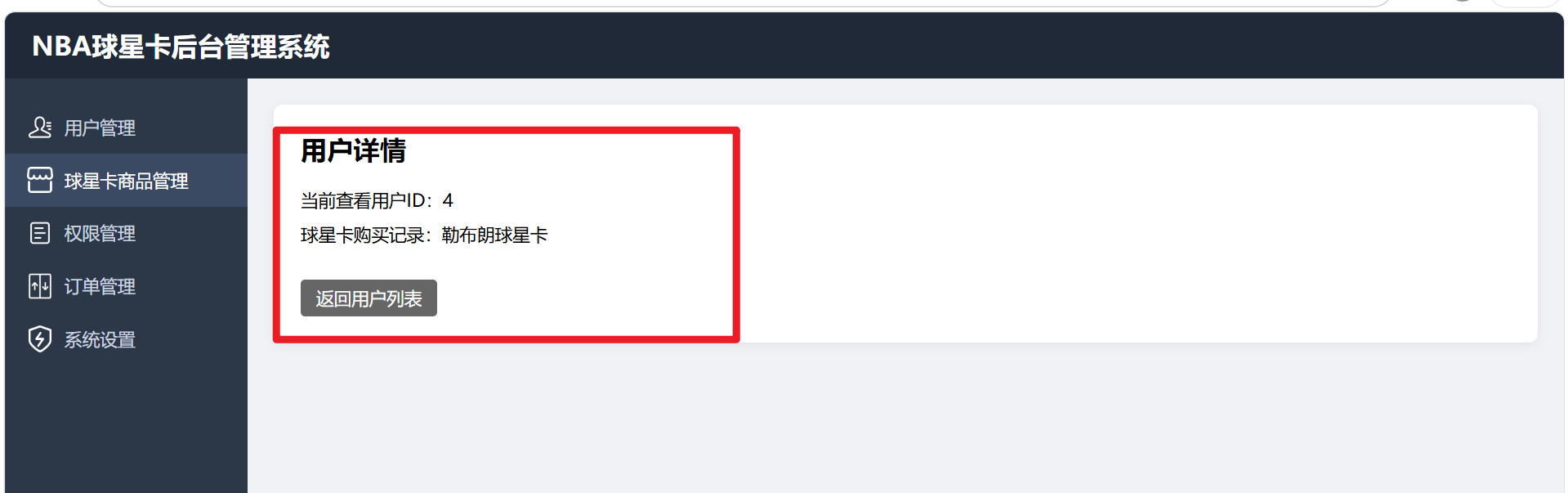
3、UserInfo.vue
html
<template>
    <div class="page-box">
        <h2>用户详情</h2>
        <p>当前查看用户ID:{{ $route.params.id }}</p>
        <p v-if="$route.params.id != 4">球星卡购买记录:暂无</p>
        <p v-else>球星卡购买记录:勒布朗球星卡</p>
        <router-link class="back-btn" to="/users">返回用户列表</router-link>
    </div>
</template>
<script>
export default {
    name: "UserInfoPage"
}
</script>
<style scoped>
.page-box {
    background: #fff;
    padding: 24px;
    border-radius: 8px;
    box-shadow: 0 2px 10px #00000010;
}

h2 {
    margin-bottom: 20px;
}

p {
    margin: 10px 0;
    font-size: 16px;
}

.back-btn {
    display: inline-block;
    margin-top: 20px;
    padding: 6px 14px;
    background: #666;
    color: white;
    text-decoration: none;
    border-radius: 4px;
}
</style>
4、Goods.vue
html
<template>
    <div class="page-box">
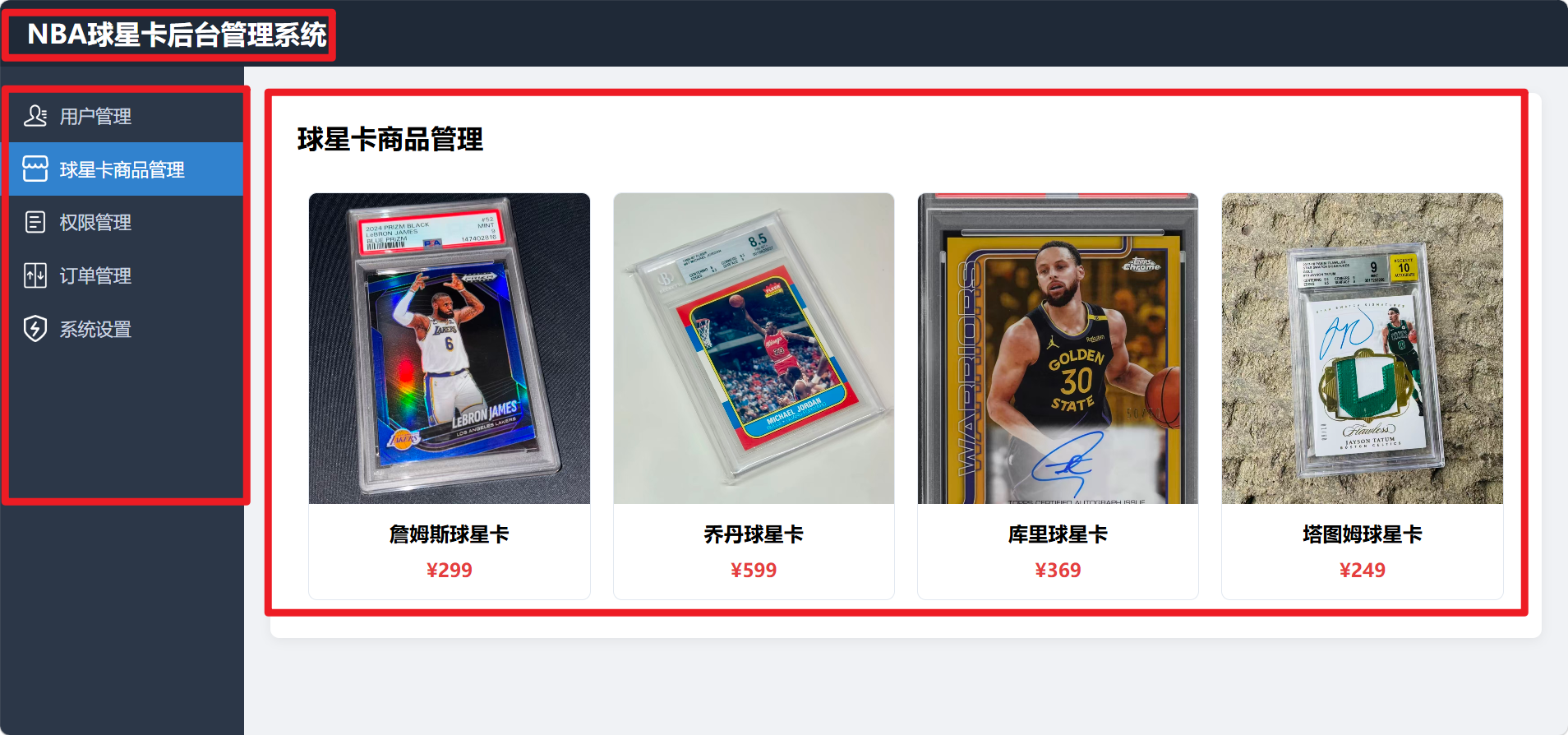
        <h2>球星卡商品管理</h2>
        <div class="card-container">
            <div class="card-item" v-for="card in cardList" :key="card.id">
                <!-- 本地路径,文件没放入public就会显示破碎图片 -->
                <img :src="card.img" alt="球星卡">
                <h3>{{ card.name }}</h3>
                <p class="price">¥{{ card.price }}</p>
            </div>
        </div>
    </div>
</template>
<script>
export default {
    name: "GoodsManage",
    data() {
        return {
            cardList: [
                { id: 1, name: "詹姆斯球星卡", img: "/images/admin/lbj_card.jpg", price: 299 },
                { id: 2, name: "乔丹球星卡", img: "/images/admin/jordan_card.jpg", price: 599 },
                { id: 3, name: "库里球星卡", img: "/images/admin/curry_card.jpg", price: 369 },
                { id: 4, name: "塔图姆球星卡", img: "/images/admin/tatum_card.jpg", price: 249 }
            ]
        }
    }
}
</script>
<style scoped>
.page-box {
    background: #fff;
    padding: 24px;
    border-radius: 8px;
    box-shadow: 0 2px 10px #00000010;
}

h2 {
    margin-bottom: 24px;
}

.card-container {
    display: grid;
    grid-template-columns: repeat(auto-fill, minmax(220px, 1fr));
    gap: 20px;
    max-height: 500px;
    /*设置最大高度,超出就滚动*/
    overflow-y: auto;
    padding: 10px;
}

.card-item {
    border: 1px solid #e2e8f0;
    border-radius: 8px;
    overflow: hidden;
    text-align: center;
    padding-bottom: 16px;
}

.card-item img {
    width: 100%;
    height: 280px;
    object-fit: cover;
}

.card-item h3 {
    margin: 10px 0;
    font-size: 18px;
}

.price {
    color: #e53e3e;
    font-weight: bold;
    font-size: 17px;
}
</style>
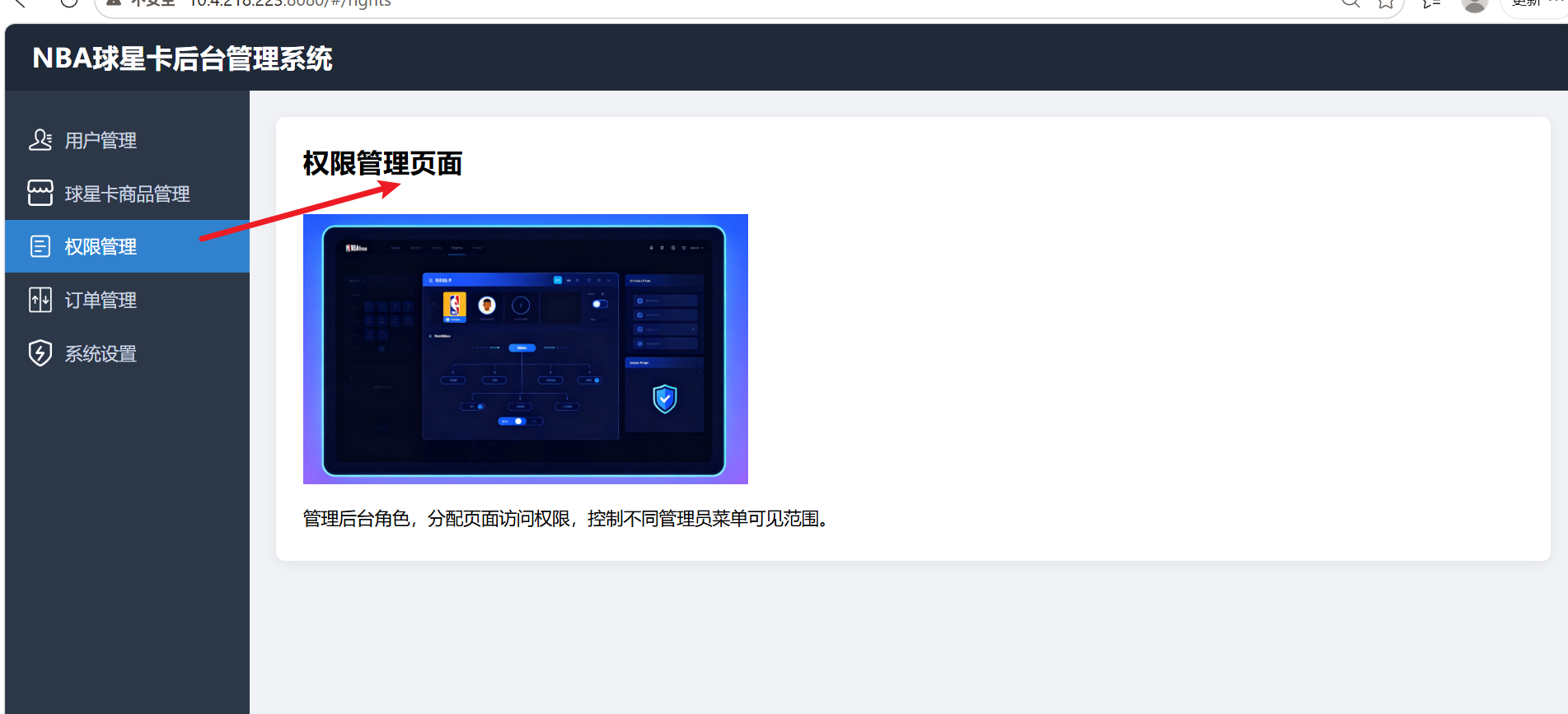
5、Rights.vue
html
<template>
    <div class="page-box">
        <h2>权限管理页面</h2>
        <img src="/images/admin/role_nba.jpg" alt="权限配图">
        <p>管理后台角色,分配页面访问权限,控制不同管理员菜单可见范围。</p>
    </div>
</template>
<script>
export default {
    name: "RightsManage"
}
</script>
<style scoped>
.page-box {
    background: #fff;
    padding: 24px;
    border-radius: 8px;
    box-shadow: 0 2px 10px #00000010;
}

h2 {
    margin-bottom: 20px;
}

img {
    width: 400px;
    margin: 12px 0;
}

p {
    font-size: 16px;
    line-height: 1.8;
}
</style>
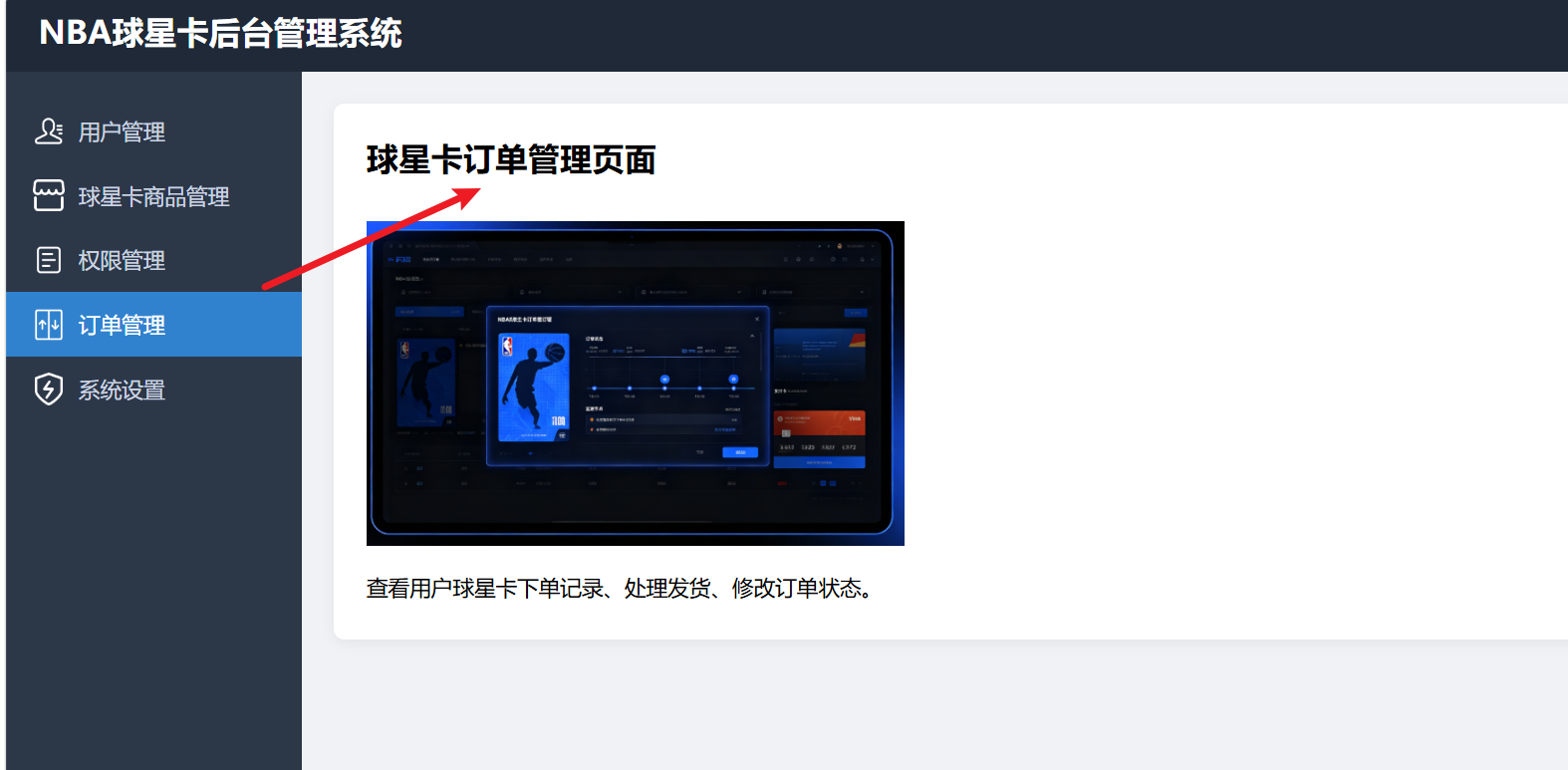
6、Orders.vue
html
<template>
    <div class="page-box">
        <h2>球星卡订单管理页面</h2>
        <img src="/images/admin/order_nba.jpg" alt="订单配图">
        <p>查看用户球星卡下单记录、处理发货、修改订单状态。</p>
    </div>
</template>
<script>
export default {
    name: "OrderManage"
}
</script>
<style scoped>
.page-box {
    background: #fff;
    padding: 24px;
    border-radius: 8px;
    box-shadow: 0 2px 10px #00000010;
}

h2 {
    margin-bottom: 20px;
}

img {
    width: 400px;
    margin: 12px 0;
}

p {
    font-size: 16px;
    line-height: 1.8;
}
</style>
7、Settings.vue
html
<template>
    <div class="page-box">
        <h2>系统设置页面</h2>
        <p>修改网站名称、后台登录密码、上传系统logo、配置网站基础参数。</p>
    </div>
</template>
<script>
export default {
    name: "SysSettings"
}
</script>
<style scoped>
.page-box {
    background: #fff;
    padding: 24px;
    border-radius: 8px;
    box-shadow: 0 2px 10px #00000010;
}

h2 {
    margin-bottom: 20px;
}

p {
    font-size: 16px;
    line-height: 1.8;
}
</style>
8、index.js
javascript
import Vue from 'vue'
import VueRouter from 'vue-router'
import Layout from '../components/Layout.vue'
import Users from '../components/Users.vue'
import UserInfo from '../components/UserInfo.vue'
import Goods from '../components/Goods.vue'
import Rights from '../components/Rights.vue'
import Orders from '../components/Orders.vue'
import Settings from '../components/Settings.vue'

Vue.use(VueRouter)

const routes = [
    {
        path: '/',
        component: Layout,
        redirect: '/users',
        children: [
            { path: 'users', component: Users },
            { path: 'userinfo/:id', component: UserInfo }, //动态路由
            { path: 'goods', component: Goods },
            { path: 'rights', component: Rights },
            { path: 'orders', component: Orders },
            { path: 'settings', component: Settings }
        ]
    }
]

const router = new VueRouter({
    routes
})
export default router
9、App.vue
javascript
<template>
  <div id="app">
    <router-view />
  </div>
</template>

<script>
export default {
  name: 'App'
}
</script>

<style>
* {
  margin: 0;
  padding: 0;
  box-sizing: border-box;
}

body {
  font-family: "Microsoft Yahei", sans-serif;
  background-color: #f0f2f5;
}
</style>
10、main.js
javascript
import Vue from 'vue'
import App from './App.vue'
import router from './router'

Vue.config.productionTip = false

new Vue({
  router,
  render: h => h(App),
}).$mount('#app')
11、项目运行效果
、