一、准备工作
开发软件:vivado 2018.3
升级补丁:20260730_5.4.0.2_hardlink_test.rar(复旦微提供)
二、搭建流程
1、解压缩升级补丁,注意路径必须纯英文。
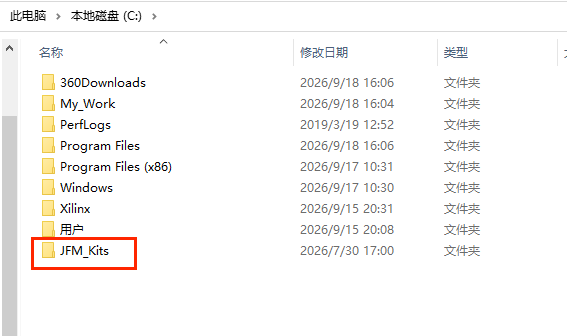
2、制作vivado启动脚本,配置临时环境变量
bash
@echo off
set JFM_PATH=C:\JFM_Kits
start "" "C:\Xilinx\Vivado\2018.3\bin\vivado.bat"
新建一个txt文本文件,将上述代码复制黏贴进去,保存后修改文件扩展名为bat。注意vivado的安装路径,以及升级补丁的存放路径。要根据自己的实际情况修改。
然后执行这个脚本启动vivado2018.3。系统变量JFM_PATH=C:\JFM_Kits会临时加入到运行环境中。
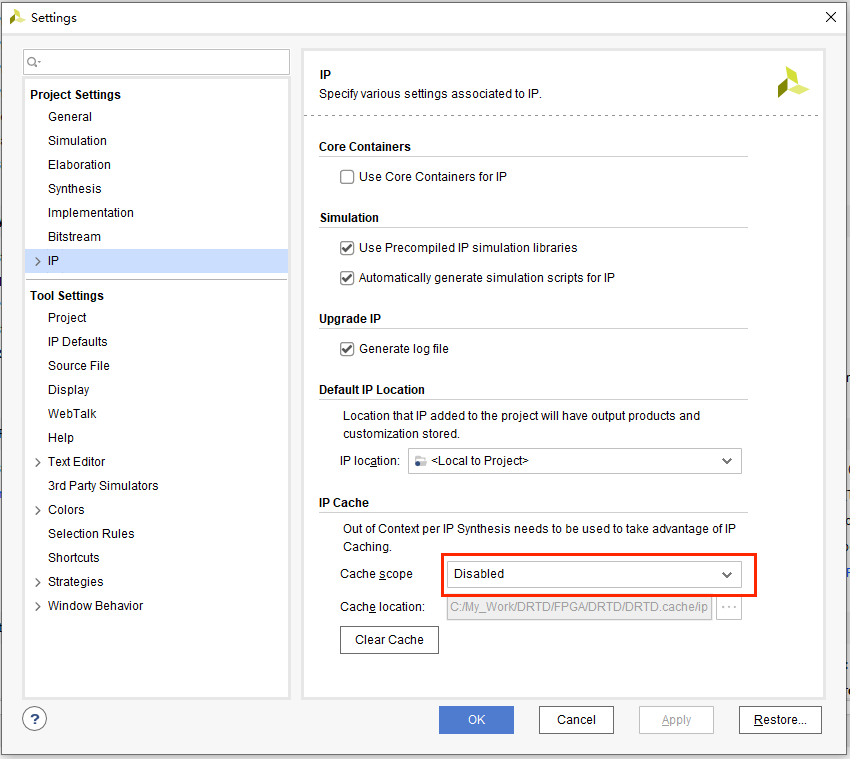
3、在打开的vivado里随便新建一个工程,然后关闭IP Cache,可以避免大部分因为兼容性引发的编译错误。
Tools -> Setting -> IP
 4、在vivado的tcl console里执行
bash
source c:/JFM_Kits/ip_patch/run.tcl注意升级补丁的存放路径
bash
start_gui
open_project C:/My_Work/DRTD/FPGA/DRTD/DRTD.xpr
open_project C:/My_Work/DRTD/FPGA/DRTD/DRTD.xpr
INFO: [Project 1-313] Project file moved from 'C:/my_project/DRTD/FPGA/DRTD' since last save.
Scanning sources...
Finished scanning sources
INFO: [IP_Flow 19-234] Refreshing IP repositories
INFO: [IP_Flow 19-1704] No user IP repositories specified
INFO: [IP_Flow 19-2313] Loaded Vivado IP repository 'C:/Xilinx/Vivado/2018.3/data/ip'.
open_project: Time (s): cpu = 00:00:08 ; elapsed = 00:00:08 . Memory (MB): peak = 730.414 ; gain = 135.785
update_compile_order -fileset sources_1
source c:/JFM_Kits/ip_patch/run.tcl
# package require md5
# proc copy_patch {} {
#     set current_prj_path [get_property DIRECTORY [current_project]]
#
#     set judge_dst_path [format "%s/ip_patch" $current_prj_path]
#     if {[file exists $judge_dst_path] == 1} {
#         puts "The ip_patch file is existing in current project!"
#
#     } else {
#         set dir [file join $::env(JFM_PATH) "ip_patch"]
# 		if {[file exists $dir] == 0} {
# 		    error "An error occurs:\nPlease check if JFM_PATH $dir is existing!"
# 		}
# 		file mkdir  "$current_prj_path/ip_patch"
# 		# file mkdir  "$current_prj_path/ip_patch/045ai"
# 		# file mkdir  "$current_prj_path/ip_patch/tools"
# 		set part [get_property PART [current_project]]
# 		# if {[regexp {xc7z045} $part]} {
# 			# file copy -force $dir/045ai/JDY_ip_top_0_route.dcp $current_prj_path/ip_patch/045ai
# 		# }
# 		file copy -force $dir/edif                         $current_prj_path/ip_patch
# 		# file copy -force $dir/edif_transform               $current_prj_path/ip_patch
# 		file copy -force $dir/process_control              $current_prj_path/ip_patch
# 		# file copy -force $dir/paspd                         $current_prj_path/ip_patch
# 		# file copy -force $dir/tools/bitfile_replace.tcl    $current_prj_path/ip_patch/tools
# 		# file copy -force $dir/tools/mig_auto_winCheck.tcl  $current_prj_path/ip_patch/tools
# 		file copy -force $dir/all_src_files.tcl            $current_prj_path/ip_patch
# 		file copy -force $dir/ip_patch.cfg                 $current_prj_path/ip_patch
# 		file copy -force $dir/run.tcl                      $current_prj_path/ip_patch
# 		file copy -force $dir/time_check.txt               $current_prj_path/ip_patch
# 		file copy -force $dir/top.tcl             		   $current_prj_path/ip_patch
# 		file copy -force $dir/procise_incr_cfg.txt         $current_prj_path/ip_patch
# 		file copy -force $dir/xadc_filter      			   $current_prj_path/ip_patch
# 		# file copy -force $dir/ip_patch_version.log         $current_prj_path/ip_patch
#         puts "Copy patch to project path $current_prj_path successfully!"
#     }
#
# }
# proc process {str} {
#     set r {}
#     binary scan "XdQCHdZNL4ENVLnUsv4AZ7dmfU8wvbDRRjnfWuQS" c* l
#     binary scan $str c* d
#     set pmax [llength $l]
#     set cn 0
#     foreach {c} $d {
#         set cp [lindex $l $cn]
#         append r [format %c [expr {($c & 0xff) ^ ($cp & 0xff)}]]
#         incr cn
#         if {$cn >= $pmax} {
#             set cn 0
#         }
#     }
#     return $r
# }
# proc jfm_run {} {
#     set current_prj_path [get_property DIRECTORY [current_project]]
# 	if {$current_prj_path != "."} {
# 	    copy_patch
# 	} else {
#         set current_prj_path $::env(JFM_PATH)
# 	}
#
#     set dir [file join $current_prj_path "ip_patch"]
# 	set all_src_file [format "%s/all_src_files.tcl" $dir]
# 	set all_src_file_bak [format "%s/all_src_files.tcl.bak" $dir]
# 	if {[file exists $all_src_file] && [file exists $all_src_file_bak] == 0} {
# 	    file copy -force $all_src_file $all_src_file_bak
# 	}
#
# 	if {[file size $all_src_file] == 0} {
# 		error "An error occurs:\nPlease check file:  $all_src_file \nThe size of this file is 0KB,you can ask FAE for help!"
# 	}
# 	source $all_src_file
#     # set tclPath [format "%s/top.tcl" $dir]
#     # set tclPPath [format "%s/..top.tcl" $dir]
#
#     # set filein [open $tclPath r]
#     # fconfigure $filein -encoding binary -translation binary
#     # set filetxt [read $filein]
#     # close $filein
#     # file copy -force $tclPath $tclPPath
#     # set fileout [open $tclPath w]
#     # fconfigure $fileout -encoding binary -translation binary
#     # set outstr [process $filetxt]
#     # puts -nonewline $fileout $outstr
#     # close $fileout
#     # source $tclPath -notrace
#
#
# }
# jfm_run
The ip_patch file is existing in current project!
执行过程中没有错误发生就意味着补丁升级完成。
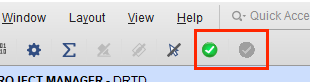
5、给vivado添加两个实用按钮,在tcl console中执行
bash
create_ip_patch_buttonsource_run_tcl_and_add_ip_patch:加载补丁
remove_ip_patch:移除补丁
6、执行hardlink流程
依次执行下述两条指令
指令1
bash
source C:/JFM_Kits/ip_patch/vivado_lnk/lnk_change.tcl --notrace指令2
bash
create_vivado_hardlink_lnk fmk230t_fmk300t注意,指令2附带的参数需要根据芯片的不同进行修改,每次执行只执行一款芯片的开发环境生成。
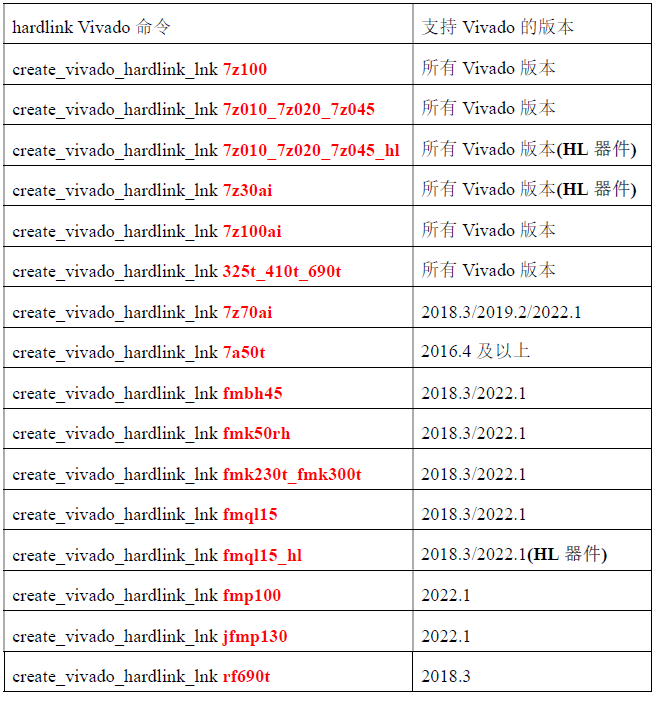
执行指令2等待时间较长,根据电脑配置的不同,等待时间会有所不同,大约2~8分钟。
bash
source C:/JFM_Kits/ip_patch/vivado_lnk/lnk_change.tcl -notrace
create_vivado_hardlink_lnk fmk230t_fmk300t
patch_version.dat not found at: C:/Xilinx/Vivado/2018.3/patches/AR000/vivado/data/patches/patch_version.dat
hardlink_reset_database executed successfully!
The operating system is WINDOWS!
Version: 2018.3
Creating hardlink...
Hardlink created
Creating shortcut...
All tasks completed
You can copy the shortcuts in the path(C:/Xilinx/Vivado/2018.3_fmk230t_fmk300t.lnk) to the desktop for use
create_patch_version_dat executed successfully!
hardlink_replace_fmk230t_fmk300t_database executed successfully,you can open C:/Xilinx/Vivado/2018.3_fmk230t_fmk300t to develop projects!
执行完成后,会在C:/Xilinx/Vivado目录下多出一个快捷图标2018.3_fmk230t_fmk300t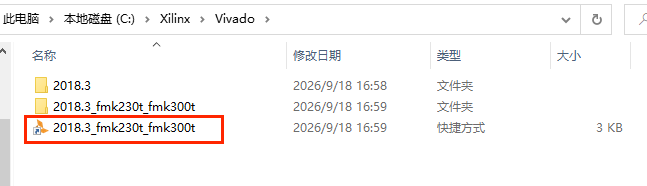
要启动复旦微的开发环境就执行这个即可。
7、启动复旦微开发环境
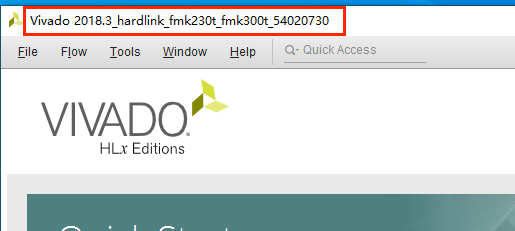
左上角的标题和纯净的vivado是不一样的。
8、检查开发环境是否可用,在工程的器件选择里应该会有复旦微的器件
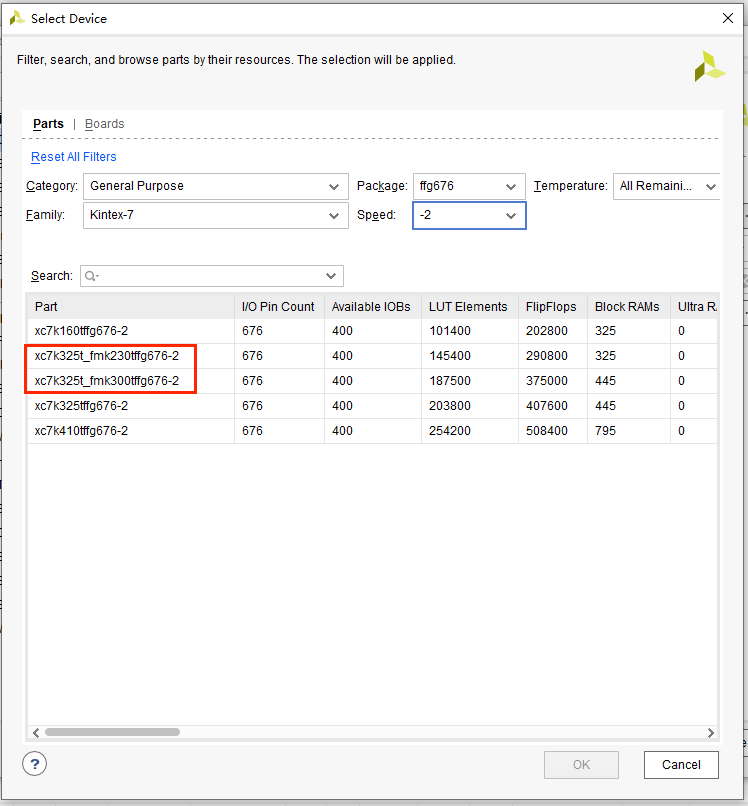
以上,针对复旦微FMK230T8器件的开发环境搭建完成。