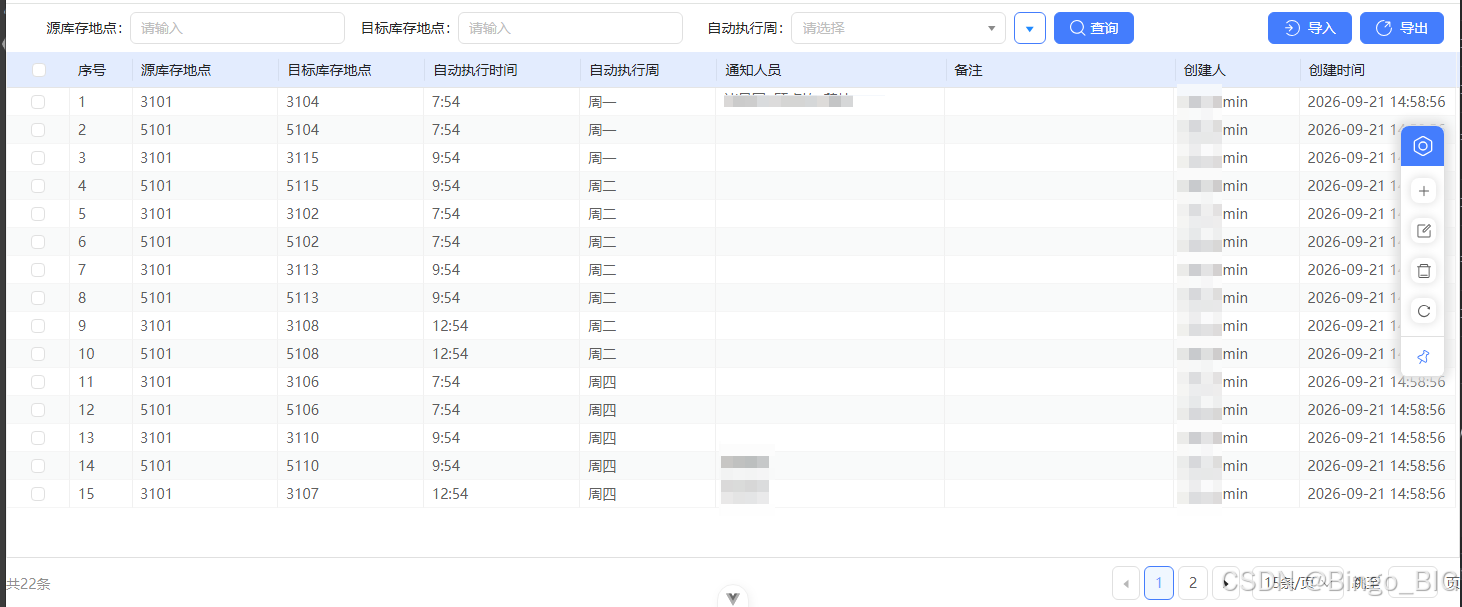
一、 前端:
index.vue
<template>
  <div class="replenish-config flex flex-col">
    <WmsHeader
      ref="searchRef"
      :formConfig="searchConfig"
      :labelCol="{ span: 8 }"
      :searchNum="4"
      :searchPopoverStyle="{ width: '640px' }"
      :wrapperCol="{ span: 16 }"
      @onQuery="handleSearch"
      @onReset="handleReset"
    >
      <template #btnArea>
        <tips-icon icon="import" type="primary" @click="openImportDrawer">{{ $t('common.import') }}</tips-icon>
        <tips-icon icon="export" type="primary" @click="exportExcel">{{ $t('common.export') }}</tips-icon>
      </template>
    </WmsHeader>

    <base-table ref="tableRef" :autoWidth="false" :columns="columns" is-serial-number :query-api="QueryData" :query-args="queryArgs">
      <template #columns="{ column, currentRecord, text }">
        <template v-if="column?.key !== 'index'">
          <display-user v-if="column?.key === 'creator'" :value="currentRecord.creator" />
          <span v-else-if="column?.key === 'tj0Notifier'" class="multiple-user">
            <user-info-popover
              v-for="item in String(currentRecord.tj0Notifier || '')
                .split(',')
                .filter(Boolean)"
              :key="item"
              :user-id="item"
            />
          </span>
          <span v-else-if="column?.key === 'tj0AutoCreateWeek'">{{ getExecutionWeekLabel(text) }}</span>
          <n-tooltip v-else placement="topLeft">
            {{ text }}
            <template #title>
              <span style="white-space: pre-wrap">{{ text }}</span>
            </template>
          </n-tooltip>
        </template>
      </template>
    </base-table>

    <menu-boll :btnList="btnList" @btnclickEmit="menuClick" />

    <GvDrawer :title="drawerTitle" :type="formStatus" :visible="formVisible" @close="closeFormDrawer" @confirm="confirmForm">
      <template #form>
        <base-form ref="formRef" :config="formConfig" :model="formModel" :status="formStatus" />
      </template>
    </GvDrawer>

    <GvDrawer
      :confirmBtnText="$t('common.import')"
      :loading="importLoading"
      :title="$t('common.import')"
      :visible="importVisible"
      @close="closeImportDrawer"
      @confirm="confirmImport"
    >
      <template #form>
        <ImportTemplate ref="importTemplateRef" handUpload @change="handleImportChange" @downTemplate="downloadTemplate" />
        <p v-if="importErrorMsg" class="text-red mt-16">{{ $t('common.importError') }}: {{ importErrorMsg }}</p>
      </template>
    </GvDrawer>
  </div>
</template>

<script setup lang="ts">
import ImportTemplate from '@/components/ImportTemplate.vue';
import { Add, DeleteByIds, DownloadTemp, ExportExcel, ImportExcel, QueryData, Update } from '@/api/wms/replenishConfig';
import type { BaseFormExpose } from '@/types/baseForm.d';
import type { BaseTableExpose, QueryArgs, QueryCondition } from '@/types/baseTable';
import { fileTools } from '@/utils/fileTools';
import WmsHeader from '@/views/wms/components/WmsHeader.vue';
import { DeleteOutlined, EditOutlined, PlusOutlined, ReloadOutlined } from '@nancal-icon/icons-vue';
import { Modal, message } from 'n-designv3';
import { getExecutionWeekLabel, type ReplenishConfig } from './data';
import { ExtendConfig } from './extend';

const { columns, searchConfig, formConfig } = ExtendConfig;
const tableRef = ref<BaseTableExpose>();
const searchRef = ref();
const formRef = ref<BaseFormExpose>();
const importTemplateRef = ref();

/** 当前新增或编辑的表单数据。 */
const formModel = ref<Partial<ReplenishConfig>>({});
/** 表单抽屉状态;编辑时必须携带 objId。 */
const formStatus = ref<'add' | 'edit'>('add');
const formVisible = ref(false);
const importVisible = ref(false);
const importLoading = ref(false);
const importErrorMsg = ref('');
/** 上传组件返回的原始 Excel 文件。 */
const importFile = ref<any>(null);
const drawerTitle = computed(() => (formStatus.value === 'add' ? '新建驻地库自动补库配置' : '修改驻地库自动补库配置'));

/** 列表的默认分页、排序和筛选条件。 */
const queryArgs: QueryArgs = reactive({
  attrSet: [],
  condition: [],
  sorts: [{ name: 'createAt', sort: 'desc' }],
  page: { pageNo: 1, pageSize: 15 },
});

const btnList = computed(() => [
  { type: 'create', icon: PlusOutlined, name: '新建' },
  { type: 'edit', icon: EditOutlined, name: '修改' },
  { type: 'delete', icon: DeleteOutlined, name: '删除' },
  { type: 'refresh', icon: ReloadOutlined, name: '刷新' },
]);

/** 返回空表单模型,防止上次编辑数据残留到新增表单。 */
const defaultFormModel = (): Partial<ReplenishConfig> => ({});

/** 重新请求分页数据。 */
const queryList = () => tableRef.value?.refreshList();

/** 将搜索组件条件同步至列表,并回到第一页。 */
const handleSearch = (_model: Record<string, any>, condition: QueryCondition[] = []) => {
  queryArgs.page!.pageNo = 1;
  tableRef.value?.setQueryArgs({}, true);
  tableRef.value?.setQueryArgs(condition);
  queryList();
};

/** 清空搜索、勾选状态并恢复默认分页。 */
const handleReset = () => {
  tableRef.value?.setSelectedRows([]);
  tableRef.value?.setQueryArgs({}, true);
  queryArgs.page!.pageNo = 1;
  queryList();
};

/** 打开新增或编辑抽屉。 */
const openFormDrawer = (status: 'add' | 'edit') => {
  formStatus.value = status;
  formVisible.value = true;
};

/** 初始化新增表单。 */
const create = () => {
  formModel.value = defaultFormModel();
  openFormDrawer('add');
};

/**
 * 将后端以英文逗号保存的通知人员编号转换为多选组件数组值。
 *
 * @param notifier 后端保存的人员编号字符串。
 */
const splitNotifier = (notifier?: string) =>
  notifier
    ?.split(',')
    .map(item => item.trim())
    .filter(Boolean) || [];

/** 读取单个勾选行并初始化编辑表单。 */
const edit = () => {
  const rows = tableRef.value?.getSelectedRows() || [];
  if (!rows.length) return message.warn('请选择需要修改的数据');
  if (rows.length > 1) return message.warn('一次只能修改一条数据');
  formModel.value = {
    ...rows[0],
    tj0Notifier: splitNotifier(rows[0].tj0Notifier),
  };
  openFormDrawer('edit');
};

/** 关闭表单并清理数据。 */
const closeFormDrawer = () => {
  formVisible.value = false;
  formModel.value = defaultFormModel();
};

/** 校验表单后调用新增或修改接口,并刷新列表。 */
const confirmForm = async () => {
  try {
    await formRef.value?.validate();
    const api = formStatus.value === 'add' ? Add : Update;
    const params = {
      ...formModel.value,
      // 多选人员组件返回编号数组,提交给后端时按英文逗号拼接。
      tj0Notifier: Array.isArray(formModel.value.tj0Notifier) ? formModel.value.tj0Notifier.join(',') : formModel.value.tj0Notifier,
    };
    const response: any = await api(params);
    if (response.code === '0') {
      message.success('操作成功');
      closeFormDrawer();
      queryList();
    }
  } catch (_error) {
    // 表单校验不通过时保持抽屉打开。
  }
};

/** 确认后批量删除已勾选的补库配置。 */
const remove = () => {
  const rows = tableRef.value?.getSelectedRows() || [];
  if (!rows.length) return message.warn('请选择需要删除的数据');
  Modal.confirm({
    content: `确定删除选中的 ${rows.length} 条数据吗?`,
    okText: '确定',
    cancelText: '取消',
    async onOk() {
      const response: any = await DeleteByIds(rows.map((row: ReplenishConfig) => row.objId!));
      if (response.code === '0') {
        message.success('删除成功');
        queryList();
      }
    },
  });
};

/** 重置搜索表单后重新加载列表。 */
const refresh = () => {
  searchRef.value?.reset();
  handleReset();
};

/** 导出当前筛选结果;增大页大小以获取全部匹配记录。 */
const exportExcel = async () => {
  const params = JSON.parse(JSON.stringify(queryArgs));
  params.page.pageSize = 60000;
  const response = await ExportExcel(params);
  fileTools.downloadXlsx(response, '驻地库自动补库配置.xlsx');
};

/** 打开 Excel 导入抽屉。 */
const openImportDrawer = () => {
  importVisible.value = true;
};

/** 下载与当前字段顺序一致的导入模板。 */
const downloadTemplate = async () => {
  const response = await DownloadTemp();
  fileTools.downloadXlsx(response, '驻地库自动补库配置导入模板.xlsx');
};

/** 兼容上传组件不同版本的文件对象结构。 */
const getUploadFile = (file: any) => file?.originFileObj || file?.file || file;

/** 缓存用户选择的 Excel 文件,并在删除文件时清空缓存。 */
const handleImportChange = (info: any) => {
  importErrorMsg.value = '';
  if (info.file?.status === 'removed') {
    importFile.value = null;
    return;
  }
  importFile.value = getUploadFile(info.file);
};

/** 上传 Excel;后端按源库存地点和目标库存地点组合覆盖重复行。 */
const confirmImport = async () => {
  if (!importFile.value?.uid && !importFile.value?.name && !(importFile.value instanceof Blob)) {
    return message.warn('请选择需要导入的文件');
  }
  const formData = new FormData();
  formData.append('file', importFile.value);
  try {
    importLoading.value = true;
    const response: any = await ImportExcel(formData, { showMsg: false, timeout: 1000 * 60 * 60 });
    if (response.code === '0') {
      message.success('导入成功');
      closeImportDrawer();
      queryList();
    } else {
      importErrorMsg.value = response.msg;
    }
  } finally {
    importLoading.value = false;
  }
};

/** 清除上传控件状态并关闭导入抽屉。 */
const closeImportDrawer = () => {
  importTemplateRef.value?.clearFile();
  importFile.value = null;
  importErrorMsg.value = '';
  importVisible.value = false;
};

/** 分发底部操作栏事件。 */
const menuClick = (status: string) => {
  if (status === 'create') return create();
  if (status === 'edit') return edit();
  if (status === 'delete') return remove();
  if (status === 'refresh') return refresh();
};

onMounted(queryList);
defineExpose({ queryList });
</script>

<style scoped lang="less">
.replenish-config {
  min-height: 100%;
}
</style>
Data.ts
 import type { FormConfig, HeaderConfig } from '@/types/baseForm';
import type { BaseTableColumn } from '@/types/baseTable';
import { getServerPath } from '@/api/basePath';
import { $t } from '@/lang';

/** 用户查询接口所在服务。 */
const serverPath = getServerPath();

/** 自动执行周下拉选项:界面显示中文,提交并保存数字编码。 */
const executionWeekOptions = [
  { label: '周一', value: '1' },
  { label: '周二', value: '2' },
  { label: '周三', value: '3' },
  { label: '周四', value: '4' },
  { label: '周五', value: '5' },
  { label: '周六', value: '6' },
  { label: '周日', value: '7' },
];

/** 将后端保存的执行周数字转换为页面显示的中文。 */
export const getExecutionWeekLabel = (value?: string | number) => executionWeekOptions.find(item => item.value === String(value))?.label || value || '';

/**
 * 驻地库自动补库配置页面数据模型。
 * objId 由后端生成;源库存地点和目标库存地点组合唯一。
 */
export interface ReplenishConfig {
  objId?: string | number;
  tj0SourceLocation?: string;
  tj0TargetLocation?: string;
  tj0AutoCreateTime?: string;
  tj0AutoCreateWeek?: string;
  remark?: string;
  /** 通知人员编号;表单中为编号数组,提交后以英文逗号分隔。 */
  tj0Notifier?: string | string[];
  creator?: string;
  creatorName?: string;
  createAt?: string;
}

/** 补库配置列表列定义。 */
export const columns = computed<BaseTableColumn[]>(() => [
  { title: '源库存地点', dataIndex: 'tj0SourceLocation', key: 'tj0SourceLocation', width: 140 },
  { title: '目标库存地点', dataIndex: 'tj0TargetLocation', key: 'tj0TargetLocation', width: 140 },
  { title: '自动执行时间', dataIndex: 'tj0AutoCreateTime', key: 'tj0AutoCreateTime', width: 150 },
  {
    title: '自动执行周',
    dataIndex: 'tj0AutoCreateWeek',
    key: 'tj0AutoCreateWeek',
    width: 130,
    // customRender: 自定义渲染函数,将后端保存的执行周数字转换为中文显示的周名称
    // 周的序号转换为中文显示,例如:周一、周二、周三等
    customRender: ({ text }) => getExecutionWeekLabel(text),
  },
  {
    title: '通知人员',
    dataIndex: 'tj0Notifier',
    key: 'tj0Notifier',
    width: 300,
    /**
     * 使用框架内置的 multiple-user 表格渲染类型,而非第三方插件。
     * 它将 tj0Notifier 中以英文逗号分隔的人员编号逐个传给 user-info-popover;
     * user-info-popover 从已加载的用户树 userStore.userAllTree 中按 objId 匹配,展示人员姓名,
     * 鼠标悬停姓名时可显示部门、电话等用户信息。
     */
    type: 'multiple-user',
    attrs: {
      /**
       * 多名人员的姓名在同一行内以逗号横向排列;不设置或为 false 时,每名人员将以块级元素换行显示。
       * 该属性会透传给 user-info-popover 的 parallelOrNot 参数,仅影响列表显示样式,不影响后端保存值。
       */
      parallelOrNot: false,
    },
  },
  { title: '备注', dataIndex: 'remark', key: 'remark', width: 200 },
  { title: $t('common.creator'), dataIndex: 'creator', key: 'creator', width: 120, type: 'user' },
  { title: $t('common.createAt'), dataIndex: 'createAt', key: 'createAt', width: 150 },
]);

/** 补库配置列表搜索字段定义。 */
export const searchConfig = computed<HeaderConfig[]>(() => [
  {
    prop: 'tj0SourceLocation',
    label: '源库存地点',
    type: 'input',
    compare: 'EQUAL',
    attrs: { maxLength: 30, placeholder: $t('common.pleaseEnter') },
  },
  {
    prop: 'tj0TargetLocation',
    label: '目标库存地点',
    type: 'input',
    compare: 'EQUAL',
    attrs: { maxLength: 30, placeholder: $t('common.pleaseEnter') },
  },
  {
    prop: 'tj0AutoCreateWeek',
    label: '自动执行周',
    type: 'select',
    compare: 'EQUAL',
    options: executionWeekOptions,
    attrs: { placeholder: $t('common.pleaseSelect') },
  },
]);

/** 新增和修改补库配置的表单定义。 */
export const formConfig = computed<FormConfig[]>(() => [
  {
    prop: 'tj0SourceLocation',
    label: '源库存地点',
    type: 'input',
    attrs: { maxLength: 30, placeholder: '请输入源库存地点' },
    rules: { required: true, message: '请输入源库存地点', trigger: 'blur' },
  },
  {
    prop: 'tj0TargetLocation',
    label: '目标库存地点',
    type: 'input',
    attrs: { maxLength: 30, placeholder: '请输入目标库存地点' },
    rules: { required: true, message: '请输入目标库存地点', trigger: 'blur' },
  },
  {
    prop: 'tj0AutoCreateTime',
    label: '自动执行时间',
    type: 'input',
    attrs: { maxLength: 8, placeholder: '请输入 04:00 或 04:00:00' },
    rules: [
      { required: true, message: '请输入自动执行时间', trigger: 'blur' },
      {
        // 匹配 HH:mm 或 HH:mm:ss 格式
        // HH 为 00-23 之间的整数,mm 为 00-59 之间的整数,ss 为 00-59 之间的整数
        // 例如:04:00 或 04:00:00
        pattern: /^([01]\d|2[0-3]):[0-5]\d(?::[0-5]\d)?$/,
        message: '自动执行时间格式必须为 HH:mm 或 HH:mm:ss,例如 04:00 或 04:00:00',
        trigger: 'blur',
      },
    ],
  },
  {
    prop: 'tj0AutoCreateWeek',
    label: '自动执行周',
       // 自动执行周只能选择一个
    type: 'select',
    // executionWeekOptions: 1-7 之间的整数,分别对应周一至周日的执行周
    options: executionWeekOptions,
    attrs: { placeholder: '请选择自动执行周' },
    rules: { required: true, message: '请选择自动执行周', trigger: 'change' },
  },
  {
    prop: 'tj0Notifier',
    label: '通知人员',
    type: 'query-select',
    className: 'User',
    svrName: serverPath.mbd,
    attrs: {
      mode: 'multiple',
      maxLength: 300,
      placeholder: '请选择通知人员',
    },
  },
  {
    prop: 'remark',
    label: '备注',
    type: 'textarea',
    attrs: { maxLength: 150, placeholder: '请输入备注' },
  },
]);

/** 页面默认配置,可由 extend.ts 按项目需要覆盖。 */
export const BaseConfig = { columns, searchConfig, formConfig };
API.ts
import * as paths from '@/api/basePath';
import { getCommonApi } from '../common';
import { http, type CustomConfig } from '@/utils/request';
import type { QueryArgs } from '@/types/baseTable';

/** WMS 服务请求前缀。 */
const serverPath = paths.default.wms;

/** 驻地库自动补库配置后端控制器路径。 */
export const className = '/ReplenishConfig';

/**
 * 驻地库自动补库配置公共 CRUD 接口。
 * 包含分页查询、新增、修改、详情和删除。
 */
export const { queryPage: QueryData, add: Add, update: Update, detail: Detail, delete: Delete } = getCommonApi(serverPath, className);

/**
 * 按对象 ID 批量删除补库配置。
 *
 * @param params 选中记录的 objId 数组。
 */
export const DeleteByIds = (params: Array<string | number>) => http.post(`${serverPath}${className}/deleteByIds`, params);

/**
 * 按当前筛选条件导出补库配置 Excel。
 *
 * @param params 列表查询及排序条件。
 */
export const ExportExcel = (params?: QueryArgs) => http.post(`${serverPath}${className}/exportExcel`, params, false, 'blob');

/**
 * 导入补库配置 Excel;后端按源库存地点和目标库存地点组合覆盖已有行。
 *
 * @param params 包含 file 字段的 FormData。
 * @param customConfig 请求超时等自定义配置。
 */
export const ImportExcel = (params?: FormData, customConfig?: CustomConfig) =>
  http.post(`${serverPath}${className}/importExcel`, params || new FormData(), undefined, 'json', customConfig);

/** 下载补库配置 Excel 导入模板。 */
export const DownloadTemp = () => http.get(`${serverPath}${className}/downloadTemp`, {}, false, 'blob');
二、后端
2.1 API 接口控制器:ReplenishConfigController.java
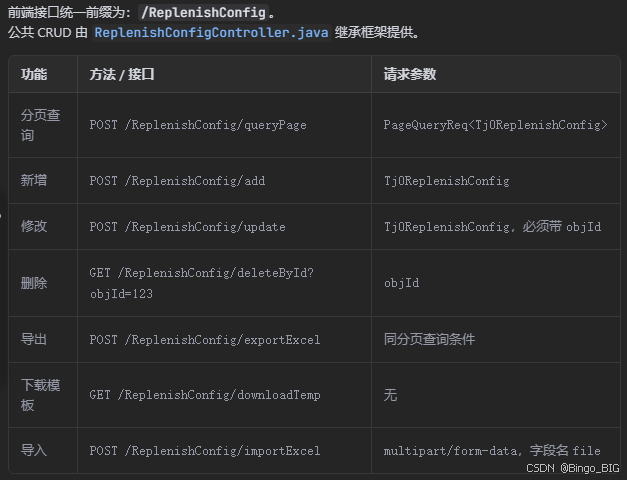
 package com.nancal.wms.controller;

import com.nancal.base.bean.page.PageQueryReq;
import com.nancal.base.bean.page.PageResult;
import com.nancal.base.bean.page.Result;
import com.nancal.base.service.BaseService;
import com.nancal.base.web.controller.AbstractController;
import com.nancal.wms.bean.entity.Tj0ReplenishConfig;
import com.nancal.wms.service.Tj0ReplenishConfigService;
import lombok.extern.slf4j.Slf4j;
import org.springframework.web.bind.annotation.GetMapping;
import org.springframework.web.bind.annotation.PostMapping;
import org.springframework.web.bind.annotation.RequestBody;
import org.springframework.web.bind.annotation.RequestMapping;
import org.springframework.web.bind.annotation.RequestParam;
import org.springframework.web.bind.annotation.RestController;
import org.springframework.web.multipart.MultipartFile;

import javax.annotation.Resource;
import javax.servlet.http.HttpServletResponse;
import java.io.IOException;

/**
 * 功能描述: 驻地库自动补库配置控制器。
 * 继承框架公共接口,提供补库配置的查询、新增、修改和删除功能。
 *
 * @author Bingo
 * @date 2026/09/18
 */
@Slf4j
@RestController
@RequestMapping("/ReplenishConfig")
public class ReplenishConfigController extends AbstractController<Tj0ReplenishConfig> {

    @Resource
    private Tj0ReplenishConfigService tj0ReplenishConfigService;

    @Resource
    private HttpServletResponse response;

    /**
     * 功能描述: 返回补库配置服务,复用框架公共增删改查接口。
     */
    @Override
    public BaseService<Tj0ReplenishConfig> getService() {
        return tj0ReplenishConfigService;
    }

    /**
     * 功能描述: 返回补库配置实体类型,供公共查询接口构建条件。
     */
    @Override
    public Class<Tj0ReplenishConfig> getEntityClass() {
        return Tj0ReplenishConfig.class;
    }

    /**
     * 功能描述: 导出当前查询结果。
     */
    @PostMapping("/exportExcel")
    public void exportExcel(@RequestBody PageQueryReq<Tj0ReplenishConfig> req) throws IOException {
        PageResult<Tj0ReplenishConfig> pageResult = this.queryPage(req);
        this.tj0ReplenishConfigService.exportExcel(pageResult.getData(), response);
    }

    /**
     * 功能描述: 下载补库配置导入模板。
     */
    @GetMapping("/downloadTemp")
    public void downloadTemp() throws IOException {
        this.tj0ReplenishConfigService.downloadTemp(response);
    }

    /**
     * 功能描述: 导入补库配置数据。
     */
    @PostMapping("/importExcel")
    public Result importExcel(@RequestParam("file") MultipartFile file) throws IOException {
        return this.tj0ReplenishConfigService.importExcel(file);
    }
}
2.1.1 继承类 AbstractController.java
 //
// Source code recreated from a .class file by IntelliJ IDEA
// (powered by FernFlower decompiler)
//

package com.nancal.base.web.controller;

import com.nancal.base.bean.entity.DtRoot;
import com.nancal.base.bean.exceptions.ParamServiceException;
import com.nancal.base.bean.page.EntityPageQueryReq;
import com.nancal.base.bean.page.EntityPageQueryResp;
import com.nancal.base.bean.page.PageQueryCovert;
import com.nancal.base.bean.page.PageQueryReq;
import com.nancal.base.bean.page.PageResult;
import com.nancal.base.bean.page.QueryReq;
import com.nancal.base.bean.page.Result;
import com.nancal.base.bean.query.CompareType;
import com.nancal.base.bean.query.Condition;
import com.nancal.base.service.BaseService;
import com.nancal.base.util.PreconditionUtil;
import java.util.List;
import org.apache.commons.collections4.CollectionUtils;
import org.springframework.web.bind.annotation.GetMapping;
import org.springframework.web.bind.annotation.PostMapping;
import org.springframework.web.bind.annotation.RequestBody;
import org.springframework.web.bind.annotation.RequestParam;

public abstract class AbstractController<T extends DtRoot> {
    public abstract BaseService<T> getService();

    public abstract Class<T> getEntityClass();

    @GetMapping({"/detail"})
    public Result<T> detail(@RequestParam("objId") Long objId) {
        PreconditionUtil.checkParamTrue(this.extDetailPre(objId));
        T entity = this.getService().detail(this.getEntityClass(), objId);
        this.extDetailPost(entity);
        return Result.success(entity);
    }

    @GetMapping({"/detailDisplayFile"})
    public Result<T> detailDisplayFile(@RequestParam("objId") Long objId) {
        PreconditionUtil.checkParamTrue(this.extDetailPre(objId));
        T entity = this.getService().detailDisplayFile(this.getEntityClass(), objId);
        this.extDetailPost(entity);
        return Result.success(entity);
    }

    @GetMapping({"/detailByCode"})
    public Result<T> detailByCode(@RequestParam("code") String code) {
        PreconditionUtil.checkParamTrue(this.extDetailByCodePre(code));
        QueryReq<T> req = new QueryReq();
        req.setEntityClass(this.getEntityClass());
        req.setCondition(List.of(new Condition("code", CompareType.EQUAL, code)));
        EntityPageQueryReq<T> entityPageReq = PageQueryCovert.buildEntityQueryReq(req);
        Result<List<T>> ret = this.getService().query(entityPageReq);
        List<T> datas = (List)ret.getData();
        if (CollectionUtils.size(datas) > 1) {
            PreconditionUtil.checkTrue(CollectionUtils.size(datas) > 1, new ParamServiceException());
        } else if (CollectionUtils.size(datas) == 1) {
            T data = (T)(datas.get(0));
            this.extDetailByCodePost(data);
            return Result.success(data);
        }

        return Result.success();
    }

    @PostMapping({"/add"})
    public Result<T> add(@RequestBody T entity) {
        this.extAddPre(entity);
        T save = this.getService().save(entity);
        entity.setObjId(save.getObjId());
        this.extAddPost(entity);
        this.processResultPost(save);
        return Result.success(save);
    }

    @PostMapping({"/addProcessFile"})
    public Result<T> addProcessFile(@RequestBody T entity) {
        this.extAddPre(entity);
        T save = this.getService().addProcessFile(entity);
        this.extAddPost(entity);
        this.processResultPost(save);
        return Result.success(save);
    }

    public void processResultPost(T save) {
    }

    @PostMapping({"/addUpdate"})
    public Result<List<T>> addUpdate(@RequestBody List<T> entitys) {
        this.extAddUpdatePre(entitys);
        List<T> saves = this.getService().addUpdate(entitys);
        this.extAddUpdatePost(entitys);
        this.extAddUpdateResultPost(saves);
        return Result.success(saves);
    }

    @PostMapping({"/update"})
    public Result<?> update(@RequestBody T entity) {
        this.extUpdatePre(entity);
        this.getService().update(entity);
        this.extUpdatePost(entity);
        return Result.success();
    }

    @PostMapping({"/updateProcessFile"})
    public Result<T> updateProcessFile(@RequestBody T entity) {
        this.extUpdatePre(entity);
        this.getService().updateProcessFile(entity);
        this.extUpdatePost(entity);
        return Result.success(entity);
    }

    @GetMapping({"/delete"})
    public Result<?> deleteById(@RequestParam("objId") Long objId) {
        PreconditionUtil.checkParamTrue(this.extDeleteByIdPre(objId));
        this.getService().deleteById(this.getEntityClass(), objId);
        this.extDeleteByIdPost(objId);
        return Result.success();
    }

    @PostMapping({"/deleteByIds"})
    public Result<?> deleteByIds(@RequestBody List<Long> ids) {
        PreconditionUtil.checkParamTrue(this.extDeleteByIdsPre(ids));
        this.getService().deleteByIds(this.getEntityClass(), ids);
        this.extDeleteByIdsPost(ids);
        return Result.success();
    }

    @PostMapping({"/delProcessFileByIds"})
    public Result<?> delProcessFileByIds(@RequestBody List<Long> ids) {
        PreconditionUtil.checkParamTrue(this.extDeleteByIdsPre(ids));
        this.getService().delProcessFileByIds(this.getEntityClass(), ids);
        this.extDeleteByIdsPost(ids);
        return Result.success();
    }

    public boolean extDeleteByIdsPost(List<Long> ids) {
        return true;
    }

    public boolean extDeleteByIdsPre(List<Long> ids) {
        return true;
    }

    @PostMapping({"/queryPage"})
    public PageResult<T> queryPage(@RequestBody PageQueryReq<T> req) {
        PreconditionUtil.checkParamTrue(this.extQueryPagePre(req));
        req.setEntityClass(this.getEntityClass());
        EntityPageQueryReq<T> entityPageReq = PageQueryCovert.buildEntityQueryReq(req);
        EntityPageQueryResp<T> pageResp = this.getService().queryPage(entityPageReq);
        this.extQueryPagePost(pageResp);
        return new PageResult(pageResp.getTotal(), pageResp.getData());
    }

    @PostMapping({"/queryPageDisplayFile"})
    public PageResult<T> queryPageDisplayFile(@RequestBody PageQueryReq<T> req) {
        PreconditionUtil.checkParamTrue(this.extQueryPagePre(req));
        req.setEntityClass(this.getEntityClass());
        EntityPageQueryResp<T> pageResp = this.getService().queryPageDisplayFile(PageQueryCovert.buildEntityQueryReq(req));
        this.extQueryPagePost(pageResp);
        return new PageResult(pageResp.getTotal(), pageResp.getData());
    }

    @GetMapping({"/findTree"})
    public PageResult<T> findTree(@RequestParam(value = "preNodeId",required = false) Long preNodeId) {
        EntityPageQueryResp<T> pageResp = this.getService().findTree(this.getEntityClass(), preNodeId);
        this.extFindTreePost(pageResp);
        return new PageResult(pageResp.getTotal(), pageResp.getData());
    }

    @PostMapping({"/query"})
    public Result<List<T>> query(@RequestBody QueryReq<T> req) {
        req.setEntityClass(this.getEntityClass());
        EntityPageQueryReq<T> entityPageReq = PageQueryCovert.buildEntityQueryReq(req);
        return this.getService().query(entityPageReq);
    }

    public void extAddUpdateResultPost(List<T> entitys) {
    }

    protected boolean extDetailByCodePre(String code) {
        return true;
    }

    protected void extDetailByCodePost(T entity) {
    }

    protected boolean extDetailPre(Long id) {
        return true;
    }

    protected void extDetailPost(T entity) {
    }

    protected void extAddPre(T entity) {
    }

    protected void extAddPost(T entity) {
    }

    protected void extAddUpdatePre(List<T> entitys) {
    }

    protected void extAddUpdatePost(List<T> entitys) {
    }

    protected void extUpdatePre(T entity) {
    }

    protected void extUpdatePost(T entity) {
    }

    protected boolean extDeleteByIdPre(Long id) {
        return true;
    }

    protected boolean extDeleteByIdPost(Long id) {
        return true;
    }

    protected boolean extQueryPagePre(PageQueryReq<T> req) {
        return true;
    }

    protected void extQueryPagePost(EntityPageQueryResp<?> resp) {
    }

    protected void extFindTreePost(EntityPageQueryResp<?> resp) {
    }
}
2.2 服务接口 Tj0ReplenishConfigService
package com.nancal.wms.service;

import com.nancal.base.bean.page.Result;
import com.nancal.base.service.BaseService;
import com.nancal.wms.bean.entity.Tj0ReplenishConfig;
import org.springframework.web.multipart.MultipartFile;

import javax.servlet.http.HttpServletResponse;
import java.io.IOException;
import java.util.List;

/**
 * 功能描述: 驻地库自动补库配置服务接口。
 *
 * @author Bingo
 * @date 2026/09/18
 */
public interface Tj0ReplenishConfigService extends BaseService<Tj0ReplenishConfig> {

    /**
     * 功能描述: 导出驻地库自动补库配置。
     */
    void exportExcel(List<Tj0ReplenishConfig> list, HttpServletResponse response) throws IOException;

    /**
     * 功能描述: 下载驻地库自动补库配置导入模板。
     */
    void downloadTemp(HttpServletResponse response) throws IOException;

    /**
     * 功能描述: 导入驻地库自动补库配置。
     */
    Result importExcel(MultipartFile file) throws IOException;
}
2.3 服务实现 Tj0ReplenishConfigServiceImpl
package com.nancal.wms.service.impl;

import cn.hutool.core.collection.CollectionUtil;
import cn.hutool.core.util.StrUtil;
import com.nancal.base.bean.exceptions.ServiceException;
import com.nancal.base.bean.page.Result;
import com.nancal.base.bean.query.EntityQueryReq;
import com.nancal.base.service.AbstractService;
import com.nancal.base.service.repository.BaseRepository;
import com.nancal.qms.utils.ExcelUtil;
import com.nancal.wms.bean.common.Tj0ReplenishConfigExcel;
import com.nancal.wms.bean.entity.Tj0ReplenishConfig;
import com.nancal.wms.service.Tj0ReplenishConfigService;
import com.nancal.wms.service.repository.Tj0ReplenishConfigRepository;
import org.springframework.beans.BeanUtils;
import org.springframework.stereotype.Service;
import org.springframework.transaction.interceptor.TransactionAspectSupport;
import org.springframework.web.multipart.MultipartFile;

import javax.annotation.Resource;
import javax.servlet.http.HttpServletResponse;
import javax.transaction.Transactional;
import java.io.IOException;
import java.time.LocalDateTime;
import java.time.format.DateTimeFormatter;
import java.util.ArrayList;
import java.util.LinkedHashMap;
import java.util.List;
import java.util.Map;
import java.util.Objects;
import java.util.stream.Collectors;

/**
 * 功能描述: 驻地库自动补库配置服务实现。
 *
 * @author Bingo
 * @date 2026/09/18
 */
@Service
@Transactional(rollbackOn = ServiceException.class)
public class Tj0ReplenishConfigServiceImpl extends AbstractService<Tj0ReplenishConfig> implements Tj0ReplenishConfigService {

    @Resource
    private Tj0ReplenishConfigRepository tj0ReplenishConfigRepository;

    /**
     * 功能描述: 返回补库配置仓储。
     */
    @Override
    public BaseRepository<Tj0ReplenishConfig> getBaseRepository() {
        return tj0ReplenishConfigRepository;
    }

    /**
     * 功能描述: 新增前校验源库存地点和目标库存地点组合唯一。
     */
    @Override
    protected boolean extSavePre(Tj0ReplenishConfig entity) {
        prepareEntity(entity);
        if (!findByLocations(entity.getTj0SourceLocation(), entity.getTj0TargetLocation()).isEmpty()) {
            throw new ServiceException("源库存地点和目标库存地点的补库配置已存在");
        }
        return super.extSavePre(entity);
    }

    /**
     * 功能描述: 修改前校验源库存地点和目标库存地点组合唯一。
     */
    @Override
    protected boolean extUpdatePre(Tj0ReplenishConfig entity) {
        prepareEntity(entity);
        List<Tj0ReplenishConfig> configs = findByLocations(entity.getTj0SourceLocation(), entity.getTj0TargetLocation());
        configs.removeIf(item -> Objects.equals(item.getObjId(), entity.getObjId()));
        if (!configs.isEmpty()) {
            throw new ServiceException("源库存地点和目标库存地点的补库配置已存在");
        }
        return super.extUpdatePre(entity);
    }

    /**
     * 功能描述: 批量保存前校验源库存地点和目标库存地点组合唯一,覆盖导入场景。
     */
    @Override
    protected boolean extAddUpdatePre(List<Tj0ReplenishConfig> entityList) {
        if (CollectionUtil.isEmpty(entityList)) {
            return super.extAddUpdatePre(entityList);
        }
        Map<String, Integer> duplicateCheck = new LinkedHashMap<>();
        for (Tj0ReplenishConfig entity : entityList) {
            prepareEntity(entity);
            String locationKey = buildLocationKey(entity.getTj0SourceLocation(), entity.getTj0TargetLocation());
            duplicateCheck.merge(locationKey, 1, Integer::sum);
            if (duplicateCheck.get(locationKey) > 1) {
                throw new ServiceException("源库存地点和目标库存地点重复:" + locationKey);
            }
            List<Tj0ReplenishConfig> configs = findByLocations(entity.getTj0SourceLocation(), entity.getTj0TargetLocation());
            configs.removeIf(item -> Objects.equals(item.getObjId(), entity.getObjId()));
            if (!configs.isEmpty()) {
                throw new ServiceException("源库存地点和目标库存地点的补库配置已存在");
            }
        }
        return super.extAddUpdatePre(entityList);
    }

    /**
     * 功能描述: 保存前统一清理字段空格并校验必填库存地点。
     */
    private void prepareEntity(Tj0ReplenishConfig entity) {
        if (entity == null || StrUtil.isBlank(entity.getTj0SourceLocation())) {
            throw new ServiceException("源库存地点不能为空");
        }
        if (StrUtil.isBlank(entity.getTj0TargetLocation())) {
            throw new ServiceException("目标库存地点不能为空");
        }
        entity.setTj0SourceLocation(entity.getTj0SourceLocation().trim());
        entity.setTj0TargetLocation(entity.getTj0TargetLocation().trim());
        entity.setTj0AutoCreateTime(trimToNull(entity.getTj0AutoCreateTime()));
        entity.setTj0AutoCreateWeek(trimToNull(entity.getTj0AutoCreateWeek()));
        entity.setTj0Notifier(trimToNull(entity.getTj0Notifier()));
    }

    /**
     * 功能描述: 按源库存地点和目标库存地点查询已有配置。
     */
    private List<Tj0ReplenishConfig> findByLocations(String sourceLocation, String targetLocation) {
        return tj0ReplenishConfigRepository.find(
                EntityQueryReq.builder(Tj0ReplenishConfig.class)
                        .eq("tj0SourceLocation", sourceLocation)
                        .eq("tj0TargetLocation", targetLocation)
        );
    }

    /**
     * 功能描述: 生成库存地点组合唯一键。
     */
    private String buildLocationKey(String sourceLocation, String targetLocation) {
        return sourceLocation + " -> " + targetLocation;
    }

    /**
     * 功能描述: 将字符串去首尾空格后转为 null。
     */
    private String trimToNull(String value) {
        return StrUtil.isBlank(value) ? null : value.trim();
    }

    /**
     * 功能描述: 导出驻地库自动补库配置。
     */
    @Override
    public void exportExcel(List<Tj0ReplenishConfig> list, HttpServletResponse response) throws IOException {
        List<Tj0ReplenishConfigExcel> excelList = list.stream().map(this::toExcel).collect(Collectors.toList());
        ExcelUtil.export("驻地库自动补库配置", excelList, Tj0ReplenishConfigExcel.class, response);
    }

    /**
     * 功能描述: 下载驻地库自动补库配置导入模板。
     */
    @Override
    public void downloadTemp(HttpServletResponse response) throws IOException {
        ExcelUtil.export("驻地库自动补库配置导入模板", new ArrayList<>(), Tj0ReplenishConfigExcel.class, response);
    }

    /**
     * 功能描述: 导入驻地库自动补库配置,按源库存地点和目标库存地点新增或覆盖已有配置。
     */
    @Override
    public Result importExcel(MultipartFile file) throws IOException {
        if (file == null || file.isEmpty()) {
            return Result.error("空数据,无需导入");
        }
        String originalFilename = file.getOriginalFilename();
        if (StrUtil.isBlank(originalFilename) || !originalFilename.endsWith(".xlsx")) {
            return Result.error("请上传.xlsx格式的Excel文件");
        }
        try {
            List<Tj0ReplenishConfigExcel> rows = ExcelUtil.importExcel(file, Tj0ReplenishConfigExcel.class)
                    .stream()
                    .map(Tj0ReplenishConfigExcel.class::cast)
                    .collect(Collectors.toList());
            if (CollectionUtil.isEmpty(rows)) {
                return Result.error("空数据,无需导入");
            }
            Map<String, Integer> duplicateCheck = new LinkedHashMap<>();
            for (Tj0ReplenishConfigExcel row : rows) {
                if (row == null || StrUtil.isBlank(row.getTj0SourceLocation())) {
                    throw new ServiceException("源库存地点不能为空");
                }
                if (StrUtil.isBlank(row.getTj0TargetLocation())) {
                    throw new ServiceException("目标库存地点不能为空");
                }
                String locationKey = buildLocationKey(row.getTj0SourceLocation().trim(), row.getTj0TargetLocation().trim());
                duplicateCheck.merge(locationKey, 1, Integer::sum);
                if (duplicateCheck.get(locationKey) > 1) {
                    throw new ServiceException("Excel中源库存地点和目标库存地点重复:" + locationKey);
                }
            }

            List<Tj0ReplenishConfig> saveList = new ArrayList<>();
            for (Tj0ReplenishConfigExcel row : rows) {
                String sourceLocation = row.getTj0SourceLocation().trim();
                String targetLocation = row.getTj0TargetLocation().trim();
                List<Tj0ReplenishConfig> existed = findByLocations(sourceLocation, targetLocation);
                Tj0ReplenishConfig entity = CollectionUtil.isEmpty(existed) ? new Tj0ReplenishConfig() : existed.get(0);
                entity.setTj0SourceLocation(sourceLocation);
                entity.setTj0TargetLocation(targetLocation);
                entity.setTj0AutoCreateTime(trimToNull(row.getTj0AutoCreateTime()));
                entity.setTj0AutoCreateWeek(trimToNull(row.getTj0AutoCreateWeek()));
                entity.setTj0Notifier(trimToNull(row.getTj0Notifier()));
                saveList.add(entity);
            }
            this.addUpdate(saveList);
            return Result.success();
        } catch (Exception e) {
            TransactionAspectSupport.currentTransactionStatus().setRollbackOnly();
            return Result.error("导入Excel失败: " + e.getMessage());
        }
    }

    /**
     * 功能描述: 将驻地库自动补库配置实体转换为 Excel 导出模型。
     */
    private Tj0ReplenishConfigExcel toExcel(Tj0ReplenishConfig entity) {
        Tj0ReplenishConfigExcel excel = new Tj0ReplenishConfigExcel();
        BeanUtils.copyProperties(entity, excel);
        excel.setCreator(StrUtil.isBlank(entity.getCreatorName()) ? entity.getCreator() : entity.getCreatorName());
        LocalDateTime createAt = entity.getCreateAt();
        if (createAt != null) {
            excel.setCreateAt(createAt.format(DateTimeFormatter.ofPattern("yyyy-MM-dd HH:mm:ss")));
        }
        return excel;
    }
}
2.4 配置仓储 Tj0ReplenishConfigRepository
package com.nancal.wms.service.repository;

import com.nancal.base.service.repository.BaseRepository;
import com.nancal.wms.bean.entity.Tj0ReplenishConfig;

/**
 * 功能描述: 驻地库自动补库配置仓储。
 *
 * @author Bingo
 * @date 2026/09/18
 */
public interface Tj0ReplenishConfigRepository extends BaseRepository<Tj0ReplenishConfig> {
}
2.5 仓储实现 Tj0ReplenishConfigRepositoryImpl
package com.nancal.wms.infrastructure.dao.impl;

import com.nancal.base.infrastructure.repository.SimpleRepository;
import com.nancal.lz.engine.Engine;
import com.nancal.wms.bean.entity.Tj0ReplenishConfig;
import com.nancal.wms.service.repository.Tj0ReplenishConfigRepository;
import org.springframework.beans.factory.annotation.Autowired;
import org.springframework.stereotype.Repository;

/**
 * 功能描述: 驻地库自动补库配置仓储实现。
 *
 * @author Bingo
 * @date 2026/09/18
 */
@Repository
public class Tj0ReplenishConfigRepositoryImpl implements SimpleRepository<Tj0ReplenishConfig>, Tj0ReplenishConfigRepository {

    @Autowired
    private Engine engine;

    /**
     * 功能描述: 返回框架数据引擎。
     */
    @Override
    public Engine getEngine() {
        return engine;
    }
}
2.6 实体类 Tj0ReplenishConfig
 package com.nancal.wms.bean.entity;

import com.nancal.base.bean.entity.ManufacturingActivity;
import lombok.Data;

import javax.persistence.Column;
import javax.persistence.Entity;
import javax.persistence.Inheritance;
import javax.persistence.InheritanceType;
import javax.persistence.Table;

/**
 * 功能描述: 驻地库自动补库配置实体。
 *
 * @author Bingo
 * @date 2026/09/18
 */
@Data
@Entity
@Table(name = "tj0_replenish_config")
@Inheritance(strategy = InheritanceType.TABLE_PER_CLASS)
public class Tj0ReplenishConfig extends ManufacturingActivity {

    /** 自动创建补库调拨单时间,如:04:00:00。 */
    @Column(name = "tj0_auto_create_time")
    private String tj0AutoCreateTime;

    /** 自动执行周,如:周一、周二。 */
    @Column(name = "tj0_auto_create_week")
    private String tj0AutoCreateWeek;

    /** 通知人员。 */
    @Column(name = "tj0_notifier")
    private String tj0Notifier;

    /** 源库存地点。 */
    @Column(name = "tj0_source_location")
    private String tj0SourceLocation;

    /** 目标库存地点,如:5104。 */
    @Column(name = "tj0_target_location")
    private String tj0TargetLocation;
}
2.6.2 配置导入导出模型 Tj0ReplenishConfigExcel
package com.nancal.wms.bean.common;

import com.alibaba.excel.annotation.ExcelProperty;
import lombok.Data;

/**
 * 功能描述: 驻地库自动补库配置导入导出模型。
 *
 * @author Bingo
 * @date 2026/09/18
 */
@Data
public class Tj0ReplenishConfigExcel {

    @ExcelProperty(value = "源库存地点", index = 0)
    private String tj0SourceLocation;

    @ExcelProperty(value = "目标库存地点", index = 1)
    private String tj0TargetLocation;

    @ExcelProperty(value = "自动创建补库调拨单时间", index = 2)
    private String tj0AutoCreateTime;

    @ExcelProperty(value = "自动执行周", index = 3)
    private String tj0AutoCreateWeek;

    @ExcelProperty(value = "通知人员", index = 4)
    private String tj0Notifier;

    @ExcelProperty(value = "创建人", index = 5)
    private String creator;

    @ExcelProperty(value = "创建时间", index = 6)
    private String createAt;
}